Most project tools say they’re secure. Few will sign the HIPAA BAA a hospital needs before patient data goes in.
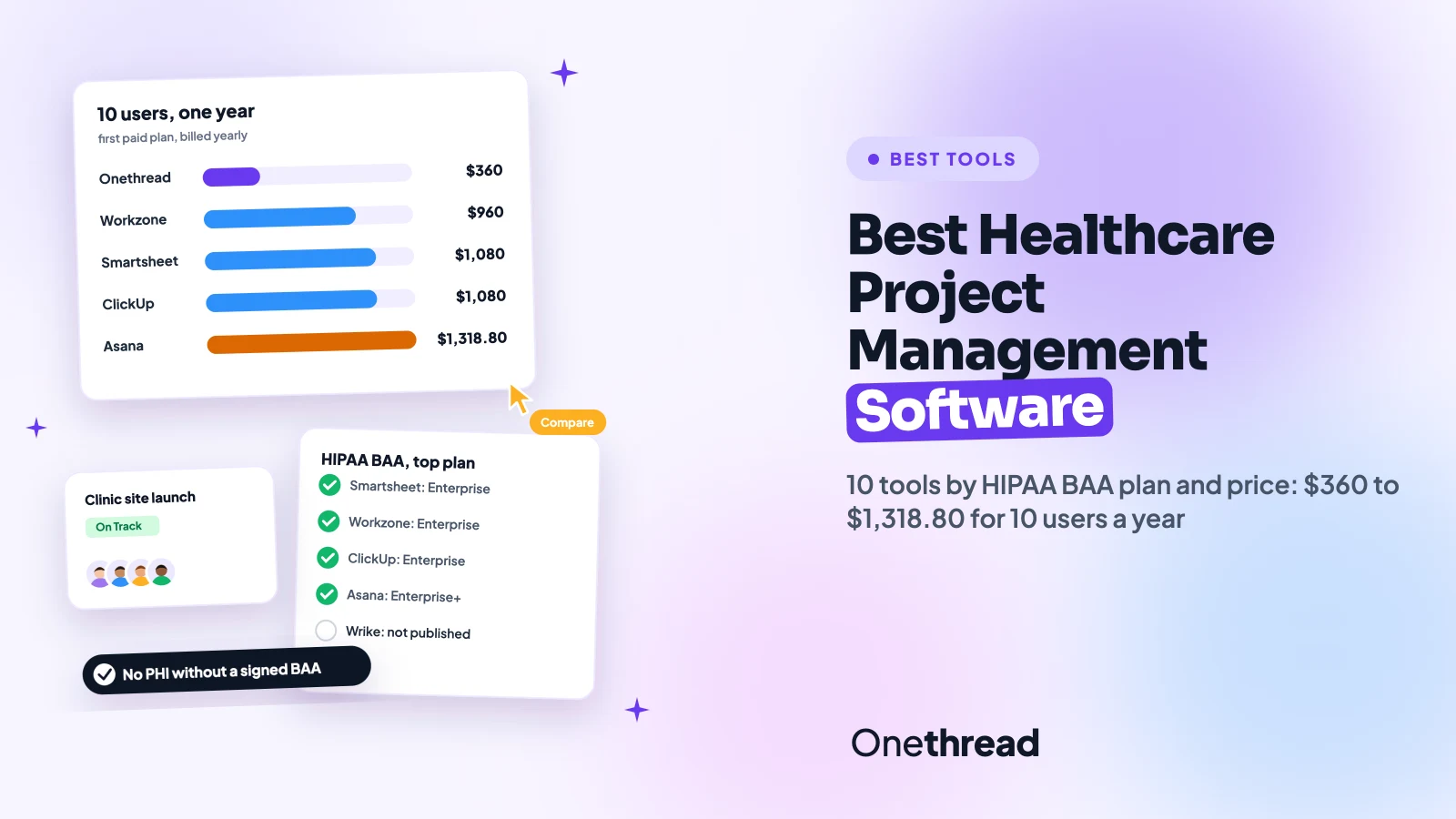
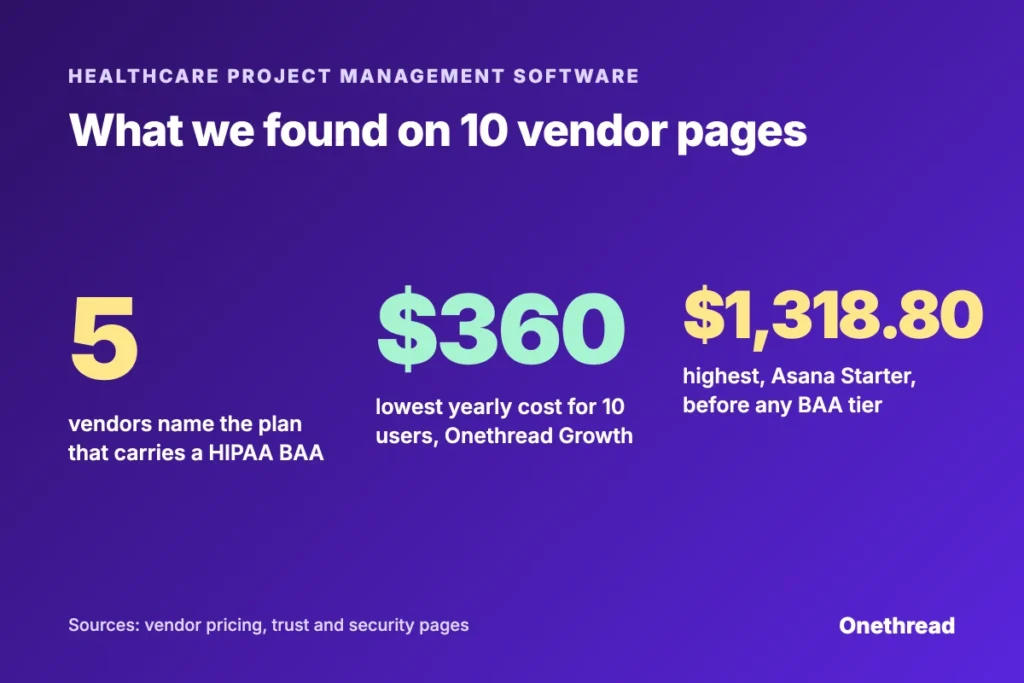
The best healthcare project management software for most teams is Smartsheet, Workzone, ClickUp, Asana or Notion. Each signs a HIPAA Business Associate Agreement (BAA) on its top plan. For projects with no patient data, Onethread, Workzone and monday.com cost $360 to $1,080 a year for 10 users.
That gap matters. A cheap plan is fine for your clinic move, but not for a patient intake tracker.
We read each vendor’s price and security pages for this guide. You’ll see which plan carries the BAA, what 10 users pay, and which tool fits a hospital PMO, a clinic or a strategy team.
| Tool | HIPAA BAA | First paid plan | 10 users, one year | Best for |
|---|---|---|---|---|
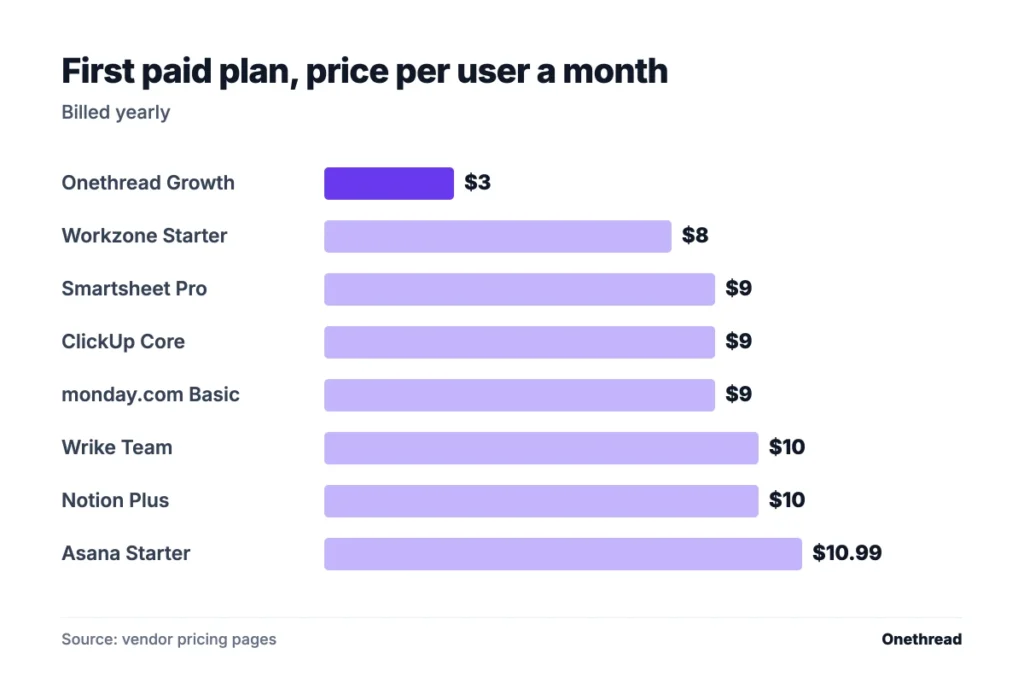
| Smartsheet | Enterprise | $9 per member a month | $1,080 | Hospital PMOs |
| Workzone | Enterprise | $8 per user a month | $960 | Intake and approvals |
| ClickUp | Enterprise | $9 per user a month | $1,080 | All-in-one teams |
| monday.com | Available, plan not named | $9 per seat a month | $1,080 | Visual boards |
| Asana | Enterprise+ | $10.99 per user a month | $1,318.80 | Cross-team work |
| Wrike | Not published | $10 per user a month | $1,200 | Complex projects |
| Notion | Enterprise | $10 per member a month | $1,200 | Docs and wikis |
| ClearPoint Strategy | Not published | Quote, 10-user minimum | Quote | Strategy and KPIs |
| OpenProject | Not published | €5.95 per user a month, 25-user minimum | 25-user minimum | Self-hosting |
| Onethread | Not published | $3 per user a month | $360 | Low-cost team projects |
Prices are billed yearly, from each vendor’s price page. Best for labels are ours.
How Did We Choose the Best Healthcare Project Management Software?
We picked tools that healthcare teams can actually buy, and we checked the two things buyers ask first: the HIPAA status and the price. Every figure in the table comes from the vendor’s own price, trust or security page.
We started from the six top-ranking guides for this keyword and the vendor pages behind them. Tools that appeared in three or more guides made the shortlist, and we added three picks for strategy, self-hosting and budget teams.
Four checks shaped the list:
- BAA on a named plan: the vendor states which plan includes a HIPAA Business Associate Agreement (BAA).
- Public price: the first paid plan has a published price, or we say it’s quote-only.
- Healthcare fit: intake forms, approvals, audit trails or portfolio views that hospital teams use.
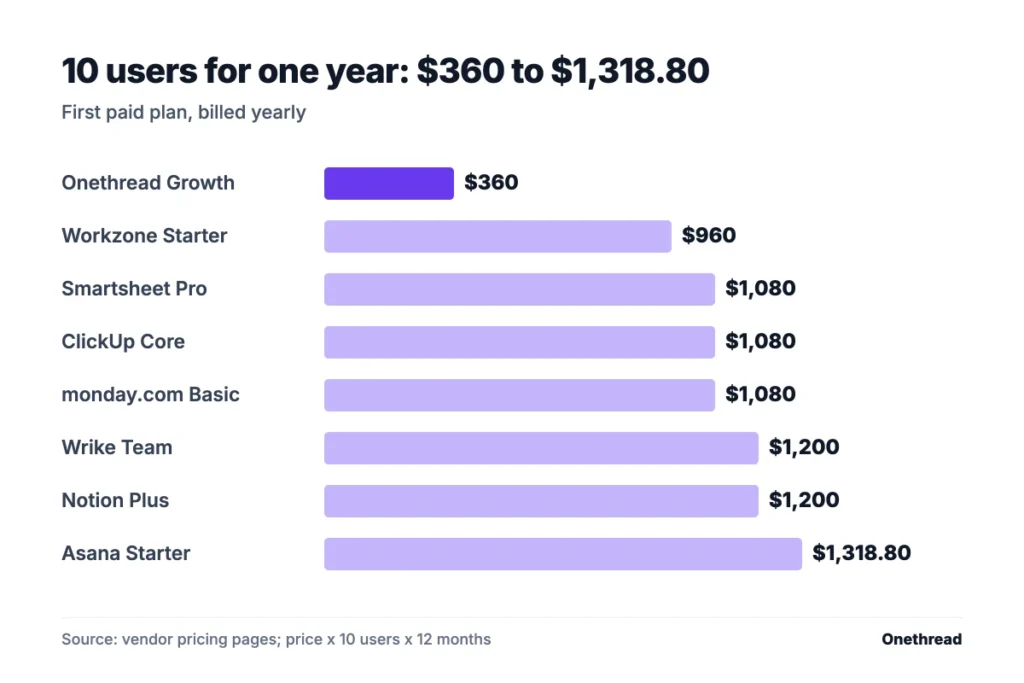
- Ten-user cost: we multiplied the yearly per-user price by 10 users and 12 months.
We dropped hospital management systems (HMS) and electronic health record (EHR) tools from the ranking. They run clinical work, not projects, so they answer a different question. Our review methodology explains how we score tools, and the older edition of this list is still on record.
Example: Asana Starter costs $10.99 per user a month, billed yearly. For 10 users, $10.99 × 10 × 12 = $1,318.80 a year. Swap in your own headcount to compare.
What Is Healthcare Project Management Software?
Healthcare project management software plans and tracks work that isn’t clinical care. It’s used in hospitals, clinics and health systems. Think EHR upgrades, new services, audits, new equipment and building work.
It’s a general project management software category with extra demands. Buyers need audit trails and strict access rights. When patient data is in scope, they need a signed BAA too.
These projects touch many departments at once. A single EHR upgrade can involve IT, nursing, pharmacy, billing and compliance, each with its own deadlines.
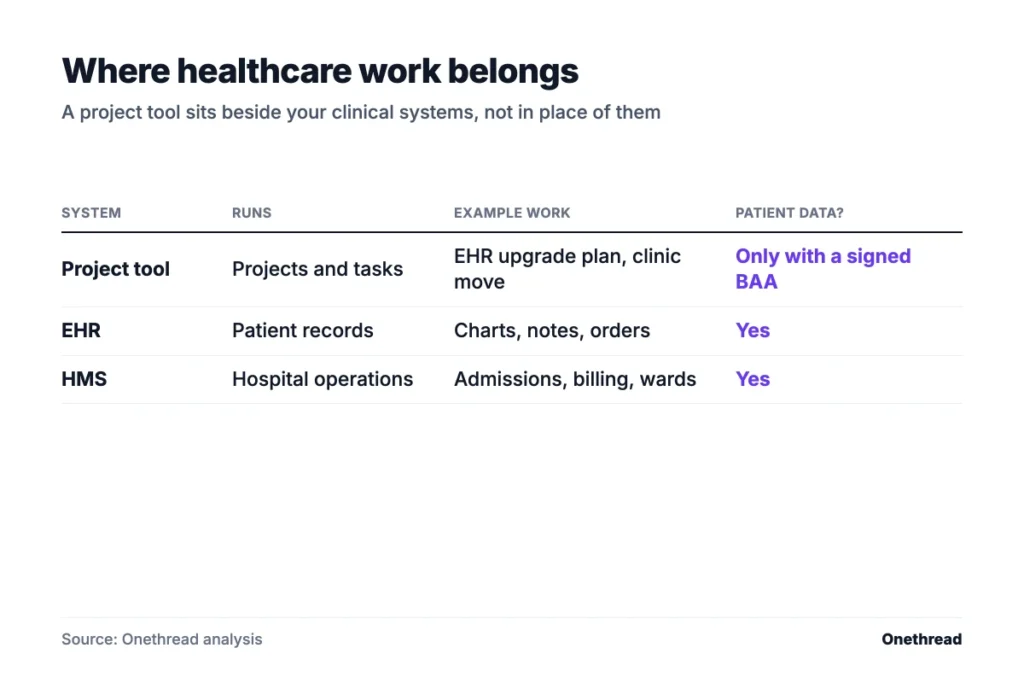
Here’s the problem. Many teams mix it up with a hospital management system, which runs admissions, billing and wards. A project tool sits beside those systems. It doesn’t replace them.
The same goes for EHR platforms. A clinic using DrChrono for charts still needs a place to plan a new site or a telehealth launch. That’s the project tool’s job.
Clinical records belong in the EHR or HMS, including online medical certificates. Keep only task names, dates and owners in your project tool unless the vendor has signed a BAA.
And when no product fits, some health systems turn to custom healthcare software solutions built around their own workflows. That costs more, but it removes the plan-gating problem.
Which Plan Do You Need for HIPAA Compliance?
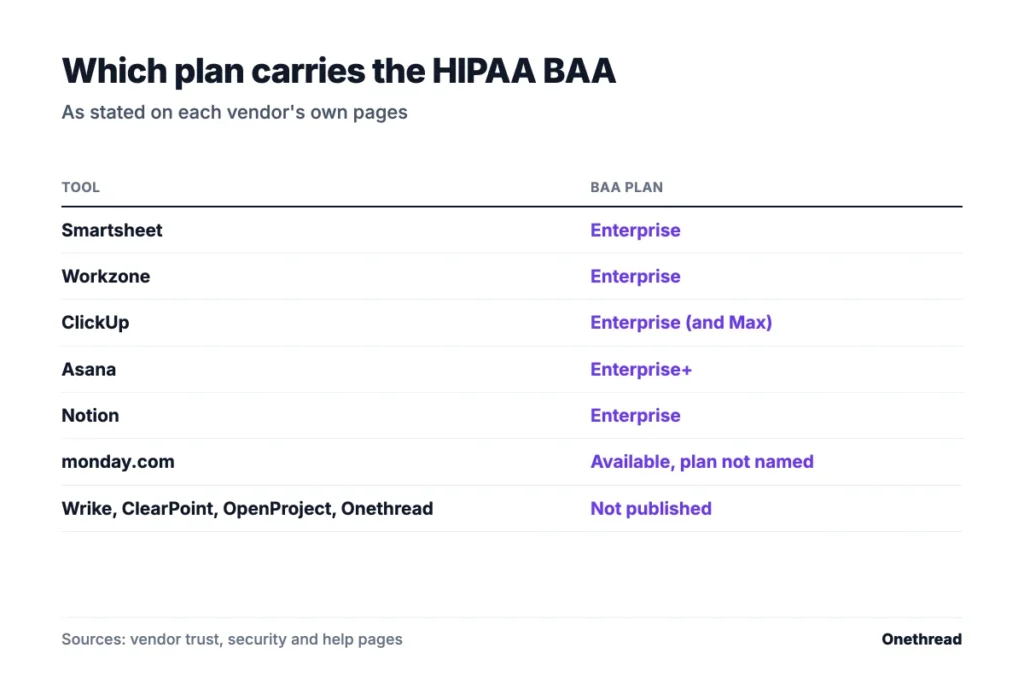
You need the plan where the vendor signs a Business Associate Agreement, which is almost always the enterprise tier. No project tool is HIPAA compliant by itself. Compliance depends on the BAA, your settings and what you store.
Here’s what the vendor pages state:
- Smartsheet: healthcare customers can handle protected health information (PHI) on Enterprise after signing a BAA.
- ClickUp: HIPAA support with a BAA on Enterprise only. Free, Core and Business don’t include it.
- Asana: BAA on Enterprise+, after a super admin accepts it in the admin console.
- Workzone: supports HIPAA and signs a BAA on the Enterprise plan.
- Notion: BAA available to Enterprise customers.
- monday.com: lists a HIPAA BAA in its trust center, without naming the work management plan.
Wrike, ClearPoint Strategy, OpenProject and Onethread don’t publish a BAA on the pages we checked. Ask before you store any PHI.
Two more points before you sign. The BAA only covers the plan named in it, and it usually requires settings such as single sign-on or restricted sharing.
Good tools back HIPAA compliance with encryption, access controls and audit logs. But the contract is what makes a vendor accountable.
Top Tip: Ask the vendor for the BAA before the trial ends. If they won’t name the plan in writing, assume none of your plans include it.
Why Do Hospital PMOs Pick Smartsheet?
Smartsheet works like a spreadsheet with Gantt, board and calendar views on top. That’s why hospital project management offices (PMOs) adopt it fast. Staff who live in Excel don’t need much training.
Business adds timeline view, workload tracking and unlimited automations. Enterprise adds portfolio tools and the BAA for PHI.
Say your PMO runs 40 projects across three hospitals. Each project manager keeps a sheet, and a portfolio dashboard rolls them up for leadership.
Here’s the catch for healthcare buyers. The BAA lives on Enterprise, and Enterprise has no public price. So get a written quote early, before your team builds 40 sheets on Pro and finds the upgrade cost later.
Pro also stops at 10 members. Most hospital PMOs outgrow it within a few months, so plan the budget on Business at least.
Pricing: Pro costs $9 per member a month and Business $19, billed yearly. Enterprise is a custom quote. Unlimited free contributors on every paid plan.
Best For
- Hospital PMOs that track many projects in one portfolio.
Pros
- Spreadsheet layout that non-PM staff learn quickly.
- Free contributors, so you pay only for editors.
- BAA available on Enterprise.
Cons
- Pro caps at 10 members and 250 automations a month.
- Timeline and workload views start on Business.
- No public price for the plan that carries the BAA.
Why Does Workzone Suit Healthcare Intake and Approvals?
Workzone is built around project intake, approvals and portfolio reporting. Hospitals use it to collect requests, route them for review and keep an approval record.
Its security page states that Enterprise supports HIPAA and includes a signed BAA. Every plan bills yearly, which suits hospital budget cycles.
Say marketing, IT and facilities all send work to one PMO. Intake forms keep requests in the same shape, so nothing arrives as a vague email.
Workzone also says no platform is HIPAA compliant on its own. That’s an honest framing, and it matches what we found on every vendor page. The setup and the contract do the work.
In practice, Workzone suits PMOs that care more about clean intake and approvals than about chat or docs. If your team wants an all-in-one workspace, look at ClickUp or Notion instead.
Pricing: Starter costs $8 per user a month, billed yearly, for 1 to 25 users. Enterprise is a custom quote. Two-week free trial.
Best For
- Health systems that need structured intake and approvals.
Pros
- Intake forms and approval trails built in.
- BAA on Enterprise, stated on its security page.
- Lowest entry price among vendors that offer a BAA.
Cons
- Annual billing only.
- No free plan.
- Enterprise price not published.
Why Do All-in-One Teams Choose ClickUp?
ClickUp puts tasks, docs, goals and chat in one place. A clinic team can run its launch plan, policy docs and meeting notes without three separate tools.
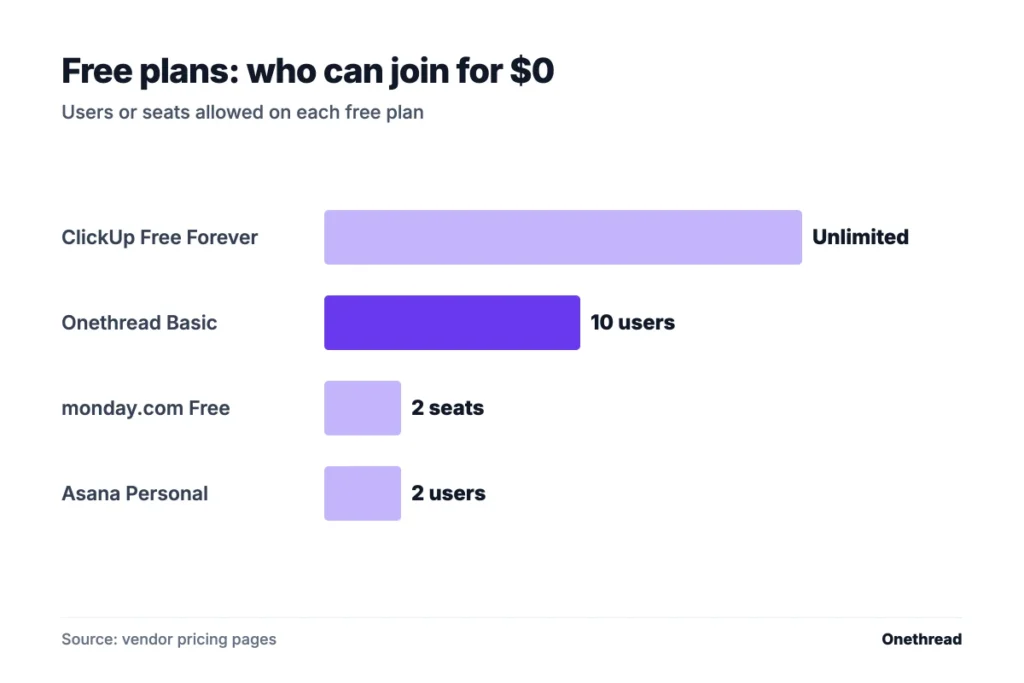
Its pricing table lists HIPAA support “With BAA” on Enterprise and Max only. Free, Core and Business don’t include it, so keep PHI out of those plans.
Say a clinic network opens a new urgent care site. One space holds the build tasks, the staffing plan and the vendor contracts.
Here’s the problem with an all-in-one tool. It does a lot, so teams switch on features they never use, and the workspace gets noisy fast.
Start with one space per department and a short list of statuses. Add docs and goals only after the task list works. That keeps a busy clinic team from drowning in options.
Pricing: Core costs $9 per user a month, billed yearly. The Free Forever plan allows unlimited free members. Enterprise is a custom quote. We cover the tiers in our ClickUp pricing guide.
Best For
- Small and mid-size healthcare teams that want one tool for tasks and docs.
Pros
- Wide feature set, even on Core.
- Free plan with unlimited members.
- BAA on Enterprise.
Cons
- The menu of features takes time to learn.
- No BAA below Enterprise.
- Enterprise price not published.
Why Do Visual Teams Like monday.com?
monday.com runs on colorful boards that show status at a glance. It’s easy for ward managers who just want to see what’s stuck and who owns it.
Its trust center lists a HIPAA BAA. But the work management price page doesn’t name the plan. Ask sales which tier includes it before you buy.
Say a nursing department tracks a new shift handover process across eight units. One board shows each unit’s progress in a single row.
monday.com sells seats in fixed buckets, so a team of 6 pays for the next bucket up. Count your editors before you pick a plan.
The free plan suits a quick test with one colleague. For a department rollout, start a trial on Standard or Pro, where automations and timeline views open up, and confirm the BAA plan in writing.
Pricing: Basic costs $9 per seat a month, Standard $12 and Pro $19, billed yearly. The free plan covers up to 2 seats.
Best For
- Department managers who want simple visual tracking.
Pros
- Clear boards that need little training.
- Many templates for operations work.
- A BAA is offered.
Cons
- The BAA plan isn’t named on the pricing page.
- Free plan stops at 2 seats.
- Seats sell in buckets, so you may pay for empty ones.
Why Do Cross-Team Projects Run Well in Asana?
Asana links goals, projects and tasks. Leaders can see how each project serves a bigger target. It’s a common pick when IT, finance and clinical teams share one rollout.
Its help center states that the BAA is available on Enterprise+, after a super admin opts in. That’s the top tier, so budget for it if PHI is in scope.
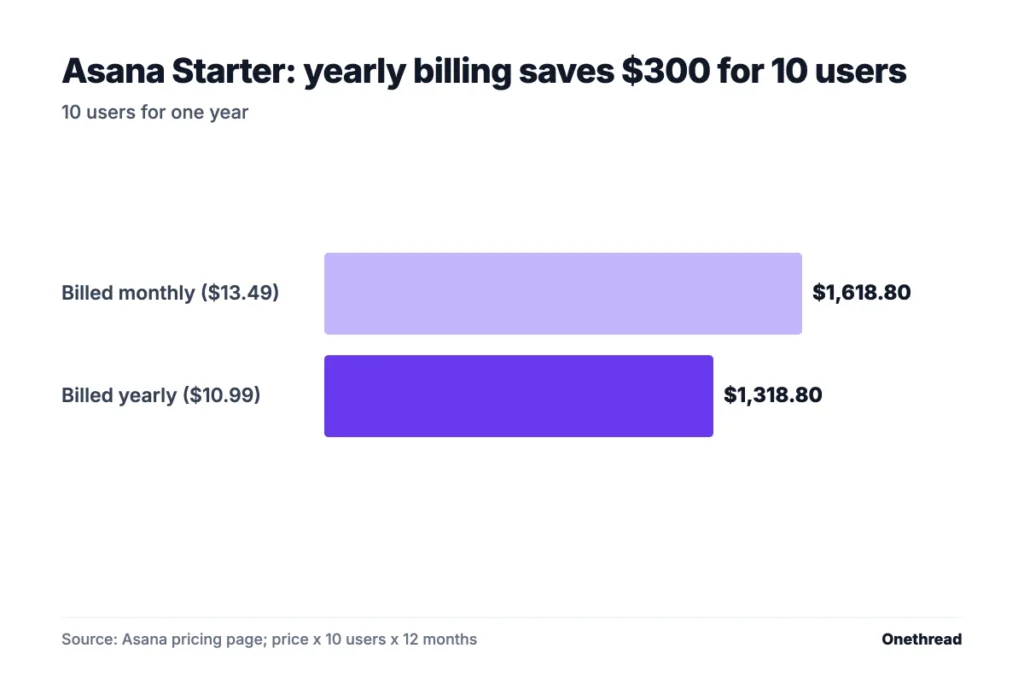
Billing matters here. Ten users on Starter pay $1,618.80 a year at the monthly rate, or $1,318.80 billed yearly, so the yearly plan saves $300.
Say a health system rolls out a new patient portal. IT owns the build, compliance owns the review, and clinics own training, all in one project.
And Asana’s goals feature helps when leaders ask how a project ties to a system-wide target, such as shorter wait times or better patient scores.
The trade-off is price. Asana’s Starter plan costs the most in this list. And the BAA sits on the top tier, so a HIPAA setup costs far more than $1,318.80.
Pricing: Starter costs $10.99 per user a month billed yearly, or $13.49 monthly. Personal is free for 2 users. Enterprise+ is a custom quote. See our Asana pricing breakdown for seat rules.
Best For
- Health systems running large cross-department projects.
Pros
- Goals link daily work to strategy.
- Clean interface that most staff pick up fast.
- BAA on Enterprise+.
Cons
- BAA only on the top tier.
- Free plan stops at 2 users.
- Highest Starter price in this list.
Why Do Complex Healthcare Projects Use Wrike?
Wrike handles big projects with many links between tasks. It’s built for detail. IT and engineering teams in health systems use it for multi-phase rollouts.
Its pricing and security pages don’t publish a BAA or name a HIPAA plan. If you need one, ask Wrike’s sales team for it in writing.
Say an IT team replaces the network in five clinics, with each site’s work depending on the one before. Wrike’s dependencies keep that order clear.
Wrike also lets you build custom request forms, which helps IT teams collect tickets from clinics in one format. Reports roll up progress across projects for weekly leadership reviews.
The gap is the BAA. Until Wrike names a plan in writing, keep patient data out and use it for infrastructure, facilities and vendor projects only.
Pricing: Team costs $10 per user a month, billed yearly, for 2 to 15 users. A free plan exists. Business and higher plans bill yearly only.
Best For
- IT and operations teams with long, dependent project plans.
Pros
- Strong dependencies and custom forms.
- Detailed reports for leadership.
- Free plan to test the basics.
Cons
- No BAA published on the pages we checked.
- Team plan stops at 15 users.
- More setup than lighter tools.
Why Do Healthcare Teams Use Notion for Projects?
Notion puts docs, wikis and project lists in one app. Healthcare teams use it to keep policies, procedures and project plans in one searchable place.
Its security page states that a BAA is available to Enterprise customers. Below Enterprise, keep patient data out.
Say a clinic writes new standard operating procedures for a lab move. The SOPs, the task list and the sign-off log sit on linked pages.
Notion shines when the documentation is the project. Policy reviews, training manuals and onboarding guides all fit its page-and-database model.
But it needs setup. Out of the box, Notion is a blank page, so someone has to build the project database, views and templates. Budget a few days for that before a rollout, and pick one owner for it. A ready-made template helps, but you’ll still adjust fields and views to match how your clinic tracks work.
Pricing: Plus costs $10 per member a month and Business $20. A free plan exists. Enterprise is a custom quote.
Best For
- Teams that need documentation and projects in one place.
Pros
- Docs and tasks live side by side.
- Flexible databases for trackers.
- BAA on Enterprise.
Cons
- Fewer project features than Smartsheet or Wrike.
- Needs setup to work as a project tool.
- BAA only on Enterprise.
Why Do Strategy Teams Pick ClearPoint Strategy?
ClearPoint Strategy tracks goals, KPIs and big plans rather than daily tasks. Hospital strategy and quality teams use it to report progress to boards.
Its trust center lists SOC 2 Type 2, GDPR and a data processing agreement. It doesn’t publish a BAA, so keep PHI out unless you get one in writing.
Say your quality team reports 12 improvement goals to the board each quarter. ClearPoint turns each goal into a scorecard with owners and status.
ClearPoint works best next to a task tool, not instead of one. The strategy team owns the scorecard, and project teams update their status from their own tool.
That split keeps board reports clean. Leaders see goals and progress, not hundreds of tasks. For a hospital with a strategic plan and a separate PMO, that’s often the right setup. It also keeps scorecard owners from editing project plans they don’t run.
Pricing: Not published. ClearPoint quotes after a pricing call, and plans start at 10 users.
Best For
- Strategy, quality and performance teams reporting to a board.
Pros
- Built for KPIs and strategic plans.
- Board-ready reports.
- SOC 2 Type 2 listed in its trust center.
Cons
- No public price.
- 10-user minimum.
- Not a task manager for day-to-day project work.
Why Do Some Hospitals Self-Host OpenProject?
OpenProject is open source, so a hospital can run it on its own servers. That keeps project data inside your own network. Some IT security teams want exactly that.
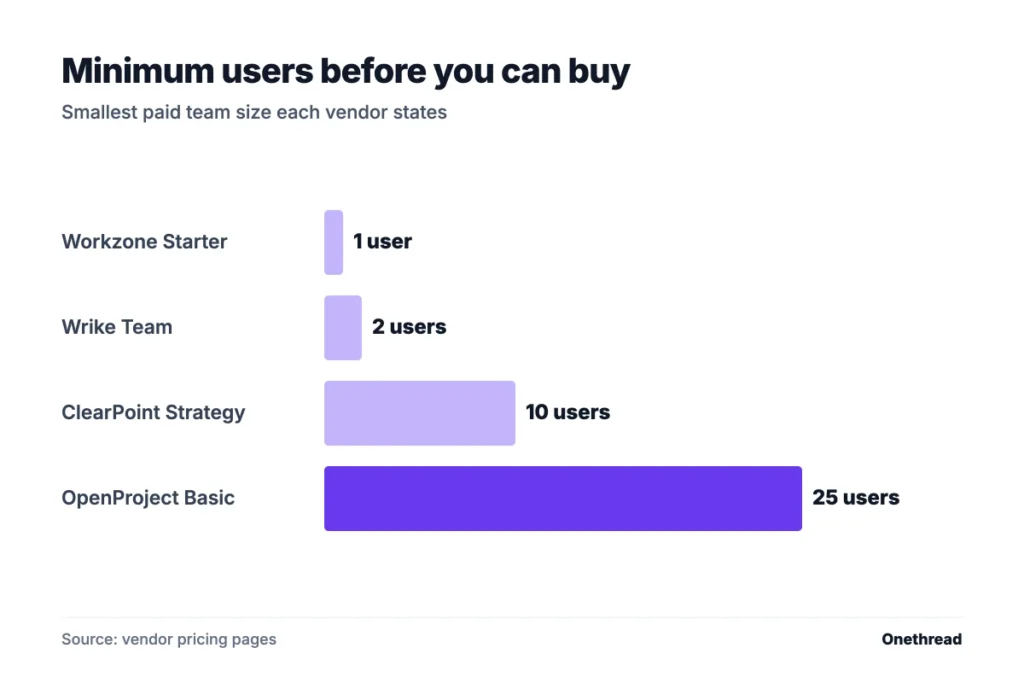
The free Community edition has no user minimum. Paid Enterprise plans add support and extra features, with a 25-user minimum on Basic and Professional.
It doesn’t publish a BAA. Self-hosting changes the question, though, because your own team controls where the data lives. See our list of open source project management software for other self-hosted picks.
Self-hosting takes real work, though. Your IT team handles installs, updates, backups and security patches, which costs staff time even when the software is free.
For hospitals with a strong IT team and strict data rules, that trade is often worth it. Small teams rarely need it. For a small clinic, a hosted tool is usually simpler and cheaper to run.
Pricing: Basic costs €5.95 per user a month, with a 25-user minimum. Professional is €10.95. Community is free.
Best For
- Hospital IT teams that want project data on their own servers.
Pros
- Free Community edition.
- Self-hosting keeps data in your network.
- Gantt charts and agile boards included.
Cons
- Your team runs updates and backups.
- 25-user minimum on paid plans.
- No BAA published.
Why Do Smaller Healthcare Teams Use Onethread?
Onethread is our own project management tool, so read this review with that in mind. It covers tasks, projects, discussions, dashboards and reports at the lowest price in this list.
It doesn’t publish a BAA. Use it for projects without patient data, such as facility moves, training plans, marketing and vendor rollouts. Healthcare admin teams often have plenty of that work.
Say a clinic group plans a new site opening. The build tasks, staff training and launch checklist run in one project, with each manager seeing only their part.
In practice, many healthcare admin projects carry no patient data at all. Think a front-desk redesign, a new phone system or a staff training rollout. For those, the BAA question doesn’t apply, and price matters more.
Ten users on Growth cost $360 a year, the lowest in our table. The free Basic plan covers a team of up to 10 people.
Pricing: Basic is free for the first 10 users. Growth costs $3 per user a month and Scale $5, billed yearly.
Best For
- Small healthcare teams running non-clinical projects on a budget.
Pros
- Lowest paid price in this list.
- Free for up to 10 users.
- Custom roles and permissions on Scale.
Cons
- No BAA published, so no PHI.
- Fewer integrations than the larger tools.
- Risk management and budgeting are still marked as upcoming.
Which Healthcare Project Management Software Fits Your Team?
Match the tool to who runs the project and whether patient data goes in. Most healthcare teams fit one of these patterns:
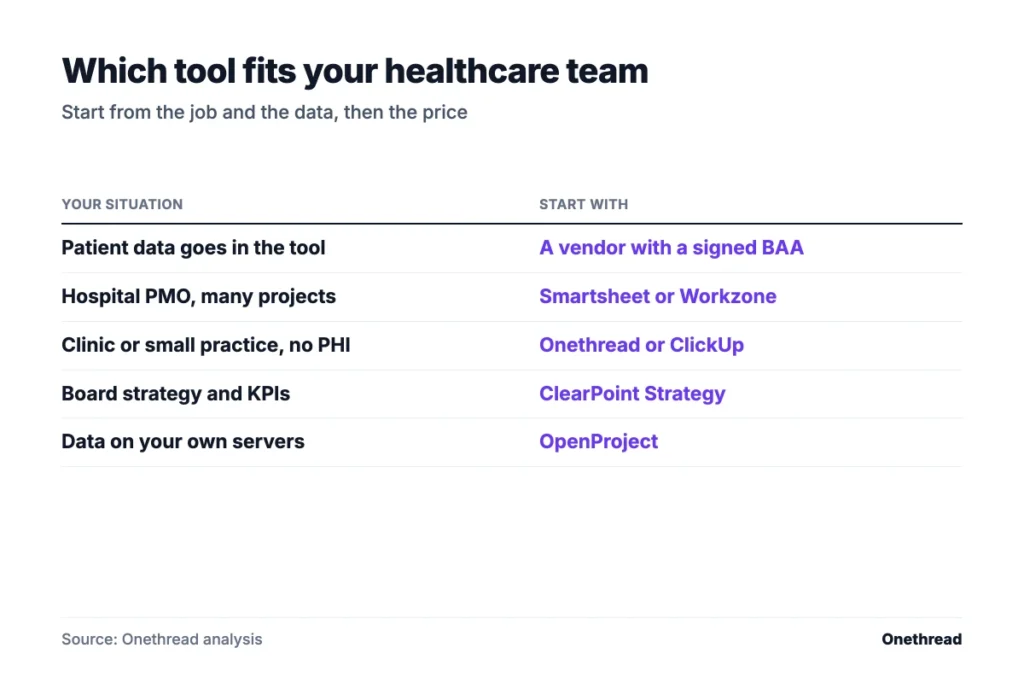
| Your situation | Start with | Why |
|---|---|---|
| Hospital PMO with many projects | Smartsheet or Workzone | Portfolio views, BAA on Enterprise |
| Patient data must go in the tool | Any vendor with a signed BAA | The BAA is the legal requirement |
| Clinic or small practice, no PHI | Onethread or ClickUp | Free plans, low paid prices |
| Board-level strategy and KPIs | ClearPoint Strategy | Built for scorecards |
| IT wants data on its own servers | OpenProject | Self-hosted Community edition |
| Looking for an Asana alternative for hospitals | Workzone or Smartsheet | BAA on Enterprise, intake and portfolios |
Multi-site tracking needs portfolio views, so lean on Smartsheet, Workzone or Asana for health systems with several hospitals. For staff and budget planning, pair the tool with a clear resource allocation process.
Facility work is its own case. Hospital builds and renovations share a lot with construction project management software, and smaller sites can start with free construction project management software. Grant-funded projects may also need project management accounting software to track spend.
What Should You Do Next?
The best healthcare project management software is the one that signs your BAA, or the one you’ll never need it for. Smartsheet, Workzone, ClickUp, Asana and Notion name the plan that carries a BAA. Onethread, Workzone and monday.com cost the least for teams without patient data.
This week, list the projects you’ll run and mark which ones touch PHI. Then ask your top two vendors for the BAA plan and a 10-user quote in writing. The answers usually pick the tool for you, faster than any long feature list ever will.
FAQs
Is Trello HIPAA Compliant for Healthcare Projects?
Treat Trello as unsafe for patient data unless Atlassian confirms a BAA for your plan in writing. We didn’t find one on the pages we checked. Many teams use Trello-style boards only for projects without protected health information. If PHI must go in, pick a healthcare project management software vendor that names its BAA plan.
Can Healthcare Project Management Software Integrate With an EHR?
Some tools connect to EHR systems through their API or automation tools, but few offer a ready-made EHR connector. Check which systems your vendor supports before you buy. Most hospitals keep the two separate, with the EHR holding records and the project tool holding tasks, dates and owners.
What Happens if a Vendor Won’t Sign a BAA?
If a vendor won’t sign a BAA, you can’t store protected health information in its tool. You can still use it for projects that never touch patient data, like facility moves or training plans. For anything with PHI, choose project management software for healthcare that names the plan carrying its BAA.
How Much Does Healthcare Project Management Software Cost?
For 10 users billed yearly, the first paid plans in our list cost $360 to $1,318.80 a year. Plans that include a BAA are usually enterprise tiers with custom quotes. Ask for a written quote that names the BAA plan, so you can compare real costs.
What Is a Healthcare PMO?
A healthcare PMO is a project management office that runs and reports on projects across a hospital or health system. It sets standards, tracks the portfolio and reports progress to leaders. Healthcare PMO software adds intake forms, portfolio dashboards and approval records, which is why PMOs often choose Smartsheet or Workzone.
Sources: Smartsheet trust, Workzone security, ClickUp security, monday.com trust center, Asana HIPAA help, Notion security, ClearPoint trust center, OpenProject security, Onethread pricing. Prices come from each vendor’s pricing page.