Cross-functional teams outperform silos. McKinsey finds that companies in the top quartile for ethnic and racial diversity are 35 percent more profitable, while Gallup reports 47 percent of remote-capable U.S. jobs now follow a hybrid schedule. Greater flexibility, however, scatters conversations. This guide helps you choose collaboration software that fits how your team already works. We’ll map real-time chat, asynchronous project boards, and AI automation to the behavioral fingerprints revealed by TeamDynamics so every function rows in the same direction.
How to evaluate collaboration software
Great tools do one thing: disappear, so your team can focus on shipping work, not fiddling with settings. Use these six checks as a quick litmus test.
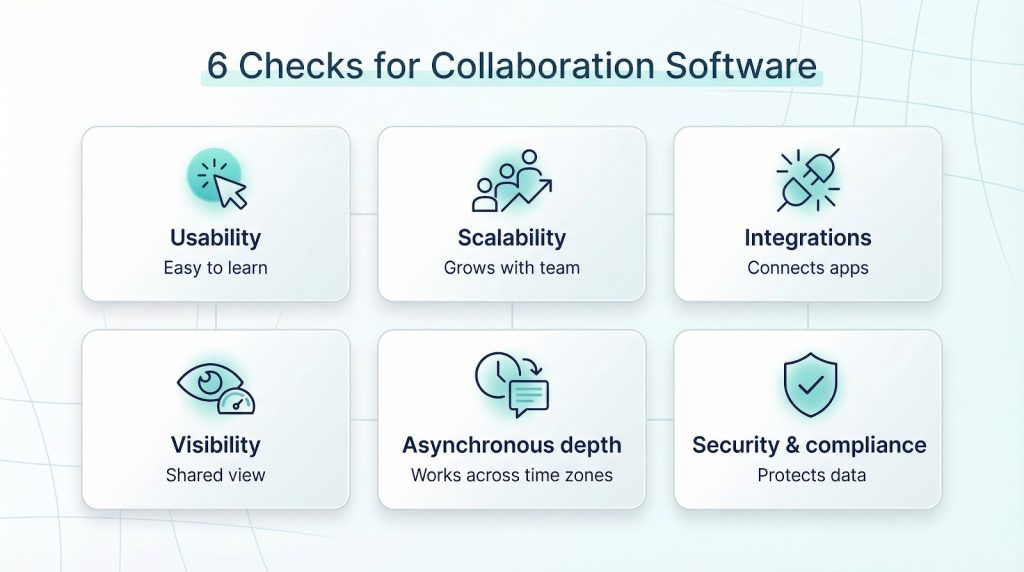
- Usability. A new hire should spot the Create channel button within 5 minutes. Anything longer signals steep training costs.
- Scalability. Trial plans for 10 users feel inexpensive until head count doubles and per-seat fees triple. Verify price tiers, role-based permissions, and a public case study of a 1,000-seat rollout.
- Integrations. Cross-functional squads bounce between chat, tasks, and files; an open API or marketplace with 2,000-plus apps shows the tool can sit at the center rather than the edge.
- Visibility. Look for shared boards, threaded comments, and automatic status pings that cut “where are we?” meetings in half.
- Asynchronous depth. Threaded discussions, doc co-authoring, and meeting recordings keep momentum when time zones don’t overlap.
- Security and compliance. End-to-end encryption, SSO, audit logs, and at least SOC 2 Type II or ISO 27001 certification protect marketing, finance, and product data under one roof.
Pass all six, and the platform belongs on your shortlist.
TeamDynamics
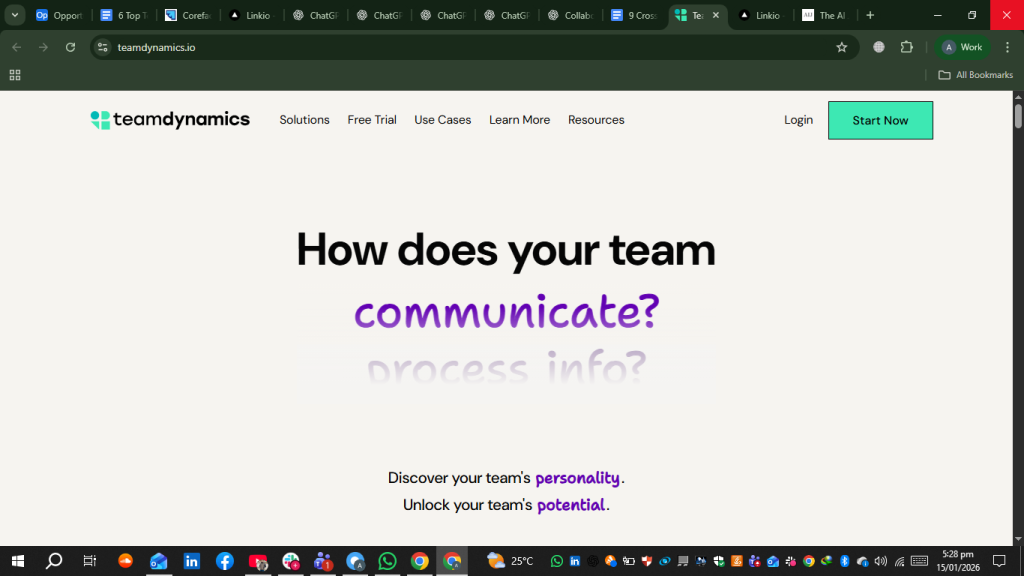
Tools don’t collaborate; people do. When designers thrive on rapid-fire chat but accountants prefer quiet, documented updates, mismatches waste time and money. U.S. companies lose an estimated $1.2 trillion each year to poor communication (Business Wire). A recent TeamDynamics State of the Team study of thousands of cross-functional groups found that 9 in 10 people hold at least one preference that clashes with their team’s default habits, making misfires the rule rather than the exception.
TeamDynamics spots these habits with a quick survey that reveals how your group shares information, makes decisions, and flags risks. With that insight, you can create Slack channels or Microsoft Teams tabs that match your culture instead of mandating change, which speeds adoption and protects your software budget.
The next subsection shows how those survey results turn into an actionable roadmap for day one.
How TeamDynamics turns insight into action
The process is straightforward:
- 10–15 minute survey. Most teammates finish the science-validated questionnaire in under a quarter hour, and reliability tests show average Cronbach’s alpha scores above 0.80 across four trait dimensions.
- Heat-map results. Minutes after submission, a shareable board shows whether your crew is fast paced and iterative or reflective and methodical.
- Custom playbook. Each pattern links to a clear nudge—for example, “Post a written stand-up in Slack every Monday” or “Add a RACI table in Asana before kickoff.” Because every tip ties back to your data, advice never feels generic.
- Real-time sentiment pulse. If marketing starts feeling out of the loop, the dashboard flags the spike so you can hold a quick retro before friction turns into fatigue.
- Flexible hand-off. Export the report as a PDF, deck, or Notion embed; TeamDynamics stays a neutral referee, not another system to babysit.
Pricing is simple: $39 per user for teams of 2–20, with enterprise tiers above that. Most groups recoup the cost after the first project cycle thanks to fewer misfires and faster decisions.
With this cultural snapshot in hand, you can now pick a real-time communication hub that fits without crossing wires.
Real-time communication hubs
Slack: the always-open virtual office
As of 2025 Slack hosts about 45 million daily users across 150 countries and connects to more than 2,400 third-party apps (Demandsage). Public channels keep discussions transparent, while private ones give legal or HR the quiet space they need. Hit ⌘-K and the entire decision trail—messages, files, polls—appears in seconds, eliminating email archaeology.
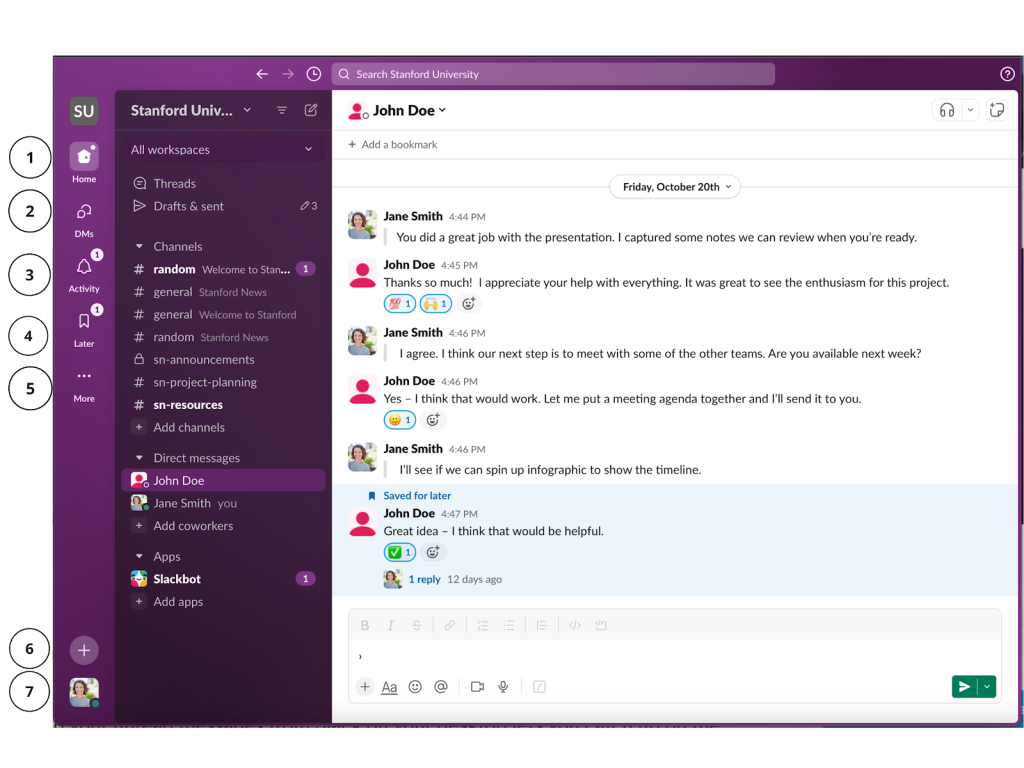
Speed matters. A new thread spins up instantly, so blockers surface before they grow.
Slack AI now summarises long threads, drafts status updates, and answers “what changed overnight?” for teams spread across time zones (TechRadar).
Pricing: the Free plan stores 90 days of history; the Pro tier costs $7.25 per user per month and unlocks unlimited archives plus SSO (Slack). Enterprise plans add data residency and granular retention rules for regulated industries.
Choose Slack when your TeamDynamics profile shows a culture that iterates rapidly and values open, real-time dialogue.
Microsoft Teams: structure without silos
Already use Outlook, Excel, and SharePoint? Microsoft Teams keeps collaboration inside the apps your staff opens every day, so no extra tabs. A team space launches with chat, meetings, and files in one pane; you can pin a Planner board or Power BI dashboard so tasks, metrics, and conversation stay side by side.
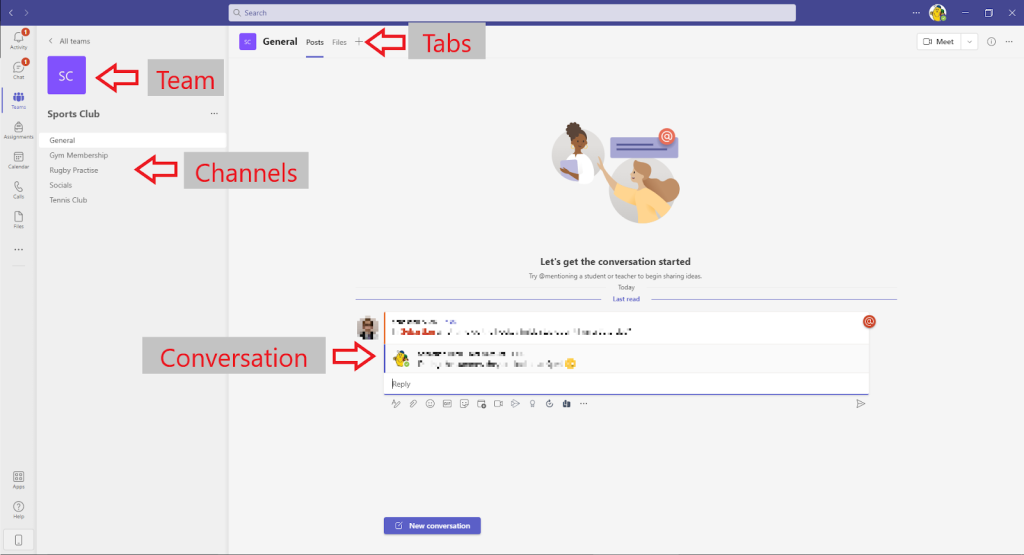
Scale is proven. Teams reached 220 million daily users and 360 million monthly users in 2025 (SQ Magazine), showing that enterprises can run it at global size. All content lands in SharePoint, so version history and search work the same throughout the suite.
Security inherits Microsoft 365 controls, including customer-key encryption, data-loss prevention, and eDiscovery, without third-party add-ons.
Copilot AI now summarises sprint channels and drafts follow-up actions in seconds, trimming recap time for hybrid teams buried in chat.
The cost is predictable. Teams comes with Microsoft 365 Business Basic at $6 per user per month (annual subscription) and is scheduled to rise to $7 in July 2026 (Microsoft; Managed Solution). If your TeamDynamics profile favours process, documentation, and formal governance, Teams keeps work orderly and audit trails tight.
Project and work-management OS
Chat moves questions, but projects need a visible spine—deadlines, owners, and dependencies everyone can trust. Work-management platforms fill that role. The category now tops $6 billion in annual spend and is growing 13 percent year over year, so choosing the right tool can save real budget and hours. Below, we compare two standouts that align with opposite collaboration styles flagged by TeamDynamics.
Asana: turning tasks into a living roadmap
When milestones hide in spreadsheets, projects drift. Asana surfaces every deliverable on a list, board, or timeline, complete with assignee and due date.
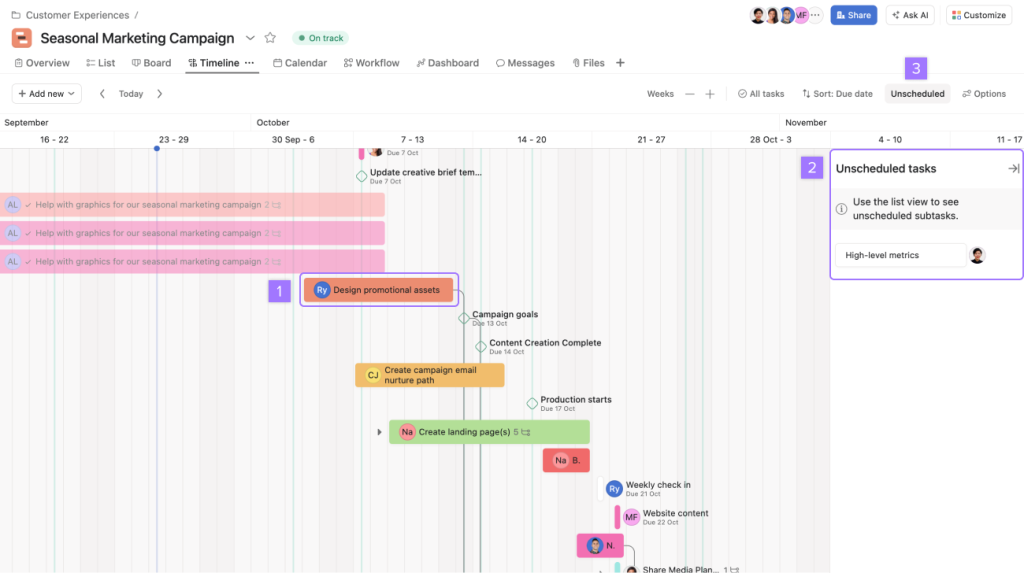
Dependencies make the difference. Mark task B as blocked by task A, and Asana shifts dates automatically if A slips, preventing a last-minute scramble. Stakeholders scan the timeline and spot risk in seconds.
Portfolios zoom out farther. Marketing, engineering, and support can run separate boards while leaders track them all on one status dashboard; red-yellow-green indicators replace weekly check-ins.
Automation trims busywork. An “Approved” design can ping the developer, move the card to Ready, and post an update in Slack without manual clicks. Asana lists 200+ native integrations and supports webhooks for anything niche.
Pricing:
- Personal (free) for up to 2 users
- Starter at $10.99 per user per month (annual billing) unlocks Timeline, dashboards, and unlimited automations (Asana)
- Advanced and Enterprise add SSO, audit logs, and custom retention
As of July 2025 Asana reported 25,006 paying “Core” customers and 770 accounts spending over $100 k annually (Reddit filing), proof that it scales from startups to global programs.
Best fit? Cross-functional squads that juggle many moving parts and value visible ownership. If your TeamDynamics readout highlights a need for accountability and visual planning, Asana delivers without a steep learning curve.
Monday.com: one board to rule diverse workflows
Some teams run projects; others follow repeatable processes. Monday.com covers both by letting you combine status, owner, date, and formula columns with no code. Switch any board into a Gantt, Kanban, or workload view so each department sees data through its own lens while pulling from the same source.
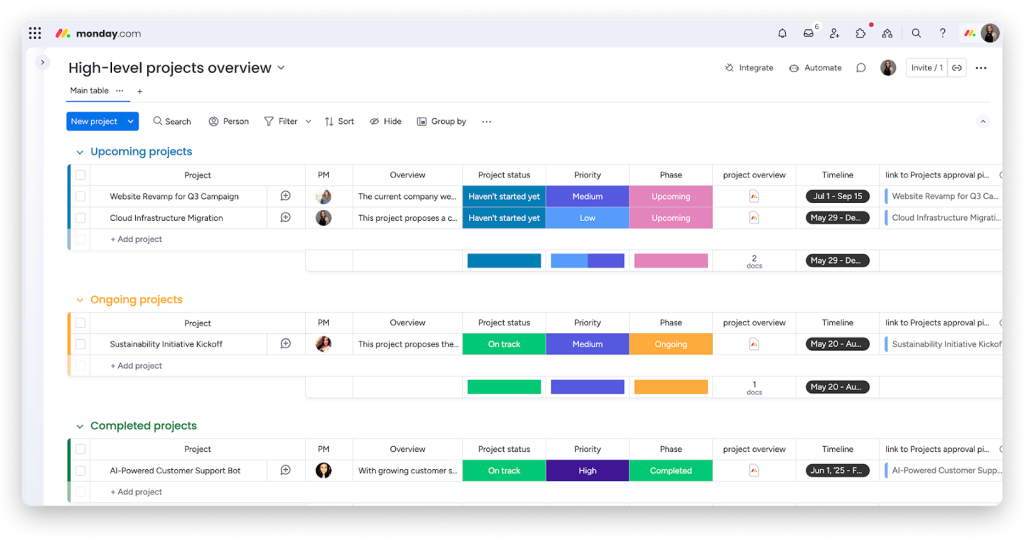
Automations reclaim hours. A rule such as “When design changes to Done, notify marketing and move item to Launch Prep” removes a dozen manual pings. Multiplied across a 10-person team, Monday’s benchmark study estimates a savings of 5 hours a week (Investor report).
Dashboards pull multiple boards into a single view so executives track cost, scope, and risk without digging through tabs. All data updates live, so reports never go stale.
Security meets enterprise checklists—SOC 2 Type II, ISO 27001, audit logs, and granular permissions.
Pricing:
- Free for up to 2 users
- Basic at $9 per seat per month billed annually
- Standard at $12 per seat per month adds automations and integrations
- Pro at $19 per seat per month unlocks workload tracking; Enterprise pricing on request (Monday.com)
Adoption keeps rising: Monday.com ended 2024 with 59,214 paying customers of 10+ seats, up 10 percent year over year (Investor report). Many organisations justify the upgrade by retiring point tools once their boards absorb CRM, hiring pipelines, and IT queues.
Best fit? Cross-functional companies that value structured processes yet need the freedom to adjust on the fly. If your TeamDynamics readout shows a preference for defined workflows with room to customize, Monday.com scales that discipline.
Visual ideation and knowledge hubs
Great ideas often start as sketches, then live on as searchable reference. Two tools dominate those moments: one turns blank space into an infinite whiteboard, the other stores every decision in a living wiki. Together, they solve the “Where did we capture that?” problem that costs teams an average 19 percent of project time in rework, according to PMI’s 2024 Pulse report.
Miro: the infinite canvas for shared thinking
Slide decks freeze ideas; Miro keeps them moving on an infinite whiteboard used by more than 90 million people worldwide (Business Wire). Every collaborator—from UX to finance—adds sticky notes, wireframes, or flowcharts in real time while coloured cursors show who is working where. It feels like standing around a wall of Post-its, minus airfare.
Templates speed the messy first mile: pick a sprint-retro, customer-journey, or PI-planning canvas and tweak on the fly—no blank-page paralysis. When the session ends, the board lives on. Link tasks to Asana, embed the canvas in Confluence, or export a PDF for exec review; teammates can comment asynchronously so the spark survives the workshop.
Built-in video chat, timers, and a new AI facilitator (50 credits per member on paid plans) cluster similar notes and draft summary headlines, trimming post-workshop clean-up.
Pricing:
- Free plan with 3 editable boards
- Starter at $8 per user per month billed annually
- Business at $16 per user per month adds SSO, unlimited private workspaces, and extra AI credits (Miro)
Best fit? Cross-functional groups that think visually and need equal voice on the canvas, especially when schedules rarely overlap. If your TeamDynamics report highlights collaborative ideation, Miro amplifies that strength.
Notion: the company wiki teams use
Most knowledge bases expire because adding content feels like homework. Notion flips that. Every page is a drag-and-drop canvas where you mix text, tables, checklists, and embedded Figma files in seconds, so updating a process doc feels as quick as sending a Slack message.
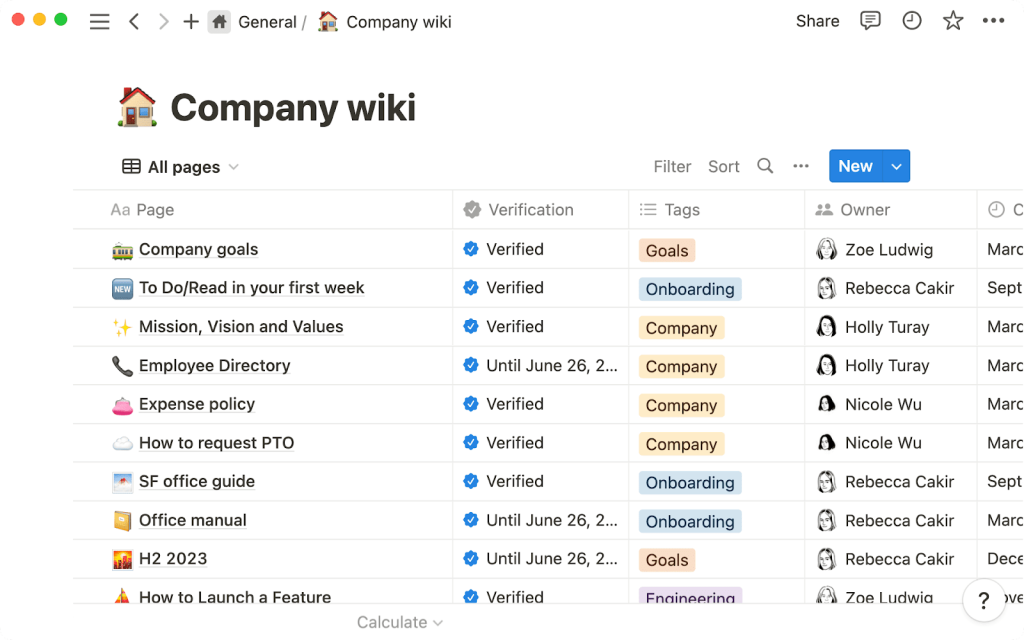
Databases take it further. Turn a bug list or OKR tracker into a synced database, then view it as Kanban, calendar, or gallery. Link tasks to specs and research so the full story sits one click away—ideal for cross-functional teams tired of hunting through silos.
Real-time editing keeps everyone on the same page. Legal can polish wording while design drops screenshots; in-line comments and 30-day version history (on Plus plans and above) protect against accidental deletions.
Notion AI—available in Business and Enterprise tiers from late 2025—summarises meeting notes or drafts project briefs, saving teams 8–12 minutes per document (CNBC).
Integrations now top 90 connectors, from Slack pings to Jira issue previews, keeping context inside the wiki instead of forcing app hops.
Pricing:
- Free for individuals
- Plus at $10 per user per month billed annually
- Business at $18 per user per month adds SAML SSO and 90-day page history
- Enterprise on request with advanced permissions and audit logs (Notion; Forbes)
Adoption proof: Notion reported 30 million users and over 4 million paying accounts in 2024 (Simple Ink).
Best fit? Organisations that need a single source of truth but dislike rigid wikis. If your TeamDynamics readout highlights curiosity and collaborative documentation habits, Notion feels natural.
Synchronous touchpoints
Even the best async stack can’t replace every conversation. Product demos, performance reviews, and complex negotiations still benefit from eye contact and immediate feedback. The average hybrid employee spends 6–7 hours a week in live video meetings, according to Microsoft’s 2025 Work Trend Index, so choosing the right platform trims cognitive load. A recent review of remote-team performance assessment tool options notes that clear, low-latency calls are a prerequisite for collecting meaningful real-time feedback across time zones. Below we profile one standout option for cross-functional teams that need crisp audio, breakout rooms, and searchable recordings.
Zoom: face-to-face clarity when chat isn’t enough
Written updates carry projects far, yet some calls still need eye contact. Zoom hosts about 300 million daily meeting participants (more than half the global video-conferencing market) (Affinco).
Quality is the hook. Whether you’re pitching a roadmap to executives or running a design critique across five time zones, audio stays crisp and screen shares sharp. Fewer “you’re on mute” moments mean faster alignment.
Breakout rooms shrink a 100-person workshop into focused huddles with one click. Marketing refines messaging while product tackles scope, then everyone reconvenes to lock decisions.
Recordings with searchable transcripts keep absentees in the loop. Drop the link in Slack and teammates skim for their action items. AI Companion, included with paid plans, now extracts tasks automatically and turns talk into to-dos (The Verge).
Zoom Team Chat and Whiteboard capture ideas mid-call, and keep the thread alive after everyone hangs up; they won’t replace Miro, but they maintain context inside one tool.
Pricing:
- Basic (free) – 40-minute group calls, up to 100 participants
- Pro – $14.99 per user per month or $149.90 annually; 30-hour meetings, 5 GB cloud storage, full AI Companion features (ScreenApp)
- Business – $19.99 per user per month; brandable meetings and up to 300 participants
Enterprise bundles add larger capacities, unlimited cloud storage, and advanced encryption for company-wide all-hands.
Best fit? Distributed teams that need quick, high-bandwidth discussions and searchable recordings to feed their async rhythm. If your TeamDynamics profile flags misalignment in remote meetings, Zoom closes the gap with a single invite.
Integration and automation layer
Even the sharpest tools lose value when data gets stuck between them. Gartner estimates that 78 percent of SaaS users still copy and paste information by hand at least once a week. An integration layer removes that friction by routing updates, files, and alerts where they need to go without help from engineering. Below, we profile Zapier, the easiest way to wire a cross-functional stack together.
Zapier: the invisible glue that keeps data flowing
Cross-functional work stalls when information sits in silos. Zapier acts as a no-code switchboard: create a “Zap,” set a trigger, and let actions fire across tools without an IT ticket.
With 5,000+ supported apps as of 2025 (Zapier), a marketing lead captured in Typeform can spawn an Asana task and post a summary in #sales-engineering on Slack in under a minute. Conditional branches and loops add sophistication: route high-value leads differently or delay follow ups until contracts close.
The new AI Builder converts plain English (“When a customer books a demo, creates an opportunity in Salesforce and sends a reminder email”) into a multi-step Zap, lowering the barrier for non-technical teammates.
Pricing (annual billing):
- Free – 100 tasks per month, single-step Zaps
- Professional – $19.99 per user per month for 750+ tasks and multi-step Zaps
- Team – $69 per user per month adds shared workspaces and 2,000+ tasks
- Enterprise – custom pricing with SAML SSO, advanced logging, and live support (PriceTimeline; Capterra)
Security note: In February 2025 Zapier disclosed an internal code-repository breach that exposed some debugging data. No production systems were affected, and all affected tokens were revoked (The Verge). The company completed an external audit and now requires hardware-key 2FA for privileged accounts.
Best fit? Organisations juggling specialised tools that need to pass data automatically without writing code. If your TeamDynamics survey highlights frustration over duplicate entries or missed handoffs, a few well-built Zaps keep information moving while people sleep.
Conclusion
Cross-functional teams work best when collaboration tools support how people already communicate and execute. The strongest setups aren’t built around a single platform, but around a small, well-connected stack that balances real-time conversation, visible ownership, shared knowledge, and automation. When information flows easily between tools, teams spend less time coordinating and more time delivering.
Fit matters more than features. Software only helps when it matches a team’s natural working style—whether that’s fast and conversational or structured and documented. Using behavioral insight, such as the patterns revealed by TeamDynamics, makes it easier to choose and configure tools that stick. As hybrid work becomes standard, teams that align technology with human behavior will collaborate with less friction and far better results.
FAQ
1) What is collaboration software for cross-functional teams?
It’s software that helps multiple departments (e.g., product, marketing, finance, sales, support) coordinate work by centralizing communication, project visibility, documentation, and handoffs—so teams can move faster without losing context.
2) Do we need one “all-in-one” platform, or a stack of tools?
Most cross-functional teams do best with a small stack rather than a single monolith. One platform rarely excels at chat, project planning, knowledge management, workshops, and automation equally. Aim for 2–4 core tools that integrate well, then add automation to connect the gaps.
3) Slack vs. Microsoft Teams: which is better for cross-functional collaboration?
- Choose Slack if your culture prefers fast iteration, open discussion, and lots of app integrations feeding into channels.
- Choose Microsoft Teams if your organization runs on Microsoft 365, needs stronger governance by default, and values structured spaces tied to SharePoint, Outlook, and Office files.
4) Asana vs. Monday.com: what’s the difference?
- Asana is usually best for project clarity—deadlines, dependencies, timelines, and stakeholder updates.
- Monday.com shines when you want a configurable Work OS that supports both projects and repeatable processes across departments (and you’re willing to tailor boards and automations).
5) Miro vs. Notion: do we need both?
They solve different problems:
- Miro is best for visual collaboration (workshops, mapping, planning sessions, brainstorming).
Notion is best for living documentation (wikis, decision logs, specs, project hubs).
Many teams use Miro to create the plan and Notion to store the outcomes.