Google Calendar works fine until you need it to do one more thing.
The best Google Calendar alternatives are Microsoft Outlook Calendar for Microsoft 365 users, Apple Calendar for Apple devices, and Proton Calendar for privacy. Notion Calendar, Zoho Calendar and TimeTree are free picks. Fantastical and Morgen suit power users, while Cozi suits families.
Most people switch for one of three reasons: privacy, a better fit with their devices, or features Google leaves out.
Our team checked each vendor’s own pages for plans, prices and limits. You’ll get a quick table, a short review of each app, and a checklist for picking one.
Key Points
- Free picks: Outlook, Apple Calendar, Zoho Calendar, Notion Calendar and TimeTree cost nothing for personal use. Proton Calendar and Cozi also have free plans.
- For privacy, Proton Calendar encrypts your events end to end. Its free plan holds 3 calendars, and Mail Plus raises that to 25.
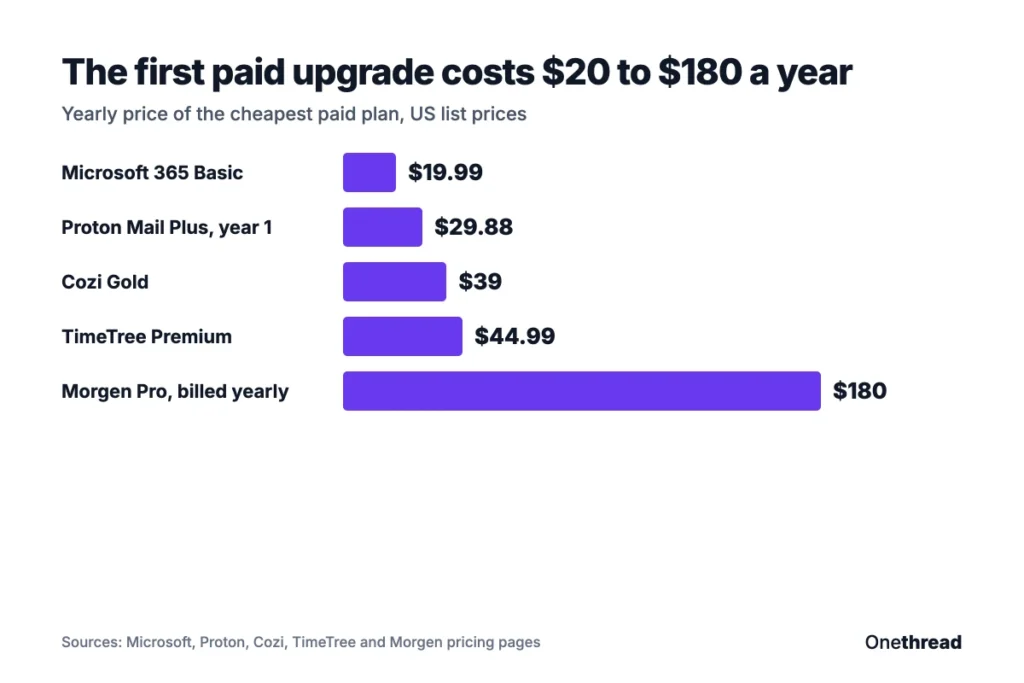
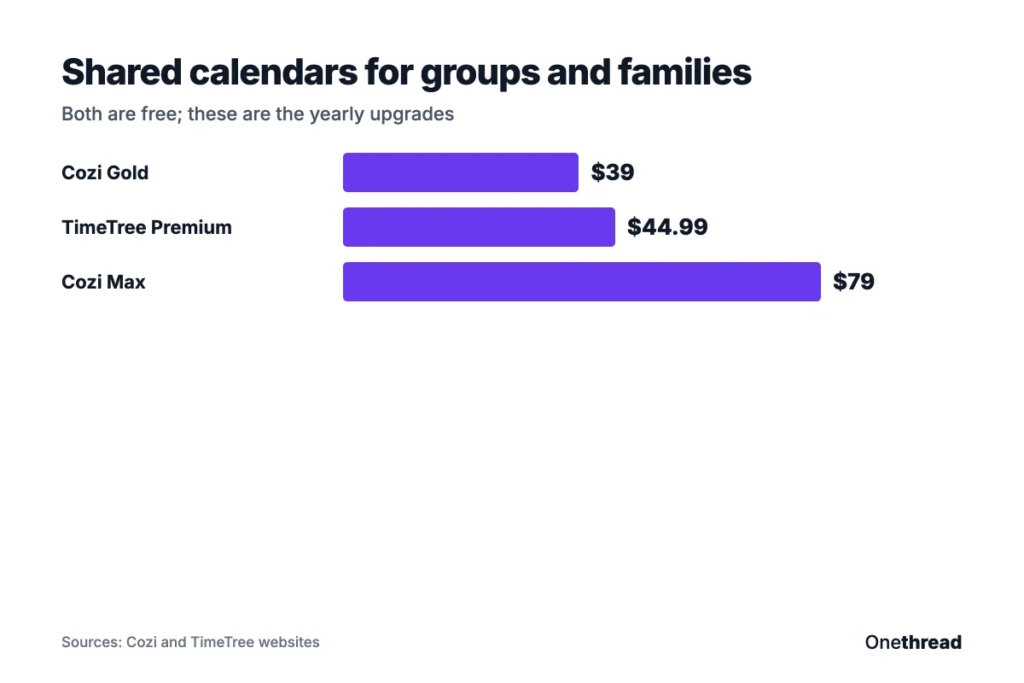
- Paid upgrades stay small: Cozi Gold is $39 a year, TimeTree Premium is $44.99 a year, and Morgen is $15 a month billed yearly.
- Pick by your devices and your main job (privacy, family, time blocking or team projects), then test your top choice for a week next to Google Calendar.
Why Look for a Google Calendar Alternative?
Most people look for a Google Calendar alternative because of privacy, device fit or missing features. Google Calendar is free and simple, but it’s built for everyone, so it isn’t the best fit for anyone in particular.
Here are the usual reasons people switch:
- Privacy: Google Calendar doesn’t encrypt your events end to end. Apps like Proton Calendar do.
- Device fit: Apple and Microsoft users often get a smoother setup with the calendar built into their system.
- Time blocking: planners such as Morgen pull tasks and events into one view, so you can schedule your actual work.
- Family life: shared family apps add shopping lists, chores and meal plans next to the calendar.
- Team projects: project tools show deadlines, tasks and owners in a calendar view, which a plain calendar can’t do.
You don’t have to leave Google behind, though. Several apps on this list connect to your Google account. Notion Calendar, Fantastical and Morgen give you a better view of the same events.
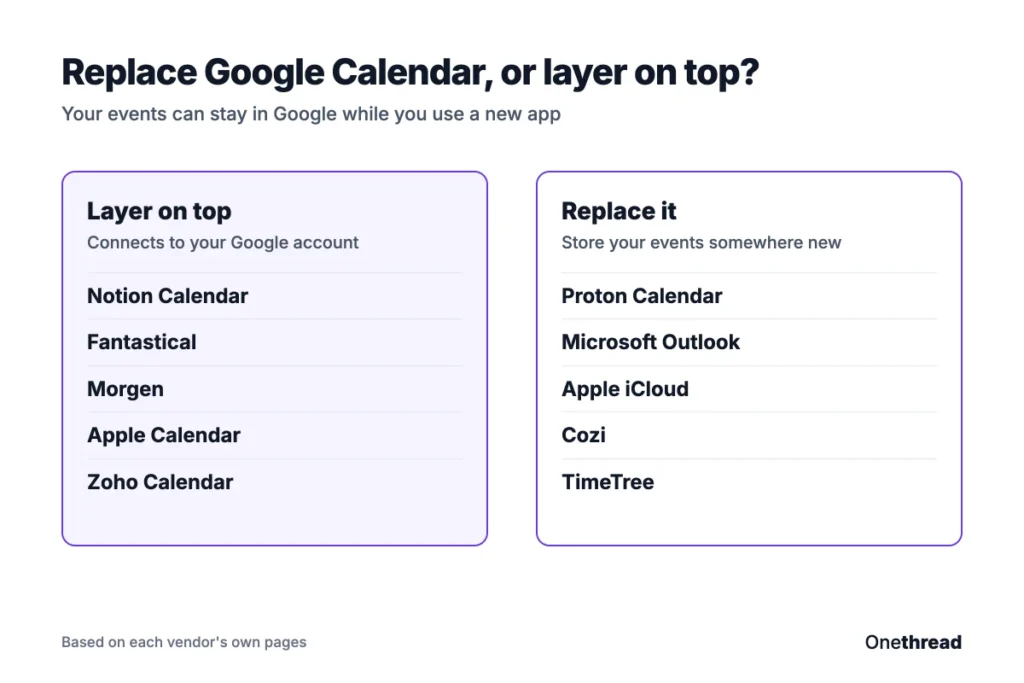
That’s the first decision. Do you want to replace Google Calendar or just put a better app on top of it? If it’s the second, start with the apps that connect to Google. If you want out of Google entirely, look at Proton Calendar, Apple Calendar or Outlook.
If you’re also weighing broader tools, our roundup of best calendar apps covers more options beyond Google alternatives.
What Are the Best Google Calendar Alternatives?
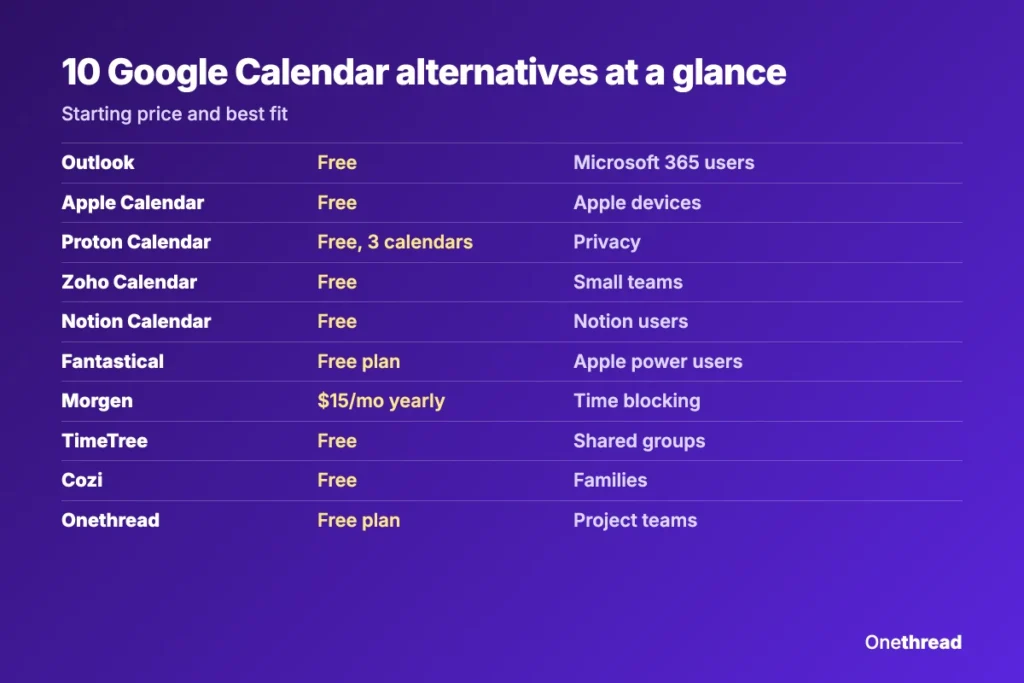
The best Google Calendar alternatives depend on your devices and your main job. Here’s the short version, with the starting price shown on each vendor’s page:
| App | Free plan | Paid from | Best for |
|---|---|---|---|
| Microsoft Outlook Calendar | Yes | $19.99 a year (Microsoft 365 Basic) | Microsoft 365 users |
| Apple Calendar | Yes | None needed | iPhone, iPad and Mac users |
| Proton Calendar | Yes, 3 calendars | $2.49 a month (Mail Plus, first year) | Privacy |
| Zoho Calendar | Yes | Not published | Small teams on Zoho |
| Notion Calendar | Yes | None listed | Notion users |
| Fantastical | Yes | Price shown at checkout | Power users on Apple |
| Morgen | 14-day trial | $15 a month, billed yearly | Time blocking |
| TimeTree | Yes | $44.99 a year | Shared calendars |
| Cozi | Yes | $39 a year (Cozi Gold) | Families |
| Onethread | Yes | $3.60 per user a month | Project teams |
Prices change often, so check each vendor’s page before you buy. The “Best for” labels are our own summary.
Sources: Microsoft Outlook, Apple iCloud Calendar, Proton Calendar, Zoho Calendar, Notion Calendar, Fantastical, TimeTree, Cozi.
What Does Microsoft Outlook Calendar Offer?
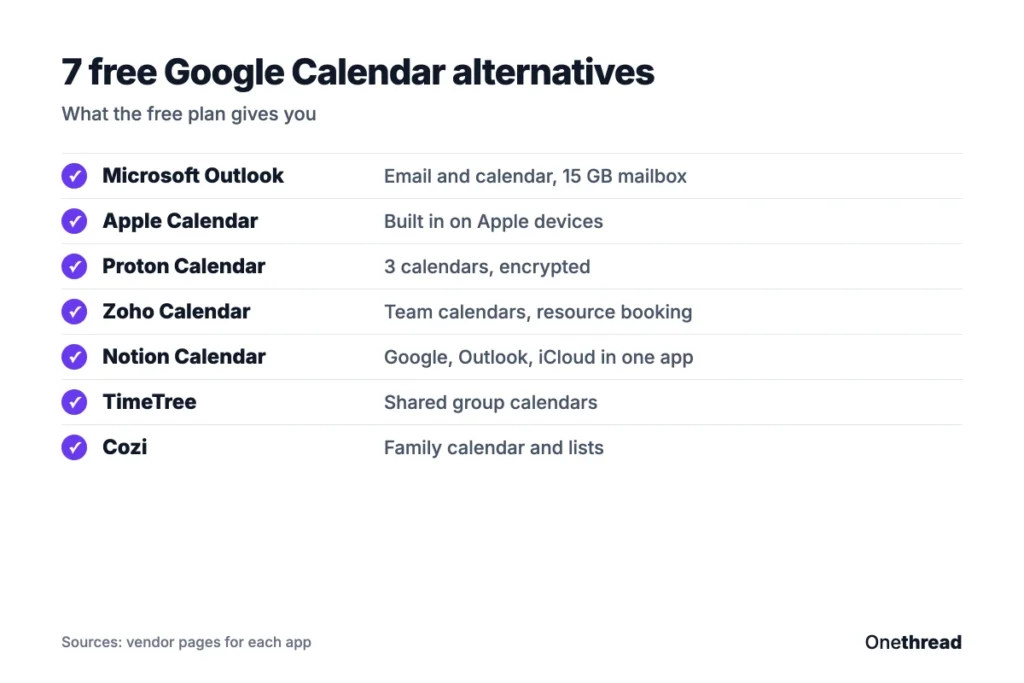
Microsoft Outlook Calendar is the closest match to Google Calendar for people who live in Microsoft tools. The free Outlook plan includes email and calendar on the web, desktop and mobile apps, plus 15 GB of mailbox storage.
It fits best at work. If your office already runs on Microsoft 365, the calendar is already there, next to the email you use every day. And the free plan covers the same calendar on your phone, desktop and the web.
The free plan also includes 5 GB of cloud storage. If you upgrade to Microsoft 365 Personal, Microsoft says you save up to 17% by paying yearly.
Say your company already pays for Microsoft 365. Moving your personal calendar to Outlook means one app for work and home, with no new bill.
Pricing: Free with an Outlook account. Microsoft 365 Basic costs $19.99 a year and removes ads from the inbox. Microsoft 365 Personal costs $99.99 a year or $9.99 a month.
Best For
- Teams that already use Microsoft 365, Teams and Exchange.
Pros
- Free plan covers email and calendar on every device.
- One app for email and calendar.
- Paid plans remove inbox ads at a low yearly price.
Cons
- The free plan shows ads in the inbox.
- Busy screen with many menus, which can feel heavy for personal use.
- The best features need a work account on Microsoft 365.
What Does Apple Calendar Offer?
Apple Calendar is the built-in calendar on iPhone, iPad and Mac, and it syncs through iCloud. Apple also lets you use iCloud calendars on a Windows device and on iCloud.com in a web browser on a tablet or computer.
The big win is how little setup it needs. Events sync between your phone, laptop and watch without extra apps. You can also add your Google or Outlook accounts, so one app shows every calendar you own.
Getting started on the web takes one step: go to icloud.com/calendar and sign in with your Apple Account. That helps when you’re on a work PC without your phone.
Picture a freelancer with an iPhone and a MacBook. Apple Calendar keeps both in sync, and family events from a shared iCloud calendar show up next to client calls.
Pricing: Included with your Apple Account on Apple devices.
Best For
- People who use an iPhone, iPad or Mac every day.
Pros
- No setup beyond signing in with an Apple Account.
- Shows iCloud, Google and Outlook calendars in one place.
- Works on the web at icloud.com/calendar from a tablet or computer.
Cons
- No native app for Android phones.
- Fewer team features than Outlook or a project tool.
- Calendar on iCloud.com needs a tablet or computer, not a phone browser.
What Does Proton Calendar Offer?
Proton Calendar is the privacy pick. Proton says it secures all your events with end-to-end encryption, so only you and the people you share with can read them.
The free plan includes 3 personal calendars, which covers work, home and one shared calendar. If you need more, the Mail Plus plan raises the limit to 25 calendars and adds Proton’s paid email features.
Events you bring in from other calendars are covered too. Proton says those are secured with zero-knowledge encryption, so your full schedule stays private. Proton Unlimited also allows up to 25 calendars.
Say you’re a lawyer or a therapist who books private client sessions. Proton keeps those event details encrypted, while you still get reminders on your phone.
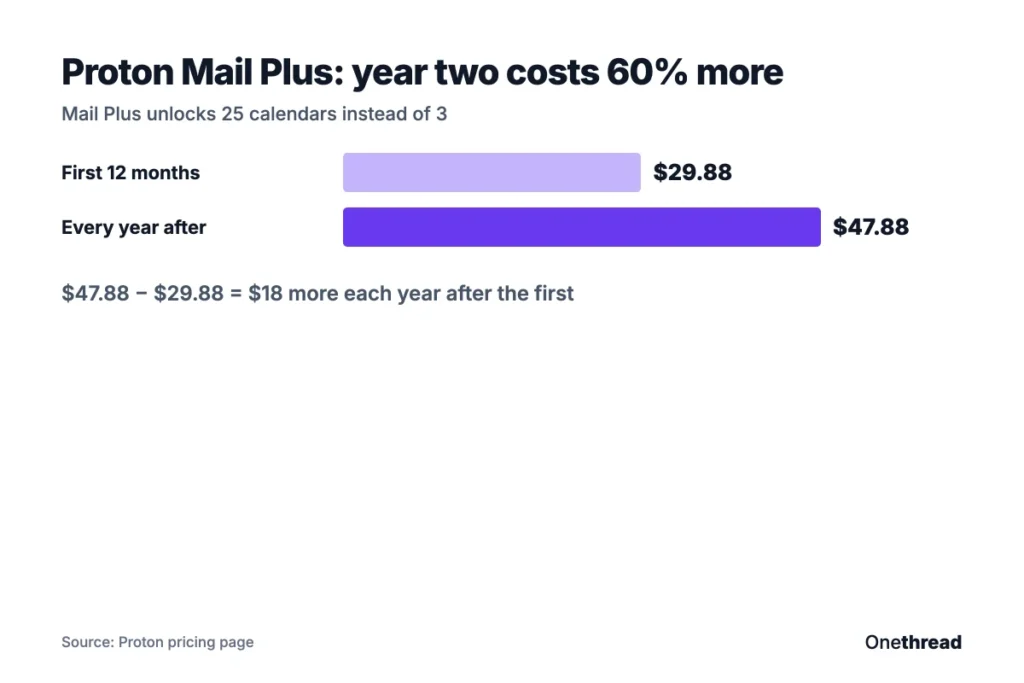
Pricing: Free plan available. Mail Plus is $2.49 a month for the first 12 months, billed at $29.88, then it renews at $47.88 a year.
Top Tip: Note the renewal price before you pay for Mail Plus. The first-year deal is about half the price you’ll pay in year two.
Best For
- People who want their calendar details encrypted end to end.
Pros
- End-to-end encryption on every event.
- Free plan with 3 calendars.
- Works with Proton Mail for invites.
Cons
- Fewer third-party integrations than Google or Outlook.
- Paid price rises after the first 12 months.
- More calendars need a paid Mail plan.
What Does Zoho Calendar Offer?
Zoho Calendar is a free online calendar for teams and individuals. It covers more than most free tools, with appointment booking, team calendars and resource booking. Video meetings run through Zoho Meeting, Zoom or Microsoft Teams.
Switching is simple, too. Zoho imports iCal and CSV files and your Google Calendar, and it connects to Zapier for automations. Admin controls let a team lead manage who sees what.
Its Smart Add feature lets you type an event in plain words, and it fills in the date and time. You also get day, week, month and agenda views, color coding, a dark mode and two time zones side by side.
Imagine a 12-person agency that books a meeting room and a projector with each client call. Zoho’s resource booking handles that inside the same calendar, so nobody double-books the room.
Pricing: Free. Zoho doesn’t list a paid plan on its Calendar page.
Best For
- Small teams that already use Zoho Mail or other Zoho apps.
Pros
- Free, with team calendars and resource booking.
- Syncs with Google, Outlook, Apple and Calendly.
- Web, iOS and Android apps.
Cons
- Less polished design than Fantastical or Notion Calendar.
- Works best inside the wider Zoho suite.
- Admin settings take some time to learn.
What Does Notion Calendar Offer?
Notion Calendar is a free calendar app that sits on top of your existing accounts. It connects to Google Calendar, Outlook calendars and Apple iCloud calendars, so you don’t have to move your events anywhere.
Its main draw is the link to Notion. If your team plans projects in Notion, the calendar sits in the same family of apps you already use. It runs on desktop and mobile, so your view stays the same everywhere.
Because Notion Calendar reads your existing accounts, trying it is low risk. If you stop using it, your events stay in Google, Outlook or iCloud where they were.
Say you run a content team that keeps its editorial plan in Notion. Notion Calendar puts publish dates and review meetings on one screen, and your Outlook or Google events sit right beside them. Nobody has to copy dates from one tool to another.
Pricing: Free.
Best For
- Teams that already plan work in Notion.
Pros
- Free, with no paid tier listed.
- Connects Google, Outlook and iCloud calendars.
- Desktop apps for macOS and Windows, plus iPhone, iPad and Android.
Cons
- Most useful if you already use Notion.
- Depends on your Google, Outlook or iCloud account to store events.
- No built-in email, unlike Outlook or Proton.
What Does Fantastical Offer?
Fantastical is a polished calendar app from Flexibits, popular with Apple users who want more power than Apple Calendar. It runs on Mac, iPhone, iPad, Apple Watch, Apple Vision Pro and Windows, and Flexibits says Android is coming in 2027.
It connects to iCloud, Google, Microsoft 365, Exchange, Todoist and CalDAV accounts, so all your calendars and tasks show in one place. The free plan gives you the core app, and paid plans add the extras.
Flexibits also offers Family and Team plans, so a household or a small company can share one subscription. Its contacts app, Cardhop, is free to use as well.
Picture a consultant juggling three client calendars plus a Todoist task list. Fantastical shows all of them in one view.
Pricing: Free plan available. Paid Individual, Family and Team plans are billed monthly or yearly, and Flexibits shows the price at checkout. Paid plans include a 14-day free trial.
Best For
- Apple users who want a faster, more flexible calendar.
Pros
- Runs on Mac, iPhone, iPad, Apple Watch and Windows.
- Connects Google, iCloud, Microsoft 365 and Todoist.
- Free plan to test the basics.
Cons
- No Android app yet.
- Paid prices aren’t listed until checkout.
- Best features sit behind the paid plan.
What Does Morgen Offer?
Morgen is a calendar and planner for time blocking. It pulls your events and tasks into one view. That way, each task gets a real slot in your day.
It runs on Windows, macOS, Linux, mobile and the browser. That makes it one of the few planners with a Linux app.
Say you have six tasks and four meetings on Tuesday. Morgen lets you place each task into the gaps between meetings, so your plan matches the hours you actually have. If you want to build that habit first, our guide on how to plan your day walks through it.
Example: a two-person team on Morgen’s Teams plan pays 2 × $10 × 12 = $240 a year. That’s the smallest team bill, since the plan needs at least 2 seats.
Pricing: Individuals pay $15 a month billed yearly, or $30 a month billed monthly. Teams pay $10 per seat a month billed yearly, with a 2-seat minimum. There’s a 14-day free trial with no credit card.
Best For
- People who plan their day with time blocks.
Pros
- Tasks and events in one view.
- Apps for Windows, macOS, Linux and mobile.
- Team plan for shared scheduling.
Cons
- No free plan after the trial.
- Monthly billing costs twice the yearly rate.
- Overkill if you only need a simple calendar.
What Does TimeTree Offer?
TimeTree is a free shared calendar app for groups. Couples, families, clubs and small teams all see the same events on their own phones.
Premium goes further for heavy users. It adds ad-free calendars, a vertical view, prioritized events and dedicated support on top of attachments and pinned events.
It’s simple to start. You create a calendar, invite people, and everyone adds events from their own phone. There’s no work account to set up and no admin panel to learn.
Imagine a five-person volunteer group that runs weekend events. TimeTree gives them one shared calendar, without anyone setting up a work account.
It also works across phones. TimeTree offers apps on the App Store and Google Play. So a mixed group of iPhone and Android users can share one calendar with no extra setup. That’s a gap Apple Calendar leaves open.
Pricing: Free. Premium costs $4.49 a month or $44.99 a year, and TimeTree notes prices may vary by region.
Best For
- Groups that need one shared calendar across iPhone and Android.
Pros
- Free to start, with easy invites.
- Premium adds file attachments and pinned events.
- Apps for iPhone and Android.
Cons
- Ad-free calendars need Premium.
- Limited work features, such as meeting links.
- Prices may vary by region.
What Does Cozi Offer?
Cozi is a family organizer with a shared calendar at its center. Next to the calendar, it holds shopping lists, to-do lists and a recipe box, so the whole household runs from one app.
Everyone in the house sees the same calendar and the same lists. That helps when one parent is already at the store and the other adds an item. For chores and errands, a simple to do list template pairs well with Cozi’s shared lists.
Cozi Gold is sold on the web or as an in-app purchase. A bigger tier, Cozi Max, costs $79 a year for families who want every extra.
Say a family of four juggles school, sports and work shifts. Cozi puts every schedule in one place, and the grocery list updates as soon as someone adds milk. Nobody has to text the list around anymore.
Pricing: Free. Cozi Gold costs $39 a year, and Cozi Max costs $79 a year.
Best For
- Families who share schedules, lists and meal plans.
Pros
- Shared family calendar on the free plan.
- Shopping and to-do lists built in.
- Free plan covers the basics.
Cons
- Not built for work or teams.
- Some features need Cozi Gold.
- Fewer calendar views than work apps.
What Does Onethread Offer?
Onethread is project management software, not a pure calendar app. It belongs on this list for teams whose calendar is mostly a list of deadlines, tasks and milestones.
It includes a Calendar View, a Gantt chart, sprints and timesheets. You can see every task’s due date on a calendar, then switch to a Gantt chart to see how the work connects. Discussion rooms keep project talk and team collaboration next to the tasks.
Say a marketing team runs four campaigns at once. Onethread shows each campaign’s tasks on a shared calendar with owners and due dates, which Google Calendar can’t track. It also fits with other picks in our list of best productivity apps and tools.
Pricing: The Basic plan is free forever, with unlimited projects and tasks and 15 GB of file sharing. Growth costs $3.60 per user a month on monthly billing.
Best For
- Project teams that need deadlines, owners and tasks on one calendar.
Pros
- Free plan with unlimited projects and tasks.
- Calendar View, Gantt chart and timesheets in one tool.
- Low per-user price on paid plans.
Cons
- Not a replacement for a personal email calendar.
- Meeting scheduling still runs through Google or Outlook.
- Best value comes when the whole team uses it.
How Do You Choose a Google Calendar Alternative?
Choose a Google Calendar alternative by matching it to your devices first, then to your main job. A great app that doesn’t run on your phone won’t last a week.
Four checks help you decide:
- Check your devices: Apple-only users can start with Apple Calendar or Fantastical. Mixed Windows and Android setups suit Outlook, Zoho or Notion Calendar.
- Decide replace or layer: if you’ll keep Google as the store for events, pick an app that connects to it, such as Notion Calendar, Fantastical or Morgen.
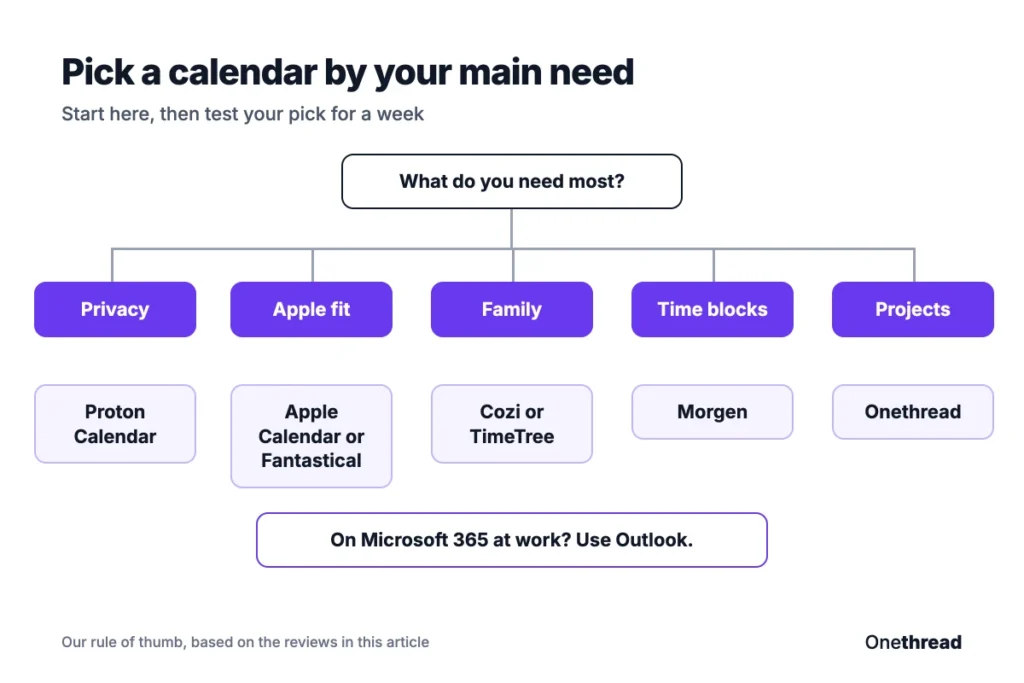
- Name your main job: privacy points to Proton, families to Cozi, groups to TimeTree, time blocking to Morgen, and projects to Onethread.
- Price the upgrade: look past the first-year deal and check the renewal price, as with Proton Mail Plus.
For a sense of how software reviewers weigh factors like these, one outlet publishes its full review methodology for anyone to read.
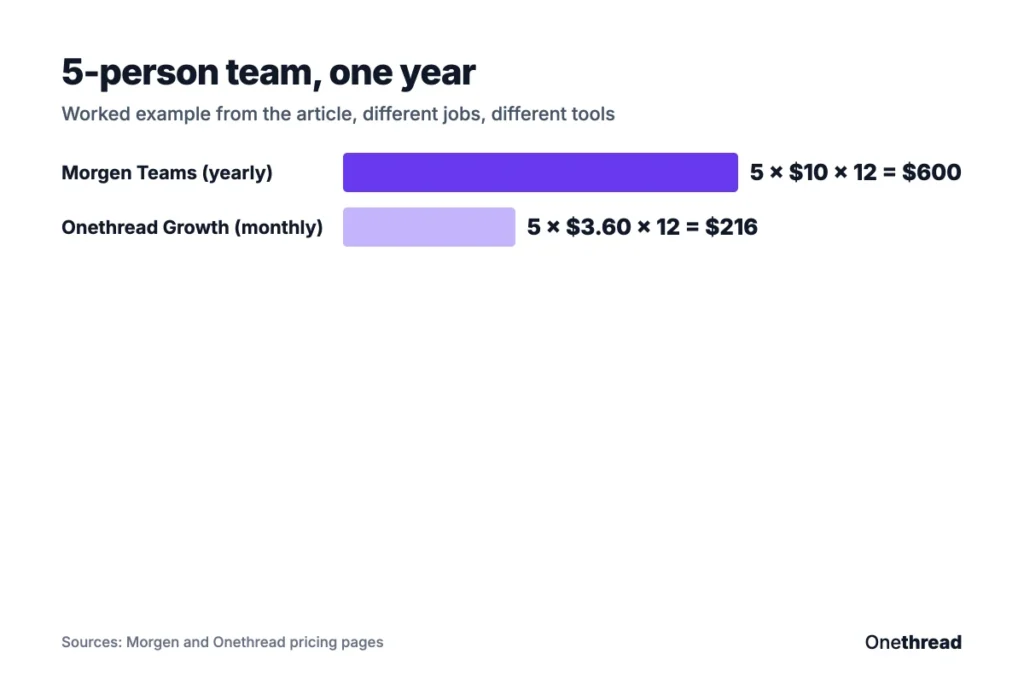
Example: a 5-person team on Morgen’s Teams plan pays 5 × $10 × 12 = $600 a year. The same team on Onethread Growth pays 5 × $3.60 × 12 = $216 a year on monthly billing. The jobs differ, so compare features first, then price.
If your real goal is planning your days better, our guide to daily planner apps may fit better than a new calendar.
What Should You Do Next?
Google Calendar is a good default, and it’s free, but it’s rarely the best tool for a specific job. Once you know your main need, the list shrinks fast. Privacy, Apple or Microsoft fit, family sharing, time blocking and project tracking each point to one or two apps.
This week, pick your top choice and run it next to Google Calendar for seven days. Keep the one you open without thinking about it. Move your events over only after that, and keep a backup export of your Google Calendar first.
FAQs
Can You Sync Google Calendar With Wunderlist?
No, because Wunderlist no longer exists. Microsoft shut it down on May 6, 2020, according to TechCrunch, and moved users to its own To Do app. If you want tasks next to your calendar today, Microsoft To Do works with Outlook, while Morgen and Fantastical show tasks beside Google Calendar alternatives.
Is There a Free Alternative to Google Calendar?
Yes. Outlook, Apple Calendar, Zoho Calendar, Notion Calendar and TimeTree are free for personal use, and Proton Calendar and Cozi have free plans. Zoho Calendar is the strongest free option for small teams. Proton Calendar is the best free pick among Google Calendar alternatives if privacy matters most.
What Is the Most Private Google Calendar Alternative?
Proton Calendar is the most private option on this list. Proton says it secures all events with end-to-end encryption, and its free plan holds 3 calendars. Events you bring in from other calendars are protected with zero-knowledge encryption, so Proton can’t read your schedule.
Can I Keep Using Google Calendar With These Apps?
Yes. Notion Calendar, Fantastical, Morgen, Apple Calendar and Zoho Calendar can all connect to a Google account. That lets you keep Google as the place your events live while you use a different app to view and plan them. It’s the easiest way to try a new calendar without moving anything.
Which Calendar App Is Best for iPhone?
Apple Calendar is the easiest choice for iPhone because it comes built in and syncs through iCloud. Fantastical is the upgrade pick, with support for Google, Microsoft 365 and Todoist accounts. If you share an iPhone calendar with Android users, TimeTree or Cozi work on both.