n8n pricing looks simple until one busy workflow eats your whole month.
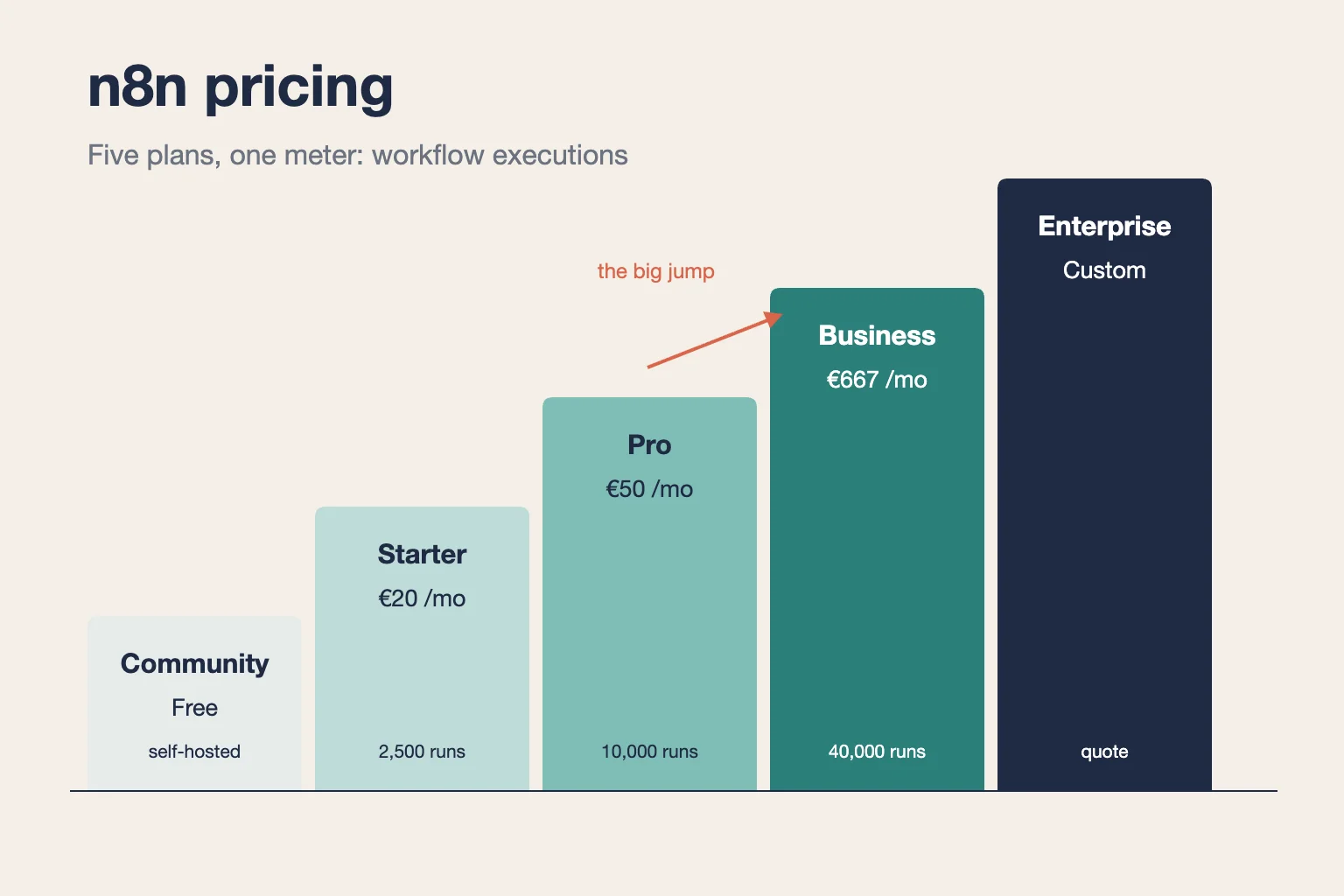
n8n Cloud costs €20 a month on Starter (2,500 executions) and €50 on Pro (10,000), billed annually. The self-hosted Business plan costs €667 for 40,000, Enterprise is quoted, and the Community Edition is free.
But “free” still means you pay for a server. And the step from Pro to Business is steep.
We read 10 recent n8n pricing guides and ran the execution math ourselves.
Here’s what each plan includes, how to count your own executions, and which plan fits your team.
Key Points
- n8n Cloud Starter costs €20 a month and Pro €50 on annual plans (€24 and €60 billed monthly). Business costs €667 a month and runs self-hosted only. Enterprise is by quote, and the Community Edition is free to self-host.
- Count runs, not steps. One workflow run is one execution, so a single poll every 5 minutes uses 8,640 executions a month.
- Plan around the Pro-to-Business gap. Going from 10,000 to 40,000 executions moves the price from €50 to €667 a month, so trim or batch triggers before you upgrade.
- Self-host only if someone can run the server. A small VPS costs far less than Cloud at high volume, but updates, backups and fixes become your job.
How Much Does n8n Cost per Plan?
n8n charges €20 to €667 a month for its published paid plans on annual billing. The price follows how many workflow executions you need each month.
| Plan | Billed annually | Billed monthly | Executions a month | Hosting |
|---|---|---|---|---|
| Community Edition | Free | Free | Not metered | Self-hosted |
| Starter | €20 a month | €24 a month | 2,500 | n8n Cloud |
| Pro | €50 a month | €60 a month | 10,000 | n8n Cloud |
| Business | €667 a month | €800 a month | 40,000 | Self-hosted only |
| Enterprise | Custom quote | Custom quote | Custom | n8n Cloud or self-hosted |
Every plan includes unlimited users, unlimited active workflows and every integration. Annual billing saves about 17% against paying month to month.
Example: Starter paid yearly costs €20 × 12 = €240 a year. Billed monthly, it costs €24 × 12 = €288. You save €48 by paying up front.
Top Tip: n8n lists its prices in euros. Guides that quote $20 or $24 for Starter either converted the price or used the monthly rate, so check the currency at checkout.
Sources: n8n pricing page, n8n pricing announcement.
What Does the n8n Community Edition Include?
The n8n Community Edition is the free version of n8n that you download and run on your own server. It has no execution meter. A workflow can run as often as your hardware allows.
n8n ships it under its own Sustainable Use License, a fair-code license. You get the same workflow editor and nodes as paid users. Support comes from the community forum, and SSO sits on higher plans.
You can run it on a rented server, in Docker, or on your own hardware. Upgrades are manual, so you choose when to take each new release. Plan backups from day one, because a lost database means lost workflows.
Say your team already runs a small server for internal tools. Adding n8n there costs you server space and upkeep, not a subscription. That’s the whole appeal.
Pricing: Free to download. You pay for hosting, such as a VPS, plus the time to maintain it.
Best For
- Technical teams with someone who can run and patch a server.
Pros
- No execution limit, no monthly fee, and access to every node.
- Full control over where your workflow data lives.
- Unlimited workflows and users.
Cons
- You handle updates, backups, security and downtime.
- Support is forum-only.
- No SSO or other paid team features.
What Does the n8n Starter Plan Include?
The n8n Starter plan is the cheapest n8n Cloud plan. It’s hosted by n8n and includes 2,500 workflow executions a month.
It also includes 1 shared project, 5 concurrent executions and a 5-minute limit per run. Execution logs stay for 7 days, and support is forum-only. Reviewers often flag that the entry plan covers only 2,500 executions, and they’re right to.
Here’s what that looks like in practice. A form-to-CRM workflow that fires 40 times a day uses 1,200 executions a month. A daily digest adds 30 and a weekly report adds 4 or 5, so the three together come to about 1,235.
That leaves real room on Starter. Add one poll every 15 minutes, though, and you don’t.
Pricing: €20 a month on an annual plan, or €24 billed monthly.
Best For
- Solo builders and small teams running a few light, event-driven workflows.
Pros
- No server to set up or patch.
- Unlimited users and active workflows.
- The lowest entry price for n8n Cloud.
- A free trial with 1,000 executions to test first.
Cons
- Only 2,500 executions a month.
- The 5-minute run limit can cut off long AI or batch jobs.
- One shared project for the whole team.
- Forum-only support.
What Does the n8n Pro Plan Include?
The n8n Pro plan raises the allowance to 10,000 workflow executions a month and adds team controls. It’s still hosted by n8n.
Pro includes 3 shared projects, a 40-minute run limit and 30 days of execution logs. It adds admin roles and global variables, which help once several people build workflows. Larger Pro sizes with more executions also exist, and the price shows when you pick one.
The longer run limit matters more than it looks. AI agents and batch imports often need more than Starter’s 5 minutes, and Pro gives them 40.
Pro is where most production workflows land. One sync that polls every 5 minutes uses 8,640 executions a month. That fits Pro with a little room left.
Example: Pro gives you 10,000 ÷ 2,500 = 4 times Starter’s executions for €50 ÷ €20 = 2.5 times the price.
Pricing: €50 a month on an annual plan, or €60 billed monthly.
Best For
- Small teams with production workflows or one frequent poll.
Pros
- Four times Starter’s executions for 2.5 times the price.
- Longer runs for AI and batch workflows.
- Admin roles and global variables for shared work.
Cons
- n8n’s page lists Pro concurrency as both 20 and 50.
- No SSO or Git version control.
- The next fixed plan, Business, costs over 13 times more.
What Does the n8n Business Plan Include?
The n8n Business plan covers 40,000 executions a month, but it runs only on your own servers. A cloud version of Business sits on a waitlist.
You pay n8n for a license and pay separately for hosting. In return, Business adds 6 shared projects, SSO, Git-based version control and support for separate environments. The free trial asks for a card, unlike Starter and Pro.
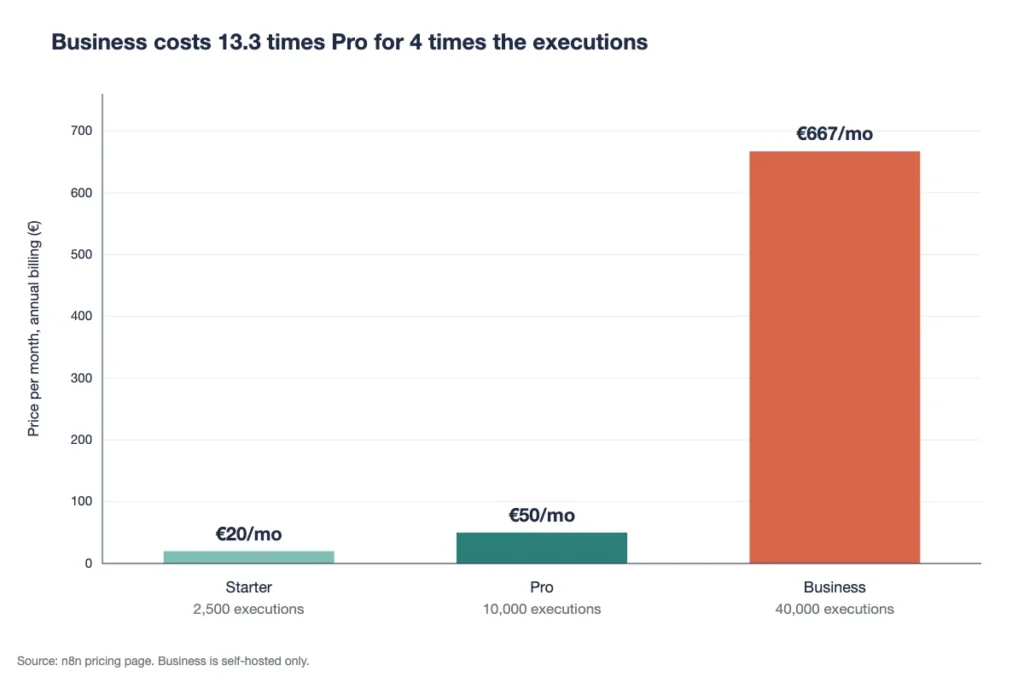
This is the Pro-to-Business gap reviewers warn mid-size teams about.
Example: Business costs €667 ÷ €50 = 13.3 times the price of Pro for 4 times the executions. A team that needs 12,000 executions a month pays the same €667 as a team that needs 39,000.
Overages work out cheaper per run. At €4,000 ÷ 300,000, each extra execution costs about €0.013, but you buy them in one large block.
Pricing: €667 a month on an annual plan, or €800 billed monthly, plus your server costs.
Best For
- Companies under 100 people that need SSO and Git and can host n8n themselves.
Pros
- SSO and Git version control for compliance-minded teams.
- 40,000 executions a month.
- A startup plan cuts the price in half for companies under 20 people.
Cons
- Self-hosted only, so you still run the servers.
- A steep jump from Pro.
- Overages are sold in large buckets of 300,000 executions.
What Does the n8n Enterprise Plan Include?
The n8n Enterprise plan has no public price. You contact n8n’s sales team for a quote based on your execution volume.
Enterprise is the only paid plan you can run either way: hosted by n8n or self-hosted. It includes a custom execution allowance, unlimited shared projects and 200+ concurrent executions. The pricing page also lists log streaming, payment by invoice and dedicated support with an SLA (service level agreement).
Picture a team whose security review rules out shared cloud hosting, or one that runs hundreds of workflows at once. Neither Pro nor Business fits them. That’s who Enterprise is for.
n8n says Enterprise pricing scales with executions, not with how many workflows you build. So bring your monthly execution count, your peak runs at once and any data-location rules to the first sales call.
Pricing: Custom quote from n8n’s sales team.
Best For
- Large organisations with strict compliance rules or high run volumes.
Pros
- Choice of n8n Cloud or self-hosted deployment.
- 200+ runs at the same time.
- Support with an SLA.
- Unlimited shared projects for many teams.
Cons
- No published price to plan a budget around.
- Buying goes through a sales process.
- Overkill for teams under 40,000 executions a month.
How Does Your Workflow Schedule Decide Your n8n Plan?
Your schedule decides your n8n plan, because n8n bills one execution per full workflow run. The number of steps inside the run doesn’t matter.
n8n’s own pricing change made every plan unlimited for workflows, steps and users. So a 2-node workflow and a 50-node workflow cost the same: one execution each. What changes your bill is how often each workflow fires.
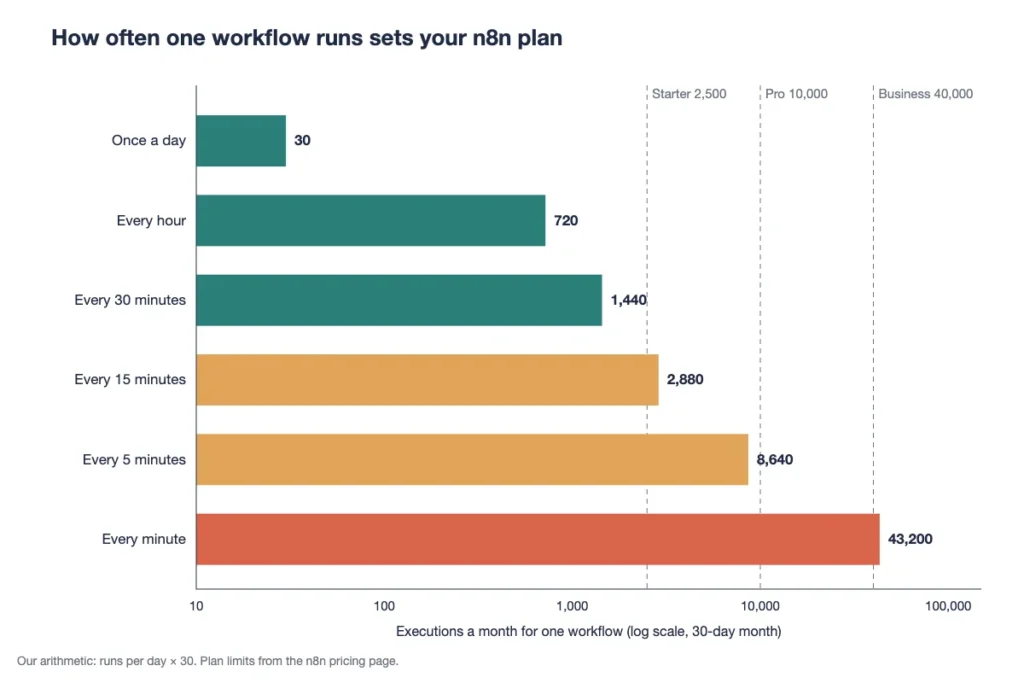
| How often one workflow runs | Executions a month (30 days) | Smallest plan that fits |
|---|---|---|
| Once a day | 30 | Starter |
| Every hour | 720 | Starter |
| Every 30 minutes | 1,440 | Starter |
| Every 15 minutes | 2,880 | Pro |
| Every 5 minutes | 8,640 | Pro |
| Every minute | 43,200 | Above Business |
Example: A workflow that polls every 5 minutes runs 288 times a day, so 288 × 30 = 8,640 executions a month. That one workflow burns 86% of Pro’s 10,000.
Webhook triggers work differently. They count one execution for every incoming event, so volume follows your traffic, not a clock.
Top Tip: Poll every 15 minutes instead of every 5, and the same workflow drops from 8,640 to 2,880 executions a month. Switching a poll to a webhook can cut it further.
What Does Self-Hosting n8n Cost in Practice?
Self-hosting n8n costs nothing in license fees. You pay for the server and for the hours it takes to run it.
The server part is small. Findstack priced a VPS at about $11.99 a month, against roughly $54 for Cloud Pro at 10,000 executions. Its advice: under 10,000 executions a month, use Cloud, because the saving rarely covers your time.
The time part is what guides skip. Axel Grubba of Findstack worked out that at 50,000 executions, self-hosting would need 17 hours of upkeep a month to lose. His verdict: “Nobody spends seventeen hours a month maintaining an n8n instance.“
Zapier’s Nicole Replogle sees “free” differently. She writes that self-hosting means “you take on all the operational responsibility yourself.” Zapier sells a rival tool, so read that as a fair warning, not a verdict.
Example: Say self-hosting saves you €40 a month and your time costs €50 an hour. If upkeep takes more than 48 minutes a month, Cloud is the cheaper choice.
Volume changes the setup, too. Findstack notes that above 100,000 executions, you should budget for queue mode: Redis, a worker node and a second server.
Can you name the person who patches your server when n8n ships an update? If not, price Cloud first.
How Does n8n Pricing Compare With Zapier and Make?
n8n pricing usually beats Zapier for multi-step workflows. Zapier bills each action as a task, while n8n bills one execution per run.
| Tool | What it counts | First paid plan, billed annually | Included usage | Best for |
|---|---|---|---|---|
| n8n | Workflow runs | €20 a month | 2,500 executions | Technical teams with long workflows |
| Zapier | Each action step | $19.99 a month | 750 tasks | Non-technical teams who want the most apps |
| Make | Each module run | $9 a month | 10,000 credits | Visual builders on a tight budget |
The Best for column is our read. Zapier and Make prices come from their pricing pages as reported in recent guides, so check each vendor’s page before you buy.
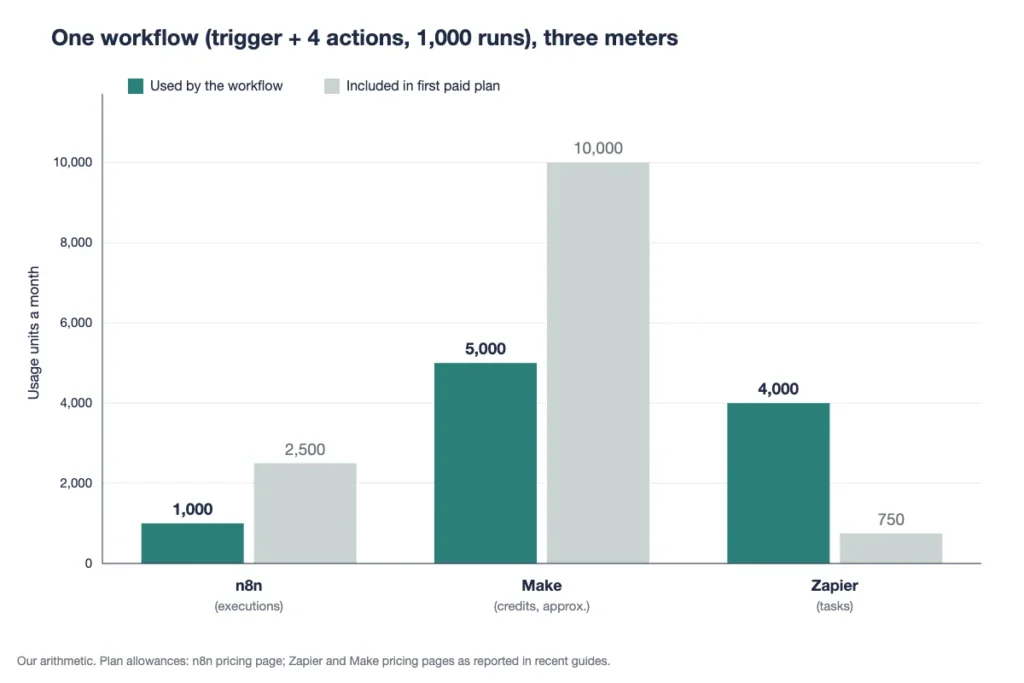
Example: A workflow with a trigger and 4 actions runs 1,000 times a month. Zapier counts 4 × 1,000 = 4,000 tasks, far past its 750-task entry tier. Make counts about 5 × 1,000 = 5,000 credits, inside Core. And n8n counts just 1,000 executions, inside Starter.
Zapier still wins on reach and ease. It lists 9,000+ app integrations, and anyone on the team can build a Zap. Per-task pricing just costs more once workflows grow long.
Which Hidden Costs Should You Check Before Buying n8n?
Six costs sit outside the headline n8n price, and each one can change the plan you need. Check these before you pay:
- Overages: Workflows keep running past your quota, and overage charges may apply. On Business, the page lists €4,000 per extra 300,000 executions.
- Concurrency and run time: Starter allows 5 concurrent executions and 5-minute runs. Long AI jobs can hit that wall first.
- Log retention: Starter keeps execution logs for 7 days and Pro for 30. Old failures get hard to debug.
- AI Assistant credits: Starter lists 1,600 a month and Pro up to 9,600. They reset monthly and don’t roll over.
- Annual terms: Monthly subscriptions end at the close of the billing cycle. Annual ones run to the end of the term, and n8n offers no pro-rata refunds.
- License check-ins: Business and Enterprise license keys contact n8n’s server daily. The ping includes your production execution counts.
The figures above also need a second look. Andrey Tverdomed of Entech Solutions, who checked the page line by line, notes that “The page contradicts itself in places.“
His example is Pro concurrency, shown as both 20 and 50. Confirm the one figure your workflows depend on before you pay for a year.
Unpaid overages arrive as an invoice 45 days after they happen. It’s the one bill that shows up late and never early.
When Is n8n Pricing Worth It for Your Team?
n8n pricing is worth it when your team is technical and your workflows are long or frequent. It’s less of a deal for non-technical teams that need a few simple automations.
Long workflows are where n8n shines. A 30-step workflow costs one execution, the same as a 2-step one. On per-task tools, that same run would count every action.
The complaints come from the other end. Reddit users call n8n Cloud too pricey for what it offers, and most of that traces back to the small entry allowance. If your workflows are short and rare, Starter’s 2,500 executions are plenty. If they’re short and frequent, you’ll feel the limit.
Non-technical teams face a different cost. Complex logic in n8n often needs JavaScript or Python, so building takes longer. Paying more for Zapier can still be the cheaper choice once you count build time. Hours spent wiring code nodes are a cost, even if no invoice shows them.
And sometimes the work doesn’t need app-to-app automation at all. If you mainly want tasks assigned, tracked and chased, compare workflow management software first. Our own tool, Onethread, handles task assignment, deadlines and reminders inside projects, so check what your project tool already does before you automate around it.
Which n8n Plan Should Your Team Pick?
Pick the smallest n8n plan whose execution allowance covers your busiest month. We’d keep about 20% spare for spikes and retries.
Count your busiest month, not your average. Month-end reports, campaigns and retries all push volume up. Then match that number to a plan:
- Under 2,000 executions, no server skills: Starter at €20 a month.
- 2,000 to 8,000 executions, or one 5-minute poll: Pro at €50 a month.
- 8,000 to 10,000 executions: Pro, but cut polling or batch triggers before you outgrow it.
- Over 10,000 executions with DevOps help: Run the Community Edition on your own server and skip Business fees.
- Over 10,000 executions plus SSO or Git: Business at €667 a month, or half that on the startup plan.
- Compliance rules or 200+ concurrent runs: Ask n8n’s sales team for Enterprise.
Not sure which project tasks deserve automation at all? Our guide to project management automation covers where teams see the payoff first.
Re-check the count after your first full month. Real traffic rarely matches the plan on paper, and the usage figures in your n8n account settle the question.
If two plans look close, start on the smaller one, since overages keep workflows running while you decide. Moving up later is easy, but an annual plan won’t refund you for moving down.
What Should You Do Next With n8n?
The n8n price you pay depends on how often your workflows run, not how big they are. Once you know your monthly execution count, the right plan is usually obvious, and the Pro-to-Business gap stops being a surprise.
This week, list every scheduled and webhook workflow you plan to run, multiply each one’s daily runs by 30, and add them up. Compare the total with 2,500, 10,000 and 40,000, then start the free trial on the plan it lands in. A plan picked from your own numbers beats one picked from a pricing card.
FAQs
Does n8n Offer a Free Trial?
Yes, the n8n Cloud trial includes 1,000 executions and Pro-level features, and it needs no credit card. The Business trial runs for 14 days and asks for a card. Once a trial ends, n8n pricing applies to the plan you pick, and there’s no free cloud tier to fall back on.
Is There an n8n Startup or Nonprofit Discount?
n8n offers a startup plan for companies with fewer than 20 employees, which it describes as 50% off the Business plan. That puts Business at about €333 a month on annual billing. We found no published nonprofit discount, so ask n8n’s sales team before you buy.
Can You Buy Extra Executions on n8n Cloud?
Yes. On a monthly n8n Cloud plan, you can add executions yourself in the Admin panel. On an annual plan, you request them by email through n8n’s support team. If you buy extras every month, compare that cost with the next plan up before you renew.
Is n8n Open Source?
Not in the strict sense. The company calls its model fair-code: the source is public and the Community Edition is free to run on your own server. But it ships under n8n’s own Sustainable Use License, not a standard open source license. Read that license before you build a paid product on it.
Why Does n8n Show Prices in Euros?
n8n is a Berlin company, and its pricing page lists plans in euros. That’s why n8n pricing guides quote €20, $20 or $24 for the same Starter plan: some convert the currency and some show the monthly rate. Your bank may also add a conversion fee if you pay in dollars.