Most teams pick a project tool by its demo. Then the bill and the learning curve show up.
Jira vs Monday comes down to who does the work. Jira suits software and agile teams, and it’s free for up to 10 users. Monday.com suits non-technical teams that want visual boards, and its free plan stops at 2 seats.
Price is the other gap. For 10 people on yearly billing, Jira Standard costs $950 and monday.com Standard costs $1,440.
We checked both pricing pages, the plan details, and the top-ranking comparisons.
You’ll see the real cost for your team size, where each tool falls short, and which one to pick.
Key Points
- Jira is the better pick for software and agile teams, and it’s cheaper: $950 a year for 10 users on Standard, against $1,440 for monday.com Standard.
- Pick monday.com when most of your team isn’t technical and wants colorful boards, Gantt views, and fast setup.
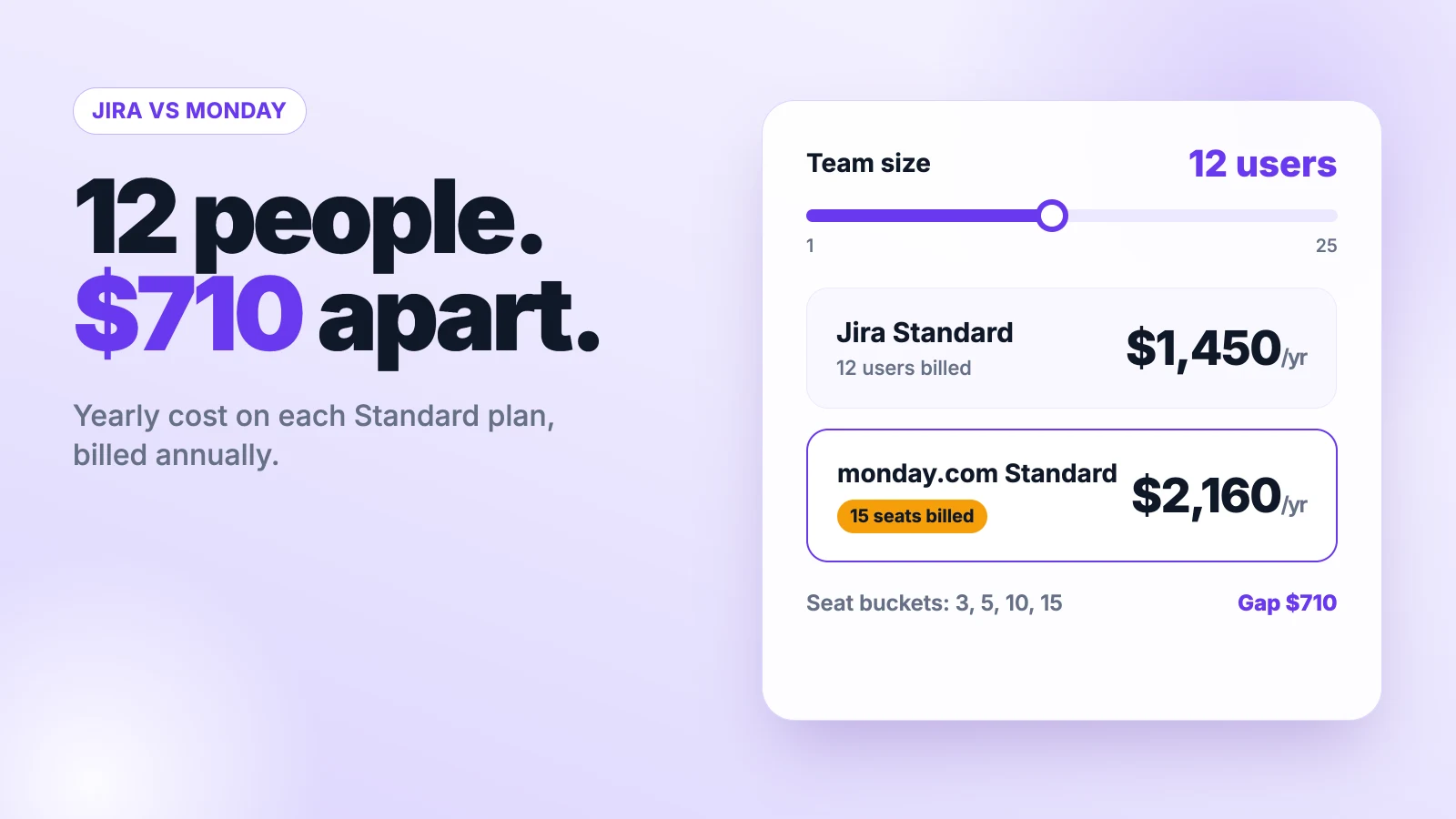
- Count seats before you buy monday.com, because it sells seats in buckets of 3, 5, 10, 15 and up, so 12 people pay for 15.
- Test automation limits on a trial, since Jira Standard grants 400 steps per user a month and monday.com Standard caps you at 250 actions a month.
How Do Jira vs Monday Compare at a Glance?
Jira is cheaper and deeper for software work. Monday.com is easier for mixed teams. The table shows the first paid plan of each tool, plus Onethread as a lower-cost option. The Best for labels are our own read of each tool.
| Tool | Free plan | First paid plan, per user a month | 10 users a year, first paid plan | Best for |
|---|---|---|---|---|
| Jira | Up to 10 users | $9.70 (monthly billing) | $950 (yearly billing) | Software and agile teams |
| monday.com | Up to 2 seats and 3 boards | $9 (yearly billing, 3-seat minimum) | $1,080 (yearly billing) | Non-technical teams who want visual boards |
| Onethread | Free for the first 10 users | $3 (yearly billing) | $360 (yearly billing) | Small teams that want one simple tool |
We read the Jira, monday.com and Onethread pricing pages for these figures. Jira’s per-user price drops as your team grows, so larger teams pay less per head.
Top Tip: Jira’s pricing page defaults to a large team size. Type your real headcount into its calculator before you compare, or the price will look lower than you’ll pay.
What Is Jira Best At?
Jira is Atlassian’s tool for planning and tracking work in sprints, backlogs and boards. It started with software teams, and it still shows. You get Scrum and Kanban boards, a backlog view, a timeline, and custom workflows on every plan.
Say your team ships code every two weeks. In Jira, you groom the backlog, start a sprint, and track each work item from to-do to done. Dashboards and reports come built in.
The paid plans add Rovo, Atlassian’s AI for search, chat and agents. Standard also adds user roles and 250 GB of storage. Premium adds cross-team planning, unlimited storage, and a 99.9% uptime promise.
Pricing: Free for up to 10 users. Standard costs $9.70 per user a month and Premium $19.60 per user a month on monthly billing for a small team. Enterprise requires a sales call and yearly billing.
Best For
- Software, IT and product teams that run sprints.
- Companies that already use Confluence or other Atlassian tools.
Pros
- Free plan covers 10 users, not 2.
- Sprints, backlogs and custom workflows come on every plan.
- Standard grants 400 automation steps per user each month.
- Atlassian lists more than 3,000 apps and integrations.
Cons
- Field names and menus confuse non-technical people.
- Free plan holds only 2 GB of files.
- Free plan caps automation at 150 steps a month for the whole site.
- Uptime promise starts only at Premium.
What Is Monday.com Best At?
Monday.com is a visual work platform built around colorful boards. Each row is an item, and each column holds a status, owner, date or number. Marketing, HR and operations teams pick it up in a day.
Say you run a campaign with design, copy and ads. In monday.com, each person sees their items, statuses change color, and a Gantt view shows the schedule. Guests can join on Standard.
The higher plans add more power. Pro brings private boards, time tracking and 25,000 automation actions a month. Enterprise adds portfolio and resource management.
Pricing: Free for up to 2 seats and 3 boards. Basic costs $9, Standard $12 and Pro $19 per seat a month on yearly billing. You buy at least 3 seats.
Best For
- Non-technical teams in marketing, HR, sales or operations.
- Teams that want a visual board and Gantt view without setup work.
Pros
- Easy to learn, with colorful boards and drag-and-drop views.
- Timeline, Gantt and calendar views start on Standard.
- Unlimited free viewers on paid plans.
- Yearly billing saves 18% over monthly.
Cons
- Free plan stops at 2 seats and 3 boards.
- Seats come in buckets, so odd team sizes pay for empty seats.
- Standard caps automations at 250 actions a month.
- Timeline and Gantt views are missing on Basic.
How Much Do Jira vs Monday Cost for a Real Team?
Jira costs less than monday.com for most small teams. The gap grows when your headcount falls between monday.com’s seat buckets. Monday.com sells 3 seats, then 5, then multiples of 5.
Example: A 12-person team on monday.com Standard buys 15 seats, so 15 × $12 × 12 months = $2,160 a year. The same team on Jira Standard pays $1,450 a year. That’s $710 apart.
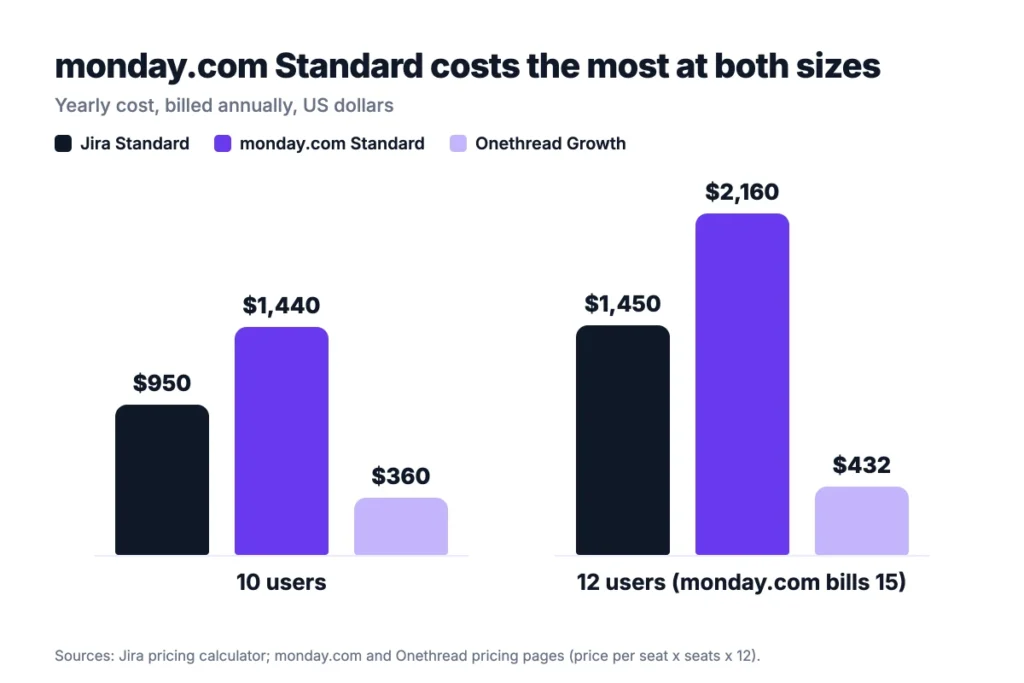
| Team size | Jira Standard, yearly | monday.com Standard, yearly | Onethread Growth, yearly |
|---|---|---|---|
| 10 users | $950 | $1,440 | $360 |
| 12 users | $1,450 | $2,160 (15 seats) | $432 |
Jira figures come from Atlassian’s yearly calculator. The monday.com and Onethread rows are our math from their per-seat prices.
Use your own headcount. Then add any paid apps you need on top.
Which Handles Agile Work Better, Jira or Monday.com?
Jira handles agile work better. Sprints, backlogs and Scrum boards sit at its core. Monday.com can run a Kanban board, but its work management plans are built for general projects.
Here’s the thing. Agile teams care about the backlog more than the board. Jira lets you rank the backlog, plan a sprint, and see what slipped. Premium adds cross-team plans and dependency views across projects.
Scrum teams ask this a lot. On r/scrum, a thread titled Jira vs Monday puts the same question to working Scrum teams.
Monday.com works fine for a light Kanban flow. You set status columns, drag items across, and add an automation or two. But you’ll build sprint fields and reports yourself, and someone has to keep them tidy.
Reporting is the other gap, and it shows up fast in sprint reviews. Jira’s boards feed sprint reports and dashboards with no extra setup. On monday.com, you build those views from columns and widgets.
So the choice is plain. If your team estimates work and runs sprints, start with Jira. If you only need to see who’s doing what, monday.com is enough.
For a wider list of tools, see our guide to the best agile project management software.
Which Is Easier for Non-Technical Teams, Jira or Monday.com?
Monday.com is easier for non-technical teams. Ease of use is its biggest selling point. Its boards look like a colorful spreadsheet, and most people get it in minutes. Jira asks you to learn work types, workflows and fields first.
That gap matters when the tool spans many departments. Sales, design and finance won’t open a tool that feels like a bug tracker, however good it is for sprint work. Monday.com’s views help here, with board, Gantt and calendar views on Standard.
Jira has closed some of the gap. The free plan now includes list, board, timeline, calendar and summary views. Forms let other teams send requests without learning the tool. But the language still leans technical.
One caveat worth being honest about. Monday.com feels simple at first. Large boards with many columns get heavy too, so keep each board focused.
Onboarding time is a real cost. Every hour spent on training is an hour not spent on the project, so count it.
If your teams mix both worlds, you can run both tools. Product teams stay in Jira, and the rest of the company stays in monday.com.
If you’re still weighing simple boards, our Kanban board examples show what a clean setup looks like.
How Do Jira and Monday.com Handle Automation and Integrations?
Jira gives you more automation on its lower paid plan. Jira Standard grants 400 automation steps per user each month. Monday.com Standard caps you at 250 automation actions and 250 integration actions a month.
Example: A 10-person team on Jira Standard gets 400 × 10 = 4,000 automation steps a month. On monday.com Standard, the same team gets 250 automation actions. You’d need Pro to reach 25,000.
Integrations follow the same pattern, and they matter more as you grow. Atlassian’s own comparison lists more than 3,000 apps for Jira and about 200 for monday.com. Treat that as a vendor claim, but the gap is real.
Cross-team links are where it hurts. Product managers raise it on Reddit too. One r/ProductManagement thread is titled Jira >> Asana or Monday – Wondering about the link for cross-org collab.
You can connect the two. The Atlassian Marketplace lists two-way sync apps for monday.com and Jira. They cost extra, so price them in.
Automation limits also reset every month, so plan for your busiest month, not an average one. A busy launch month can burn through a small cap in a week, and then rules stop firing until the next cycle.
Top Tip: Count the automations you run today, then multiply by a month. If the total passes 250, monday.com Standard won’t be enough.
How Do Jira and Monday.com Compare on Security and Uptime?
Both tools keep their strongest security controls for Enterprise. Both run in the cloud, so the plan you pick decides what you get, and Jira lets you add single sign-on without moving to Enterprise.
Jira’s pricing page lists encryption in transit and at rest, data residency, and audit logs. Standard adds user roles and permissions. Single sign-on through Atlassian Guard comes included only on Enterprise. Lower plans need a separate Guard subscription.
Monday.com keeps its strongest controls for Enterprise. That plan lists enterprise-grade security and governance and multi-level permissions. Pro adds private boards and docs, which helps when client work must stay hidden.
Uptime promises follow the same split, and they only matter if you’d claim the credit. Jira Premium promises 99.9% uptime and Jira Enterprise 99.95%. Monday.com lists a 99.9% uptime promise on Enterprise only.
Here’s what that looks like in practice. A team that needs single sign-on on Jira can add Guard to Standard or Premium. On monday.com, ask sales which plan includes it before you commit, since the pricing page doesn’t spell it out.
So check your must-have controls first. List them on one page: sign-on, audit logs, data location, and guest rules. Then pick the cheapest plan that covers them on each tool.
Why Consider Onethread Instead of Jira or Monday.com?
Onethread is a project management tool for small teams that want tasks, projects and discussions in one place. It skips sprint jargon and big automation menus. The trade is less depth for a lower price, and for many small teams that’s a fair deal.
Say you run a 10-person agency. You need projects, tasks, a discussion room per project, and a dashboard. Onethread’s free plan covers your first 10 users, with unlimited projects and 15 GB of file sharing.
The paid plans add reports and control. Growth adds task and project export and standard reports. Scale adds custom workflows, issue management, phases, milestones, and custom roles.
Pricing: Free for the first 10 users. Growth costs $3 and Scale $5 per user a month on yearly billing, or $3.6 and $6 on monthly billing.
Best For
- Small teams and agencies that want one simple tool.
- Teams leaving spreadsheets who don’t run sprints.
Pros
- Free plan covers the first 10 users.
- Paid plans cost a fraction of Jira or monday.com.
- Unlimited projects, tasks and discussion rooms on every plan.
- Custom workflows and roles arrive on Scale.
Cons
- No sprint planning listed on its pricing page.
- Fewer integrations than either tool.
- Risk management and budgeting are still marked upcoming.
- File sharing caps at 15 GB.
Which Should You Pick, Jira or Monday.com?
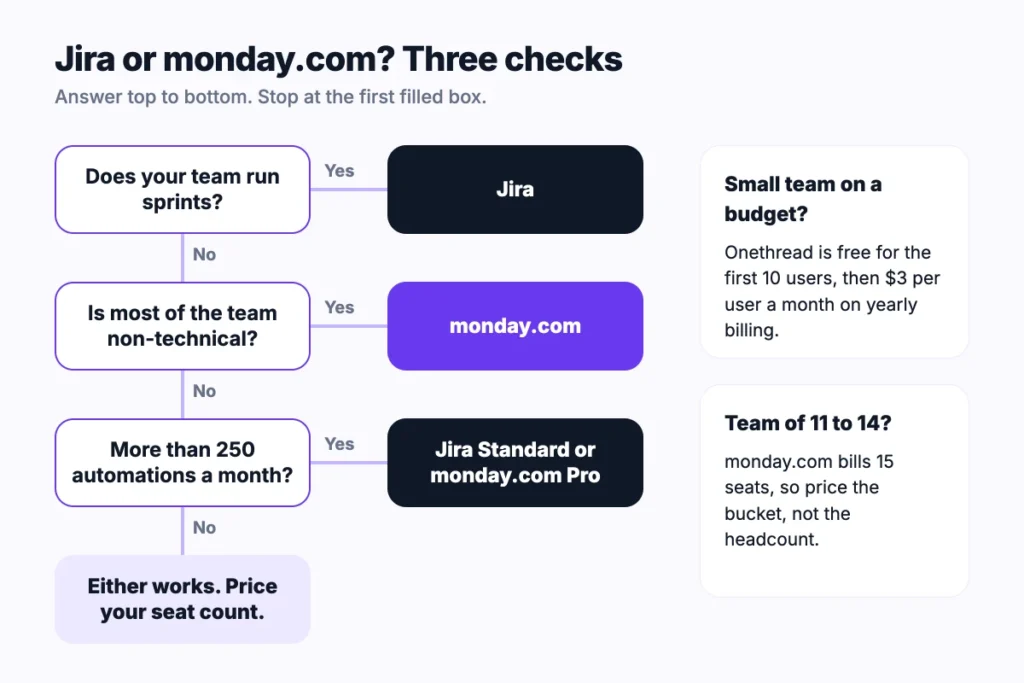
Pick Jira if your team runs sprints, and pick monday.com if your team lives in boards and timelines. Most teams can decide with four checks:
- Team type: Software and IT teams fit Jira. Marketing, HR and operations teams fit monday.com.
- Headcount: Price your real seat count. Monday.com rounds up to the next bucket, and Jira’s price drops as you grow.
- Automation load: Count monthly automations. Over 250 means monday.com Pro or Jira Standard.
- Other tools: Already on Confluence? Jira fits in. Already on monday.com for sales or CRM? Stay there.
Still unsure? Run both free plans for a week with one real project. Pick a project with real deadlines, not a test board, so you see how each tool feels under pressure. Jira’s free plan holds 10 users, and monday.com offers a 14-day Pro trial.
Ask each vendor two questions before you buy. What happens when we pass the automation cap? And how is the price set when we add five people?
If neither fits, compare more pairs. Our Jira vs Asana and Asana vs Monday guides use the same method. So does Basecamp vs Monday.
Sources: Jira pricing, monday.com pricing, monday.com plans and seats, Atlassian Jira vs monday.com page, Onethread pricing.
What Should You Do Next With Jira or Monday.com?
Jira vs Monday isn’t a contest of better and worse. Jira wins for sprint teams and costs less per seat at small sizes. Monday.com wins for mixed teams that want visual boards with little setup. Now you know the cost, the caps, and the trade-offs, so the demo won’t decide for you.
This week, write down three numbers: your headcount, your monthly automations, and how many people run sprints. Then price both tools at that size and run one real project on the winner. The right pick usually shows up in the first week.
FAQs
Can Jira and Monday.com Work Together?
Yes. The Atlassian Marketplace lists several apps that sync Jira and monday.com in both directions. Product teams can stay in Jira while other teams track the same work on monday.com boards. These apps cost extra, so add their price to your Jira vs Monday budget.
Can You Move From Monday.com to Jira?
Yes. Atlassian says Jira includes a monday.com importer that brings your projects across. Plan the move by board, since monday.com columns don’t always map to Jira fields. Test one board first, check the statuses and owners, then move the rest.
Does Jira Work for Non-Software Teams?
Yes, but it takes setup. Atlassian pitches Jira to marketing and operations teams too, and the free plan includes list, board, timeline and calendar views. The words still lean technical, so non-software teams often find monday.com faster to learn in a Jira vs Monday trial.
Which Tool Has the Better Free Plan?
Jira has the better free plan for most teams. It covers 10 users with 2 GB of storage and 150 automation steps a month. Monday.com’s free plan covers only 2 seats and 3 boards, so it works for trying the tool, not for running a team.