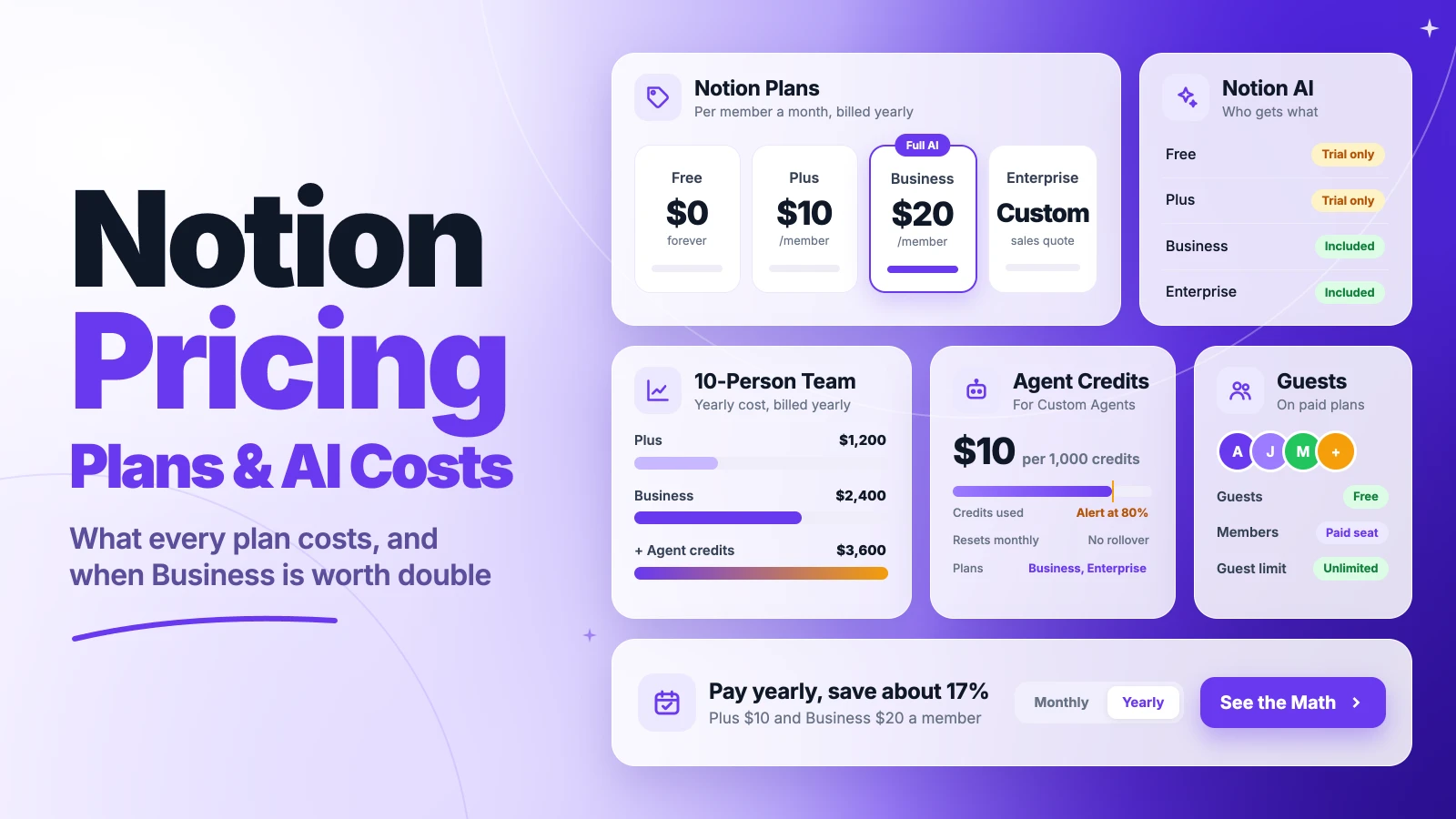
Notion pricing looks simple until someone on your team asks for AI.
Notion’s Free plan costs nothing. Plus costs $10 per member a month and Business $20, billed yearly. Monthly billing raises them to $12 and $24. Enterprise is quoted.
The catch: full Notion AI now sits only on Business, agents bill in credits, and some long-time users face a price increase at renewal.
We checked Notion’s pricing page, billing FAQ and help center, then ran the numbers for a 10-person team.
Here’s what each plan costs you, what sits outside the seat price, and when Business is worth double.
Key Points
- Notion’s plans cost $0 (Free), $10 (Plus) and $20 (Business) per member a month billed yearly, or $12 and $24 billed monthly. Enterprise is a custom quote.
- Pick Business only if most of your team needs Notion AI, SAML SSO or private teamspaces. Free and Plus only get an AI trial, and Notion no longer sells AI as a separate add-on to new customers.
- Budget Custom Agents on top of seats. They run on Notion credits at $10 per 1,000, available on Business and Enterprise.
- Invite clients as guests, not members. Guests are free on every paid plan, while each member is a paid seat.
How Much Does Notion Cost per Member?
Notion costs $0 to $20 per member a month on its published plans, billed yearly. Monthly billing raises Plus to $12 and Business to $24.
| Plan | Billed yearly (per member a month) | Billed monthly (per member a month) | Page history | Notion AI |
|---|---|---|---|---|
| Free | $0 | $0 | 7 days | Trial only |
| Plus | $10 | $12 | 30 days | Trial only |
| Business | $20 | $24 | 90 days | Included |
| Enterprise | Custom quote | Custom quote | Unlimited | Included |
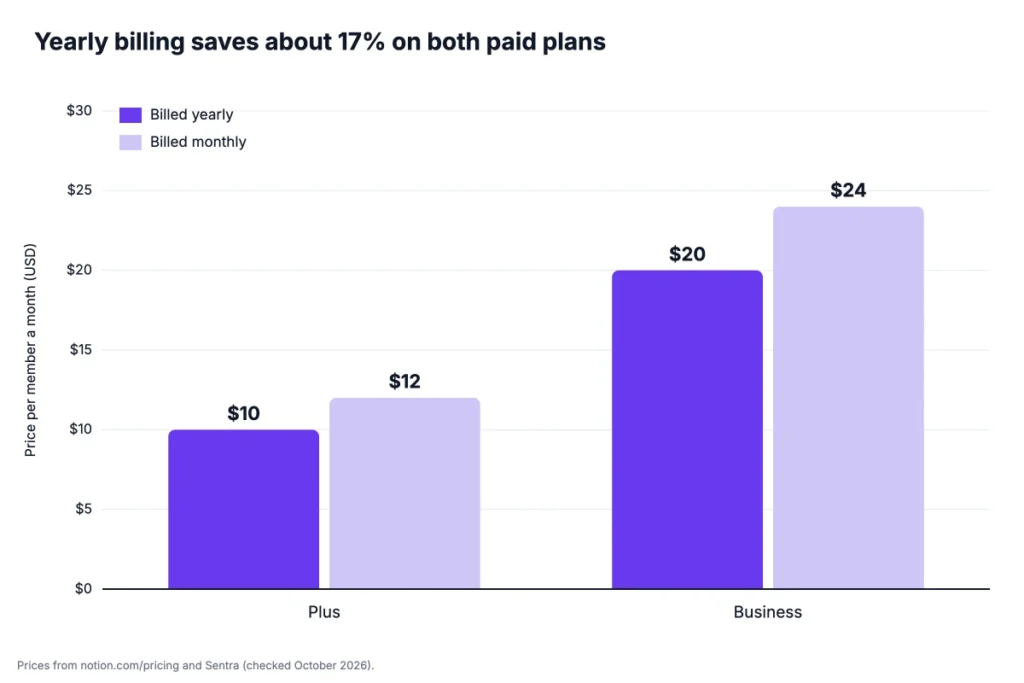
Notion bills by member. Everyone with full access to your workspace takes a seat, and the plan applies to the whole workspace.
Example: Plus for 5 members costs $10 × 5 × 12 = $600 a year on annual billing. Paid monthly, it costs $12 × 5 × 12 = $720, so annual billing saves $120.
Top Tip: Start on monthly billing for the first month, then switch to yearly once you know who needs a seat. Upgrades apply right away, while downgrades wait for the end of the billing cycle.
Sources: Notion pricing page, Notion plans and pricing guide, Sentra’s Notion AI pricing check.
What Does the Notion Free Plan Include?
The Notion Free plan includes unlimited pages and blocks for one person. It also gives you 7 days of page history, 10 guests and file uploads up to 5 MB, and it never expires.
You also get one Notion site, basic forms, basic automations through buttons and a trial of Notion AI. For a solo user taking notes or planning personal projects, that covers a lot.
The limit changes the moment you add a second member. Pages and blocks then become limited, and Carly reports the cap at 1,000 blocks for workspaces with two or more members. A shared project wiki can reach that in a few weeks.
The 5 MB upload cap is the other wall. One slide deck or a short screen recording can go past it.
So treat Free as a personal plan. A team that shares one workspace will hit the block limit before it hits anything else.
Pricing: $0, with no time limit.
Best For
- Individuals who use Notion for notes, personal projects or a small solo wiki.
Pros
- Unlimited pages and blocks for one person.
- Up to 10 guests at no cost.
- Docs, databases and a public Notion site included.
Cons
- Block limit returns once you add a second member.
- Only 7 days of page history.
- File uploads capped at 5 MB.
What Does the Notion Plus Plan Include?
The Notion Plus plan includes unlimited blocks for teams, unlimited file uploads and 30 days of page history. It costs $10 per member a month billed yearly.
Plus also adds unlimited guests, custom forms, unlimited chart views and custom database automations. You can publish up to five Notion sites and get priority support.
This is the plan most small teams land on. A five-person agency can run a client wiki, a project database and shared docs on Plus without touching Business.
What Plus doesn’t give you is full AI. You get the same AI trial as Free, and Notion no longer lets new customers bolt AI onto Plus. That’s why eesel says small teams “feel stuck in the middle” between the two plans.
Plus also lacks SAML SSO, private teamspaces and granular database permissions. If you need to hide one teamspace from part of the company, that’s a Business feature.
Pricing: $10 per member a month billed yearly, or $12 billed monthly.
Best For
- Small teams that share docs, databases and client pages but don’t need AI for everyone.
Pros
- Unlimited blocks and file uploads for the whole team.
- Unlimited guests on shared pages.
- Custom database automations and custom forms.
Cons
- Notion AI is trial only.
- No private teamspaces or SAML SSO.
- Page history stops at 30 days.
What Does the Notion Business Plan Include?
The Notion Business plan includes full Notion AI, SAML single sign-on (SSO) and private teamspaces. It costs $20 per member a month billed yearly and is the plan Notion marks as recommended.
On the AI side, Business adds the Notion Agent, AI Meeting Notes and Enterprise Search, which is in beta. It also opens up Custom Agents, which run on paid Notion credits.
Business also raises page history to 90 days and adds granular database permissions, verified pages, domain verification and premium connections. Forms also get conditional logic.
The price is the hard part. Business costs twice as much as Plus for every member, whether they use AI or not.
Example: A 10-person team on Business pays $20 × 10 × 12 = $2,400 a year on annual billing. The same team on Plus pays $1,200, so Business costs $1,200 more each year.
If only two or three people want AI, that’s a lot to pay for the rest of the team. If most of the team writes, summarizes or searches docs every day, Business starts to make sense.
Pricing: $20 per member a month billed yearly, or $24 billed monthly.
Best For
- Growing teams that want AI for most members, or need SAML SSO and private teamspaces.
Pros
- Full Notion AI, including the Notion Agent and AI Meeting Notes.
- SAML SSO, private teamspaces and granular permissions.
- 90 days of page history.
Cons
- Twice the Plus price for every member.
- Custom Agents cost extra in credits.
- No SCIM provisioning or audit log.
What Does the Notion Enterprise Plan Include?
The Notion Enterprise plan has no public price. You contact Notion’s sales team for a quote based on your seats and terms.
Enterprise adds SCIM user provisioning, an audit log, unlimited page history and advanced security and admin controls. It also includes workspace consolidation, a managed users dashboard and SIEM and data loss prevention (DLP) connections.
For AI, Enterprise adds zero data retention with Notion’s LLM providers. On Free, Plus and Business, the pricing page lists 30-day retention.
Most teams under 50 people won’t need it. It earns its price when your IT team requires SCIM, audit trails or strict rules on how AI providers handle company data.
Before you call sales, count three things: members, guests and the Custom Agents you plan to run. Those numbers shape the quote more than the feature list does. Ask about custom data retention settings too, since they’re an Enterprise-only control.
Pricing: Custom quote from Notion’s sales team.
Best For
- Large organizations with security reviews, SCIM requirements or strict AI data rules.
Pros
- SCIM provisioning and an audit log.
- Unlimited page history.
- Zero data retention with LLM providers.
Cons
- No published price to budget around.
- Buying goes through a sales process.
- More control than most small teams will use.
How Much Does Notion AI Cost Now?
Notion AI costs nothing extra on Business and Enterprise, because full AI is included in the seat price. On Free and Plus, you only get a limited trial.
That’s a change from how Notion used to sell it. Until May 13, 2025, any plan could add AI for about $8 to $10 per member a month, according to Carly. Notion then stopped selling that AI add-on to new customers.
So for a new workspace, the real price of Notion AI is the gap between Plus and Business: $10 per member a month billed yearly.
Example: A 10-person team that wants AI pays $2,400 a year on Business, against $1,200 on Plus. The AI step costs that team $1,200 a year, or $120 per member.
On Business, that AI covers the Notion Agent, AI Meeting Notes and Enterprise Search across connected apps, which is still in beta. Free and Plus users can test parts of it first, but only as a trial.
Business seats aren’t only AI, though. The same $10 gap also buys SAML SSO, private teamspaces and 90-day page history. If you need those anyway, AI comes at no extra cost.
Is it worth it? We’d say yes when most members use AI each week, and no when only a few do.
Source: Carly on the Notion AI pricing change.
What Do Notion Custom Agents Cost?
Notion Custom Agents cost $10 per 1,000 Notion credits, on top of your Business or Enterprise seats. Charging started on May 4, 2026, after a free period.
Credits are bought as a monthly amount for the whole workspace. They reset each month and don’t roll over. Admins can cap each agent, and Notion sends alerts at 80% and 100% of the allowance.
Credits are off by default. An admin turns them on under Settings, then Notion AI, before any agent can draw on them.
How far 1,000 credits go depends on the task. Notion’s help center estimates about 5 credits for a simple task, 10 for a medium one and 25 for a complex one.
Example: A medium agent task (10 credits) runs once a workday for each of 10 members, 22 days a month. That’s 10 × 10 × 22 = 2,200 credits, so the workspace buys 3,000 credits for $30 a month, or $360 a year.
Sentra puts single runs at about 3 to 11 cents for a Q&A agent and 10 to 30 cents for a daily brief.
Heavy use climbs fast. Notion consultant Matthias Frank reports his workspace used 33,700 credits in one month, about $337.
So start with one or two agents, set a cap on each, and check usage after the first month.
Sources: Notion help center on Custom Agent pricing, Matthias Frank on Notion agent pricing, Sentra’s Notion AI pricing check.
Why Are Some Notion Bills Going Up at Renewal?
Some Notion bills are going up because older Plus customers who paid for the AI add-on are moving to standard Business pricing when they renew.
Nuclino tracked the change. In late 2025, Notion moved some Plus customers with the AI add-on to Business at roughly their old price. In September 2026, users reported emails saying that discount would end, and one Notion support email named December 1, 2026 as the end date.
The higher price then applies at the next eligible renewal. One Reddit user Nuclino cites saw a yearly bill go from $96 to $240.
Another long-time user reported a monthly price going from $11.99 to $24 at a December renewal, according to the same Nuclino report.
Not every legacy plan is affected, and Notion hasn’t announced a move for all older subscriptions.
Example: A 5-member team moved to standard Business pays $20 × 5 × 12 = $1,200 a year on annual billing. The same team on Plus without AI pays $600.
If you’re on an older plan, check your billing page and your email before the renewal date. Then decide whether your team needs Business, or whether Plus without AI covers you. A downgrade takes effect at the end of the billing cycle, so make the change before the renewal date.
How Do Members and Guests Change Your Notion Bill?
Members change your Notion bill, while guests don’t. Each member is a paid seat on Plus, Business and Enterprise, and guests are free.
The difference is access. A guest only sees the pages you invite them to. A member can open teamspaces and the rest of the workspace.
That makes guests a good fit for clients and freelancers who need a few shared pages. The Free plan caps you at 10 guests, while paid plans allow unlimited guests.
Seat rules follow from that:
- Adding a member: Uses an open paid seat, or adds one. Mid-cycle adds are prorated.
- Removing a member: Frees the seat for the rest of the period, with no credit back.
- When you renew: Notion resets the seat count to match your members.
This is where surprise charges come from. One Trustpilot reviewer quoted by CostBench wrote, “I only found out when I was charged over $100.”
The fix takes five minutes. Open Settings, go to People, and move clients and freelancers who only need a few pages from member to guest.
Top Tip: If you add a member by mistake, remove them and contact Notion support within 3 days of the invoice. The billing FAQ says that can get you a prorated refund.
What Does a 10-Person Team Pay for Notion per Year?
A 10-person team pays $1,200 to $4,080 a year for Notion, depending on the plan, the billing cycle and Custom Agents. We calculated each case from the published per-member prices.
| Setup for 10 members | Yearly cost (billed yearly) | Yearly cost (billed monthly) |
|---|---|---|
| Plus | $1,200 | $1,440 |
| Business | $2,400 | $2,880 |
| Business + 3,000 credits a month | $2,760 | $3,240 |
| Business + 10,000 credits a month | $3,600 | $4,080 |
| Business with the nonprofit discount | $1,200 | $1,440 |
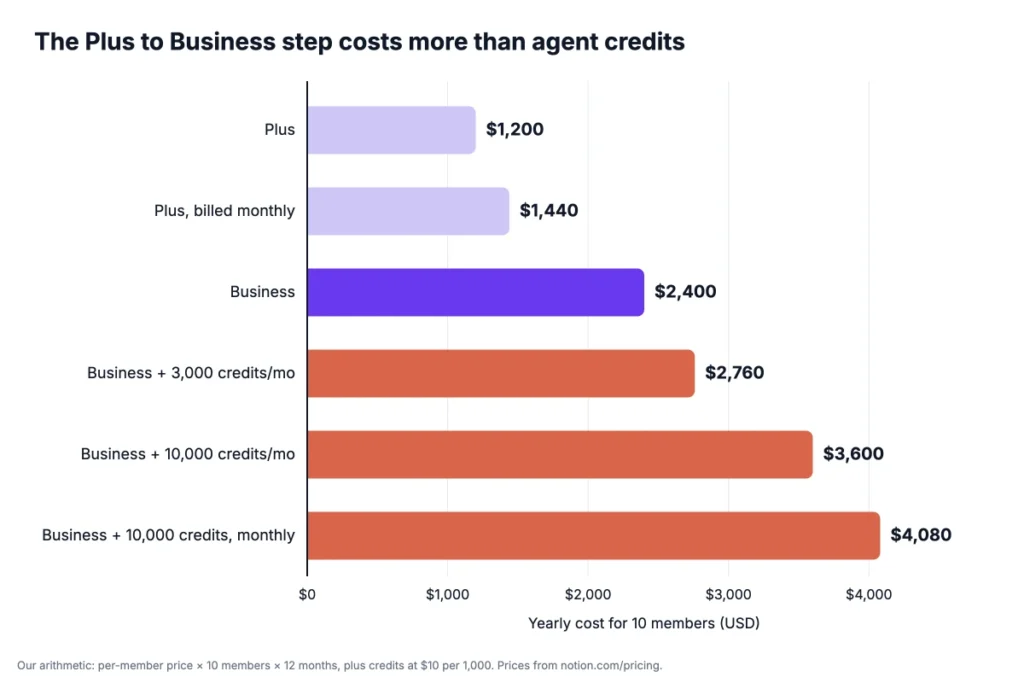
The biggest jump is from Plus to Business, not from credits. Light agent use adds a few hundred dollars a year.
Example: Business with 10,000 credits a month costs $20 × 10 × 12 = $2,400 in seats, plus $100 × 12 = $1,200 in credits. That’s $3,600 a year, three times the Plus bill.
A custom domain for a published Notion site adds $8 a month billed yearly, or $96 a year. Use your own member count in place of 10.
How Does Notion Pricing Compare With ClickUp, Asana and Confluence?
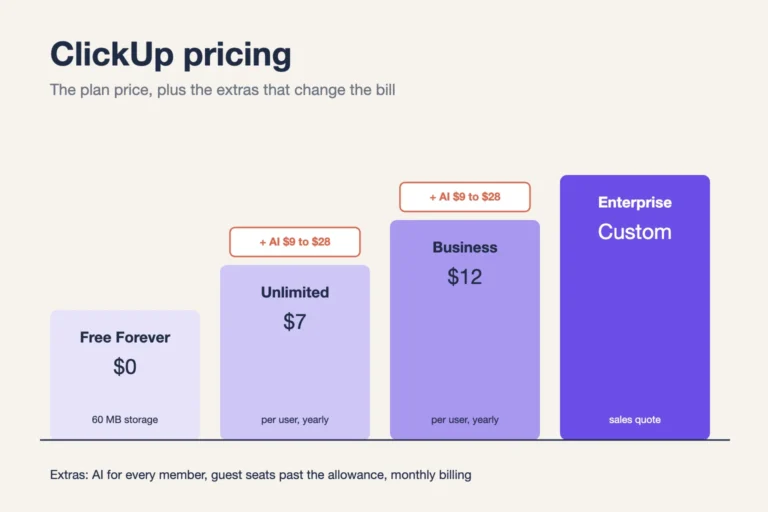
Notion pricing sits in the middle for first paid plans. Plus costs more per member than ClickUp and Confluence, and less than Asana and Coda.
| Tool | First paid plan, per user a month | Cost for 10 users a year | Best for |
|---|---|---|---|
| Notion | $10 (Plus, billed yearly) | $1,200 | Teams that run docs, wikis and databases in one place |
| ClickUp | $7 (Unlimited, billed yearly) | $840 | Teams that want task views and features in one tool |
| Asana | $10.99 (Starter, billed yearly) | $1,318.80 | Teams that plan cross-team projects and goals |
| Confluence | $5.42 (Standard, billed monthly) | $650.40 | Teams that want a wiki next to Jira |
| Coda | $12 (Pro) | $1,440 | Teams that build docs with tables and formulas |
Competitor prices come from Tech.co’s ClickUp pricing guide for ClickUp and Asana, and from Plaky’s Notion pricing guide for Confluence and Coda. Check each vendor’s own page before you buy. The Best for column is our read.
For the full ClickUp breakdown, see our guide to ClickUp pricing and its AI costs. Our Asana vs Notion comparison covers how the two tools differ beyond price. Onethread, our own tool, also covers task assignment, Gantt charts, dashboards and a wiki in one place.
Which Notion Pricing Plan Should Your Team Pick?
Pick the cheapest Notion plan that covers your members, page history and security needs. Move to Business only if most of the team will use AI. We’d decide in this order:
- Solo user: Free, until you need a second member or files over 5 MB.
- Small team sharing docs and databases: Plus at $10, if AI can wait.
- Team that wants AI for most members: Business at $20, since Notion no longer sells AI on Plus to new customers.
- Team that needs SAML SSO or private teamspaces: Business, with AI as a bonus.
- IT needs SCIM, audit logs or zero data retention: Ask Notion’s sales team for Enterprise.
Before you upgrade, ask the team who would use AI each week. If it’s fewer than half, Plus with a separate AI tool for those few people may cost less.
Example: A 10-person team where only three people want AI pays $1,200 more a year on Business than on Plus. That’s $400 a year for each person who uses it.
Check the discounts too. Students and educators get Plus free for one member, and nonprofits get 50% off Business.
Not sure Notion is the right category at all? Our roundup of project management software for small teams compares more options.
What Should You Do Next With Notion?
The Notion price you pay depends less on the plan list than on one question: does most of your team need AI? If yes, Business is worth double the Plus seat. If not, Plus with guests for clients keeps the bill at half.
This week, count your members and guests, then ask who would use AI weekly. Multiply your member count by $10 or $20, add credits only for agents you’ll run, and compare the yearly totals before you pay. The cheaper plan is often the one your team already uses well.
FAQs
Does Notion Offer Refunds?
Yes, Notion pricing includes a refund window. Monthly plans get a full refund if you downgrade within 3 days of signing up, and annual plans within 30 days. Customers in the EU, UK and similar regions may get a refund on monthly plans within 14 days. Outside those windows, Notion doesn’t refund unused time.
Is Notion Free for Students?
Yes, students and educators can use the Plus plan free, limited to one member. Eligibility is based on a school email domain, so you sign up with your school address. Team workspaces with more than one member pay the normal Plus or Business price.
Is There a Notion Nonprofit Discount?
Yes, Notion gives eligible nonprofits 50% off the Business plan, for up to three workspaces. You apply through Notion’s nonprofit page with your workspace ID and supporting documents. Notion replies by email within 3 to 7 business days and applies the discount once you’re verified.
Can You Get Notion AI Without the Business Plan?
Not as a new customer. Notion pricing now puts full Notion AI only on Business and Enterprise. Free and Plus include only a trial of AI, and the old add-on is no longer sold to new customers. Some older add-on subscriptions still exist, but many are moving to Business pricing when they renew.
Can You Cancel Notion at Any Time?
Yes, you can cancel at any time from Settings, then Billing. Your subscription renews automatically until you cancel, and paid features stay active until the end of the billing cycle you paid for. After that, the workspace moves to the Free plan and its limits apply.