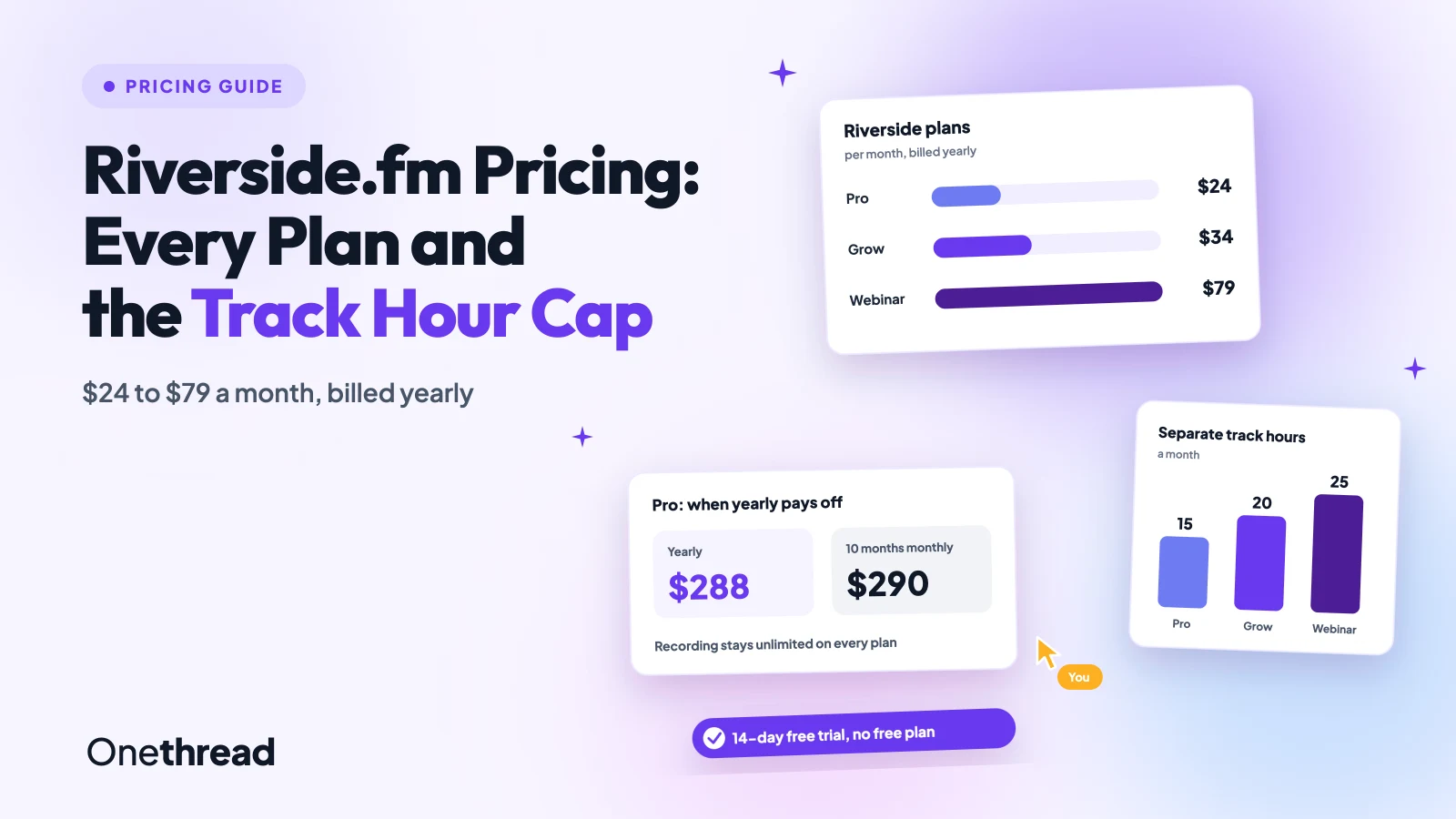
Riverside records without limits. The limit sits on what you download.
Riverside.fm pricing starts at $24 a month for Pro, $34 for Grow and $79 for Webinar, billed yearly. Monthly billing costs $29, $39 and $99, and Business is a custom quote.
There’s no free plan anymore, only a 14-day trial. And each plan caps the separate track downloads that make Riverside worth paying for.
We read Riverside’s pricing page and help center, compared five top-ranking guides, then ran the math on track hours and billing.
You’ll see what each plan includes, how the caps work, and when yearly billing pays off.
Key Points
- Riverside.fm costs $24, $34 or $79 a month on Pro, Grow or Webinar with yearly billing. Monthly billing costs $29, $39 or $99, and Business is a custom quote.
- Pick a plan by separate track hours, not features: Pro includes 15, Grow 20 and Webinar 25 a month, while recording itself stays unlimited.
- Pay yearly if you’ll use Riverside for 10 months or more. Below that, monthly billing on Pro or Webinar costs less.
- You need the Webinar plan to run registration-based webinars. Grow covers live streaming but not registration, polls or webinar analytics.
How Much Does Riverside.fm Pricing Cost per Plan?
Riverside.fm pricing runs from $24 to $79 a month on yearly billing, or $29 to $99 on monthly billing. Business sits above that as a custom quote.
| Plan | Yearly billing, per month | Monthly billing | Separate track downloads a month | Studios |
|---|---|---|---|---|
| Pro | $24 | $29 | 15 hours | 1 |
| Grow | $34 | $39 | 20 hours | 2 |
| Webinar | $79 | $99 | 25 hours | 3 |
| Business | Custom quote | Custom quote | Unlimited | Unlimited |
Riverside says yearly billing saves up to 20%. That top rate only applies to Webinar. Our math puts Pro at 17% and Grow at 13%.
Top Tip: Flip the Monthly and Yearly toggle before you compare. Riverside’s pricing page shows both prices side by side, and guides often quote only the lower one.
What Happened to the Riverside Free Plan?
Riverside dropped its free plan. It no longer offers one. You get a 14-day free trial of Pro, Grow or Webinar, and Business starts with a sales call instead.
The trial gives full access to the plan you pick. Riverside’s own guide says trial exports carry no watermark, so you can test real episodes.
Here’s the catch. The trial turns into a paid subscription on day 15 unless you cancel. Set a reminder for day 12 if you’re only testing.
Older guides still describe a free tier with a watermark and a small download allowance. That plan is gone from the pricing page, so treat those write-ups as history.
That matters if you planned to run a small show for nothing. Every Riverside show now costs at least $24 a month after the trial.
Pricing: $0 for 14 days, then the plan price you picked.
The trial is the right place to answer one question: how many separate track hours does your show use? Record two normal sessions, download every track, then check your usage before day 15.
If the numbers fit under 15 hours a month, Pro is enough. If they don’t, start the paid plan one level up rather than upgrading mid-month.
What Do Separate Track Hours Mean on Riverside?
Separate track hours count the studio-quality files you download, one per participant. Recording itself is unlimited on every paid plan.
Pro includes 15 separate track hours a month, Grow 20 and Webinar 25. Business has no cap.
If you hit the cap, you keep access to your content. But you can’t download new separate tracks until the next billing cycle, or until you upgrade.
Riverside’s pricing page doesn’t say whether a one-hour session with three people uses one hour or three. So plan for the higher number.
Example: A weekly one-hour show with a host and two guests runs 4 sessions a month. Counted by session, that’s 4 hours. Counted by track, it’s 4 × 3 = 12 hours. Both fit inside Pro’s 15.
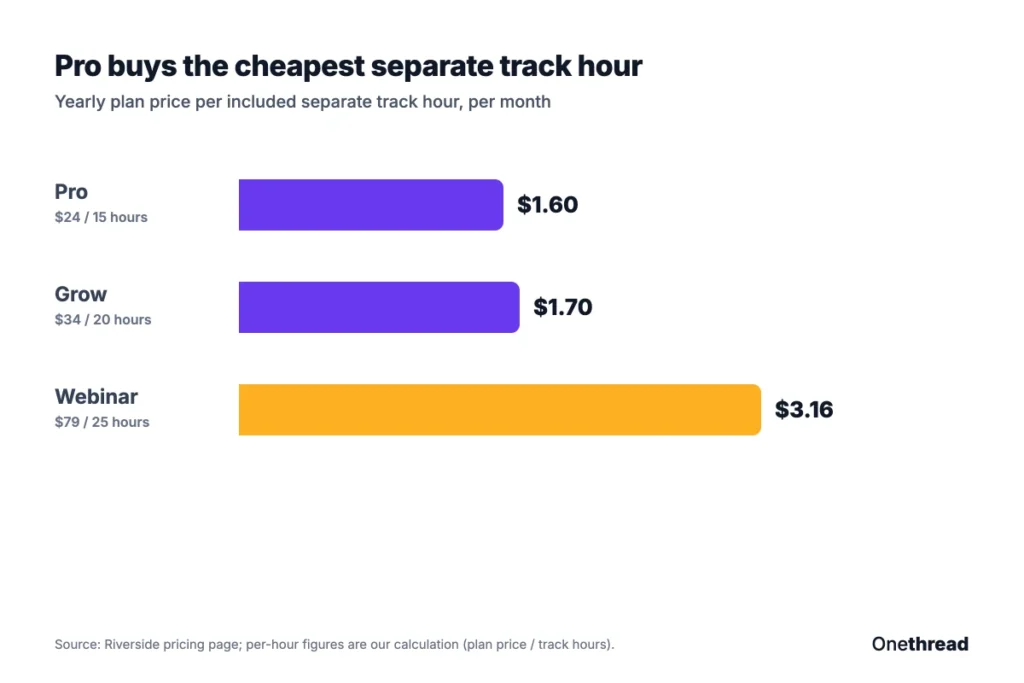
On cost per hour, Pro wins. Its yearly price works out to $1.60 per included track hour, against $1.70 on Grow and $3.16 on Webinar.
That’s our own division of plan price by hours. Webinar costs more per hour because you’re paying for the webinar tools, not the downloads.
One caveat worth being honest about: if you only ever export the mixed recording, the cap may never bite. It bites when you want each guest’s file for a proper edit.
What Does the Riverside Pro Plan Include?
Riverside Pro costs $24 a month on yearly billing, or $29 billed monthly. It includes 15 separate track hours a month and one studio.
Recordings go up to 4K video and 48kHz audio, with no watermark. You also get unlimited text-based editing, unlimited transcriptions, Magic Clips, show notes and audio enhancement.
Pro adds the AI editing agent, AI B-roll, eye contact and silence and filler-word removal. It also includes podcast hosting with analytics and publishing to YouTube, Spotify, Apple and Instagram.
Say you host one interview podcast and edit it yourself. Pro covers recording, editing, clips and hosting in one place, with room for retakes.
Pro also includes a teleprompter for the host and in-person multi-cam recording. That helps if you film some episodes in the same room.
Pricing: $24 a month billed yearly, or $29 billed monthly.
Best For
- Solo podcasters and creators running one show.
Pros
- Lowest cost per separate track hour.
- 4K video and 48kHz audio with no watermark.
- Unlimited transcriptions and text-based editing.
- Podcast hosting and publishing included.
Cons
- One studio, so a second show needs Grow.
- No live streaming.
- Extra editors cost extra, at a price Riverside doesn’t publish.
- Only 15 separate track hours, the lowest cap of any plan.
What Does the Riverside Grow Plan Include?
Riverside Grow costs $34 a month on yearly billing, or $39 billed monthly. It includes everything in Pro, plus 20 separate track hours and two studios.
Grow adds live streaming in full HD 1080p, with multistreaming to unlimited destinations such as YouTube, LinkedIn and Twitch. You also get custom RTMP, Omnichat and saved scenes and overlays.
It also adds growth tools: social media scheduling, a newsletter, a creator website and video hosting. Podcast hosting covers two shows, and you can publish video to Apple Podcasts.
Say you run a weekly live show and a separate client podcast. Two studios keep each show’s recordings, hosting and analytics apart.
Grow also adds AI thumbnails, custom studio links and the Riverside MCP, which connects your content to AI assistants.
Pricing: $34 a month billed yearly, or $39 billed monthly.
Best For
- Creators who stream live or run two separate shows.
Pros
- Live streaming and multistreaming included.
- Two studios with separate hosting and analytics.
- Only $10 a month more than Pro on yearly billing.
- Social scheduling and a creator website built in from day one.
Cons
- Smallest yearly discount, at 13%.
- No webinar registration, polls or webinar analytics.
- Only 5 more track hours than Pro, for $10 more a month.
What Does the Riverside Webinar Plan Include?
Riverside Webinar costs $79 a month on yearly billing, or $99 billed monthly. It includes everything in Grow, plus 25 separate track hours and three studios.
Webinar adds hosting for up to 100 registrants, recurring webinars, unlimited sessions and no time limits. You can pre-record a session and stream it as live.
For lead generation, it adds a lead capture tool, a branded registration form, email reminders and follow-ups, and webinar analytics. A HubSpot integration syncs leads to your CRM.
Here’s the thing about Webinar. It’s the only self-serve plan with registration, Q&A, polls and webinar analytics. Grow can stream to an audience, but it can’t capture leads.
You can also embed webinars on your own site. Then the AI clip tools cut the session into short posts for later.
Pricing: $79 a month billed yearly, or $99 billed monthly.
Best For
- Marketing teams that run lead-gen webinars for up to 100 registrants.
Pros
- Registration, Q&A, polls and analytics in one tool.
- HubSpot sync for webinar leads.
- Largest yearly discount, at 20%.
- Three studios and 25 track hours.
Cons
- Caps webinars at 100 registrants.
- Highest cost per track hour of the self-serve plans.
- Salesforce and Marketo sync need Business, which means a sales call.
When Does Riverside Business Make Sense?
Riverside Business makes sense once you need more than 100 webinar registrants, several producers on one show, or SSO. Pricing is a custom quote from sales.
Business removes the caps: unlimited studios, unlimited separate track downloads, unlimited video storage and webinars of up to 10,000 registrants. It also starts with 12,000 AI credits.
It adds producer mode, collaborative editing, custom roles, async recording and a teleprompter for guests. Security covers SSO with Okta or Azure, plus SOC2 and ISO27001 compliance.
Integrations include Salesforce, Marketo and API access. Support moves to a dedicated customer success manager and 24/7 live chat.
Go into the sales call with numbers: your monthly track hours, studio count and largest webinar. A quote sized to real work beats one sized to a guess.
Pricing: Custom quote. Riverside doesn’t publish a starting price.
Best For
- Media teams and B2B companies producing shows at scale.
Pros
- No caps on studios or track downloads.
- Collaborative editing and custom roles built in.
- SSO, SOC2 and ISO27001 compliance.
- Salesforce, Marketo and API access.
Cons
- No public price to budget against.
- Requires a demo and a sales process before you can start.
- More than most solo creators need.
- Custom pricing makes year-on-year budgeting harder to predict.
How Do Riverside AI Credits Work?
Riverside credits pay for a few premium AI features, such as AI translation, AI B-roll and animated clips. Pro starts with 2,000 free credits, and Business starts with 12,000.
The core AI tools don’t use credits. Magic Clips, Magic Audio and the AI Co-Creator stay free on paid plans.
That split matters for budgeting. Clips, show notes and audio cleanup are covered by the plan price, so most podcasters never touch their credit balance.
Riverside’s help center says credits don’t renew each month. That makes the starting balance a one-time pool, not an allowance. Once you use them up, an owner or admin can top up under Settings, then Subscription.
Riverside doesn’t publish top-up prices or a per-feature credit rate. So check the balance in Settings after your first AI B-roll or translation run, and note how many credits it took.
Only account owners and admins can buy more. Business accounts that pay by wire transfer go through their customer success manager instead.
If you rarely use the credit-based features, the starting credits may last a long time, possibly the whole year. If you’ll use them on every episode, ask Riverside for the top-up price before you commit to a yearly plan.
When Should You Pay for Riverside Yearly?
Pay yearly if you’ll use Riverside for 10 months or more. Below that, monthly billing on Pro and Webinar costs less.
| Plan | Yearly billing, per year | Monthly billing, per year | Yearly saving |
|---|---|---|---|
| Pro | $288 | $348 | $60 |
| Grow | $408 | $468 | $60 |
| Webinar | $948 | $1,188 | $240 |
Example: Pro on yearly billing costs $24 × 12 = $288. Monthly billing passes that after 10 months, since 10 × $29 = $290. A podcaster who records a 6-month season pays 6 × $29 = $174 and saves $114.
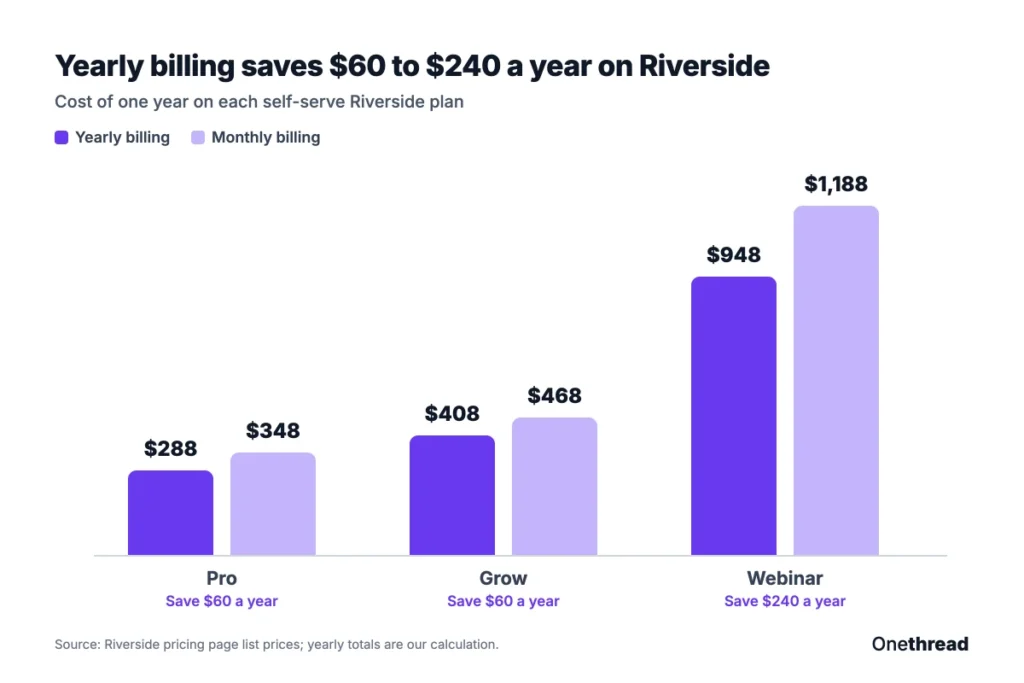
Grow breaks even later, after 11 months, because its discount is only $5 a month. Webinar breaks even after 10 months.
Which Riverside Pricing Plan Fits Your Show?
Pick the cheapest Riverside plan whose separate track hours and studios cover a normal month. Use the signals in this table to match your show to a plan.
| Signal | Plan |
|---|---|
| One show, recorded and edited by you | Pro |
| You stream live or run two shows | Grow |
| You run lead-gen webinars for up to 100 people | Webinar |
| More than 100 registrants, several producers or SSO | Business |
| Seasonal show of 9 months or less | Any plan, monthly billing |
These fit labels are our own reading of Riverside’s plan limits.
If you mostly edit audio from a transcript, compare our Descript pricing breakdown. For live streams without the podcast tools, see StreamYard pricing, and for short social edits, CapCut pricing.
What Should You Do Next About Riverside?
Riverside’s sticker price matters less than its download cap. Recording is unlimited, but separate track hours decide your plan, and the billing toggle decides your yearly bill. You came in with four price cards and no free tier. Now you can match a plan to a real month of recording.
This week, start the 14-day trial on Pro and record two normal sessions with your usual guests. Download every track, check your usage, and set a reminder for day 12 before the trial turns paid. The right plan is the one your show fits on day 30.
FAQs
Is Riverside Pricing per Seat?
Partly. Riverside’s pricing page lists Pro, Grow and Webinar as one price per plan, and extra editor seats come as an add-on. Riverside doesn’t publish that add-on price. Business is the only plan with collaborative editing and custom roles built in.
Can You Cancel a Riverside Free Trial?
Yes. You can cancel the 14-day trial before it ends, and Riverside won’t charge you. If you don’t cancel, the trial turns into a paid subscription on day 15 at the plan and billing period you picked. Check that billing period first, because yearly billing charges the full year.
Does Riverside Include Transcription?
Yes. Every paid plan includes unlimited transcriptions and unlimited text-based editing, starting with Pro. Transcripts power Magic Clips and show notes, which don’t use AI credits. Only premium features such as AI translation and AI B-roll draw on credits under Riverside.fm pricing.
Do You Need the Riverside Webinar Plan to Run a Webinar?
Yes, for a structured webinar with sign-ups. Riverside says you need at least the Webinar plan for audience registration, Q&A, polls, email reminders, HubSpot sync and webinar analytics. Grow covers live streaming and multistreaming, which works for an open live show without registration.
Is Riverside Worth the Price?
Riverside is worth it if you record remote interviews with guests, because you get a separate studio-quality track for each person. It’s weaker value for solo screen recordings or quick clips, where a simpler tool costs less. Run your real show through the 14-day trial before you choose yearly billing.
Sources: Riverside pricing page, Riverside help center: AI credits, Riverside guide: is Riverside free.