StreamYard looks simple to price. Then you read the line that says three of its plans are for individuals only.
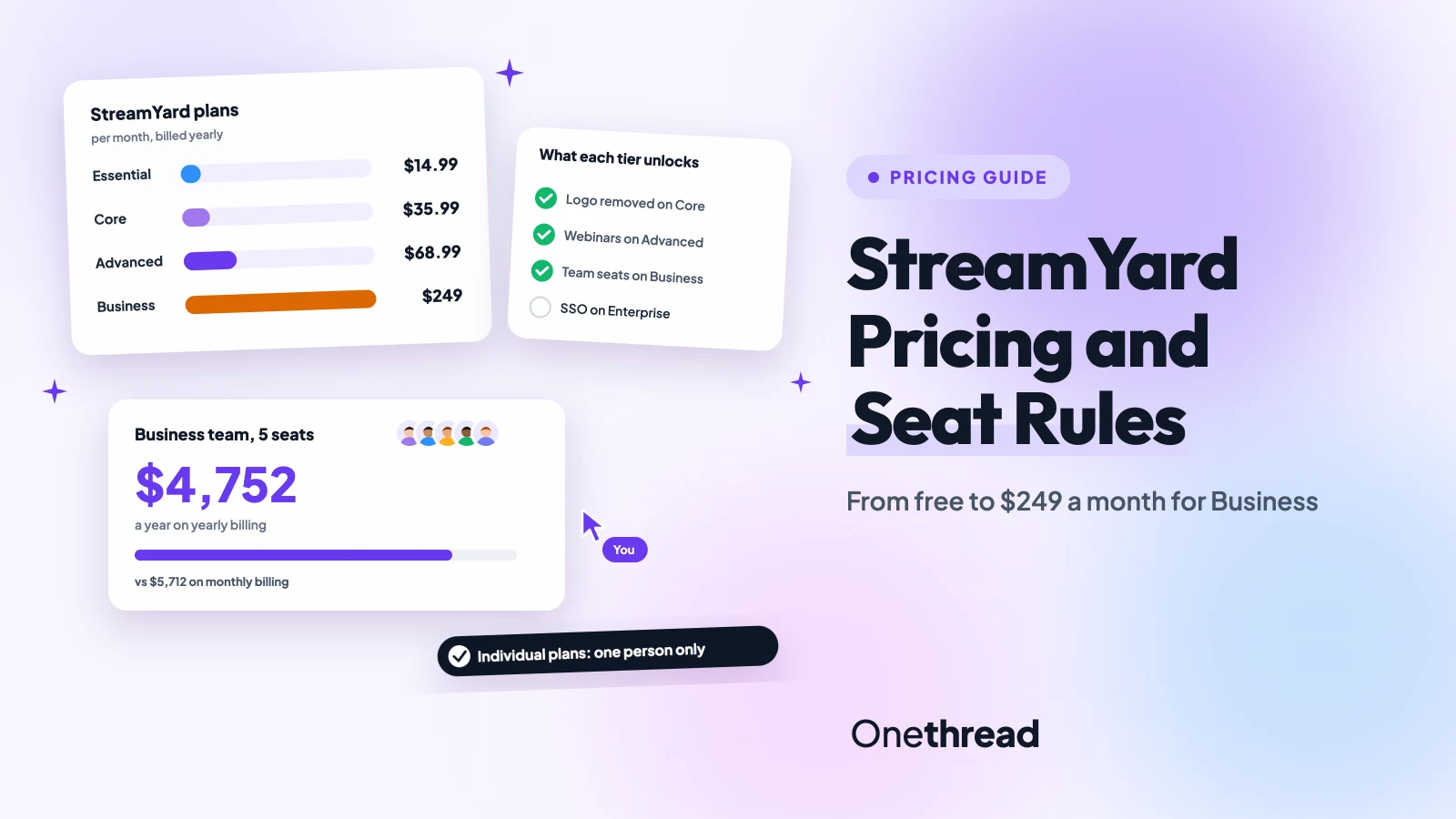
StreamYard pricing starts with a free plan. Essential costs $18.99, Core $44.99 and Advanced $88.99 a month, or $14.99, $35.99 and $68.99 a month billed yearly. Business costs $299 a month, or $249 billed yearly, with two seats.
So the real question isn’t which tier looks cheapest. It’s whether you stream alone or as a company.
We read StreamYard’s pricing page, its help center and 4 top-ranking guides, then priced real team setups.
Here’s what each plan costs you, and when Business becomes the only option.
Key Points
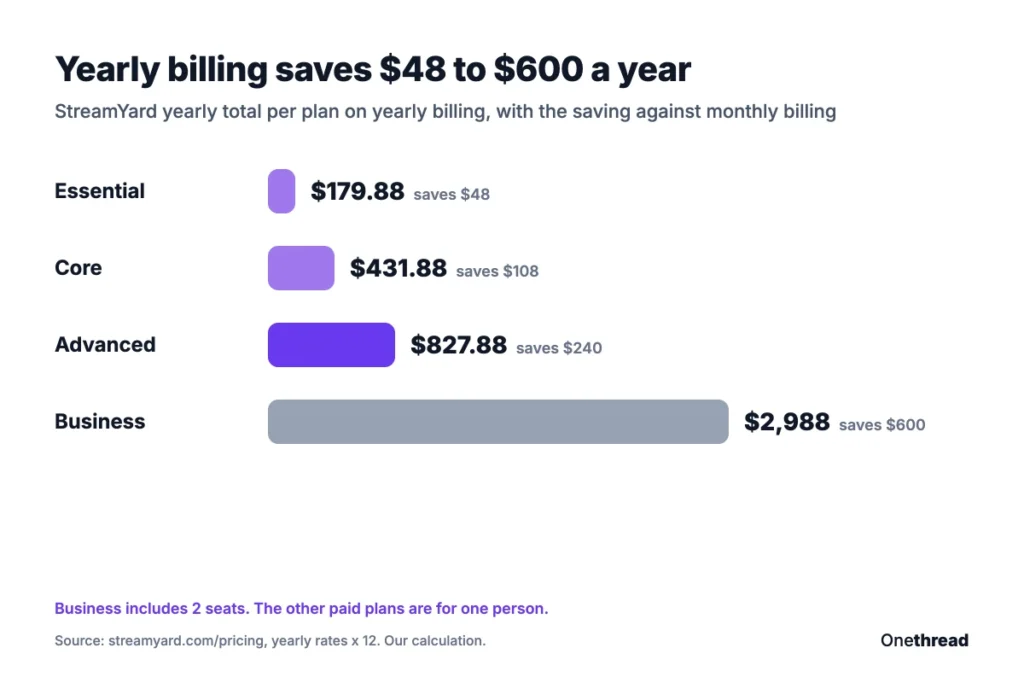
- StreamYard costs $0 (Free), $18.99 (Essential), $44.99 (Core) or $88.99 (Advanced) a month, or $179.88, $431.88 and $827.88 a year. Business costs $299 a month or $2,988 a year with two seats.
- Essential still puts the StreamYard logo on your streams. Core is the first plan that removes it.
- Essential, Core and Advanced are for individual use. A company team belongs on Business, where each extra seat costs $588 a year.
- A five-person Business team pays $4,752 a year on yearly billing, against $5,712 on monthly billing.
What Is StreamYard Pricing for Each Plan?
StreamYard pricing covers three individual plans, one Business plan and a custom Enterprise deal, plus a free tier. The annual discount on yearly billing is 22% for the individual plans and 17% for Business.
| Plan | Monthly billing (per month) | Yearly billing (per month) | Yearly total | Who it’s for |
|---|---|---|---|---|
| Free | $0 | $0 | $0 | One person, 1 seat |
| Essential | $18.99 | $14.99 | $179.88 | Individuals |
| Core | $44.99 | $35.99 | $431.88 | Individuals |
| Advanced | $88.99 | $68.99 | $827.88 | Individuals |
| Business | $299 | $249 | $2,988 | Companies, 2 seats included |
| Enterprise | Custom quote | Custom quote | Custom | Large organizations, 5+ seats |
We read these prices on StreamYard’s pricing page with both billing toggles, and multiplied the yearly rate by 12. Every paid plan starts with a 7-day free trial.
The lineup changed recently. StreamYard added the Essential plan in late October 2026, per PricingSaaS’s tracker, so many guides still skip it.
Top Tip: StreamYard says prices can vary with promotions, renewal terms and custom offers. Screenshot the checkout page before you pay, so you know your renewal price.
Sources: StreamYard pricing page, StreamYard Business plan update, StreamYard Plan Usage Policy.
What Does the StreamYard Free Plan Include?
The StreamYard free plan includes the core studio features at no cost. You can test a show without a card. It’s enough to try StreamYard, not to run a channel.
It includes the browser studio, 6 on-screen participants and 1 seat. It caps local recordings at 2 hours a month and adds a StreamYard logo, a watermark of sorts, to every stream.
Streaming time is capped too. Free streaming and recording hours are limited each month, per StreamYard’s help center. The limit resets at the start of each month. StreamYard doesn’t publish the number of hours, so check the Billing page in your account.
Here’s the useful detail: a stream already live isn’t cut off when you hit the limit. You just can’t start a new one until the reset.
That makes Free a fair trial run. Book one guest, stream one episode, and see whether the logo and limits bother you. If they do, Essential or Core fixes a different part of it. Pick by which part hurts most.
One more limit to plan around: Free allows just 1 seat. A producer and a host can’t both log in, so anyone working as a pair should test a paid trial instead.
What Does the StreamYard Essential Plan Include?
The StreamYard Essential plan is the new entry tier for creators who need more streaming time. It removes the free tier’s streaming limits and adds Full HD.
Essential includes unlimited streaming, multistreaming to 2 destinations and 1080p video. Everything else matches the free tier, including the logo. That’s the catch most buyers miss.
Essential pays for time and quality, not for a clean brand. Keep that in mind before you buy it for a client show. A fan show is fine. A paid one may not be.
Say you run a weekly YouTube and LinkedIn show for your own channel. Essential covers both destinations at 1080p, and the logo may not matter for a personal show.
But once a sponsor or client sees your stream, that logo starts to look like a free tool. At that point the $26 a month step up to Core buys a clean frame, more guests and cloud recording.
Pricing: $18.99 a month, or $14.99 a month billed yearly, which totals $179.88 a year.
Best For
- Solo creators who stream often to two platforms.
Pros
- Cheapest way to remove streaming limits.
- Full HD (1080p) streams.
- Saves $48 a year on yearly billing.
Cons
- The logo stays on your streams.
- Only 2 multistream destinations.
- For individual use only.
What Does the StreamYard Core Plan Include?
The StreamYard Core plan is where your show starts to look like your brand. It removes the logo and adds most of the production tools.
Core includes 3 destinations, 10 on-screen participants and 2-hour pre-recorded streams. It records every live stream in the cloud and lifts the local recording cap. It also adds custom RTMP destinations and 50 hours of permanent storage. You also get logos, overlays, intro and outro videos, AI clips, AI backgrounds and 16 extra custom layouts.
Here’s what that looks like for a podcast host. You stream a panel of four guests, record it in the cloud, and cut AI clips for social the same day.
Guest destinations even let a guest stream the show to their own channel. That widens your reach at no extra cost, and it’s a perk Essential lacks. One show, two feeds, no new fee.
Pricing: $44.99 a month, or $35.99 a month billed yearly, which totals $431.88 a year.
Best For
- Creators and freelancers who run a branded show with several guests.
Pros
- No logo on your streams.
- Cloud recording and 50 hours of permanent storage.
- Saves $108 a year on yearly billing.
Cons
- Webinars need Advanced or Business.
- Only 3 destinations.
- For individual use only.
What Does the StreamYard Advanced Plan Include?
The StreamYard Advanced plan is the top individual tier, built for professionals who host webinars or stream everywhere. StreamYard labels it the most popular plan.
Advanced includes everything in Core, plus 8 destinations, 4K recordings on your device, an extra camera and 15 backstage participants. Pre-recorded streams stretch to 4 hours. It adds On-Air webinars for up to 100 viewers, custom fonts and downloadable transcripts.
The 100-viewer cap is the real limit here. If your webinars draw more people, the next step is Business, which lists 1,000+ viewers.
And since Advanced is for one person, a co-host who needs their own login also pushes you toward Business. Two hosts means two seats. And seats live on Business, not here.
Example: Advanced costs $68.99 × 12 = $827.88 a year on yearly billing, against $88.99 × 12 = $1,067.88 on monthly billing. That’s $240 saved for paying up front. Not bad for one click.
Pricing: $88.99 a month, or $68.99 a month billed yearly, which totals $827.88 a year.
Best For
- Solo hosts who run webinars or multistream to many platforms.
Pros
- 8 destinations and 4K recordings.
- On-Air webinars with up to 100 viewers.
- Downloadable transcripts for show notes.
Cons
- Webinars capped at 100 viewers.
- Still one person, with no team seats.
- Costs nearly double Core.
What Does the StreamYard Business Plan Include?
The StreamYard Business plan is the company plan for teams that share one account. It includes 2 seats and scales up to 1,000.
Business includes 10 destinations, 1,000+ webinar viewers, priority support and reusable studios. It adds 700+ hours of storage, 4K recordings, custom fonts and a clean, logo-free stream. Extra seats cost $59 a month or $588 a year each, per StreamYard’s Business plan update. Nonprofits and schools can ask for a discount.
Enterprise sits above it with 5+ seats, SSO, an uptime SLA and dedicated managers. StreamYard’s policy says organizations with $50 million or more in yearly revenue must use Enterprise.
Say your marketing team runs a monthly product webinar. Business gives the host and the producer their own seats, and the event can pass 100 viewers. Each new teammate adds one seat to the bill.
Pricing: $299 a month, or $249 a month billed yearly, which totals $2,988 a year for 2 seats.
Best For
- Marketing teams and agencies that stream for a company.
Pros
- Shared account with 2 seats included.
- Webinars for 1,000+ viewers.
- 700+ hours of storage and priority support.
Cons
- Starts at $2,988 a year, even for two people.
- Extra seats add $588 a year each.
- No SSO below Enterprise.
Why Can’t a Company Team Share StreamYard Core?
A company team can’t share Core or Advanced because StreamYard sells them for individual use. StreamYard’s Plan Usage Policy says individual plans are “intended solely for personal use,” while Business covers commercial and collaborative use.
Freelancers and their collaborators fit individual plans. A marketing team streaming for its employer doesn’t. StreamYard says misuse can lead to corrective action, including suspension.
So the cheapest company setup is Business, not five Core seats.
| Team size | Business, yearly billing | Business, monthly billing |
|---|---|---|
| 2 people | $2,988 | $3,588 |
| 5 people | $4,752 | $5,712 |
| 10 people | $7,692 | $9,252 |
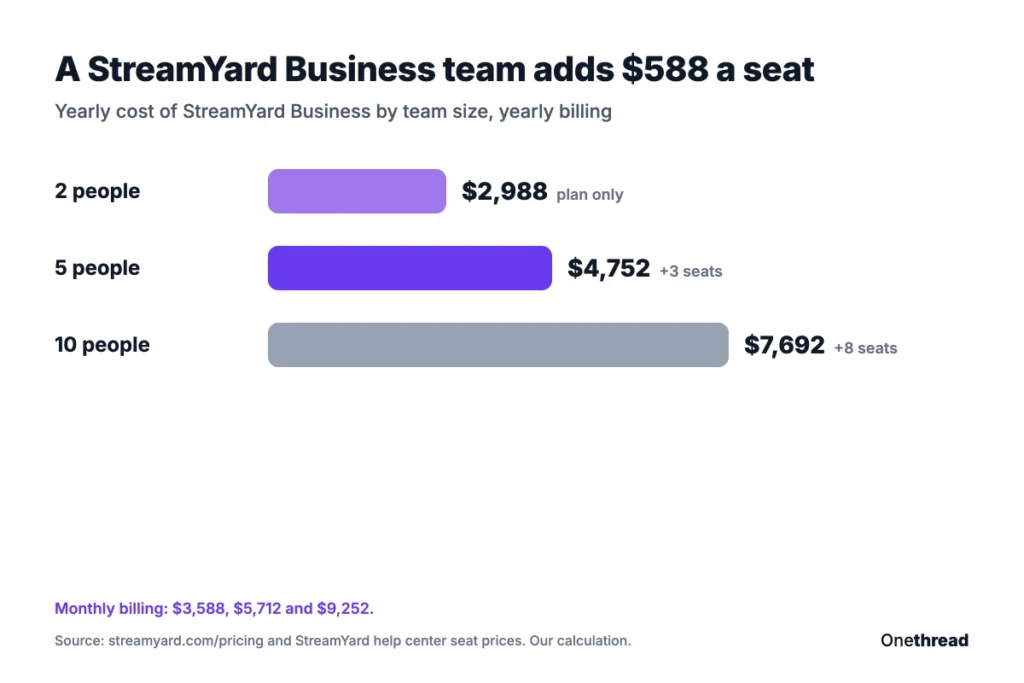
Example: Five seats on yearly billing cost $2,988 for the plan plus 3 × $588 for the extra seats, so $4,752 a year. That’s about $950 a person.
If your team also juggles show topics, guests and edits, a project management tool for video creators keeps that planning out of the studio.
Which StreamYard Plan Should You Choose?
The right StreamYard plan depends on two things: whether you stream for yourself, and what you need on screen. Settle the first, then pick the tier.
| If you… | Pick |
|---|---|
| Want to test a show or stream rarely | Free |
| Stream often and don’t mind the logo | Essential |
| Run a branded show with guests | Core |
| Host webinars for up to 100 viewers | Advanced |
| Stream for a company or share an account | Business |
| Need SSO or have $50 million or more in revenue | Enterprise |
These fit labels are our judgment from the plan limits, not StreamYard’s.
Three checks help you decide:
- Check the logo: If the StreamYard logo can’t appear, skip Essential and start at Core.
- Count your viewers: Advanced caps webinars at 100 viewers, and Business lists 1,000+.
- Price yearly against monthly: Yearly billing saves $48 to $600 a year, but the refund window covers only 7 days.
How Does StreamYard Pricing Compare to OBS and Streamlabs?
StreamYard pricing sits above free desktop tools, because it runs in the browser and handles guests for you. StreamYard’s own comparison lists OBS Studio as free and Streamlabs Ultra at about $189 a year.
| Tool | Starting paid price, per year | Best for |
|---|---|---|
| StreamYard Essential | $179.88 | Browser streaming with guests |
| Streamlabs Ultra | About $189 | Gamers and desktop streamers |
| OBS Studio | Free | Technical users who build their own setup |
Figures for Streamlabs and OBS come from StreamYard’s price comparison, and the Best for labels are ours. Check each vendor’s page before you buy.
OBS costs nothing, but you install it and handle guests yourself. If you’re weighing other ways to go live, our guide to internet broadcasting services covers the wider field. For meetings rather than shows, video conferencing software may be the cheaper fit.
What Should You Do Next With StreamYard?
StreamYard’s tiers look like a ladder, but the usage policy splits it in two. Solo creators pick by features, from the logo to webinars. Company teams start at Business, where seats drive the bill. So the cheapest plan on the page is rarely the cheapest plan for you.
This week, decide whether you stream for yourself or for a company, then start a 7-day trial on that plan. Run one real episode before day seven, so the refund window still covers you. Then commit to a year only if the plan held up.
FAQs
Can You Cancel StreamYard Anytime?
Yes, you can cancel a StreamYard subscription at any time. You keep the paid features until the end of this billing cycle, then StreamYard moves you back to the free tier. On yearly billing, that means access for the rest of the year you paid for, with no refund after the first 7 days.
Does StreamYard Offer Refunds?
Yes, StreamYard offers a 7-day money-back guarantee on your first charge. After those 7 days, the purchase counts as complete and can’t be refunded. Renewals aren’t covered by StreamYard pricing rules, so set a reminder before a yearly plan renews if you might switch tools.
What Currencies Does StreamYard Accept?
StreamYard accepts payment in US dollars or Indian rupees only. Buyers in other countries pay in US dollars, so your bank may add a foreign transaction fee. Check your card terms before you lock in StreamYard pricing on a larger yearly plan.
Can You Upgrade From Core to Advanced Later?
Yes, you can move from Core to Advanced at any point, even halfway through a billing cycle. StreamYard charges only the difference for the rest of the cycle. That makes Core a low-risk start if you aren’t sure you’ll need webinars or more destinations yet.
Does StreamYard Have a Nonprofit or Education Discount?
Yes, nonprofit and education customers can request a discount on the StreamYard Business plan. StreamYard doesn’t publish the discount amount, so you’ll need to ask its team. The help center doesn’t mention a discount on the individual Essential, Core or Advanced plans.