ClickUp pricing starts cheap and stays cheap only if nobody adds AI, guests or a second workspace.
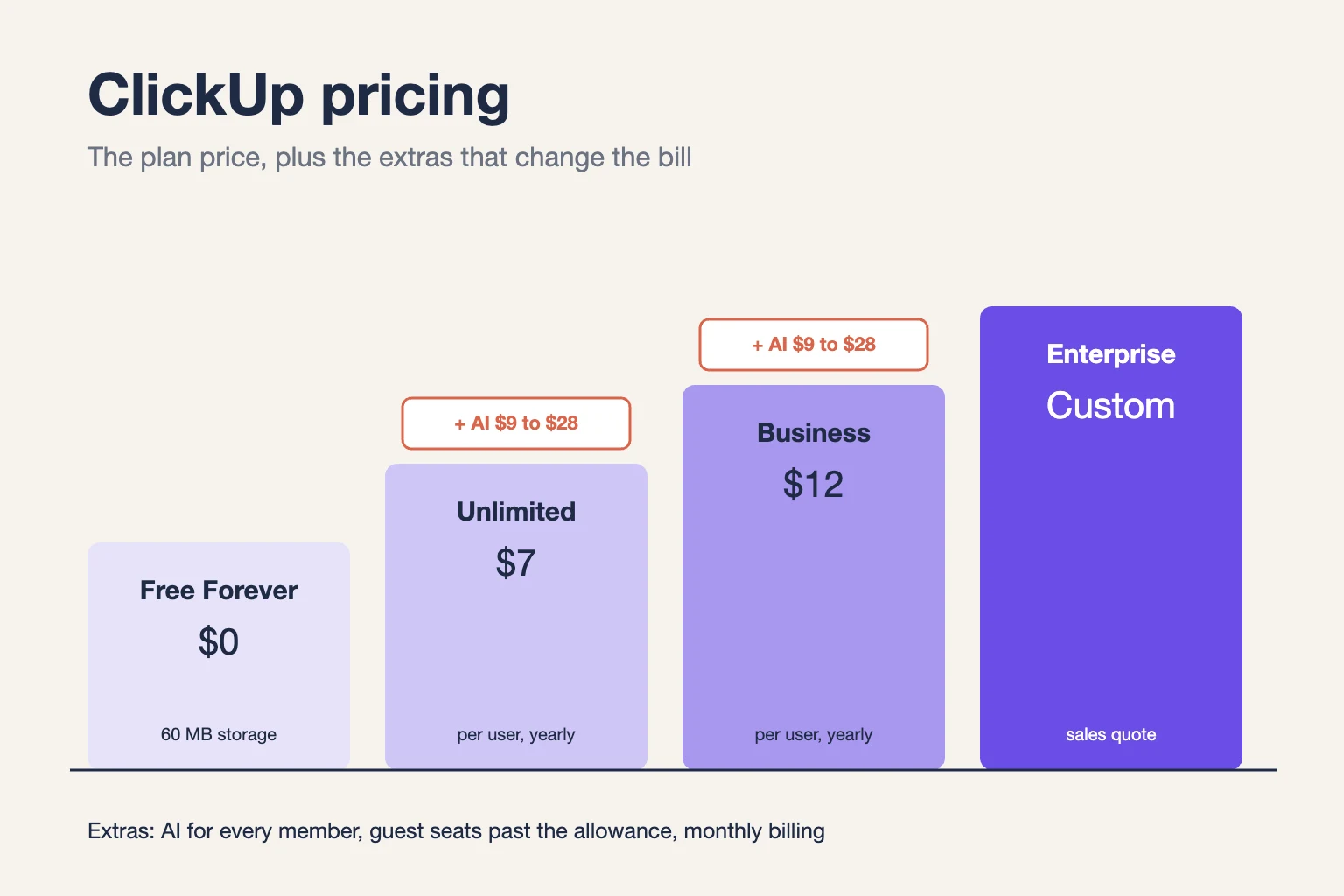
ClickUp’s Free Forever plan costs nothing. Unlimited costs $7 per user a month and Business $12, billed yearly. Monthly billing raises them to $10 and $19. Enterprise is quoted.
Then the extras land. AI is billed per seat, extra guests become paid seats, and some teams now see a second price list.
We checked ClickUp’s pricing page and help center, then ran the numbers for a 10-person team like your own.
Here’s what each plan costs you, what sits outside the headline price, and which plan fits your team.
Key Points
- ClickUp’s standard plans cost $0 (Free Forever), $7 (Unlimited) and $12 (Business) per user a month billed yearly, or $10 and $19 billed monthly. Enterprise is a custom quote.
- Budget AI for the whole workspace. Brain AI adds $9 and Everything AI adds $28 per user a month billed yearly, charged for every paid member.
- Count guests before you invite clients. Unlimited includes 5 guest seats plus 2 per member, and Business 10 plus 5 per member. Past that, ClickUp adds paid seats.
- Check which price list your workspace shows. Some workspaces see newer plans with AI included, such as Core at $9 and Business at $17 per user a month billed yearly.
How Much Does ClickUp Cost per User?
ClickUp costs $0 to $12 per user a month on its standard published plans, billed yearly. Monthly billing raises Unlimited to $10 and Business to $19.
| Plan | Billed yearly (per user a month) | Billed monthly (per user a month) | Storage | Automation runs a month |
|---|---|---|---|---|
| Free Forever | $0 | $0 | 60 MB | 100 |
| Unlimited | $7 | $10 | Unlimited | 1,000 |
| Business | $12 | $19 | Unlimited | 5,000 |
| Enterprise | Custom quote | Custom quote | Unlimited | 250,000 |
You can’t upgrade one person. ClickUp bills the whole workspace, so every member on a paid workspace counts as a paid seat.
Example: Unlimited for 5 people costs $7 × 5 × 12 = $420 a year on annual billing. Paid monthly, it costs $10 × 5 × 12 = $600, so annual billing saves $180.
Top Tip: Read the plan names on your own workspace’s billing page before you budget. ClickUp is testing a second set of plans, and the names and prices differ from the list above.
Sources: ClickUp pricing page, ClickUp help center on guest seats, ClickUp intro to pricing.
What Does the ClickUp Free Forever Plan Include?
The ClickUp Free Forever plan includes unlimited tasks and unlimited members, with 60 MB of storage and 100 automation runs a month. It never expires.
You get Docs, Kanban boards, sprints, calendar view, one form and two-factor authentication. Guests can join, but only with full access, because the plan has no guest permissions.
The catch sits in the trial features. Gantt charts, dashboards and other paid views come with a small number of uses. Those uses don’t reset, so once you hit the limit, you can view that work but can’t keep building with it.
Say you’re a freelancer tracking client work alone. Free covers you until your files pass 60 MB, which a few design attachments can do quickly.
So treat Free as a long trial. Test the views you’ll need, then upgrade before the trial uses run out mid-project.
Pricing: $0, with no time limit and no card needed.
Best For
- Solo users and small teams testing ClickUp before they commit.
Pros
- Unlimited tasks and unlimited members at no cost.
- Docs, sprints and Kanban boards included.
- 24/7 support, even on the free plan.
Cons
- Only 60 MB of storage, shared by everyone.
- Trial uses of paid views run out and don’t reset.
- Guests can’t get restricted permissions.
What Does the ClickUp Unlimited Plan Include?
The ClickUp Unlimited plan removes the storage cap and adds Gantt charts, unlimited integrations and native time tracking. It costs $7 per user a month billed yearly.
Unlimited also adds unlimited Spaces, folders and forms, plus goals, portfolios, resource management and ClickUp Chat. Automations rise to 1,000 runs a month, which suits a small team with a handful of simple rules.
Guests work differently here. Each workspace gets 5 permission-controlled guest seats, plus 2 more for each member you add. Clients can then see only the lists you share with them.
Picture a five-person agency sharing project boards with three clients. Unlimited covers the storage, the Gantt view and the client guests without touching Business.
The limit to watch is automations. A few rules that fire on every task update can use 1,000 runs faster than you’d expect.
Pricing: $7 per user a month billed yearly, or $10 billed monthly.
Best For
- Small teams that need unlimited storage, Gantt charts and a few client guests on shared boards.
Pros
- Unlimited storage and integrations.
- Gantt charts and native time tracking included.
- Guest seats with permission controls.
Cons
- 1,000 automation runs a month caps busier workflows.
- Dashboards and some advanced views stay limited.
- No Google SSO or private whiteboards.
What Does the ClickUp Business Plan Include?
The ClickUp Business plan adds unlimited dashboards, advanced automations and Google single sign-on (SSO). It costs $12 per user a month billed yearly and is the plan ClickUp marks as most popular.
Business raises automations to 5,000 runs a month and adds webhooks, mind maps, private whiteboards, custom exports, sprint points and workload management. Guest seats also rise to 10, plus 5 per member.
The monthly price is where Business bites. Paying month to month costs $19 per user, so annual billing saves 37% on this plan.
It’s also the plan where reporting gets serious. If managers want live dashboards across projects, Business is usually the first plan that stops rationing them.
Example: A 10-person team on Business pays $12 × 10 × 12 = $1,440 a year on annual billing. Monthly billing costs $19 × 10 × 12 = $2,280, which is $840 more.
Pricing: $12 per user a month billed yearly, or $19 billed monthly.
Best For
- Growing teams that run reports, automations and client work at once.
Pros
- Unlimited dashboards and 5,000 automation runs a month.
- Google SSO and SMS two-factor authentication.
- More guest seats: 10, plus 5 per member.
Cons
- Monthly billing costs $19 per user.
- AI still costs extra on the standard plan.
- No SAML SSO or audit log.
What Does the ClickUp Enterprise Plan Include?
The ClickUp Enterprise plan has no public price. You request a quote from ClickUp’s sales team, and the price depends on your seats and terms.
Enterprise adds SAML SSO, SCIM provisioning, an audit log, unlimited custom roles, data residency, white labeling and an enterprise API. It also includes a customer success manager and 250,000 automation runs a month.
Most small and mid-size teams won’t need it. It earns its price when your IT team requires SAML login, audit trails, or data stored in a specific region.
It can also make sense for big client-facing teams. White labeling lets you show your own brand to clients inside the workspace.
Before the first sales call, bring three numbers: your seat count, your guest count and how many automation runs you use today. Those shape the quote more than the feature list does.
Pricing: Custom quote from ClickUp’s sales team.
Best For
- Large organizations with formal security reviews, strict SSO rules or data residency needs.
Pros
- SAML SSO, SCIM and an audit log.
- 250,000 automation runs a month.
- A dedicated customer success manager.
Cons
- No published price to budget around.
- Buying goes through a longer sales process.
- More than most teams under 50 people will ever need.
How Much Does ClickUp AI Cost on Top of Your Plan?
ClickUp AI costs $9 per user a month for Brain AI or $28 for Everything AI on the standard plans, billed yearly. Both are charged for every paid member in the workspace.
This is the biggest of ClickUp’s hidden costs. You can’t buy AI for three people and leave the rest of the team off it.
Brain AI covers the assistant, writing help, summaries and search, with 1,500 AI credits per user a month. Everything AI adds agents, AI fields, a notetaker and more, with 5,000 credits per user. Extra credits cost $10 per 10,000.
Breeze found that ClickUp’s own pages disagree on the monthly AI price, while the yearly prices match. Check the figure at checkout, not in a guide (this one included).
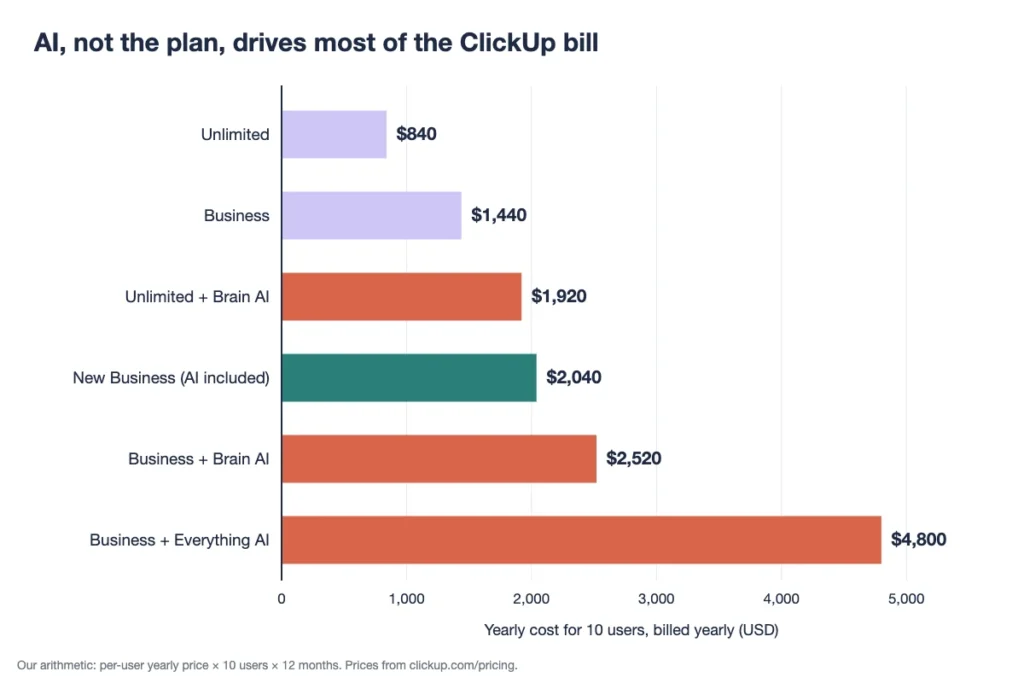
Example: Adding Brain AI to a 10-person Business team costs $9 × 10 × 12 = $1,080 a year. That lifts the yearly bill from $1,440 to $2,520, a 75% jump.
That per-seat rule is the most common complaint. If only a few people will use AI, the add-on rarely pays for itself, so test it first. ClickUp user Blake Hodges-Koch asked for more flexible AI billing on ClickUp’s feedback board, noting that “The ‘trial’ ends with no warning.“
Why Do Some Teams See Different ClickUp Plans?
Some teams see different ClickUp plans because ClickUp is rolling out a new lineup with AI included. It runs alongside the standard plans, and not every workspace sees it.
The newer lineup names its plans Free, Core, Business, Enterprise and MAX. Each paid plan includes a pooled allowance of AI credits instead of a separate AI add-on.
| New plan | Billed yearly (per user a month) | AI credits per user a month | Automation runs a month |
|---|---|---|---|
| Free | $0 | 500 per workspace | Not listed |
| Core | $9 | 1,000 | 1,000 |
| Business | $17 | 1,500 | 10,000 |
| Enterprise | Custom quote | 3,000 | 1,000,000 |
| MAX | $100 | 10,000 | 1,000,000 |
Prices in this lineup move. PricingSaaS spotted ClickUp testing Core at $9 instead of $8 per user, billed yearly, in October 2026. Work Management Hub lists the monthly prices as $12 for Core and $25 for Business.
If your workspace already pays, ClickUp’s help center says your plan and price stay until the date in your notice. Changes apply at renewal, never mid-term.
Example: For 10 people, the new Business plan costs $17 × 10 × 12 = $2,040 a year with AI included. The standard Business plan plus Brain AI costs $2,520.
How Do Guests and Seats Change Your ClickUp Bill?
Guests change your ClickUp bill once you run out of free guest seats. After that, ClickUp adds a paid member seat for each new guest with permissions.
The free guest allowance grows with your team:
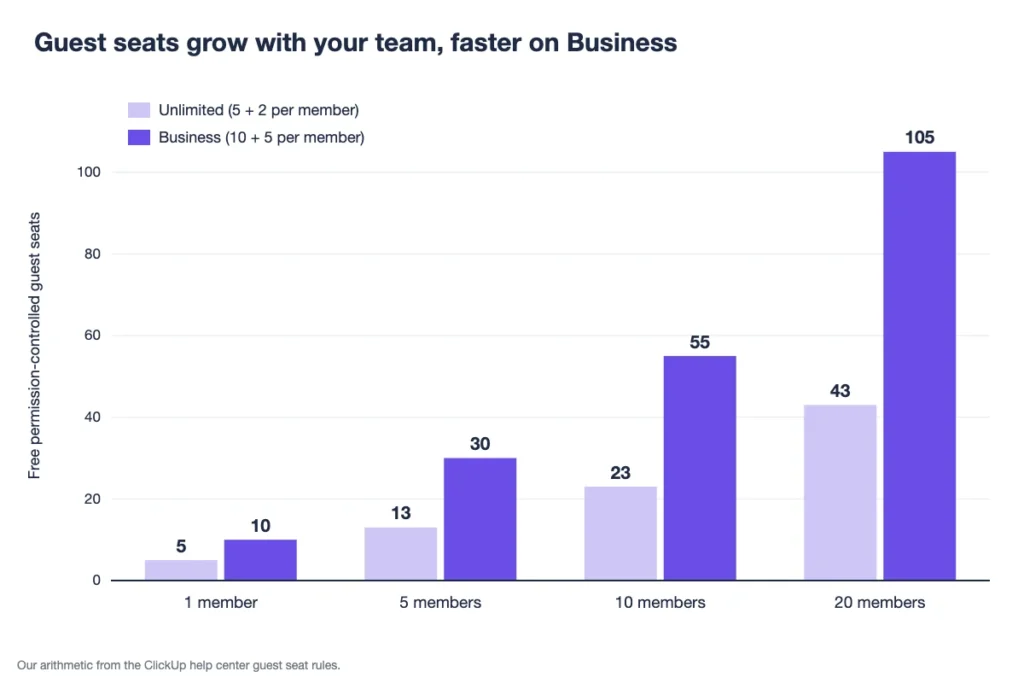
- Unlimited: 5 guest seats for the first member, plus 2 for each extra member.
- Business and Enterprise: 10 guest seats for the first member, plus 5 for each extra member.
- Free Forever: Unlimited guests, but each one gets full access.
Example: A 10-person team on Unlimited gets 5 + (9 × 2) = 23 guest seats. The same team on Business gets 10 + (9 × 5) = 55.
There are two easy ways to burn seats without noticing. Adding a view-only guest to a Team turns them into a permission-controlled guest. And colleagues from your own company count as paid members, even if you invite them as guests.
Eesel reports one Reddit user whose bill jumped from $150 to nearly $1,200 after seat changes. Your numbers will differ, but the lesson holds: audit guests before each renewal.
The fix takes ten minutes. Open the people list, sort by role, and check every guest who has more access than they need.
Top Tip: Switch guests who only need to look to view-only, and keep them out of Teams. That frees permission-controlled seats without removing anyone.
What Does a 10-Person Team Pay for ClickUp per Year?
A 10-person team pays $840 to $4,800 a year for ClickUp, depending on the plan, the billing cycle and the AI add-on. We calculated each case from the published per-user prices.
| Setup for 10 users | Yearly cost (billed yearly) | Yearly cost (billed monthly) |
|---|---|---|
| Unlimited | $840 | $1,200 |
| Unlimited + Brain AI | $1,920 | Check at checkout |
| Business | $1,440 | $2,280 |
| Business + Brain AI | $2,520 | Check at checkout |
| Business + Everything AI | $4,800 | Check at checkout |
| New Business (AI included) | $2,040 | $3,000 |
The gap between the cheapest and dearest row is almost six times. Most of it comes from AI and monthly billing, not from the plan itself.
Example: Unlimited with Brain AI costs ($7 + $9) × 10 × 12 = $1,920 a year. That’s more than Business without AI, at $1,440.
So if you want AI, price the plan and the add-on together before you compare plans. Use your own seat count in place of 10.
How Does ClickUp Pricing Compare With Asana, monday.com and Trello?
ClickUp pricing sits in the middle of the pack for first paid plans. It costs less than Asana and monday.com per user, but more than Trello.
| Tool | First paid plan, per user a month (billed yearly) | Cost for 10 users a year | Best for |
|---|---|---|---|
| ClickUp | $7 | $840 | Teams that want many views and features in one tool |
| Asana | $10.99 | $1,318.80 | Teams that plan cross-team projects and goals |
| monday.com | $9 | $1,080 | Teams that like visual boards and simple setup |
| Trello | $5 | $600 | Small teams that only need Kanban boards |
Competitor prices come from Tech.co’s ClickUp pricing guide, updated in October 2026. Check each vendor’s own page before you buy, and note that some tools sell seats in fixed bundles. The Best for column is our read.
If none of these fit, our roundup of project management software for small teams compares more options. Onethread, our own tool, also covers task assignment, Gantt charts, dashboards and a wiki in one place.
Which ClickUp Pricing Plan Should Your Team Pick?
Pick the cheapest ClickUp plan that covers your storage, automations and guests, then add AI only if most of the team will use it. We’d decide in this order:
- Solo or testing: Free Forever, until you pass 60 MB or run out of trial uses.
- Small team with a few clients: Unlimited at $7, if 1,000 automation runs and its guest seats cover you.
- Team running dashboards and automations: Business at $12, especially if you need more than 1,000 automation runs.
- Team that wants AI for everyone: Compare Business plus Brain AI, at $21 a user, with the new Business plan at $17, if your workspace offers it.
- IT needs SAML, audit logs or data residency: Ask ClickUp’s sales team for Enterprise.
Whatever you pick, check the new pricing your workspace may show before you renew. The newer plans bundle AI, so they can beat the standard plan plus an add-on.
Pay yearly only once the team has used ClickUp for a full month. The first paid subscription carries a 30-day money-back guarantee, which gives you a safe trial window.
Not sure ClickUp is the right category at all? Our guide on how to choose a project management tool walks through the questions to ask first.
What Should You Do Next With ClickUp?
The ClickUp price you pay depends less on the plan than on three extras: AI for every member, guest seats and monthly billing. Once you count those, the cheapest-looking plan isn’t always the cheapest, and the new AI plans can come out ahead.
This week, open your workspace’s billing page, note which plan names it shows, and count your members and guests. Multiply by the per-user price, add AI only if most people will use it, and compare the yearly totals. Pick the plan that wins on your own numbers.
FAQs
Does ClickUp Offer Refunds?
Yes, ClickUp pricing includes a 30-day satisfaction guarantee on your first paid subscription, which also covers add-ons bought with it. Refunds on later upgrades or charges aren’t automatic. You contact ClickUp’s support team, which checks whether the charge qualifies for a refund.
Is There a ClickUp Nonprofit or Education Discount?
ClickUp says it offers discounts to some nonprofit organizations and educators, but it publishes no fixed percentage. You contact ClickUp’s support team with your details, and it quotes pricing based on your situation. Ask before you pay for a yearly plan.
Can You Upgrade Only Some Users in ClickUp?
No, ClickUp bills the whole workspace, so each person on a paid workspace counts as a paid seat. The same rule applies to AI add-ons on the standard plans. Teams that want to limit cost often keep clients and freelancers as guests within the allowance.
Can You Cancel ClickUp at Any Time?
Yes, you can cancel at any time, and your plan stays active until the end of the billing cycle you paid for. Plans renew automatically, so cancel before the renewal date. Outside the first 30 days, ClickUp pricing refunds go through support case by case.
Do Multiple ClickUp Workspaces Need Separate Plans?
Yes, each ClickUp workspace is its own subscription with its own billing. Upgrading one workspace doesn’t upgrade the others, and members in each are billed separately. Merge work into one workspace where you can, so you pay for each person once.