Canva looks cheap until the second person joins.
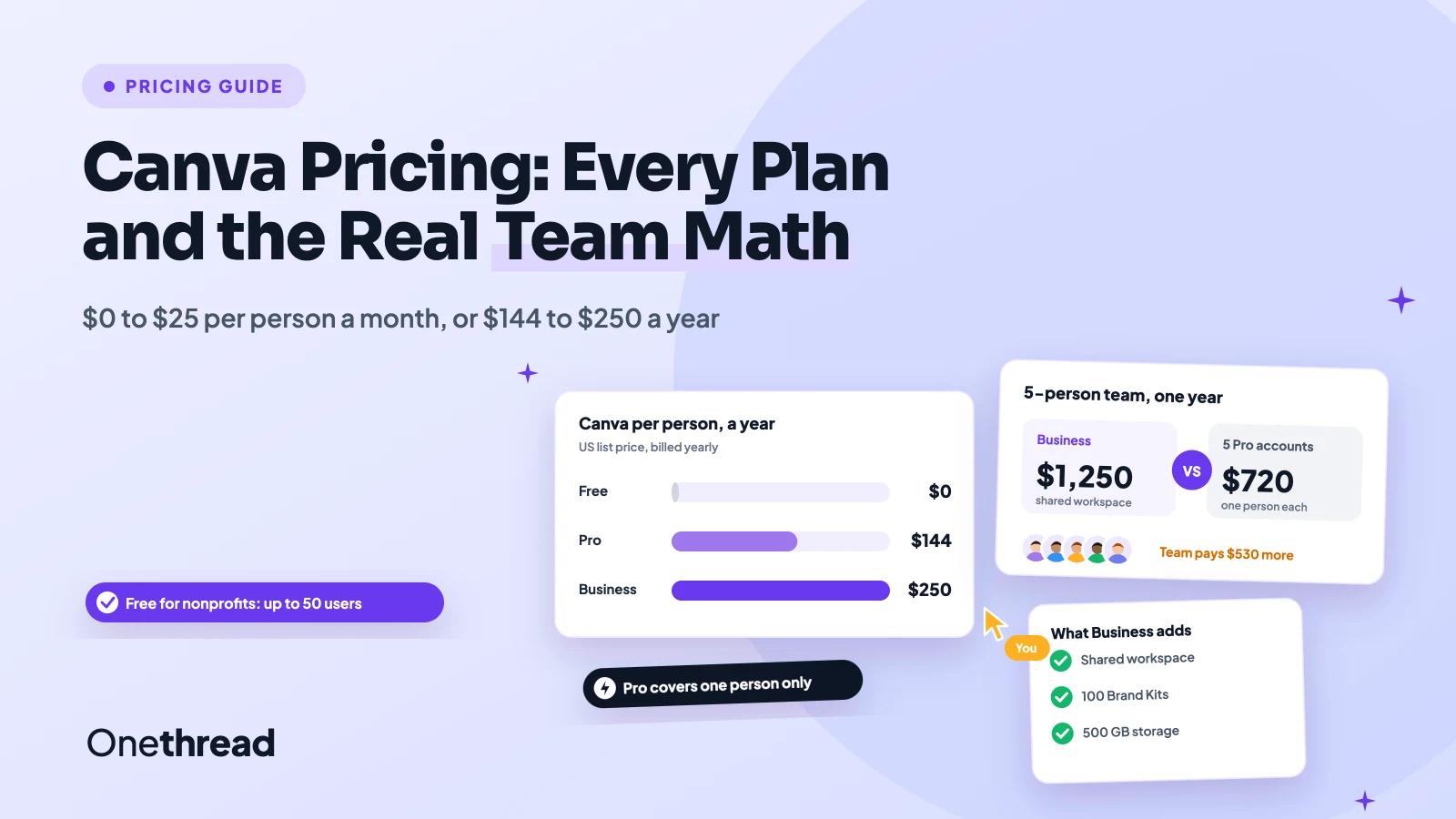
Canva pricing starts at $0 on Free. Pro costs $18 a month or $144 a year for one person. Business costs $25 per person a month, or $250 per person a year. Enterprise is a custom quote.
The catch is the jump. Pro covers one person only, so a team pays Business rates for every seat.
We read Canva’s pricing page and help center, plus eight top-ranking guides. Then we ran the math for teams of 3, 5 and 10.
You’ll see what each plan adds, how AI limits work, and which plan fits your team.
Key Points
- Canva costs $0 on Free, $18 a month or $144 a year on Pro (one person), and $25 a month or $250 a year per person on Business. Enterprise is quote only.
- Pay yearly if you’ll stay a year. It saves $72 on Pro and $50 per person on Business.
- Pick Business only when people need to share brand assets, templates and approvals. Five people pay $1,250 a year on Business, or $720 on five separate Pro accounts.
- Check AI before you buy. Pro includes 10 times the AI allowance of Free, Business 20 times, and the AI Pass add-on costs $100 per person a month.
How Much Does Canva Pricing Cost per Plan?
Canva pricing runs from $0 to $25 per person a month in the US. Yearly billing lowers both paid plans, and Enterprise sits above them as a custom quote.
| Plan | Monthly billing | Yearly billing | Who it covers | Cloud storage | Brand Kits |
|---|---|---|---|---|---|
| Free | $0 | $0 | One person | 5 GB | 1 (3 colors) |
| Pro | $18 a month | $144 a year | One person | 100 GB | 5 |
| Business | $25 per person a month | $250 per person a year | One person or a team | 500 GB | 100 |
| Enterprise | Custom quote | Custom quote | Large or multi-team orgs | 1 TB | 1,000 |
Prices are US list prices before tax. Canva shows local prices by country, so your page may show a different currency.
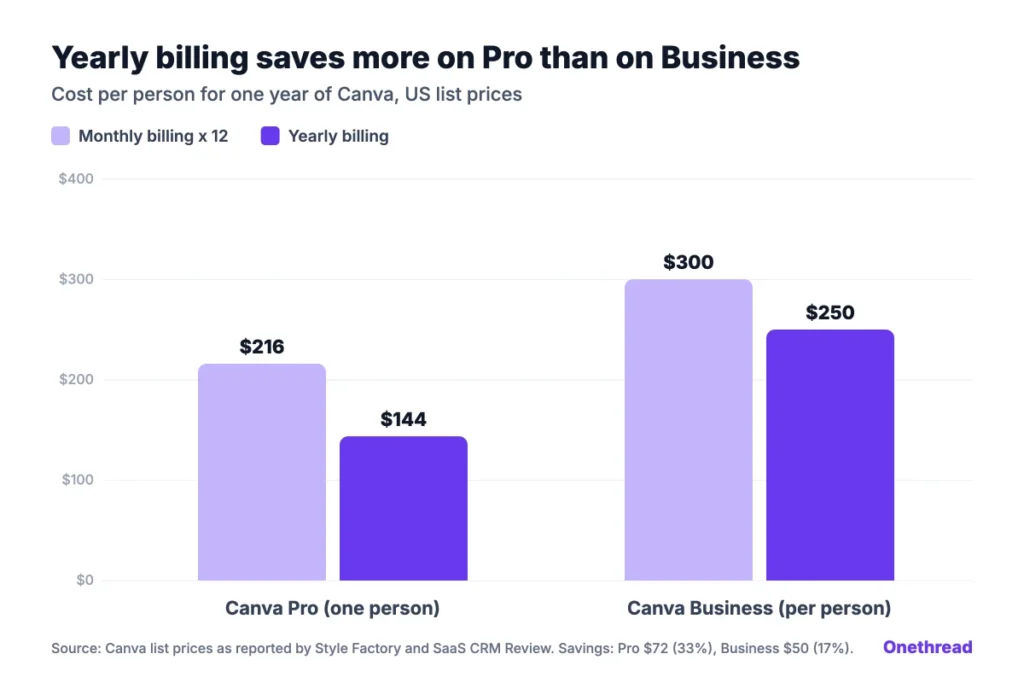
Yearly billing saves more on Pro than on Business. Pro drops from $216 to $144 a year, a 33% cut. Business drops from $300 to $250 per person, about 17%.
Example: A solo designer on monthly Pro pays $18 × 12 = $216 a year. Yearly Pro costs $144, so the same year costs $72 less.
Top Tip: Look at the billing toggle before you compare plans. Canva’s pricing page opens on one view, and the yearly prices only apply when you pay for 12 months upfront.
What Does the Canva Free Plan Include?
The Canva Free plan costs $0 and has no time limit. It includes 1.6 million templates, 4.7 million elements and an editor with over 1,000 design types.
That’s enough for a social post, a flyer or a simple deck. You also get 5 GB of storage and one Brand Kit with up to three colors.
Here’s the limit you’ll feel first. Free includes only limited access to Canva’s Standard and Premium AI tools, and no Ultra AI tools at all. Background removal and Magic Resize sit on paid plans.
Say you run a small bakery and post twice a week. Free covers the posts. But the day you want a fourth brand color or a quick resize for Stories, you’ll hit a wall.
Free also lets you work with others in real time. You can share a design, leave comments and edit together, which covers a lot of small-team needs at no cost.
Pricing: $0 for one person.
Best For
- Students, hobby creators and small shops that post a few designs a month.
Pros
- No cost and no trial clock.
- Over 1.6 million templates to start from.
- Real-time collaboration and comments on shared designs.
Cons
- Only one Brand Kit, capped at three colors.
- Limited AI access and no Ultra AI tools.
- 5 GB of storage fills up fast with video.
What Does Canva Pro Cost and Include?
Canva Pro costs $18 a month or $144 a year, and it covers one person. Canva’s own FAQ is plain about it: only one person can use a Pro account.
Pro adds the full library. You get 3.6 million templates and 141 million photos, graphics, videos and audio tracks. You also get 5 Brand Kits, 100 GB of storage and social scheduling.
AI is the other big jump. Pro includes 10 times the AI allowance of Free for Premium and Ultra AI tools. Standard AI tools on paid plans don’t draw from that allowance at all.
Picture a freelance social media manager with four clients. Pro holds a Brand Kit per client, plus one spare. That’s a neat fit for a one-person license.
The yearly plan is where Pro gets cheap. At $144, it works out to $12 a month, a third less than paying $18 each month.
Pricing: $18 a month, or $144 a year billed yearly.
Best For
- Freelancers, solo marketers and creators who design every week.
Pros
- The full template and stock library at the lowest paid price.
- Five Brand Kits, enough for a small client roster.
- Yearly billing saves $72 against monthly.
Cons
- One person per account, with no shared team workspace.
- No approvals or team admin tools.
- AI allowance is half of what Business includes.
What Does Canva Business Cost per Person?
Canva Business costs $25 per person a month, or $250 per person a year. Canva built it for individuals and small teams, and it’s the plan Canva now sells in place of Teams.
Business keeps everything in Pro and adds the team layer. That means a shared workspace, team admin tools, approvals and up to 100 Brand Kits. Storage rises to 500 GB.
It also doubles the AI. Business includes 20 times the AI allowance of Free, and only Business users can buy one-time AI top-ups. Canva adds the Flourish Presenter plan for data charts too.
Style Factory lists one more perk: 10% off Canva print orders. If you print menus or banners every month, that discount trims the real cost a little.
Say a three-person agency shares one client’s templates. Business lets one person lock the logo and fonts, while the other two edit copy and send work for approval.
Pricing: $25 per person a month, or $250 per person a year billed yearly.
Best For
- Small teams that share templates, brand assets and sign-offs.
Pros
- Shared workspace with roles, approvals and locked templates.
- 100 Brand Kits and 500 GB of storage.
- Twice the AI allowance of Pro, plus one-time top-ups.
Cons
- Every person pays, so costs climb fast with headcount.
- Yearly billing saves only about 17%.
- No SSO or SCIM, which sit on Enterprise.
How Does Canva Enterprise Pricing Work?
Canva Enterprise pricing is a custom quote from Canva’s sales team. There’s no public price and no free trial, though Canva will run a demo for your team.
Enterprise adds what IT and legal teams ask for. That covers SSO and SCIM, audit logs, a domain report and custom apps. Storage rises to 1 TB, and Brand Kits go up to 1,000.
Some perks need scale. IP indemnity content control starts at 100 seats. Premium support and creative services start at 150 contracted seats.
Billing is flexible too. Canva’s sales team can set up regular invoicing, which suits finance teams that don’t pay software by card.
Third-party data helps you size a quote before the first call. CloudEagle’s buyer data puts Enterprise at about $165.60 to $266.40 per user a year, with bigger deals at the low end.
Pricing: Custom quote, sold through Canva’s sales team.
Best For
- Large or multi-team companies that need SSO and brand control at scale.
Pros
- SSO, SCIM, audit logs and AI admin controls.
- 1 TB of storage and up to 1,000 Brand Kits.
- Invoicing and flexible billing options.
Cons
- No public price, so every deal needs a sales call.
- No free trial.
- Some perks need 100 or 150 seats.
How Does AI Usage Change Canva Pricing?
AI usage changes Canva pricing because the paid plans meter Premium and Ultra AI tools. Those tools share one monthly allowance that resets each month, while Standard AI tools on paid plans stay outside it.
| Plan | AI allowance for Premium and Ultra tools | Ways to get more |
|---|---|---|
| Free | Limited Standard and Premium AI, no Ultra AI | Upgrade |
| Pro | 10 times Free | AI Pass add-on |
| Business | 20 times Free | AI Pass add-on or top-ups |
| Enterprise | 20 times Free, plus custom options | Talk to sales |
Heavier tools use more of the pool. Generating video clips or chatting with Canva AI draws more than a quick image edit.
AI Pass is the big lever, and the big bill. SaaS CRM Review lists it at $100 per person a month. It adds 40 times Pro’s AI, or 20 times Business’s.
Example: A Pro user who adds AI Pass pays $18 + $100 = $118 a month. That’s more than six times the Pro price alone.
AI top-ups are cheaper to try. They’re a one-time purchase for Business users who buy online, equal to one month’s allowance and valid for 30 days.
One quirk catches trial users. During a trial, your AI allowance matches Canva Free. The full allowance starts when you pay.
How Does Canva Business Billing Work When Your Team Grows?
Canva Business bills on a pay-as-you-grow model. You only pay for people who accept your invite, and there’s no charge on the day they join.
Monthly and yearly plans settle up in different ways:
- Monthly billing: You can change your team size at any time. Canva charges for the people on your team at the next monthly renewal.
- Yearly billing: Canva adjusts the bill each quarter. It emails the team admin first, with a notice period to trim the team.
- Design privacy: New members can’t see your designs unless you share them or save them as team templates.
This model replaced Canva Teams, and the change was steep. Teams once covered five people for $119.99 a year. In 2024, TechCrunch reported a move to $500 a year for that same group, with a three-person minimum.
Canva Teams is now closed to new sign-ups. Existing Teams customers keep their price, even when they add members. But any new paid features made for Business won’t reach Teams accounts.
That leaves legacy Teams pricing as the cheapest team deal Canva has. Keep it if your team still fits it.
Top Tip: If you still pay legacy Teams pricing, think hard before you cancel. Canva’s help center says you can’t sign up for Teams again once it’s gone.
How Much Does Canva Cost for a Team of 3, 5 or 10?
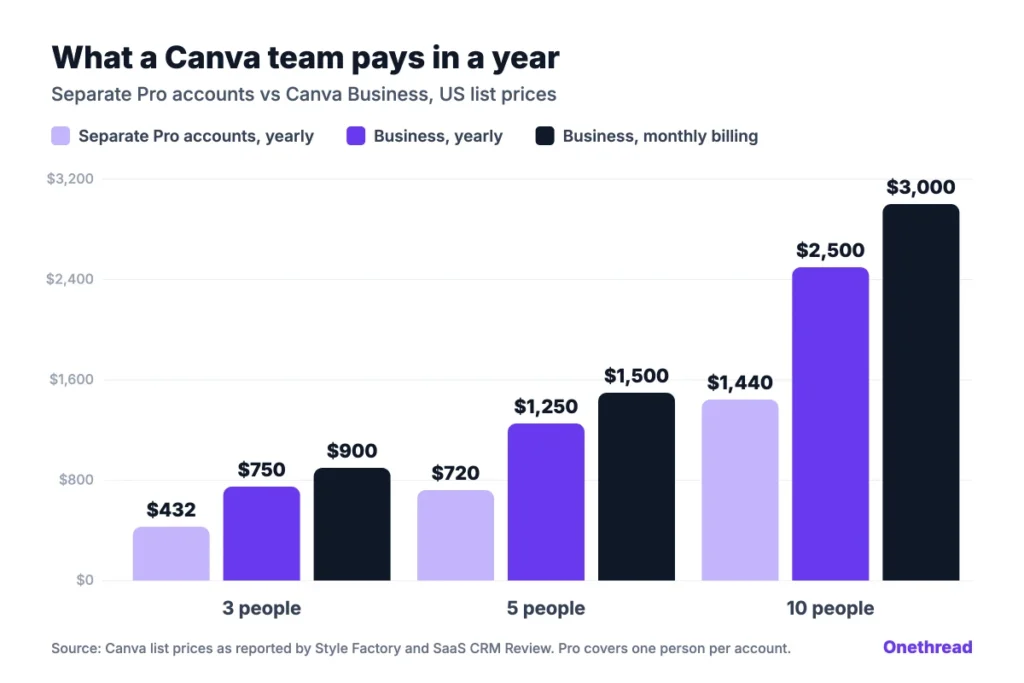
Canva costs $750 a year for 3 people, $1,250 for 5 and $2,500 for 10 on Business with yearly billing. Monthly billing adds $50 per person over the year.
| Team size | Separate Pro accounts, yearly | Business, yearly | Business, monthly billing |
|---|---|---|---|
| 1 person | $144 | $250 | $300 |
| 3 people | $432 | $750 | $900 |
| 5 people | $720 | $1,250 | $1,500 |
| 10 people | $1,440 | $2,500 | $3,000 |
Separate Pro accounts look cheaper, and they are. But each account is a one-person license, so there’s no shared workspace, no shared Brand Kits across the team and no approvals.
Example: A 5-person marketing team pays 5 × $250 = $1,250 a year on Business. Five Pro accounts cost 5 × $144 = $720, so Business costs $530 more for the team features.
That $530 buys a shared brand library and sign-off flow. If your team never shares templates, it buys you little. Run your own headcount through the table and see which column you’d live with.
Who Can Get Canva for Free or at a Discount?
Nonprofits, K-12 schools and teachers can get Canva for free. Everyone else can trim the bill with yearly billing.
- Nonprofits: Eligible nonprofits get premium Pro features plus team tools for free, for one team of up to 50 users. Extra seats cost 50% less on Canva Enterprise.
- K-12 schools: Canva Education is free for K-12 teachers, their students and qualified districts.
- Colleges: Canva Campus covers higher education students, staff and campus teams, with pricing set by Canva’s sales team.
- Yearly billing: Canva says yearly plans save from 16%. Our math puts it at 17% on Business and 33% on Pro.
Canva doesn’t publish a volume discount for Business. Larger teams get custom terms on Enterprise, where prices are set in a sales quote.
Nonprofit approval isn’t instant. Canva asks you to apply, and it checks eligibility before the free plan starts. Schools go through a similar check for Canva Education, so read the eligibility rules first.
One more saving hides in plain sight. If only one person designs and others just view or comment, you may not need Business at all. Shared view links work on every plan, so a single Pro account can serve a small team that mostly reviews and comments.
Which Canva Plan Should You Choose?
Choose by how many people design and whether they share brand assets. Price comes second, because the per-person cost decides itself once you know that.
| If this sounds like you | Pick |
|---|---|
| You make a few designs a month and need no premium templates | Free |
| You design every week and work alone | Pro, billed yearly |
| Two or more people share templates, Brand Kits or sign-offs | Business |
| You need SSO, audit logs or 100+ seats | Enterprise |
| You run a nonprofit with up to 50 users | Apply for Canva for Nonprofits |
Three checks help you decide:
- Count the designers: List every person who edits designs, not people who only view them.
- Check AI use: If someone uses video or Ultra AI tools daily, budget for top-ups or AI Pass.
- Pick the billing cycle: Choose yearly only if the team will stay a full year.
Canva handles the design work, but it doesn’t track who asked for which design or when it’s due. That job sits with your project management software for designers. If your team also pays for Figma seats, our Figma pricing guide breaks down seat types the same way.
What Should You Do Next With Canva?
Canva pricing is simple for one person and steep for a team. Pro at $144 a year suits anyone who designs alone. Business only earns its $250 per person when people share brand assets, templates and approvals every week.
Start with a headcount. List who edits designs this week, then price that number on Business and on separate Pro accounts. If the gap buys features nobody uses, stay on Pro and pay yearly. For more tools that keep creative work moving on time, see our guide to creative project management software.
FAQs
Is Canva Pro Worth $18 a Month?
Canva Pro is worth $18 a month if you design every week and need premium templates, stock or AI tools. If you’ll keep it a year, yearly billing at $144 is the better buy, since it saves $72. On Canva pricing, monthly billing only makes sense for a short project or a test.
Does Canva Offer a Free Trial?
Yes. Canva offers free trials of Pro and Business, and Style Factory reports the Pro trial at 30 days. Enterprise has no trial, only a sales demo. During a trial, your AI allowance matches Canva Free, so test AI tools lightly until your paid plan starts.
What Happens When You Switch From Canva Pro to Business?
The switch takes effect at once, and Canva bills you at the Business rate from your next billing date. Your designs stay in your account. If you later cancel Business, Pro doesn’t come back on its own, and you’d sign up again at the Canva pricing of that day.
Can Team Members See All Your Designs on Canva Business?
No. Your designs stay private on Canva Business unless you share them or save them as templates for your team. Adding someone to your team gives them access to shared folders and team templates, not to your personal drafts or private folders.
What Payment Methods Does Canva Accept?
Canva accepts PayPal and credit cards from major providers such as Visa, Mastercard and American Express. Some countries also get local online payment options. Canva Enterprise customers can set up regular invoicing through the sales team instead of paying by card each month.
Sources: Canva pricing page. Canva help center: switch from Pro or Teams to Business. Style Factory Canva pricing guide. SaaS CRM Review Canva pricing.