Figma’s price list looks simple until you count the seats.
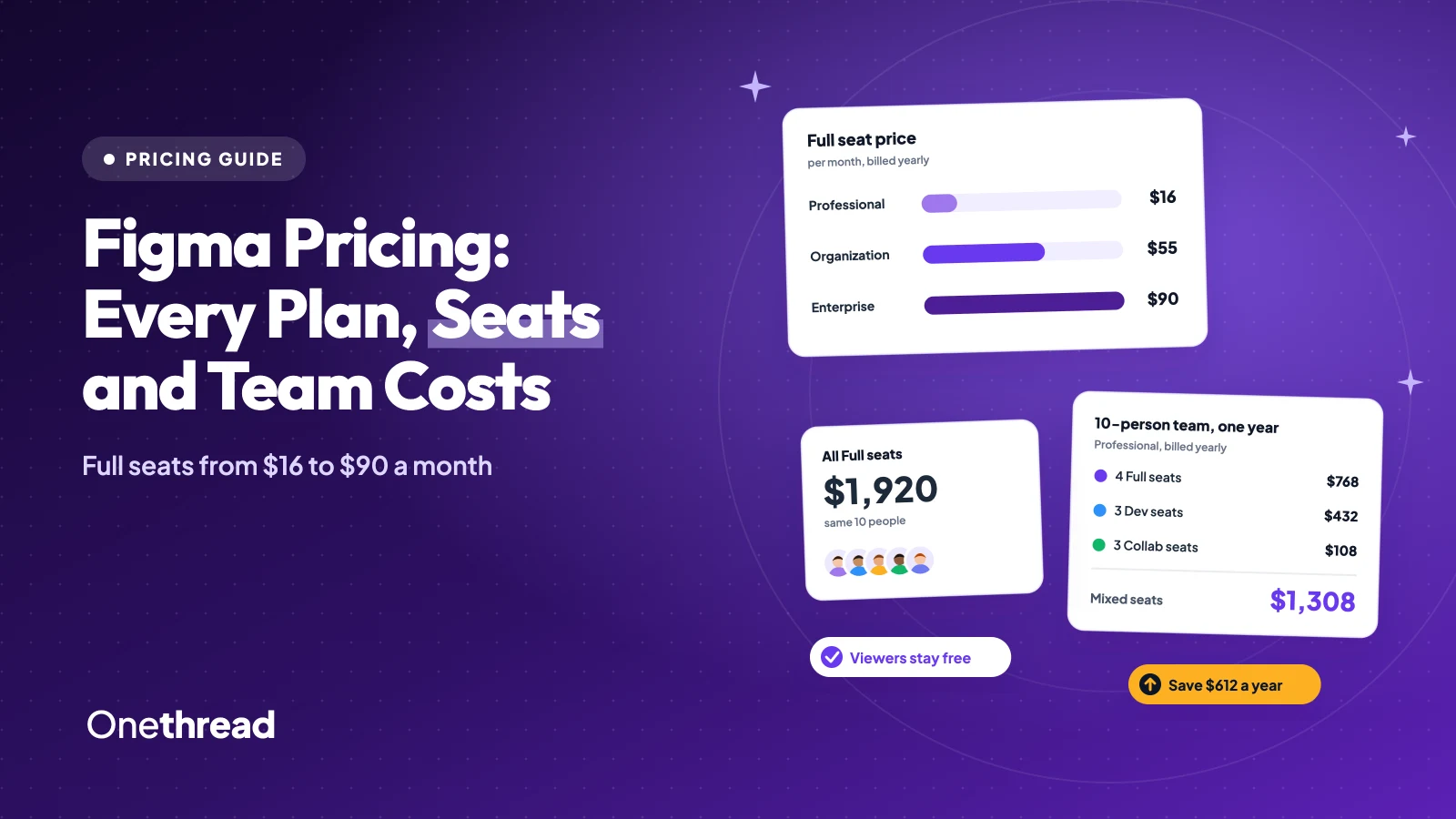
Figma pricing starts free on Starter. Paid plans charge $16 to $90 a month for a Full seat on annual billing. Dev seats cost $12 to $35, and Collab seats cost $3 to $5.
But the seat you give each person matters more than the plan. Add AI credits and a few mid-year hires, and your bill drifts fast.
We read Figma’s live pricing page and help center, compared six top-ranking guides, and priced three team sizes.
You’ll see what each plan includes, where the extra costs hide, and which plan fits your team.
Key Points
- Figma Starter is free. Professional costs $16 a month per Full seat on annual billing or $20 monthly, Organization costs $55, and Enterprise costs $90. Dev seats run $12 to $35 and Collab seats $3 to $5.
- Give a Full seat only to people who design. A 10-person team with 4 Full, 3 Dev and 3 Collab seats pays $1,308 a year on Professional, versus $1,920 if everyone gets a Full seat.
- Watch the add-ons. Extra AI credits cost far more per credit than the credits inside a seat, and seats added mid-year on Professional bill at the monthly price.
- Pick Organization or Enterprise only when you need shared libraries across teams, admin controls or SCIM. Both are billed annually only.
What Is Figma Pricing per Seat in Each Plan?
Figma charges per seat, and the price depends on both the plan and the seat type. The table lists the monthly price per seat from Figma’s pricing page.
| Plan | Full seat | Dev seat | Collab seat | Billing |
|---|---|---|---|---|
| Starter | $0 | $0 | $0 | Free |
| Professional | $16, or $20 monthly | $12, or $15 monthly | $3, or $5 monthly | Annual or monthly |
| Organization | $55 | $25 | $5 | Annual only |
| Enterprise | $90 | $35 | $5 | Annual only |
Prices are in USD per seat a month. Monthly billing exists only on Professional, and it adds 25% to a Full seat.
Sources: Figma pricing, Figma pricing FAQ, How Figma AI credits work, Manage AI credits, AI credit updates FAQ.
People who only view and comment don’t need a paid seat at all. On any paid plan, you can share files with viewers for free.
What Do Full, Dev, and Collab Seats Include in Figma?
A Full seat opens every Figma product. A Dev seat opens Dev Mode plus the whiteboard tools, and a Collab seat opens only the whiteboard and slide tools.
Here’s how the three seat types split the work:
- Full seat: Figma Design, Figma Make, Figma Draw, Figma Sites, Dev Mode, FigJam, Figma Slides and the newer beta tools. It’s the seat for anyone who builds screens.
- Dev seat: Full access to Dev Mode, FigJam, Figma Slides, Figma Buzz and Figma Specs, plus view and comment access in design files.
- Collab seat: FigJam, Figma Slides, Figma Buzz and Figma Specs, with basic inspection in Dev Mode only.
Each seat also carries AI credits. A Full seat includes 3,000 credits a month on Professional, 3,500 on Organization and 4,250 on Enterprise. Every Dev, Collab and View seat gets 500.
That spread is where most of the savings live. A Full seat on Professional costs more than five Collab seats, and a Dev seat costs as much as four.
One caveat worth being honest about: Dev and Collab seats can’t edit design files. If a developer tweaks layouts every week, a Dev seat will frustrate them fast.
Seat credits reset every month and never roll over. They also can’t move between people, so unused credits on a quiet seat simply expire.
What Does the Figma Starter Plan Include?
The Figma Starter plan is free and works for one person testing ideas. You get unlimited drafts, UI kits and templates, and 500 AI credits a month, capped at 150 a day.
The catch sits in shared work. You can co-edit only three collaborative files, with three pages per file. Unlimited version history is a paid feature, so old versions on Starter don’t stick around forever.
Say you’re a freelancer mocking up a landing page for one client. Starter covers it. Add a second and third client, and you’ll hit the file cap before the month ends.
It’s a trial with good manners. Figma lets you stay as long as you like, as long as you stay small.
Students and teachers can skip Starter. Figma’s Education team is free and grants the full Professional feature set after an application check.
Pricing: Free for every seat type.
Best For
- Solo designers, students on a trial run, and anyone learning Figma Design.
Pros
- No card needed, and drafts stay unlimited.
- AI credits included, so you can test Figma Make.
- Viewers can open and comment on shared files.
Cons
- Only three collaborative files with three pages each.
- No team-wide libraries.
- The daily AI cap of 150 credits stops longer sessions.
What Does the Figma Professional Plan Include?
The Figma Professional plan is the default for small design groups. It adds unlimited files and projects for one team, plus team-wide design libraries. You also get advanced prototyping and advanced Dev Mode inspection with the MCP server.
Billing is the part to read twice. On an annual plan, new seats added mid-term don’t join the annual price. Figma charges them as a separate monthly subscription at the monthly rate, until you move them to the annual plan.
So a designer you hire in month four costs $20 a month, not $16. Over eight months, that’s $32 more than you planned.
You can downgrade or cancel Professional yourself from the Admin Dashboard. Payments are non-refundable, though Figma says it will work with unhappy customers.
Pricing: $16 a Full seat, $12 a Dev seat and $3 a Collab seat a month yearly. Monthly billing costs $20, $15 and $5.
Best For
- Design teams and agencies of roughly 2 to 25 people working in one team space.
Pros
- The only paid plan with monthly billing.
- Ten variable modes, enough for light and dark themes.
- Self-serve upgrades, downgrades and seat changes.
Cons
- Libraries can’t be shared across separate teams.
- Mid-year seats bill at the monthly price.
- No single sign-on or advanced admin controls.
What Does the Figma Organization Plan Include?
The Figma Organization plan is for companies with several product teams that share one design system. It adds publishing across teams, shared libraries and fonts, and centralized admin tools.
You also get 20 variable modes and 3,500 AI credits on each Full seat. Admins must approve any new seat that costs money.
Billing changes too. Organization is annual only, and seats added during the term are prorated to the end of the year and invoiced quarterly.
Picture a company with a marketing team and a product team. Both pull from the same icons and fonts. On Professional, each team keeps its own copy. With Organization, one library serves both.
To downgrade or cancel, you contact Figma’s sales team rather than clicking a button. Plan the renewal date into your calendar, because the conversation takes longer than a click.
Pricing: $55 a Full seat, $25 a Dev seat and $5 a Collab seat a month, billed annually.
Best For
- Companies with two or more design teams that share one design system.
Pros
- Shared libraries and fonts across every team.
- Central admin tools and seat approval.
- More AI credits on each Full seat.
Cons
- A Full seat costs more than three times the Professional price.
- No monthly billing option.
- Cancelling or downgrading goes through sales.
What Does the Figma Enterprise Plan Include?
The Figma Enterprise plan targets businesses that run several products or brands. It adds custom team workspaces, design system theming and APIs, SCIM seat management, and unlimited variable modes through extended collections.
Each Full seat carries 4,250 AI credits a month. The Governance+ add-on, with extra access, sharing and compliance tools, is sold only on Enterprise, and Figma doesn’t publish its price.
Here’s the thing: list prices are a starting point at this size. Across 615 purchases, Vendr reports a median Figma contract of $28,500 a year, with buyers saving 19% on average (February 2026).
That figure covers large buyers, not a five-person studio. Use it as a negotiation anchor, not a quote.
Ask sales three things before you sign: the Full seat price at your headcount, the price of Governance+, and how extra AI credits are billed.
Pricing: $90 a Full seat, $35 a Dev seat and $5 a Collab seat a month, billed annually through sales.
Best For
- Multi-brand companies that need SCIM and strict security controls.
Pros
- Unlimited modes and design system theming.
- SCIM handles seat changes from your identity provider.
- The most AI credits per Full seat.
Cons
- The Full seat costs $1,080 a year per designer.
- Governance+ pricing isn’t published.
- Contracts run through sales, so expect a negotiation.
How Do AI Credits Change Figma Pricing?
AI credits are Figma’s usage meter, and they’re the part of the bill most teams forget. Every AI action spends credits, from Figma Make prompts to image edits.
The cost per action varies a lot. Figma’s help center lists 5 to 10 credits to erase an object in an image. A five-screen checkout flow built by the Figma agent takes about 300 or more.
When a seat runs dry, an admin can buy a shared credit subscription, turn on pay-as-you-go, or both. Figma shows add-on prices only inside the Admin Dashboard.
One Professional customer priced a shared pack at $150 a month for 5,000 credits. On the Figma forum, they called the add-on rate “completely disconnected from reality for power users” (January 2026).
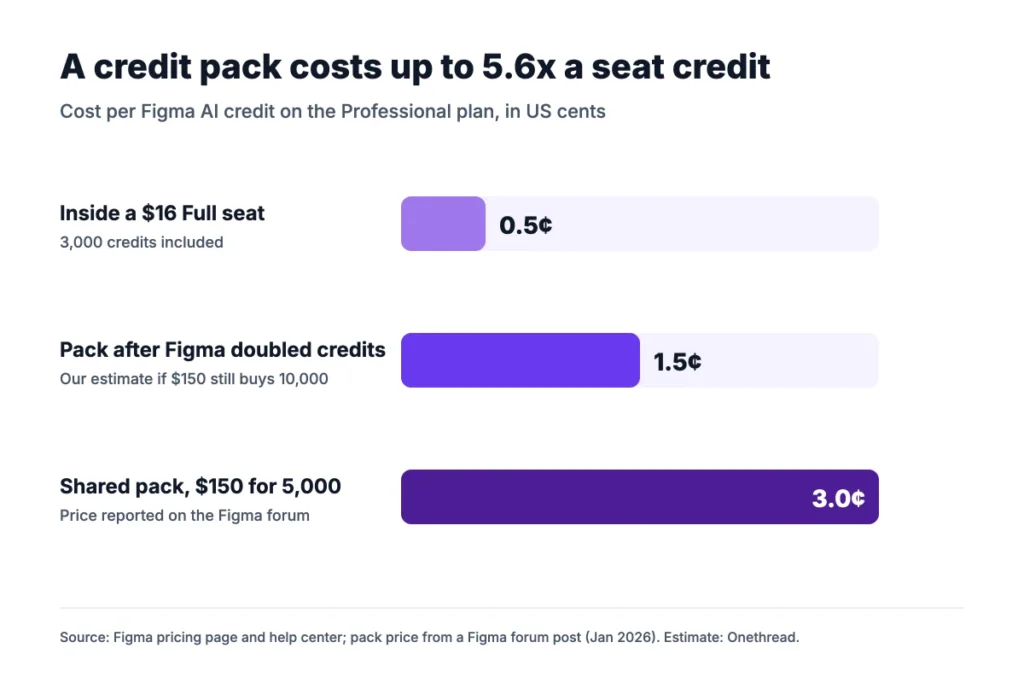
Example: A $16 Full seat includes 3,000 credits, or about $0.005 each. A $150 pack of 5,000 credits works out to $0.03 each, about 5.6 times more.
Figma has since doubled the credits in Professional add-ons at the same price. If that $150 price still holds, the rate falls to about $0.015 a credit. That’s our estimate, not a Figma figure.
Top Tip: Before you buy a credit pack, check whether a second Full seat is cheaper. On Professional, 3,000 extra credits come with a $16 seat.
What Does a Figma Team Actually Pay per Year?
A small team pays a few hundred to a few thousand dollars a year. The seat mix moves the total more than the plan does. We priced three teams with a realistic mix of Full, Dev and Collab seats.
| Team size | Seat mix (Full, Dev, Collab) | Professional annual | Professional monthly | Organization |
|---|---|---|---|---|
| 5 people | 2, 1, 2 | $600 | $780 | $1,740 |
| 10 people | 4, 3, 3 | $1,308 | $1,680 | $3,720 |
| 25 people | 8, 7, 10 | $2,904 | $3,780 | $7,980 |
Totals are yearly, from Figma’s list prices, before AI add-ons or tax.
Example: A 10-person team on Professional annual pays 4 x $16 + 3 x $12 + 3 x $3 = $109 a month, or $1,308 a year. Give all 10 people Full seats and the bill jumps to $1,920.
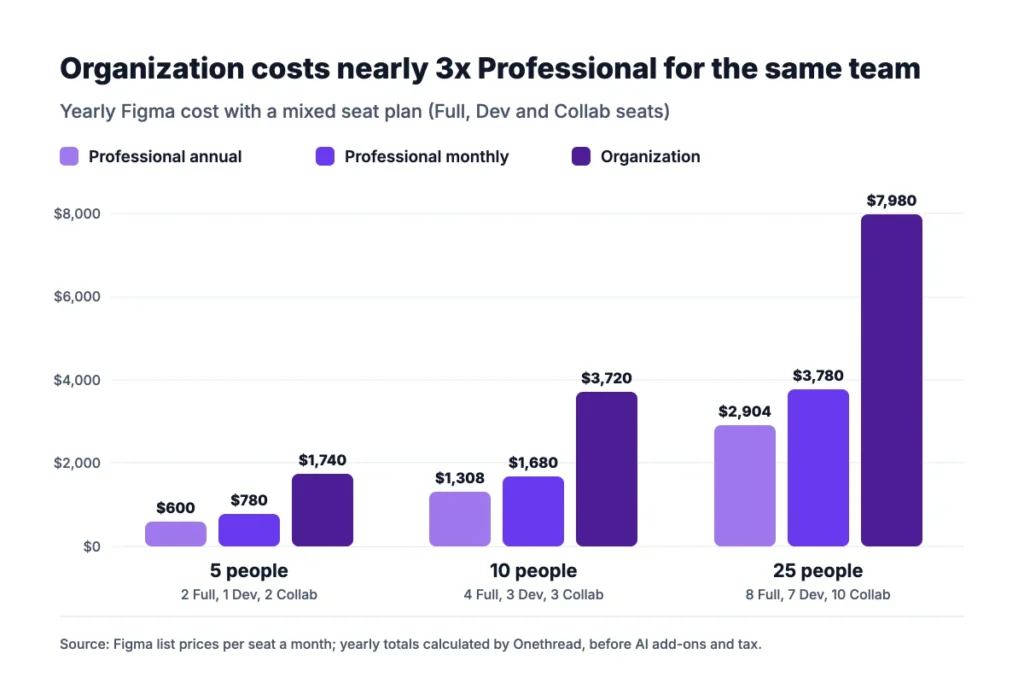
The jump from Professional to Organization is the biggest line on the sheet. At 10 people, it adds $2,412 a year for the same seat mix.
Top Tip: List every person and what they open each week. Anyone who only reviews and comments can stay on a free View seat.
Which Figma Plan Fits Your Team?
Most teams under 25 people should start on Professional with annual billing and a mixed seat plan. Move up only when a specific need forces it.
| Signal | Decision |
|---|---|
| One person, one or two projects | Starter |
| One design team, shared library, monthly flexibility | Professional |
| Two or more teams sharing one design system | Organization |
| Many brands, SCIM, strict compliance | Enterprise |
Three checks settle the choice:
- Count the designers: Only people who build screens need Full seats. Developers take Dev seats, and planners take Collab seats.
- Count the teams: If one team owns the design system, Professional covers it. If several teams share it, price Organization.
- Count the AI use: If two people live in Figma Make, budget for credits before you pick the plan.
Figma rarely runs alone. If your designers juggle client feedback and deadlines, our guide to project management software for designers covers the tools that sit next to it. Early sketching often starts in wireframe tools, and whiteboard-heavy teams can compare Miro board alternatives before paying for FigJam seats.
What Should You Do Next With Your Figma Plan?
Figma’s plan names tell you less than the seat list does. Match each person to a Full, Dev, Collab or free View seat, and Professional covers most small studios and groups. After that, the real choices are annual billing and how much AI your team will use.
This week, write down every person who opens Figma and what they do there. Price that list on Professional annual, then add one line for AI credits. That single sheet tells you your real yearly bill, and it takes about ten minutes to build.
FAQs
Is Figma Free for Students and Teachers?
Yes. Eligible students and educators get a free Figma Education team with the full Professional feature set. Access lasts two years for K-12 and higher education, and six months for bootcamps, and you can reapply while you still qualify. It’s the best Figma pricing deal for anyone in school.
Does Figma Offer a Nonprofit Discount?
No. Figma’s pricing FAQ says it has no discounts for nonprofits, and nonprofits can’t use the free Education team. A nonprofit can still start on the free Starter plan. It can then move to Professional at standard Figma pricing once it needs more than three shared files.
Can I Get a Refund From Figma?
Usually not. Figma says subscription payments are non-refundable. If something went wrong, contact Figma support in the app or by email, and Figma says it will work with you. Cancel Professional before renewal to avoid the next charge, since annual plans renew on their own.
Can the Figma Organization Plan Be Billed Monthly?
No. Organization and Enterprise are sold on annual billing only. Seats added during the year are prorated to the end of the term and invoiced each quarter. Only the Professional plan offers a monthly option, at $20 a Full seat instead of $16.
How Do I Downgrade or Cancel a Figma Plan?
On Professional, an admin downgrades to a Starter team from the Admin Dashboard, and the change applies at the end of the pay period. On Organization or Enterprise, you contact Figma’s sales team. A downgrade limits you to three collaborative files and removes unlimited version history.