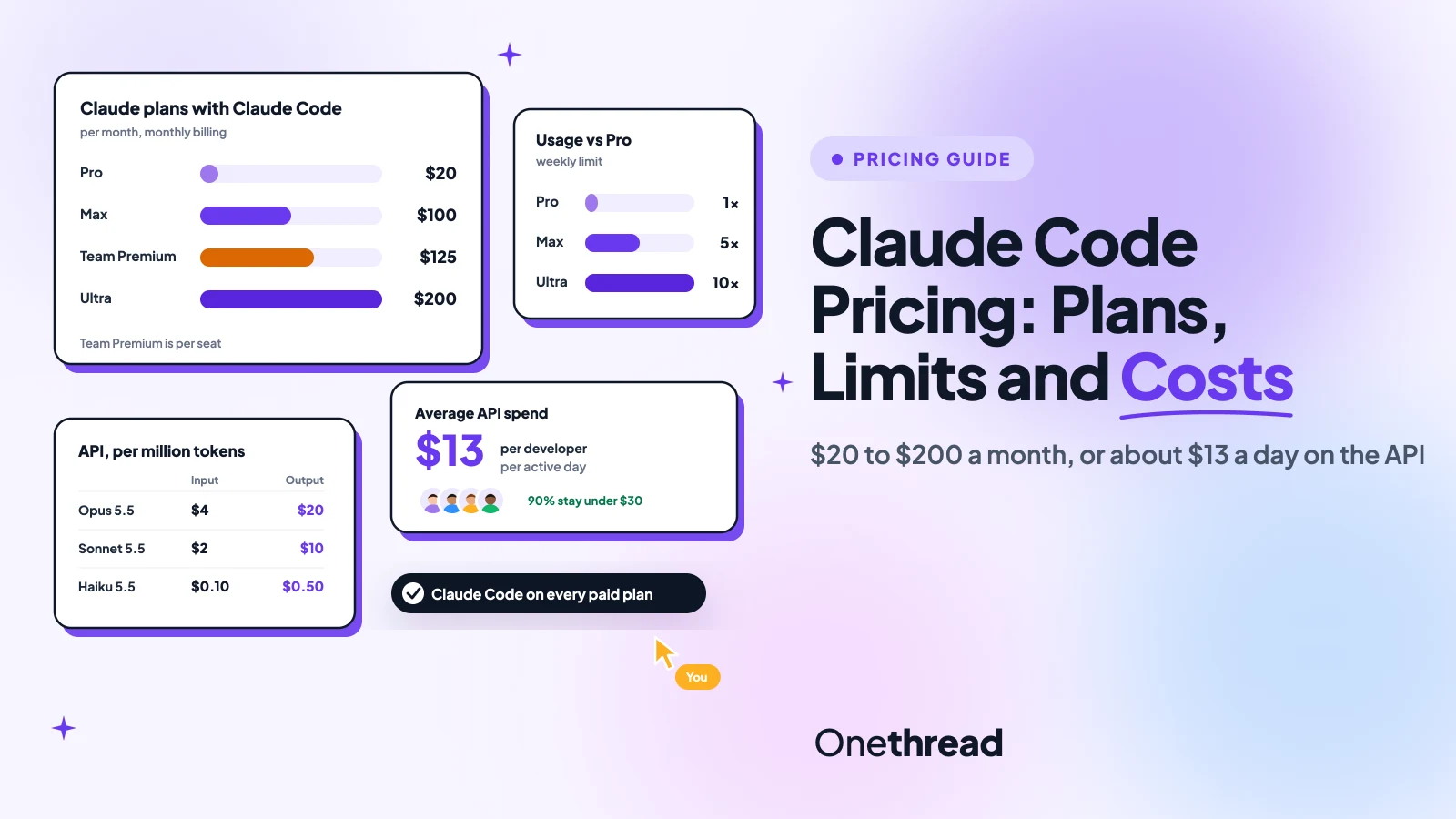
Claude Code has no price tag of its own. It rides on a Claude plan or on API tokens, and that’s where the confusion starts.
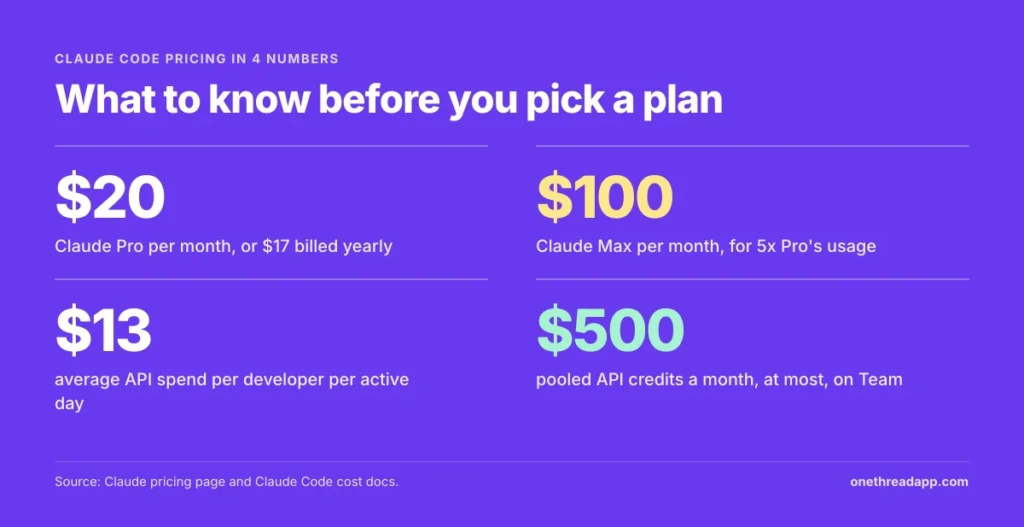
Claude Code pricing starts at $20 a month on Pro, or $17 billed yearly. Max costs $100, Ultra $200, and Team seats run $20 to $125. Enterprise adds API-rate usage to a $20 seat.
But the price is only half the bill. Limits reset every five hours, your chats share the same pool, and a busy API month can pass $250 per developer.
We checked Anthropic’s pricing page and Claude Code docs, then compared 7 top-ranking guides.
You’ll see what each plan includes, what developers actually spend, and which plan fits your team.
Key Points
- Claude Code is included on every paid Claude plan: Pro at $20 a month or $17 billed yearly, Max at $100, Ultra at $200, and Team seats from $20 to $125. The Free plan doesn’t include it.
- Your terminal work and your chats draw from one usage pool. Limits reset on a rolling five-hour window, with weekly limits on paid plans, and Ultra drops the five-hour limit.
- On API billing, Anthropic puts the average at about $13 per developer per active day, or $150 to $250 a month. A flat plan wins if you code on most workdays.
- Pick by hours, not features. Pro suits a few sessions a week, Max or Ultra suits all-day coding, and Team Premium suits developer teams that need one bill.
How Does Claude Code Pricing Work?
Claude Code pricing works in two ways. You pay a flat Claude subscription and get usage within limits, or you pay for every token through the API. Both routes run the same tool. The bills behave nothing alike, so it pays to know which one you’re on.
Subscriptions Share One Usage Pool
On Pro, Max, Ultra and Team, Claude Code costs nothing extra. It’s part of the plan. But it isn’t a separate allowance. Anthropic says your chats on web, desktop and mobile draw from the same pool as Claude Code.
Limits reset on a rolling five-hour window. Paid plans add a weekly limit on top. There’s no fixed message count, because usage depends on the model, the length of the session and the size of your files.
So a long Opus session in the terminal can eat the hours you planned for chat.
API Keys Bill Every Token
The second route skips the subscription. You connect Claude Code to a Console account and pay standard API rates for each million tokens (MTok) you send and receive.
There’s no five-hour wall here. There’s also no ceiling on the bill unless you set one. Enterprise works the same way: a $20 seat fee, plus usage billed at API rates.
In practice, the API suits short bursts of heavy work or scripts. A subscription suits steady daily coding, because the price stays flat however many tokens you burn.
What Does Claude Code Cost on Each Plan?
Claude Code costs $20 to $200 a month on a personal plan, and $20 to $125 per seat on Team. Every paid plan includes it. The Free plan doesn’t.
| Plan | Monthly billing | Annual billing | Usage | Best for |
|---|---|---|---|---|
| Free | $0 | $0 | Claude Code not included | Trying Claude chat |
| Pro | $20 | $17 a month, $200 up front | 1x | A few coding sessions a week |
| Max | $100 | Not offered | 5x Pro every 5 hours and every week | Daily coding |
| Ultra | $200 | Not offered | 10x Pro a week, no 5-hour limit | All-day sessions |
| Team Standard | $25 per seat | $20 per seat | More than Pro | Light team use |
| Team Premium | $125 per seat | $100 per seat | 5x Team Standard | Developer teams |
| Enterprise | Not offered | $20 per seat plus usage | Billed at API rates | 20 or more seats |
Sources: Claude pricing page, Claude API pricing and Claude Code cost docs. Prices exclude tax. Best for labels are ours.
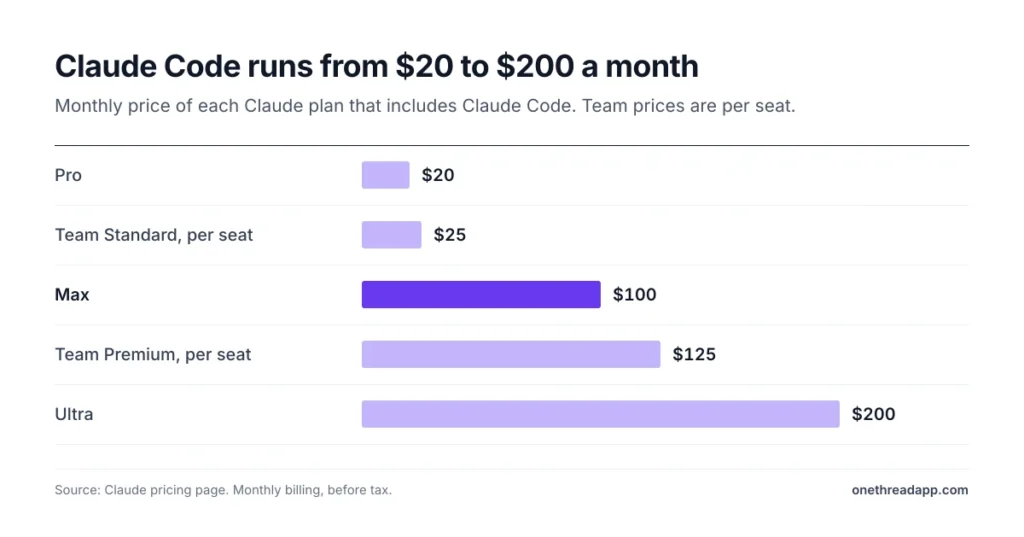
The jump from Pro to Max is five times the price for five times the usage. Ultra doubles the price again. What it adds is the missing five-hour limit, which matters most on long agent runs.
What Does Claude Pro Include for Claude Code?
Claude Pro is the cheapest way to run Claude Code. It costs $20 a month, or $17 a month when you pay $200 for the year.
Pro includes Claude Code, Claude in Chrome, Projects and more Claude models, Opus among them. Anthropic says Pro gives at least 5x the usage of Free per five-hour session. That’s enough for focused work, not for a full day of agent runs.
Say you fix bugs for an hour after standup and review a pull request after lunch. Pro covers that. Leave three agents running through lunch, and you’ll likely wait for a reset before the review.
Fable, Anthropic’s top model, isn’t part of Pro’s usage. You can still use it, but it’s paid with usage credits at API rates.
Example: a year of Pro costs $200 up front against $240 for 12 monthly payments of $20. We make that a $40 saving, or two months free in all but name.
Pricing: $20 a month billed monthly, or $17 a month billed yearly, which is $200 up front.
Best For
- Solo developers who code in short, focused sessions a few days a week.
Pros
- Lowest entry price for Claude Code, with a yearly discount.
- Includes Opus, Sonnet and Haiku models.
- Usage credits let you keep working at API rates after a limit.
Cons
- Shares one usage pool with your Claude chats.
- Fable costs extra through usage credits.
- Limits reset every five hours, which can stall long agent runs.
What Does Claude Max Add for Claude Code?
Claude Max costs $100 a month and gives you 5x Pro’s usage, both every five hours and every week. Anthropic built it for people who keep Claude Code open most of the working day.
Max adds three extras. Fable is included for up to half your weekly limit. You get $100 a month in API credits to build on the Claude Platform. And you get priority access when traffic is high.
Those API credits matter more than they look. If you also run scripts or small apps on the API, the first $100 of that spend is already paid.
Say you pair with Claude Code from nine to five and switch to Opus for the hard parts. That’s the day Max is priced for.
Max is billed monthly only. There’s no yearly discount.
Pricing: $100 a month, billed monthly.
Best For
- Developers who use Claude Code for several hours on most workdays.
Pros
- 5x Pro’s usage every five hours and every week.
- Fable included for up to half the weekly limit.
- $100 a month in API credits on the Claude Platform.
- Priority access at high traffic times.
Cons
- No annual billing option.
- Still capped by the five-hour window.
- Five times the price of Pro.
What Does Claude Ultra Add for Claude Code?
Claude Ultra costs $200 a month and removes the five-hour limit for verified accounts. Instead, you get 10x Pro’s usage every week.
That changes how you plan work. On Max, a big refactor can stop mid-session until the window resets. On Ultra, the only clock that matters is the weekly one.
Ultra also raises the monthly API credit to $200, up from $100 on Max. Fable stays included for up to half your weekly limit.
Here’s the thing about the math. Ultra costs 2x Max and gives 2x Max’s weekly usage (10x versus 5x Pro). So you aren’t buying cheaper usage. You’re buying the missing five-hour wall.
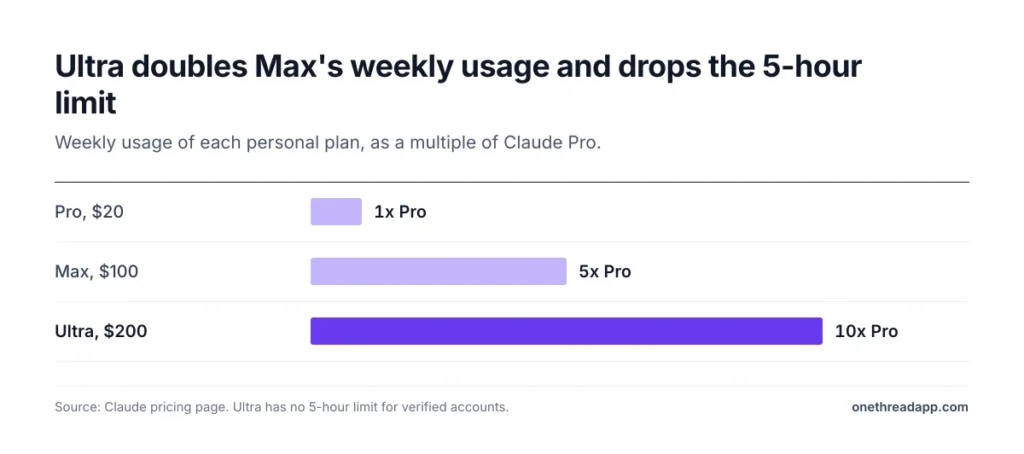
Who needs that? Mostly people who start a big task, walk away, and expect it finished when they come back. If your sessions end before lunch, Max does the same job for half the price.
Ultra is billed monthly only.
Pricing: $200 a month, billed monthly.
Best For
- Developers who run long agent sessions or several Claude Code instances at once.
Pros
- No five-hour limit for verified accounts.
- 10x Pro’s usage every week.
- $200 a month in API credits on the Claude Platform.
Cons
- No annual billing option.
- Same price per unit of weekly usage as Max.
- The weekly limit still applies.
What Do Claude Team Seats Cost for Claude Code?
Claude Team costs $20 to $125 per seat a month, for teams of 2 to 150 people. Claude Code is included on both seat types, and you can mix them on one plan.
A Standard seat costs $20 a month billed yearly, or $25 monthly. It gives more usage than Pro. A Premium seat costs $100 billed yearly, or $125 monthly, and gives 5x the usage of a Standard seat.
That makes Premium the better deal for developers. Standard gives more than Pro, so Premium gives more than 5x Pro. Max gives exactly 5x Pro for the same $100.
Team also adds central billing, single sign-on (SSO), spend controls and up to $500 per month in pooled API credits.
Example: five developers on Premium seats cost 5 x $100 x 12 = $6,000 a year on annual billing. Pay monthly and it’s 5 x $125 x 12 = $7,500. Five Standard seats cost $1,200 a year, or $1,500 monthly.
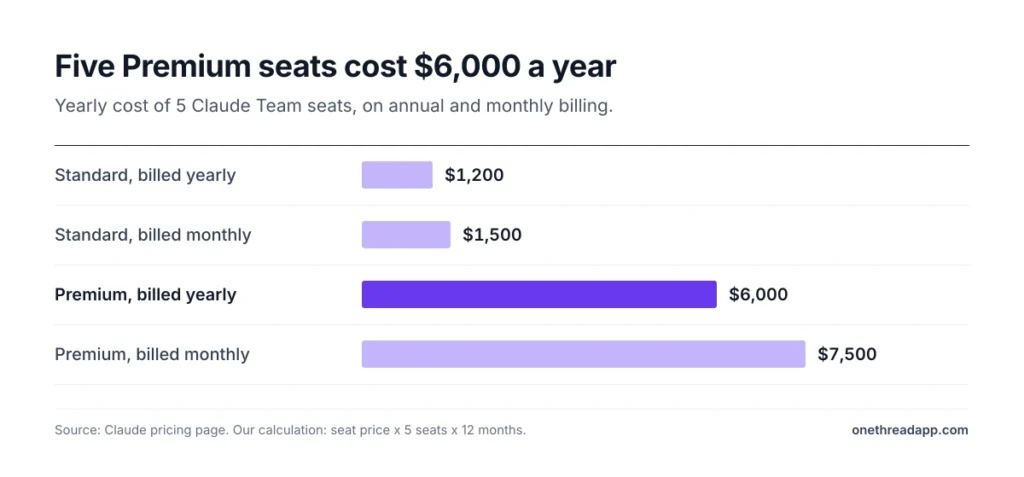
Pricing: Standard seats at $20 a month billed yearly or $25 monthly. Premium seats at $100 billed yearly or $125 monthly.
Best For
- Teams of 2 to 150 that want one bill and admin controls.
- Mixed groups: Premium for developers, Standard for everyone else.
Pros
- Claude Code on both seat types.
- Premium gives more than 5x Pro’s usage.
- Up to $500 a month in pooled API credits.
- SSO, central billing and spend controls.
Cons
- Monthly billing costs 25% more than yearly.
- No SCIM, audit logs or role-based access.
- Fable only on Premium seats, up to half the weekly limit.
How Much Does Claude Enterprise Cost for Claude Code?
Claude Enterprise costs $20 per seat a month, billed yearly, plus usage at API rates. There’s a 20 seat minimum.
Unlike Team, the seat fee doesn’t buy a usage allowance. Every token your developers use goes on the bill at API rates. Admins can set spend limits for each user and for the whole organization. That model suits teams whose usage swings from month to month.
Enterprise adds the controls that large companies ask for: SCIM, audit logs, role-based access, custom data retention, the Compliance API and IP allowlisting. A HIPAA-ready offering is also available.
Example: 20 seats cost 20 x $20 x 12 = $4,800 a year before usage. Add Anthropic’s average of $150 to $250 per developer a month, and usage runs $36,000 to $60,000 a year. We put the total at about $40,800 to $64,800.
Pricing: $20 per seat a month, billed yearly, with a 20 seat minimum, plus usage at API rates.
Best For
- Companies with 20 or more developers that need SCIM, audit logs or a HIPAA-ready setup.
Pros
- Costs follow real usage instead of seat tiers.
- Admins set spend limits per user and per organization.
- Security and compliance controls that Team lacks.
Cons
- 20 seat minimum.
- Annual billing only.
- Heavy users can cost far more than a flat seat.
How Much Does Claude Code Cost on the API?
On the API, Claude Code costs $0.10 to $10 per million input tokens and $0.50 to $50 per million output tokens, by model. Output always costs 5x input.
| Model | Input per MTok | Output per MTok | Cache read per MTok |
|---|---|---|---|
| Fable 5.1 | $10 | $50 | $0.25 |
| Opus 5.5 | $4 | $20 | $0.20 |
| Sonnet 5.5 | $2 | $10 | $0.10 |
| Haiku 5.5 | $0.10 | $0.50 | $0.01 |
Source: Claude pricing page, API tab. Haiku 5.5 prices cover prompts up to 100K tokens. Longer prompts cost $0.50 input and $2.50 output.
Three modifiers change the bill. Fast mode on Opus 5.5 runs up to 2.5x faster at 2x the standard price. US-only inference costs 1.1x. And prompt caching cuts the cost of context you send again.
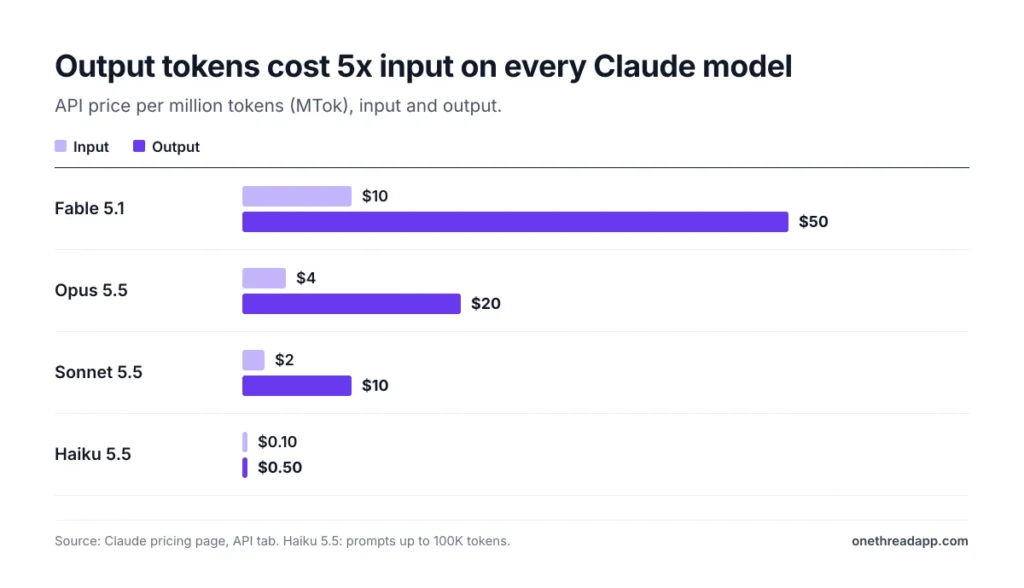
Example: a session that sends 1 million input tokens and gets 100,000 output tokens back costs $4 + $2 = $6 on Opus 5.5. On Sonnet 5.5, the same work costs $2 + $1 = $3.
Top Tip: Long Claude Code sessions resend your codebase context again and again. Keep the session warm so those tokens come from the cache, which costs 95% less than fresh input on Opus 5.5.
What Do Developers Actually Spend on Claude Code?
Developers on API billing spend about $13 per active day on Claude Code, according to Anthropic’s Claude Code cost docs. That works out to $150 to $250 per developer a month across enterprise deployments.
The spread is narrower than you’d fear. Anthropic says 90% of users stay below $30 per active day.
Those are still averages. Costs move with model choice, codebase size, and habits like running several instances at once or scripting Claude Code into automation.
So the useful question isn’t what Claude Code costs. It’s how many days a month you’ll lean on it.
Use the averages as a sanity check, not a budget. A team that pairs with Claude Code all day on a large monorepo will sit near the top of the range. A team that asks it for the odd test file will sit far below.
Example: at $13 per active day, Pro’s $20 covers less than two days of average API spend. Max’s $100 covers about eight, since $100 / $13 = 7.7. Code with it 15 days a month and average API usage comes to about $195.
Anthropic’s own advice for teams is simple. Start with a small pilot group, track its spend, and set a baseline before a wider rollout.
Which Is Cheaper for Claude Code: a Subscription or the API?
A subscription is cheaper for Claude Code if you use it on most workdays. The API wins only when you use it a handful of days a month.
Three break-even points help you decide, using Anthropic’s $13 average:
- Pro at $20: pays for itself after about 2 active days a month.
- Max at $100: pays for itself after about 8 active days a month.
- Ultra at $200: pays for itself after about 15 active days a month.
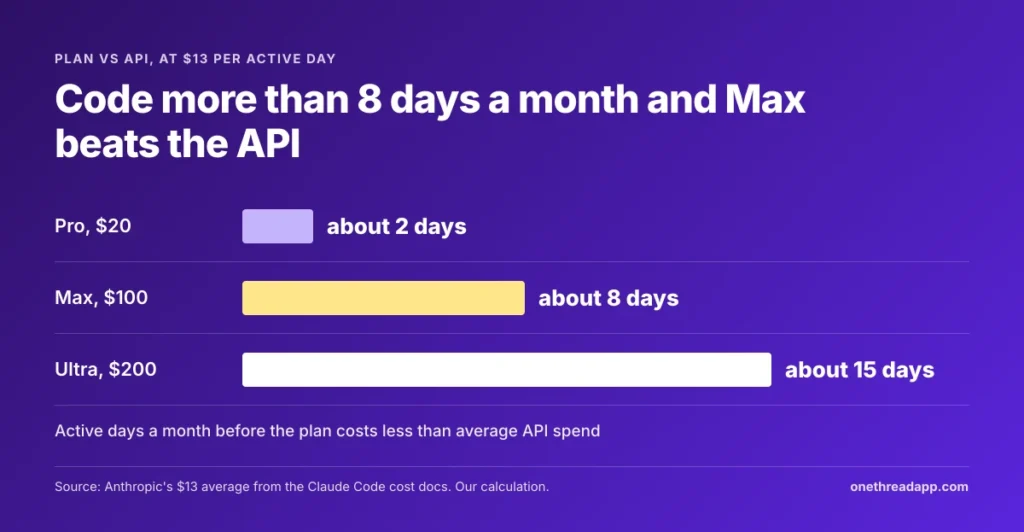
One caveat worth being honest about. A day of Opus with big files can cost far more than $13, and a day of Haiku far less. Treat these as rough lines, then check your own numbers after a full week of normal work.
There’s also a control angle. A subscription caps what you spend, while the API caps nothing unless you set a limit. But plan limits can stop you mid-task, and the API never does.
Anthropic’s pricing page points to a middle path. For heavy coding sessions, you can switch to pay-as-you-go API credits through a Console account and keep the plan for everything else. Not sure where you sit? Start on Pro for a month, and your /usage history will answer it.
What Happens When You Hit a Claude Code Usage Limit?
When you hit a Claude Code usage limit, you have three choices. Wait for the reset, move to a bigger plan, or turn on usage credits.
Each one has a cost. Waiting costs time, a bigger plan costs a flat fee, and usage credits cost tokens at list price.
Usage credits let paid plans keep working at standard API rates. On Pro, Max and Ultra, you can set a monthly spend limit for them. On Team and Enterprise, your organization sets the limit.
You can check where you stand in Settings, under Usage, or by typing /usage inside Claude Code. On a paid plan, /usage also shows which skills, subagents and MCP servers used the most, with suggested fixes. Press f on that screen and Claude Code applies the fixes it can, such as a lower effort setting.
Anthropic also says it may limit usage in other ways, such as weekly and monthly caps, to keep access fair. So don’t plan a launch week around the last 10% of your weekly limit.
Top Tip: Set a monthly spend limit before you turn on usage credits. Without one, /usage shows Unlimited and no spend figure, so you won’t see the bill coming.
How Can You Keep Claude Code Costs Down?
Most Claude Code costs come from three things: how much context you send, which model reads it, and how hard it thinks. Five habits keep all three in check:
- Pick the model per task: Sonnet 5.5 costs half as much as Opus 5.5 per token. Save Opus for the hard problems.
- Lower the effort setting: use /effort to drop from max to high on simple work. Claude Code’s own /usage tips suggest this.
- Clear between tasks: /clear starts a fresh session. Old context stops riding along on every request.
- Compact long sessions: run /compact before you step away. It shrinks the conversation the next request has to resend.
- Follow the /usage tips: they flag which CLAUDE.md file, skill or MCP server eats the most tokens per request.
Teams can go one step further. Admins on Team and Enterprise can set spend limits per user, so one runaway script can’t drain the budget for the whole month.
It also helps to treat AI spend like any other project cost. Log it next to the sprint in your software project management plan, and the cost of a feature stops hiding in a separate invoice. You’ll also see which projects lean on Claude Code hardest.
Which Claude Code Plan Fits Your Team?
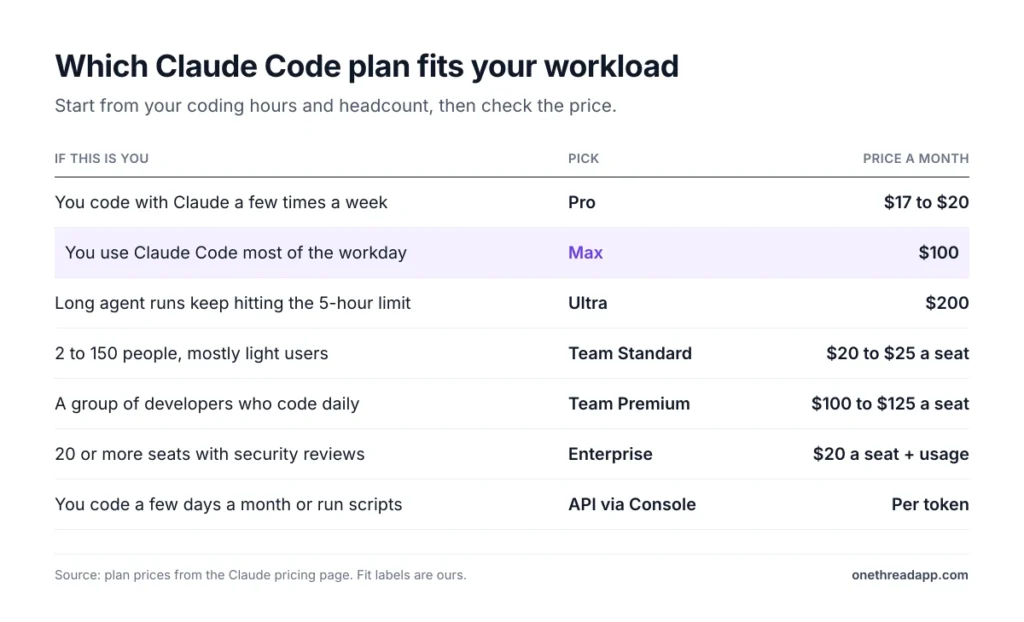
The right Claude Code plan depends on how many people use it and how many hours they spend. Start from your workload, then check the price.
| If this is you | Pick | Cost |
|---|---|---|
| You code with Claude a few times a week | Pro | $17 to $20 a month |
| You use Claude Code most of the workday | Max | $100 a month |
| Long agent runs keep hitting the 5-hour limit | Ultra | $200 a month |
| 2 to 150 people, mostly light users | Team Standard | $20 to $25 per seat |
| A group of developers who code daily | Team Premium | $100 to $125 per seat |
| 20 or more seats with security reviews | Enterprise | $20 per seat plus API usage |
| You code a few days a month or run scripts | API through Console | Pay per token |
Fit labels are ours. Prices come from the Claude pricing page.
If you’re pricing other AI tools for the rest of the team, our ChatGPT pricing guide breaks down its plans the same way. And if Claude Code is part of a wider dev stack, see our list of project management software for developers.
What Should You Do Next With Claude Code?
Claude Code pricing looks simple until you notice that the plan buys hours, not features. Every paid plan runs the same tool. What you pay for is how long it keeps running before a limit or a bill stops you.
This week, run /usage after a normal workday and note your spend or plan bar. Multiply it by your coding days, then hold the total up against the break-even points here. The cheapest plan is the one you don’t outgrow by Thursday, and you’ll know which one that is within a week.
FAQs
Is Claude Code Free?
No. Claude Code isn’t part of the Free Claude plan. The cheapest way in is Claude Pro at $20 a month, or $17 a month billed yearly. You can also pay per token through a Console account on the API, which has no monthly fee but bills every token Claude Code uses.
Can You Pay for Claude Max or Ultra Yearly?
No. Max and Ultra are billed monthly only, at $100 and $200. Pro is the only personal plan with a yearly price, $200 up front. Teams that want annual billing for Claude Code can use Team seats, where yearly billing costs 20% less than monthly.
Can I Use My Own API Key With Claude Code?
Yes. Claude Code can run on pay-as-you-go API credits through a Claude Console account instead of a subscription. You then pay standard token rates, such as $4 input and $20 output per million tokens on Opus 5.5. Anthropic suggests this route for heavy coding sessions.
What Is the Minimum Team Size for Claude Team?
Claude Team needs at least 2 people and tops out at 150. Above that, or when you need SCIM and audit logs, Claude Enterprise takes over with a 20 seat minimum. You can add Team seats midterm and mix Standard and Premium seats, so heavy Claude Code users get Premium usage.
Do Students Get a Discount on Claude Code?
Claude offers an Education plan for whole universities, with discounted access for students, faculty and staff. It’s sold to institutions, not to single students. Anthropic doesn’t publish a student price for Claude Code, so ask your university whether it has a Claude for Education deal.