ChatGPT’s price list looks simple until you try to buy it for a team.
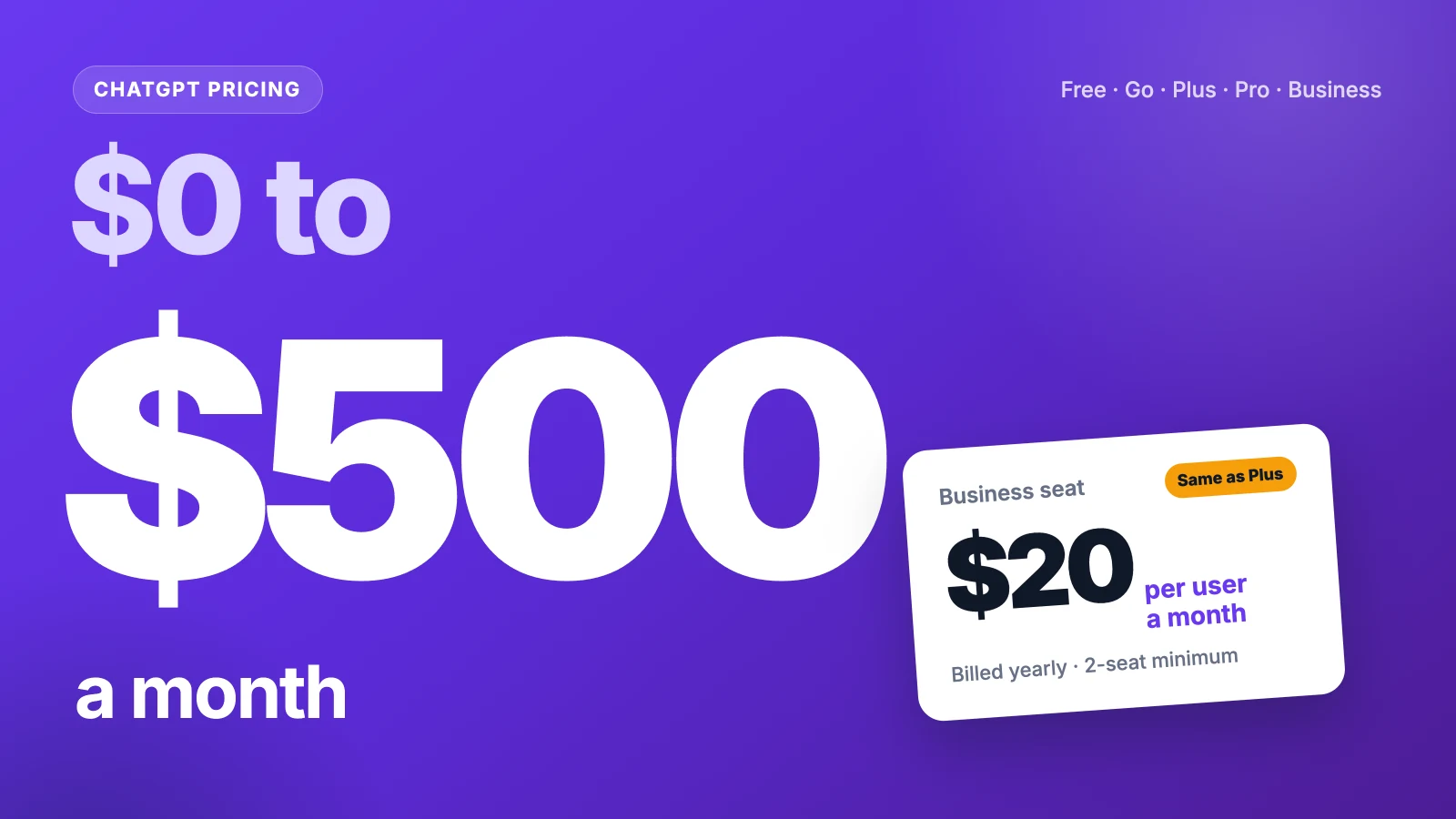
ChatGPT pricing runs from $0 to $500 a month. Free costs $0, Go is $8, Plus is $20, and Pro comes in $100, $200 and $500 tiers. Business starts at $20 per user, billed yearly.
But the sticker price skips the parts that move the bill. Ads on Go. A two-seat minimum. A Pro allowance that just got smaller.
We read OpenAI’s pricing page and two help articles, seven pricing guides and two user threads, then did the math.
Here’s what each plan includes, who it fits, and what your 10-person team would pay.
Key Points
- ChatGPT costs $0 on Free, $8 a month on Go, $20 on Plus, and $100, $200 or $500 on Pro. Business costs $20 per user a month billed yearly or $25 billed monthly, with a two-seat minimum. Enterprise is a custom quote.
- Pick Plus if you hit Free or Go limits often and want no ads. Only move to Pro once Plus limits block real work, since every Pro tier works out to about $20 per Plus-sized slice of usage.
- A team of 10 on Business Standard pays $2,400 a year billed yearly, the same as 10 Plus plans, but with admin controls and no training on business data by default.
- Watch the extras: Fast and Ultrafast modes burn your allowance 2.5 to 8 times faster, and only Pro and Business include monthly API credits.
What Does ChatGPT Pricing Look Like on Each Plan?
ChatGPT pricing splits into four personal plans and two team plans. Personal plans bill monthly. Only Business and Enterprise offer yearly billing.
| Plan | Price per month | Yearly billing | Best for |
|---|---|---|---|
| Free | $0 | Not offered | Light, casual use |
| Go | $8 | Not offered | Daily chat on a budget |
| Plus | $20 | Not offered | Regular work use |
| Pro 100 | $100 | Not offered | Heavy solo users |
| Pro 200 | $200 | Not offered | Long Codex sessions |
| Pro 500 | $500 | Not offered | Users who need Ultrafast |
| Business Standard | $25 per user | $20 per user | Teams of 2 to 200 |
| Business Premium | $125 per user | $100 per user | Team power users |
| Enterprise | Custom quote | Yes | Large firms |
The “Best for” labels are our own read of each plan. Prices are US list prices and exclude tax, so check the checkout page in your country.
Sources: ChatGPT pricing page, About ChatGPT Pro tiers, API credits benefit.
What Does the ChatGPT Free Plan Include?
ChatGPT Free costs nothing and still covers most casual use. You get unlimited text chats with GPT-6, though OpenAI notes they’re subject to abuse guardrails.
The limits show up once you use tools. Uploads, image creation, voice chats, deep research, memory and Codex are all capped. ChatGPT Work runs only in the desktop app.
The context window is small too. OpenAI lists 27K tokens for instant replies, or about 12 pages of text. Paste a long contract and you’ll feel it.
Say you use ChatGPT to rewrite emails and answer quick questions a few times a day. Free handles that fine. Upload three spreadsheets in a row, and you’ll start seeing limit messages.
Free also lets you try data analysis and the Excel, Word, PowerPoint and Google Sheets extensions at limited levels. That’s a fair way to learn which tools you’d use before paying.
Pricing: $0.
Best For
- Casual users who chat a few times a day and rarely upload files.
Pros
- Unlimited text chats with GPT-6.
- Includes a taste of deep research, Codex and image creation.
- Works on web, iOS and Android.
Cons
- Tight caps on uploads, images and voice.
- Small 27K context window for instant replies.
- Your chats can train OpenAI’s models unless you opt out.
What Does ChatGPT Go Include for $8?
ChatGPT Go is the budget step up from Free. It costs $8 a month and adds more messages with tools, more uploads, more image creation, more voice chats and longer memory.
Here’s the catch. The Go plan card says it “may include ads”. Plus and the plans above it don’t carry that note.
Go also lacks the bigger features. There are no projects, custom GPTs or advanced reasoning models listed for it. Those start at Plus.
Go still keeps unlimited text chats, under the same abuse guardrails as Free. So the real question is the $12 gap to Plus, and whether removing ads and adding custom GPTs is worth it to you.
TechRadar’s Graham Barlow thinks Go might even be worth the downgrade for Plus users who rarely push limits. The math backs him up.
Example: Go costs $8 × 12 = $96 a year, while Plus costs $20 × 12 = $240, so Go saves you $144 a year.
Pricing: $8 a month, billed monthly.
Best For
- Daily users who mostly chat and don’t mind ads.
Pros
- Saves $144 a year against Plus.
- More uploads, images and voice than Free.
- Longer memory than Free.
Cons
- The plan may include ads.
- No projects, custom GPTs or advanced reasoning models.
- No yearly billing option.
What Does ChatGPT Plus Include for $20?
ChatGPT Plus is the plan most people mean when they say they pay for ChatGPT. It costs $20 a month and removes the ad note.
Plus adds advanced reasoning models with GPT-6. It expands messages, uploads, deep research, memory and context. It also adds projects, scheduled tasks and custom GPTs.
For work, two lines matter most. Plus expands Codex usage, and it opens ChatGPT Work on desktop, web and mobile.
Picture a marketer who drafts briefs, analyzes a CSV and builds a custom GPT for brand voice. That’s a normal Plus week. If you write for clients, our list of writing tools for marketing shows where ChatGPT fits next to other options.
Plus also brings more complex image creation and early access to new features. You pay by card, and you can switch plans from your settings.
One gap surprises people. Plus doesn’t include API credits, and the API bills on its own.
Pricing: $20 a month, billed monthly.
Best For
- Professionals who use ChatGPT every day for real work.
Pros
- Advanced reasoning models with GPT-6.
- Projects, scheduled tasks and custom GPTs.
- ChatGPT Work on desktop, web and mobile.
- No ad note on the plan.
Cons
- No yearly discount.
- No API credits included.
- Limits still apply, and OpenAI doesn’t publish exact counts.
How Do the ChatGPT Pro Tiers Compare?
ChatGPT Pro comes in three tiers: Pro 100, Pro 200 and Pro 500. All three include Pro reasoning powered by GPT-6 Astra, longer Codex and ChatGPT Work sessions, and maximum deep research.
The tiers differ in usage, not features, with one exception. Only Pro 500 includes Ultrafast mode.
| Tier | Price per month | Price per year | Usage vs Plus (reported) | Ultrafast |
|---|---|---|---|---|
| Pro 100 | $100 | $1,200 | 5x | No |
| Pro 200 | $200 | $2,400 | 10x | No |
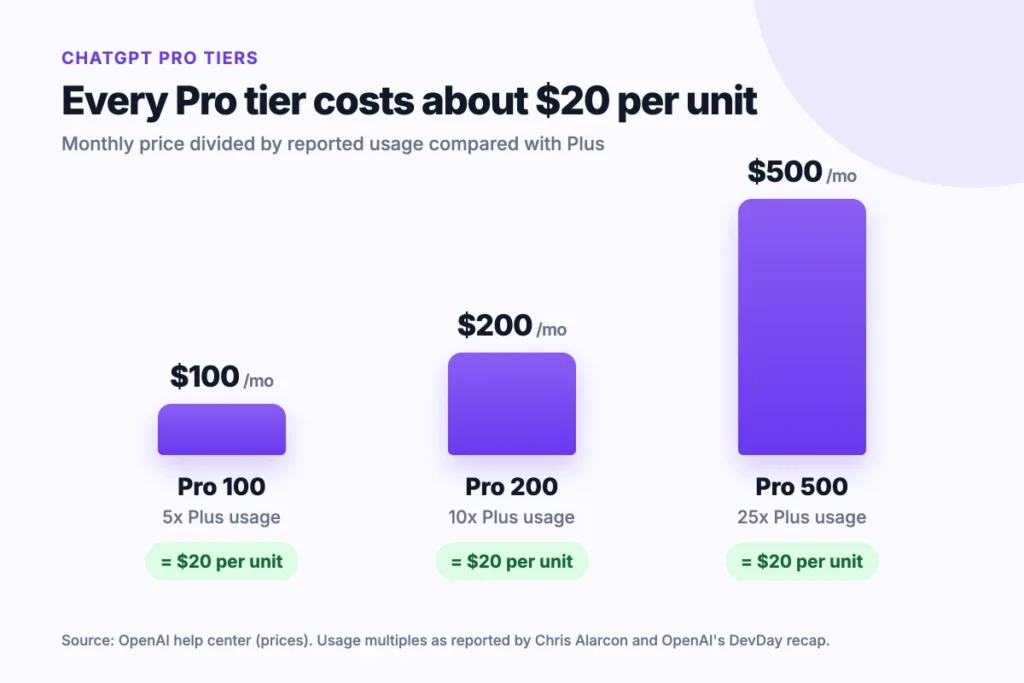
| Pro 500 | $500 | $6,000 | 25x | Yes |
OpenAI’s help center no longer prints the usage multiples. The 5x and 10x figures come from OpenAI’s Thibault Sottiaux, as reported by Chris Alarcon, and 25x comes from OpenAI’s DevDay recap.
Example: $100 ÷ 5 = $20, $200 ÷ 10 = $20 and $500 ÷ 25 = $20, so every Pro tier costs about $20 per Plus-sized slice of usage.
Pro 200 also changed. New subscribers now get a lower allowance at the same $200 price, and grandfathered accounts move to it too. One long-time subscriber in the OpenAI community forum said the change made the plan unworkable for them.
Pricing: $100, $200 or $500 a month. Pro bills monthly only.
Best For
- Solo developers and analysts who hit Plus limits every week.
- Codex users who run long sessions.
Pros
- More usage at the same rate per unit.
- Monthly API credits equal to the plan price.
- Dot, OpenAI’s always-on agent, and unlimited image creation.
Cons
- No yearly billing or prepay discount.
- Pro 200 now carries a lower usage allowance.
- Ultrafast is locked to Pro 500.
What Does ChatGPT Business Cost per Seat?
ChatGPT Business costs $20 per user a month billed yearly, or $25 billed monthly, for a Standard seat. A Premium seat costs $100 billed yearly or $125 billed monthly.
Premium grants 5x more usage than Standard and drops the 5-hour limit. You can mix both seat types in one workspace, so only your heavy users need Premium.
Business adds what Plus lacks for teams. That includes SAML SSO, MFA, central billing, usage analytics and spend controls. It also connects to Google Workspace, Slack, GitHub and Microsoft 365.
Data handling changes as well. Business doesn’t train on your business data by default. Plus and Free do, unless you opt out.
The plan fits teams of 2 to 200 people. Business also pools API credits for the workspace: $20 per paid Standard seat and $100 per Premium seat, capped at $500 a month.
Pricing: Standard seat $20 billed yearly or $25 monthly. Premium seat $100 billed yearly or $125 monthly.
Best For
- Small and midsize teams that share work in one workspace.
Pros
- Yearly billing saves 20% on every seat.
- No training on business data by default.
- Mix Standard and Premium seats.
- Pooled API credits for the workspace.
Cons
- Two-seat minimum.
- Capped at 200 employees.
- Premium seats cost five times a Standard seat.
When Does ChatGPT Enterprise Make Sense?
ChatGPT Enterprise makes sense once you outgrow 200 people or need contract-level controls. Pricing is a custom quote from OpenAI’s sales team.
Enterprise expands the context window to 128K tokens for instant replies, or about 250 pages of text. Business gets 54K.
Security goes further too. Enterprise adds SCIM, enterprise key management, role-based access controls and data residency in ten regions.
Support changes most. You get 24/7 priority support, service level agreements (SLAs), custom legal terms, invoicing and volume discounts. OpenAI also offers credit-based and token-based pricing on Enterprise.
Say a firm of 400 needs EU data storage and a signed security review. Business can’t cover that. Enterprise can.
Enterprise also adds user analytics, domain verification and custom data retention policies. Eligible customers get access to AI advisors too.
Expect a sales call and a yearly contract before rollout. Enterprise can pay by invoice, while the other plans pay by card.
Pricing: Custom quote. Billed yearly.
Best For
- Organizations over 200 people with strict security or data rules.
- IT teams that need SCIM user provisioning alongside SSO.
Pros
- Data residency in ten regions.
- SCIM and enterprise key management.
- 24/7 priority support and SLAs.
Cons
- No public price.
- Requires a sales process.
- Not eligible for the API credits benefit.
How Does ChatGPT Pricing Work for a Team of 10?
ChatGPT pricing for a team of 10 lands between $2,400 and $5,400 a year on Business. The seat mix and billing cycle set where you land.
We priced two common seat mixes, each billed two ways, with OpenAI’s list prices.
Example: 10 Standard seats billed yearly cost 10 × $20 × 12 = $2,400 a year. Billed monthly, the same seats cost 10 × $25 × 12 = $3,000.
Example: 8 Standard seats and 2 Premium seats billed yearly cost $1,920 + $2,400 = $4,320 a year. Billed monthly, that mix costs $5,400. It also earns 8 × $20 + 2 × $100 = $360 a month in pooled API credits.
Monthly billing costs 25% more for the same seats. On 10 Standard seats, that’s $600 a year, enough for 2.5 more seats billed yearly.
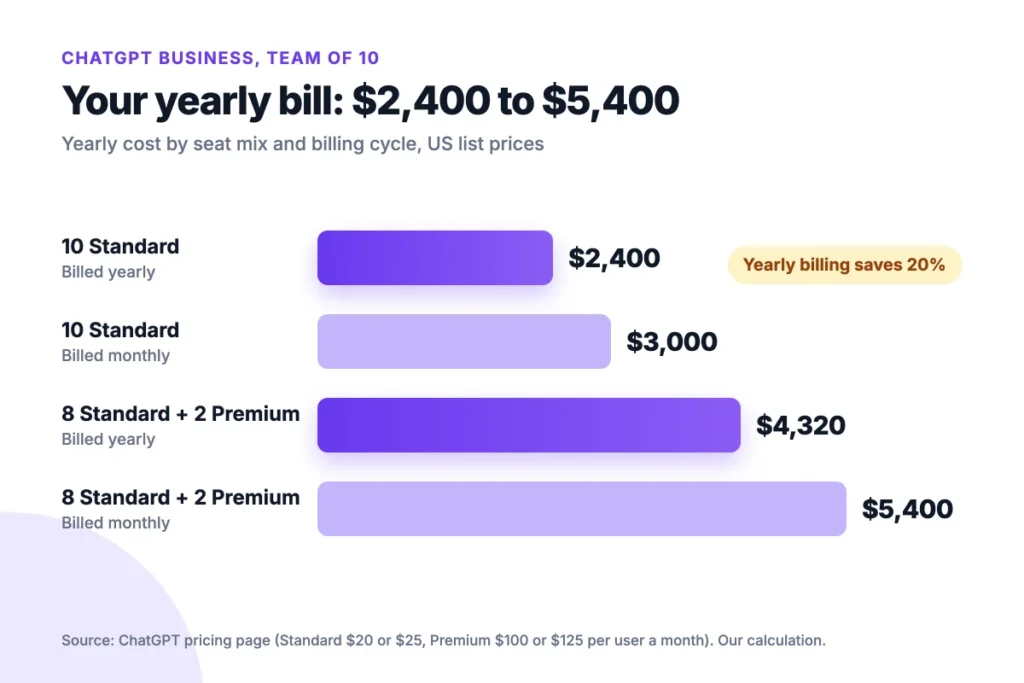
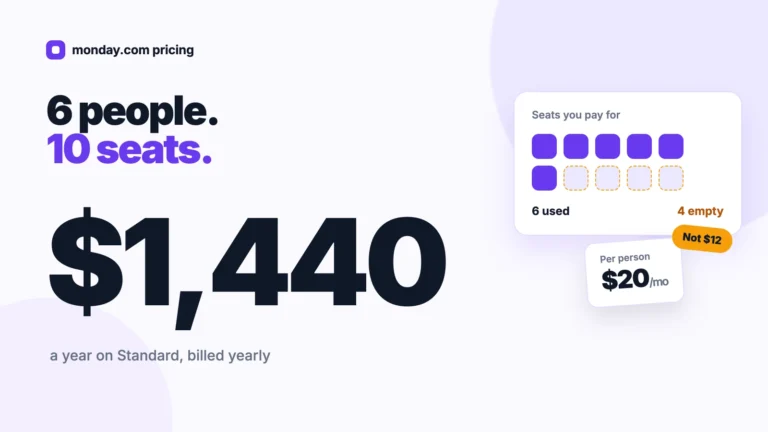
Here’s the surprise. Ten Plus plans also cost $2,400 a year. Business Standard billed yearly matches that price and adds admin controls.
ChatGPT handles the drafting. It doesn’t track who owns each task or when it’s due. A project tool such as Onethread covers that side, and our Notion pricing breakdown shows how another per-seat bill adds up.
Top Tip: Start everyone on Standard seats. Upgrade only the people who hit limits to Premium, since one Premium seat costs as much as five Standard seats.
How Do Credits and Fast Modes Change the ChatGPT Bill?
Credits and speed modes are where a fixed ChatGPT bill starts to drift. Each plan grants an included allowance first, then you can buy credits for eligible features.
Speed costs allowance. Fast mode uses your allowance at 2.5 times the Standard rate. Ultrafast on Pro 500 uses it at 8 times the rate, then bills credits at 6 times the Standard credit rate.
Credits cover Codex, ChatGPT Work and the ChatGPT add-ins for Word, Excel and PowerPoint. They don’t add usage for every model or feature. Business and Enterprise can also buy credits for more access.
Budget a buffer if your team leans on Codex. Credits are a second bill on top of seats, and the pricing page lists no flat credit price.
API credits work differently. Pro tiers grant monthly API credits equal to the plan price, and they expire at the end of each billing cycle. The credits fund the OpenAI API, not more chat usage.
If you run automations, the API side matters more. Our Zapier pricing guide walks through how task-based billing adds up.
Top Tip: Turn off Fast mode for routine work. At 2.5 times the burn rate, one Fast task uses the allowance of two and a half Standard tasks.
Which ChatGPT Plan Should You Choose?
The right plan depends on how often you hit limits and who else needs access. OpenAI’s head of ChatGPT, Nick Turley, has said pricing will keep changing: “There’s no world in which pricing doesn’t significantly evolve.”
So pick for your use today, and review it every few months. Four checks settle most cases:
- Frequency: If you chat a few times a day, stay on Free or Go.
- Ads and tools: If you want custom GPTs, projects or no ads, pay for Plus.
- Limits: If Plus limits stop real work every week, try Pro 100 before Pro 200.
- Team: If two or more people share work, use Business Standard billed yearly.
Discounts can change the answer. Nonprofits can get up to 75% off Business or Enterprise. Verified US K-12 teachers get ChatGPT for Teachers free, and universities can buy ChatGPT Edu.
Still unsure if Plus is worth it? Use Free for two weeks and count how often limits stop you. Three or more stops a week is your sign to upgrade.
Switching is quick. Open Settings, then My Plan, to see the changes your account allows. Dropping from Pro 200 to Pro 100 halves the bill, and monthly billing lets you test it for one cycle.
What Should You Do Next With ChatGPT?
ChatGPT’s plans look like a ladder, but each step buys more of the same usage at about the same rate. For most people, the real choice is Free, Plus or a Business seat. Business makes sense once two people share the work, since yearly seats cost the same as Plus. Everything else follows how often limits stop you.
This week, check your usage history and count every limit message you hit. Then match that count to the four plan checks in this guide and pick the cheapest plan that clears all four.
FAQs
What Happened to ChatGPT Team?
ChatGPT Team is now ChatGPT Business. CloudZero notes that OpenAI renamed the plan and later cut the price by $5 a seat. Business pricing now starts at $20 per user a month billed yearly, or $25 billed monthly, with a minimum of two seats.
Can You Pay for ChatGPT Plus Yearly?
No. OpenAI bills Go, Plus and every Pro tier monthly only, so there’s no yearly discount on personal ChatGPT pricing. Pro’s help page states that annual billing and paying several months ahead aren’t available. Yearly billing exists only on Business and Enterprise, where it cuts a Standard seat from $25 to $20.
Does ChatGPT Plus Include API Access?
No. Plus doesn’t include API credits, and the OpenAI API bills separately from ChatGPT. Pro and Business subscribers can claim monthly API credits once the plan has been active for seven days. Unused credits expire at the end of each billing cycle and don’t roll over.
Can You Cancel ChatGPT Pro and Get a Refund?
You can cancel ChatGPT Pro anytime in your plan settings, or through Apple or Google Play if you bought it there. Access normally lasts until the billing period ends. Canceling doesn’t refund past charges automatically, so you need to request a refund, and eligibility depends on your purchase.
Is There a Student Discount on ChatGPT Pricing?
OpenAI doesn’t list a standing student price on its pricing page. Teachers get more help: verified US K-12 educators can use ChatGPT for Teachers free, and universities can license ChatGPT Edu for students and staff. Nonprofits can get up to 75% off ChatGPT Business or Enterprise through sales.