Nobody quits a job over one bad meeting. But a year of them adds up.
The best team meeting ideas fix three things: purpose, participation, and follow-up. Send pre-work, open with a win, give everyone a role, and end with owners and dates. Then add one fun element, like a show-and-tell or a themed round.
You’ve seen the “this meeting could have been an email” jokes. Most of them are fair.
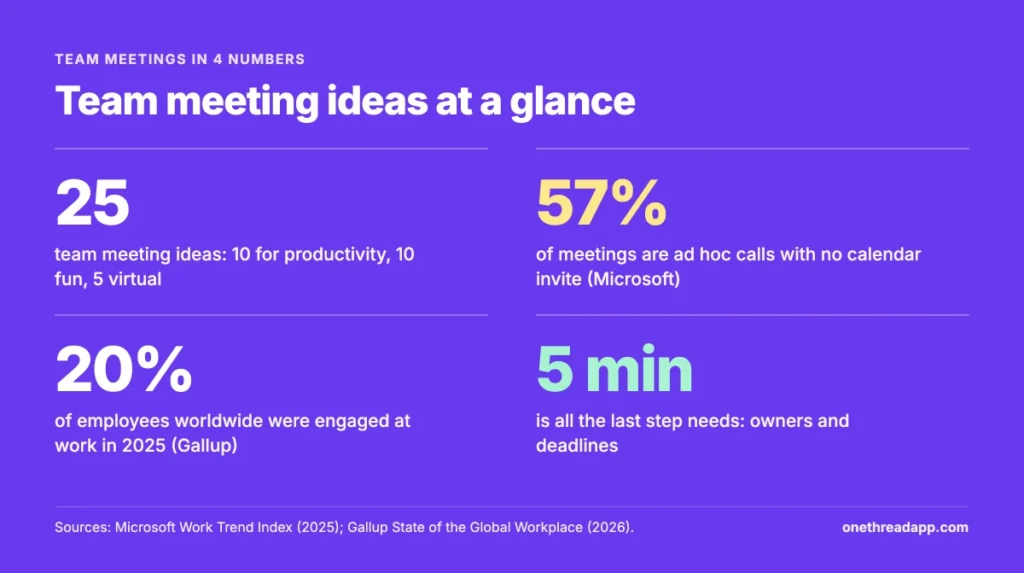
We read the top guides on this topic and sorted 25 ideas by the problem they solve.
You’ll get 10 productivity ideas, 10 fun ones, 5 for virtual teams, discussion topics, and a table to pick from.
Key Points
- The best team meeting ideas fix purpose, participation and follow-up. Start with pre-work and one objective, give every attendee a role, and close with owners and deadlines.
- Add one fun element per meeting, not five. An icebreaker question, a show-and-tell or a themed round is enough to change the mood.
- Virtual teams need structure more than games. Use a check-in round, a shared whiteboard, and meeting times that rotate across time zones.
- Match the idea to the meeting type with the table in this guide, and test one change for four weeks before you judge it.
Why Do Most Team Meetings Fail?
Most team meetings fail because they have no clear purpose, the wrong people in the room, and no follow-up. The meeting itself is rarely the problem. The setup around it is.
Meeting science is a real research field. Organizational psychologist Steven Rogelberg has written a whole book on it.
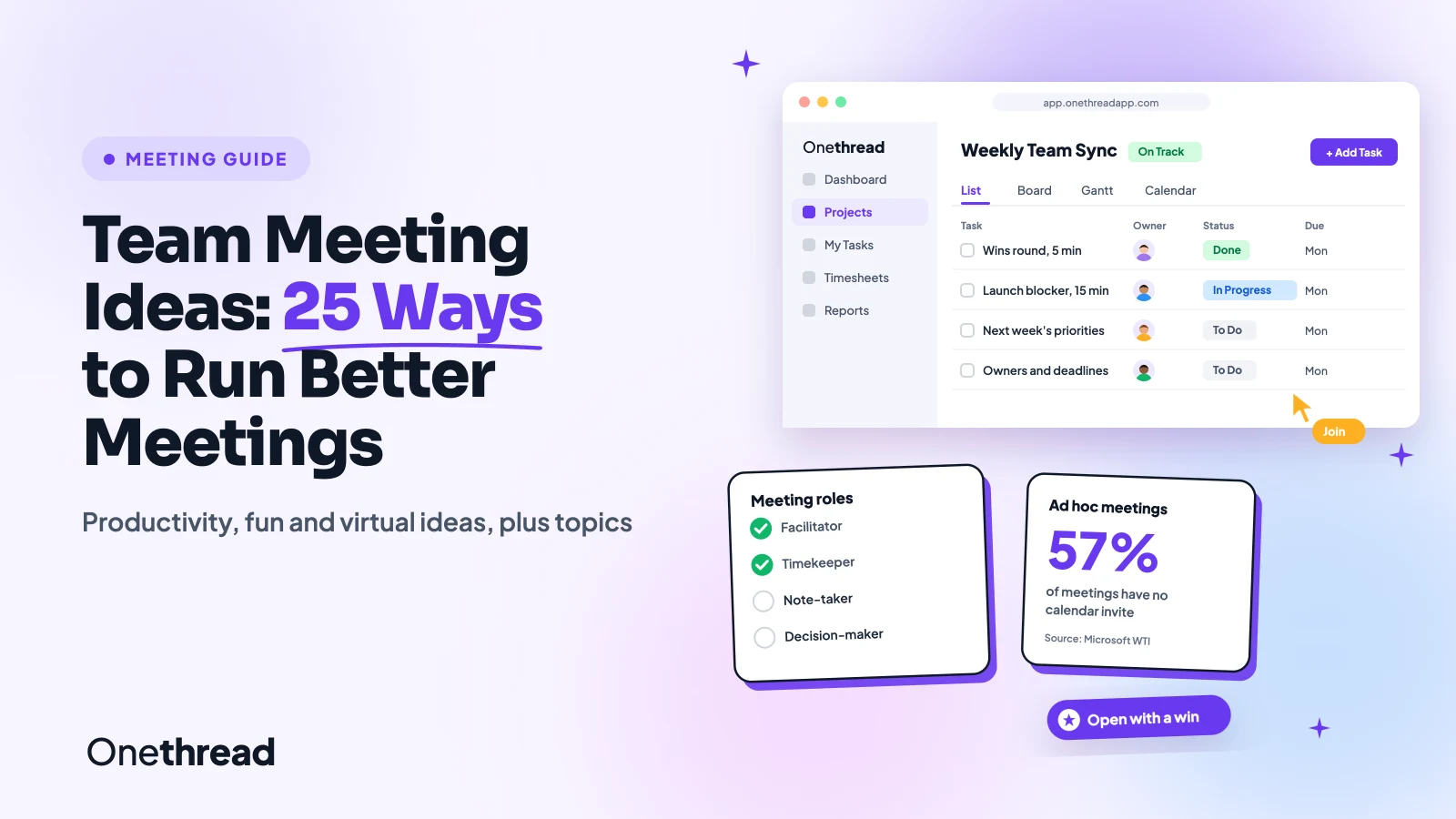
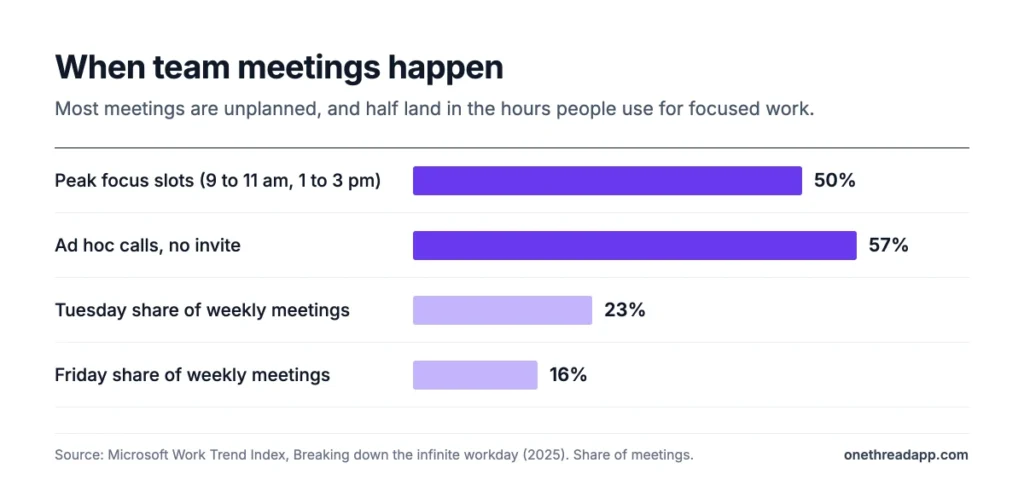
Meetings also pile up fast. In Microsoft’s Work Trend Index research, 57% of meetings were ad hoc calls with no calendar invite. Half of all meetings landed between 9 and 11 am or 1 and 3 pm, which is when many people do their best focused work.
That timing matters. A status meeting at 10 am can eat the most productive hour of someone’s day.
Three patterns show up in almost every bad meeting:
- No objective: people leave unsure why they came or what changed.
- Too many attendees: half the room listens and nobody owns the outcome.
- No next steps: decisions float away because nobody wrote down who does what.
Engagement adds to the problem. In Gallup’s State of the Global Workplace report, global employee engagement fell to 20% in 2025. People who are already checked out won’t check back in for a slide deck.
The good news is that each pattern has a simple fix. The 25 ideas in this guide target those fixes, one at a time.
What Are the Best Team Meeting Ideas for Productivity?
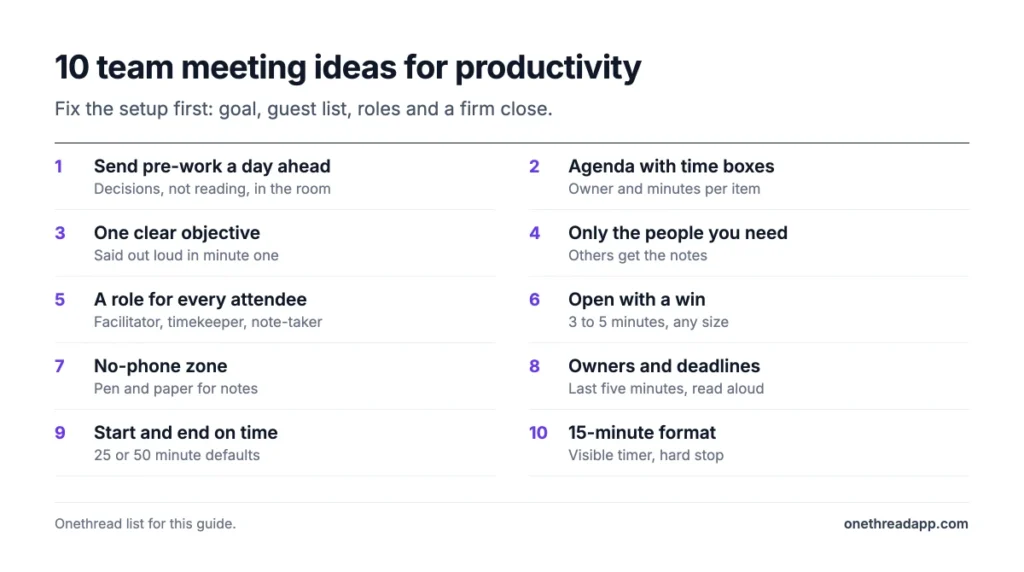
The best team meeting ideas for productivity give the meeting a clear goal, a tight guest list, and a hard finish with owners. These 10 ideas fix the setup before anyone joins the call. Pick two or three to start, and add more once they stick.
1. Send Pre-Work a Day Ahead
Pre-work is anything attendees read, watch, or fill in before the meeting. It moves the thinking out of the room, so the meeting time goes to decisions.
Keep it short. A one-page brief, three questions, or a shared doc with options is enough. Send it 24 hours ahead, not five minutes before.
Example: before a pricing discussion, you share last quarter’s numbers and ask each person to suggest one change. The meeting starts with eight ideas on the table instead of zero.
Make the pre-work optional to read but required to answer. People skip reading. They rarely skip a direct question.
2. Share an Agenda With Time Boxes
An agenda tells people what will happen and how long each part takes. Time boxes stop one topic from eating the whole hour.
List each item with an owner and a set number of minutes. Put the most important item first, while energy is high. If you need a quick start, our free meeting agenda generator builds one from a few prompts.
Example: a 30-minute weekly meeting gets three items: wins (5 minutes), the launch blocker (15 minutes), and next week’s priorities (10 minutes).
When a topic runs over, park it. Write it in a “next time” list and move on.
3. Start With One Clear Objective
One objective keeps the meeting from drifting. Say it out loud in the first minute: “By the end of this call, we’ll decide on the launch date.”
Meetings with three goals usually finish none of them. Pick the one that matters most this week.
Write the objective at the top of the agenda and the invite. People can then judge whether they need to attend at all.
Top Tip: If you can’t state the objective in one sentence, you probably don’t need a meeting yet. Send a message with the question instead.
4. Invite Only the People You Need
A smaller guest list makes a faster meeting. Invite the people who will decide, do the work, or bring facts nobody else has.
Everyone else can read the notes. That’s a favor, not a snub.
Example: a design review needs the designer, the product owner, and one engineer. The sales lead gets the summary afterward.
Check your recurring meetings once a quarter. Lists grow, and nobody ever removes themselves.
As a rough guide, our suggestion is four to seven people for a discussion meeting. Larger groups tend to split into speakers and spectators.
5. Give Every Attendee a Role
Roles give spectators a job. Common ones are facilitator, note-taker, timekeeper, and decision-maker.
Some teams use DACI to set roles for a decision: Driver, Approver, Contributors, and Informed. The approver makes the final call, and everyone knows it before the meeting starts.
Example: in a weekly sync, the facilitator runs the agenda and the timekeeper calls the time boxes. The note-taker posts action items in the project tool within an hour.
Rotate the roles every week. People pay more attention when they know they’ll run the next one.
6. Open With a Win
Starting with good news changes the tone of the whole meeting. Ask each person to share one win from the past week, big or small.
It takes three to five minutes and costs nothing. It also tells you what’s working, which is easy to miss when meetings focus on problems.
Example: a support lead mentions the ticket queue fell under 20 for the first time. The team asks how, and a useful process change spreads.
For more ways to mark progress, see our guide to celebrating team success.
7. Make It a No-Phone Zone
Phones split attention, and everyone in the room can tell. In a Project Manager News poll, 55% of participants said texting or taking calls during a meeting was irritating.
Ask people to put phones face down or leave them at their desks. For video calls, ask them to close other tabs and chat apps.
Keep one exception: someone on call for an urgent issue. Say so at the start, so nobody wonders why their phone is out.
Pen and paper work well for notes. It sounds old-fashioned. It also keeps eyes off email.
8. End With Owners and Deadlines
The last five minutes decide whether anything happens after the meeting. Use them to list every action item with one owner and one date.
Read the list out loud before people leave. Then post it where the team tracks work, not in a private notebook.
Example: “Priya sends the revised quote by Thursday. Tom books the client call for next week.” Two lines, two owners, two dates.
Start the next meeting by checking last week’s actions. People finish tasks when they know someone will ask.
9. Start and End on Time
Starting late punishes the people who arrived on time. Ending late eats into the next meeting, and the delay spreads across the day.
Start at the set minute, even if people are missing. Don’t recap for latecomers. They’ll learn to show up.
End five minutes early when you can. A 25-minute or 50-minute default gives people time to reach their next call.
If a topic needs more time, schedule a follow-up with only the people who need it. Everyone else gets their time back.
10. Try a 15-Minute Format
Many updates fit in 15 minutes. Short meetings force short answers, and people prepare better when time is tight.
A daily stand-up is the classic version. Each person answers three questions: what they did, what they’ll do next, and what’s blocking them.
Example: a five-person team runs a 15-minute stand-up each morning. Blockers get named fast, and longer discussions move to a separate call with two people.
Use a timer that everyone can see. When it rings, the meeting ends, even mid-sentence.
What Are Some Fun Team Meeting Ideas?
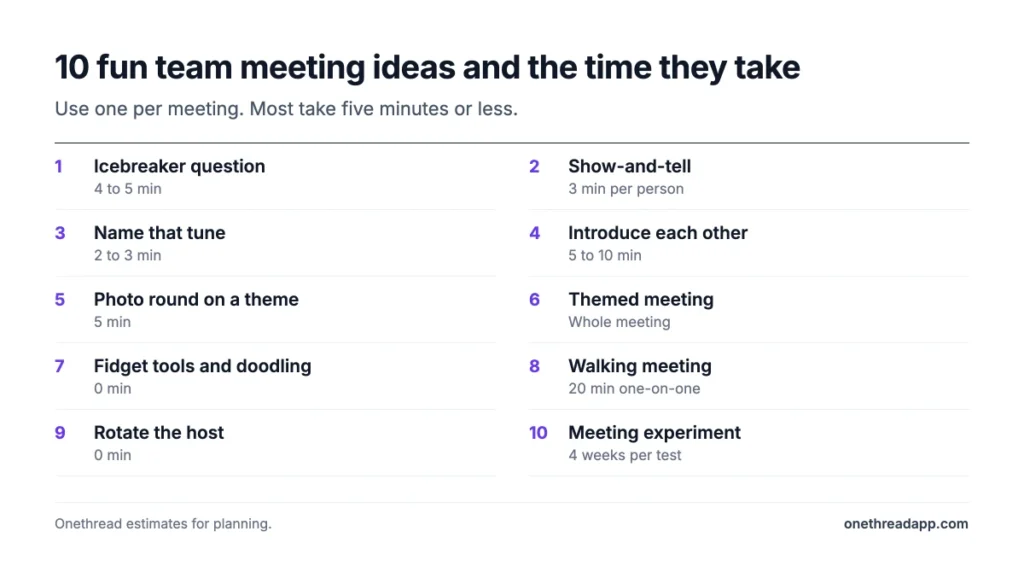
Fun team meeting ideas build trust and make people want to show up. These 10 ideas take five to ten minutes each. Use one per meeting, and keep the rest of the agenda serious, so the fun feels like a reward rather than a distraction.
1. Ask One Good Icebreaker Question
A good icebreaker question is easy to answer and tells you something real about a colleague. Skip anything that makes people perform.
Try questions like “What’s a skill you’d learn if you had a free month?” or “What’s the best meal you had this year?” Give everyone 30 seconds to answer.
Example: a team of eight spends four minutes on “Which three people would you invite to dinner?” They learn more about each other than in a year of status calls.
Rotate who picks the question. It keeps the ritual from going stale.
2. Run a Quick Show-and-Tell
Show-and-tell works at any age. One person brings an object, a photo, or a project and explains why it matters to them.
Keep it to one presenter per meeting and three minutes each. Over a few months, everyone gets a turn.
Example: a developer shows the guitar he built from a kit. Two colleagues turn out to play too, and they start a lunch jam session.
On video calls, the object goes in front of the camera. It works just as well.
3. Play Name That Tune
Music games add energy fast. Play a few seconds of a song, and the first person to name it wins a point.
Pick a theme: 90s hits, movie soundtracks, or songs from each team member’s home country. Keep it to three or four songs.
Example: a Friday wrap-up starts with a two-minute music round. The winner chooses next week’s theme.
Check volume and audio sharing before the meeting, especially on video calls. A silent game is a different game entirely.
4. Introduce Each Other
Instead of introducing themselves, people introduce a colleague. Pair them up for two minutes first, then each person shares one fact and one compliment about their partner.
It works well when new people join or when two teams start working together. If you’re onboarding someone, our guide on fun ways to introduce new team members has more formats.
Example: in a merged team’s first meeting, each person introduces their partner’s hidden talent. The room is laughing within ten minutes.
People remember compliments. They also remember who gave them.
5. Share Photos on a Theme
A photo round is low effort and high return. Pick a theme, like “my workspace” or “the best view from my weekend”, and ask everyone to bring one picture.
Some teams go further and build custom photo collages for a themed meeting. They offer a more personal look into each other’s lives and build stronger connections.
Example: a remote team shares photos of the view from their desks. They learn that one colleague works from a boat.
Keep it optional. Not everyone wants to share their home.
6. Hold a Themed Meeting
A theme turns a routine meeting into an event. Tie it to a season, a holiday, or a team milestone.
Ideas include a costume day, a team trivia round, or a short celebration for an occasion like International Women’s Day. Our list of creative ideas for women’s day has options that fit into a regular meeting.
Example: in December, a team holds its last meeting of the year in a decorated room with a short review of the year’s wins.
Keep the business part short on themed days. The theme is the point.
7. Allow Fidget Tools and Doodling
Some people listen better when their hands are busy. Stress balls, fidget cubes, or a doodle pad can help them stay focused.
Put a small basket of fidget tools on the meeting table, or tell remote colleagues it’s fine to doodle while they listen.
Example: a team lead notices that one quiet engineer doodles during every call. She asks him to sketch the process being discussed, and his drawing becomes the team’s reference diagram.
Doodling isn’t rude. Checking email is.
8. Try a Walking Meeting
A walking meeting moves a one-on-one or a small discussion outside. Movement can make conversations feel less formal and more open.
It suits two or three people and topics that don’t need screens. Brainstorming, feedback, and planning talks work well.
Example: a manager holds weekly one-on-ones as a 20-minute walk around the block. Topics that felt awkward across a desk come up more easily side by side.
Bring your phone for notes, and write action items as soon as you return.
9. Rotate the Host
Rotating the host shares ownership of the meeting. Each week, a different team member runs the agenda, picks the opener, and keeps time.
New hosts often try new formats. You get fresh ideas without having to invent them yourself.
Example: a junior marketer hosts the weekly sync and adds a two-minute “one thing I learned” round. The team keeps it.
Give first-time hosts a simple template with the agenda slots filled in. It removes the fear of starting from a blank page.
10. Run a Meeting Experiment
Treat your meeting format as something to test. Change one thing for four weeks, then ask the team whether it helped.
Experiments might include closing chat apps during the meeting, asking for questions before criticism, or moving the meeting to a different day.
Example: a team tests a “no slides” rule for a month. Updates get shorter, and the meeting drops from 45 to 30 minutes.
Keep a short log of what you tried and what happened. Over a year, it becomes your team’s meeting playbook.
What Are Good Virtual Team Meeting Ideas?
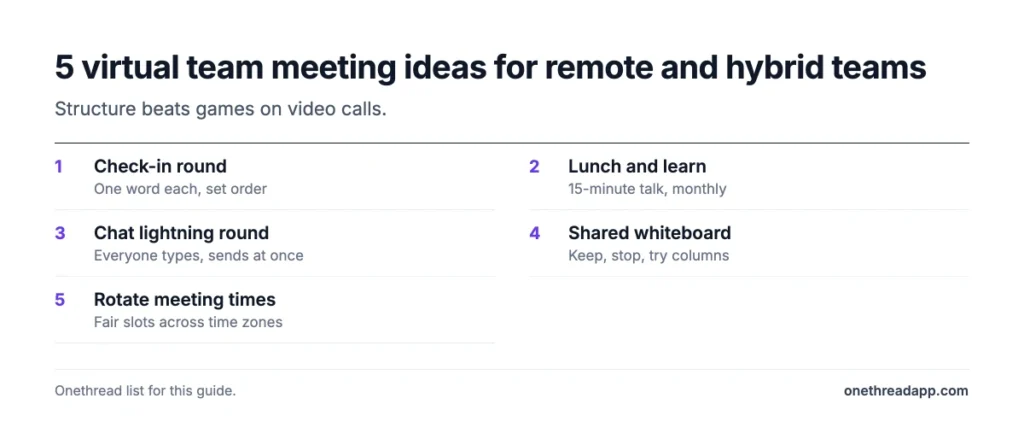
Good virtual team meeting ideas add structure that a room gives you for free: turn-taking, eye contact, and a shared whiteboard. Remote meetings need clearer rules more than extra games. These five ideas help remote and hybrid teams stay connected without adding more calls.
1. Open With a Quick Check-In Round
A check-in round gives every person a few seconds of airtime at the start. Ask a simple question, like “One word for how your week is going?”
Go around the screen in a set order, so nobody talks over anyone else. Cameras can stay optional.
Example: a six-person team uses one-word check-ins. When someone says “swamped”, the manager follows up after the call and moves a deadline.
The round takes two minutes. It often tells you more than the status update that follows.
2. Host a Virtual Lunch and Learn
A lunch and learn pairs a casual meal with a short talk. One person teaches something for 15 minutes while everyone eats on camera.
Topics can be work-related, like a new tool, or personal, like a hobby. The point is shared learning without a formal training session.
Example: a designer runs a 15-minute session on keyboard shortcuts in the team’s design tool. Half the team uses three new shortcuts by Friday.
Keep it monthly and optional. Required fun isn’t fun.
3. Use the Chat for a Lightning Round
Big video calls make speaking up hard. A chat lightning round lets everyone answer at once.
Ask a question, give 60 seconds, and have everyone type an answer without hitting enter. Then everyone sends at the same time.
Example: in a 30-person all-hands, the host asks “What’s one thing slowing you down this month?” Thirty answers appear in a minute, and three themes stand out.
Quiet team members often share more in writing than out loud. The host can read the top answers aloud.
4. Work on a Shared Whiteboard
A shared whiteboard gives a remote meeting a place to put ideas. Everyone can add sticky notes, vote, and group ideas together.
Use it for brainstorming, retrospectives, and planning. Prepare the board before the meeting with columns or prompts, so people know where to start.
Example: a remote team runs its retrospective on a whiteboard with three columns: keep, stop, try. Each person adds notes for five minutes, then the team votes on the top two.
Save the board after the meeting. It becomes the record of what was decided.
5. Rotate Meeting Times Across Time Zones
Teams spread across time zones often push the same people into early or late calls. Rotating the meeting time shares the pain fairly.
This matters more than it used to. Microsoft’s research found nearly a third of meetings now span multiple time zones, and meetings after 8 pm rose 16% year over year.
Example: a team split between New York and Berlin alternates its weekly meeting between 9 am and noon New York time. Each side gets a comfortable slot every other week.
For more ideas that bring remote colleagues together, see our list of remote team building activities.
What Topics Should You Discuss in Team Meetings?
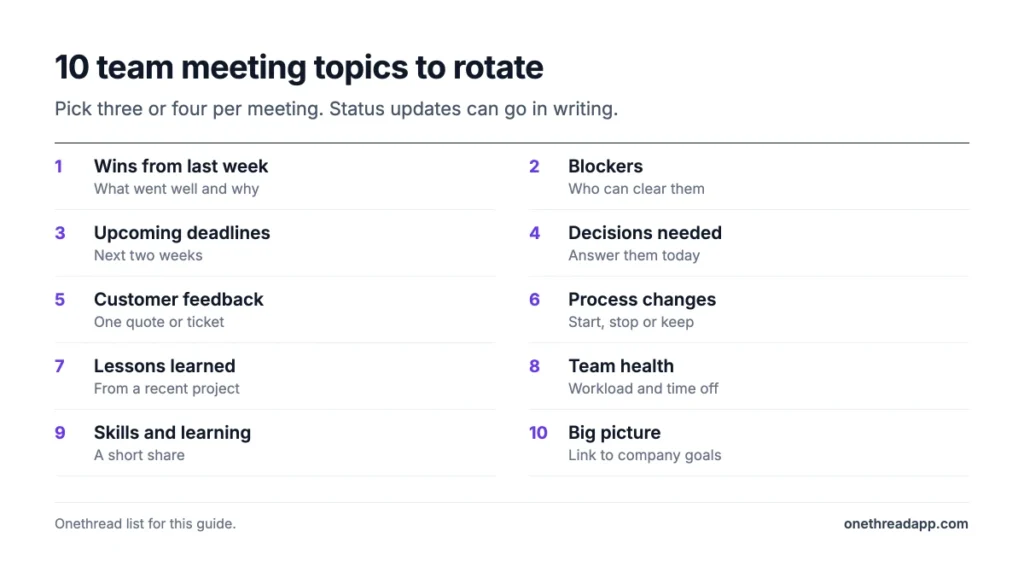
Good team meeting topics focus on decisions, blockers, and learning, not long status reports. Status updates can go in writing. Meeting time is for the things that need people talking together.
Ten topics work well for regular team meetings:
- Wins from last week: what went well and why.
- Blockers: what’s stopping work, and who can clear it.
- Upcoming deadlines: what’s due in the next two weeks.
- Decisions needed: questions the group must answer today.
- Customer feedback: one quote or ticket worth discussing.
- Process changes: one thing to start, stop, or keep doing.
- Lessons learned: what a recent project taught the team.
- Team health: workload, stress, and time off coming up.
- Skills and learning: a short share from someone’s recent training.
- Big picture: how the team’s work connects to company goals.
You don’t need all ten every week. Pick three or four per meeting and rotate the rest.
Fun discussion topics work too, as an opener. Try “What’s the best part of your work week?” or “If you had a magic wand, what would you change about our team?” Both get honest answers and often surface real issues.
Ask the team which topics they want. A simple poll once a quarter tells you what people find useful.
How Do You Plan a Team Meeting in 5 Steps?
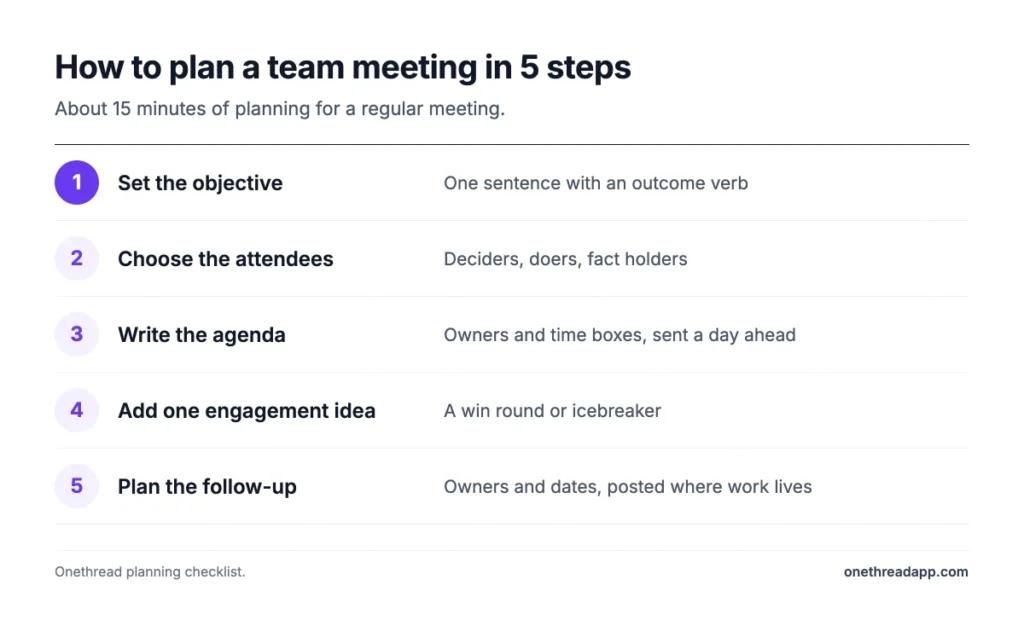
Planning a team meeting takes 5 steps: set the objective, choose the attendees, write the agenda, add one engagement idea, and plan the follow-up. The whole process takes about 15 minutes for a regular meeting.
Step 1: Set the Objective
Write one sentence that says what the meeting must achieve. Use a verb that names an outcome: decide, approve, plan, or solve.
“Discuss the launch” is not an objective. “Decide whether the launch moves to May” is.
If the objective is only to share information, consider a written update instead. Most teams have at least one meeting that could be a message. Save live meeting time for things that need a conversation, like decisions and problems with no clear owner.
Step 2: Choose the Attendees
List the people who must decide, the people who will do the work, and anyone with facts the group needs. Leave everyone else off the invite.
Send the notes to stakeholders who don’t attend. They stay informed without losing an hour, and they can reply in writing if they spot a problem.
For recurring meetings, review the list every quarter and remove anyone who no longer needs to be there. Roles change, and people often stay on invites long after the topic stopped being theirs.
Step 3: Write the Agenda
Break the meeting into items with an owner and a time box for each. Put the most important item first.
Add any pre-work to the invite, with a clear question for each person to answer. Share the agenda at least a day ahead, so people come prepared and can flag missing topics.
Keep a “parking lot” section at the bottom for topics that come up but don’t fit today’s goal. Review it at the end and schedule what still matters.
Step 4: Add One Engagement Idea
Choose one idea from this guide to open or break up the meeting. A win round, an icebreaker, or a chat lightning round all take five minutes or less.
Match the idea to the group. A new team needs introductions. A team that’s worked together for years might prefer a quick game or a themed opener.
Don’t stack several ideas into one meeting. One well-chosen moment of fun beats a packed agenda of activities. Change the idea every few weeks so it stays fresh.
Step 5: Plan the Follow-Up
Decide before the meeting where action items will go and who will post them. A shared project board works far better than a private notebook.
Block five minutes at the end of the meeting to read actions aloud with owners and dates. Then start the next meeting by checking them, one by one.
This step closes the loop. Without it, even a great meeting fades by Friday. With it, the team sees that meetings lead to real work getting done.
Which Team Meeting Idea Fits Which Meeting?
Use the table to match your meeting type to the ideas that fit it best. Start with the meeting you run most often and test two ideas from its row.
| Meeting type | Main problem | Try first | Then add |
|---|---|---|---|
| Daily stand-up | Runs too long | 15-minute format | Visible timer |
| Weekly team sync | Status reports drag | Pre-work and agenda | Open with a win |
| Project kickoff | People don’t know each other | Introduce each other | Clear roles |
| Brainstorming session | Same voices dominate | Chat lightning round | Shared whiteboard |
| All-hands | Low engagement | Themed meeting | Name that tune |
| Remote team meeting | Quiet attendees | Check-in round | Rotating host |
| One-on-one | Feels formal | Walking meeting | Owners and deadlines |
| Retrospective | No follow-through | Shared whiteboard | Meeting experiment |
These pairings are our suggestions, based on what each idea is built to fix. Most meetings need one structure idea and one engagement idea.
Example: a weekly sync drags to 60 minutes. The team adds pre-work and a win round, and the meeting drops to 35 minutes within a month. That’s 25 minutes saved each week, or about 20 hours a year per person.
How Do You Keep Employees Engaged During Meetings?
You keep employees engaged during meetings by giving them a part to play and a reason to care about the outcome. People tune out when they only listen. They tune in when they decide, present, or vote.
Engagement is low across the workforce, so meetings can’t assume attention. Gallup found global employee engagement at 20% in 2025, its lowest level since 2020. A meeting is one of the few places where a manager sees the whole team at once. That makes it a good place to change the number.
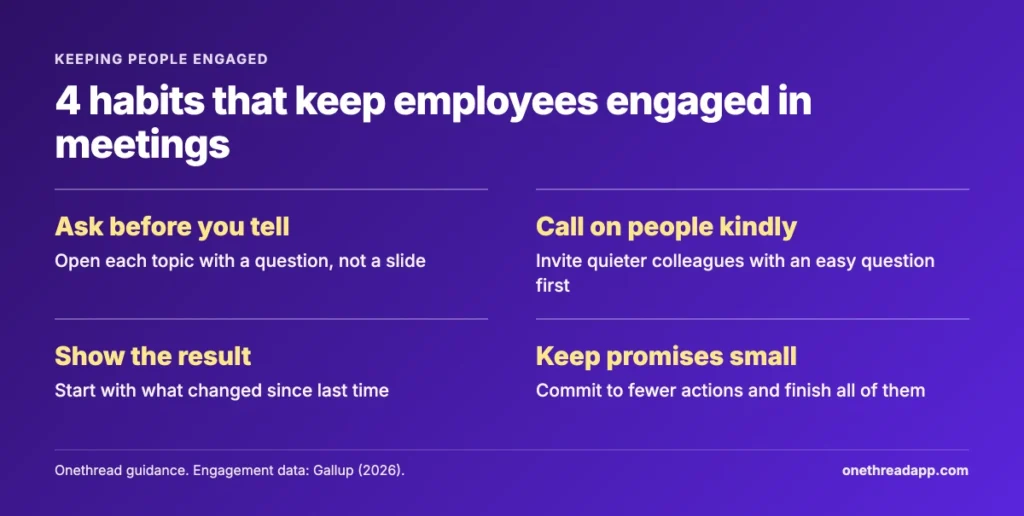
Four habits make the biggest difference:
- Ask before you tell: open each topic with a question, not a slide.
- Call on people kindly: invite quieter colleagues by name with an easy question first.
- Show the result: start each meeting by showing what changed since the last one.
- Keep promises small: commit to fewer actions and finish all of them.
Watch for signs that attention is slipping: cameras going off, short answers, and the same two people talking. When you see them, switch formats. A two-minute chat round or a quick vote can reset the room.
Ask for feedback on the meeting itself. A one-question poll at the end, such as “Was this meeting worth your time?”, gives you a simple score to track over a quarter.
How Can Onethread Help You Run Team Meetings?
A project management tool keeps the work around a meeting in one place: the agenda, the notes, and the tasks that come out of it. Onethread is one option built for small teams and agencies.
You can share an agenda in a project before the meeting, so attendees add their pre-work in the same thread. During the meeting, action items become tasks with an owner and a due date. After the meeting, everyone sees progress on those tasks without another status call.
This setup supports ideas 1, 2, and 8 in this guide: pre-work, a shared agenda, and clear owners and deadlines. It also helps people who missed the meeting catch up without asking someone to repeat it.
Onethread’s limits are worth stating too. It doesn’t host video calls, so you’ll still need your usual meeting app. It’s also not a whiteboard tool, so brainstorming boards live elsewhere. Check the features page before you decide.
For a step-by-step approach to the meeting itself, the planning steps earlier in this guide are a good place to start. Better meetings are also one of the fastest ways of improving team productivity, because they give hours back to real work.
Related reading: Christmas decoration ideas at office and running effective team meetings.
What Should You Do Next?
Good team meeting ideas don’t need a big budget or a new tool. They need a clear objective, the right people, one moment of fun, and a firm close with owners and dates. Small changes to the meetings you already run make the biggest difference.
Pick your most common meeting and add two ideas from the table this week: one for structure and one for engagement. Run them for four weeks, then ask the team whether the meeting got better. Keep what works, drop the rest, and try the next idea on the list.
FAQs
How Do You Make Team Meetings More Engaging?
You make team meetings more engaging by giving every attendee a reason to speak. Open with a win or an icebreaker, give people roles like note-taker and timekeeper, and use a chat round in big calls. Keep the meeting short, and end with clear next steps so people see the result.
What Is a Good Icebreaker for a Team Meeting?
A good icebreaker for a team meeting is one question that everyone can answer in 30 seconds. Try “What’s a skill you’d learn with a free month?” or “What’s the best part of your work week?” Avoid questions that force people to share private details or perform in front of the group.
How Often Should a Team Hold Meetings?
Most teams do well with one weekly team meeting of 30 to 45 minutes, plus short daily stand-ups if the work changes fast. Fewer, shorter team meetings usually beat frequent long ones. Review your schedule each quarter and cancel any recurring meeting that no longer has a clear purpose.
What Are Good Team Meeting Ideas for Small Teams?
Good team meeting ideas for small teams include a 15-minute stand-up, a rotating host, and a short show-and-tell. Small teams can skip formal agendas for quick syncs, but they still need owners and dates for every action item. A monthly retrospective helps them fix problems before they grow.
How Do You End a Team Meeting Well?
You end a team meeting well by spending the last five minutes on action items. Read each task aloud with one owner and one deadline. Then post the list where the team tracks work. Thank people for their time, and finish on schedule so attendees can reach their next commitment.