Plans change on construction sites every day. If your crew still works from old PDFs and group texts, someone will build from the wrong sheet.
The best online construction project management software for most teams is Procore for large general contractors, Buildertrend for home builders and Fieldwire for field crews. Smaller teams get more for less from Contractor Foreman, Smartsheet, monday.com or Onethread.
Prices run from $0 to custom quotes. Fieldwire charges $39 per user a month, while Procore and Buildertrend quote each company.
We checked the pricing pages of all 8 tools and compared them with the 4 top-ranking guides.
You’ll see what each tool costs for a 10-person team, where it shines, and which one fits your work.
Key Points
- Procore suits large general contractors, Buildertrend suits home builders and Fieldwire suits field crews. Procore and Buildertrend sell by custom quote with unlimited users.
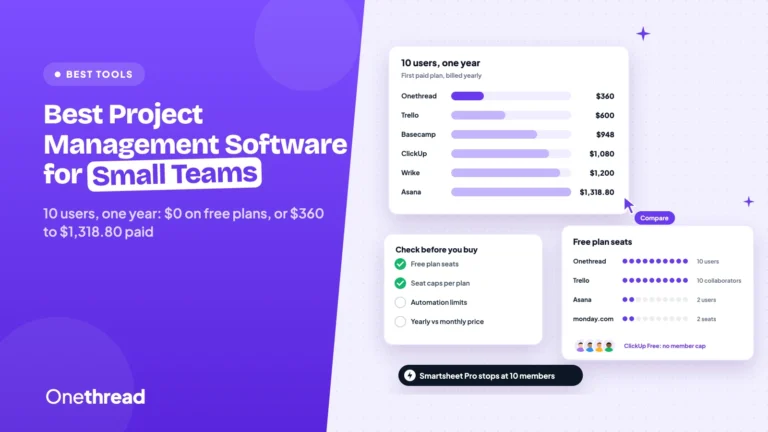
- For 10 users on the first paid plan, a year costs $360 on Onethread, $1,080 on Smartsheet or monday.com, $2,654 on Contractor Foreman and $4,680 on Fieldwire.
- Check which plan includes RFIs, submittals and change orders. Fieldwire keeps them on Business Plus at $89 per user a month.
- Per-user prices climb fast as the crew grows. Price your team at 25 users before you sign, not just the starting plan.
How Do the Best Online Construction Project Management Software Picks Compare?
Here’s the short version. The table lists each tool’s fit, its first paid price and what 10 users pay in a year on annual billing.
| Tool | Best for | Starting price | 10 users, one year | No-cost tier |
|---|---|---|---|---|
| Procore | Large general contractors | Custom quote | Custom quote | No |
| Autodesk Forma Build | Teams on Autodesk files | $67 per user a month | $8,000 | No |
| Buildertrend | Home builders and remodelers | Custom quote | Custom quote | No |
| Fieldwire | Field crews and foremen | $39 per user a month | $4,680 | Yes, up to 5 users |
| Contractor Foreman | Small contractors | $49 a month for 1 user | $2,654 on Pro (up to 15 users) | No, 30-day trial |
| Smartsheet | Schedule-heavy teams | $9 per member a month | $1,080 | No |
| monday.com | Office teams tracking jobs | $9 per seat a month | $1,080 | Yes, up to 2 seats |
| Onethread | Small teams on a budget | $3 per user a month | $360 | Yes, first 10 users |
Prices are US list prices on yearly billing. The Best for labels are our own fit notes.
Sources: Procore, Autodesk Forma Build, Buildertrend, Fieldwire, Contractor Foreman, Smartsheet, monday.com and Onethread pricing.
Top Tip: Ask Procore and Buildertrend for a quote early. Procore prices by product and your annual construction volume, so two firms of the same size can pay different amounts.
How Did We Compare the Construction Software on This List?
We started with the pages Google ranks for this search. Four in-depth guides came up, from The Digital Project Manager, Fieldwire, Autodesk and Website Planet. We kept tools that two or more of them reviewed, then added cheaper picks for small crews.
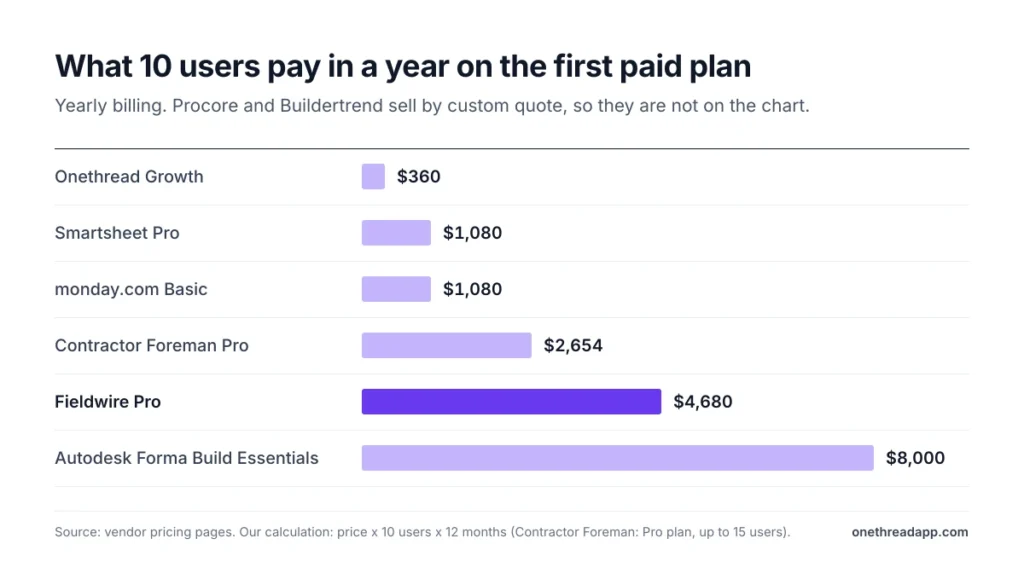
Next, we opened each vendor’s pricing page and noted the first paid plan. For per-user plans, we multiplied the price by 10 users and 12 months. Where a vendor only sells by quote, we say so plainly.
Example: Fieldwire Pro costs $39 per user a month, so 10 users pay 10 × $39 × 12 = $4,680 a year.
One caveat worth being honest about. We read pricing and feature pages, but we didn’t run live jobs in these apps. So we judge fit by what each plan includes, not by hands-on speed.
We also checked each $0 tier or trial, since most small crews start there. Fieldwire, monday.com and Onethread offer $0 tiers, and Contractor Foreman offers a 30-day trial.
Last, we sorted the tools by the work they suit. Some are built for jobsites, with sheets, RFIs and daily logs. Others are general project tools that construction offices bend to fit. That split matters more than any star rating, so each review names it.
What Makes Construction Project Management Software Online?
Online construction project management software runs in a web browser and a mobile app, with plans, tasks and files stored in the cloud. The office and the jobsite see the same version at the same time. Nobody installs it on one office PC.
That’s the main difference from older desktop tools. A change in the office shows up on the foreman’s phone a moment later.
It also means no server to patch. The vendor runs the hosting and updates, and you pay a subscription instead.
You’ll also see it called a web-based construction management platform or online building project management software. It’s the same idea.
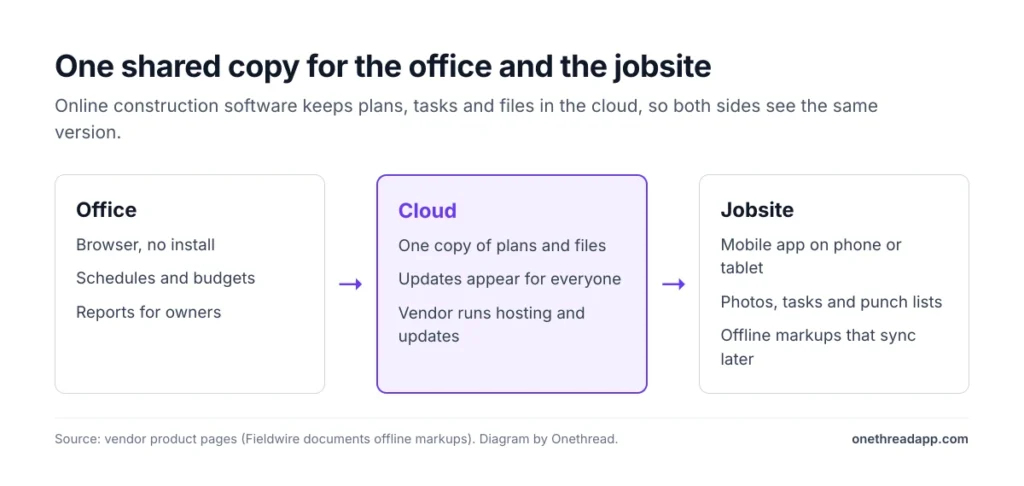
Three parts make it work:
- Browser access: Office staff open schedules, budgets and reports from any computer, with no install. Our guide to web-based project management tools covers this side in more depth.
- Mobile app: Field teams view sheets, add photos and close tasks from a phone or tablet.
- Offline sync: Good field apps keep working without signal. Fieldwire, for one, lets crews record markups even when offline.
Why does this matter now? Fewer hands are doing the paperwork. In the AGC and NCCER 2025 Workforce Survey, 92 percent of construction firms said they had trouble filling open jobs.
When a crew is short, every hour spent hunting for the latest drawing is an hour off the job. A shared online system cuts that hunt. We cover this in more detail in our guide to project efficiency software.
What Does Procore Offer Large General Contractors?
Procore is the heavyweight here. It covers a job from preconstruction to closeout, and Procore says it has supported 3 million+ projects worldwide.
Its pricing model is the big draw. You pay an annual fee by product, and every user is included. That includes owners, architects and every sub on the job.
Say you run three commercial builds with 40 subcontractors. On a per-seat tool, those subs would push your bill up fast. On Procore, they log in at no extra charge.
Procore also includes unlimited data, 24/7 live support and 18 role-based training courses at no charge.
You can also buy products one at a time. A firm that only needs project tools can start there and add money tools later.
Pricing: Custom quote. Procore charges an upfront annual fee by product, based on your annual construction volume.
Best For
- General contractors and owners with many subs on each job.
- Firms that want one system from bid to closeout.
Pros
- Unlimited users, so subs and clients join at no cost.
- Unlimited data and 24/7 live support.
- You pick only the products you need.
- Role-based training for the whole team.
Cons
- No public price, so budgeting takes a sales call.
- Annual fee is paid upfront.
- The Field Productivity product is priced by full-time staff, not unlimited.
What Does Autodesk Forma Build Offer Teams on Autodesk Files?
Autodesk Forma Build is the old Autodesk Build, renamed. It’s also where PlanGrid’s sheet and markup tools now live. Autodesk Construction Cloud now goes by Autodesk Forma.
The tool covers project, cost, safety and quality work in one place, for the office and the field. Both paid tiers include Forma Data Management, which keeps model and document files in one store.
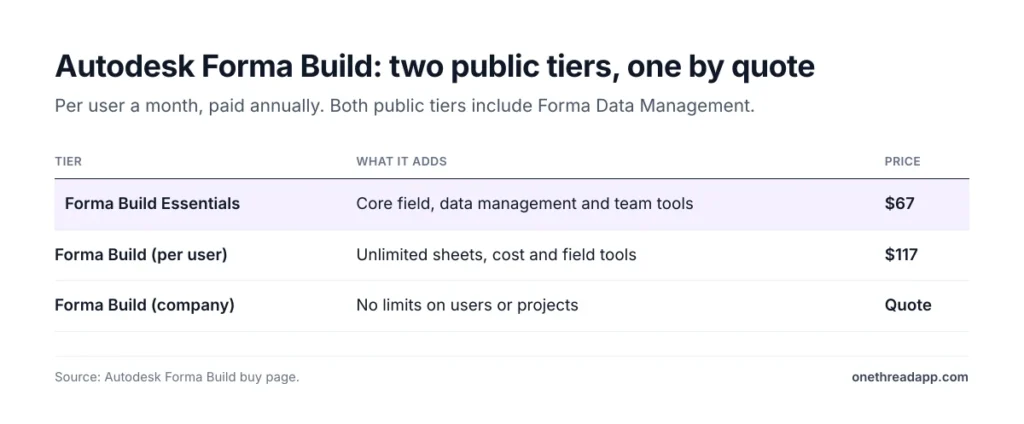
There are three tiers. Forma Build Essentials covers core field, data and team tools. Forma Build per user adds unlimited sheets plus cost and field tools. A company-wide tier with no user or project limits is sold through sales.
Say your designers already share models in Autodesk tools. Forma Build keeps the field team on the same files, so nobody exports a PDF set by hand.
Pricing: Essentials costs $67 per user a month, paid yearly. Forma Build costs $117 per user a month, paid yearly. Unlimited-user tiers need a sales quote.
Best For
- Builders who already work in Autodesk design files.
- Teams that need sheets, cost and quality tools together.
Pros
- Former PlanGrid sheet tools now sit inside a wider suite.
- Includes Forma Data Management on both paid tiers.
- 30-day money-back window on yearly terms.
Cons
- At $8,000 a year for 10 Essentials users, it’s the priciest public plan here.
- Per-user pricing grows with every new field hire.
- No $0 tier.
What Does Buildertrend Offer Home Builders and Remodelers?
Buildertrend is built for residential builders and remodelers. Its own pricing page says it fits builders running 5+ projects a year or complex, multi-phase builds.
The tool joins project, sales, client and money work in one place. Field tools include scheduling, daily logs, tasks, a time clock, change orders, client selections, a sub portal and warranty tracking.
Every Buildertrend account includes unlimited users and unlimited projects. That suits a builder who brings clients and trade partners into the same app.
Say a client wants to pick tile and sign off a change order from home. Buildertrend’s selections and change order tools handle both online, and the client never needs a paper form.
If you used CoConstruct, it’s now part of Buildertrend. CoConstruct says its move to Buildertrend is in its final phase, so new teams should start on Buildertrend.
Pricing: Custom quote. Buildertrend takes 10% off when you pay annually upfront.
Best For
- Home builders and remodelers with 5 or more jobs a year.
- Teams that want client selections and change orders online.
Pros
- Unlimited users and construction projects.
- Selections, warranties and a sub portal built in.
- Sales and money tools sit next to the schedule.
Cons
- No public price list.
- More than a small trade crew needs.
- Built for residential work, not large commercial jobs.
What Does Fieldwire Offer Field Crews and Foremen?
Fieldwire, owned by Hilti, is a jobsite app first. It focuses on plans, tasks and punch lists for the people on site. Fieldwire says it has been used on 4,000,000+ projects worldwide.
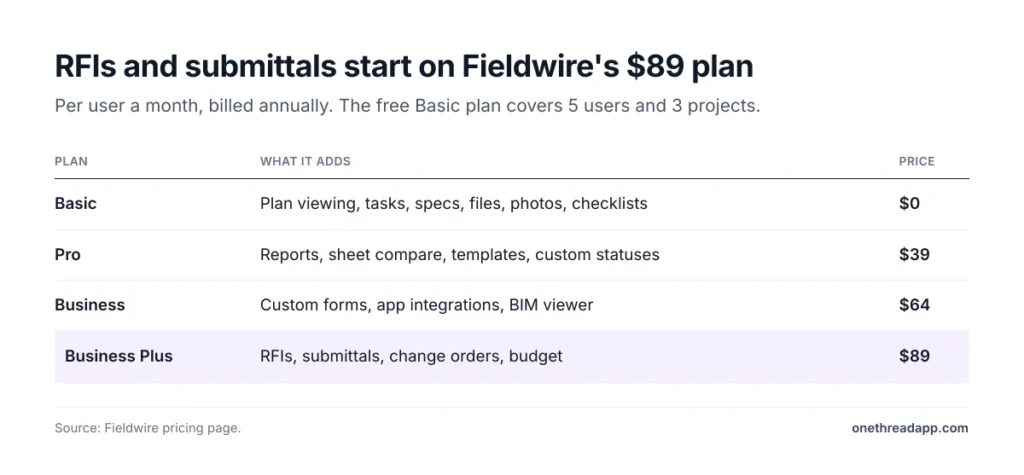
Basic costs $0 and covers 5 users, 3 projects and 100 sheets. It includes plan viewing, task management, specs, files, photos and checklists.
Paid tiers add more as you climb. Pro adds reports, sheet compare and project templates. Business adds custom forms, app links and a BIM viewer. RFIs, submittals, change orders and budgets wait on Business Plus.
Say your foreman walks a floor with no signal. Fieldwire still records markups offline and syncs them later.
Every paid plan bills per user. For bigger firms, Fieldwire’s sales team sells custom plans with unlimited user options, API access and single sign-on.
Pricing: Basic is $0. Pro is $39, Business $64 and Business Plus $89 per user a month, billed yearly.
Best For
- Foremen and field crews who live in drawings.
- Specialty contractors running punch lists.
Pros
- $0 Basic tier for up to 5 users.
- Strong plan viewing and markup, even offline.
- Clear construction ladder, from field tasks up to RFIs.
Cons
- RFIs and submittals need the $89 Business Plus plan.
- 10 Pro users cost $4,680 a year.
- Basic stops at 3 projects.
What Does Contractor Foreman Offer Small Contractors?
Contractor Foreman is the budget all-in-one. It packs estimates, invoices, daily logs, punch lists, time cards and a client portal into one app.
Instead of charging per user, it sells tiers by user count. Basic covers 1 user, Standard 3, Plus 8, Pro 15 and Unlimited has no cap.
That bundle pricing helps a small crew. A 10-person team lands on Pro, which allows up to 15 users.
The app also links to QuickBooks Online, Zapier and Google or Outlook calendars. Pro and Unlimited add free setup and implementation, which helps if nobody on staff wants to build templates. Every plan starts with a 30-day trial, and Plus and above add a 100-day money-back guarantee on yearly billing.
If you’re still comparing no-cost options, our list of free construction project management software covers those.
Pricing: Billed yearly, Basic is $49, Standard $105, Plus $166, Pro $221 and Unlimited $332 a month. Monthly billing costs more.
Best For
- Small general and trade contractors who want estimates and field logs together.
- Teams of 3 to 15 people.
Pros
- Flat tiers by user count, not per seat.
- Estimates, invoices and job costing built in.
- QuickBooks Online link.
- 30-day trial.
Cons
- No $0 tier.
- Basic covers just 1 user.
- Busy screens take time for new staff.
What Does Smartsheet Offer Schedule-Heavy Construction Teams?
Smartsheet looks like a spreadsheet but works like a project tool. Many construction offices use it for schedules, trackers and status reports.
Smartsheet Pro includes Gantt, table, board and calendar views. It also allows unlimited contributors, rich formulas and 250 automations a month.
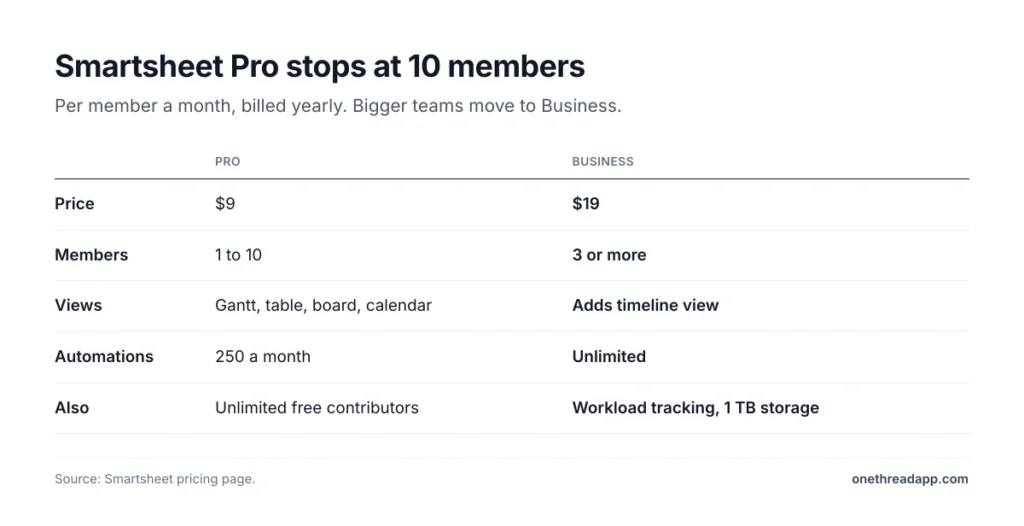
Pro covers 1 to 10 members. Bigger teams move to Business, which adds a timeline view, workload tracking, unlimited automations and 1 TB of file storage. Business needs at least 3 members and adds unlimited guests, which helps when owners only need to look.
Say your scheduler lives in Excel. Smartsheet keeps that grid feel and adds a shared Gantt chart. If you’re unsure which chart to use, here’s how PERT and Gantt charts differ.
There’s a catch, though. Smartsheet has no built-in RFIs, submittals or sheet markup. You build those as forms and sheets yourself.
Pricing: Pro is $9 and Business is $19 per member a month, billed yearly. Enterprise is a custom quote and adds portfolios and SAML single sign-on.
Best For
- Office teams that run schedules in spreadsheets.
- Firms that want Gantt charts and reports more than field tools.
Pros
- Familiar grid with Gantt, board and calendar views.
- Unlimited contributors on Pro.
- $1,080 a year for 10 Pro members.
Cons
- Pro caps at 10 members.
- No construction-specific tools like RFIs or plan markup.
- 250 automations a month on Pro.
What Does monday.com Offer Construction Office Teams?
monday.com is a general work tool with flexible boards. Construction offices use it to track bids, jobs, hiring and client requests in one place.
The $0 tier covers up to 2 seats and 3 boards. Basic adds unlimited items and viewers. Standard adds Timeline and Gantt views, a calendar view, guest access and 250 automation actions a month.
You buy seats by team size, so a 10-person office picks the 10-seat option. Paid tiers also include AI credits each month, from 1,000 on Basic to 3,000 on Pro.
Say your estimator, office manager and PM all need one view of every bid. A monday.com board does that well. A foreman marking up drawings will want a field app beside it.
For the full plan breakdown, see our monday.com pricing guide.
Pricing: $0 for up to 2 seats. Basic is $9, Standard $12 and Pro $19 per seat a month, billed yearly.
Best For
- Office teams tracking bids, jobs and requests.
- Firms that want one tool for every department.
Pros
- $0 tier for 2 seats.
- Gantt and timeline views on Standard.
- Easy boards that new staff pick up fast.
Cons
- No plan sheets, RFIs or punch lists.
- Gantt needs Standard, not Basic.
- Seats come in team-size steps.
What Does Onethread Offer Small Construction Teams?
Onethread is our own project management software, so read this section with that in mind. It isn’t a jobsite app, and it doesn’t do plan markup or RFIs. It’s built for the office side of small teams.
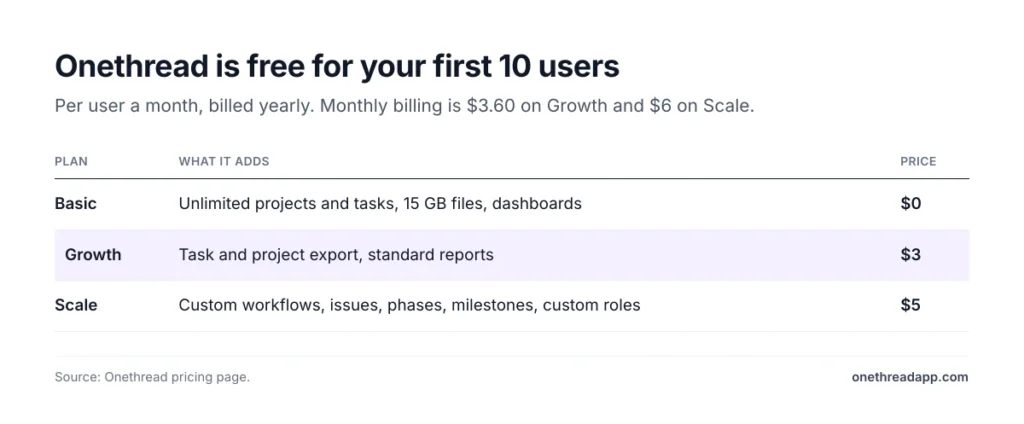
Basic costs $0 for your company’s first 10 users. It includes unlimited projects, tasks and discussion rooms, 15 GB of file sharing, a notice board and dashboards. That tier allows up to three workflows.
Growth adds task and project export and standard reports. Scale adds custom workflows, issue tracking, phases and milestones, advanced reports and custom roles.
Say you run a 6-person renovation firm. Onethread holds each job’s tasks, files and talks in one place, at no cost. If you outgrow the three included workflows, Scale adds custom ones.
Pricing: Basic is $0 for the first 10 users. Growth is $3 and Scale $5 per user a month, billed yearly, or $3.60 and $6 billed monthly.
Best For
- Small teams that need task, file and team tracking without a big bill.
- Office staff who plan jobs before the field app takes over.
Pros
- $0 for the first 10 users.
- $360 a year for 10 Growth users.
- Phases, milestones and issue tracking on Scale.
Cons
- No plan sheets, RFIs or submittals.
- Budgeting and risk tools are listed as upcoming.
- No construction-specific field features.
How Much Does Construction Software Cost at 25 Users?
A 25-person team pays $900 a year on Onethread Growth and $11,700 on Fieldwire Pro. The starting price hides that gap, so we priced each public construction tool at 10 and 25 seats.
| Tool and plan | 10 users, one year | 25 users, one year |
|---|---|---|
| Onethread Growth | $360 | $900 |
| monday.com Basic | $1,080 | $2,700 |
| Contractor Foreman | $2,654 on Pro | $3,984 on Unlimited |
| Smartsheet | $1,080 on Pro | $5,700 on Business |
| Fieldwire Pro | $4,680 | $11,700 |
| Autodesk Forma Build Essentials | $8,000 | $20,000 |
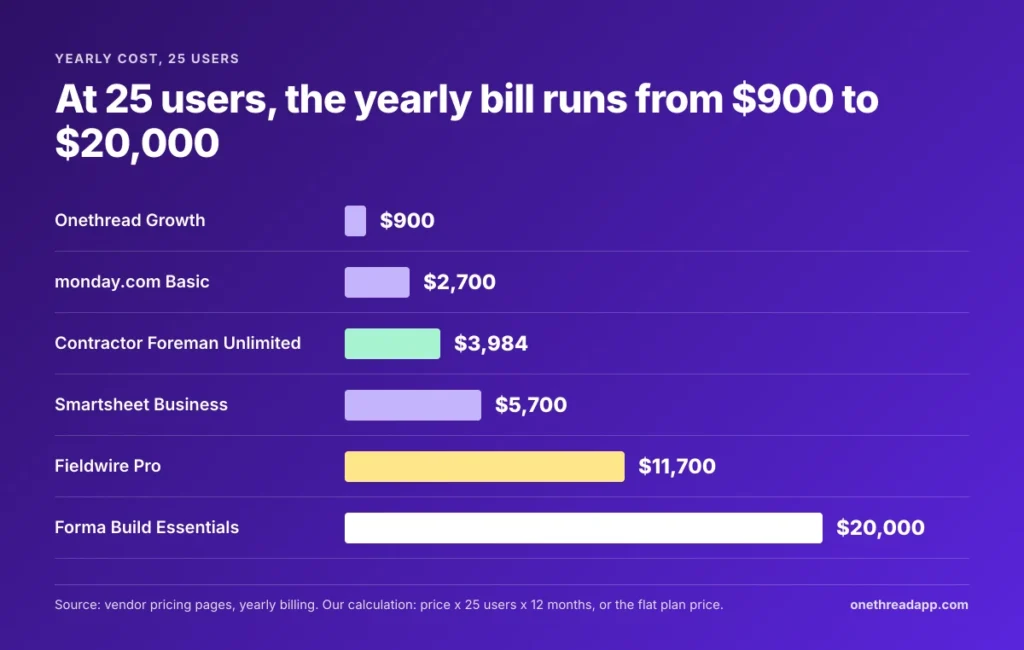
Example: Fieldwire Pro for 25 users costs 25 × $39 × 12 = $11,700 a year. Contractor Foreman’s Unlimited plan costs a flat $3,984, whatever the headcount.
Smartsheet jumps more than it seems. Pro stops at 10 members, so 25 people need Business at $19 each.
Use your own numbers here. Count field users and office users apart, since some tools charge for both.
And watch the $0 tiers too. Fieldwire Basic stops at 5 users and Onethread’s at 10, so construction growth can move you onto a paid tier overnight.
Which Features Should You Check Before You Buy Construction Software?
Seven checks catch most bad fits. Each one is a place where construction tools differ, even inside one vendor.
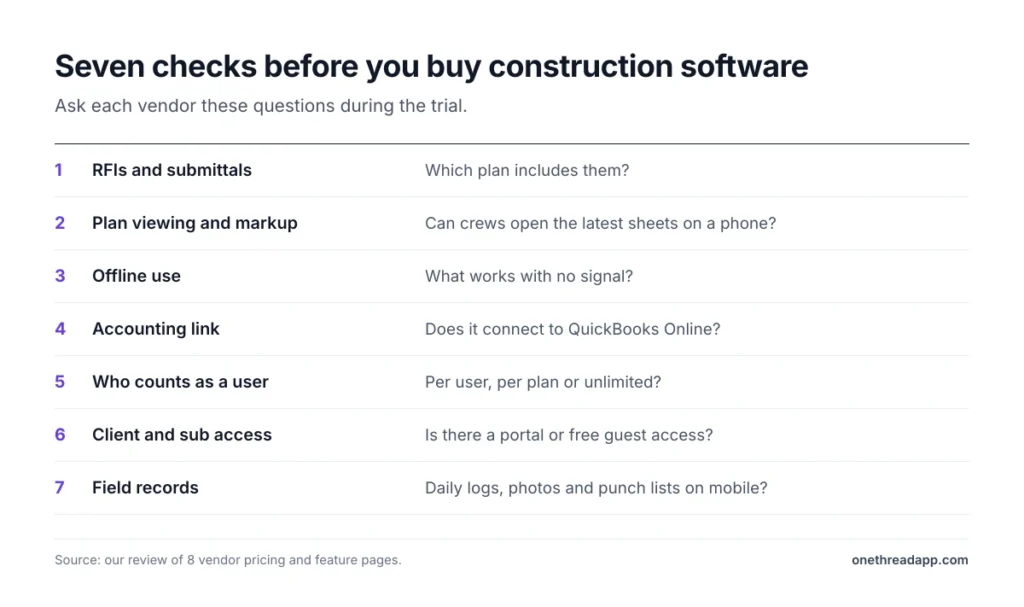
- RFIs and submittals: Fieldwire puts them on Business Plus. Smartsheet and monday.com don’t have them built in.
- Plan viewing and markup: Field crews need the latest sheets on a phone. Fieldwire and Autodesk Forma Build lead here.
- Offline use: Ask each vendor what works without signal. Fieldwire documents offline markups.
- Accounting link: Contractor Foreman connects to QuickBooks Online. Fieldwire adds app links from Business up.
- Who counts as a user: Procore and Buildertrend include unlimited users. Fieldwire, Smartsheet and Autodesk charge per person.
- Client and sub access: Buildertrend includes a sub portal and client selections. Procore lets owners and subs join at no seat cost.
- Field records: Look for daily logs, photos and punch lists on mobile. Buildertrend, Fieldwire and Contractor Foreman all list them.
Missing one of these shows up later as rework and project delays. So test the full path, from a field photo to a closed task, during the trial. Ask the vendor to show it live if the trial feels thin.
Top Tip: Run one real construction job through a trial or $0 tier. Add one sub, one change order and one daily log, then see who gets stuck.
Which Online Construction Project Management Software Should You Pick?
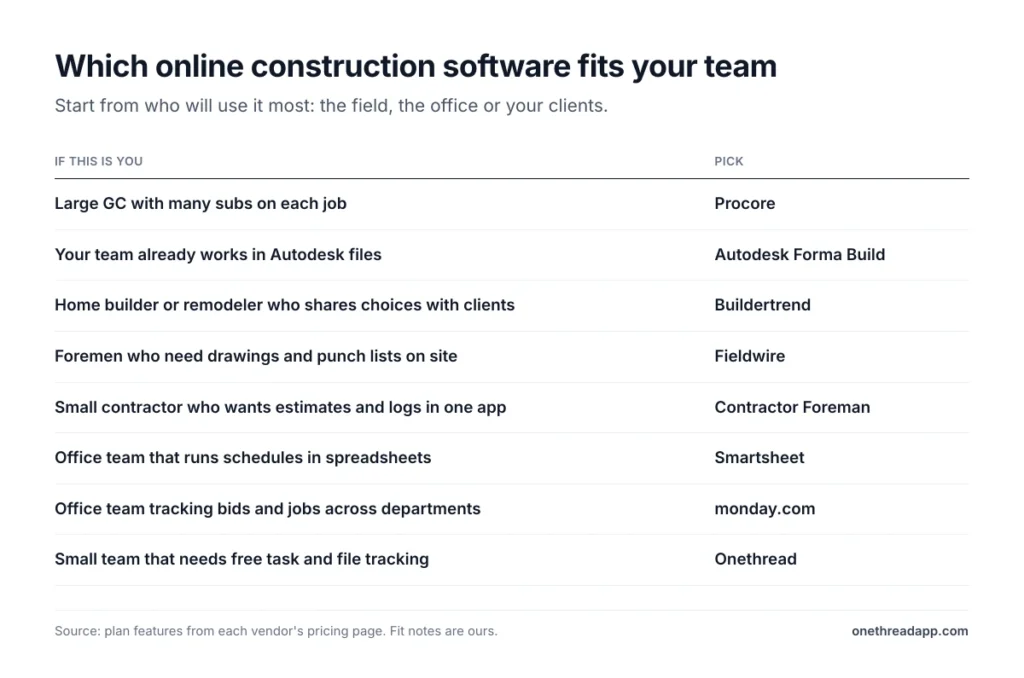
Here’s how to choose: pick by who will use it most, the field, the office or your clients. This table pairs a common situation with the tool that fits it best.
| If this is you | Pick |
|---|---|
| Large GC with many subs on each job | Procore |
| Your team already works in Autodesk files | Autodesk Forma Build |
| Home builder or remodeler who shares choices with clients | Buildertrend |
| Foremen who need drawings and punch lists on site | Fieldwire |
| Small contractor who wants estimates and logs in one app | Contractor Foreman |
| Office team that runs schedules in spreadsheets | Smartsheet |
| Office team tracking bids and jobs across departments | monday.com |
| Small team that needs free task and file tracking | Onethread |
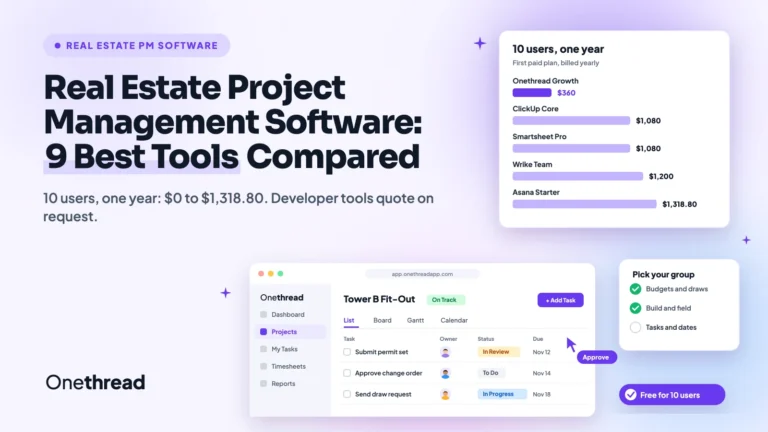
Many firms pair two tools. A field app handles drawings, and an office tool handles tasks and clients. For more options by trade, see our wider construction project management software roundup. Developers can also check our real estate project management software picks.
What Should You Do Next With Your Construction Software Shortlist?
The best online construction project management software is the one your field crew and office both open every day. Price matters, but the user model matters more: per-seat plans get costly as subs and clients join. That’s why the cheapest starting price rarely stays the cheapest.
This week, count your field users and office users apart, then run both numbers through the 25-user table. Start a trial on your top two picks with one real job, ideally a small one. The winner is the app your foreman opens without anyone asking.
Related reading: Healthcare project management software and Accounting project management software.
FAQs
Is There Free Construction Project Management Software?
Yes. Fieldwire’s Basic tier costs $0 for up to 5 users and 3 projects. Onethread costs nothing for a company’s first 10 users, and monday.com costs nothing for 2 seats. Free online construction project management software works for small crews, but RFIs, reports and bigger teams sit on paid plans.
Can You Use Construction Management Software Offline?
Some apps work offline and sync later, but not all of them do. Fieldwire lets crews record markups and as-builts on mobile even without signal. Before you buy, ask each vendor which tasks work offline and how syncing handles two people editing the same item.
Is Construction Management Software Worth It for Small Contractors?
Yes, if it replaces paper and texts you already pay for in lost time. Contractor Foreman starts at $49 a month for one user, and its Pro plan covers 15 users for $2,654 a year. Small construction teams should try $0 tiers first, then pay only when the crew outgrows them.
Can Construction Software Connect to QuickBooks?
Yes, several tools connect to accounting software. Contractor Foreman links to QuickBooks Online, and Fieldwire adds app integrations from its Business plan. When you compare online construction project management software, ask whether the link syncs invoices both ways. That decides how much typing you still do.
What Is the Difference Between Construction Management and Project Management Software?
Construction management software adds jobsite tools like sheets, RFIs, submittals and daily logs. General project management software tracks tasks, schedules and files for any kind of work. Procore and Fieldwire belong to the first group, while Smartsheet, monday.com and Onethread belong to the second.