A Gantt chart looks simple until one task slips and ten others move with it.
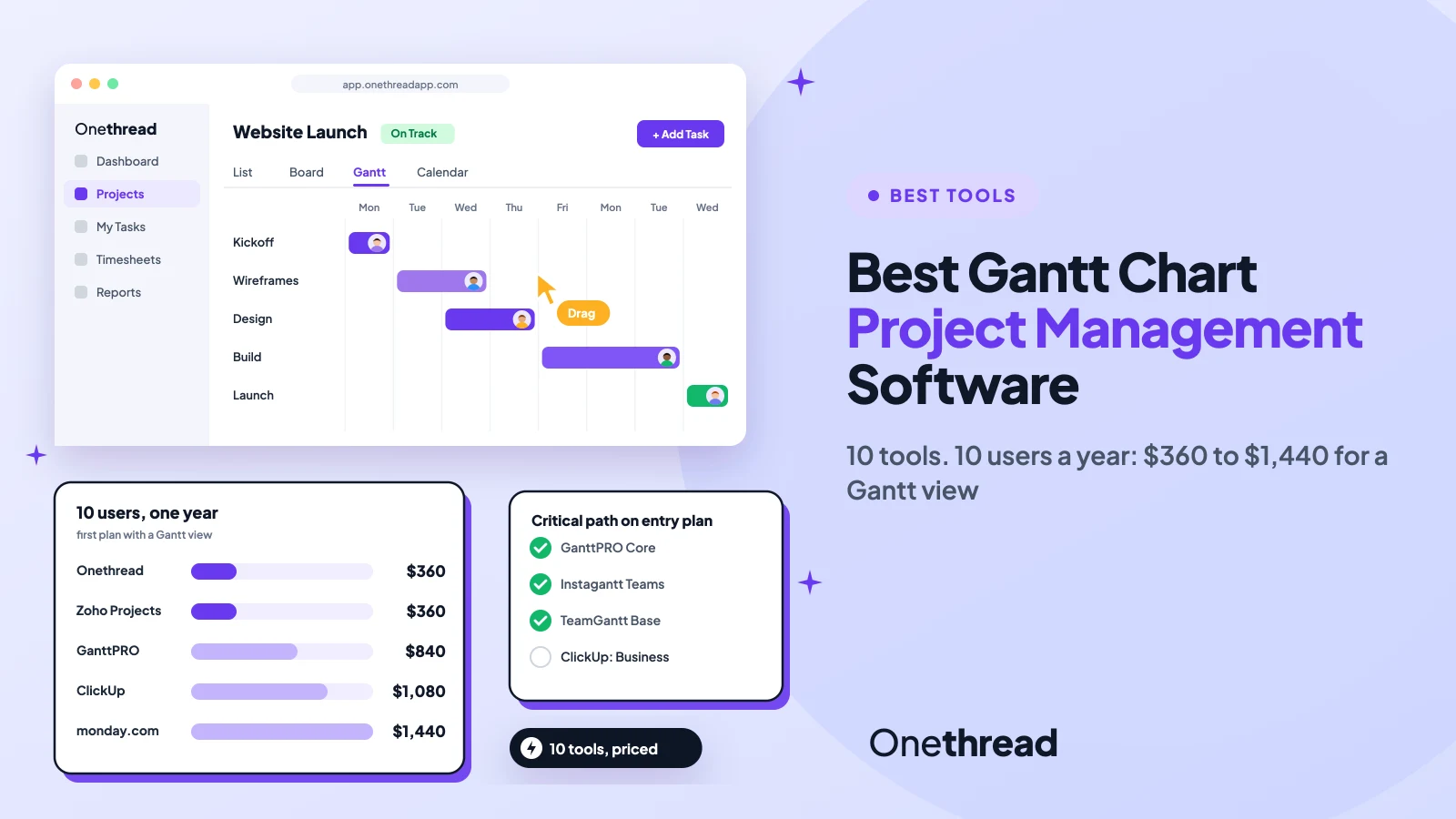
The best Gantt chart project management software for most small teams is Onethread, Zoho Projects or GanttPRO. They cost $360 to $840 a year for 10 users. If you need critical path and baselines, the same 10 seats cost $800 to $3,600.
But the sticker price is only half the story. Many tools keep dependencies, critical path or baselines on a higher tier.
We checked the pricing pages of all 10 tools and read 8 top-ranking guides.
Here's what each tier includes, what you pay, and which tool fits your projects.
Key Points
- Onethread and Zoho Projects cost the least for 10 users at $360 a year on a paid plan, and Onethread Basic is free for your first 10 users.
- GanttPRO and Instagantt include dependencies, critical path and baselines on every paid plan, for about $800 to $840 a year at 10 users.
- ClickUp, Smartsheet and Microsoft lock critical path or baselines behind a higher tier, which lifts 10 users to $2,040 to $3,600 a year.
- Pick by the feature you can't live without first, then compare the yearly cost for your real headcount.
Which Gantt Chart Project Management Software Costs Least for 10 Users?
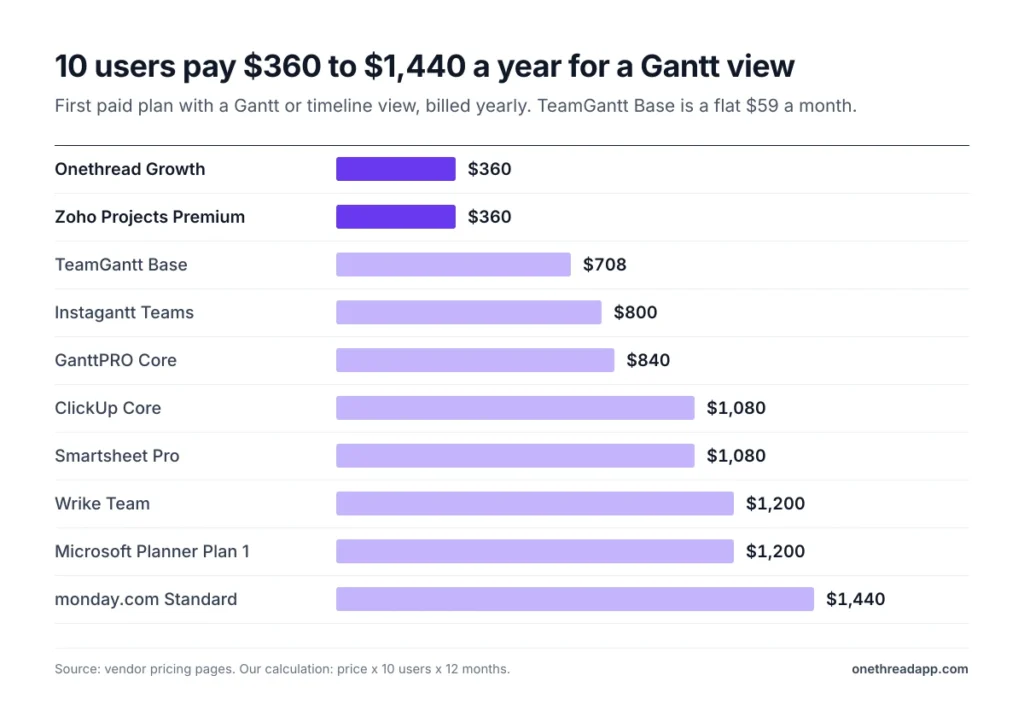
Onethread and Zoho Projects cost the least, at $360 a year for 10 users on the first paid plan. The table shows each tool's first plan with a Gantt view, billed yearly unless noted.
| Tool | First plan with a Gantt view | Price | 10 users, one year | Best for |
|---|---|---|---|---|
| Onethread | Growth | $3 per user a month | $360 | Small teams on a budget |
| Zoho Projects | Premium | $3 per user a month | $360 | Low-cost full suite |
| TeamGantt | Base | $59 a month, 1 manager and 10 collaborators | $708 | Pure Gantt scheduling |
| Instagantt | Teams | $240 a year plus $80 per extra collaborator | $800 | Asana users |
| GanttPRO | Core | $7 per user a month | $840 | Detailed schedules |
| ClickUp | Core | $9 per user a month | $1,080 | All-in-one teams |
| Smartsheet | Pro | $9 per member a month | $1,080 | Spreadsheet fans |
| Wrike | Team | $10 per user a month | $1,200 | Growing teams |
| Microsoft Planner | Plan 1 | $10 per user a month | $1,200 | Microsoft 365 teams |
| monday.com | Standard | $12 per user a month | $1,440 | Visual teams |
The Best for labels are our own short fit notes. Prices change often, so check each vendor's page before you buy.
Sources: Onethread, Zoho Projects, TeamGantt, Instagantt, GanttPRO, ClickUp, Smartsheet, Wrike, Microsoft Planner and monday.com pricing pages.
Which Tier Adds Critical Path and Baselines in Each Gantt Chart Tool?
GanttPRO, Instagantt and Zoho Projects Enterprise give you both critical path and baselines for $800 to $840 a year at 10 users. Other tools put one or both on a pricier tier.
| Tool | Plan with critical path | Plan with baselines | 10 users, one year |
|---|---|---|---|
| Instagantt | Every plan | Every plan | $800 on Teams |
| GanttPRO | Core | Core | $840 |
| Zoho Projects | Enterprise | Enterprise | $840 |
| TeamGantt | Base | Not published | $708 on Base |
| ClickUp | Business | Not published | $2,040 on Business |
| Smartsheet | Not published | Business | $2,280 on Business |
| Microsoft Planner | Plan 3 | Plan 3 | $3,600 on Plan 3 |
| Wrike | Not published | Not published | Ask sales |
| monday.com | Not published | Not published | Ask sales |
| Onethread | Not published | Not published | Ask sales |
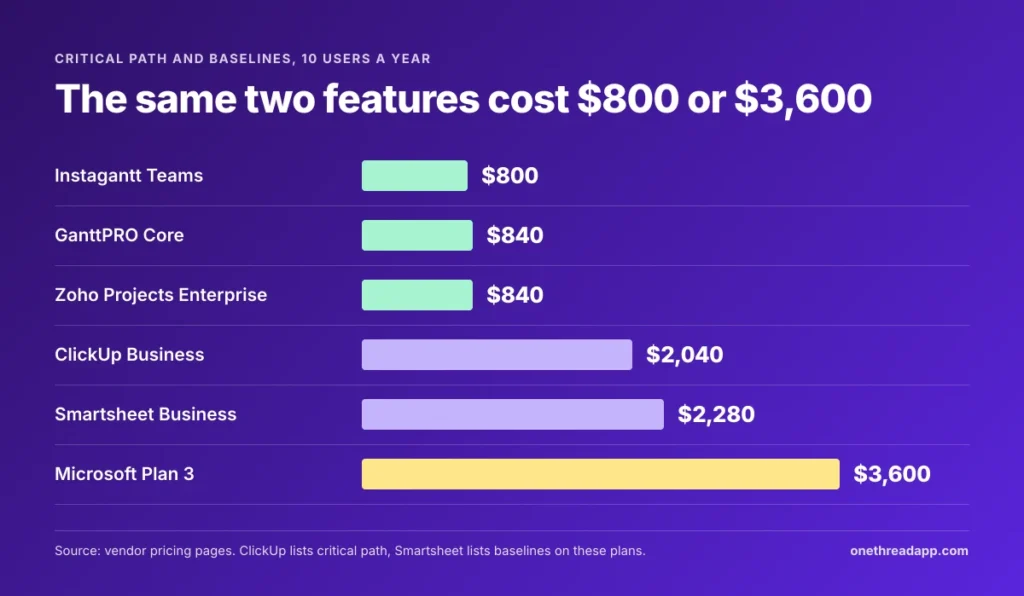
Example: Ten people on Microsoft Planner and Project Plan 3 pay 10 × $30 × 12 = $3,600 a year. The same team on GanttPRO Core pays 10 × $7 × 12 = $840. That's $2,760 back for the same two features.
Top Tip: Ask each vendor which tier includes critical path before your trial ends. It's the feature most often missing from the plan you tested.
How Did We Compare These Gantt Chart Tools?
We compared each Gantt chart tool on four things: price for 10 users, the free plan, task dependencies and the advanced scheduling features. Every price comes from the vendor's own pricing page.
First, we listed the plan where a Gantt or timeline view first appears. Then we checked which tier adds critical path and baselines. Those two features decide whether a chart can warn you about risk, or just draw bars.
We also read 8 top-ranking guides on Gantt chart software. Most of them list prices. Few of them show which tier holds which scheduling feature. That gap shaped the second table.
Our scoring follows our review methodology. If you want a wider list with 13 tools, our guide to Gantt chart software covers more picks.
Here's what we did not do. We didn't sign up for paid trials, so we can't speak to support speed. We also didn't count add-ons such as AI or extra storage.
A quick note on users: some tools count every person, while others let guests view for free. Smartsheet, for example, lets unlimited contributors work next to paid members. TeamGantt's Base plan covers 1 manager and 10 collaborators for one flat price.
That's the method. Now the tools.
What Does Onethread Offer for Gantt Planning?
Onethread is project management software with a Gantt chart view built in. You plan tasks on a timeline, then switch to a board, list or calendar view without leaving the project.
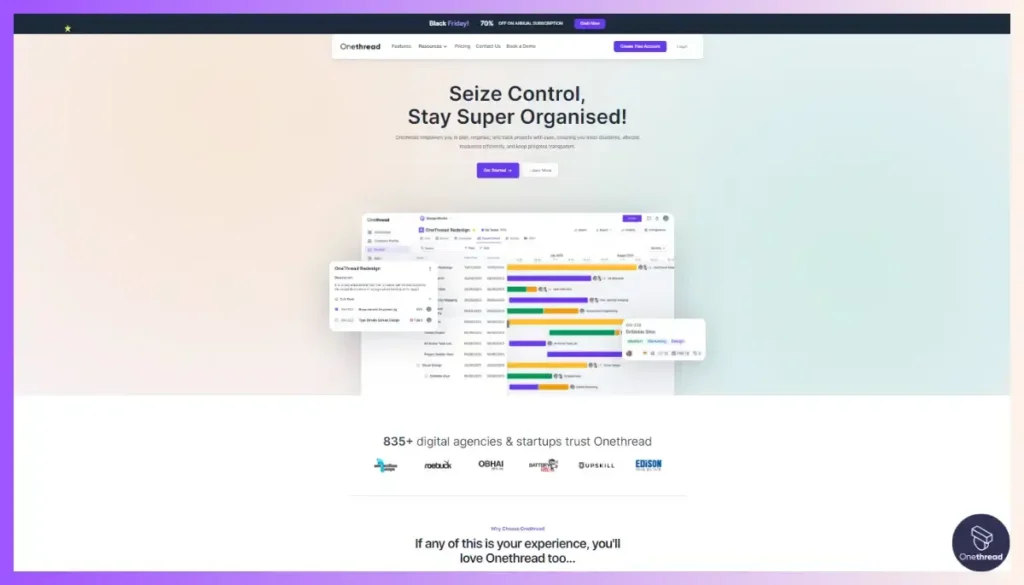
Say you run a 6-week website project for a client. You set the tasks on the Gantt chart, then talk through changes in the task's discussion room. Your team sees the new dates in the same place.
Basic is free for the first 10 users, with limits such as three workflows. Growth adds exports and reports. Scale adds phases, milestones, custom workflows and issue management.
Reviewers like the clean layout. Shihab Shahriyar on Product Hunt calls the experience uncluttered, and Minhaz F. on G2 praises the support team and the discussion section. You can see every view on the Onethread features page.
Pricing: Basic is free for the first 10 users. Growth costs $3 and Scale $5 per user a month, billed yearly, or $3.60 and $6 billed monthly.
Best For
- Small teams and agencies that want a Gantt chart, tasks and team chat in one tool.
Pros
- The lowest paid price in this list, at $360 a year for 10 users.
- Free for the first 10 users on Basic.
- Gantt, board, calendar and sprint views in one project.
Cons
- Critical path and baselines are not listed on the pricing page.
- Phases and milestones need the Scale plan.
- Fewer third-party integrations than ClickUp or monday.com.
What Makes TeamGantt Good for Pure Gantt Scheduling?
TeamGantt is a tool built around the Gantt chart first. Drag-and-drop bars, dependencies and percent-complete tracking sit at the center, and boards come second.
The pricing is unusual. Base costs one flat $59 a month for 1 manager and 10 collaborators, with up to 5 projects. Critical path scheduling comes on Base, and paying yearly takes 20% off.
Business starts at $120 a month for unlimited managers, with 5 projects included and $24 for each extra project. Builder Edition starts at $199 a month for 10 projects.
Users note the trade-off. Valerie H. on Capterra praises the ease of use and percent-complete tracking. Matt A. on G2 finds the paid tiers too costly for a solo user.
Pricing: Base $59 a month, Business from $120 a month, Builder Edition from $199 a month. Yearly billing saves 20%. A 14-day free trial, no free plan.
Best For
- Teams that plan almost everything by dates and want critical path on a flat fee.
Pros
- Flat pricing instead of a per-seat bill on Base.
- Critical path scheduling on the entry plan.
- Collaborators can update tasks without a manager seat.
Cons
- No free plan, only a 14-day trial.
- Base caps you at 5 projects.
- Extra projects on Business cost $24 each a month.
Why Does GanttPRO Suit Detailed Project Schedules?
GanttPRO is an online Gantt chart maker for teams that need tight schedule control. Its pricing page marks Gantt view, dependencies, critical path, baselines and auto scheduling as included on every tier.
That matters for a launch with fixed dates. You save a baseline at kickoff, and every later slip shows against the original plan. No upgrade needed for that.
Calendar view starts on Advanced. Portfolio and workload views start on Business, so a team that runs many projects at once may need that tier.
Maddie B. on Capterra says she picked it up fast without a project management background. Ian D. on G2 ran into team links that didn't work for him.
One more detail: Enterprise shows a limited offer of $25 instead of $35. Check the page again before you sign, since offers end.
Pricing: Core $7, Advanced $10, Business $17 and Enterprise $25 per user a month, billed yearly. Enterprise needs 5 or more users. A 14-day free trial, no free plan.
Best For
- Teams that need critical path and baselines at the lowest per-user price.
Pros
- Critical path and baselines on the $7 Core plan.
- Auto scheduling on every tier.
- Simple drag-and-drop chart for beginners.
Cons
- No free plan.
- Calendar view needs Advanced.
- Workload and portfolio views need Business at $17.
How Does ClickUp Handle Gantt Charts and Dependencies?
ClickUp is an all-in-one work app where the Gantt chart is one of many views. Dependencies work on every tier, even Free, while the Gantt view itself is only a trial on Free.
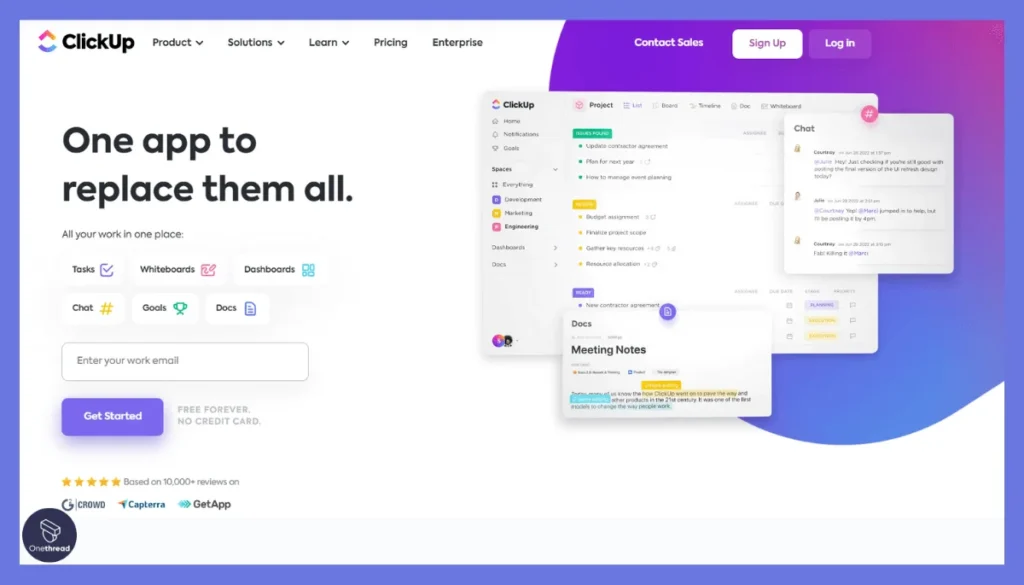
The full Gantt chart arrives on Core at $9 per user a month. Critical path and slack time need Business at $17, and so does the timeline view.
Picture an agency with docs, goals, chat and tasks in one place. ClickUp fits that team, as long as people accept a longer setup.
Lindsey Miller on Product Hunt says it keeps client folders on track, but admits her team doesn't use its full range. Dr. Hillary H. on G2 has to refresh the page to see new tasks.
Pricing: Free, then Core $9, Business $17 and Max $100 per user a month, billed yearly. The regular prices are $12, $25 and $120. Enterprise is a custom quote.
Best For
- Teams that want docs, chat and Gantt planning in one app.
Pros
- Unlimited free members on Free Forever.
- Dependencies on every tier, Free included.
- Gantt chart on Core at $9.
Cons
- Critical path needs Business, so 10 users pay $2,040 a year.
- The timeline view needs Business too.
- So many features that setup takes time.
How Does Smartsheet Build Gantt Charts From Spreadsheets?
Smartsheet looks like a spreadsheet, and each sheet can switch to a Gantt view. Pro includes Gantt, table, board and calendar views, plus dependencies that move dates when a predecessor slips.
That makes it a short step for teams leaving Excel. You keep rows and columns, and the chart draws itself from the dates. Change a date in the grid, and the bar moves on the chart.
Pro caps you at 10 members, with unlimited contributors. Business needs 3 or more members and adds baselines and the timeline view. Enterprise starts at 10 members on a custom quote.
Kelly B. on Capterra says it shines with dependencies and quick dashboards. Anusuya M. on G2 finds it laggy with big data and a little costly for small firms.
Pricing: Pro $9 and Business $19 per member a month, billed yearly, or $12 and $24 billed monthly. Enterprise is a custom quote. A 30-day free trial, no free plan.
Best For
- Teams that think in spreadsheets and want a Gantt chart on top.
Pros
- Dependencies on the Pro plan.
- Unlimited free contributors next to paid members.
- Familiar grid for Excel users.
Cons
- Pro stops at 10 members.
- Baselines need Business at $19.
- The Pro plan is only for new customers.
What Does Wrike Include for Interactive Gantt Charts?
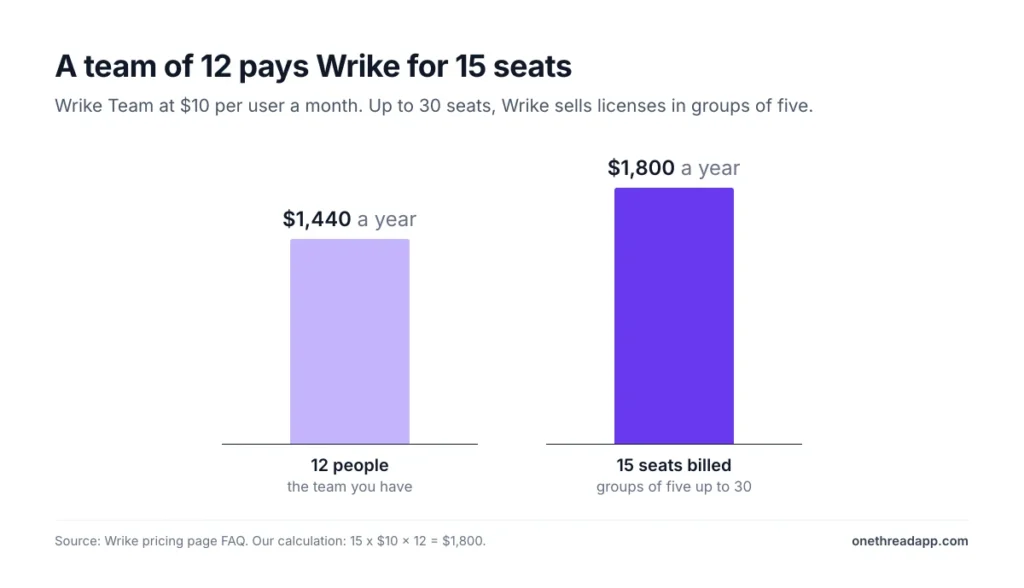
Wrike adds an interactive Gantt chart on its Team plan. Team suits 2 to 15 users, and Business covers 5 to 200 users, so the plan follows your headcount.
The licenses come in blocks. Up to 30 users, Wrike sells them in groups of five, so a team of 7 pays for 10.
Wrike's pricing page doesn't say which tier holds critical path or baselines. Ask sales before you plan a long, dependent project around them.
Add-ons cost extra. Wrike Whiteboard runs $15 per user a month, and other add-ons are priced on request.
Stephanie J. on Capterra calls it adaptable, with strong training and help. Megan D. on G2 felt passed between too many account managers.
Pricing: Free, then Team $10 and Business $25 per user a month, billed yearly. Business and above are annual only. Pinnacle and Apex are quote only.
Best For
- Growing teams that want a Gantt chart with room to scale past 15 users.
Pros
- Interactive Gantt chart on the $10 Team plan.
- Business covers up to 200 users.
- Free plan for trying the basics.
Cons
- Licenses sold in groups of five up to 30 users.
- Critical path and baselines not shown on the pricing page.
- Business plans are annual only.
Why Do Visual Teams Use monday.com Gantt Views?
monday.com builds work around colorful boards, and its Timeline and Gantt views start on the Standard plan. Dependencies between tasks come through advanced columns on Pro.
The page prices per user. Standard costs $12 a month billed yearly, so 10 people cost $120 a month.
Say a marketing team runs campaigns on boards. They add a Gantt view to see launch dates, and they keep the boards for daily work. The calendar view also starts on Standard, so one upgrade covers both.
Volodymyr Kuzmenko on Product Hunt rates it easy for early startups. Kenneth D. on G2 says items can get dragged out of place by mistake.
Pricing: Free for up to 2 seats, then Basic $9, Standard $12 and Pro $19 per user a month, billed yearly. Yearly billing saves 18%. Enterprise is a custom quote.
Best For
- Visual teams that live on boards and want a Gantt view for launch dates.
- Marketing teams that plan campaigns by week.
Pros
- Timeline and Gantt views on Standard.
- Clear pricing example for a team of 10.
- Free plan for 2 seats.
Cons
- Gantt starts at $12 a month, not on Basic.
- Dependencies need Pro at $19.
- Critical path and baselines not shown on the pricing page.
Why Is Zoho Projects the Cheapest Way to Get Critical Path?
Zoho Projects gives every plan a Gantt chart, the Free plan included. Free covers up to 5 users and 3 projects, with simple dependencies.
Premium adds all four dependency types inside a project for $3 per user a month. Enterprise adds critical path, baselines and dependencies across projects for $7.
That makes Zoho Projects the cheapest route to critical path in this list. Ten users on Enterprise pay $840 a year. Enterprise also adds 10 read-only users, which helps when clients only need to look.
Deniz Nur C. on Capterra likes the simple layout, even with many projects. Carlos P. on G2 finds the mobile app thinner than the desktop version.
Pricing: Free for up to 5 users, then Premium $3, Enterprise $7 and Ultimate $11 per user a month, billed yearly. A 15-day free trial.
Best For
- Budget teams that want a full suite and critical path for under $10 a user.
- Zoho users who want projects next to their other Zoho apps.
Pros
- Gantt chart on every tier, Free included.
- Critical path and baselines on Enterprise at $7.
- Up to 15 baselines per project on Enterprise.
Cons
- Free stops at 3 projects.
- Premium has no critical path.
- The mobile app has fewer functions than the web app.
What Do Microsoft Planner and Project Offer Microsoft 365 Teams?
Microsoft Planner now holds the old Project tools. Planner Plan 1 adds a Timeline (Gantt) view and task dependencies for $10 per user a month.
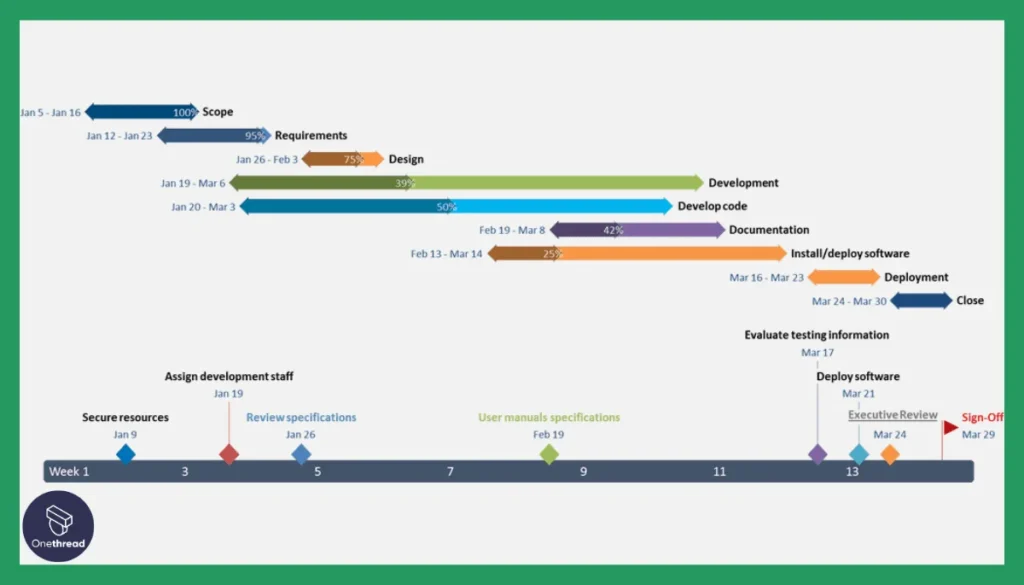
Planner and Project Plan 3 costs $30 per user a month. It adds baselines, critical path, lead and lag, and the Project desktop app.
If your company already runs on Microsoft 365, Planner sits inside Teams and Outlook. That saves a login, but Plan 3 is the priciest way to get critical path here. Plan 3 also lets each user install the desktop app on up to 5 PCs.
Mazidul Islam M. on Capterra praises the planning and resource tools. Alex N. on G2 found it costly at first but says pricing has improved.
Pricing: Planner Plan 1 $10 and Planner and Project Plan 3 $30 per user a month, paid yearly. Basic Planner comes with Microsoft 365.
Best For
- Microsoft 365 companies that need classic project scheduling.
- Project managers who still want the desktop app.
Pros
- Works inside Teams and Outlook.
- Plan 3 includes baselines, critical path and the desktop app.
- No limit on the number of users.
Cons
- Critical path costs $30 per user a month.
- Ten users on Plan 3 pay $3,600 a year.
- Planner Plan 1 has no baselines.
How Does Instagantt Add Gantt Charts to Asana?
Instagantt adds a Gantt chart to Asana, and it also works as a standalone tool. Its pricing page lists critical path, baselines and finish-to-start dependencies on every tier, the free one included.
The Free plan connects up to 3 Asana projects for 1 user. Teams costs $20 a month billed yearly with 3 collaborators, plus $8 a month for each extra person.
Here's the math for 10 people on yearly billing. Teams costs $240, and 7 extra collaborators at $80 each add $560, for $800 a year. Lag and lead times are a paid feature.
Anna E. on Capterra likes how easy it is to create projects, tasks and subtasks. Andrew E. on G2 admits a learning curve, then says it becomes second nature.
Pricing: Free for Asana users (3 projects, 1 user). Individual $10 and Teams $20 a month, billed yearly, or $12 and $24 monthly. Extra collaborators cost $8 a month.
Best For
- Teams that already run on Asana and want a real Gantt chart.
Pros
- Critical path and baselines on every tier.
- A free plan for Asana users.
- Yearly billing saves 17%.
Cons
- Extra collaborators add $8 each a month.
- Free stops at 3 Asana projects and 1 user.
- Workload and multi-project dashboards need a paid plan.
What Features Should Gantt Chart Software Include?
Gantt chart software should include task dependencies, critical path, baselines and a way to see several projects at once. Without those four, you get a pretty timeline that can't warn you when dates break. Each feature covers a different scheduling job, so check them one by one.
Task Dependencies Keep Dates Honest
A task dependency links two tasks so one can't start until the other ends. Finish-to-start is the common type. When the first task slips, the second moves on its own.
Every tool here lists dependencies on some plan. ClickUp and Instagantt even include them for free, and Zoho Projects Free covers the basic type. Check the type, too. Zoho Projects Premium adds all four types within a project.
If dependencies sit on a top tier, the chart turns into a drawing. You end up moving every bar by hand.
Critical Path Shows What Can't Slip
The critical path is the longest chain of linked tasks. Any delay on it pushes the end date, while other tasks have slack.
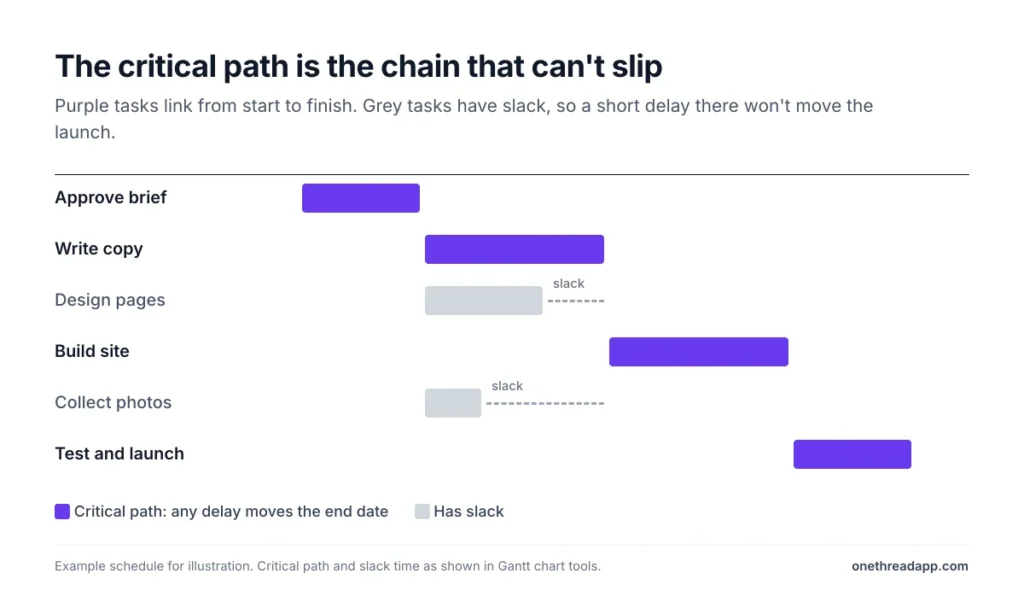
GanttPRO, Instagantt and TeamGantt include critical path on their entry plans. Zoho Projects needs Enterprise, ClickUp needs Business and Microsoft needs Plan 3. ClickUp also shows slack time, the days a task can slip without moving the end date.
For a project with fixed deadlines, this is the feature to test first. It tells you which delay costs the launch and which one doesn't.
Baselines Track the Plan You Promised
A baseline saves a copy of your schedule at one moment. Later, the chart shows how far each task drifted from that copy.
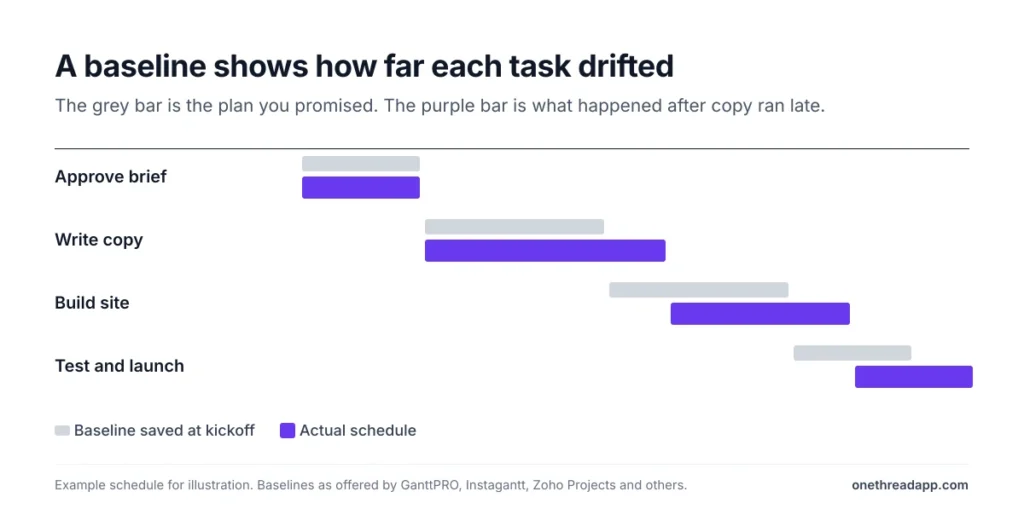
GanttPRO, Instagantt and Microsoft Plan 3 include baselines. Smartsheet adds them on Business, and Zoho Projects Enterprise allows up to 15 per project.
Baselines matter most for client work. When a client asks why the date moved, you can show the exact slip. Save a new baseline only when the client agrees to a new plan, or the old promise disappears.
Multiple Projects Need One View
A team that runs many projects needs a view across all of them. Otherwise, a busy week on one project hides a clash on another.
GanttPRO adds a portfolio view on Business, and Zoho Projects Enterprise adds a portfolio dashboard. Zoho Projects Enterprise also links dependencies across projects.
If you run more than five projects at once, test this view in your trial. A single-project chart won't show anyone booked on two projects in the same week. That clash is where most missed dates start.
Which Gantt Chart Tool Fits Your Team?
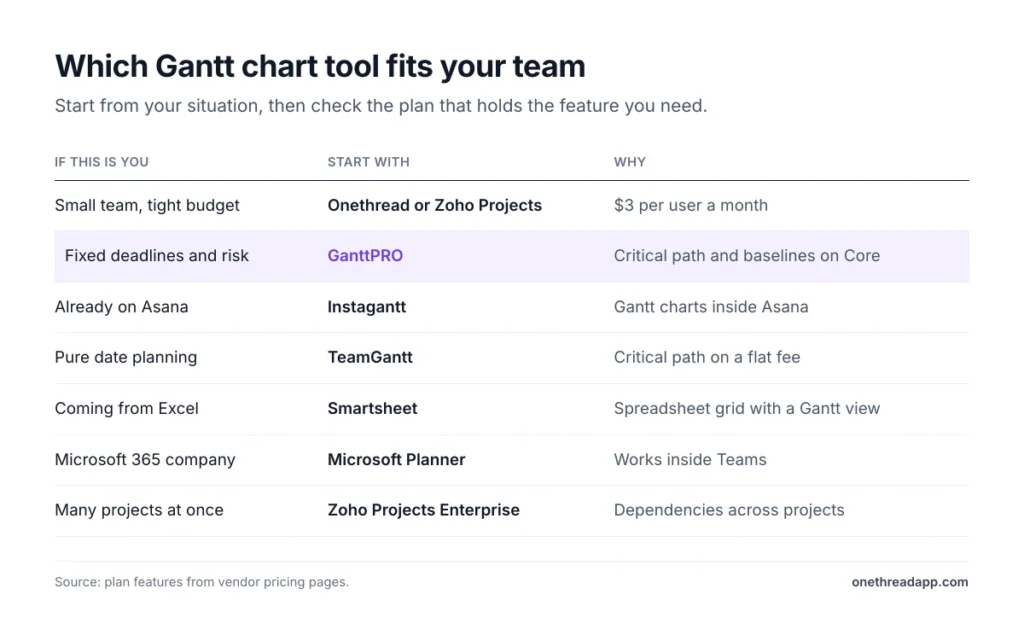
The right Gantt chart tool depends on your team size, the scheduling features you need and the apps you already use. Use the table to match your situation to a starting pick.
| Your situation | Start with | Why |
|---|---|---|
| Small team, tight budget | Onethread or Zoho Projects | $3 per user a month |
| Fixed deadlines and risk | GanttPRO | Critical path and baselines on Core |
| Already on Asana | Instagantt | Gantt charts inside Asana |
| Pure date planning | TeamGantt | Critical path on a flat fee |
| Agile teams with sprints | ClickUp or Onethread | Sprints, boards and Gantt in one app |
| Coming from Excel | Smartsheet | Spreadsheet grid with a Gantt view |
| Microsoft 365 company | Microsoft Planner | Works inside Teams |
| Construction schedules | Microsoft Plan 3 or GanttPRO | Baselines, critical path, lead and lag |
| Many projects at once | Zoho Projects Enterprise | Dependencies across projects |
Agile teams often mix a Gantt chart with boards. If boards matter more than dates, our guide to Kanban project management compares tools built around columns.
If a full tool feels like too much, a lighter option may do. You can sketch a schedule with our free Gantt chart generator, or check our list of free Gantt chart software.
Some teams don't need a Gantt chart at all. Our roundup of Gantt chart alternatives covers timelines, boards and calendars.
How Do You Pick Gantt Chart Project Management Software in a Week?
You can pick Gantt chart project management software in a week by testing 2 tools on one real project. Give each tool two or three days. Four checks keep the trial honest:
- Count your users: List everyone who edits dates and everyone who only views. Some tools let viewers in at no cost.
- Name your must-have feature: Pick one of dependencies, critical path or baselines. Find the plan that holds it.
- Price the year: Multiply seats by the monthly price by 12. Use yearly billing if you'll stay.
- Run one real project: Build a 2-week plan, then slip one task. Watch what the chart does, and note how many clicks the fix took.
Two tools is the right number. One tool gives you nothing to compare, and three spreads your week too thin.
Example: A team of 12 picks Wrike Team at $10 a user. Wrike sells licenses in groups of five, so the team pays for 15. That's 15 × $10 × 12 = $1,800 a year, not $1,440. Run the same math for every tool on your list.
Top Tip: Slip a task on purpose during the trial. If the later tasks don't move on their own, the dependencies aren't doing their job.
What Should You Do Next With Your Gantt Chart Shortlist?
The best Gantt chart project management software is the one whose plan holds the scheduling feature you need, at a price that fits your headcount. Most small teams can start for $360 a year or less. Critical path and baselines can cost up to ten times more, so the plan matters more than the brand.
This week, list the people who edit dates and name your one must-have feature. Then open trials for two tools from the tables, build one real plan in each, and slip one task to see which chart reacts. The chart that moves your dates for you is the one worth paying for.
FAQs
Is There Free Gantt Chart Project Management Software?
Yes. Onethread Basic is free for the first 10 users, and Zoho Projects Free covers up to 5 users with a Gantt chart. ClickUp Free includes dependencies, and Instagantt is free for 1 Asana user and 3 projects. Free plans usually limit projects, workflows or advanced Gantt chart features such as critical path.
Can Gantt Chart Software Handle Multiple Projects at Once?
Yes, but usually on a higher tier. GanttPRO adds a portfolio view on Business, and Zoho Projects Enterprise adds a portfolio dashboard and dependencies across projects. For several projects, test the cross-project view during your trial, because a single-project Gantt chart won't show people booked on two projects.
Does Excel Have a Built-In Gantt Chart?
No. Excel has no built-in Gantt chart type, so you build one from a stacked bar chart or a template. That works for a simple plan. But Excel won't move dates when a task slips, which is why teams switch to Gantt chart project management software with real dependencies.
What Is the Difference Between a Gantt Chart and a Timeline?
A Gantt chart shows tasks as bars against dates, with dependencies linking them. A timeline view shows dates and milestones too, but often without links between tasks. In ClickUp and Smartsheet, the timeline view starts on Business. The Gantt chart project management software view starts on a lower plan in both.
Do All Team Members Need a Paid License to Use a Gantt Chart?
Not always. Smartsheet lets unlimited contributors work next to paid members, and TeamGantt Base covers 1 manager and 10 collaborators for one flat price. ClickUp, Wrike and monday.com charge per user. Count viewers separately before you compare yearly costs for Gantt chart software.