Slack is cheap right up until you count the seats.
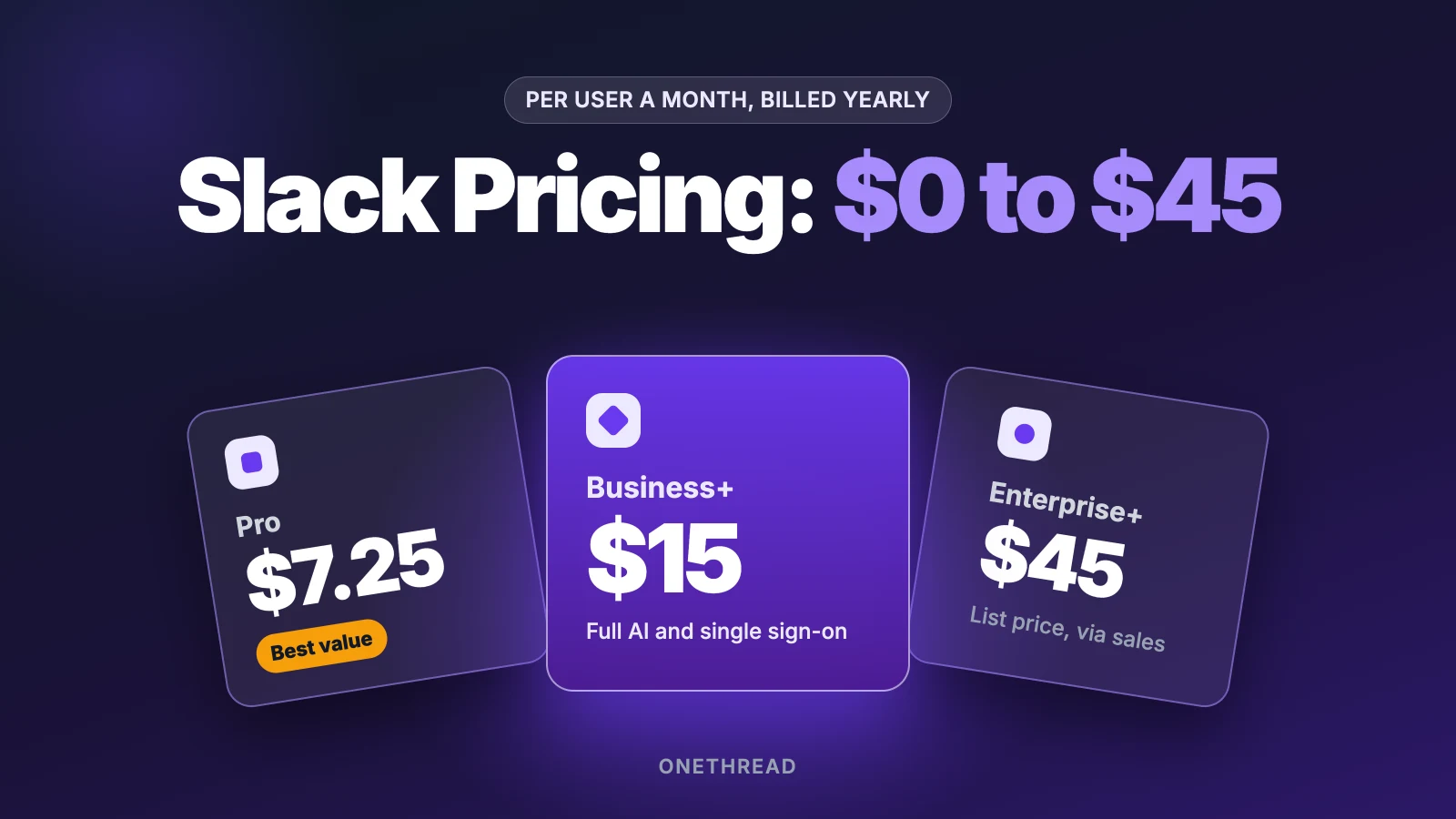
Slack pricing starts at $0 on the Free plan. Pro costs $7.25 per user a month and Business+ costs $15 when you pay yearly, while Enterprise+ lists at $45.
Pay month to month and the same seats cost about 20% more. Fair billing, guest rules and a 50% promo then nudge the total up or down.
We read Slack’s pricing page, its billing help docs and six pricing guides. Then we ran the math for a 10-person team.
Here’s what each plan includes, what you’ll pay, and which one fits your team.
Key Points
- Slack has four plans: Free at $0, Pro at $7.25 per user a month billed annually or $8.75 monthly, Business+ at $15 annually or $18 monthly, and Enterprise+ at $45 list, sold through sales. For 10 users, that’s $870 a year on Pro and $1,800 on Business+.
- Pick Pro if your team mainly needs full history, group calls and unlimited apps. Move to Business+ only when you need single sign-on, data exports or the full AI set.
- Pay yearly if your headcount is stable. In our math, the 50% first-quarter promo still costs a 10-person team more over the year than annual billing.
- Count only active people. Slack credits you for members idle over 28 days, and single-channel guests are free.
How Much Does Slack Pricing Cost per User?
Slack pricing costs $0 to $45 per user a month, based on the plan and how you pay. Pro and Business+ are the two plans most small teams buy. Enterprise+ is quote-based, so the $45 figure is a list price, not a promise.
| Plan | Billed yearly (per user a month) | Billed monthly (per user a month) | 10 users for a year, yearly billing |
|---|---|---|---|
| Free | $0 | $0 | $0 |
| Pro | $7.25 | $8.75 | $870 |
| Business+ | $15 | $18 | $1,800 |
| Enterprise+ | $45 (contact sales) | Not published | $5,400 at list |
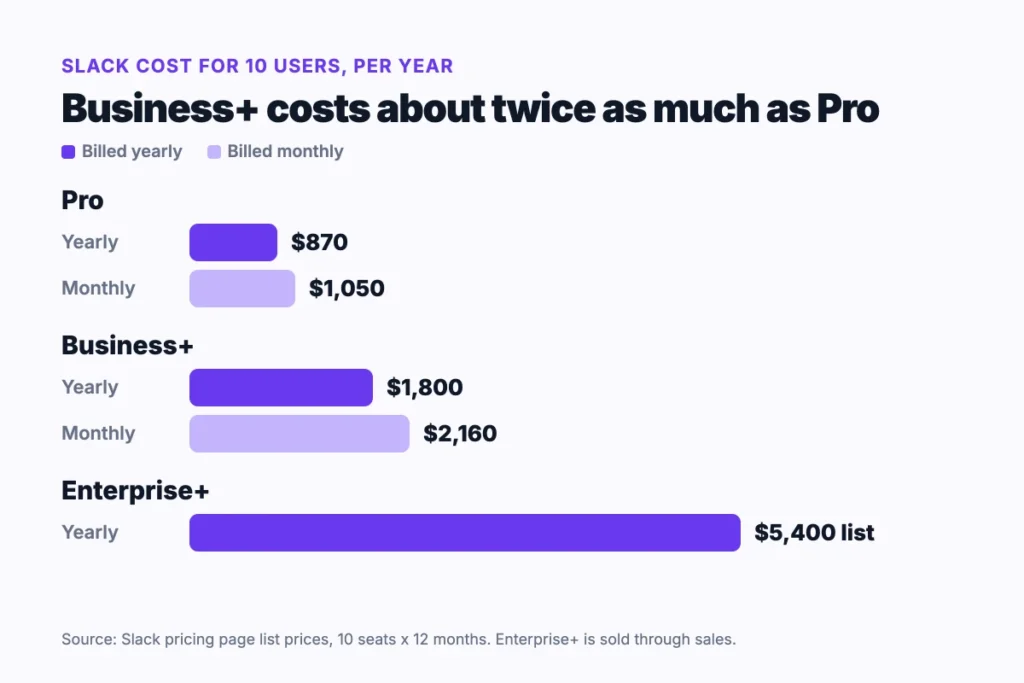
The 10-user column is our own math: price times 10 seats times 12 months. Paying monthly raises Pro to $1,050 and Business+ to $2,160 for the same team.
Real deals often land lower. Vendr’s data on 535 Slack purchases puts the median Business+ price at $13.53 and Enterprise+ at $26.18 per user a month (March 2026).
Sources: Slack pricing page, Slack Fair Billing Policy, Slack pricing update.
What Does the Slack Free Plan Include?
The Slack Free plan costs nothing and shows only the last 90 days of messages and files. That limit is the one people hit first. On G2, the 90-day cap is the most cited pain point in Slack’s 38,000+ reviews.
Free also caps you at 10 apps. Huddles and Slack Connect work one to one only, so no group calls and no shared channels with a client’s whole team.
One more catch sits in the fine print. Slack’s pricing page says Free deletes data after one year. Old threads don’t just hide. They go.
Free still suits plenty of groups. A club, a study group or a small volunteer crew can run on it for years, as long as nobody needs last quarter’s decisions.
Say you run a five-person side project. Free works fine until someone asks where that file from March went.
Pricing: $0, with no time limit.
Best For
- Small groups testing Slack before they commit.
- Teams that only care about this week’s chat.
Pros
- No cost and no seat limit.
- Search works across the last 90 days.
- Free users get a limited Slackbot trial.
Cons
- Messages older than 90 days are hidden.
- Data older than one year is deleted.
- Huddles are one to one only.
- Only 10 app integrations.
What Does Slack Pro Include?
Slack Pro costs $7.25 per user a month billed annually, or $8.75 billed monthly. It removes the Free limits that hurt most. You get full message history and unlimited apps.
Pro also opens group huddles and Slack Connect with up to 250 outside groups. That’s the plan for agencies that talk to clients in shared channels.
AI on Pro is light. It covers thread and channel summaries plus huddle notes. Google sign-in works, but SAML single sign-on does not.
Fair billing applies here too. A contractor who leaves mid-month stops costing you once they’ve been idle for 28 days.
The jump from Free to Pro is the one most teams make, and it’s the cheapest fix for the 90-day cap.
Picture a 12-person agency with three client channels. Pro covers it for $1,044 a year on yearly billing (12 seats times $7.25 times 12 months).
Pricing: $7.25 per user a month billed yearly, $8.75 on monthly billing.
Best For
- Small teams and agencies that need full history.
- Teams that share channels with clients or vendors.
Pros
- Unlimited history and apps.
- Group huddles for quick calls.
- Thread summaries and huddle notes included.
Cons
- No single sign-on (SSO) through SAML or SCIM.
- Slackbot and AI search are limited to a trial.
- Monthly billing adds $1.50 per seat.
What Does Slack Business+ Include?
Slack Business+ costs $15 per user a month billed yearly, or $18 monthly. It adds the admin and AI tools that growing teams ask for.
Slack raised this plan from $12.50 to $15 (yearly billing) in its June 2025 pricing update. In return, Business+ now includes Slackbot, daily recaps, file summaries, AI search and AI workflow generation.
Security gets an upgrade too. You get single sign-on, SCIM user setup and full message exports, including private channels and DMs.
Say your IT lead wants one login for every tool. That alone moves a team from Pro to Business+, at roughly double the seat cost.
For a 10-person team, that’s $1,800 a year on yearly billing, against $870 on Pro. The extra $930 buys security and AI, not more chat.
Slack says it hosts its AI models in its own cloud setup and doesn’t train them on customer data.
Pricing: $15 per user a month billed yearly, $18 billed monthly.
Best For
- Teams that need single sign-on (SSO) and user setup through SCIM.
- Teams that want Slackbot and AI search for everyone.
Pros
- Full AI set, including recaps and workflow generation.
- Data exports for all messages.
- Slackbot access for every member.
Cons
- Costs about twice as much as Pro per seat.
- The 2025 increase raised the yearly price by $2.50 per seat.
- Higher Slackbot limits need extra Flex Credits through sales.
What Does Slack Enterprise+ Include?
Slack Enterprise+ lists at $45 per user a month on yearly billing, and you buy it through sales. It’s built for large companies with many workspaces.
The plan adds enterprise search across connected apps and multiple SAML setups. It also adds audit logs, legal holds, data loss prevention and HIPAA support.
The list price is rarely what people pay. Vendr’s sample shows a median of $26.18 per user a month, so expect a long talk with a sales rep.
Picture a firm with 400 staff across three regions, each with its own workspace. That’s the buyer Enterprise+ was made for.
If your team is under a few hundred people, skip the sales call. Business+ covers the same AI features at a third of the list price.
If you do go this route, ask for a multi-year term. Vendr lists it as a common lever.
Pricing: $45 per user a month at list, custom quotes in practice.
Best For
- Large companies with several workspaces.
- Teams with strict audit, legal or health data rules.
Pros
- Enterprise search across connected tools.
- Compliance tools such as legal holds and HIPAA support.
- Room to negotiate well below list.
Cons
- No public self-serve price.
- List price is six times the Pro rate.
- Most small teams pay for tools they won’t touch.
How Does Slack’s Fair Billing Policy Change Your Bill?
Slack’s Fair Billing Policy charges you only for active members. Anyone idle for more than 28 days counts as inactive, and Slack adds a prorated credit for their unused days.
Owners, admins, full members and multi-channel guests are billed. Single-channel guests and bots are free. So a client you invite to one channel costs nothing.
New people are prorated too. Slack’s own help page walks through the math.
Example: You add a member on Pro monthly with 20 days left in a 30-day month. You pay $8.75 divided by 30, times 20, which is $5.83.
Deactivated members count as inactive right away, and Slack credits them the next day.
Credits have limits. They only count against future Slack bills, they have no cash value, and they expire if you cancel. If everyone goes idle, Slack still bills at least one member.
Top Tip: Before you renew, check who has been idle for 28 days. Those seats already earn a credit, so you don’t need to rush removals.
Here’s the thing: fair billing doesn’t shrink the price per seat. It only stops you paying for ghosts. For a team with seasonal staff or contractors, that can matter more than any promo.
When Does the Slack Pricing Promo Beat Annual Billing?
It doesn’t, for a team that stays all year. Slack’s 50% promo cuts Pro to $4.38 and Business+ to $9 per seat. But it lasts only three months, and only on monthly billing.
To get it, you must buy online within 7 days of creating the team. It doesn’t apply to annual plans or Enterprise+.
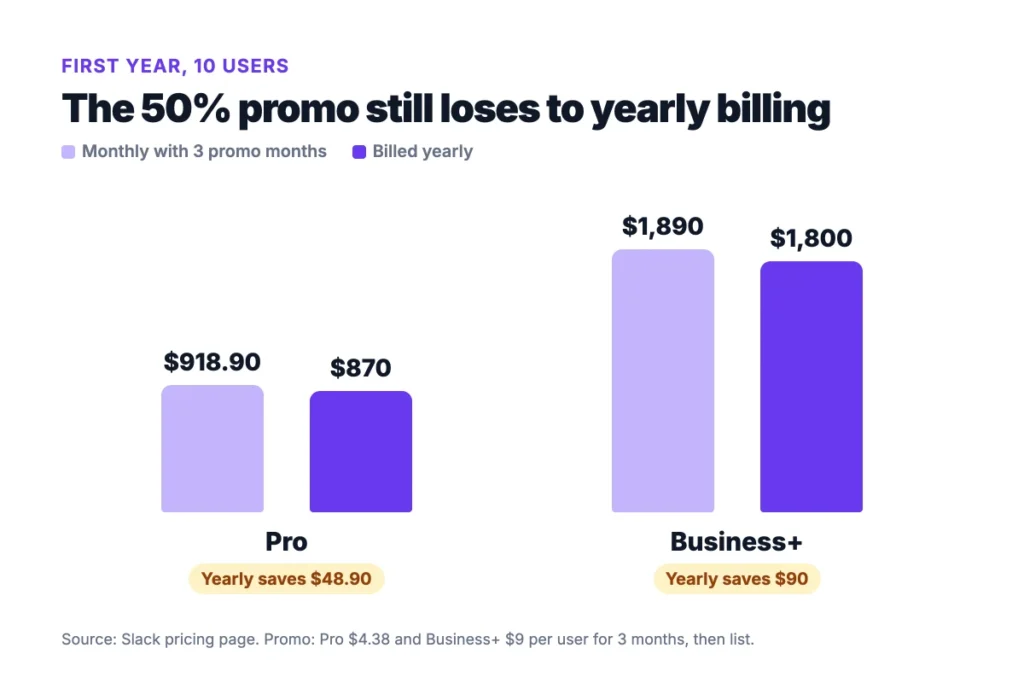
We ran the first year for 10 users. The promo looks huge in month one. By month twelve, yearly billing wins. The math flips only if you cut seats or cancel within the year.
Example: On Pro, three promo months cost $131.40 (10 seats times $4.38 times 3). Nine full months add $787.50, so the year totals $918.90. Yearly billing costs $870, which is $48.90 less.
Business+ follows the same path. The promo year costs $1,890 against $1,800 billed yearly, a $90 gap. Yearly billing commits you up front, while monthly lets you walk away.
So when does the promo make sense? When you’re not sure the team will stick with Slack. Three cheap months on monthly billing is a low-cost trial, and you can switch to yearly billing once you know.
Top Tip: If you take the promo, set a reminder for month three. That’s when the full price kicks in.
How Do Teams Cut Slack Pricing Below List?
Teams cut Slack pricing in two main ways: a nonprofit or education discount, or a deal with sales at renewal. Both need some paperwork, and both can save more than any promo. Start with the discount check, because it takes one form and a few days.
Apply for Nonprofit or Education Pricing
Slack gives qualified nonprofits Pro for free if the workspace has 250 members or fewer. Larger nonprofits get 85% off Pro, and every size gets 85% off Business+.
Schools and other accredited learning groups get 85% off Pro and Business+ through Slack for Education. Faculty groups and alumni groups can qualify too.
A workspace owner applies, and Slack checks nonprofit status through TechSoup. Approval usually lands within three days.
One catch: Slack doesn’t refund fees paid before approval. Apply before you upgrade, not after.
Negotiate Seats at Renewal
Larger teams can ask for a lower rate at renewal. Vendr reports typical discounts of 5% to 10% for 50 to 200 users, and more as seat counts climb.
Multi-year terms and early renewal give you more to trade. So does a clean seat count, so trim idle members first.
Ask your rep three things. What is the yearly price per seat? Can you cap next year’s increase? Can you drop auto-renew?
If the rep won’t move, the list price still holds. You’ve lost nothing but a call.
Which Slack Plan Fits Which Team?
Most small teams should start on Pro and stay there. Business+ earns its price when security rules or AI needs force it. Three checks help you decide:
- History: If anyone needs messages older than 90 days, Free is out.
- Sign-in: If your IT team requires single sign-on for every tool, you need Business+.
- AI: If summaries are enough, Pro covers it. If you want Slackbot and AI search for all, budget for Business+.
Size matters less than these needs. A 40-person agency with no SSO rule can run on Pro for $3,480 a year (40 seats times $7.25 times 12). The same team on Business+ pays $7,200.
That $3,720 gap pays for a lot of other tools. So make the upgrade earn its place. Name the one feature you need, and check that Pro truly lacks it.
Slack also handles chat, not project plans. If your team tracks tasks, budgets and time in another tool, price that tool too. Our breakdown of Asana pricing shows how quickly seat costs stack. Teams that want projects and budgets in one place can compare Onethread pricing as well.
And if Slack itself feels too costly, our list of Slack alternatives covers chat tools with lower seat prices.
What Should You Do Next With Slack?
Slack’s price per seat is simple. The bill isn’t, because billing cycle, idle seats and the AI tier decide what you pay. For most small teams, Pro on yearly billing gives the lowest stable cost. Business+ only pays off when a rule or a real AI need forces it.
This week, export your member list and count who posted in the last 28 days. Multiply that number by $7.25 and by 12, and you have your real Pro budget before you talk to anyone. Then add any multi-channel guests to that count.
FAQs
Is Slack Free Forever?
Yes, the Free plan has no time limit. But it shows only 90 days of messages and files, and it deletes data older than one year. Slack pricing for paid plans starts at $7.25 per user a month. Most teams that need old threads move to Pro once the cap starts to bite.
Does Slack Charge for Guests?
It depends on the guest type. Single-channel guests are free, so a client in one shared channel costs nothing. Multi-channel guests are billed like full members under Slack’s fair billing rules. Before you invite outside people, decide whether they need one channel or several.
Can You Pay for Slack by Invoice?
Yes, on annual plans. Slack says customers who pay yearly may be able to pay by invoice through ACH or wire transfer. Any plan can be paid by credit card. If your finance team needs invoices, yearly billing is the route Slack names.
Does Slack Pro Include AI?
Yes, but only the basics. Slack Pro includes thread and channel summaries plus huddle notes. Slackbot, daily recaps, AI search and AI workflow generation sit on Business+ and above, and Pro users get only a limited trial. That split is the main reason teams weigh Slack pricing for Business+.
Did Slack Raise Its Prices?
Yes. Slack raised Business+ from $12.50 to $15 per user a month on yearly billing, and from $15 to $18 on monthly billing. Pro stayed at $7.25 yearly. The change came with more AI tools on Business+ and the new Enterprise+ plan.