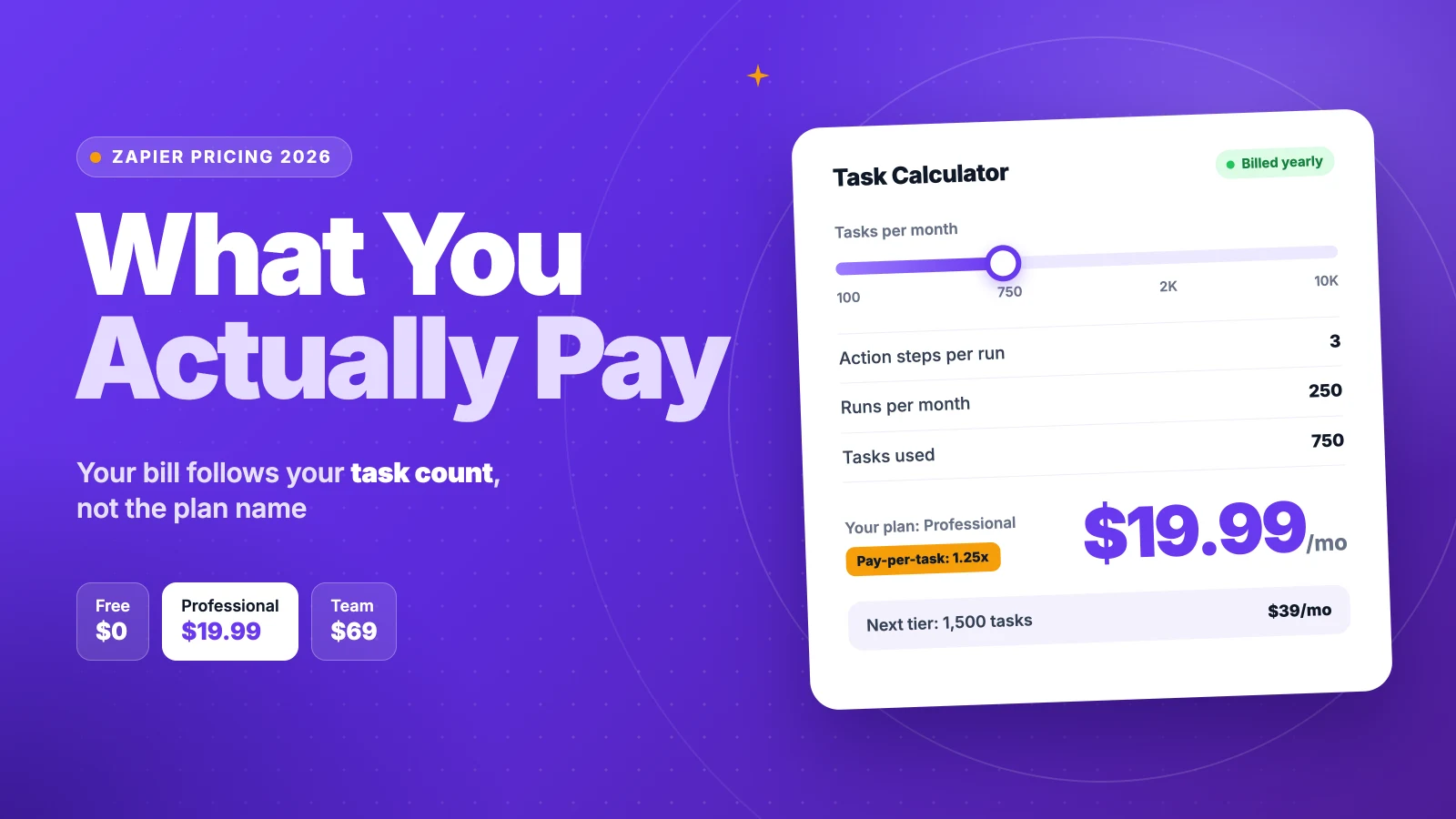
Zapier pricing looks like a plan choice, but what you pay comes down to a task count.
Zapier’s Free plan costs nothing. Professional starts at $19.99 a month and Team at $69, billed yearly. Monthly billing raises them to $29.99 and $103.50. Enterprise is quoted.
Those prices buy a small task allowance. Every action step in every run uses a task, AI steps use up to five, and the bill climbs with each extra tier.
We checked Zapier’s pricing page and help center, then ran the task math for a team like yours.
Here’s what each plan costs you, how tasks move the bill, and which plan fits.
Key Points
- Zapier’s plans cost $0 (Free), $19.99 (Professional) and $69 (Team) a month billed yearly, or $29.99 and $103.50 billed monthly. Enterprise is a custom quote.
- Count tasks before you pick a plan. Each successful action step in each run is one task, while triggers, Filters, Paths and Formatter steps are free.
- Price AI steps at their real weight. An Advanced AI step uses 3 tasks and a Premium one uses 5, so AI can double a Zap’s task use.
- Turn on pay-per-task only if you need it. Extra tasks cost 1.25 times your plan’s per-task rate, so moving up a tier is often cheaper.
How Much Does Zapier Cost per Month?
Zapier costs $0 to $69 a month on its entry tiers, billed yearly. Monthly billing raises Professional to $29.99 and Team to $103.50, and every paid plan gets dearer as you add tasks.
| Plan | Billed yearly (a month) | Billed monthly | Tasks included | Users |
|---|---|---|---|---|
| Free | $0 | $0 | 100 a month | 1 |
| Professional | From $19.99 | From $29.99 | From 750 a month | 1 |
| Team | From $69 | From $103.50 | From 2,000 a month | Up to 25 |
| Enterprise | Custom quote | Custom quote | Annual task limit | Unlimited |
Zapier prices the plan and the task tier together. You pick a plan, then slide the task allowance up, and the price rises with it.
Example: Professional with 750 tasks costs $19.99 × 12 = $239.88 a year on annual billing. Paid monthly, it costs $29.99 × 12 = $359.88, so annual billing saves $120.
Top Tip: Run your Zaps on the 14-day Professional trial first and read the task count in your usage page. Buy the tier that fits that number, not a guess.
Sources: Zapier pricing page, Zapier’s own pricing guide, Zapier help center on discounts.
What Does the Zapier Free Plan Include?
The Zapier Free plan includes 100 tasks a month, unlimited Zaps and two-step Zaps only. It never expires.
You also get Tables with up to 2,500 records and Forms with up to 10 pages. Zapier Copilot, the AI helper, builds Zaps from a plain description. Zaps check for new data every 15 minutes, which is fine for slow, routine jobs.
The two-step limit bites first. A Zap on Free has one trigger and one action. You can’t add a filter, a second app or a formatting step in the middle.
Say you’re a freelancer who copies new form leads into a spreadsheet. That’s one trigger and one action, and 100 tasks covers about three leads a day. Past that, new leads wait for next month.
So treat Free as a test bench. Build one simple Zap, watch how many tasks it uses, and upgrade once you need a second step, a filter or faster checks.
Pricing: $0, with no time limit.
Best For
- Solo users testing one simple, two-step automation.
Pros
- Unlimited Zaps at no cost.
- Tables, Forms and Copilot included.
- No credit card needed.
Cons
- Only 100 tasks a month.
- Two-step Zaps only, so no filters or extra actions.
- Zaps check for data only every 15 minutes.
What Does the Zapier Professional Plan Include?
The Zapier Professional plan includes multi-step Zaps, premium apps and webhooks. It costs $19.99 a month billed yearly for 750 tasks.
Professional also adds AI fields in Tables, conditional logic in Forms, email and live chat support, and 2-minute polling. Tables grow to 100,000 records and Forms to 50 pages.
The plan is built for one person. It includes a single user, so a team that wants to share Zaps has to move to Team. Freelancers who run automations for their own business rarely need more.
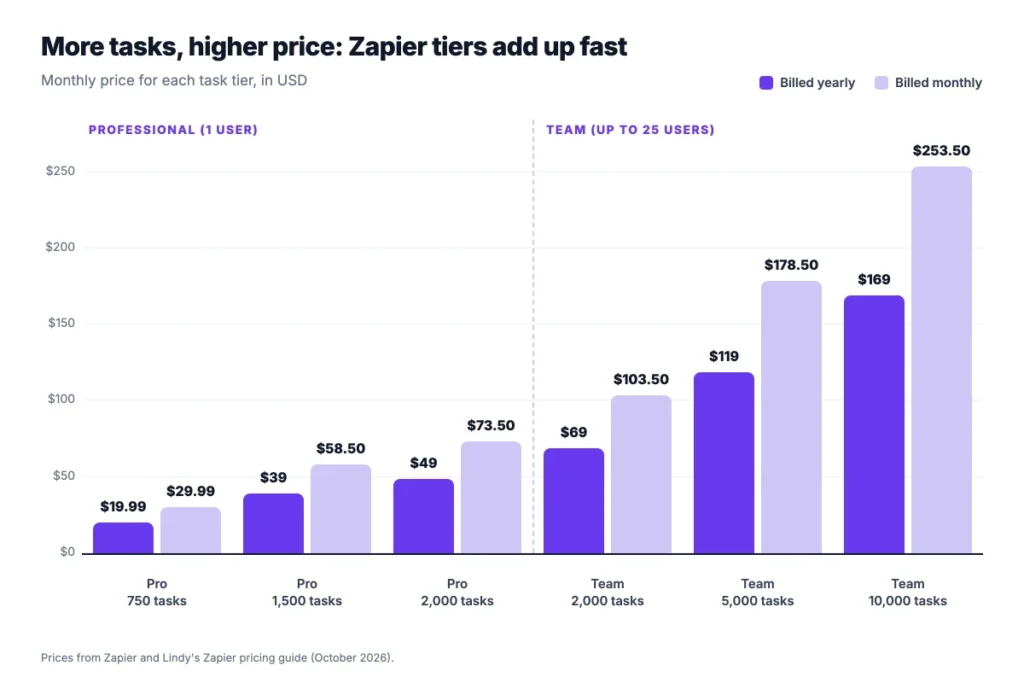
The task tier is where the price moves. Zapier sells Professional with 750, 1,500 or 2,000 tasks and more, and Lindy lists these prices for the first three:
- 750 tasks: $19.99 a month billed yearly, or $29.99 monthly.
- 1,500 tasks: $39 a month billed yearly, or $58.50 monthly.
- 2,000 tasks: $49 a month billed yearly, or $73.50 monthly.
Pricing: From $19.99 a month billed yearly, or $29.99 billed monthly.
Best For
- Freelancers and solo operators who need multi-step Zaps and premium apps.
Pros
- Multi-step Zaps with filters, paths and formatting.
- Premium apps and webhooks included.
- 2-minute polling and live chat support.
Cons
- One user only.
- 750 tasks run out quickly on multi-step Zaps.
- Each higher task tier raises the monthly price.
What Does the Zapier Team Plan Include?
The Zapier Team plan includes up to 25 users, shared Zaps and folders, shared app connections and SAML single sign-on (SSO). It costs $69 a month billed yearly for 2,000 tasks.
Team also adds priority support and 1-minute polling, and Tables grow to 500,000 records. It’s the first plan where a team can own and edit the same automations.
The jump from Professional is steep. You pay $69 instead of $19.99 a month for the entry tier, a gap of $49.01 a month, mostly for collaboration and SSO.
Higher task tiers follow the same pattern as Professional. Lindy lists Team at $119 a month billed yearly for 5,000 tasks and $169 for 10,000.
Picture a five-person agency that runs client onboarding, invoicing and reporting through shared Zaps. Team lets everyone see and fix the same Zaps, which Professional can’t do. When someone leaves, their Zaps stay with the team.
Pricing: From $69 a month billed yearly, or $103.50 billed monthly.
Best For
- Small teams that share automations and need SSO.
Pros
- Up to 25 users on one plan.
- Shared Zaps, folders and app connections.
- SAML SSO and priority support.
Cons
- Entry price is more than three times Professional’s.
- 2,000 tasks are shared across the whole team.
- Monthly billing costs $103.50.
What Does the Zapier Enterprise Plan Include?
The Zapier Enterprise plan has no public price. You contact Zapier’s sales team for a quote based on your users and yearly task volume.
Enterprise adds unlimited users, advanced admin permissions, app controls and observability tools. It also includes an annual task limit instead of a monthly one, and a technical account manager at higher spend.
The annual task pool matters for seasonal work. If your Zaps run hard in one quarter and quietly in the rest, a yearly pool smooths out the peaks.
Most small teams won’t need it. It earns its price when IT needs tight control over which apps people connect and who can edit which Zaps. Security reviews often ask for exactly those controls.
Before you call sales, count three numbers: your users, your tasks over the last 12 months, and how many Zaps use AI steps. Those numbers shape the quote more than the feature list.
Pricing: Custom quote from Zapier’s sales team.
Best For
- Large organizations that need admin controls and a yearly task pool.
Pros
- Unlimited users.
- Annual task limits that absorb busy months.
- Advanced admin permissions and app controls.
Cons
- No published price to budget around.
- Buying goes through a sales process.
- More control than most teams under 50 people need.
How Do Zapier Tasks Change Your Bill?
Zapier tasks change your bill because your plan price follows your task tier. A task is one action step that Zapier completes successfully, so each run of a Zap uses one task per action.
Several steps are free. Zapier doesn’t count triggers, polling checks, failed steps, Filters, Paths, Formatter, Delay, Tables or Forms.
Free steps are your best cost lever. A Filter at the top of a Zap stops runs you don’t need, and those stopped runs use no tasks at all.
Example: A Zap with one trigger and three actions runs 300 times a month. That’s 3 × 300 = 900 tasks, which is past the 750 tier, so you need the 1,500 tier at $39 a month billed yearly.
Add a Filter that stops half the runs, and the same Zap uses 3 × 150 = 450 tasks. That fits the $19.99 tier, which saves about $228 a year.
Write your Zaps down before you pick a tier: actions per run, runs per month, and which steps are free. A simple spreadsheet with one row per Zap takes ten minutes and shows you which Zaps drive most of the bill.
Sources: Zapier on what counts as a task, Lindy’s Zapier pricing guide.
What Happens When You Go Over Your Zapier Task Limit?
When you go over your Zapier task limit, your Zaps keep running only if pay-per-task billing is on. Without it, your Zaps pause until the next usage period starts.
Pay-per-task is an opt-in setting on any paid plan. Zapier’s help center says each extra task costs 1.25 times the per-task cost of your plan, and you turn it on under Billing and usage.
There’s a ceiling, too. Nocode.mba reports that Zaps pause at three times your task limit, which is 2,250 tasks on the 750 tier. Eesel adds that Zapier emails you at 80% and 100% of your limit, so watch for those alerts.
Example: On the 750 tier at $19.99 a month, each task costs about $19.99 ÷ 750 = 2.7 cents. At 1.25 times that, 500 extra tasks cost about $16.66, which nearly matches the $19.01 step up to the 1,500 tier.
That’s why this pricing feels unpredictable to many users. One Reddit user, quoted by eesel, said “It can add up so fast, you won’t even notice.”
Top Tip: If you go over your limit two months in a row, move up a tier instead of paying per task. The higher tier lowers your per-task price and removes the surprise.
How Much Do Zapier AI Steps, Agents and Chatbots Cost?
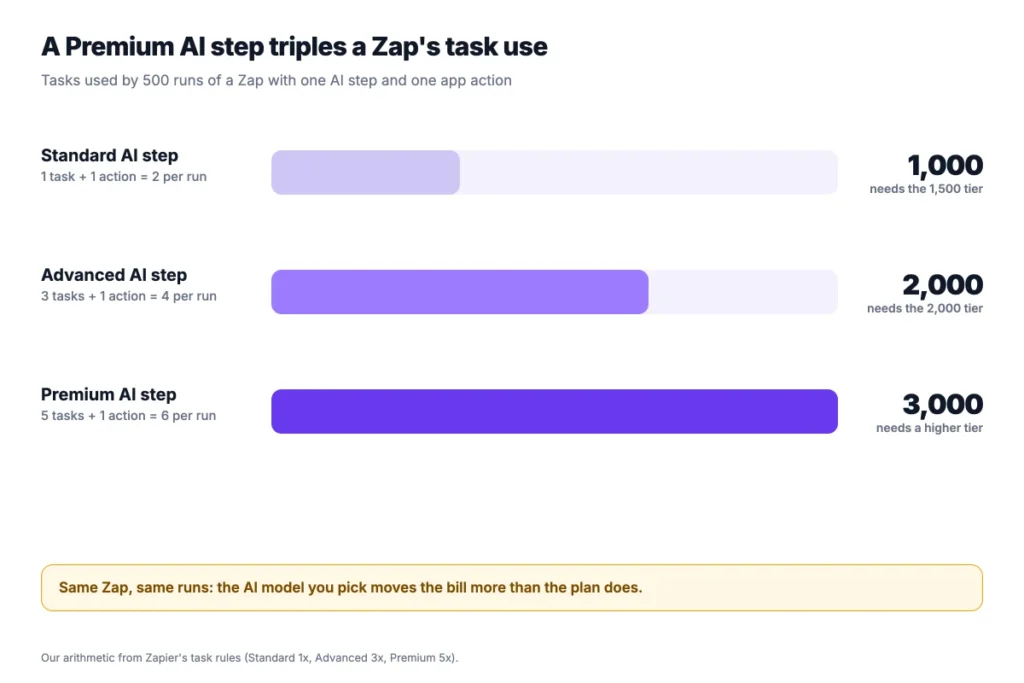
Zapier AI steps cost tasks, not a separate fee. A standard AI by Zapier step uses 1 task, an Advanced AI step uses 3, and a Premium AI step uses 5 per run.
Zapier MCP calls also use tasks: 2 for each successful call. Copilot, the Zap-building assistant, uses no tasks.
Example: A Zap with an Advanced AI step and one action uses 3 + 1 = 4 tasks per run. Over 500 runs, that’s 2,000 tasks and the $49 tier. With a standard AI step, it’s 1,000 tasks and the $39 tier.
Agents and Chatbots are separate products with their own plans. Zapier lists Agents Pro at $400 a year for 1,500 activities a month, and Chatbots Pro at $160 a year for 5 chatbots. Chatbots Advanced costs $800 a year for up to 20 chatbots.
Both have free tiers: Agents Free includes 400 activities a month, and Chatbots Free includes 2 chatbots. Actions they take in other apps can still use tasks from your plan.
So price AI by the step it uses, not by the feature name. The model choice moves the bill more than the plan does. Test the standard model first and step up only where the output needs it.
What Does a 5-Person Team Pay for Zapier per Year?
A 5-person team pays $828 to $3,042 a year for Zapier on the Team plan, depending on the task tier and billing cycle. We calculated each case from the published monthly prices.
| Setup | Yearly cost (billed yearly) | Yearly cost (billed monthly) |
|---|---|---|
| Professional, 2,000 tasks (1 user) | $588 | $882 |
| Team, 2,000 tasks | $828 | $1,242 |
| Team, 5,000 tasks | $1,428 | $2,142 |
| Team, 10,000 tasks | $2,028 | $3,042 |
| Team, 2,000 tasks + Agents Pro | $1,228 | Not listed |
Team doesn’t charge per user, so 5 people pay the same as 2. The task tier is what grows with the team, because every person’s Zaps draw from one shared pool.
Example: Team with 5,000 tasks costs $119 × 12 = $1,428 a year billed yearly. Paid monthly, it costs $178.50 × 12 = $2,142, which is $714 more.
Use your own task count in place of ours, and price the tier one step above it for growth.
How Does Zapier Pricing Compare With Make and n8n?
Zapier pricing costs more per action than Make or n8n at the entry level. Each tool counts usage differently, so compare the volume you’ll run, not the headline price.
| Tool | Entry paid plan (billed yearly) | Usage included | What counts |
|---|---|---|---|
| Zapier | $19.99 a month (Professional) | 750 tasks | Each successful action step |
| Make | $9 a month (Core) | 10,000 credits | Each module run |
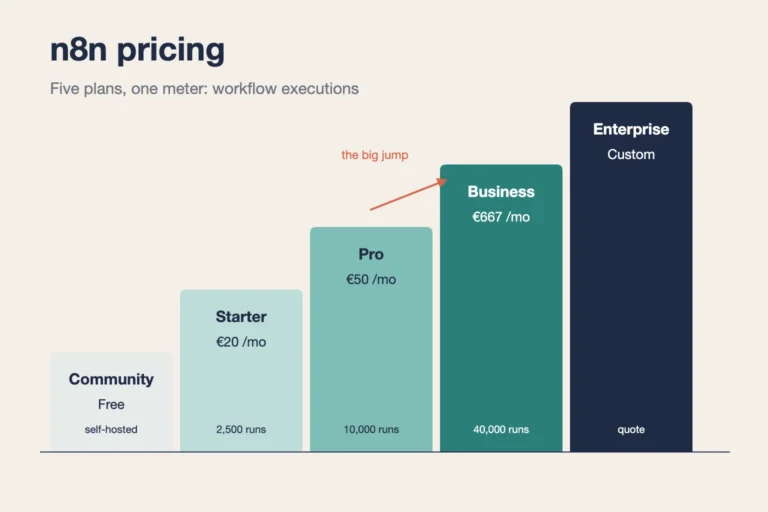
| n8n Cloud | €20 a month (Starter) | 2,500 executions | Each full workflow run |
Make and n8n pricing come from Jet Admin’s Make pricing guide and its n8n guide, both checked in September 2026. Check each vendor’s own page before you buy.
n8n counts a whole workflow run as one execution, however many steps it has. That favors long workflows. Our n8n pricing guide covers its plans in detail.
Zapier still connects more apps and needs less setup. If your team values speed to set up over cost per action, that’s what the higher price buys.
Which Zapier Pricing Plan Should You Pick?
Pick the cheapest Zapier plan that fits your task count with a little room to spare. Add users only when people need to share Zaps. We’d decide in this order:
- One simple Zap: Free, until you need a filter or a second action.
- Solo user with multi-step Zaps: Professional at $19.99, on the task tier that matches your usage.
- Team sharing automations: Team at $69, if two or more people edit the same Zaps.
- Heavy AI use: Price the tier with AI weights first, since Advanced and Premium steps use 3 to 5 tasks each.
- IT needs admin controls or a yearly pool: Ask Zapier’s sales team for Enterprise.
Pay yearly once your task count is steady for two months. Annual billing saves 33%, but it locks in a tier. If your usage is still growing, stay monthly until it settles, then switch. A tier you outgrow in month three costs more than the monthly premium you’d have paid.
If your Zaps mostly move tasks between project tools, check our list of the best workflow apps before you add more Zaps. Onethread, our own tool, also runs tasks, Gantt charts and dashboards in one place, which removes some of those Zaps.
What Should You Do Next With Zapier?
The Zapier price you pay depends less on the plan than on your task count. Three things drive it: actions per run, runs per month and the AI steps you add. Count those first, and the right tier picks itself, along with the plan that comes with it.
This week, open your Zap history, add up the action steps for the last 30 days, and add 20% for growth. Choose the tier that covers that number, and turn on pay-per-task only as a safety net. Then check the usage page again after the first month and adjust.
FAQs
Does Zapier Offer a Free Trial?
Yes, Zapier pricing includes a 14-day free trial of the Professional plan, and you don’t need a credit card to start it. During the trial you can build multi-step Zaps and use premium apps. When it ends, you either pick a paid plan or drop to the Free plan.
Is There a Zapier Nonprofit Discount?
Yes, eligible nonprofits get 15% off any paid Zapier plan. The discount doesn’t apply to pay-per-task charges. You apply through Zapier’s nonprofit page with documents that prove your charitable status, and the discount shows up at checkout once Zapier approves it.
Do Failed Zaps Count as Tasks?
No, failed or halted steps don’t count as tasks. Zapier only counts action steps that complete successfully. Triggers and polling checks are free. So are built-in steps such as Filters, Paths, Formatter, Delay, Tables and Forms, which makes them useful for keeping your task count down.
Can You Cancel Zapier at Any Time?
Yes, you can cancel at any time and keep access until the end of the billing cycle you paid for. Upgrades take effect right away with a prorated charge, while downgrades take effect at the end of the cycle. On annual billing, you keep your tier until the year ends, so check the renewal date first.
Does Zapier Charge per User?
No, Zapier pricing doesn’t charge per user. Professional includes one user, and Team covers up to 25 users for the same price. What grows with a team is the task tier, because everyone’s Zaps share one monthly task pool. Plan the tier for the whole team, not per person.