Asana pricing looks simple until your team grows by one person.
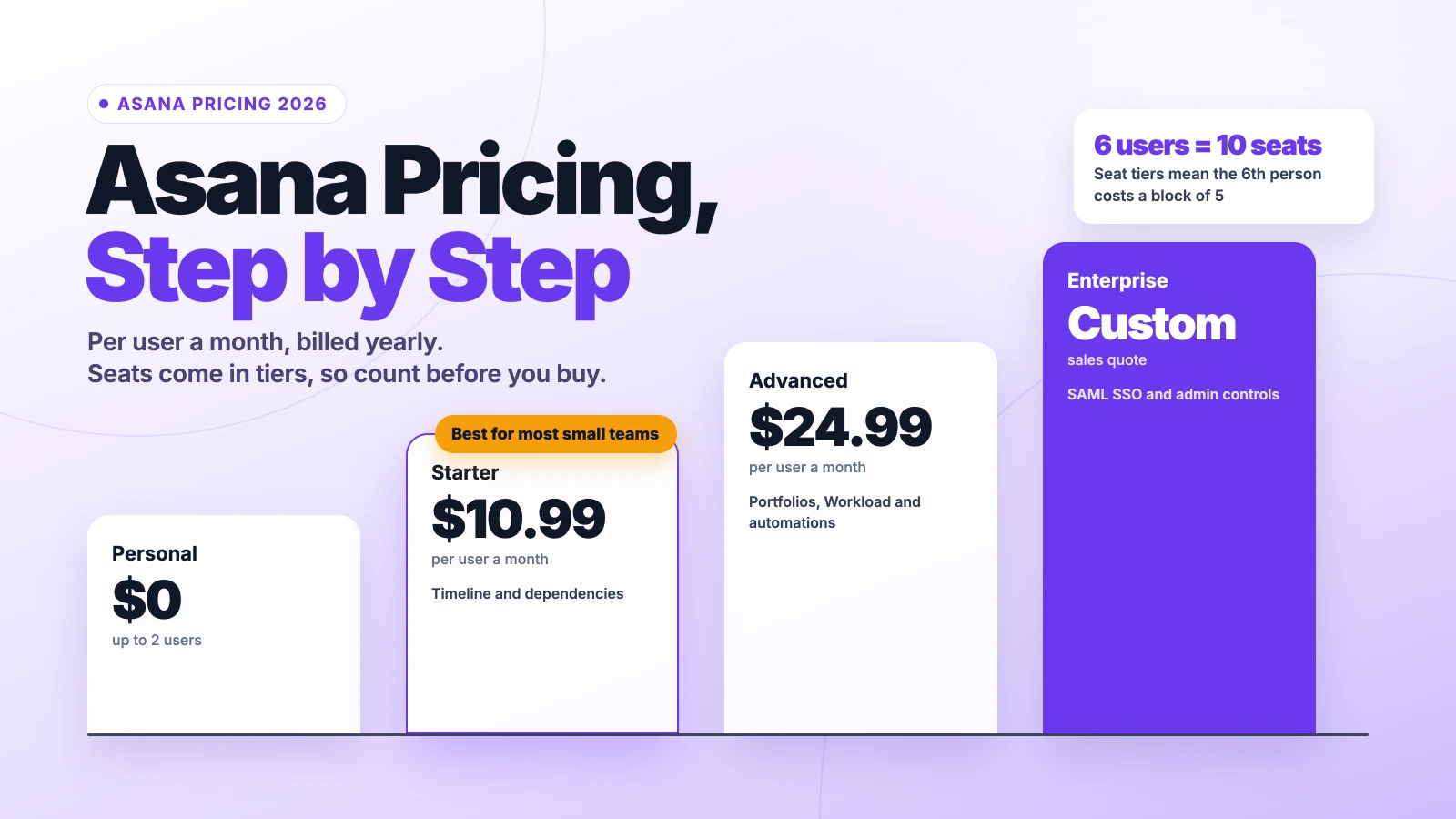
Asana’s Personal plan is free for up to 2 users. Starter costs $10.99 per user a month and Advanced $24.99, billed yearly. Monthly billing raises them to $13.49 and $30.49. Enterprise is quoted.
The catch: Asana sells seats in tiers, so you can pay for seats nobody uses, and AI work now has its own meter.
We checked Asana’s help center, offer terms and recent pricing data, then ran the numbers for real team sizes.
Here’s what each plan costs you, where the bill grows, and how to pay less.
Key Points
- Asana’s plans cost $0 (Personal), $10.99 (Starter) and $24.99 (Advanced) per user a month billed yearly, or $13.49 and $30.49 billed monthly. Enterprise and Enterprise+ are quoted.
- Count seats, not people. Asana bills in tiers of 2, 3, 4 and 5 seats, then in steps of 5 up to 30, so a 6-person team pays for 10 seats.
- Budget for AI use. Starter and Advanced include 5 AI requests per user a month, capped at 50 per account, and extra requests cost $0.50 prepaid or $0.60 on demand.
- Cut the first-year bill with code UNLOCKED25 (25% off Starter or Advanced for 12 months for new customers), or 50% off as an eligible nonprofit.
How Much Does Asana Cost per User?
Asana costs $0 to $24.99 per user a month on its published plans, billed yearly. Monthly billing raises Starter to $13.49 and Advanced to $30.49, so yearly billing saves about 18%.
| Plan | Billed yearly (per user a month) | Billed monthly (per user a month) | Users | Best known for |
|---|---|---|---|---|
| Personal | $0 | $0 | Up to 2 | Lists, boards and calendars |
| Starter | $10.99 | $13.49 | Unlimited | Timeline, dependencies and reporting |
| Advanced | $24.99 | $30.49 | Unlimited | Portfolios, Workload and automations |
| Enterprise | Custom quote | Custom quote | Unlimited | SAML SSO and admin controls |
| Enterprise+ | Custom quote | Custom quote | Unlimited | Extra auditing and data loss prevention |
Asana bills by seat, not by active user. The seat count follows its tier rules, which we cover further down, and every member who shares your company email domain takes a seat.
Example: Starter for 5 users costs $10.99 × 5 × 12 = $659.40 a year on annual billing. Paid monthly, it costs $13.49 × 5 × 12 = $809.40, so annual billing saves $150.
Top Tip: Check your seat tier before you add one more person. A sixth member moves you from a 5-seat plan to a 10-seat plan, which doubles the seat bill.
Sources: Asana help center on subscriptions and pricing, Tech.co’s Asana pricing guide, Superdupr’s Asana pricing breakdown.
What Does the Asana Personal Plan Include?
The Asana Personal plan is free for up to 2 users. It includes list, board and calendar views, assignees, due dates and integrations, with files up to 100 MB each.
That covers a freelancer and one collaborator who share a handful of projects. You get unlimited tasks and projects, so the plan doesn’t run out as your work grows.
What it doesn’t cover is planning across time. Personal has no Timeline view, no task dependencies and no automations, which most agencies want once deadlines start to stack.
The 2-user limit is the bigger wall. A third person means a paid plan, and the smallest paid plan is 2 seats, so a 3-person team pays for 3 Starter seats.
So treat Personal as a test drive for a pair. Try the views you’ll use every day, then move to Starter before a third person joins, so your projects don’t stall at the limit.
Pricing: $0, with no time limit.
Best For
- Freelancers and two-person teams that track simple projects in lists or boards.
Pros
- Free for up to 2 users with no time limit.
- Unlimited tasks and projects.
- List, board and calendar views included.
Cons
- Only 2 users.
- No Timeline view, dependencies or automations.
- Files capped at 100 MB each.
What Does the Asana Starter Plan Include?
The Asana Starter plan adds the Timeline view, task dependencies, milestones and custom fields. It costs $10.99 per user a month billed yearly, or $13.49 billed monthly.
Starter also includes advanced search and reporting, a form builder, and private teams and projects. That’s enough for a small agency to plan client work, track handoffs and report on progress.
This is the plan most small teams pick. A 5-person team pays $659.40 a year on annual billing, which is less than many single-seat tools charge for a year.
What Starter lacks is the cross-project layer. There are no Portfolios or Workload views, so managers can’t see every project and every person’s capacity in one place.
Starter also carries the same AI cap as Advanced. You get 5 AI requests per user a month, pooled to a maximum of 50 for the whole account.
Pricing: $10.99 per user a month billed yearly, or $13.49 billed monthly.
Best For
- Small teams that need timelines, dependencies and simple reporting on a few projects.
Pros
- Timeline view, dependencies and milestones.
- Custom fields, forms and advanced reporting.
- Private teams and projects.
Cons
- No Portfolios or Workload view.
- Seats come in tiers, so you may pay for unused seats.
- AI use capped at 50 included requests per account.
What Does the Asana Advanced Plan Include?
The Asana Advanced plan adds Portfolios, Workload, proofing and custom automations. It costs $24.99 per user a month billed yearly, or $30.49 billed monthly.
Advanced also includes locked custom fields, pre-built automations and built-in time tracking. That makes it the plan for teams that run many projects at once and need to see who has room for more work.
The price gap is large. Advanced costs more than twice as much as Starter for every seat, whether that person uses Portfolios or not.
Example: A 10-person team on Advanced pays $24.99 × 10 × 12 = $2,998.80 a year on annual billing. The same team on Starter pays $1,318.80, so Advanced costs $1,680 more each year.
Pay for that gap only when managers will use Portfolios and Workload every week. If the main need is one or two automations, Starter plus a separate automation tool may cost less.
Pricing: $24.99 per user a month billed yearly, or $30.49 billed monthly.
Best For
- Growing teams that manage many projects and need to balance workloads across people.
Pros
- Portfolios and Workload views.
- Custom and pre-built automations.
- Built-in time tracking and proofing.
Cons
- More than twice the Starter price per seat.
- Same 50-request AI cap as Starter.
- Timesheets and Budgets are paid add-ons.
What Do Asana Enterprise and Enterprise+ Include?
Asana Enterprise and Enterprise+ have no public price. You request a quote from Asana’s sales team, and the price depends on your seats and contract.
Enterprise adds SAML single sign-on (SSO), user provisioning and de-provisioning, data export and deletion, and custom branding. It also includes priority support, 24/7 live support, a 99.9% uptime promise and the option to block third-party integrations.
Enterprise+ adds extra auditing and support for data loss prevention (DLP) tools. It suits companies with strict compliance rules.
On AI, both plans raise the included pool from 50 to 250 requests a month per account. That matters for large teams that use AI Teammates often.
Most teams under 50 people won’t need either plan, since Advanced already covers Portfolios, Workload and automations. Before the first sales call, count your users, guests and expected AI requests. Those shape the quote more than the feature list does.
Pricing: Custom quote from Asana’s sales team.
Best For
- Large organizations with security reviews, SSO rules or compliance needs.
Pros
- SAML SSO and user provisioning.
- 250 included AI requests a month per account.
- 24/7 support and a 99.9% uptime promise.
Cons
- No published price to budget around.
- Buying goes through a sales process.
- More control than most small teams need.
Why Does Asana Charge for Seats You Don’t Use?
Asana charges for seats you don’t use because it sells paid plans in fixed seat tiers. You can’t buy a single seat or an exact headcount above 5.
Asana’s help center sets the tiers. The smallest paid plan is 2 seats, followed by 3, 4 and 5 seats. Above that, seats come in steps of 5 up to 30 users and steps of 10 up to 100. Larger teams buy in steps of 25 up to 500, then 50.
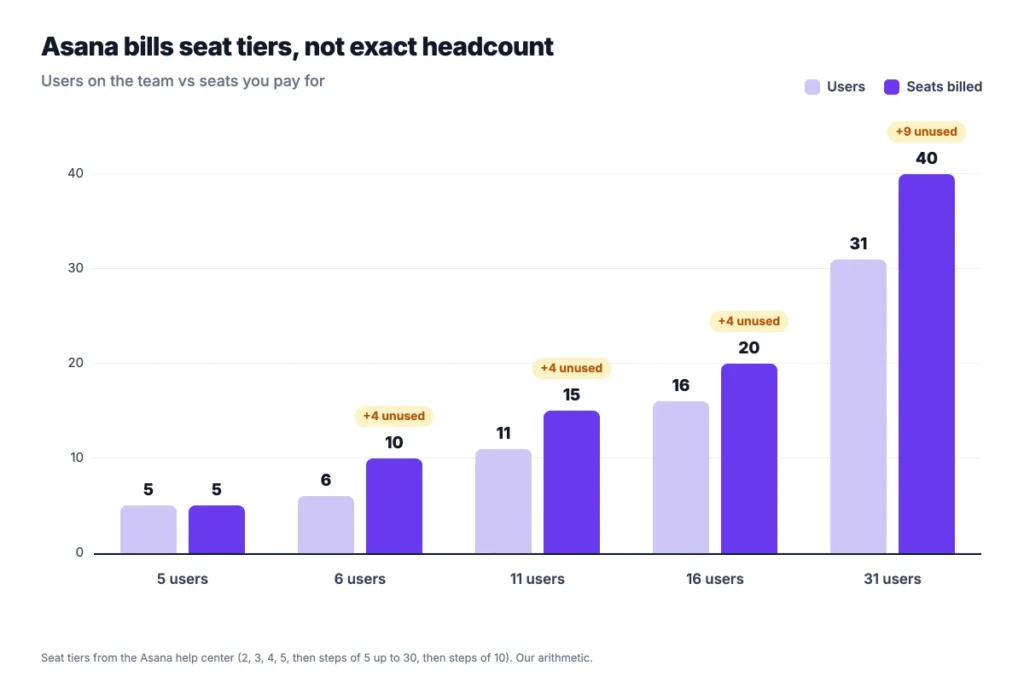
Example: A 6-person team must buy 10 Starter seats. That costs $10.99 × 10 × 12 = $1,318.80 a year, against $791.28 for 6 seats, so 4 unused seats cost $527.52.
Users notice. On Asana’s forum, one customer who moved from 5 to 6 users wrote, “Just not happy to pay for seats I don’t use.” An Asana community manager replied that there were no immediate plans to change the tiers.
So plan headcount around the tiers. Hiring the 6th, 11th or 16th person costs a full block of 5 seats at once. The people who join after that, up to the next block, cost nothing extra.
The tiers also work in your favor once you’ve paid for a block. A team at 11 users already pays for 15 seats. It can add four more members, or upgrade four guests to members, without a bigger bill.
How Much Does Asana AI Cost Now?
Asana AI costs nothing extra up to your included pool, then $0.50 per extra request prepaid or $0.60 on demand. Starter and Advanced include 5 requests per user a month, capped at 50 for the whole account.
The cap is the part that bites. A 30-person team on Starter still gets only 50 included requests a month, not 150, because the pool stops at 50.
A request counts when an AI Teammate or Asana’s AI assistant finishes a task, answers a follow-up or revises its work. Failed or canceled requests, casual chat and many basic actions, like creating projects, don’t count.
Example: A 10-person team that runs 300 AI requests a month uses its 50 included requests, then pays for 250 more. That’s 250 × $0.50 = $125 a month prepaid, or $1,500 a year, which is more than the team’s $1,318.80 yearly Starter bill.
Admins can set a monthly spend cap on on-demand use, or set it to $0 to block overages. Included requests reset each month and don’t roll over.
We’d set a cap on day one, then raise it only once the team shows which AI tasks save real time.
Sources: Asana help center on AI requests, UsagePricing’s record of the change.
How Do Guests Change Your Asana Bill?
Guests don’t change your Asana bill in most setups. Asana’s help center says guests are free and don’t take a seat, as long as your subscription sits on a team, division or organization.
That makes guests the cheapest way to work with clients. A client can see the projects you share and comment on tasks without adding a seat or pushing you into the next tier. For an agency with many clients, that keeps the bill tied to the team, not the client list.
There’s one exception. In a workspace, rather than an organization, everyone who collaborates counts toward the plan, including guests.
Seats also go to people you might not expect. In an organization, every member who shares your company email domain is counted, so a colleague who joins with their work email takes a seat.
Here’s how to keep the seat count down:
- Invite clients and freelancers as guests with their own email domains.
- Check your plan type in the admin console, so you know whether guests are free.
- Review members before renewal and remove people who left.
Top Tip: Before you invite a contractor with a company email, decide whether they need full access. A guest invite keeps them out of your seat count.
What Does a 10-Person Team Pay for Asana per Year?
A 10-person team pays $659.40 to $3,658.80 a year for Asana, depending on the plan, the billing cycle and any discount. We calculated each case from the published per-user prices.
| Setup for 10 users | Yearly cost |
|---|---|
| Starter, billed yearly | $1,318.80 |
| Starter, billed monthly | $1,618.80 |
| Advanced, billed yearly | $2,998.80 |
| Advanced, billed monthly | $3,658.80 |
| Starter with UNLOCKED25 (first year) | $989.10 |
| Starter with the nonprofit discount | $659.40 |
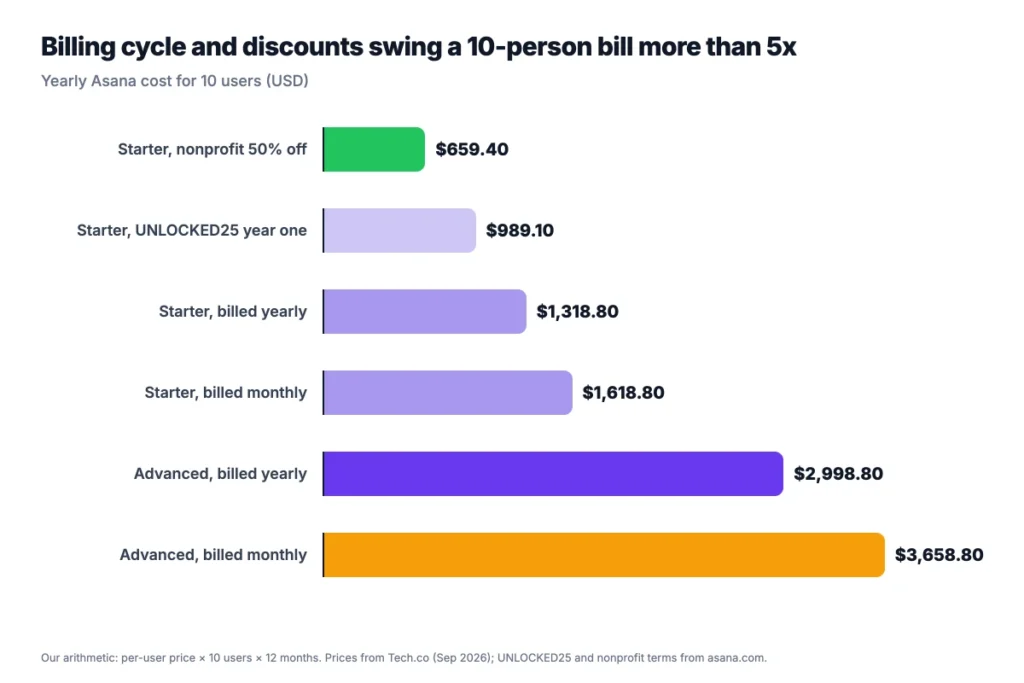
Ten users fit a 10-seat tier exactly, so no seats go to waste. An 11th user would push the team to 15 seats.
Example: Advanced billed monthly costs $30.49 × 10 × 12 = $3,658.80 a year. Billed yearly, it costs $2,998.80, so the switch saves $660.
AI requests beyond the included 50 come on top of these figures. Use your own seat tier in place of 10.
How Can You Pay Less for Asana?
You can pay less for Asana by billing yearly, using a promo code in the first year, or applying for the nonprofit discount. Each one cuts a different part of the bill.
Bill yearly. Annual billing saves about 18% against monthly billing on both Starter and Advanced.
Use code UNLOCKED25. Asana’s offer terms give 25% off Starter or Advanced for 12 months to new customers and free users who upgrade. It works on monthly or annual billing, one redemption per customer, and the plan renews at the standard price after a year. Asana says it can change or end the offer at any time.
Apply as a nonprofit. Asana offers 50% off Starter or Advanced to eligible nonprofits, including 501(c)(3) groups, public libraries and organizations with equivalent status abroad. Schools go through a separate education program.
Fit your team to the tiers. If you’re at 6 or 11 users, check whether a contractor could work as a guest instead of a member.
Watch the add-ons. Timesheets and Budgets cost extra on paid plans, so add them only when you’ll use them.
Stack these where you can. A nonprofit that bills yearly gets both savings. A new team can use UNLOCKED25 in year one, then switch to yearly billing before the discount ends.
Sources: Asana UNLOCKED25 offer terms, Asana for nonprofits.
How Does Asana Pricing Compare With ClickUp, monday.com and Notion?
Asana pricing sits at the top of the pack for first paid plans. Starter costs more per user than ClickUp, monday.com and Notion, and much more than Trello.
| Tool | First paid plan, per user a month (billed yearly) | Cost for 10 users a year | Best for |
|---|---|---|---|
| Asana | $10.99 (Starter) | $1,318.80 | Teams that plan cross-team projects and goals |
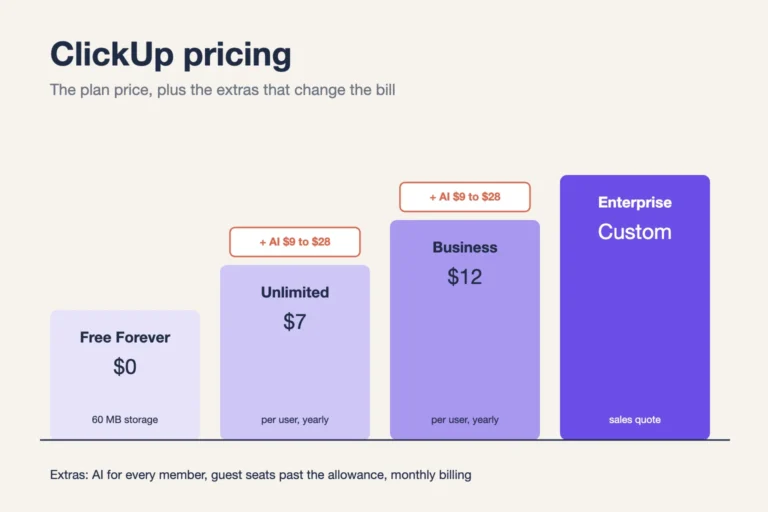
| ClickUp | $7 (Unlimited) | $840 | Teams that want many views and features in one tool |
| monday.com | $9 | $1,080 | Teams that like visual boards and simple setup |
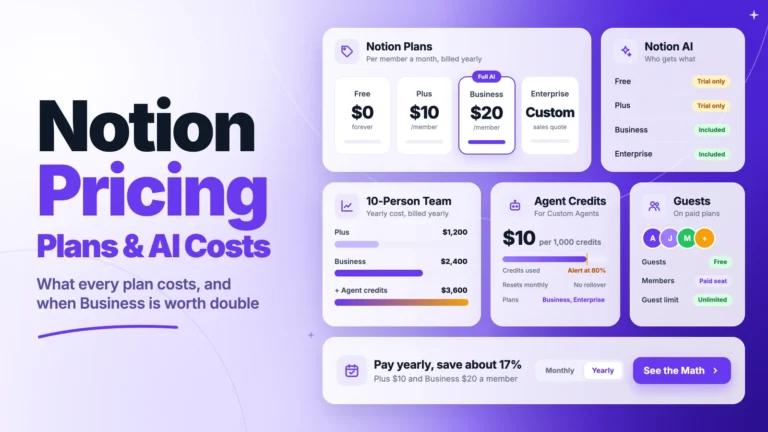
| Notion | $10 (Plus) | $1,200 | Teams that run docs, wikis and databases in one place |
| Trello | $5 | $600 | Small teams that only need Kanban boards |
Competitor prices come from Tech.co’s ClickUp pricing guide for ClickUp, monday.com and Trello, and from Notion’s pricing page for Notion. Check each vendor’s own page before you buy, and note that some tools sell seats in fixed bundles. The Best for column is our read.
For the full breakdowns, see our guides to ClickUp pricing and its AI costs and Notion pricing and its AI plans. Our Asana vs ClickUp comparison covers how the two tools differ beyond price. Onethread, our own tool, also covers task assignment, Gantt charts, dashboards and a wiki in one place.
Which Asana Pricing Plan Should Your Team Pick?
Pick the cheapest Asana plan that covers your planning needs, then check your seat tier before you commit. We’d decide in this order:
- Freelancer or a pair: Personal, until a third person joins or you need a timeline.
- Small team with a few projects: Starter at $10.99, if Timeline and dependencies cover you.
- Team that runs many projects at once: Advanced at $24.99, if managers will use Portfolios and Workload every week.
- Team that needs SSO or compliance controls: Ask Asana’s sales team about Enterprise.
- Eligible nonprofit: Apply for 50% off before you pay full price.
Before you buy, write down your expected headcount for the next 12 months, including planned hires. If you’ll cross 5, 10 or 15 users, budget for the next seat tier, not today’s team.
Example: A team of 9 that expects 2 hires buys 15 Starter seats once it reaches 11 users. That’s $10.99 × 15 × 12 = $1,978.20 a year, not the $1,318.80 it pays at 10 seats.
Then decide how much AI your team will use. If you expect more than 50 requests a month, set a spend cap and track usage for the first month. Our Asana vs Notion comparison helps if you’re still choosing between tools.
What Should You Do Next With Asana?
The Asana price you pay depends less on the plan than on three extras: seat tiers, AI requests beyond the cap, and monthly billing. Once you count those, Starter often costs more than its sticker price, and Advanced only pays off when managers use its extra views.
This week, count your members and guests, find your seat tier, and check whether code UNLOCKED25 or the nonprofit discount applies. Then compare the yearly totals before you pay. The right plan is the one your team will use fully, at the seat tier you actually need.
FAQs
Is Asana Free?
Yes, Asana pricing includes a free Personal plan for up to 2 users, with no time limit. It covers list, board and calendar views, unlimited tasks and projects, and integrations. A third user, the Timeline view or task dependencies need a paid plan, starting with Starter at $10.99 per user a month billed yearly.
Can You Buy a Single Asana Seat?
No, the smallest paid Asana plan is 2 seats, and Asana doesn’t offer a 1-seat plan. Seats are sold at 2, 3, 4 and 5, then in steps of 5 up to 30 users and in larger steps after that. A solo user pays for 2 seats or stays on the free Personal plan.
Are Guests Free in Asana?
Yes, guests are free in most Asana setups and don’t take a seat on your plan. That applies when your subscription sits on a team, division or organization. In a workspace, everyone who collaborates counts toward the plan, including guests, so check your setup before you invite clients.
Does Asana Charge Extra for AI?
Yes, once you pass the included pool. Asana pricing gives Starter and Advanced 5 AI requests per user a month, capped at 50 per account, and Enterprise up to 250. Extra requests cost $0.50 each prepaid or $0.60 on demand, and admins can set a monthly spend cap or block overages.
Does Asana Offer a Nonprofit Discount?
Yes, Asana offers eligible nonprofits 50% off the Starter or Advanced plan. That covers 501(c)(3) groups, public libraries and organizations with equivalent status in other countries. You choose your user count, Asana reviews your eligibility, and the discount applies once you upgrade from the free trial.