Descript looks cheap until the hours run out.
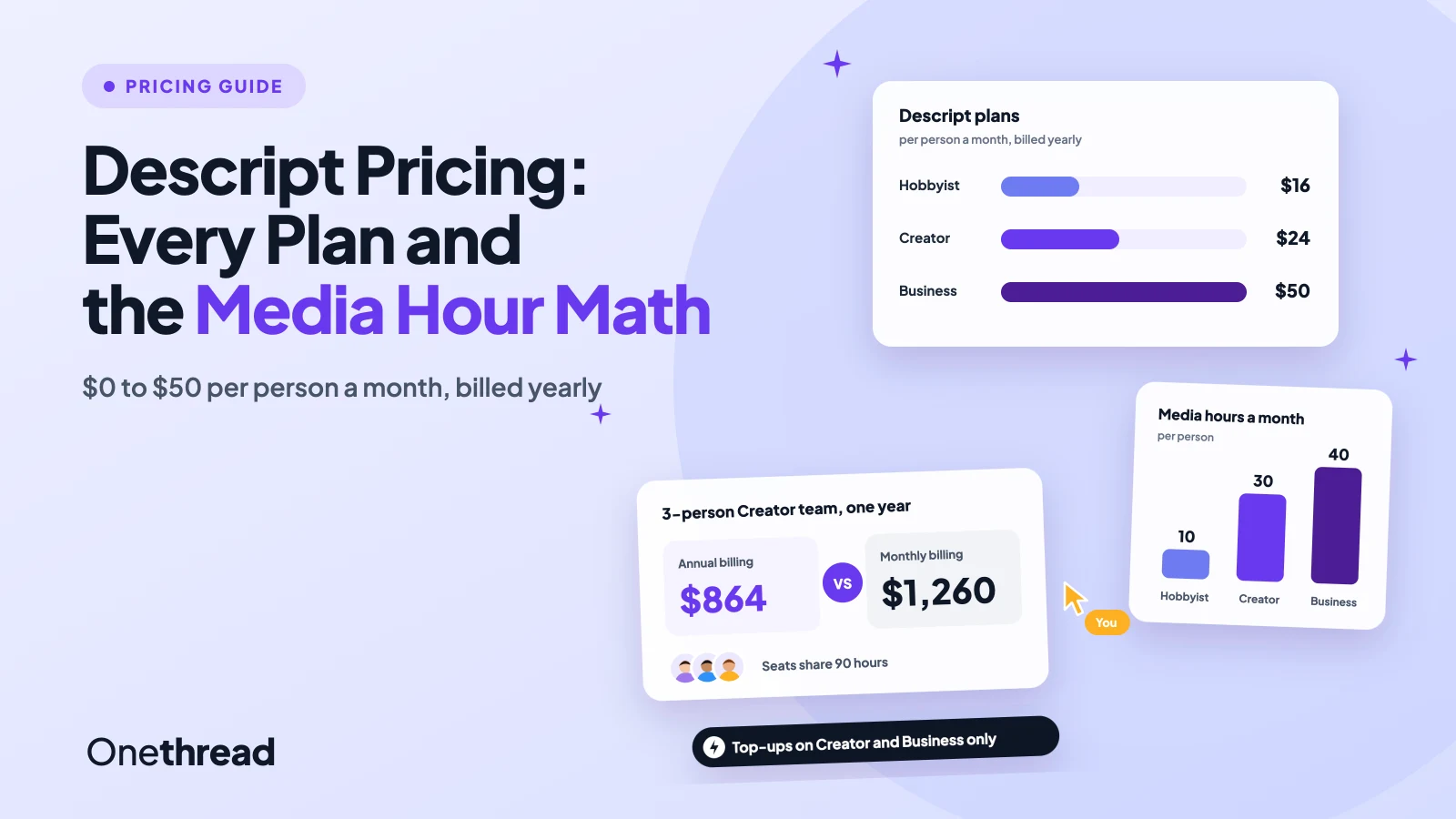
Descript pricing runs from $0 on Free to $16, $24 and $50 per person a month on Hobbyist, Creator and Business, billed yearly. Monthly billing costs $24, $35 and $65.
But the price tag is only half the bill. Every plan also meters media hours and AI credits, and a long recording can burn through both fast.
We read Descript’s pricing page and help center, plus six top-ranking guides, then ran the math for solo creators and teams of three and five.
You’ll see what each plan includes, when a top-up beats an upgrade, and which plan fits your output.
Key Points
- Descript costs $0 on Free, then $16, $24 or $50 per person a month on Hobbyist, Creator or Business with annual billing. Monthly billing costs $24, $35 or $65, and Enterprise is a custom quote.
- Pick a plan by media hours, not features: Hobbyist includes 10, Creator 30 and Business 40 per person each month, and unused hours don’t roll over.
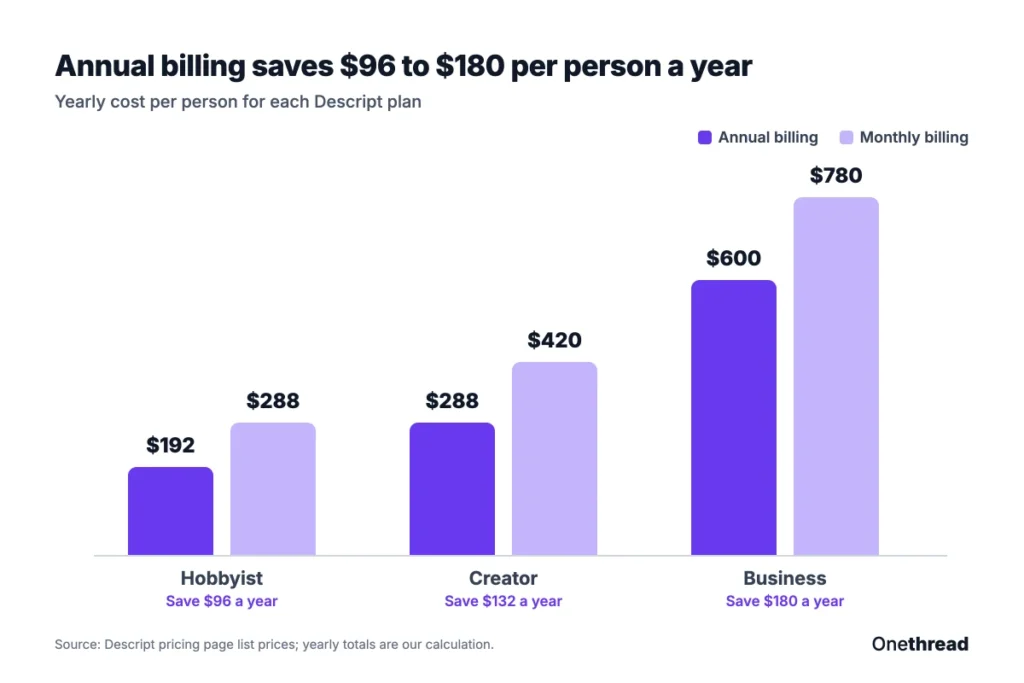
- Pay yearly if you’ll stay a year: it saves $96 on Hobbyist, $132 on Creator and $180 on Business per person.
- Only Creator and Business can buy top-ups. Pack hours cost $3 to $5 each, so a Creator user who runs short every month usually saves by moving to Business.
How Much Does Descript Pricing Cost per Plan?
Descript pricing starts at $0 and tops out at $50 per person a month on annual billing, or $65 on monthly billing. Enterprise sits above that as a custom quote.
| Plan | Annual billing, per person a month | Monthly billing, per person | Media hours a month | AI credits | Team size |
|---|---|---|---|---|---|
| Free | $0 | $0 | 1 | 100, one time | 1 person |
| Hobbyist | $16 | $24 | 10 | 400 a month | 1 person |
| Creator | $24 | $35 | 30 | 800 a month | Up to 3 |
| Business | $50 | $65 | 40 | 1,500 a month | Up to 5 |
| Enterprise | Custom quote | Custom quote | Sized to your team | Sized to your team | Custom |
Descript says annual billing saves up to 35%. Our math on its own list prices lands between 23% and 33%, depending on the plan.
Top Tip: Check which toggle is on before you compare. Descript’s pricing page opens on annual prices, which only apply to a yearly plan.
What Do Media Hours and AI Credits Mean on Descript?
Media hours count what you bring into Descript. AI credits count what Descript’s AI does for you. Both reset when your billing cycle renews, and unused amounts don’t roll over.
Media hours cover uploads and recordings, whether or not you transcribe them. Screen, webcam and microphone recordings all count. Still images count as one second each.
Rooms, Descript’s remote recording space, bills by session length, not per guest. A one-hour session with five people uses 60 media minutes.
Uploads are where creators get caught. Chris Enns uses Descript for client work. He notes that a one-hour guest recording with separate audio and video “easily uses up 4 hours of your quota“.
AI credits cover Underlord, Studio Sound, Remove Filler Words, Green Screen, Eye Contact, AI speech, avatars and generated video. Even chatting with Underlord uses a few credits per message.
Prices per action vary. Studio Sound and Remove Filler Words cap at 30 credits per file. Underlord has no fixed price, because the cost depends on the AI model and the size of the task.
Your Usage tab lists what each run cost, and you can export up to 12 months of it as a CSV. Open it after your first week and you’ll know which meter runs out first.
What Does the Descript Free Plan Include?
The Descript Free plan costs $0 and needs no credit card. It includes 60 media minutes a month and 100 AI credits that don’t renew.
That’s enough to test text-based editing on a short episode or two. You edit the transcript like a doc, and the video follows. Cut a sentence from the text and Descript cuts the matching clip.
The catch is export. Hobbyist is the first plan with watermark-free 1080p export, so free exports carry a watermark. Third-party guides such as Castmagic list the free export at 720p.
We found no timed trial of the paid plans on Descript’s pricing page. So Free is the trial, and a fair one if you keep the test small.
One quirk to know: the 60 minutes reset each month, but the 100 credits never come back. Spend them on the AI tool you’re most likely to pay for.
Pricing: $0, with no credit card required.
Best For
- Testing text-based editing before you pay for a plan.
Pros
- No credit card needed to start.
- The media allowance resets every month.
- 100 AI credits let you try Studio Sound and Underlord.
Cons
- Exports carry a Descript watermark.
- The 100 AI credits are one time and don’t renew.
- One hour of media a month fills fast with video.
What Does the Descript Hobbyist Plan Include?
Descript Hobbyist costs $16 per person a month on annual billing, or $24 billed monthly. It covers one person and includes 10 media hours and 400 AI credits a month.
Exports go up to 1080p with no watermark. You also get Underlord, Descript’s AI video co-editor, plus Studio Sound, Remove Filler Words, Create Clips and AI Speech with custom voice clones.
Say you publish a single-track, 30-minute podcast every week. Four episodes use about 2 media hours, which leaves room for retakes inside 10 hours.
The limit is growth. Hobbyist can’t buy top-ups, so a busy month means waiting for the reset or upgrading. Add a video track or a remote guest, and that 2-hour month can double fast.
It’s also a one-seat plan. If a second person needs to edit, you’re on Creator.
Pricing: $16 per person a month billed yearly, or $24 billed monthly.
Best For
- Solo podcasters and creators who publish weekly at 1080p.
Pros
- Watermark-free 1080p export.
- Underlord and the core AI audio tools included.
- Custom voice clones for AI Speech.
- Lowest paid entry price.
Cons
- One person only, with no team seats.
- No top-ups for extra hours or credits.
- 10 media hours is tight for multi-camera video.
- No 4K export.
What Does the Descript Creator Plan Include?
Descript Creator costs $24 per person a month on annual billing, or $35 billed monthly. It includes 30 media hours and 800 AI credits per person each month.
Creator adds 4K export, full access to Underlord with 20+ more AI tools, AI video generation and an unlimited royalty-free stock media library. It’s also the first plan that can buy top-ups.
You can scale Creator to a team of 3, and each person is billed separately. Seats share one pool, so three editors get 90 media hours a month between them.
On cost per hour, Creator wins. Its annual price works out to $0.80 per included media hour, against $1.60 on Hobbyist and $1.25 on Business.
That’s our own division of plan price by hours, and it ignores AI credits. Still, it’s the plan where each dollar buys the most raw recording time.
Pricing: $24 per person a month billed yearly, or $35 billed monthly.
Best For
- YouTubers and small video teams who export in 4K.
- Teams of up to 3 that share one pool of hours.
Pros
- Lowest cost per included media hour.
- 4K export and the full AI toolset.
- Top-ups available when a month runs long.
- Unlimited royalty-free stock media.
Cons
- Caps at 3 people.
- No Brand Studio or dubbing.
- Monthly billing costs $132 more per person a year.
What Does the Descript Business Plan Include?
Descript Business costs $50 per person a month on annual billing, or $65 billed monthly. Each person adds 40 media hours and 1,500 AI credits a month to the shared pool.
Business adds team-wide Brand Studio for shared templates and dubbing in 30+ languages with proofreading. It also adds custom avatars from a photo or text, plus priority support with an SLA.
It scales to a team of 5, with each person billed separately. Past five people, Descript points you to Enterprise.
Here’s the thing about Business. The step up from Creator costs $26 more per person a month on annual billing, for 10 more hours and 700 more credits.
That trade pays off when credits are the meter you burn. Teams that run Studio Sound, dubbing and avatars on every video tend to hit the credit cap before the hour cap.
Pricing: $50 per person a month billed yearly, or $65 billed monthly.
Best For
- Brand and marketing teams of 4 or 5 that need shared templates.
- Teams that publish video in several languages.
Pros
- Most AI credits of any self-serve plan.
- Brand Studio keeps templates the same across editors.
- Dubbing and custom avatars included.
- Priority support with an SLA.
Cons
- Caps at 5 people.
- Smallest annual discount, at 23%.
- Higher cost per media hour than Creator.
When Does Descript Enterprise Make Sense?
Descript Enterprise makes sense once you pass five editors or need a security review signed off. Pricing is a custom quote from sales.
Descript sizes AI credits and media hours to your team. Enterprise adds SSO, SCIM and audit logs, a custom MSA and flexible billing such as ACH transfer.
It also adds AI and data controls, so you can opt out of model training and set custom data retention. Support moves to a dedicated customer success manager, with onboarding and priority response.
Say a 12-person marketing team edits all its webinars in Descript. Business stops at 5 seats, so a quote is the only route.
Go into that call with numbers. Bring your monthly raw media hours, your expected AI use and your seat count. A quote sized to real work beats one sized to a sales guess.
Pricing: Custom quote. Descript doesn’t publish a starting price.
Best For
- Teams with more than 5 editors, or with security and procurement rules.
Pros
- Hours and credits sized to your volume.
- SSO, SCIM and audit logs.
- Training opt-out and custom data retention.
- Invoicing and flexible billing.
Cons
- No public price to plan a budget around.
- Requires a sales process.
- Hard to compare against the self-serve plans.
How Much Does Descript Pricing Cost for a Team?
A three-person Creator team pays $864 a year on annual billing, or $1,260 on monthly billing. Every seat is a paid person, so team cost grows in a straight line.
| Team | Plan | Annual billing, per year | Monthly billing, per year | Shared media hours a month |
|---|---|---|---|---|
| 1 person | Hobbyist | $192 | $288 | 10 |
| 1 person | Creator | $288 | $420 | 30 |
| 3 people | Creator | $864 | $1,260 | 90 |
| 3 people | Business | $1,800 | $2,340 | 120 |
| 5 people | Business | $3,000 | $3,900 | 200 |
Example: A five-person Business team on monthly billing pays 5 × $65 × 12 = $3,900 a year. On annual billing it pays 5 × $50 × 12 = $3,000, which saves $900.
If you run client video at an agency, seats are only one line in the budget. Our list of project management software for creative agencies covers the tools that track the rest.
When Do Descript Top-Ups Beat an Upgrade?
A Descript top-up beats an upgrade only for an odd busy month. If you run short every month, the next plan up usually costs less.
| Top-up pack | Price | Cost per unit |
|---|---|---|
| 5 media hours | $25 | $5.00 an hour |
| 20 media hours | $80 | $4.00 an hour |
| 50 media hours | $150 | $3.00 an hour |
| 350 AI credits | $35 | $0.10 a credit |
| 1,000 AI credits | $80 | $0.08 a credit |
| 4,000 AI credits | $200 | $0.05 a credit |
Top-ups work only on Creator and Business. They kick in after your monthly allowance runs out, and the whole Drive shares them.
Example: A solo Creator who needs 45 media hours a month adds a 20-hour pack: $24 + $80 = $104 a month. Business plus a 5-hour pack costs $50 + $25 = $75, saves $29 a month and adds 700 credits.
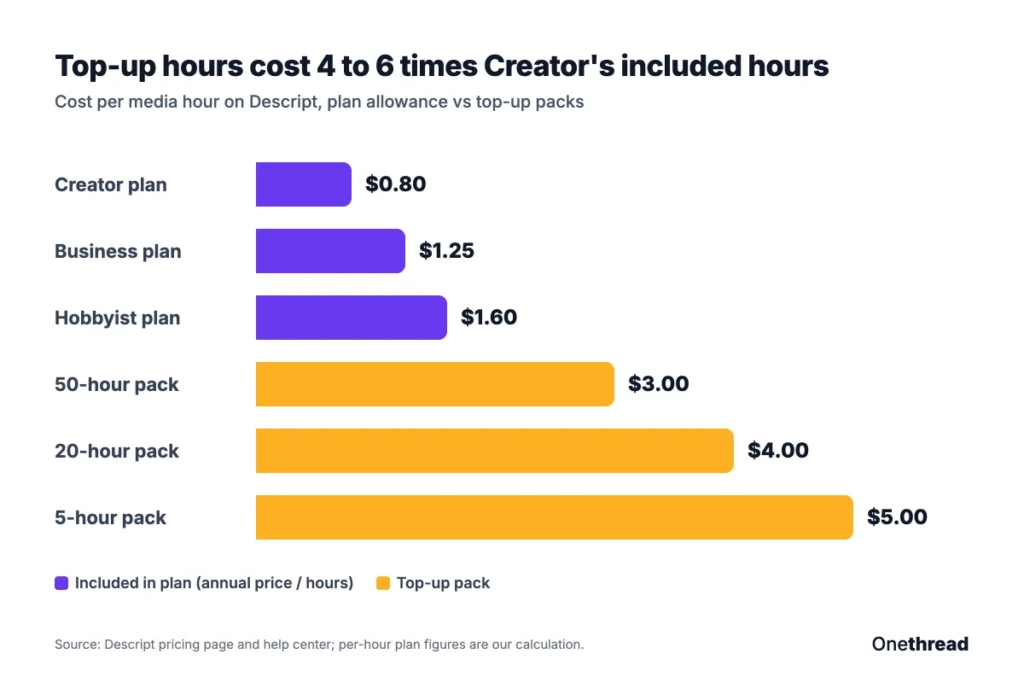
Pack hours cost 4 to 6 times what Creator’s included hours cost. That’s why upgrades win for steady overuse.
Top Tip: Buy the 50-hour pack only if you’ll use it within a year. Top-ups expire 12 months after purchase, and Descript doesn’t refund them.
Which Descript Plan Should You Pick?
Pick the cheapest Descript plan whose media hours cover a normal month, then add seats. Use the signals in this table to match your output to a plan.
| Signal | Plan |
|---|---|
| You’re testing the editor and can live with a watermark | Free |
| One person, under 10 hours of media a month, 1080p is fine | Hobbyist |
| You need 4K, or 2 to 3 people share the work | Creator |
| 4 or 5 people, shared templates or dubbing | Business |
| More than 5 editors, or SSO and procurement rules | Enterprise |
| You run short of hours every month on Creator | Business, not top-ups |
These fit labels are our own reading of Descript’s plan limits.
If you mostly cut short social clips and rarely work from a transcript, compare CapCut pricing first. For script-to-video and avatar work, our Pictory pricing and Synthesia pricing breakdowns show how other video tools meter usage.
What Should You Do Next About Descript?
Descript’s sticker price matters less than its two meters. Media hours decide your plan, AI credits decide whether you need top-ups, and seats multiply both. You started with five plan cards. Now you can price a real month instead of guessing from them.
This week, pull last month’s raw recordings and add up their length, counting every separate audio and video track. Match that total to the team table, then pick the plan that covers it with room to spare. The cheapest plan is the one you don’t outgrow by week three.
FAQs
Does Descript Have a Free Trial?
Descript doesn’t list a timed free trial for its paid plans. Free acts as the trial instead, with one media hour per month and 100 one-time AI credits. You don’t need a credit card to sign up, so you can test the editor before Descript pricing comes into play.
Does Descript Offer Student or Nonprofit Discounts?
Yes. Descript offers special rates for students, educators and nonprofits through a form linked from its pricing page. It doesn’t publish the discount amount, so you won’t know the final price until Descript replies. Ask before you pay for a yearly plan.
Can You Cancel a Descript Subscription Anytime?
Yes. You can cancel from your Descript subscription page, and you can also delete your account to wipe your data from Descript’s servers. Descript’s pricing page doesn’t publish a refund rule for plans, though top-up packs are non-refundable. Check your renewal date before you cancel a yearly plan.
Can You Pay for Descript by Invoice?
Not on the self-serve plans. Hobbyist, Creator and Business charge the credit card you provide on your chosen billing cycle. If you need invoices or ACH transfer, Descript points you to its Enterprise team, where billing terms are part of the custom Descript pricing quote.
Is Descript Worth the Price?
Descript is worth it if you edit spoken content, such as podcasts, interviews or webinars, because text-based editing saves you from scrubbing a timeline. It’s weaker value for heavy multi-track video, since every separate track uses media hours. Run one real project on Free before you commit.
Sources: Descript pricing page, Descript help center: top ups, Descript help center: usage tracking.