Most startups pick a project tool the way they pick lunch: whatever the first hire already likes.
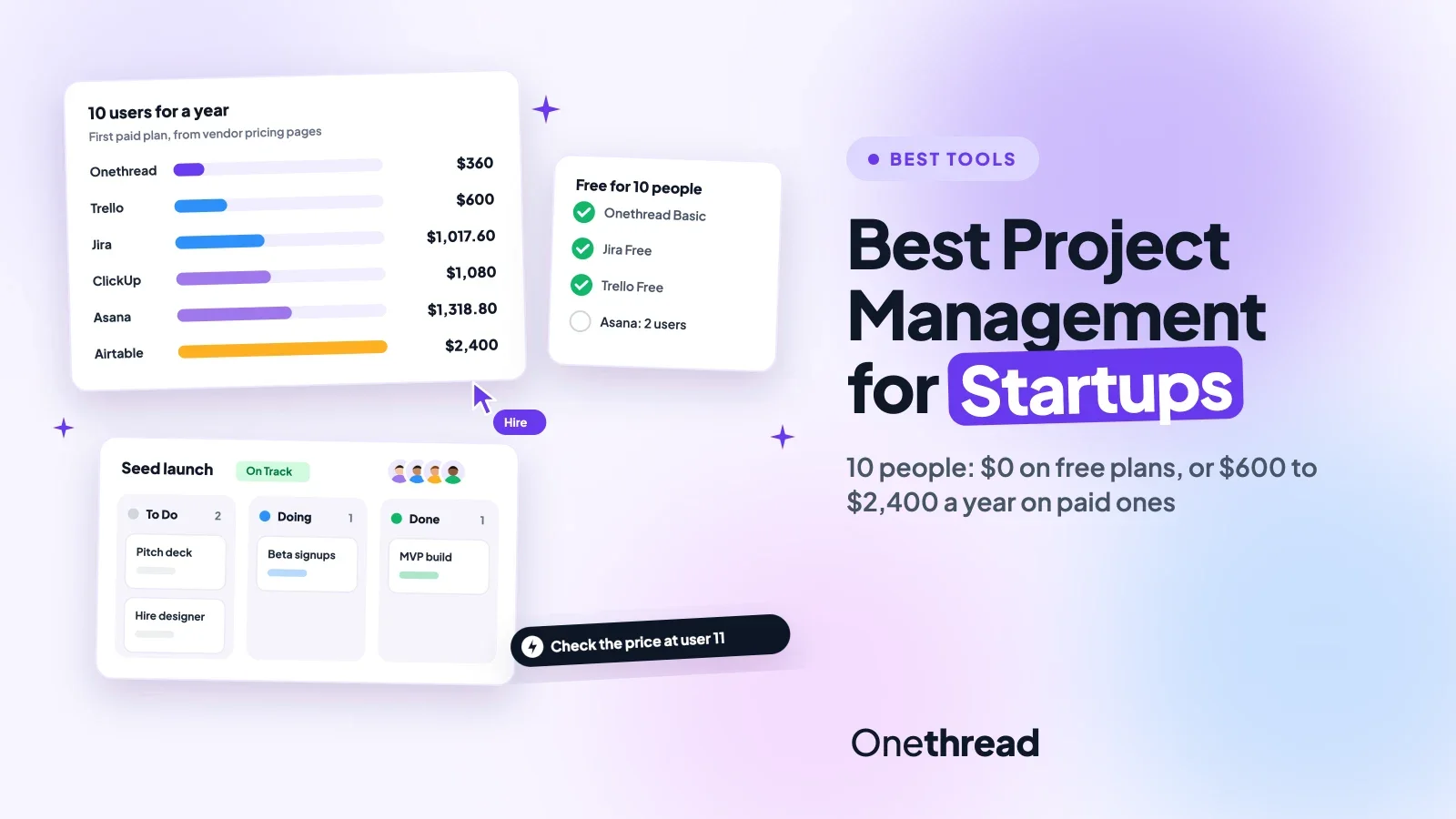
The best project management software for startups is ClickUp for all-in-one work, Trello for simple boards and Jira for software work. A 10-person team pays $0 on several free plans, or about $600 to $2,400 a year on paid ones.
That’s a wide gap. And the cheapest pick isn’t always the one that saves you time.
We compared 10 tools against the six top-ranking guides for this search and checked each price on the vendor’s own page.
You’ll get a cost table for 10 people, a short review of each tool, and a pick-by-stage guide.
Key Points
- ClickUp, Trello and Jira are the strongest all-round picks for most startups. For a 10-person team, a year on the first paid plan costs $600 (Trello), $1,017.60 (Jira) or $1,080 (ClickUp).
- You can run a 10-person team for $0 on Onethread Basic, Jira Free or Trello Free. Asana Personal and monday.com Free stop at 2 people, so they suit founders, not teams.
- Pick by the work you do most: boards for simple task lists, sprints for product teams, client portals for agencies, and databases for ops-heavy teams.
- Count seats before you buy. Per-user plans grow with every hire, while Basecamp and Agency Handy charge a flat monthly price up to a user cap.
Which Project Management Software for Startups Costs the Least?
Trello Standard is the cheapest paid plan for a 10-person startup at $600 a year, and three tools let 10 people work at no cost. The table lists the first paid plan of each tool, priced per user a month, and the yearly cost for 10 users.
| Tool | $0 tier | First paid plan, per user a month | 10 users for a year | Best for (our label) |
|---|---|---|---|---|
| ClickUp | Yes, 60 MB storage | $9 billed yearly | $1,080 | All-in-one work |
| Trello | Yes, up to 10 collaborators | $5 billed yearly | $600 | Simple boards |
| Asana | Yes, up to 2 users | $10.99 billed yearly | $1,318.80 | Cross-team plans |
| monday.com | Yes, up to 2 seats | $9 billed yearly, 3-seat minimum | $1,080 | Dashboards |
| Jira | Yes, up to 10 users | $8.48 billed monthly | $1,017.60 | Software teams |
| Airtable | Yes | $20 billed yearly | $2,400 | No-code databases |
| Basecamp | Yes, up to 3 users | $79 a month flat, up to 10 users | $948 | Team chat and docs |
| Wrike | Yes | $10 billed yearly | $1,200 | Request intake |
| Agency Handy | No, 7-day trial | $99 a month flat, up to 10 users | $1,188 | Client portals |
| Onethread | Yes, first 10 users | $3 billed yearly | $360 | Low-cost projects |
Sources: ClickUp, Trello, Asana, monday.com, Atlassian Jira, Airtable, Basecamp, Wrike, Agency Handy and Onethread pricing pages, checked this month.
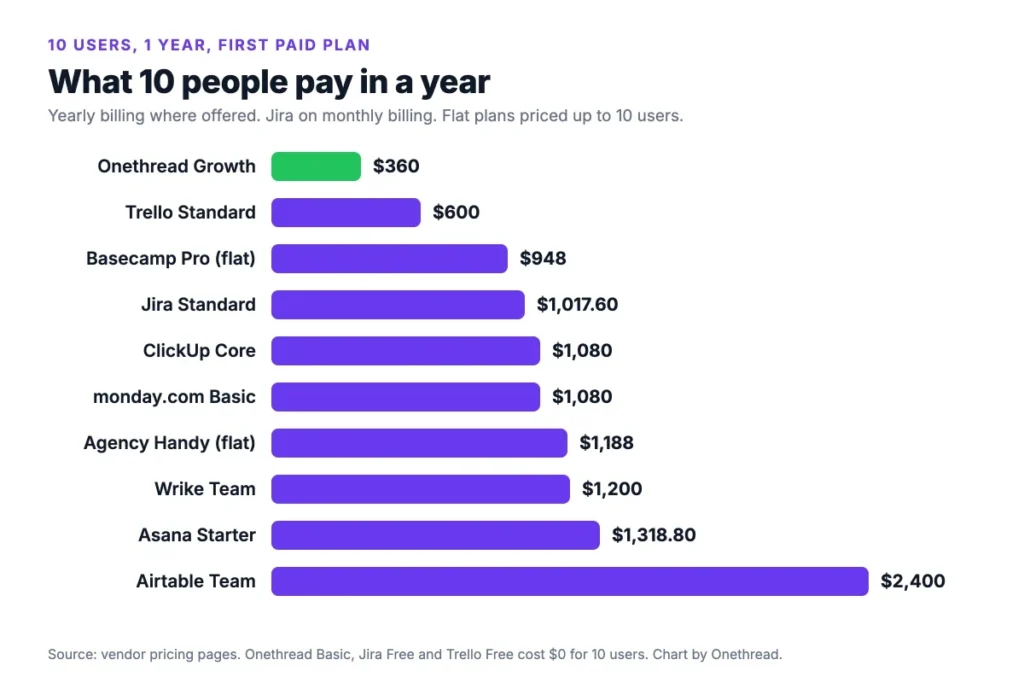
Top Tip: Check what happens at user 11. Trello Free, Jira Free and Onethread Basic all start charging there, so price your next hire before you commit.
How Did We Choose These Startup Project Management Tools?
We built this list from the search results, not from a wish list. We read the six top-ranking guides for this keyword and noted which tools at least three of them cover. ClickUp, Asana, monday.com, Trello and Jira made almost every list.
Then we added tools with a clear startup case. Airtable and Basecamp suit specific team styles. Agency Handy fits service startups that bill clients. Onethread is our own product, so we review it last and list its limits too.
For each tool, we checked four things:
- $0 tier: how many people can join before you pay.
- First paid plan: the price per user, or the flat fee, on the vendor’s pricing page.
- Growth cost: what 10 users pay in a year, from our own arithmetic.
- Fit: the type of startup work the tool handles best.
We also kept the user reviews from our earlier version of this guide. Each quote links to the reviewer’s own page on G2, Product Hunt or Trustpilot, so you can read it in full. You can read how we score tools in our review methodology.
Prices change often, and so do no-cost limits. Asana’s Personal tier, for example, now stops at 2 users. So treat the figures here as a starting point, and confirm them on each vendor’s page before you buy.
Which Are the Best Project Management Tools for Startups?
The best project management tools for startups split into three groups. ClickUp, Asana and monday.com do a bit of everything, while Trello, Basecamp and Onethread keep things simple. Jira, Airtable, Wrike and Agency Handy serve one kind of team well. Each review lists the price, who it suits, and its pros and cons.
ClickUp
ClickUp puts tasks, docs, whiteboards and chat in one place. Startups like it because it grows with them. You can start with a simple list and add custom fields, time tracking and approval flows later.
Say you’re planning a product roadmap, running a launch campaign and writing a help center at once. ClickUp can hold all three without extra apps.
The trade-off is setup time. One G2 reviewer, Muhamed ., notes that “some of the filtering functionality does have kinks.”
Pricing: Free Forever at $0. Core costs $9 per user a month and Business $17, billed yearly.
Best For
- Startups that want one tool for tasks, docs and goals.
Pros
- A $0 plan with no time limit.
- Many views, from lists to Gantt charts.
- Custom fields and automations on paid plans.
Cons
- The $0 plan caps storage at 60 MB.
- So many settings that new users can get lost.
- AI credits cost extra past the included amount.
Trello
Trello is the simplest tool here. You get boards, lists and cards, and you drag cards from “To do” to “Done.” Most teams learn it in an afternoon.
That makes it a good first tool for a startup of three to ten people. Power-Ups add calendars, timelines and integrations when you need them. You can see real setups in our kanban board examples.
But boards pile up as you grow. G2 reviewer Bikash P. says that with more boards, “it can look cluttered.”
Pricing: $0 for up to 10 collaborators. Standard costs $5 per user a month billed yearly, or $6 monthly. Premium costs $10 yearly.
Best For
- Small teams that want visual task lists with no training.
Pros
- The cheapest paid plan in this list.
- The $0 plan fits a 10-person team.
- Little to learn on day one.
Cons
- The $0 plan caps you at 10 boards per workspace.
- Files top out at 10 MB each on the $0 plan.
- Large projects get messy fast.
Asana
Asana suits startups that run work across several groups. Marketing, product and ops can each keep their own projects, while managers see goals and portfolios on one screen.
It shines once you have repeat processes, like a weekly content plan or a hiring pipeline. Intake forms, rules and timelines keep each step moving. Our Asana vs Trello guide shows where the extra structure pays off.
The Personal plan is small now. And G2 reviewer Sarah G. wants better calendar sync, which she says “only works in one direction.”
Pricing: Personal costs $0 for up to 2 users. Starter costs $10.99 per user a month billed yearly, or $13.49 monthly. Advanced costs $24.99 yearly.
Best For
- Startups with several teams and repeat workflows.
Pros
- Clean design that most people pick up fast.
- No seat limit on Starter.
- Goals and portfolios for leaders.
Cons
- Personal stops at 2 users.
- Pricier than Trello or ClickUp per seat.
- AI requests are capped per user each month.
monday.com
monday.com works like a colorful spreadsheet that runs your projects. Each board has rows for tasks and columns for owners, dates and status. Dashboards then roll that data up for founders.
It suits data-minded startups that want to link plans to numbers, like a sales pipeline next to a launch plan. You can switch the same board to Kanban, calendar or timeline views.
Watch the seat rules. G2 reviewer Jose C. points out that the cheapest plan “is for 3 people,” which hurts a solo founder.
Pricing: $0 for up to 2 seats. Basic costs $9 per seat a month and Standard $12, billed yearly, with a 3-seat minimum.
Best For
- Startups that track projects and numbers side by side.
Pros
- Easy, visual boards with many views.
- Strong dashboards on paid plans.
- Many ready-made templates.
Cons
- Paid plans start at 3 seats.
- The $0 plan stops at 2 seats.
- Monthly billing gets no discount.
Jira
Jira is the default for software startups that run sprints. You get backlogs, boards, timelines and bug tracking, plus links to GitHub and other dev tools.
The $0 plan is generous for small groups. Up to 10 users get unlimited projects, the core views and 2 GB of storage. Our Jira vs Asana comparison covers how it handles non-dev work.
Jira feels heavy for teams that don’t write code. And it’s easy to build more workflow than a five-person team needs.
Pricing: $0 for up to 10 users. Standard costs $8.48 per user a month and Premium $15.56, on monthly billing.
Best For
- Product and engineering teams that work in sprints.
Pros
- The $0 plan covers 10 users.
- Sprint, backlog and bug tracking built in.
- Deep links to developer tools.
Cons
- Too much setup for non-technical teams.
- Storage stops at 2 GB on the $0 plan.
- Only 150 automation steps a month without paying.
Airtable
Airtable is a database with a friendly face. You build tables for anything, like a hiring tracker or an inventory list, then add views, forms and automations on top.
It suits ops-heavy startups that need structured data more than task lists. Read-only users don’t count as paid seats, which keeps costs down when only a few people edit.
G2 reviewer Tammy K. says that “there isn’t much easily available documentation” for complex cases.
Pricing: $0 plan for light use. Team costs $20 per seat a month and Business $45, billed yearly.
Best For
- Non-technical teams that need flexible no-code databases.
Pros
- Build almost any tracker without code.
- Only editors count as paid seats.
- A $0 plan for light use.
Cons
- The most expensive first paid plan here.
- Not built for sprints or Gantt-style planning.
- Complex bases take time to design.
Basecamp
Basecamp keeps project work and team talk in one calm place. Each project holds to-dos, a message board, a schedule, docs and group chat.
It suits lean startups that want fewer pings and clearer updates. Hill Charts show progress at a glance, and automatic check-ins replace some status meetings. Our Basecamp vs Asana guide compares the two styles.
G2 reviewer Gustavo C. likes the simplicity but notes “it can lack some of the more advanced features.”
Pricing: $0 for up to 3 users and 1 project. Paid plans are flat: $29, $79, $99 or $199 a month, with no per-user fees.
Best For
- Small teams that want calm communication and simple to-dos.
Pros
- Flat pricing, so new hires don’t raise the bill.
- Chat, docs and tasks in one place.
- Simple enough for non-technical teams.
Cons
- Few views compared with ClickUp or monday.com.
- Lower plans cap active projects.
- Light reporting.
Wrike
Wrike suits startups that take in a lot of requests, like a marketing or design team serving the rest of the company. Request forms, approvals and dashboards keep that queue in order.
Its Team plan covers 2 to 15 users, which fits a growing startup. The Business plan adds resource planning and more automation.
The forms take work to set up. G2 reviewer Lindsey F. writes, “I wish the request forms were more built out.”
Pricing: A $0 plan exists. Team costs $10 per user a month and Business $25, billed yearly.
Best For
- Startup teams that handle many requests and approvals.
Pros
- Strong request forms and approvals.
- A $0 plan with board and table views.
- Room to grow to 200 users on Business.
Cons
- The interface feels busy at first.
- Team plan caps users at 15.
- Best features sit on higher plans.
Agency Handy
Agency Handy fits service startups, like a design or marketing agency, that need projects and clients in one place. You get a client portal, service catalog, intake forms, Kanban boards, invoicing and proposals.
Say a client orders a website. They fill in the intake form, pay the invoice, and track progress in the portal. Your team sees the same order as a card on its board.
Users rate it well. G2 reviewer Andrew J. calls it “a fantastic client portal tool for agencies.” Shamima Nasrin wrote “A great tool for agency management” on Product Hunt, and Vikas Patil said on Trustpilot he is “extremely satisfied with Agency Handy.”
Pricing: Freelancer costs $29 a month for 1 user, Team Starter $99 for 10 users, and Business Pro $199 for 30 users. A 7-day free trial needs no card.
Best For
- Agencies and service startups that bill clients for projects.
Pros
- Client portal, invoicing and tasks in one tool.
- Flat price up to a user cap.
- Custom branding on every plan.
Cons
- No $0 plan, only a trial.
- Built for client work, not internal sprints.
- Custom domain and API need Team Starter or higher.
Onethread
Onethread is our own tool, so read this one with that in mind. It covers projects, tasks, discussion rooms, dashboards and time sheets, and it keeps the price low for small teams.
The Basic plan costs $0 for the first 10 users in a company, with unlimited projects and 15 GB of file sharing. The paid Scale plan adds custom workflows, phases, milestones and custom roles.
G2 reviewer Finlay W. wrote, “For the price, this is an awesome piece of kit!”
Pricing: Basic costs $0 for the first 10 users. Growth costs $3 per user a month and Scale $5, billed yearly, or $3.60 and $6 billed monthly.
Best For
- Budget-minded startups that want full project tracking.
Pros
- $0 for a 10-person team.
- Lowest paid price per user in this list.
- Phases, milestones and roles on Scale.
Cons
- Basic caps workflows at 3.
- Fewer integrations than ClickUp or Jira.
- Risk and budget tools are still on the roadmap.
Why Do Startups Need Project Management Software?
Startups need project management software because a small team can’t afford lost work. When five people juggle a launch, sales calls and support, tasks slip through chat threads fast.
A shared tool fixes that in a few plain, practical ways:
- One list of work: every task has an owner and a due date, so nobody asks “who’s on this?”
- Less status chasing: boards and dashboards show progress, which cuts update meetings.
- Better use of people: you can see who is overloaded before someone burns out.
- Remote work: team members in different cities or time zones see the same plan in real time.
- Faster decisions: founders spot late projects early and move people or dates.
It also makes hiring easier, which matters when you double in a year. A new team member can open the tool on day one and see what’s in flight, who owns what, and how work moves.
Here’s the thing: you don’t need a big or costly tool to get these wins. A $0 plan with a simple board covers most of them for the first year. The paid features, like portfolios and resource planning, earn their price once you run several projects at the same time.
What Features Should Startup Project Management Software Have?
Startup project management software needs five features: shared tasks, more than one view, integrations, simple reports and a fair price as you grow. Choosing the Best Project Management Software for your team comes down to these checks:
- Task management: owners, due dates, subtasks and comments on every task.
- Multiple views: a list, a board and a timeline or Gantt chart for the same work.
- Integrations: links to Slack, Google Drive, GitHub or your CRM, so work doesn’t live in two places.
- Collaboration: team members can comment, share files and get alerts without email chains.
- Reports: a dashboard that shows what’s late without a status meeting.
Growth cost: a $0 tier or low first paid plan, plus a clear price for your next 10 hires.
Mobile apps: iOS and Android apps, so founders can check status between meetings.
Time tracking, portfolio views and resource planning matter less on day one. Add them when you run several projects at once.
AI features are now on most plans too, from summaries to task drafts. They’re handy, but check the limits. Asana caps AI requests per user each month, and ClickUp sells extra AI credits as an add-on.
If you’re still a team of two or three, you may not need much more than a board. Our guide to free project management software covers that stage.
How Much Does Project Management Software Cost as Your Startup Grows?
Project management software costs a 10-person startup between $0 and $2,400 a year on the first paid plans we checked. The real question is what happens at 25 people.
Example: ClickUp Core at $9 a user costs $9 x 10 x 12 = $1,080 a year for 10 people. At 25 people, that becomes $9 x 25 x 12 = $2,700.
Flat-price tools behave differently. Basecamp Pro costs $79 a month for up to 10 users, so $948 a year. Past 15 users, you move to Pro Unlimited at $199 a month billed yearly, or $2,388 a year, with no user cap.
No-cost tiers change the math too. Onethread, Jira and Trello cost $0 for 10 people. But each one needs a paid plan once you add person 11.
Here’s what that looks like for 25 people on the first paid plan:
- Trello Standard: $5 x 25 x 12 = $1,500 a year.
- Jira Standard: $8.48 x 25 x 12 = $2,544 a year.
- Onethread Growth: $3 x 25 x 12 = $900 a year.
- Asana Starter: $10.99 x 25 x 12 = $3,297 a year.
The gap between the cheapest and the priciest option grows from about $1,000 at 10 people to over $2,000 at 25. That’s a real line in a seed-stage budget.
Use your own headcount plan in place of ours. Our ClickUp pricing and Trello pricing guides break down each plan in more detail.
Which Project Management Tool Fits Your Startup Stage?
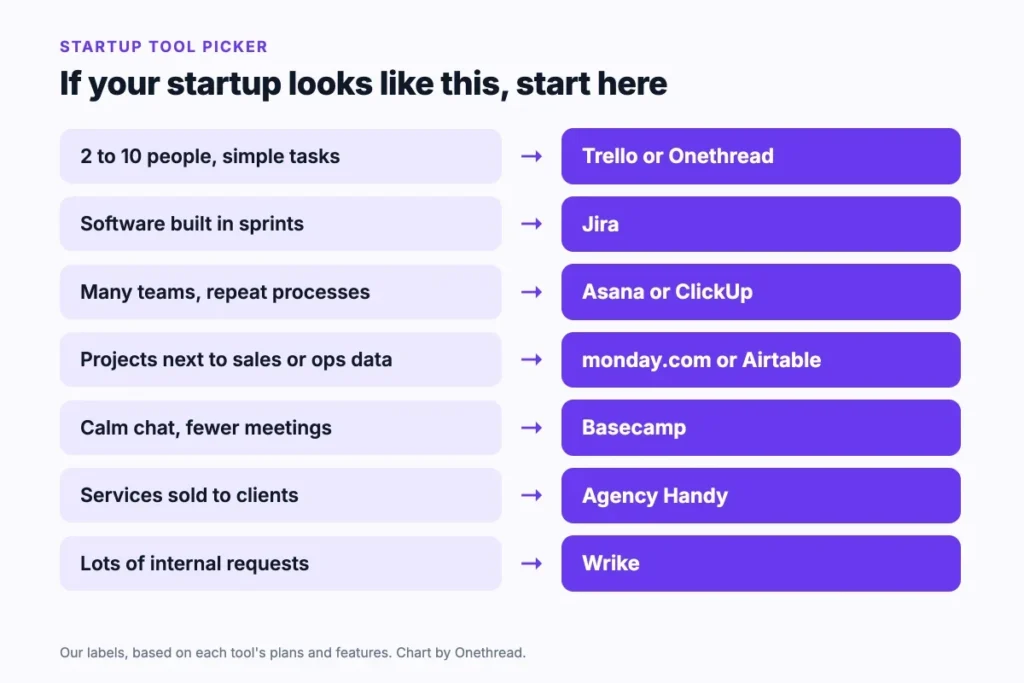
The right project management tool depends on what your startup does all day. Match your main signal to a tool:
| If your startup… | Start with |
|---|---|
| Has 2 to 10 people and simple tasks | Trello or Onethread |
| Builds software in sprints | Jira |
| Runs many teams with repeat processes | Asana or ClickUp |
| Tracks projects next to sales or ops numbers | monday.com or Airtable |
| Wants calm chat and fewer meetings | Basecamp |
| Sells services to clients | Agency Handy |
| Handles many internal requests | Wrike |
Two checks help you decide between finalists:
- Seat math: count your team in 12 months, not today, and price both tools at that size.
- One real project: run a live project in each $0 plan or trial for a week, then ask the team which one they opened more.
If you’re a small team that has outgrown a spreadsheet, our list of project management software for small teams goes deeper on that size.
Top Tip: Book the trial week when you have a real deadline. A quiet week tells you nothing about how the tool holds up under pressure.
How Do You Get Your Startup Team to Use the Tool?
A startup team uses a new tool when one person owns the setup and every task lives there from day one. Here’s a short rollout plan:
- Pick an owner: one person sets up projects, views and rules.
- Start with one project: move a single live project first, not every project at once.
- Set the rules: decide what counts as a task, who assigns it, and where updates go.
- Connect your apps: add the Slack, email or calendar integration your team already uses.
- Retire the old place: stop taking task updates in chat or spreadsheets after week two.
Give it a month before you judge. Most of the friction in week one is habit, not the software.
Then measure whether it worked. Three signs tell you the tool has stuck:
- Fewer status pings: people check the board instead of asking in chat.
- Fewer missed dates: late tasks show up on the dashboard before the deadline, not after.
- Faster onboarding: a new hire can find their tasks on day one without a walkthrough.
For the bigger picture, our guide on project management for startups covers planning, roles and rituals beyond the tool. And if you’re still learning the basics, start with how to manage a project.
What Should Your Startup Do Next?
The best project management software for startups is the one your team opens every day at a price that still works at 25 people. The $0 plans from Onethread, Jira and Trello cover a 10-person team, and paid plans run from $360 to $2,400 a year. Features matter less than that habit.
This week, write your headcount for the next 12 months and price your top two picks at that size. Then run one real project in each trial for a week and keep the tool your team opened without being asked. To save time here, use our free free startup pitch generator.
Related reading: Best project management software for freelancers and Small business project management software.
FAQs
Do Startups Need Project Management Software?
Yes, once more than two or three people share work. Project management software for startups keeps tasks, owners and deadlines in one place, so nothing hides in chat threads. Neil Patel’s widely cited Forbes piece says 90% of startups fail. Software won’t fix that alone, but it keeps work visible, and free plans cost nothing to try.
What Is the Best Free Project Management Software for Startups?
Onethread Basic, Jira Free and Trello Free are the best free options for a startup team, because each covers 10 people. Jira suits software teams, Trello suits simple boards, and Onethread covers full projects. ClickUp Free Forever is another option, but its storage stops at 60 MB, so files fill it fast.
Can Project Management Software Integrate With Other Tools?
Yes. Most project management tools for startups connect to Slack, Google Drive, email and calendars. Jira links to GitHub and other developer tools, while ClickUp, Asana and monday.com list hundreds of integrations. Check that the two or three apps your team uses most are on the vendor’s list before you buy.
Can Remote Startup Teams Use Project Management Software?
Yes. Remote startup teams use project management software as their shared office. Comments, file sharing and alerts replace hallway updates, and mobile apps keep people in the loop on the go. Basecamp and Onethread add discussion rooms or message boards, which cut down on scattered chat for distributed teams.
When Should a Startup Hire a Project Manager?
Most startups hire a project manager when founders spend more time chasing updates than building. There’s no fixed headcount; the signal is several projects running at once with no clear owner. Until then, a founder or team lead can own the tool. Good project management software also makes that first hire easier.