Make looks cheap right up until your scenarios start running every minute.
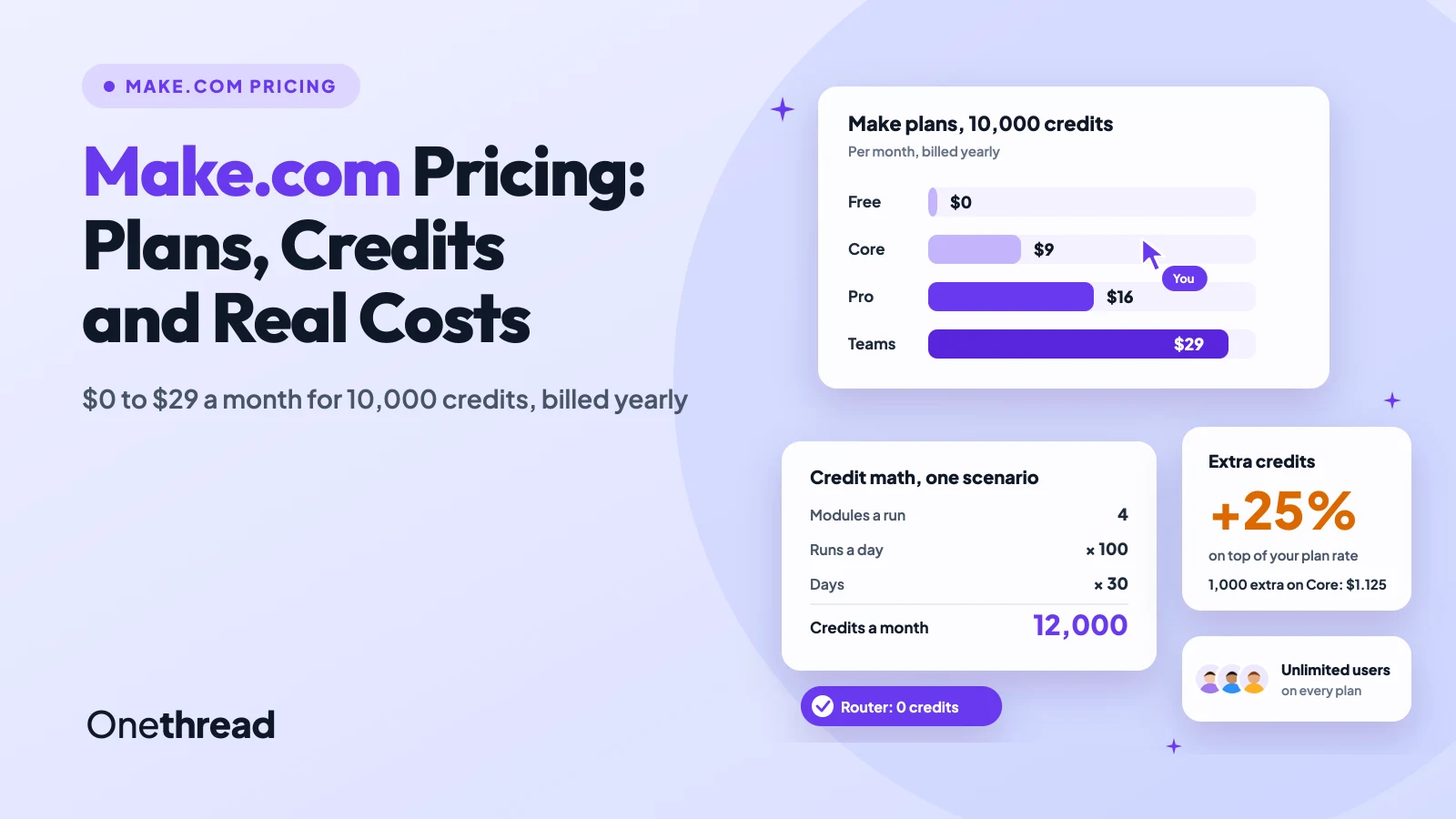
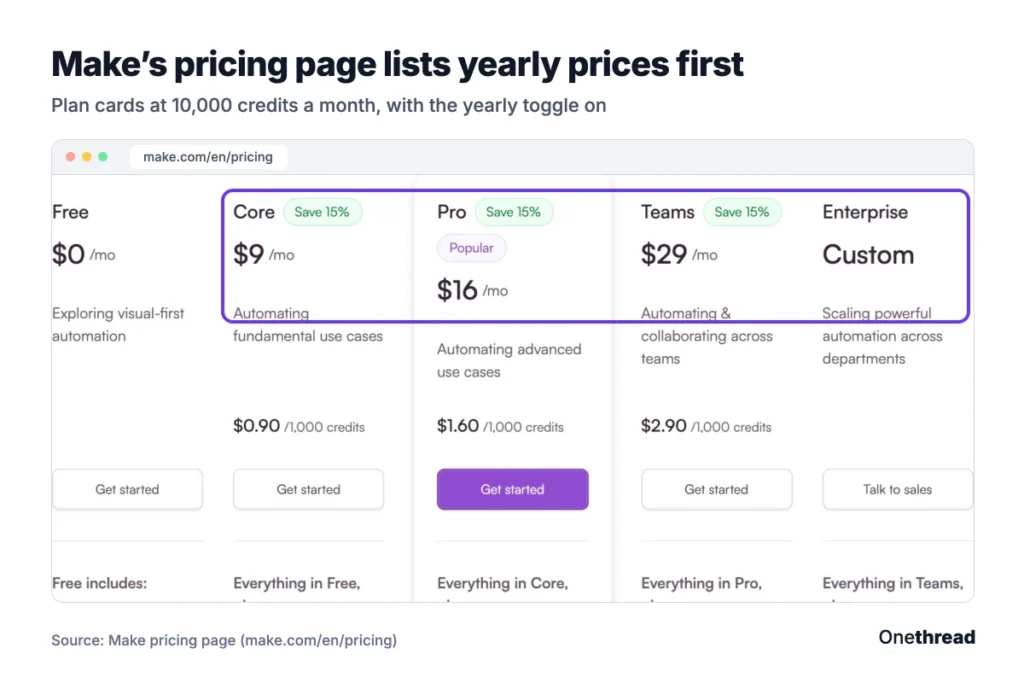
Make.com pricing starts at $0 for 1,000 credits a month. With 10,000 credits, Core costs $9, Pro $16 and Teams $29 a month billed yearly, or $10.59, $18.82 and $34.12 billed monthly. Enterprise is a custom quote.
But the plan name buys features, not volume. Your credit count sets the bill, and every module that runs spends credits.
We read Make’s live pricing slider, its help center pages and 8 top-ranking guides. So you can price your own scenarios before you pick a plan.
Key Points
- Make.com pricing: Free is $0 for 1,000 credits a month. At 10,000 credits, Core is $9, Pro $16 and Teams $29 a month billed yearly. Enterprise is quoted.
- Credits drive the bill. Most module actions use 1 credit, routers and error handlers use none, and AI or code steps can use more.
- Pick the plan for features (Pro for priority runs and custom variables, Teams for roles and shared templates), then pick the credit tier for volume.
- Extra credits cost 25% more than plan credits. If you run out every month, a bigger credit tier usually costs less.
How Much Does Make.com Cost?
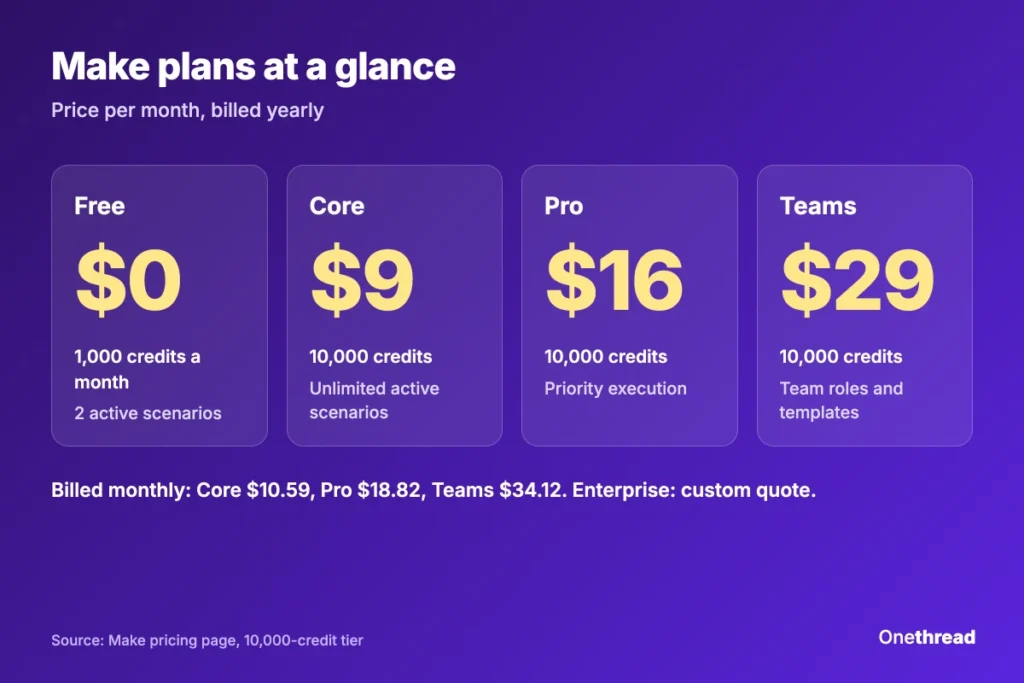
Make costs $0 to $29 a month at the entry tier of 10,000 credits, billed yearly. Every paid plan uses the same credit slider, so the price climbs as you add credits.
| Plan | Credits a month | Billed yearly, per month | Billed monthly | Per 1,000 credits, yearly |
|---|---|---|---|---|
| Free | 1,000 | $0 | $0 | $0 |
| Core | 10,000 | $9 | $10.59 | $0.90 |
| Pro | 10,000 | $16 | $18.82 | $1.60 |
| Teams | 10,000 | $29 | $34.12 | $2.90 |
| Enterprise | Custom | Custom quote | Custom quote | Custom quote |
Source: Make pricing page, US dollars, read on the live credit slider.
Users cost nothing extra: every plan, Free included, lists unlimited users. So a year at 10,000 credits costs $108 on Core, $192 on Pro and $348 on Teams, billed yearly, for the whole team.
How Does Make.com Pricing Work With Credits?
Make.com pricing works on credits, which replaced operations as Make’s billing unit on August 27. Every time a module in a scenario does something, it spends credits. Most actions spend exactly 1.
A scenario is one automated workflow: a trigger finds new data, then modules pass it between apps.
Each of these counts as a credit on Make’s pricing page:
- Reading data: a trigger or module that reads a record, a row or a webhook.
- Searching and writing: searching, creating, updating or deleting data in an app.
- Shaping data: reshaping, aggregating or iterating a row of data with the built-in tools.
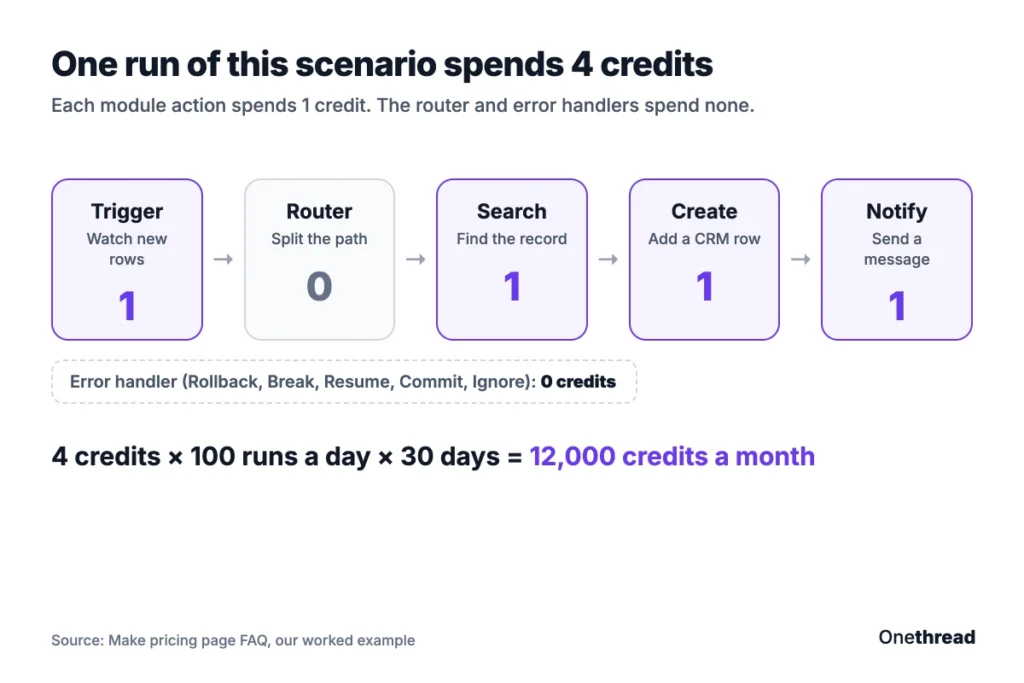
A few modules spend nothing. The router uses no credits, and neither do the error handlers (Rollback, Break, Resume, Commit and Ignore).
AI and code change the math. Make’s own AI Provider charges credits by tokens, so a long prompt costs more than a short one. With your own AI account on a paid plan, Make bills per operation and your AI provider bills the tokens.
The Make Code App spends 2 credits per second of run time and isn’t on the Free plan.
Example: a scenario with a trigger and 3 actions spends 4 credits a run. Run it 100 times a day for 30 days and you use 4 × 100 × 30 = 12,000 credits. That’s past the 10,000-credit entry tier.
What Does the Make Free Plan Include?
The Make Free plan costs $0 and includes 1,000 credits a month. It’s built for trying the visual builder, not for running a business on it.
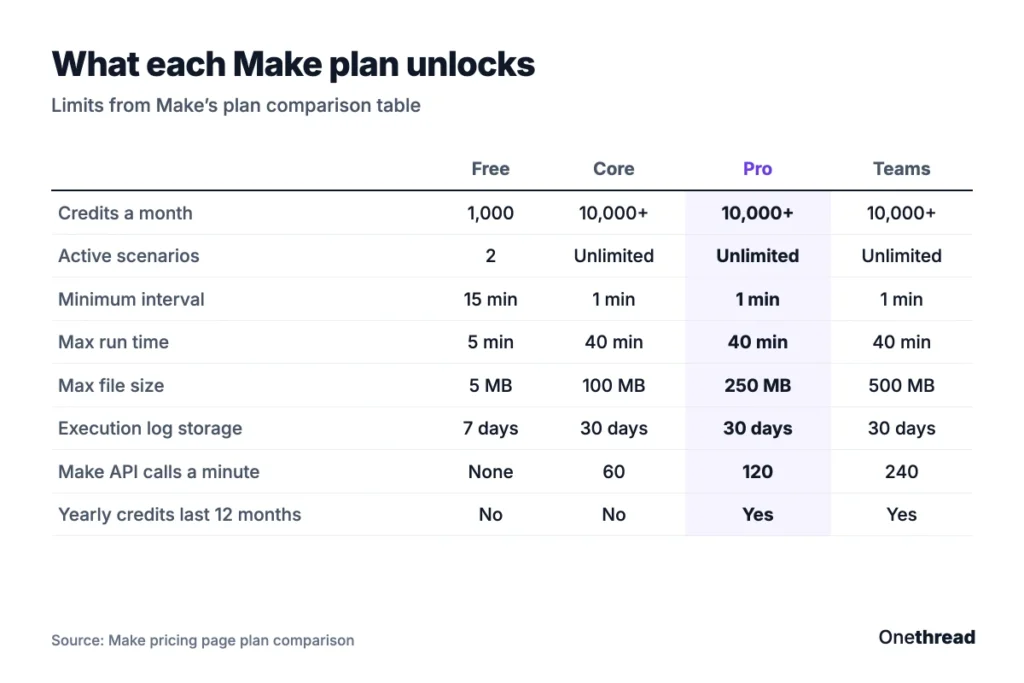
The limits are tight. You get 2 active scenarios, a 15-minute minimum gap between scheduled runs and a 5-minute cap on each run. Files max out at 5 MB, data transfer at 512 MB and execution logs stay for 7 days.
Say you want a form reply copied into a Google Sheet. Free handles that fine, until a second and third workflow show up. Then the 2-scenario cap decides for you.
Free also skips the Make API and Make Grid. Support comes as 90 days of expert access to help you get started. That’s fair for a test drive. It’s thin for anything a client depends on.
Pricing: $0 a month, 1,000 credits.
Best For
- Solo users testing Make before they commit.
- One or two light workflows that can wait 15 minutes.
Pros
- Includes Maia, AI Agents and the Make MCP server.
- Same no-code builder and 3,500+ apps as paid plans.
- Routers and filters included at no extra cost.
Cons
- Only 2 active scenarios.
- 15-minute minimum interval between runs.
- No Make API access and no Make Code App.
What Does the Make Core Plan Include?
The Make Core plan costs $9 a month billed yearly, or $10.59 billed monthly, for 10,000 credits. It removes the Free plan’s main walls.
Core lifts the cap on active scenarios and lets scheduled scenarios run every minute. Runs can last 40 minutes, files can reach 100 MB and logs stay for 30 days. You also get the Make API at 60 calls a minute and Make Grid, the map of your automations.
One catch sits in the billing. On yearly Core, your credits still reset every month, so you can’t save quiet months for busy ones.
Say you run a lead form, a CRM update and a weekly report. Core runs all three every minute if needed, with no seat fees as your team grows. You only watch one number: credits.
Pricing: $9 a month billed yearly, or $10.59 billed monthly, for 10,000 credits.
Best For
- Small teams moving real work off the Free plan.
- Steady workflows with similar volume each month.
Pros
- Unlimited active scenarios.
- 1-minute scheduling and 40-minute run time.
- Lowest price per credit of the paid plans.
Cons
- Credits reset monthly, even on yearly billing.
- No priority execution or custom variables.
- Core tops out at 300,000 credits on the slider.
What Does the Make Pro Plan Include?
The Make Pro plan costs $16 a month billed yearly, or $18.82 billed monthly, for 10,000 credits. It adds speed and housekeeping features for heavier builders.
Pro scenarios get priority execution, so they queue less at busy times. Custom variables let you edit a value once and use it across many scenarios. Full-text log search helps when a run fails and you need the one bad record fast.
Pro also changes how yearly credits behave. Prepaid annual credits only expire after 12 months, so a slow spring can cover a busy autumn. Files can reach 250 MB and the Make API allows 120 calls a minute.
Say your shop runs order syncs that triple in November. On Core, you’d buy extras that month. On yearly Pro, the year’s credits absorb the spike without a top-up.
Pricing: $16 a month billed yearly, or $18.82 billed monthly, for 10,000 credits.
Best For
- Builders running many scenarios that share settings.
- Seasonal teams whose volume swings month to month.
Pros
- Priority execution during peak hours.
- Custom variables and full-text log search.
- Yearly credits stay usable for 12 months.
Cons
- Costs 78% more than Core at 10,000 credits.
- No team roles or shared templates.
- Same 40-minute run limit as Core.
What Does the Make Teams Plan Include?
The Make Teams plan costs $29 a month billed yearly, or $34.12 billed monthly, for 10,000 credits. It’s the first plan built for several people sharing automations.
Teams adds teams and team roles, so you can control who edits which scenarios, apps and connections. You can also create and share scenario templates across the organization. It keeps Pro’s priority execution. Files can reach 500 MB and the Make API allows 240 calls a minute.
Support steps up too. Make lists “high-priority guidance from dedicated consultants” for Teams, against technical support on Core and Pro.
Say an agency builds the same onboarding scenario for every new client. On Teams, one builder makes the template and the others reuse it. Roles keep a junior from editing a live client scenario by mistake. And because users are free, adding a fifth builder costs nothing.
Pricing: $29 a month billed yearly, or $34.12 billed monthly, for 10,000 credits.
Best For
- Agencies and ops teams with several builders.
- Groups that reuse the same scenario templates.
Pros
- Team roles and permissions.
- Shared scenario templates.
- Yearly credits stay usable for 12 months.
Cons
- Costs 81% more per credit than Pro.
- SSO and audit logs still need Enterprise.
- No custom roles below Enterprise.
What Does the Make Enterprise Plan Include?
The Make Enterprise plan uses a custom quote. It’s for companies that need security controls, enterprise apps and help at any hour.
Enterprise adds company single sign-on (SSO), enforced two-factor login, audit logs, custom roles and an analytics dashboard. It also opens enterprise apps such as Workday finance modules, Coupa, ServiceNow, Greenhouse and Infor M3, plus an on-prem agent for local systems.
Two features protect the bill and the uptime. Overage protection keeps scenarios running after you hit the credit limit, and 24/7 support covers every hour. Files can reach 1,000 MB, logs stay for 60 days and enterprise customers can pay by wire transfer.
Say finance runs invoice approvals through Make and a stopped scenario means late payments. That’s the case Enterprise is built for. Ask sales how overage protection is billed, since the page doesn’t say.
Pricing: custom quote from Make’s sales team.
Best For
- Large companies with SSO and audit needs.
- Teams that can’t afford a stopped scenario.
Pros
- Overage protection instead of hard stops.
- Enterprise apps and on-prem agent.
- 24/7 support and the Value Engineering team.
- SSO, custom roles and audit logs.
Cons
- No public price on the page.
- Sales call needed before you can compare.
- Overkill for a handful of scenarios.
How Do Make Prices Change as Your Credits Grow?
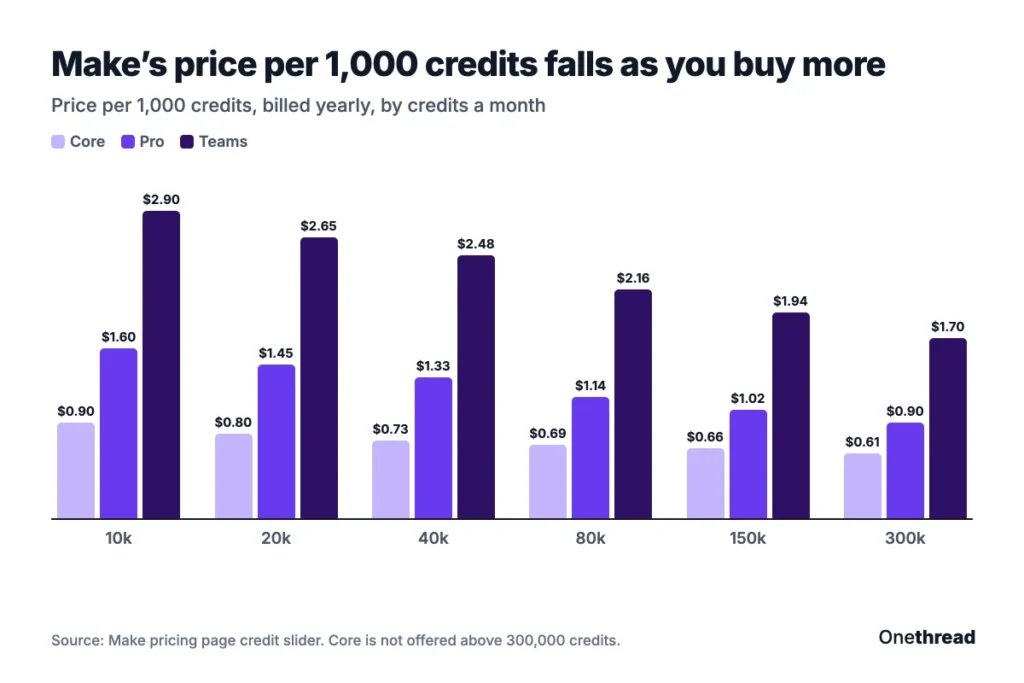
Make prices rise with every credit tier, but the price per 1,000 credits falls. We moved the slider on Make’s pricing page and wrote down each tier, billed yearly.
| Credits a month | Core | Pro | Teams |
|---|---|---|---|
| 10,000 | $9 | $16 | $29 |
| 20,000 | $16 | $29 | $53 |
| 40,000 | $29 | $53 | $99 |
| 80,000 | $55 | $91 | $172.90 |
| 150,000 | $99 | $153.45 | $291.56 |
| 300,000 | $182.16 | $268.54 | $510.22 |
Source: Make pricing page, price per month billed yearly.
The drop per credit is real. Core falls from $0.90 per 1,000 credits at 10,000 to $0.61 at 300,000. Pro falls from $1.60 to $0.90, and Teams from $2.90 to $1.70.
Above 300,000 credits, Core leaves the slider. Pro and Teams keep going up to 8,000,000 credits a month. Past that, you talk to sales.
How Much Do You Save With Yearly Make Billing?
Yearly Make billing costs about 15% less than paying month to month. At 10,000 credits, Core runs $108 a year billed yearly against $127.08 billed monthly.
| Plan at 10,000 credits | Billed yearly, one year | Billed monthly, one year | You save |
|---|---|---|---|
| Core | $108 | $127.08 | $19.08 |
| Pro | $192 | $225.84 | $33.84 |
| Teams | $348 | $409.44 | $61.44 |
Source: Make pricing page, our math at 12 months.
And the plan decides what yearly means. On Pro and Teams, yearly credits stay usable for 12 months. On Core, they still reset each month.
Top Tip: Pay monthly for the first month, read your real credit use in the Organization dashboard, then switch to yearly.
What Happens When You Run Out of Make Credits?
When you run out of Make credits, your scenarios stop until you add more. Incoming webhooks wait in a queue, and scenarios that poll for data pick up from their last good run.
You have three ways back:
| Option | How it works | Cost |
|---|---|---|
| Upgrade | Move to a bigger credit tier | New tier price |
| Buy extras by hand | Units of 1,000 from the Subscription tab | Plan rate plus 25% |
| Auto-purchase | 10,000 credits each time you hit the limit (Core, Pro and Teams) | Plan rate plus 25% |
Source: Make help center, extra credits page.
Auto-purchase also has a ceiling. It runs as many times as your plan has 10,000-credit blocks, so an 80,000-credit plan tops up 8 times at most.
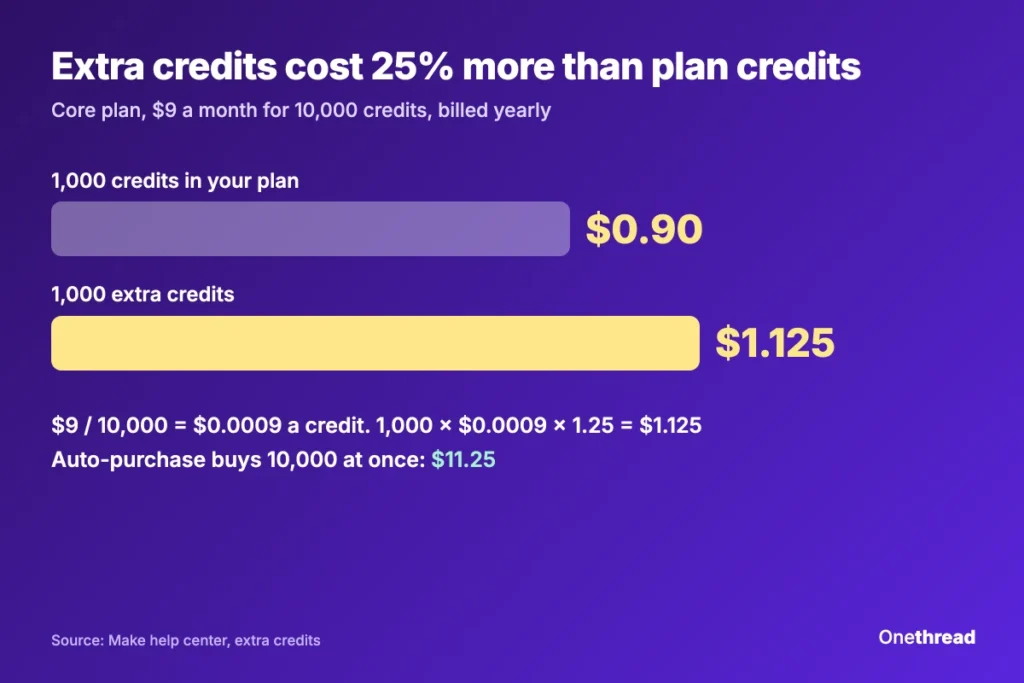
Example: on the $9 Core plan, one credit costs $9 / 10,000 = $0.0009. So 1,000 extra credits cost 1,000 × $0.0009 × 1.25 = $1.125, and 10,000 cost $11.25.
Extras expire too. On monthly plans they end with the billing cycle, and on yearly Core they end at each monthly reset. Card is the only way to pay for them.
What Hidden Costs Should You Budget For in Make?
The hidden costs in Make come from usage, not from fees. Four things push the bill past the sticker price.
| Cost | What triggers it | How to limit it |
|---|---|---|
| Iterators | 50 items in a bundle can spend 50 credits | Filter before the iterator |
| AI steps | Token pricing; some AI Content Extractor modules use 2 or 10 credits | Short prompts or your own AI key |
| Usage allowance | 5 GB data transfer, 10 MB storage and a 667-item webhook queue per 10,000 credits | Watch data transfer, which can trigger auto-purchase |
| Expiry | Plan credits expire at the end of the term | Size the tier to real use |
Source: Make pricing page and help center.
If your scenarios mostly copy project tasks between apps, check what your workflow management software already does on its own. Fewer hops means fewer credits.
How Does Make Pricing Compare With Zapier and n8n?
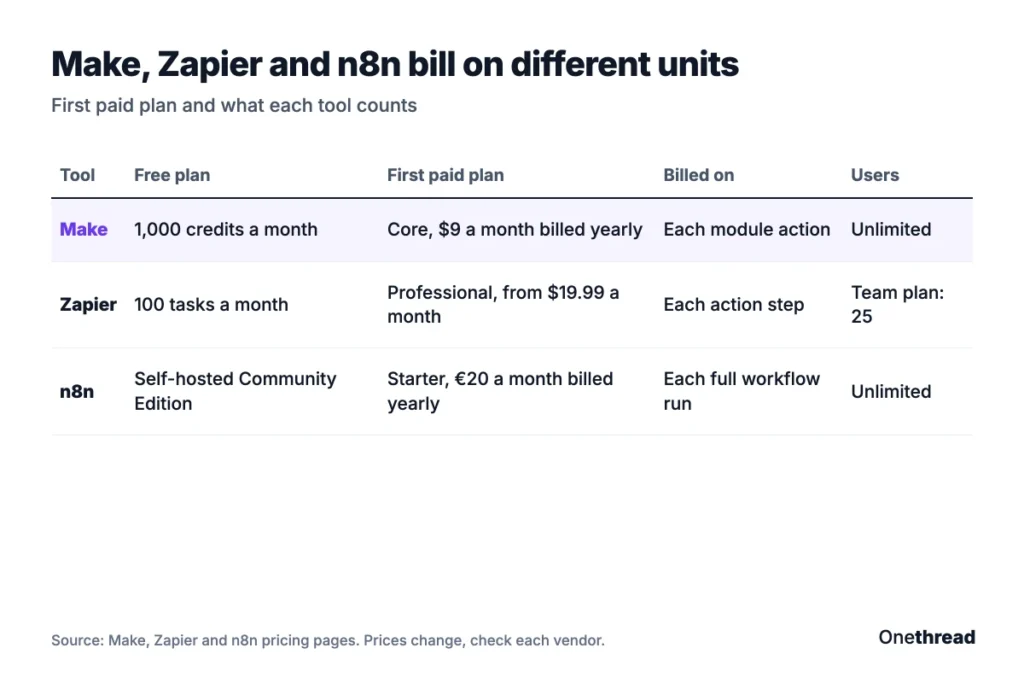
Make pricing usually beats Zapier at the entry tier, and it bills in a different unit than n8n. Here’s the first paid plan of each.
| Tool | Free plan | First paid plan | What you pay for | Users |
|---|---|---|---|---|
| Make | 1,000 credits a month | Core, $9 a month billed yearly, 10,000 credits | Each module action | Unlimited |
| Zapier | 100 tasks a month | Professional, from $19.99 a month | Each action step | Team plan lists 25 users |
| n8n | Self-hosted Community Edition | Starter, €20 a month billed yearly, 2,500 executions | Each full workflow run | Unlimited |
Source: Make, Zapier and n8n pricing pages. Check each vendor’s page, since prices change.
The unit matters more than the price. A 10-step workflow costs n8n one execution, Make about 10 credits and Zapier a task for each action step.
For the detail on the other two, read our Zapier pricing guide and our n8n pricing breakdown.
Which Make Plan Should Your Team Choose?
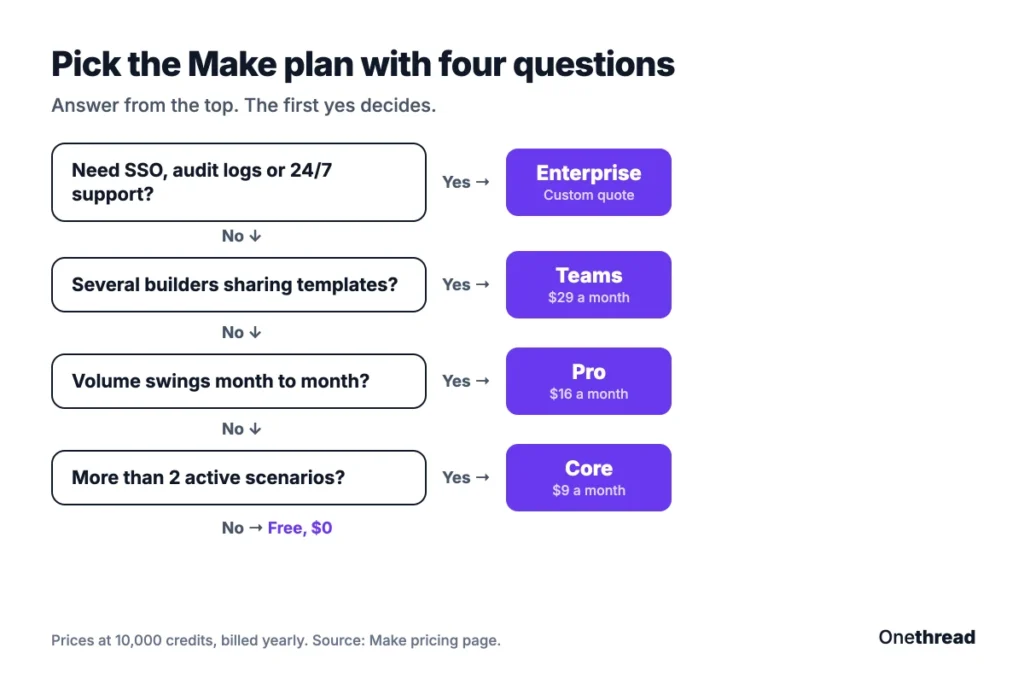
Choose the Make plan by features first, then pick the credit tier by volume. The two are separate dials on the same pricing page.
| Signal | Plan |
|---|---|
| 1 or 2 light workflows, slow runs are fine | Free |
| Steady volume, one builder | Core |
| Busy and quiet months, many shared settings | Pro |
| Several builders, reused templates | Teams |
| SSO, audit logs or 24/7 support | Enterprise |
Source: Make’s plan features.
Then size the tier with your own numbers. Count modules per run, multiply by runs per month, and add room for growth.
Example: the 12,000-credit scenario from earlier sits on Core. Buying 2,000 extra credits by hand costs 2 × $1.125 = $2.25, so the month comes to $11.25. The 20,000-credit tier costs $16 a month billed yearly. But auto-purchase buys 10,000 at once for $11.25, which makes that month $20.25.
So manual top-ups win for a small, steady overrun. If you rely on auto-purchase, move up a tier.
What Should You Do Next With Make?
Make’s price tag is the smallest part of the decision. The plan buys features, the credit tier buys volume, and your scenario design decides how fast you burn through both. Once you see the bill that way, a $9 plan and a $29 plan stop looking like rivals. They answer different questions.
This week, open your busiest scenario and count its modules. Multiply by runs per month, add a margin for growth, then pick the tier that covers it. Start monthly if you’re unsure, and switch to yearly once the number holds.
FAQs
Can You Cancel a Make Subscription at Any Time?
Yes, you can cancel Make at any time. Your paid plan keeps running until the end of the monthly billing cycle or the annual term. After that, Make moves the organization to the Free plan, unless its owner already owns another free organization.
What Happens to Unused Make Credits?
Unused Make credits expire at the end of the term. On monthly plans that’s each month. Pro and Teams annual plans keep prepaid credits usable for 12 months, while Core annual plans still reset monthly. If you downgrade, Make moves your unused credits to the new plan for the next month or year.
What Payment Methods Does Make Accept?
Make accepts major credit cards, ACH direct debit and Google Pay. That covers Core, Pro and Teams. Enterprise customers can also pay by wire transfer after an invoice. Extra credits are the exception: Make only takes credit or debit cards for those, whether you buy them by hand or through auto-purchase.
Does Make Offer Nonprofit or Startup Discounts?
Yes, Make offers both, but neither has a public price. Nonprofits and NGOs are asked to contact Make for details. The pricing page also lists a Start-up Plan for firms under 20 people, with 50% off Business, a plan the grid doesn’t show. Ask Make what it applies to before you budget around it.
How Does Downgrading a Make Plan Work?
Downgrading a Make plan charges your card right away and starts a new billing cycle. Scenarios that use higher-plan features stop, and Make warns you first. Unused credits move to the new plan, so the Make pricing you already paid isn’t lost.
Sources: Make pricing, credits, extra credits, subscriptions. Zapier and n8n pricing pages.