Open your laptop and count the apps that promise to make you productive. Then ask which ones actually do.
Productivity software is any application that helps you create, plan, track or coordinate work. That covers word processors, spreadsheets, task boards, calendars and chat apps.
The label stretches so far that people on forums still ask what counts.
We read the 12 top-ranking guides to give you a clear answer, a test you can reuse and a way to avoid tool overload.
Here's what counts, what doesn't, and how to pick tools you'll open.
Key Points
- Productivity software is any application that helps you create, plan, track or coordinate work, from Microsoft Office and Google Workspace to task boards, calendars and note apps.
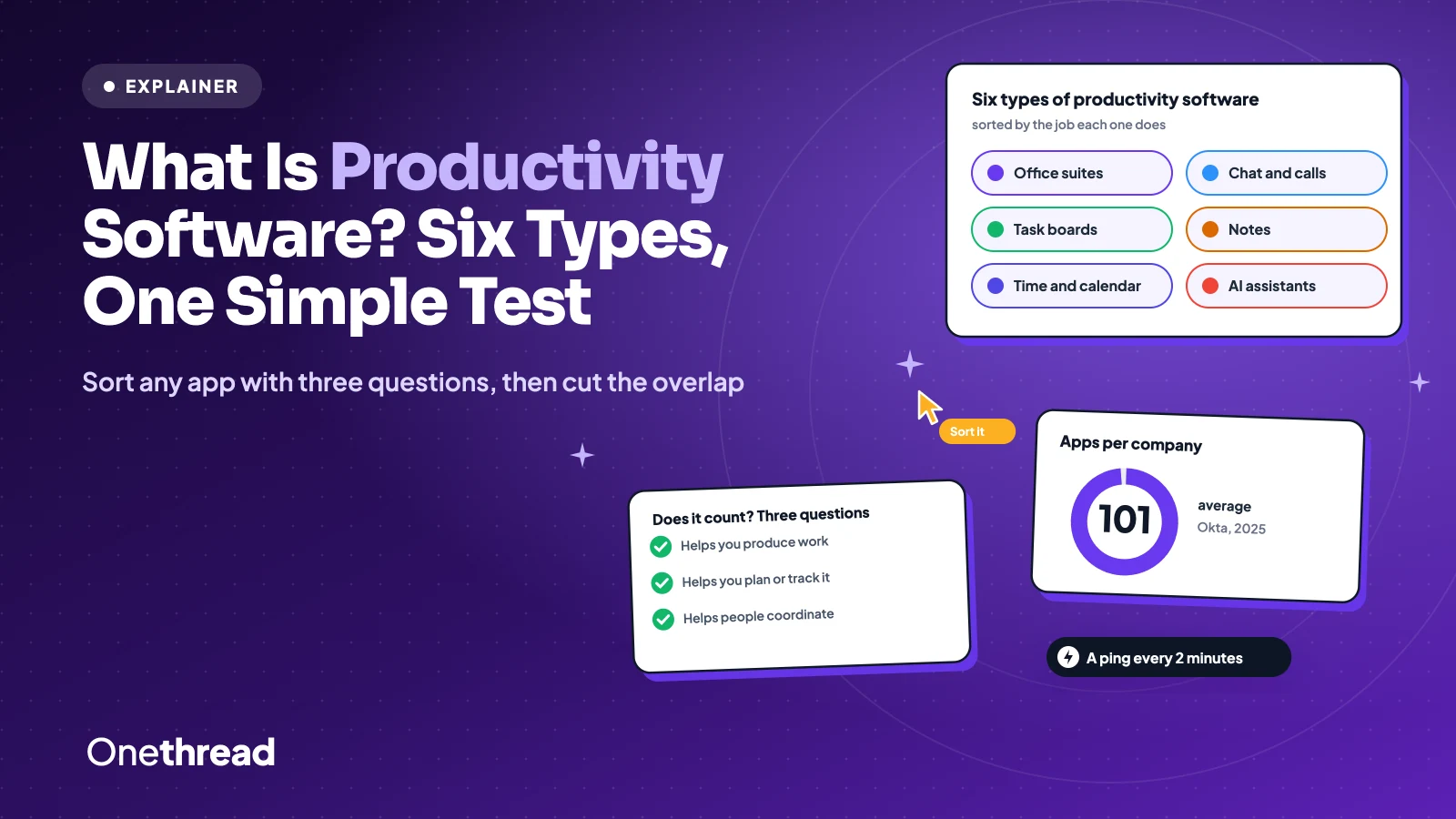
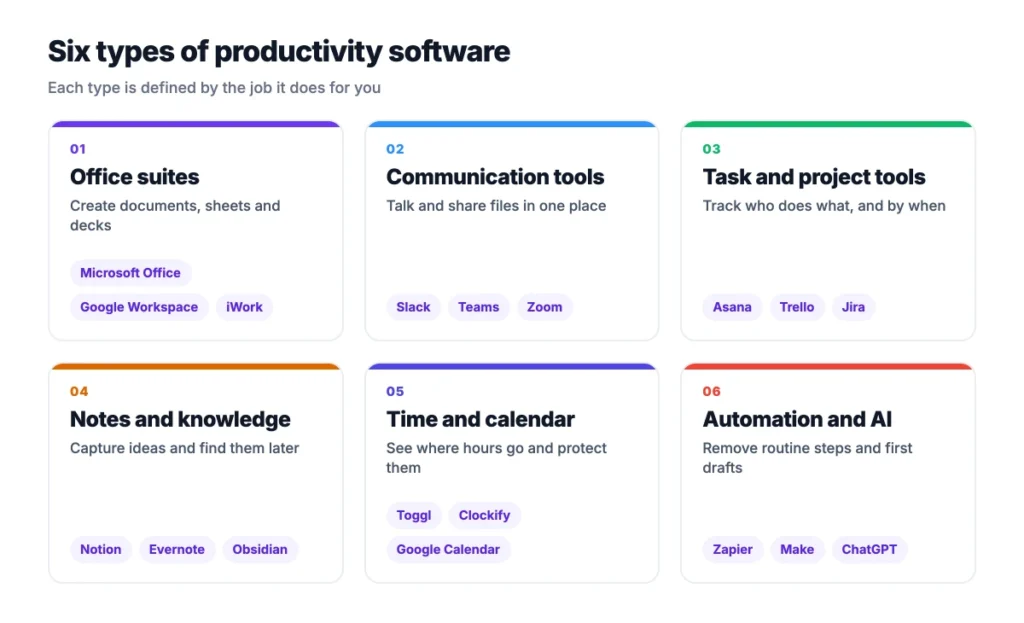
- Six types cover most tools: office suites, communication tools, task boards, notes, time and calendar tools, and automation or AI assistants.
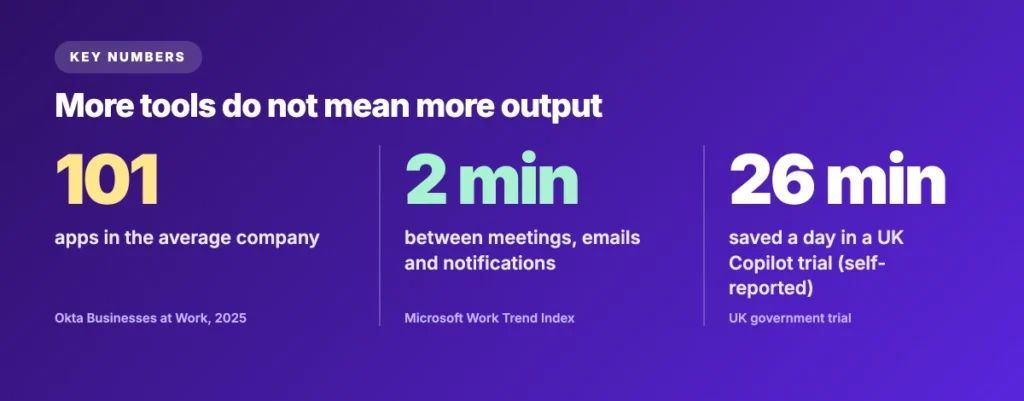
- More tools don't mean more output. The average company runs 101 apps and workers get pinged every 2 minutes, so cut overlap before you add anything.
- Pick by problem: name the one job that slips, trial one tool on it, and track a number you can see.
What Is Productivity Software?
Productivity software is a category of application programs. They help people produce documents, spreadsheets, databases, graphs and presentations. The TechTarget definition adds job tasks such as communication and collaboration.
Plain version: it's software that helps you get work done, alone or with a team.
Productivity tools, productivity programs and productivity apps all point to the same idea. A tool is just one app from the category.
The category started with the suite. A suite bundles word processing, spreadsheet and database programs. They share one interface. The earliest suite for personal computers was MicroPro's StarBurst, from the early 1980s. Microsoft Office came to dominate the market in the 1990s.
Today the scope is wider. Zoho groups the tools by four jobs: communicating, collaborating, coordinating and creating. We use a similar split below, with six types. Each job maps to a kind of tool.
Application software is the bigger bucket. It also holds games and media players. Productivity software is the part that helps you work.
Here's a normal day. You draft a proposal in a word processor, discuss it in a chat channel and assign the follow-ups on a task board. Then you log your hours in a time tracker. Four apps, one workflow.
Which Types of Productivity Software Should You Know?
Guides split the category into four, seven or even nine types, depending on who writes them. We grouped what we found across 12 ranking pages into six types. Each one is defined by the job it does for you. That lets you match a type to a problem.
Office Suites and Document Tools
An office suite bundles a word processor, a spreadsheet, a presentation tool and often a database. Microsoft Office usually includes Word, Excel, PowerPoint, Outlook and OneNote. Google Workspace adds Docs, Sheets, Slides and Forms, plus Gmail, Drive and Meet. Apple iWork covers Pages, Numbers and Keynote.
You need this type when your output is a document, a sheet or a deck. LibreOffice is a free option if budget is your first filter. Most of these apps now run on phones and tablets too.
Communication and Collaboration Tools
These apps move conversations out of crowded inboxes and into shared spaces. Slack and Microsoft Teams give you channels and direct messages. Zoom and Google Meet handle video calls.
The payoff is speed: a question gets answered in a thread, not in a three-day email chain. The risk is noise, because every channel can ping you and every ping breaks focus. Our guide to the best collaboration tools compares the main options. Pick one chat app and retire the rest.
Task and Project Management Software
This type tracks who does what, and by when. It gives a pile of requests an order and an owner. Asana, monday.com, Trello, ClickUp and Jira all sit here. ActivTrak counts it as one of its four main types.
You get boards, lists, deadlines and owners in one place. Status stops living in email threads. If your work lives in scattered to-do lists, start with task management software. It fixes the most common coordination gap: nobody knows who owns the next step.
Note-Taking and Knowledge Tools
Notion, Evernote, Obsidian and OneNote capture ideas, meeting notes and reference pages. Search does the heavy lifting: you write once and find it later, even months on. Pages link to each other, so related ideas stay together.
This type suits solo planners and teams that keep a shared handbook. It works best with one simple rule for where each kind of note lives. Without it, you end up with five half-empty notebooks. See our list of note-taking apps for options.
Time and Calendar Tools
Time trackers such as Toggl, RescueTime and Clockify record where your hours go. Calendars such as Google Calendar and Outlook protect them. Timely adds automatic time tracking. The Pomodoro method splits focus into 25-minute blocks with five-minute breaks.
Use this type when you bill by the hour or lose afternoons to meetings, and you want proof of where the time went. Start with our review of time tracking software. Then add one calendar rule, such as no meetings before lunch.
Automation and AI Assistants
Zapier, Make and Power Automate move data between apps without copy and paste. Set a rule once, such as saving every email attachment to a shared folder, and it runs without you. ChatGPT, Microsoft Copilot and Gemini draft text, summarize long threads and answer questions about your files.
You get time back on routine work, such as first drafts, meeting recaps and status updates. The catch is review. An assistant can sound right and be wrong. You still check the output before it reaches a client or your boss.
How Can You Tell Whether a Tool Counts as Productivity Software?
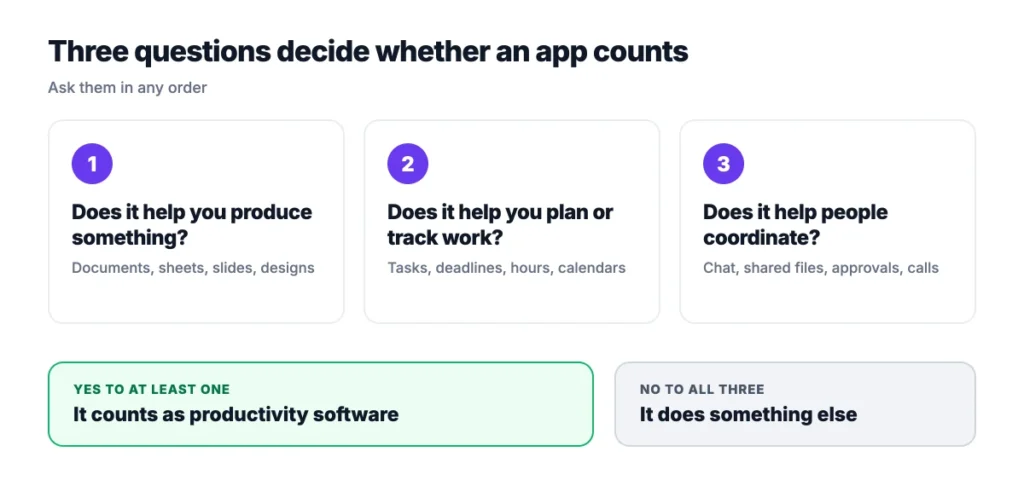
Ask three questions. If a tool answers yes to at least one, it counts as productivity software.
- Does it help you produce something? Documents, sheets, slides, designs.
- Does it help you plan or track work? Tasks, deadlines, hours, calendars.
- Does it help people coordinate? Chat, shared files, approvals, calls.
A tool that answers no to all three does something else, even when its homepage promises to save time. This test settles most of the borderline cases forum threads argue about.
| Tool | Counts? | Why |
|---|---|---|
| Microsoft Excel | Yes | Produces spreadsheets, a core app in Microsoft Office |
| Slack | Yes | Coordinates conversations in channels |
| Notion | Yes | Captures notes and knowledge, plans projects |
| Zoom | Yes | Coordinates people through calls |
| ChatGPT | Yes | Drafts and summarizes work as an AI assistant |
| Netflix | No | Produces, plans and coordinates nothing |
What Can Productivity Software Fix, and When Does It Backfire?
It fixes the work around the work: hunting for files, chasing status and writing routine text. It backfires when you add tools faster than you retire them.
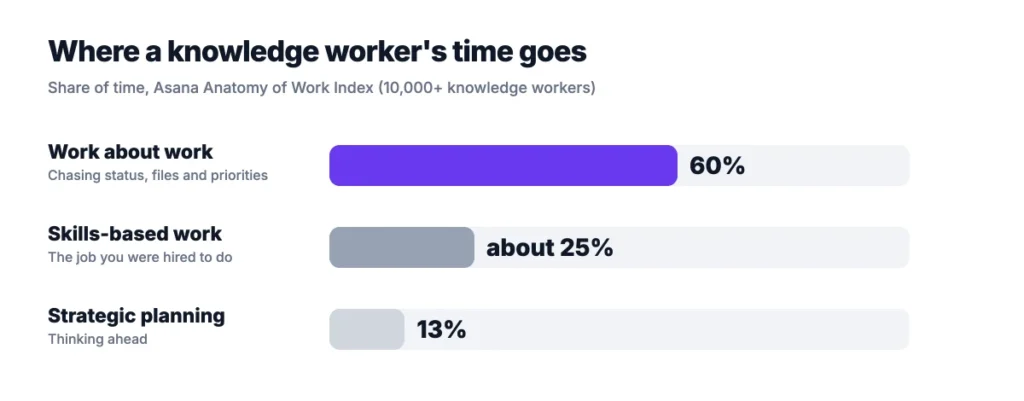
Asana's Anatomy of Work Index measures it. Knowledge workers spend about 60% of their time on communicating about tasks, hunting down documents and managing shifting priorities.
In a UK government trial, more than 20,000 civil servants using Microsoft 365 Copilot reported saving 26 minutes a day. That adds up to nearly two weeks a year. The savings were self-reported, not measured.
On the downside, Okta's 2025 Businesses at Work report found that the average organization runs 101 apps. Microsoft's Work Trend Index shows a meeting, email or notification interrupts the typical worker every 2 minutes. That worker also gets 117 emails and 153 Teams messages a day.
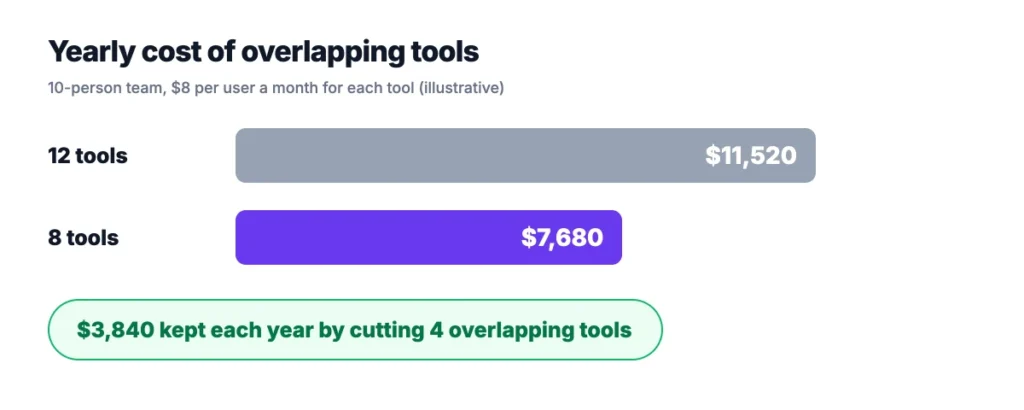
Overlap costs money too, and the arithmetic is quick.
Example: Say 10 people each use 12 paid tools at $8 per user a month. That's 10 × 12 × $8 = $960 a month, or $11,520 a year. Cut the 4 tools that overlap and you pay 10 × 8 × $8 = $640 a month, or $7,680 a year, which keeps $3,840. Use your own prices and headcount.
Top Tip: Before you buy anything, list every tool your team uses and the one job each does. Any job with two tools is your first cut.
How Do You Choose Productivity Software for Your Team?
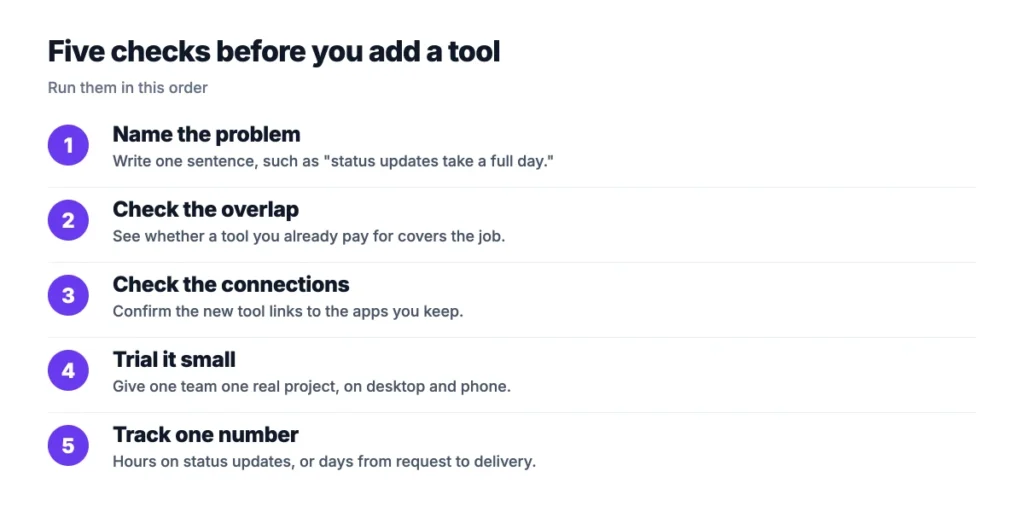
Start with the job that slips, not the feature list. Zoho's advice is the same: begin with a defined problem, then check your existing tools and workflows. Five checks keep the choice honest:
- Name the problem: write one sentence, such as "status updates take a full day."
- Check the overlap: see whether a tool you already pay for covers the job.
- Check the connections: confirm the new tool links to the apps you keep, or you add a manual step.
- Trial it small: give one team one real project, on desktop and phone.
- Track one number: pick hours on status updates or days from request to delivery, because you can see both.
If your slipping job is tasks and deadlines, a project tool can replace several apps at once. Onethread lists task management, Gantt charts, timesheets, discussions and a wiki, and it suits teams of 2 to 200. It doesn't replace your office suite, so you keep Word or Docs for writing.
When you're ready to compare options, our roundup of the best productivity apps ranks them. The list of productivity apps for Android covers phone-first teams. To start now, the free to-do list generator builds a task list in seconds.
Sources we used:
- TechTarget definition
- Wikipedia on office suites
- Zoho Workplace guide
- Reclaim guide
- CRM.org guide
- ActivTrak guide
- Timely guide
- Google Workspace products
What Should You Do Next With Your Productivity Tools?
Productivity software is any tool that helps you produce, plan or coordinate work, and the best stack is the smallest one that covers those jobs. Now you can sort any app with three questions. You can also spot the overlap that eats your budget and your attention.
This week, list every tool your team pays for and write the one job each does. Mark any job that has two tools, then cut or merge one before the next renewal. The tool you open every day beats the one with the longest feature list.
FAQs
Is Microsoft Office Productivity Software?
Yes. Microsoft Office is an office suite, which is a bundle of productivity software built for office workers. It usually includes Word, Excel, PowerPoint, Outlook and OneNote, though the exact apps depend on your plan. Google Workspace and Apple iWork fill the same role, and LibreOffice is a free alternative.
Is Productivity Software the Same as Application Software?
No. Application software is the wider group of programs people use, including games and media players. Productivity software is the part that helps you produce documents, plan tasks or work with others. Every productivity tool is an application. Plenty of applications are not productivity tools.
Is Productivity Software the Same as Project Management Software?
No. Project management software is one type of productivity software. It tracks tasks, deadlines and owners across a project, while the wider category also covers writing tools, chat, notes and calendars. ActivTrak lists it beside office suites, database systems and time management tools as its four main types.
How Do You Measure Whether Productivity Software Works?
Pick one number you can see before you start, such as hours spent on status updates or days from request to delivery. Compare it after a trial. Be careful with self-reported savings. The UK government's Copilot trial reported 26 minutes saved a day, but those figures came from participants' own reports, not direct measurement.