A weekly schedule template only helps when the hours in it are honest.
A weekly schedule template is a grid of days and time slots where you place fixed commitments first, then tasks. Choose five days for an office week, seven for a variable one, or hourly rows for time blocking.
We reviewed more than 10 top-ranking template pages and guides to find the layouts that cover most real weeks.
You'll see each layout, a filled-in example, and how to size the time blocks so the plan you build holds up.
Key Points
- A weekly schedule template is a grid of days and time slots. Use five columns for an office week, seven for a varied one, 30-minute or hourly rows for scheduled blocks, and a roster for shifts.
- Fill it in a fixed order: non-negotiables, recurring items, meetings, then tasks with padded estimates. Students in one study predicted 33.9 days for a thesis and needed 55.5.
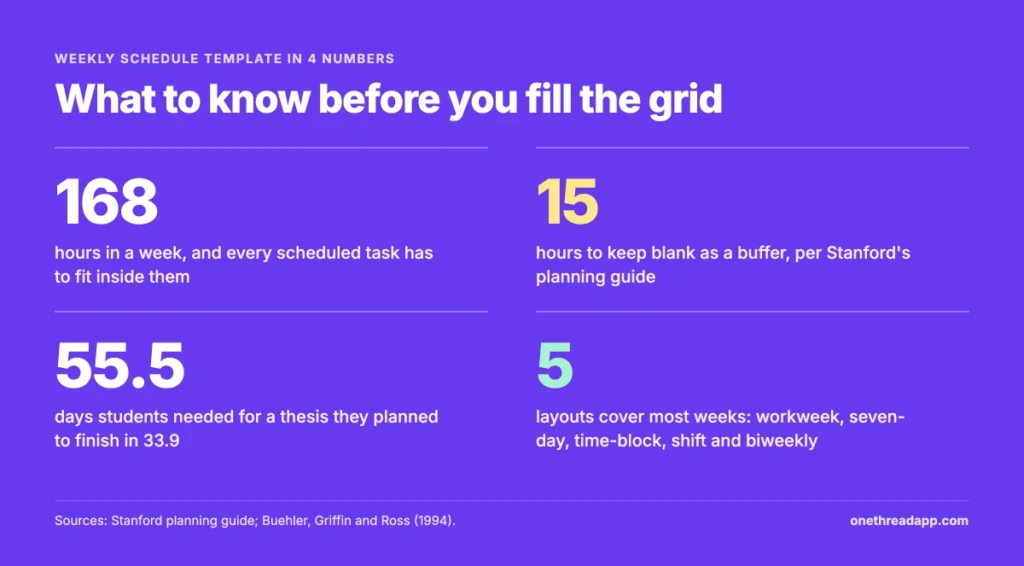
- Keep at least 15 of the 168 weekly hours blank. Stanford's planning guide recommends that buffer so one late task doesn't break the week.
- Choose Google Sheets for shared schedules, Excel or Word for printed ones, and PDF for a wall copy. Review the grid once a week.
What Is a Weekly Schedule Template?
A weekly schedule template is a reusable grid that shows one week at a glance. Days run across the top and time slots down the side. You fill it with meetings, tasks and routines, then copy it forward each week instead of starting over.
Every template holds the same three things: fixed commitments, flexible tasks and open time. Fixed items include classes, shifts and meetings, while flexible items are tasks you can move. Open time absorbs the surprises, since one late task otherwise pushes back everything after it.
The main benefit is visibility, and good time management starts there. You can see an overloaded Thursday on Monday, not on Thursday. The limits are real too. A static template sends no alerts when plans change, you reset it by hand each week, and it leaves little room for task detail.
Don't confuse it with a weekly planner. Calendarpedia points readers who want open-ended task lists to weekly planners, and readers who need school bell times to class schedules. The schedule is the time grid.
Choice isn't the problem. Canva's weekly schedule gallery lists nearly 3,900 templates, and Notion's planner category lists about 845. Layout decides whether a template fits your week, and looks matter less. Pick the one that matches how your days actually run.
Which Weekly Schedule Template Layout Fits Your Week?
The right layout depends on your work schedule and how finely you plan each day. We grouped the layouts that top pages offer into five main types. Match your week to the table here, then read the notes on each one.
| Layout | Days | Time rows | Best for |
|---|---|---|---|
| Workweek | Monday to Friday | Hourly, or none | Office jobs with a steady rhythm |
| Seven-day | Monday to Sunday | Hourly, or none | Freelancers and anyone with weekend commitments |
| Time-block | Five or seven days | 30-minute or hourly | Deep work and heavy meeting loads |
| Shift roster | Five to seven days | Shift start and end | Managers who schedule other people |
| Biweekly | Fourteen days | Shifts or sprints | Pay cycles and two-week sprints |
The "Best for" column is our judgment, not a vendor claim.
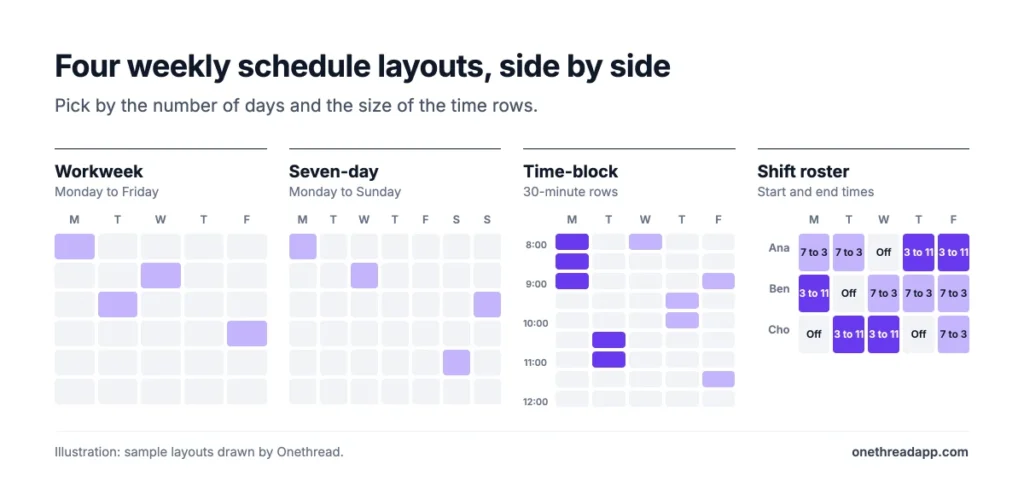
Monday to Friday Workweek Template
Five columns is the default for office work. Calendarpedia's free PDF set offers it as one wide page, two schedules on a portrait page, and a version with a notes area. Choose it when weekends stay free. The notes version suits workdays that need call prep or follow-ups.
Leave the Time column blank at first. You can write in meeting hours, half-hour slots, or just morning and afternoon. Keep the grid simple enough that a teammate can read it at a glance.
Seven-Day Weekly Schedule Template
Add Saturday and Sunday when weekends hold real commitments such as family, shifts or a side project. Calendarpedia offers both Sunday to Saturday and Monday to Sunday versions, so pick the start day you actually think in. A Monday start fits a workweek that spills into the weekend.
Seven columns get tight on a phone. Give each day a short label and keep entries to a few words. And schedule rest, too. A grid with no empty weekend hour is a plan you'll abandon.
Hourly Time-Block Schedule Template
Time blocking splits each day into 30 or 60 minute rows and assigns one job to each block. Smartsheet's Excel version runs in 30-minute steps that you can adjust from 10 to 120 minutes. Spreadsheet Point's Google Sheets version covers Monday to Sunday, 5:00 AM to 10:00 PM.
Use fine rows only if you plan that finely. Hourly rows are enough for most people, and 30-minute rows help when meetings run short. Name blocks by outcome, such as "Draft report", not "Work".
Weekly Shift Schedule Template
A roster swaps the time grid for shift start and end times. Smartsheet's employee version runs from 7 a.m. to 8 p.m., totals each day's hours, and helps you spot overtime early.
Its bi-weekly version tracks two weeks of shifts with hourly rates and calculated pay. Wrike also lists a two-week layout for Agile sprints. Choose a roster when you plan other people's hours, not only your own. Share it as a PDF so staff see one version, and color each shift type so gaps show at a glance.
What Does a Filled-In Weekly Schedule Template Look Like?
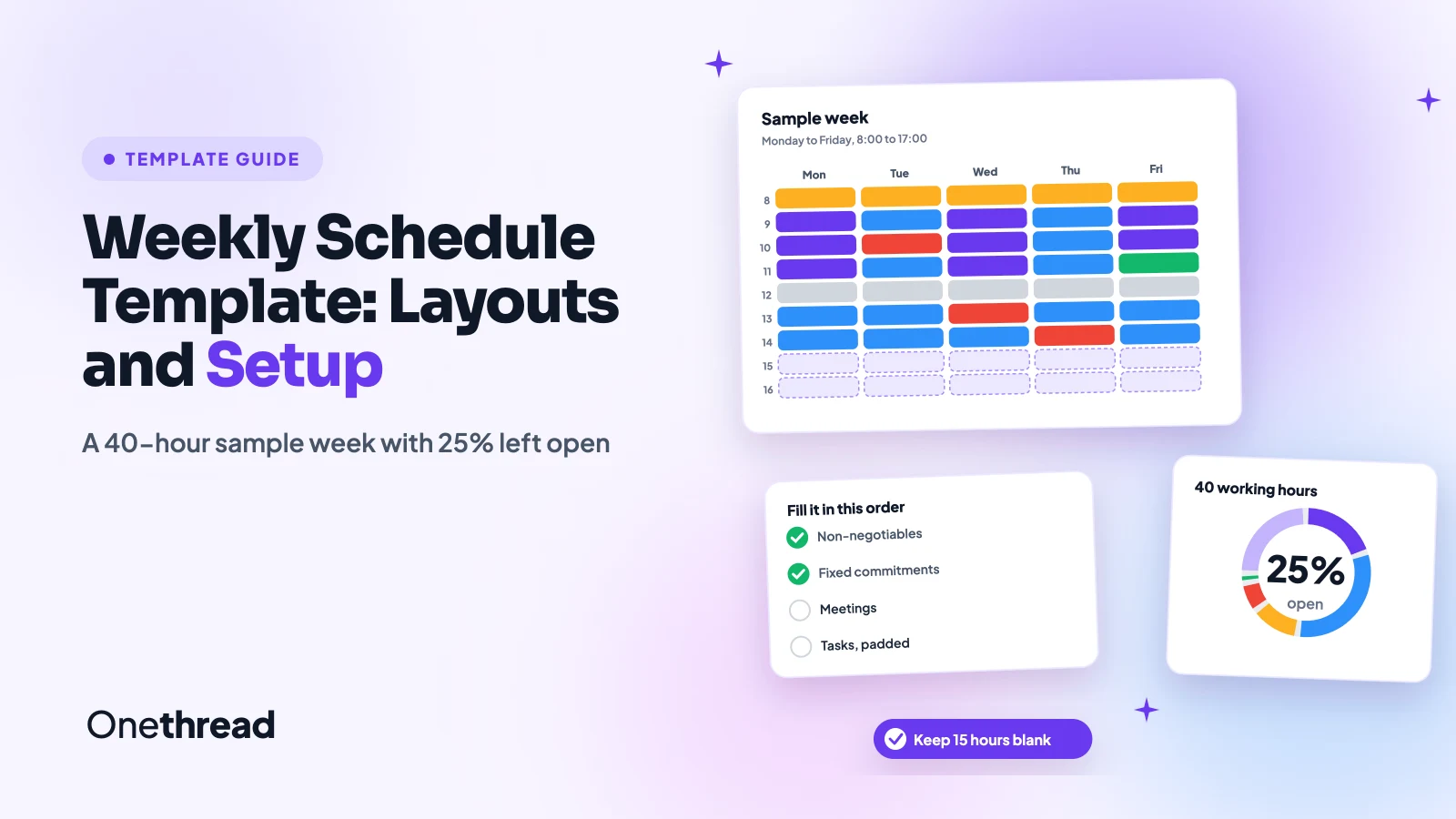
A filled-in weekly schedule template shows fixed items first, flexible work second and open hours last. This sample is our illustration of a Monday to Friday remote worker, not a real person's week. It runs 8:00 to 17:00 with a one-hour lunch, which makes 40 working hours.
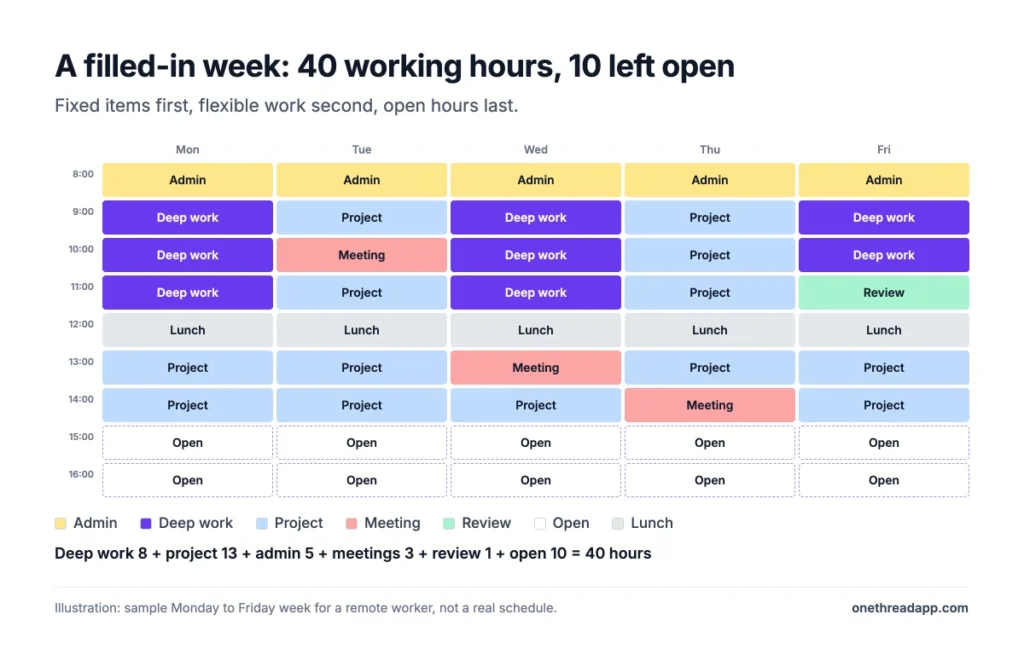
Example: The 40 hours split into 8 of deep work, 13 of project tasks, 5 of admin, 3 of meetings and 1 of review. The other 10 stay open. So 8 + 13 + 5 + 3 + 1 + 10 = 40, and 25% of the week is open.
Three choices make the grid work. Admin sits at 8:00 every day, so email never leaks into deep work. Deep work takes the morning, when most people have the most energy. And the open hours sit at the end of each day, right after the meetings that tend to overrun.
No block of focused work runs longer than three hours, and every day ends with two open hours.
Top Tip: Put open blocks after meetings, not before them. An overrun then lands in the open hour instead of eating your deep work.
Use color coding by type of work, as in the sample, so you can spot a week made only of meetings.
Which File Format Works Best for a Weekly Schedule Template?
Google Sheets suits shared schedules, Excel and Word suit schedules you edit and print, and a PDF suits a wall copy. Pick by who edits the schedule, not by looks.
| Format | Strength | Limit |
|---|---|---|
| Google Sheets | Real-time editing across devices | Needs an account, and a connection unless you turn on offline access |
| Excel | Free templates in Excel for the web, with PDF export | Real-time editing behaves differently once you download the file |
| Word | Ready-made designs that print cleanly | A fixed table, so every edit is manual |
| US Letter pages in color or black and white, no sign-up on Calendarpedia | Handwritten changes only |
Every static file shares one weakness. Edits must be re-shared, absences aren't tracked, and version control is thin. Once several people edit one schedule, a work management tool such as Onethread keeps a single live copy. If you'd rather skip the spreadsheet, our roundup of daily planner apps covers the alternatives.
Top Tip: In Google Sheets, choose File, then Make available offline, before a trip. Your edits sync when you reconnect.
How Do You Build a Weekly Schedule Template From Scratch?
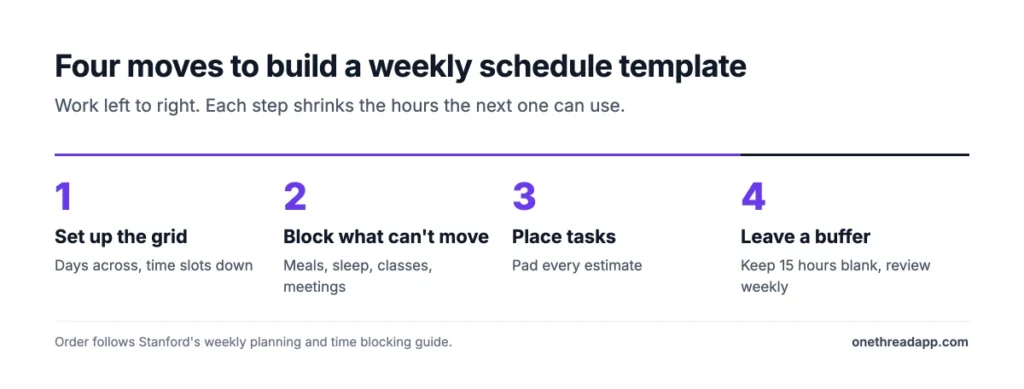
Building a weekly schedule template takes four moves. Set up the grid, block what can't move, place tasks with padded estimates, then leave a buffer and review it weekly. Stanford's planning guide uses the same order, with non-negotiables first and tasks last.
Set Up the Grid
In Google Sheets, type "Time" in cell A1 and the seven days in B1 through H1. Fill the time column in 30-minute steps, then freeze the first row and column so labels stay visible.
In Excel, put the days across the top and time slots down the first column. For Word, insert a table with five columns for a workweek or seven for a full week, then save it as a Word Template. If you live in a calendar, copy the blocks into one of the best calendar apps.
Block Fixed Commitments First
Start with what can't move. Stanford's guide orders it this way: meals and bedtime, then classes and other recurring tasks, then appointments and meetings. Work and school hours can't move either. Enter these before any task, because they decide how many hours remain.
Recurring tasks like a weekly standup belong here as well.
Writing down when you'll act pays off. A meta-analysis of 94 studies found that if-then plans stating when and where raised goal achievement, with an effect size of 0.65.
Place Tasks Using Honest Estimates
List the week's tasks, then give each a duration. Our to-do list template or the free todo list generator can help. Place hard tasks when your energy is highest. Break each big task into pieces that fit one block.
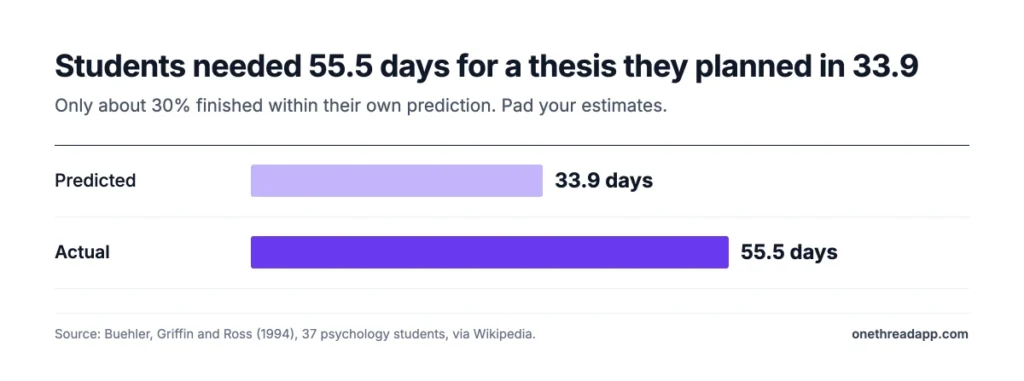
Then pad the estimates. Round up when unsure, because estimates are guesses. In a classic study, 37 psychology students predicted their thesis would take 33.9 days. It took 55.5 on average, and only about 30% finished within their prediction, according to the planning fallacy research summary.
Leave a Buffer and Review Weekly
Leave at least 15 hours of the week blank, as Stanford recommends, so tasks can shift. Interruptions cost more than they look. Researcher Gloria Mark reported that interrupted work took an average of 23 minutes and 15 seconds to resume.
At week's end, compare plan and actual, then adjust next week's estimates. Duplicate the tab to keep each week for comparison. Book the review for a fixed slot, such as Friday afternoon, so it happens. For the day-level version, see how to plan your day.
How Much of Your Week Should a Weekly Schedule Template Cover?
Plan less than you think. A week holds 168 hours, and Stanford's time-blocking guide recommends keeping at least 15 of them blank. Everything you schedule has to fit in what's left after sleep, work and that buffer.
Example: Say you sleep 8 hours a night and work 40 hours a week. That's 8 × 7 = 56 hours of sleep. Then 168 − 56 − 40 − 15 = 57 hours remain for meals, commuting, exercise, family and everything else you schedule.
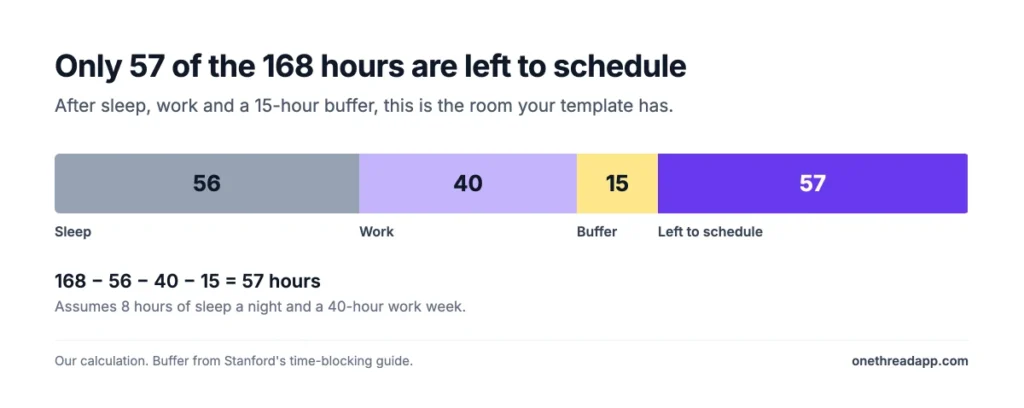
Change the inputs and the answer moves. Work 45 hours and 52 hours remain. Sleep 9 hours a night and 50 remain. That's why we start with the arithmetic, not the layout.
Run the same arithmetic with your own numbers. If the remainder is smaller than the tasks on your list, the template isn't the problem. The list is.
Cut tasks, move them to next week, or ask what can wait. A template makes overload visible. It can't make the week longer.
Sources: Stanford weekly planning and time blocking guide, Calendarpedia weekly schedule PDFs, Smartsheet Excel weekly schedule templates. Formats: Microsoft Excel schedule templates, Spreadsheet Point weekly schedule template, Wrike weekly schedule guide. Guides: Motion weekly schedule guide, Time Doctor weekly schedule templates. Galleries: Canva weekly schedule templates, Notion planner templates.
What Should You Do Next With Your Weekly Schedule Template?
A weekly schedule template works when it holds honest hours, not when it looks tidy. Block what can't move, pad your estimates, and keep open hours on purpose. Then you'll see overload on Monday morning, while there's still time to cut a task. Start with a buffer of at least 15 hours.
This week, build one workweek grid with only the fixed items. Our guide to productivity apps and tools covers software that keeps the grid alive. Next Friday, compare what you planned with what happened, and adjust one estimate.
FAQs
What Is the Difference Between a Weekly Schedule and a Weekly Planner?
A weekly schedule assigns tasks to days and times, so it answers when. Planners hold open-ended lists, goals and notes, so they answer what. Calendarpedia recommends planners for open-ended task planning and class schedules for school bell times. A weekly schedule template covers the first job.
How Do I Make a Daily Schedule From a Weekly Template?
Copy one day's column from your weekly schedule template and split its rows into 30-minute steps. Add that day's fixed items first, then place the tasks you chose for it. Keep the open hours from the weekly grid, because a daily plan needs them most.
Can I Use a Weekly Schedule Template Offline?
Yes. In Google Sheets, choose File, then Make available offline, and edits sync when you reconnect. You can also download an .xlsx file and open it in Excel, or print a PDF. On paper, write recurring hours in pen and use sticky notes for one-time changes.
Does Excel Have a Weekly Schedule Template?
Yes. Microsoft offers free schedule templates for daily, weekly, monthly, work shift, class and team roster plans, and they open in Excel for the web. You can change dates and time slots, add rows or columns, and export a PDF. Smartsheet also publishes 14 downloadable Excel weekly schedule templates.