An expense report decides whether you get paid back and whether a deduction survives an audit. Both depend on what each line records.
An expense report template is a reusable form with one row per expense. Each row records the date, vendor, category, amount, business purpose, and receipt. Add a total, an advance line, and an approver signature, and the form works in Excel, Google Sheets, or Word.
We compared 10 top-ranking guides with the IRS record-keeping rules. You get four copy-ready layouts, a filled-in trip with the math, and the receipt and deadline rules.
Key Points
- Give every expense one row with seven fields: date, vendor, category, amount, business purpose, payment method, and receipt. Close the form with a total, an advance, and an approver line.
- Attach a receipt for all lodging and for any other expense of $75 or more. Write the business purpose on every row.
- Account for expenses within 60 days and return unspent advances within 120 days, the IRS safe harbors for accountable plans.
- Price business miles at 76 cents from July 1, 2026 (72.5 cents before that). Move to software when several approvers or lost receipts outgrow the sheet.
What Is an Expense Report Template?
An expense report template is a pre-built form that records business expenses for reimbursement, budgeting, and tax records. You fill in one row per purchase, and the sheet adds the total.
Employees use it to claim money back for work purchases, and their managers use it to review what a team spent. Small business owners and freelancers use the same form to log spending for tax time, so one layout serves all three jobs.
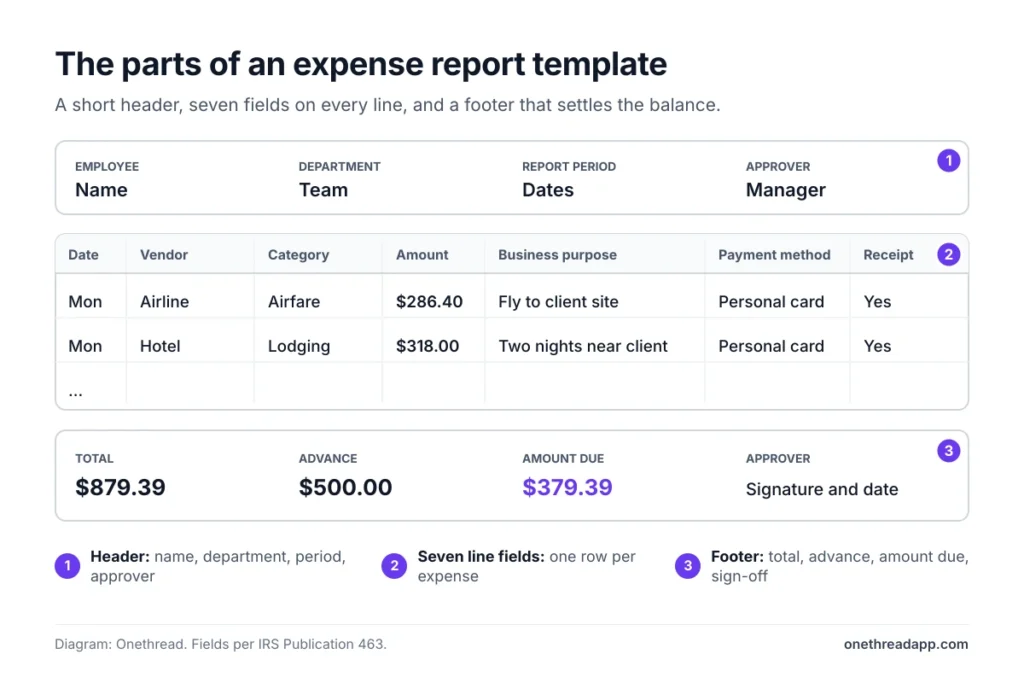
Every template has the same three parts:
- Header: Your name, department, report period, and the manager who approves.
- Line items: One row per expense, with date, vendor, category, amount, and receipt.
- Footer: The total, any cash advance, the amount owed, and a signature line for the approver.
A report differs from a folder of receipts or a bank statement. It adds the context neither one holds: why you spent the money, which category it belongs to, and who approved it.
A template only helps if each column has a reason. The next section ties every column to a rule, so the form holds up when someone checks it. Done well, one page also answers the questions a manager, a bookkeeper, and a tax preparer ask later.
What Fields Should an Expense Report Template Include?
An expense report template needs seven fields on every line, and each one answers a question an approver or auditor asks. Pick the category from a short list of expense categories. For travel, IRS Publication 463 asks you to record the amount, the dates, the destination, and the business purpose of each expense.
| Field | What to enter | Why it matters |
|---|---|---|
| Date | The day you paid | Sets the report period |
| Vendor | Who you paid | Matches the receipt |
| Category | One pick from a short list, such as Meals | Totals business expenses by type |
| Amount | The exact total paid | Sets the reimbursement |
| Business purpose | One line on why, such as "Client kickoff" | The IRS asks you to record it |
| Payment method | Personal card, company card, or cash | Shows what the company owes you |
| Receipt | Yes or No, plus the file name | Required for lodging and for $75 or more |
IRS Publication 463 requires documentary evidence, such as a receipt, for lodging and for any other expense of $75 or more. That's the $75 receipt rule. Your company policy can set a lower limit.
Top Tip: Log each expense at or near the time you pay it. That's the standard the IRS sets for expense records, and it keeps the business purpose accurate.
Which Expense Report Templates Can You Copy Today?
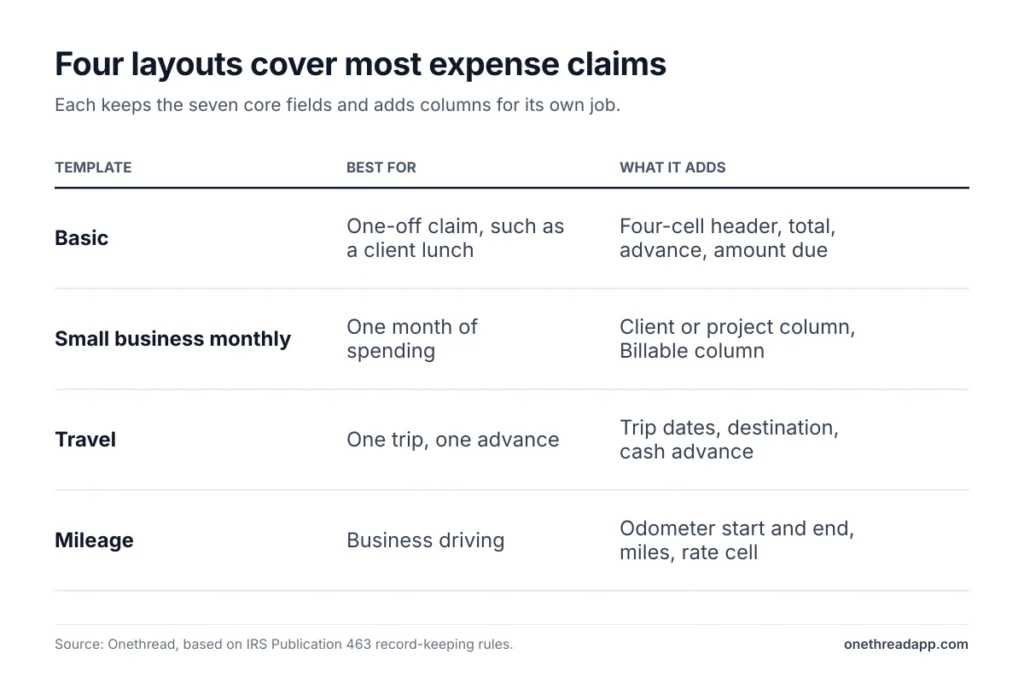
These four layouts cover most requests, from a single lunch to a month of client work. Each keeps the seven core fields and adds columns for its job. Copy the column list into Excel, Google Sheets, or Word, then add a total row.
Basic Expense Report Template
Use the basic template for a one-off claim, such as a client lunch or a software purchase. Keep the header to four cells: employee, department, report period, and approver.
List expenses in the order you paid them, and total the Amount column at the bottom. Add the advance you received, if any, so the footer shows what the company owes you. Print one page, or save one PDF per claim.
- Columns: Date, Vendor, Category, Business purpose, Payment method, Amount, Receipt.
- Footer: Total, Advance received, Amount due.
Small Business Monthly Expense Report Template
Run this one once a month, and close it on the same day each month so every receipt has a home. It adds a Client or project column, so you can bill costs back. A Billable column holds Yes or No.
Sort by category before you review the totals with your bookkeeper or accountant. Keep the monthly files together, so a year of spending sits in one folder.
- Extra columns: Client or project, Billable.
- Footer: Total per category, Total for the month.
Travel Expense Report Template
Use one report per trip, so one advance matches one set of receipts. Add the trip dates and destination to the header, group lines by day, and total each day before you total the trip.
If your company pays a daily meal allowance (a per diem), log the daily rate once. Check your policy on receipts. Keep flights and hotel bills in the same trip folder as the report.
- Extra fields: Trip dates, Destination, Cash advance.
- Categories: Airfare, Lodging, Meals, Local transport.
Mileage Expense Report Template
Mileage needs its own log. For each trip, the IRS asks for the date, the business destination, the business purpose, and the business miles.
Read the odometer at the start and end of each drive, and multiply the miles by the rate. Write the entry soon after the drive, because the IRS wants records made near the time.
- Columns: Date, Start, Destination, Business purpose, Odometer start, Odometer end, Miles, Rate, Amount.
- Rate cell: Keep the rate in one cell, so one edit reprices every row.
How Do You Fill Out an Expense Report?
Filling out an expense report takes six steps. Enter the header, log each expense, choose a category, write the business purpose, attach receipts, then total and submit.
- Enter the header: Add your name, department, period, and approver.
- Log each expense when you pay: One purchase gets one row.
- Choose a category: Pick from the drop-down.
- Write the business purpose: Name the client, project, or meeting.
- Attach receipts: Add one for lodging and for each expense of $75 or more.
- Total, subtract any advance, and submit: Send it before your policy deadline.
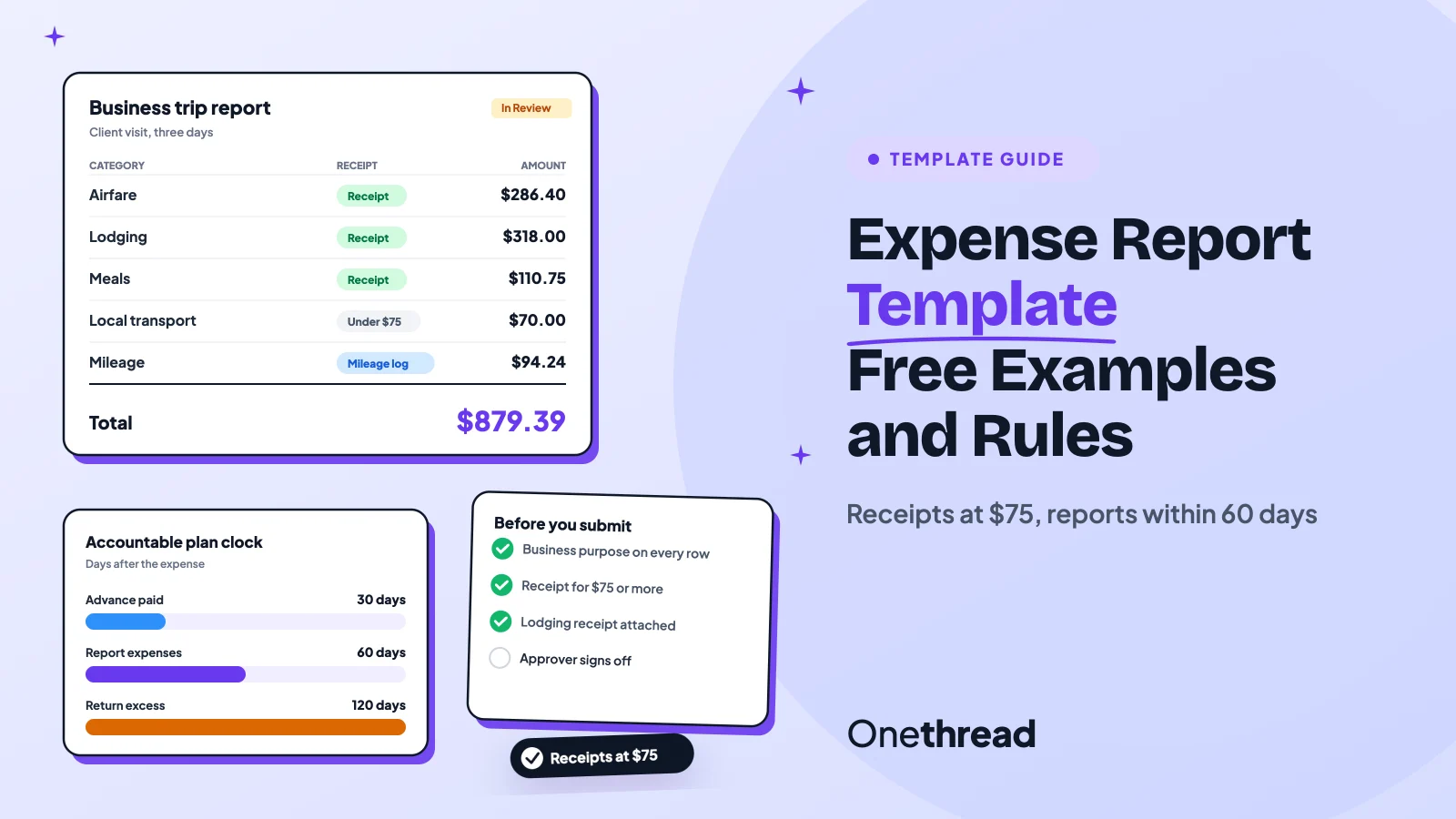
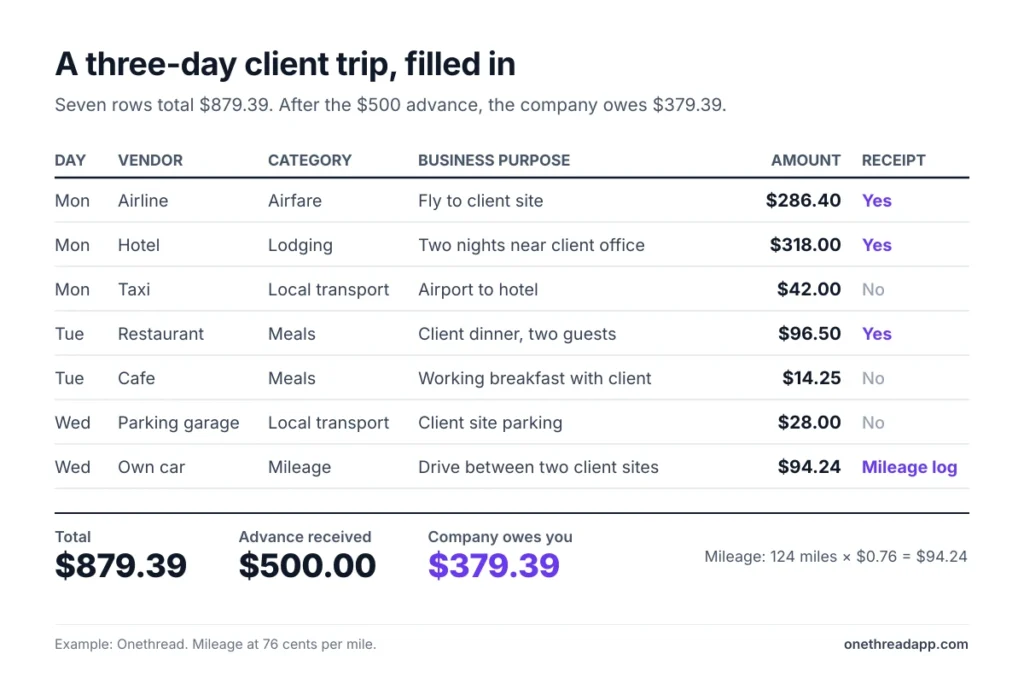
Example: Say you take a three-day client trip, drive between two client sites, and receive a $500 advance. Mileage is 124 miles at 76 cents, which is $94.24 (124 × 0.76). The report below totals $879.39, so the company owes you $379.39, which is the total minus the $500 advance.
| Day | Vendor | Category | Business purpose | Amount | Receipt |
|---|---|---|---|---|---|
| Mon | Airline | Airfare | Fly to client site | $286.40 | Yes |
| Mon | Hotel | Lodging | Two nights near client office | $318.00 | Yes |
| Mon | Taxi | Local transport | Airport to hotel | $42.00 | No |
| Tue | Restaurant | Meals | Client dinner, two guests | $96.50 | Yes |
| Tue | Cafe | Meals | Working breakfast with client | $14.25 | No |
| Wed | Parking garage | Local transport | Client site parking | $28.00 | No |
| Wed | Own car | Mileage | Drive between two client sites | $94.24 | Mileage log |
Three rows carry receipts because of the lodging rule and the $75 receipt rule. The other rows fall under $75, though your policy can still ask for them. Category totals: airfare $286.40, lodging $318.00, meals $110.75, local transport $70.00, and mileage $94.24.
How Do You Build an Expense Report Template in Excel or Google Sheets?
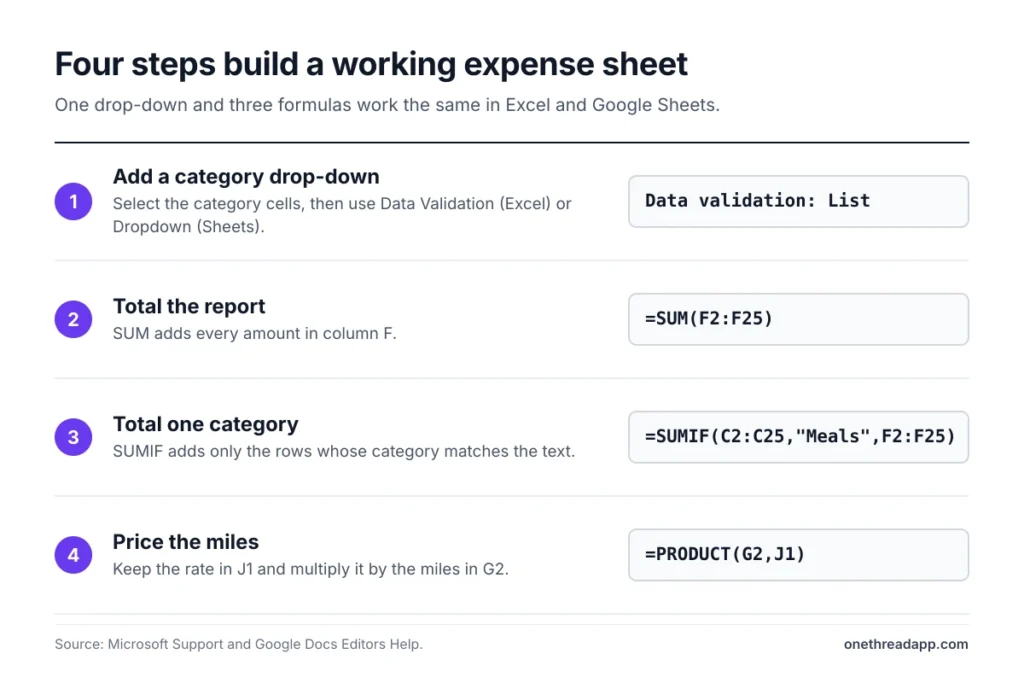
You can build a working template with one drop-down and three formulas. SUM totals the report, SUMIF totals each category, and a multiplication prices the miles. SUMIF adds only the amounts whose category matches the text you give it.
| Task | Excel | Google Sheets |
|---|---|---|
| Category drop-down | Select the cells, then Data, Data Validation, Allow: List, and enter your category range as the Source | Select the cells, then Data, Data validation, Add rule, and choose Dropdown from a range |
| Report total | =SUM(F2:F25) | =SUM(F2:F25) |
| Total for one category | =SUMIF(C2:C25,"Meals",F2:F25) | =SUMIF(C2:C25,"Meals",F2:F25) |
| Mileage amount | =PRODUCT(G2,J1), with the rate in J1 | =PRODUCT(G2,J1), with the rate in J1 |
Here, column C holds the category and column F holds the amount. For the mileage formula, lock J1 with dollar signs, so the rate cell stays fixed when you copy the formula down.
Sources: Microsoft Support pages on SUMIF and drop-down lists, and Google Docs Editors Help on dropdown lists.
Which IRS Receipt and Deadline Rules Apply to Expense Reports?
Four U.S. tax rules shape an expense report. Lodging and any expense of $75 or more need a receipt. Each line needs a business purpose.
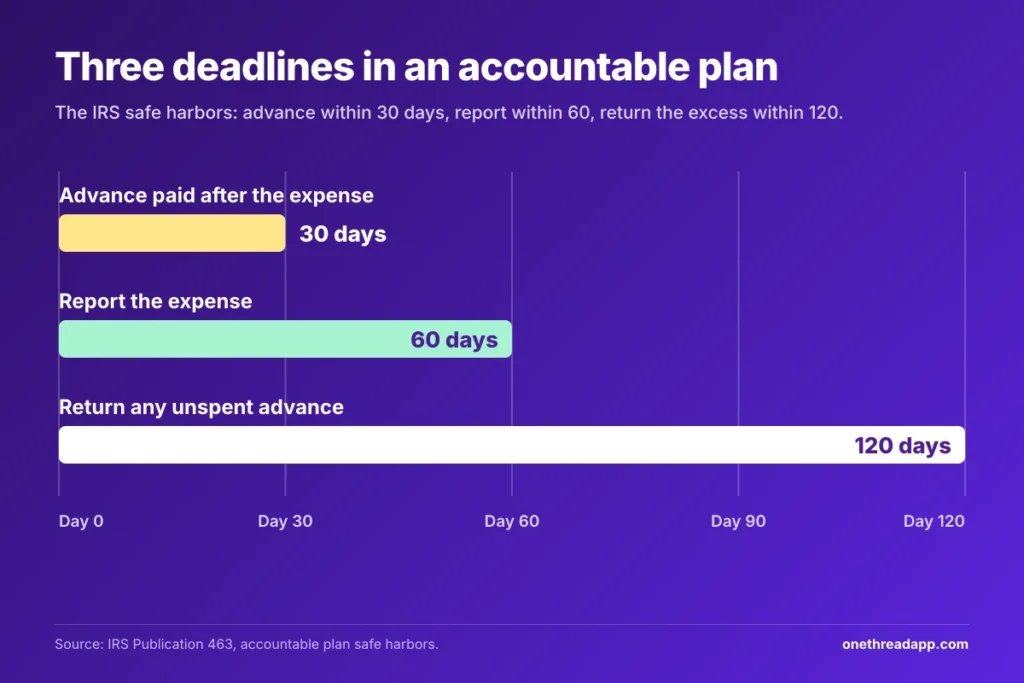
You have 60 days to account for expenses and 120 days to return an unused advance. Those are the IRS safe harbors for accountable plans. Other countries set their own rules.
| Rule | Limit | What it adds to your template |
|---|---|---|
| Receipts | All lodging, plus any other expense of $75 or more | A Receipt column and a file for each one |
| Accounting for expenses | Within 60 days after the expense is paid or incurred | A Submit by cell in the header |
| Advances | Paid within 30 days of the expense; excess returned within 120 days | An Advance line and a Balance due line |
| Business mileage | 72.5 cents through June 2026; 76 cents from July 1, 2026 | One rate cell |
Top Tip: Add a Submit by cell to the header. Count 60 days from the oldest expense on the report, not from the report date.
Sources: IRS Publication 463, and the Journal of Accountancy report on the mid-2026 mileage rate (IRS Announcement 2026-11). Check the IRS site for rates before you file.
When Should You Move From a Template to Expense Software?
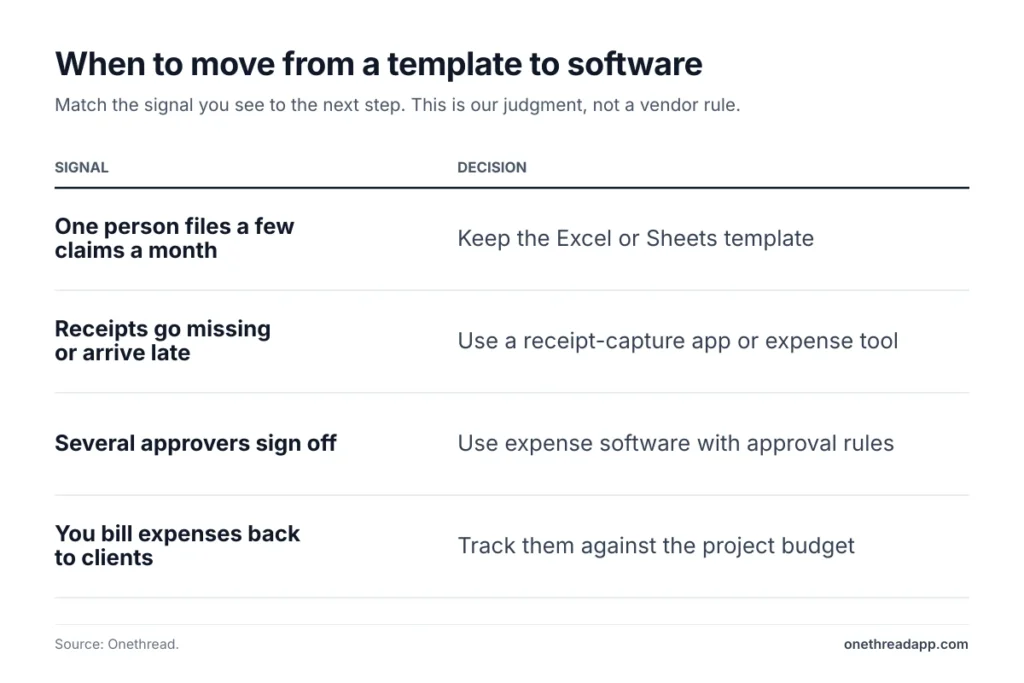
Move off the template when the form stops being the bottleneck. Lost receipts, several approvers, and card transactions you retype by hand are the usual signs. This table is our judgment, not a vendor rule.
| Signal | Decision |
|---|---|
| One person files a few claims a month | Keep the Excel or Sheets template |
| Receipts go missing or arrive late | Use a receipt-capture app or expense tool |
| Several approvers sign off | Use expense software with approval rules |
| You bill expenses back to clients | Track them against the project budget |
If you bill costs back, start with the Client or project column. Project management software with invoicing keeps tasks, time, and budgets together, and Onethread is one option. Pair expenses with time: see how to track time. Freelancers can pass reimbursable costs to clients with our free invoice generator.
What Should You Do Next With Your Expense Report Template?
A good expense report template is a short form that records seven things per expense and shows which ones need a receipt. Fill it in when you pay, and the report is nearly done at month end. That habit protects both your reimbursement and your tax file.
This week, copy the basic template and enter your last five expenses. Check which rows lack a business purpose or a receipt, fix those first, and send the report. For more reusable forms, see our to-do list template and the best productivity apps.
FAQs
How Often Should You Submit an Expense Report?
Submit one report per trip or once a month, and never later than 60 days after the oldest expense. That's the IRS safe harbor for accountable plans. Your company policy may set a shorter deadline, so check it before you fill in your expense report template.
How Long Should You Keep Expense Reports?
Keep them for at least 3 years from the date you file the return they support, per the IRS record-keeping guidance. The period grows to 6 years if you left out more than 25% of your gross income. It has no limit if you never filed. Keep employment tax records for at least 4 years.
What Is the Best Format for an Expense Report Template?
Pick the format by who does the math. Excel and Google Sheets add drop-downs, formulas, and shared editing. Word suits a one-page printout that a manager signs. Use a spreadsheet for any expense report template that you total or review more than once.
Can Freelancers Use an Expense Report Template?
Yes. Freelancers use the same seven fields to log spending for tax records and to bill reimbursable costs to clients. Add a Client or project column, and keep receipts for lodging and for any expense of $75 or more. Ask your accountant which categories your tax return needs.