An action plan only works when every step has an owner and a date. A template builds that rule into the page.
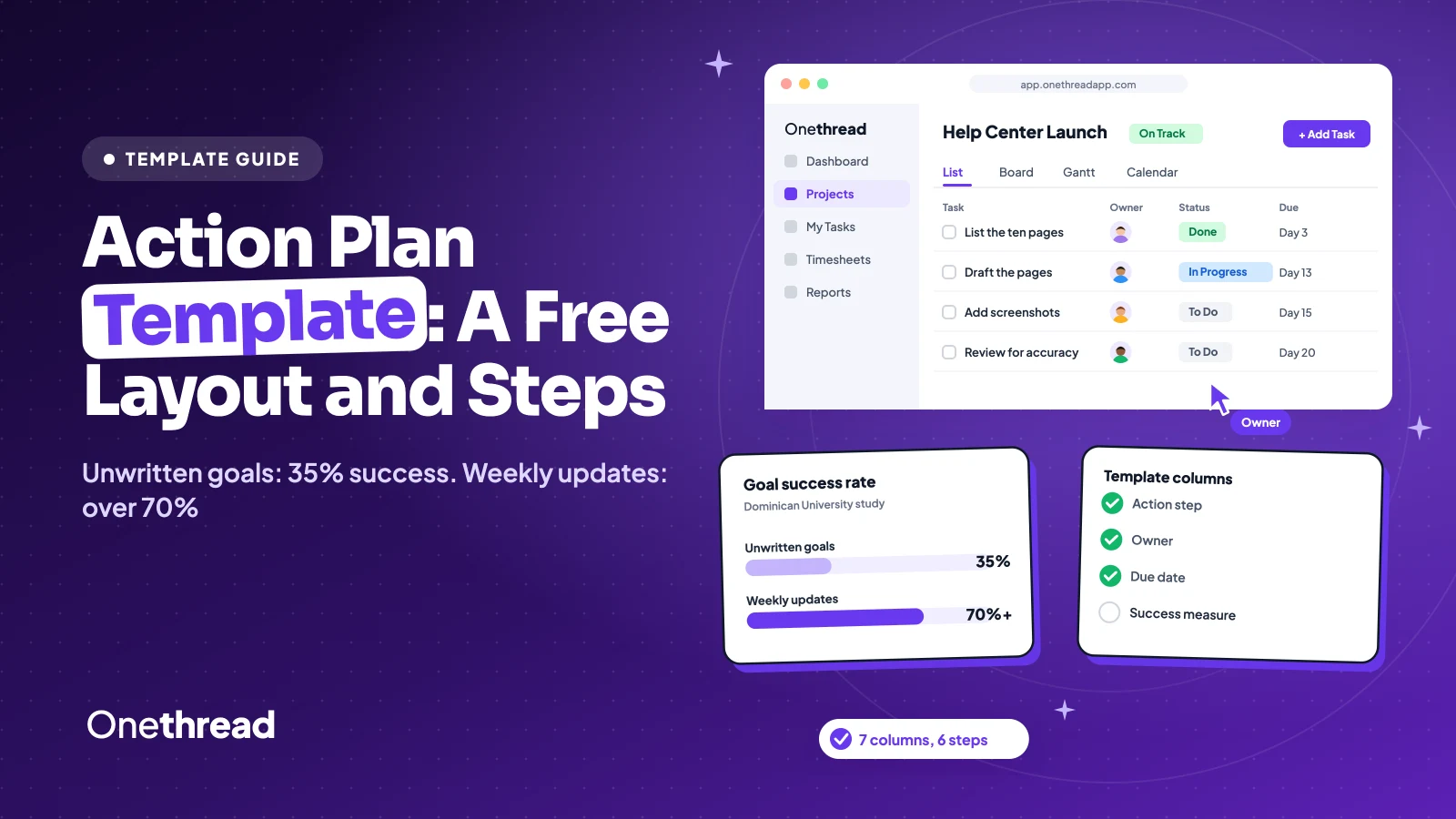
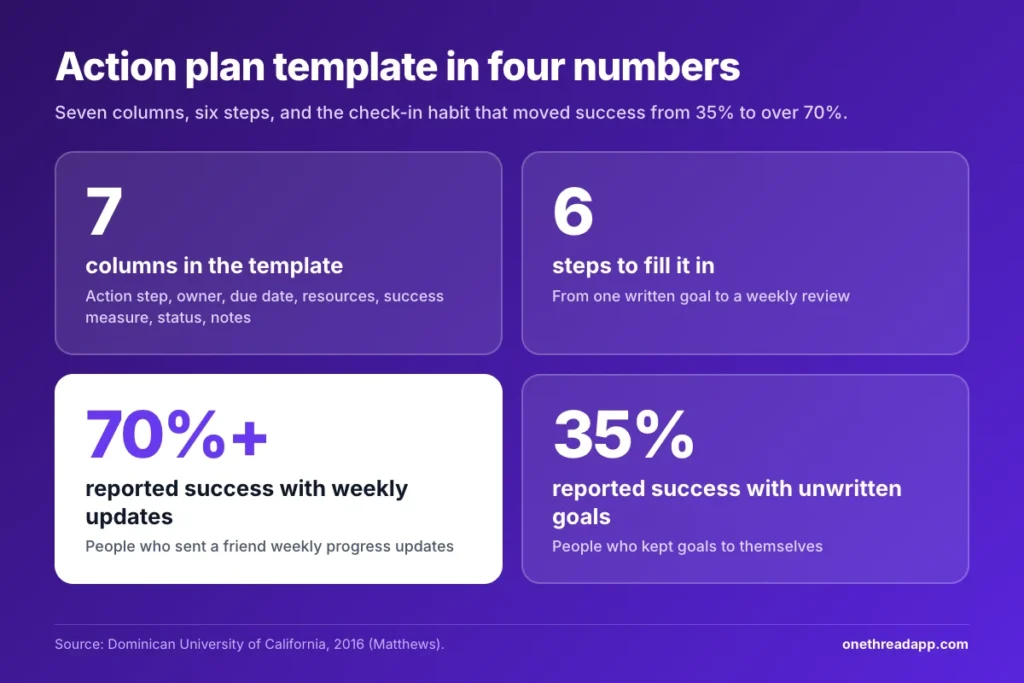
An action plan template is a reusable table that lists each action step with an owner, a due date, the resources needed and a status. Seven columns cover most plans.
We read 14 guides and templates on the topic, so you start from one clear layout.
You get the layout to copy, a filled-in example, six steps to complete it and a way to pick the right variant.
Key Points
- An action plan template is a reusable table with seven columns: action step, owner, due date, resources, success measure, status and notes. You fill it in six steps, from one written goal to a weekly review.
- Give every step one owner and one due date. Work owned by a team stalls, and a goal such as "increase trial signups" describes a direction, not a task someone can start.
- Pick the variant by the question it answers: project, business, corrective, emergency, mutual, 30-60-90 day or personal. Add one extra column and keep the rest.
- Writing the goal helps, and checking in helps more. In a 2016 study, over 70% of people who sent weekly updates reported success, against 35% of those who kept goals unwritten.
What Is an Action Plan Template?
An action plan template is a pre-built table that turns one goal into assigned work. It lists each action step with an owner, a due date, the resources needed and a status. You fill in a plan instead of designing one. A reader scans one row to see what the step is, who owns it and when it is due.
The plan answers three questions: what gets done, who does it and by when. Everything else in the table supports those three answers.
Most templates share the same core. Canva's guide lists objectives, action steps, a timeline, resources and the people in charge, and monday.com adds priorities, KPIs and a review cadence. Our layout keeps the parts that appear on most pages and drops the rest.
A template saves the first hour of every plan. The columns, the status labels and the review rhythm are set once, so you edit tasks instead of structure. Some sites call the same document a plan of action template. The two are interchangeable.
Top Tip: Write the goal before you open the template. If you can't state it in one sentence with a number or a date in it, no column will rescue the plan.
What Should an Action Plan Template Include?
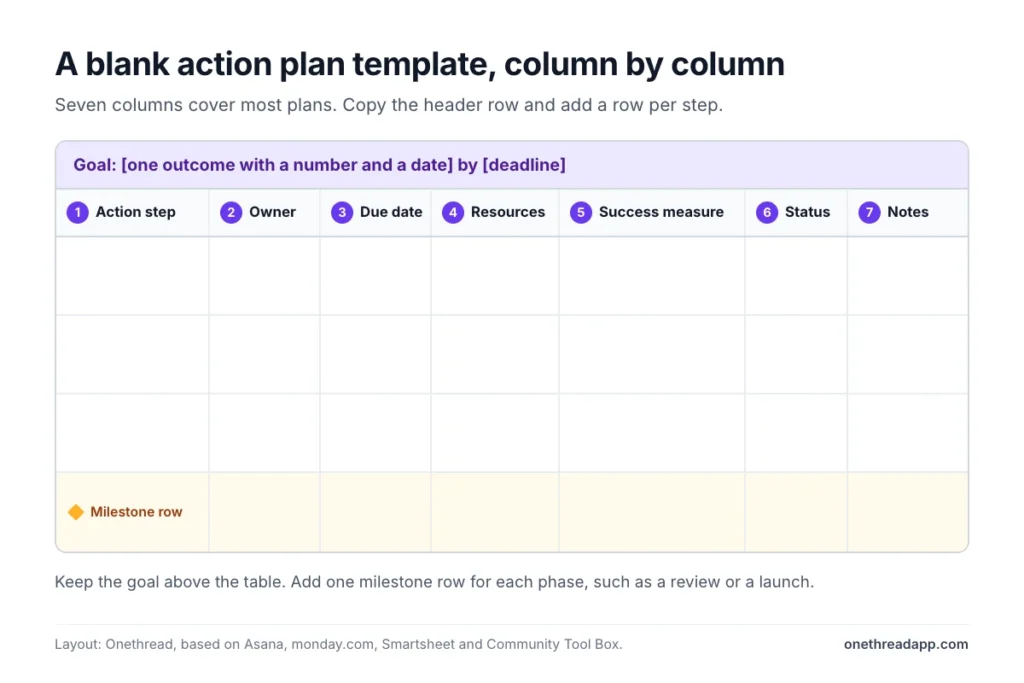
A useful action plan template needs seven columns. We settled on this layout after comparing the fields in the Asana, monday.com, Smartsheet and Community Tool Box templates.
| Column | What it holds | Example |
|---|---|---|
| Action step | One task someone can start without asking questions | Draft the ten help pages |
| Owner | One named person or role | Support lead |
| Due date | The day the step must be finished | Day 13 |
| Resources | People, tools or budget the step needs | Writing time |
| Success measure | How you know the step is done | Ten drafts in review |
| Status | Not started, in progress, blocked or done | In progress |
| Notes | Dependencies, risks or links | Waits for the page list |
Put the goal and its deadline in one line above the table. Add a milestone row for each major phase, such as a review or a launch.
How Do You Fill Out an Action Plan Template?
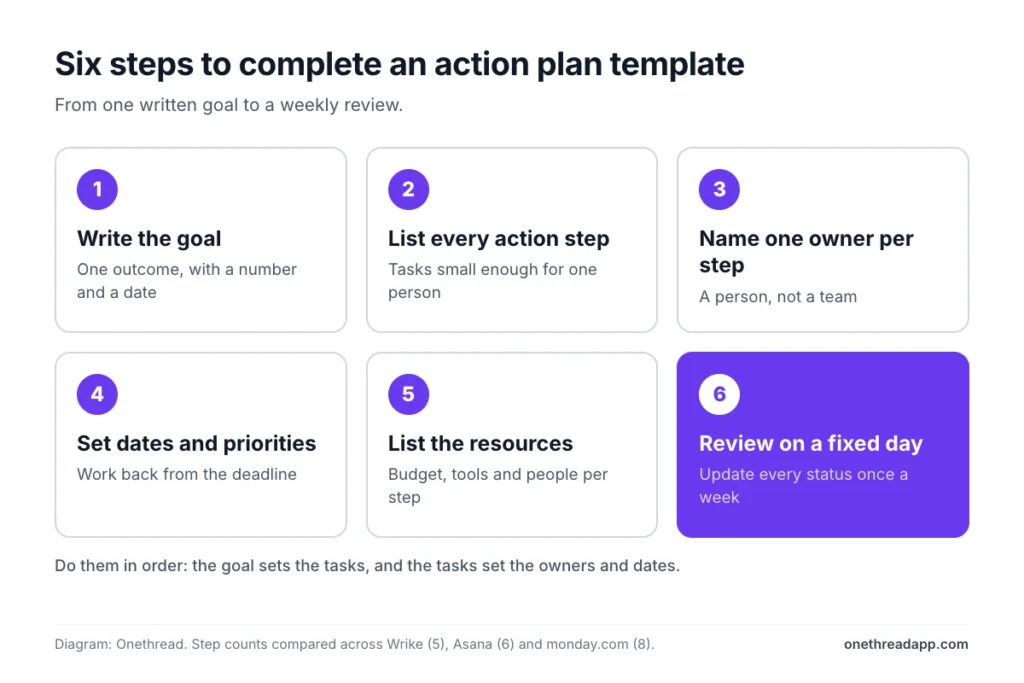
Filling out an action plan template takes six steps, from one written goal to a weekly review. Do them in order, because each step feeds the next: the goal sets the tasks, and the tasks set the owners and dates.
- Write the goal: State one outcome with a number and a date. A SMART goal is specific, measurable, achievable, relevant and time-bound, and it passes that test.
- List every action step: Break the goal into tasks small enough for one person to finish. "Increase trial signups" is a direction. "Write the signup email" is a step.
- Name one owner per step: Assign a person, not a team. If two people share a step, nobody answers for it.
- Set due dates and priorities: Work backward from the final deadline, and prioritize your action steps by urgency and by what waits on what.
- List the resources: Note the budget, tools and people each step needs, and flag anything you don't have yet. A step with nothing behind it won't start on time.
- Review on a fixed day: Update every status once a week, and agree before work starts who reviews the plan and when. The review is where blocked steps surface.
Top Tip: Read each step aloud. If a teammate could ask "do what, exactly?", rewrite the step until they can't.
What Does a Filled-In Action Plan Template Look Like?
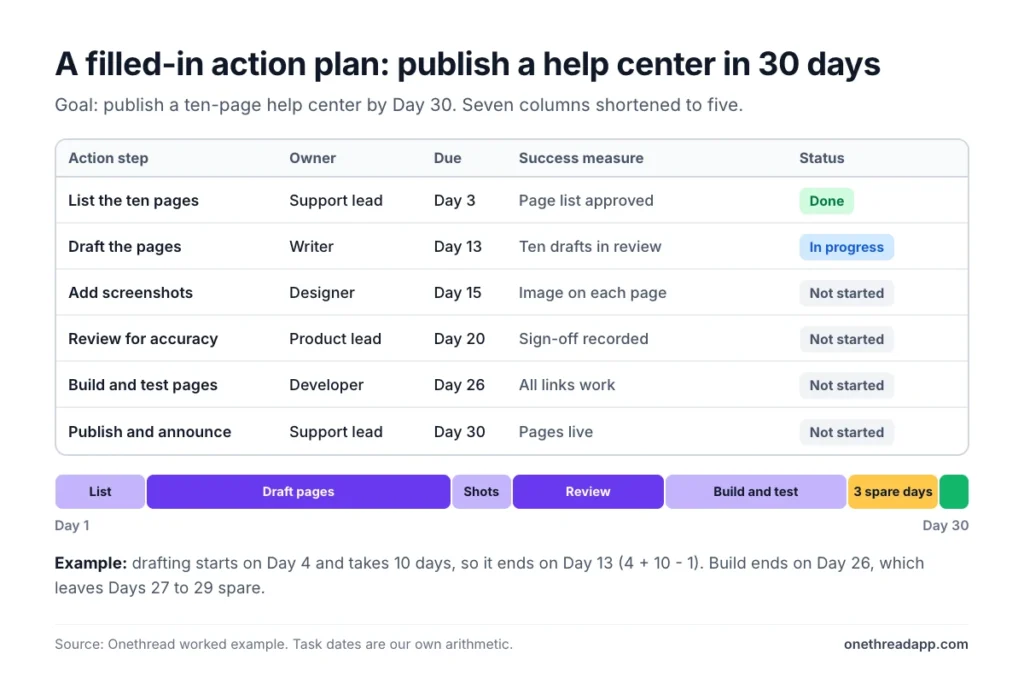
Here is a 30-day plan to publish a ten-page help center. It uses the seven columns above, with plan days instead of calendar dates so you can reuse it.
Goal: Publish a ten-page help center by Day 30.
| Action step | Owner | Due | Resources | Success measure | Status | Notes |
|---|---|---|---|---|---|---|
| List the ten pages | Support lead | Day 3 | Ticket export | Page list approved | Done | Top questions first |
| Draft the pages | Writer | Day 13 | Writing time | Ten drafts in review | In progress | Waits for the page list |
| Add screenshots | Designer | Day 15 | Screenshot tool | Image on each page | Not started | Needs the drafts |
| Review for accuracy | Product lead | Day 20 | Two review hours | Sign-off recorded | Not started | Late drafts block it |
| Build and test pages | Developer | Day 26 | Help center tool | All links work | Not started | None |
| Publish and announce | Support lead | Day 30 | Email list | Pages live | Not started | None |
Example: Drafting ten pages at one page a day takes 10 days. Drafting starts on Day 4, so it ends on Day 13 (4 + 10 - 1). Screenshots take 2 days (Day 14 to 15), review takes 5 (Day 16 to 20) and the build takes 6 (Day 21 to 26). That leaves 3 spare days (30 - 26 - 1).
The success measure column does real work. PMI's Pulse of the Profession reports that projects that define success criteria upfront succeed at nearly twice the rate. That finding covers projects that also use a performance measurement system.
How Is an Action Plan Different From a To-Do List or Project Plan?
An action plan covers one goal with owners and dates. A to-do list holds loose tasks, and a project plan covers a larger project in more depth.
| Plan | What it covers | Use it when |
|---|---|---|
| To-do list | Tasks not tied to one goal | You track errands and daily tasks |
| Action plan | The steps, owners and dates for one goal | A goal needs several people or several weeks |
| Project plan | A multi-part project with many moving parts | The work has phases, budgets and dependencies across teams |
| Strategic plan | Long-term vision and priorities | You are deciding what to work on, not how |
The "use it when" column is our own rule of thumb. A strategic plan sets the direction, and an action plan makes it operational. Daily tasks fit a to-do list template. A full multi-phase project needs a project plan instead.
Which Action Plan Template Fits Your Situation?
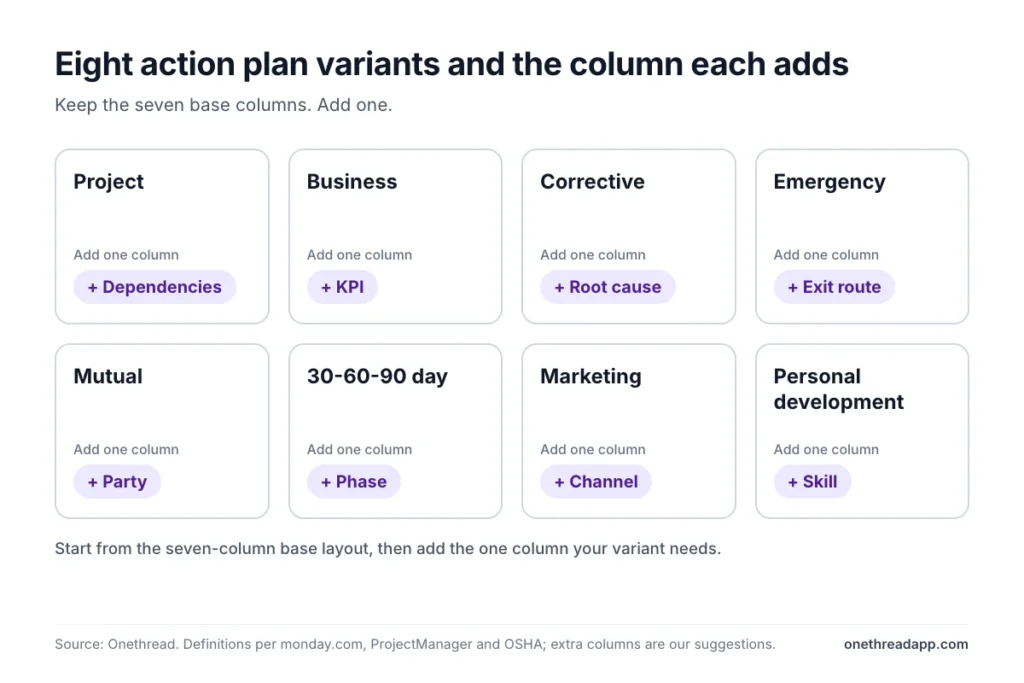
Pick the variant that answers your question, then add one column to the base layout. Most variants share the same seven columns.
| Template | Pick it when | Column to add |
|---|---|---|
| Project action plan | A defined project needs scoped steps with owners and dependencies | Dependencies |
| Business action plan | You are mapping steps to a strategic goal, such as entering a new market | KPI |
| Corrective action plan | A problem, failed inspection or complaint needs a fix | Root cause |
| Emergency action plan | You must cover fire, evacuation or other emergencies | Exit route |
| Mutual action plan | Two or more parties share goals, steps and responsibilities | Party |
| 30-60-90 day plan | A new role needs a plan for its first three months | Phase |
| Marketing action plan | A campaign needs a roadmap with shared progress | Channel |
| Personal development plan | You work toward a career goal or a new skill | Skill |
Definitions follow monday.com, ProjectManager and OSHA, while the extra columns are our own suggestions.
Why Does an Action Plan Stall After the First Week?
Action plans stall when a step has no clear owner, no date or no check-in. The plan was fine. Nobody was answerable for it.
Check-ins matter more than most people expect. Dr. Gail Matthews of Dominican University of California found that more than 70% of participants who sent weekly updates to a friend reported success. Of those who kept unwritten goals to themselves, 35% did (study published January 2016).
Five habits cause most of the stalling:
- Shared ownership: Work owned by "the team" has no owner until it turns urgent. Name one person per step.
- Goals posing as actions: "Increase trial signups" gives a direction, not work. Rewrite it as the first task.
- Vague step names: "Handle launch" can hide several days of effort. Name the output instead.
- Missing dates: Breeze reports that only 29% of roughly 2 million tasks in its own app carry a due date. That is vendor data, but the pattern is familiar.
- Stale status: A weekly batch update can hide a blocker for up to six days. Update the status when the work moves.
Here is how three vague steps read once they pass the owner test:
| Instead of | Write |
|---|---|
| Handle launch | Schedule the launch email for Tuesday morning |
| Improve onboarding | Rewrite the day-one welcome email |
| Increase trial signups | Publish the updated pricing page |
Top Tip: Add the weekly review to the plan as its own row, with an owner and a day. It then gets treated like any other step.
Where Should You Keep Your Action Plan Template?
Keep it in a Word document, an Excel file or a Google Sheet until the plan outgrows it. Documents suit plans that a few people read. Spreadsheets suit plans you sort by owner or due date, and some Excel and Sheets templates count completed, uncompleted and overdue tasks for you.
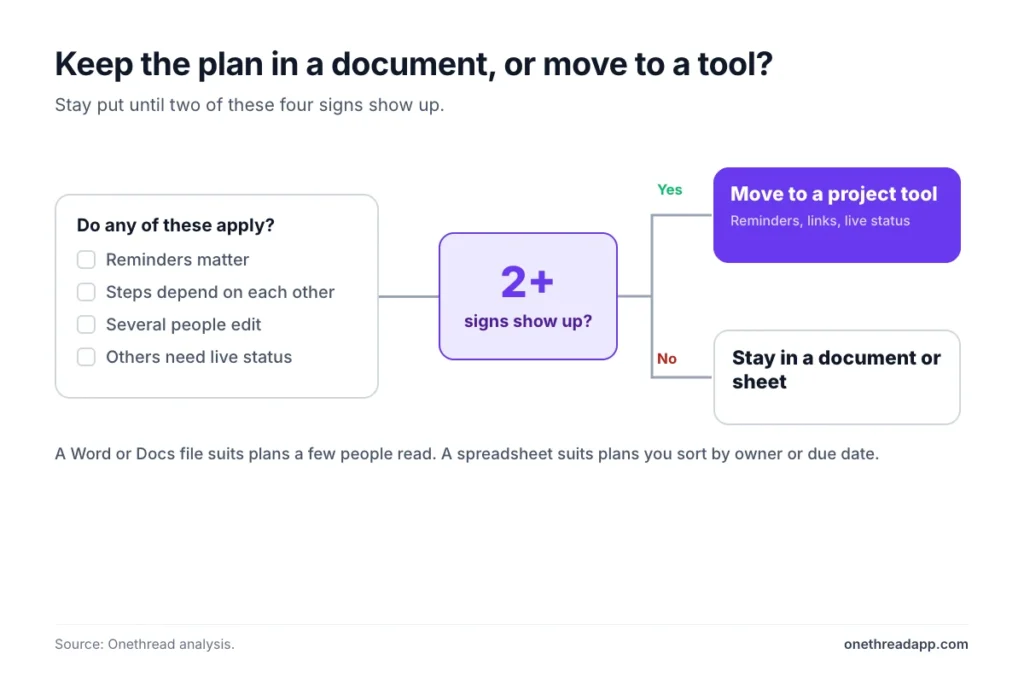
Move to a project tool when two of these signs show up:
- Reminders matter: Owners miss dates unless something nudges them.
- Steps depend on each other: One late step means re-dating every follower by hand.
- Several people edit: Copies drift apart, and nobody knows which file is up to date.
- Others need live status: A manager wants progress without asking for an update.
Onethread's project features let you assign tasks, track progress, set priorities, send deadline reminders and link dependencies. They also break projects into phases, milestones, tasks and subtasks. For a wider view of tools that track plans, see our guide to the best productivity apps and tools.
Prefer not to start from a blank table? Our free project plan generator turns a short project description into a first draft with phases, tasks and owners. Edit the draft before you use it, because the tool doesn't save plans.
Sources: Canva, Asana, monday.com, Smartsheet, ProjectManager, Community Tool Box, HubSpot, Wrike, Breeze, wimi, OSHA, Dominican University of California.
What Should You Do Next With Your Action Plan?
An action plan template turns a goal into a table where every step has an owner, a date and a status. Most plans fail on ownership, not on layout, so the owner column matters most. Seven columns and one weekly review carry most plans, and the filled-in example shows how little that takes.
This week, write one goal with a number and a date. Then list the first five action steps, give each one an owner and book the review in your calendar. Start with the plan you keep putting off.
FAQs
What Are the 3 Parts of an Action Plan?
The three parts are what, who and when: what needs to happen, who is responsible and the deadline. Every other column, such as resources, status and notes, supports those three. If a step is missing one of them, it isn't ready to go into the plan yet.
How Many Steps Does an Action Plan Need?
It depends on how finely you split the work. Wrike's guide uses 5 steps, Asana's uses 6 and monday.com's uses 8. All three start with the goal and end with a review. Our six-step version sits in the middle, so pick the count that keeps your plan short enough to read.
What Is a 5W1H Action Plan Template?
A 5W1H action plan template turns six questions into columns: what, who, where, when, why and how. What is the action step, who is the owner and when is the due date. How becomes the resources, why is the goal above the table, and where goes in the notes.
What Is a Corrective Action Plan Template?
A corrective action plan template is a structured response to a problem that hurts performance, quality or compliance. It starts with the problem and its root cause, then lists the fixes with owners and dates. Canva's example uses problem, action steps, action items, timeline, resources, people in charge and a report.
What Does an Emergency Action Plan Template Need?
OSHA's US rule lists six minimum elements. The plan must cover reporting a fire or emergency, evacuation and exit routes, and staff who run critical operations first. It also covers a headcount, rescue and medical duties, and a named contact. Employers must write the plan, though those with 10 or fewer employees may share it orally.