A project tracker only works if you keep it up to date.
The best project tracker for most teams is a board or sheet that shows each task's owner, due date and status at a glance. Excel for the web, Trello, ClickUp and Onethread all start free, and paid plans run from $3 to $11 per user a month.
Plenty of teams still run on a spreadsheet emailed around, as one r/projectmanagement thread about a 36-module job shows.
We compared eight pricing pages and eight top-ranking guides, then priced a ten-person team.
You'll see which tool fits, what it costs and the seven columns to copy.
Key Points
- The best project tracker depends on your size and budget. Excel for the web, Trello Free, ClickUp Free Forever and Onethread Basic cost nothing. First paid plans run from $3 (Onethread Growth) to $10.99 (Asana Starter) per user a month, billed yearly.
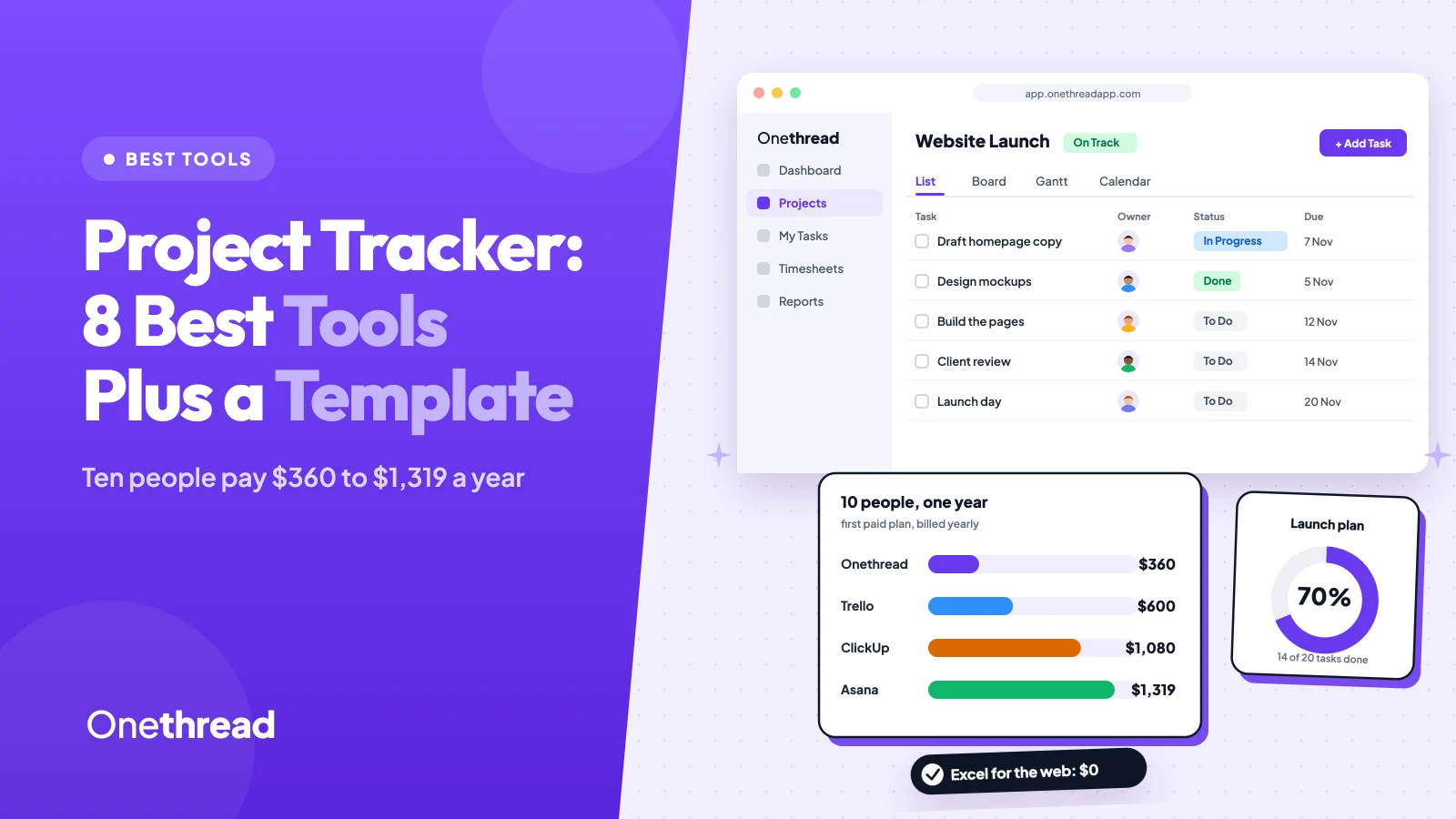
- Ten people pay from $360 (Onethread Growth) to $1,319 (Asana Starter) a year on those first paid plans, against $0 for Excel on the web.
- Copy seven columns into any sheet: task, owner, priority, start date, due date, status and next step. A late-task formula and a percent-complete cell finish the job.
- Leave the spreadsheet when status labels drift, decisions move to chat or client reports need hand work. Until then, a sheet is enough.
Which Project Tracker Fits Which Job?
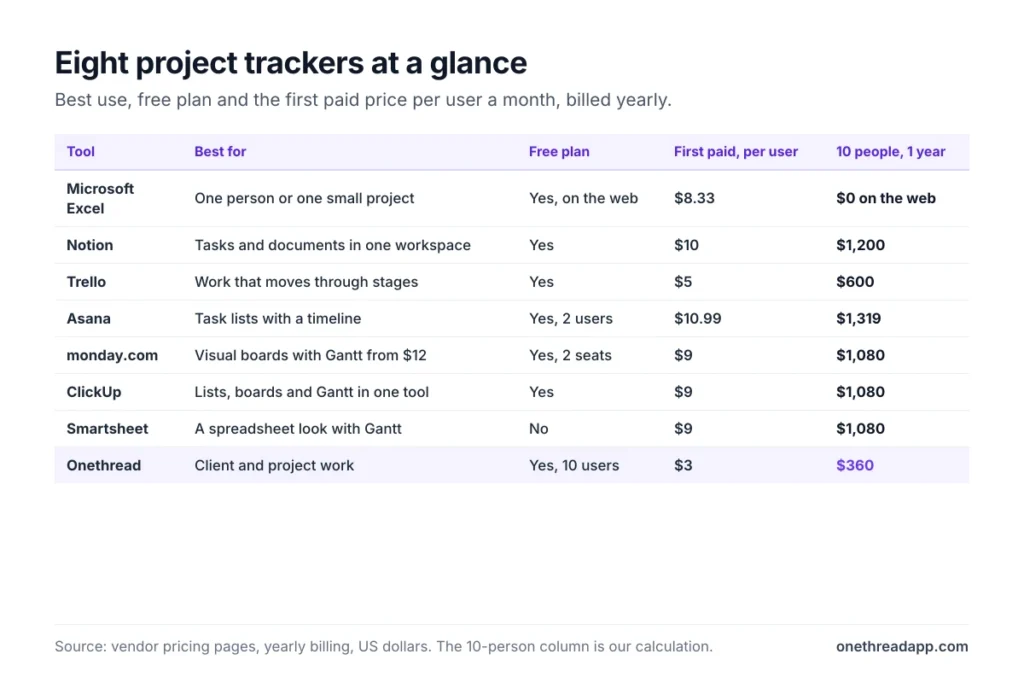
Each project tracker below fits one job, and the table puts all eight side by side. Excel sits first because most teams already own it.
| Tool | Best for | Free plan | First paid plan, per user a month | 10 people, one year |
|---|---|---|---|---|
| Microsoft Excel | One person or one small project | Yes, on the web | $8.33 | $0 on the web |
| Notion | Tasks and documents in one workspace | Yes | $10 | $1,200 |
| Trello | Work that moves through stages | Yes | $5 | $600 |
| Asana | Task lists with a timeline | Yes, 2 users | $10.99 | $1,319 |
| monday.com | Visual boards with Gantt from $12 | Yes, 2 seats | $9 | $1,080 |
| ClickUp | Lists, boards and Gantt in one tool | Yes | $9 | $1,080 |
| Smartsheet | A spreadsheet look with Gantt | No | $9 | $1,080 |
| Onethread | Client and project work | Yes, 10 users | $3 | $360 |
Sources: the pricing pages of Microsoft, Notion, Trello, Asana, monday.com, ClickUp, Smartsheet and Onethread, yearly billing, US dollars. Excel's price is Microsoft 365 Personal at $99.99 a year divided by 12, and Excel for the web is free. The 10-person column is our arithmetic (price × 10 × 12), and the Best for column is our judgment.
We checked three things for every tool:
- Free plan: Whether one person or a small team can start without paying.
- First paid price: What one user costs a month on yearly billing.
- Tracking views: Where the Gantt chart or timeline starts, because that is the first feature most teams miss.
What Is a Project Tracker and What Should It Show?
Project tracking compares what is done with what was planned. A project tracker is the sheet or app where that comparison lives, listing each task with its owner, due date and status. We see it as a record of work, while full project management software also plans and runs it.
Slack's template page names five basics: tasks, status, priority, assignee and due date. We add milestones, the key dates that show whether the whole project is on track.
monday.com's guide lists four payoffs of tracking: clear visibility, early risk detection, better use of people and informed stakeholders. A tracker earns those only when the data stays fresh.
A good tracker answers three questions in ten seconds: what is late, what is blocked and who owns it next. Everything else on the sheet is detail. If you can't answer those three, fix the tracker before you fix the team.
Trackers also come in flavors. Smartsheet's template page lists versions for tasks, costs, risks, issues, milestones, KPIs and budgets.
Most guides stop at the template. This one prices the tools too, because a tracker is only as good as the habit of updating it. For a shorter list of tools, see our Onethread's project tracking software roundup.
How Far Does Microsoft Excel Go as a Project Tracker?
Yes, for one person or one small project. Excel for the web is free for anyone, with 5 GB of cloud storage. Desktop Excel comes with a Microsoft 365 plan.
Microsoft's template page offers project tracker and timeline templates. They cover milestones, assigned tasks and progress reports. Its FAQ walks through building a milestone timeline and a timeline with dates.
Excel suits the person who wants control. You choose the columns, the formulas and the colors, as the build steps below show. Say you coordinate a website launch with fifteen tasks and two helpers. A shared workbook handles that job.
Pricing: Excel for the web is free. Microsoft 365 Personal costs $99.99 a year or $9.99 a month for one person, and Family costs $129.99 a year for up to six.
Best For
- One person or a small team with a short, fixed task list.
Pros
- Excel for the web costs nothing, and Microsoft supplies free tracker templates.
- Formulas and conditional formatting let you build the exact columns you need.
- Most people already know how to open and edit a sheet.
- Microsoft's FAQ covers milestone timelines, so dates can sit on a visual timeline.
Cons
- Upkeep is manual. Breeze lists inconsistent statuses and copied rows among the signs a team has outgrown a spreadsheet.
- Desktop Excel needs a Microsoft 365 plan, and Personal covers one person.
- A plain sheet has no built-in board or Gantt view.
Why Use Notion as a Project Tracker?
Notion works as a project tracker when you want tasks and documents in one workspace. The projects page lists calendar and board views, a timeline view, dependencies, sub-tasks and dashboards. Its marketplace holds a free Project Tracker template that groups projects by type and status.
The Free plan works for a solo tracker, since blocks are unlimited for one person. Teams of two or more meet a block limit, so a shared tracker usually means Plus.
Take a content team that keeps each brief next to its task list. Notion puts both on one page, where a spreadsheet needs two files.
Pricing: Free costs $0. Plus costs $10 per member a month and Business costs $20, and Notion says yearly billing saves up to 20%.
Best For
- Teams that keep briefs and notes next to their tasks.
Pros
- Documents and task databases live on the same page.
- Plus adds custom database automations.
- The marketplace template gives you a starting structure at no charge.
Cons
- Free limits file uploads to 5 MB and keeps 7 days of page history. Plus raises those to 5 GB and 30 days.
- The pricing page doesn't say which database views the Free plan includes.
- Free limits blocks for teams of two or more, and includes one chart.
Why Use Trello as a Project Tracker?
Yes, when your work moves through stages. Trello shows each task as a card on a board, and you drag the card from column to column as its status changes. The Free plan allows 10 boards and 10 collaborators per Workspace, with unlimited cards.
Free also includes unlimited Power-Ups per board, assignee and due dates, mobile apps and two-factor login.
Consider a three-person agency that tracks blog posts from idea to published. One column per stage does the job.
Standard adds unlimited boards, custom fields, advanced checklists and card mirroring. Premium adds Timeline, Table, Dashboard, Calendar and Map views, and the page calls it best for teams up to 100.
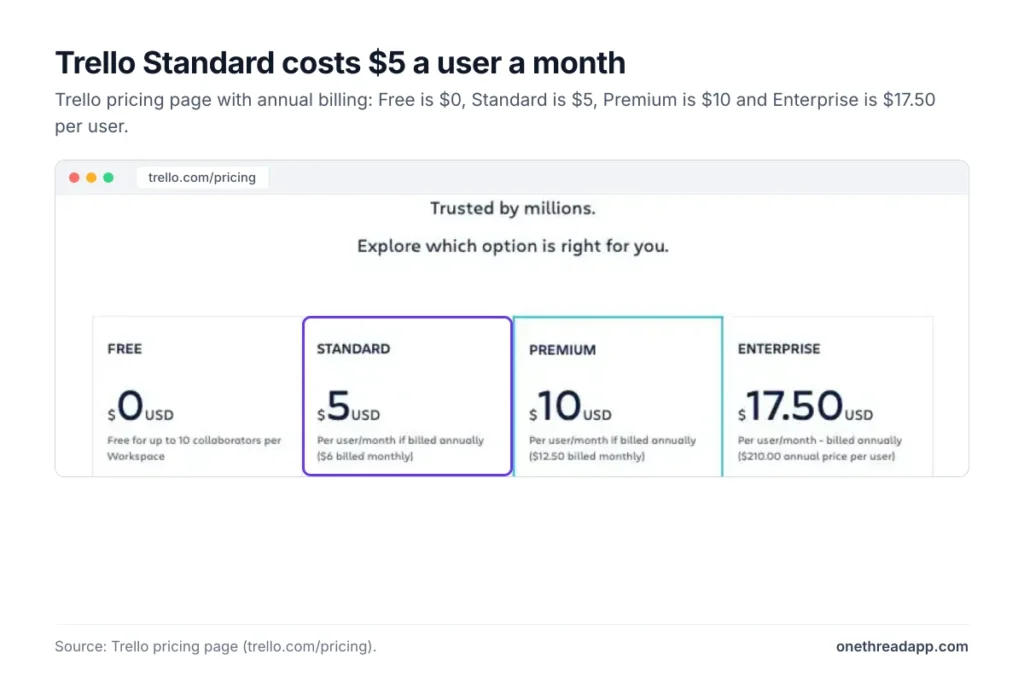
Pricing: Free costs $0. Standard costs $5 per user a month billed yearly, or $6 monthly. Premium costs $10 yearly or $12.50 monthly.
Best For
- Small teams that track work in clear stages.
Pros
- The Free plan covers 10 boards and unlimited cards.
- Standard at $5 is the second-lowest first paid price in this list.
- Premium adds a Timeline view and a Dashboard view.
Cons
- Timeline, Table and Dashboard views start on Premium at $10.
- Free caps each Workspace at 10 boards and 10 collaborators.
- Free allows 250 Workspace command runs a month, against 1,000 on Standard.
How Does Asana Work as a Project Tracker?
Asana tracks progress through tasks, custom fields and a timeline. Starter adds Timeline and Gantt views, reporting dashboards, custom fields, forms and unlimited automations. The free Personal plan lists "up to 2 seats per project and team." It offers list, board and calendar views, but no timeline, reporting or custom fields.
Suppose you juggle six client projects and want one view of which are on track. Portfolios do that, but they start on Advanced.
Asana says its yearly option saves up to 18%. Enterprise is quoted by sales and adds single sign-on and capacity planning. Starter and Advanced list no cap on members, which helps a growing team.
Pricing: Personal is free. Starter costs $10.99 per user a month billed yearly, or $13.49 monthly. Advanced costs $24.99 yearly or $30.49 monthly, and adds portfolios, goals, resource management and time tracking.
Best For
- Teams that want a timeline and reporting on the first paid plan.
Pros
- Starter includes Timeline, Gantt and reporting dashboards.
- Forms and custom fields shape the tracker to your work.
- Starter includes unlimited automations.
- Personal still gives unlimited tasks and projects.
Cons
- Personal lists only two seats per project and team.
- Portfolios start on Advanced at $24.99.
- Monthly billing on Starter costs $2.50 more per user than yearly billing.
What Does monday.com Add as a Project Tracker?
monday.com tracks projects on boards, with Timeline and Gantt views from the Standard plan. The Free plan covers up to 2 seats and 3 boards. Basic adds unlimited items, while Standard adds Timeline and Gantt, Calendar view, guest access and 250 automation actions a month. Pro lifts that to 25,000 actions and 3,000 AI credits a month.
Basic includes 1,000 AI credits, and prices exclude tax.
The FAQ points teams above 40 users to a quote. Say a four-person studio wants every deadline on a Gantt chart. That needs Standard at $12, not Basic at $9. Paid plans start at three seats, per the pricing page FAQ, so even a small studio pays for three.
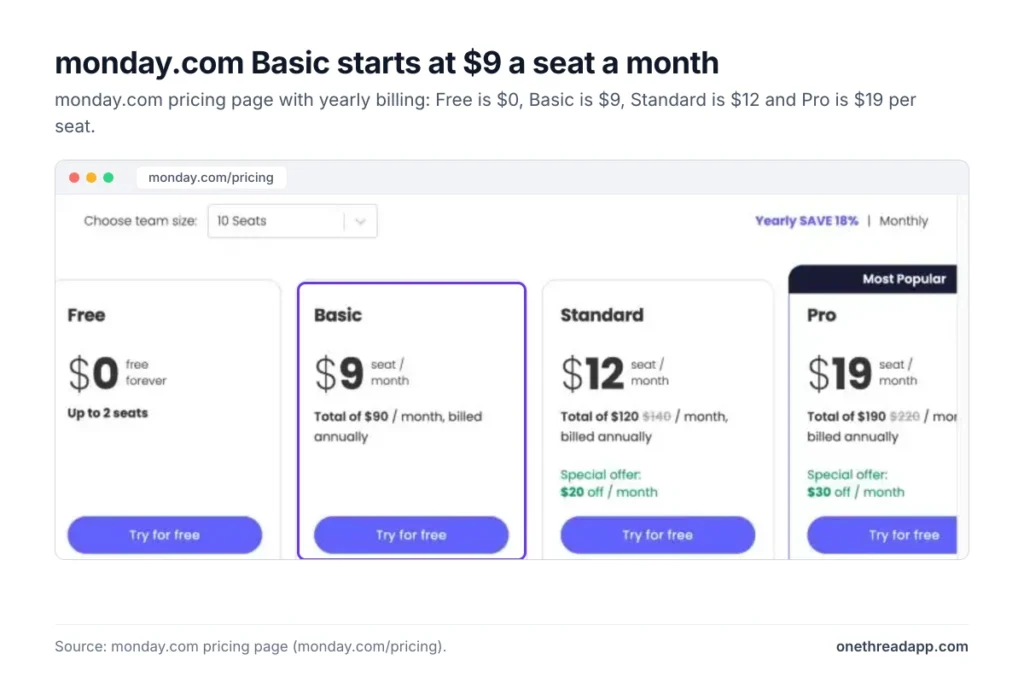
Pricing: Free costs $0. Basic costs $9 per seat a month billed yearly, Standard $12 and Pro $19. Pro adds private boards, time tracking and 25,000 automation actions.
Best For
- Small teams that want visual boards and a Gantt chart on a mid-priced plan.
Pros
- Standard includes Timeline, Gantt and Calendar views.
- The Free plan offers 200+ templates and mobile apps.
- Pro adds time tracking.
Cons
- Basic lists no Timeline or Gantt view.
- Paid plans start at three seats, so Basic begins at $27 a month.
- Free covers 2 seats and 3 boards.
Why Pick ClickUp as a Project Tracker?
ClickUp packs lists, boards and Gantt charts into one tool, but the tracking views sit on paid plans. Free Forever includes 60 MB of storage and 100 automation actions a month, and lists Gantt and dashboards as a trial only.
Core adds the Gantt chart, unlimited storage and 1,000 automation actions. Business adds dashboards, Gantt PDFs and timesheets.
Core includes 1,000 AI credits per user a month, pooled, and Business includes 1,500. Extra AI credits cost $10 per 10,000 on any plan. The page lists no price for ClickUp Assist. Imagine a product launch with owners in three teams. Core gives each of them a list and a shared Gantt chart.
Pricing: Free Forever costs $0. Core costs $9 per user a month billed yearly, and the page shows $12 as the regular price. Business costs $17, with $25 shown as regular.
Best For
- Teams that want Gantt, lists and boards in one tool at $9.
Pros
- Core includes the Gantt chart and unlimited storage.
- Business adds dashboards and timesheets.
- Free Forever has no time limit.
Cons
- Free Forever stores only 60 MB.
- Dashboards start on Business at $17.
- The page shows a promotional price and a regular price, so budget at the regular one.
When Does Smartsheet Beat a Spreadsheet Project Tracker?
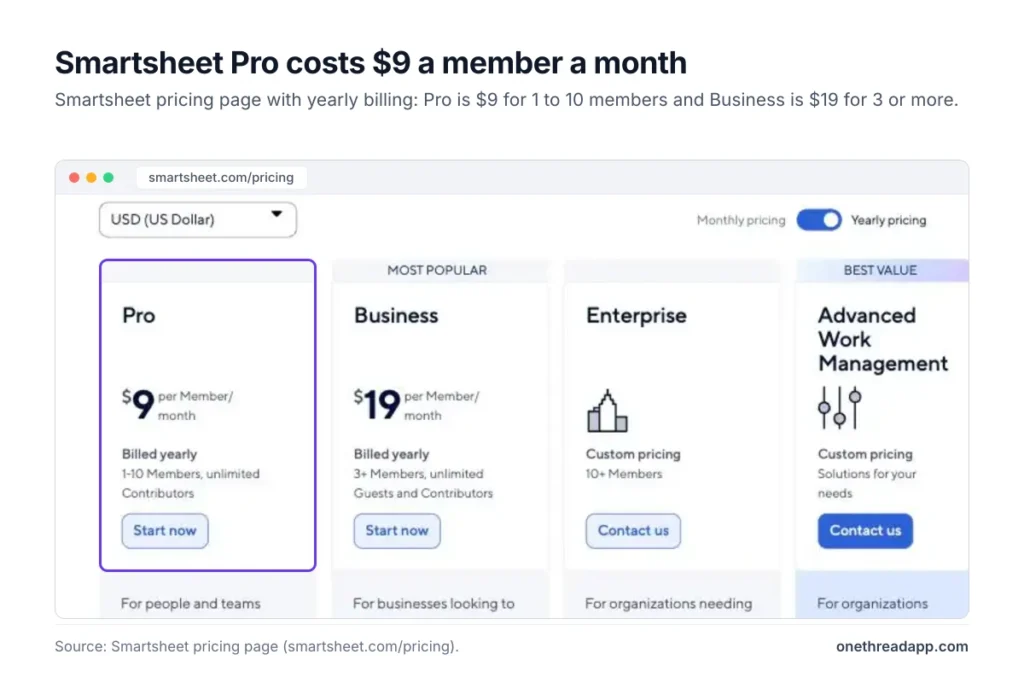
Smartsheet beats a plain sheet when you want the spreadsheet look with Gantt charts and dashboards built in. Grid and Gantt views come with every plan, along with Calendar and board views. Pro covers 1 to 10 members with unlimited sheets, 250 automated triggers a month and 20 GB of storage. Business raises storage to 1 TB.
Its template library lists trackers for tasks, costs, milestones, issues, risks, time, KPIs and budgets. Take a finance team that already thinks in rows and columns. Smartsheet keeps that habit and adds dates that move.
Pricing: Pro costs $9 per member a month billed yearly, or $12 monthly. Business costs $19 yearly or $24 monthly for 3 or more members, and adds Timeline view, workload tracking and unlimited automations. Enterprise starts at 10 members and is quoted.
Best For
- Spreadsheet-minded teams of up to 10 that want a Gantt chart in a grid.
Pros
- Grid and Gantt views come with every plan.
- Pro includes unlimited free contributors.
- The template library covers more than a dozen tracker types.
Cons
- The pricing page lists no free plan.
- Pro stops at 10 members, and Timeline view starts on Business at $19.
- Pro reports draw on one sheet each, and dashboards hold 10 widgets.
Why Choose Onethread as a Project Tracker?
We build Onethread, so weigh this section accordingly. It's project management software that tracks work by project, phase and milestone. The features page lists a Gantt chart and Calendar view. It also lists task tracking with priorities and reminders, dependencies with a critical path, custom dashboards, timesheets and role permissions.
A client project with three phases, a handful of milestones and a launch date fits that structure directly. See our guide to the best agency project management software for other options.
If hours matter most, our list of time tracking tools compares timesheet apps.
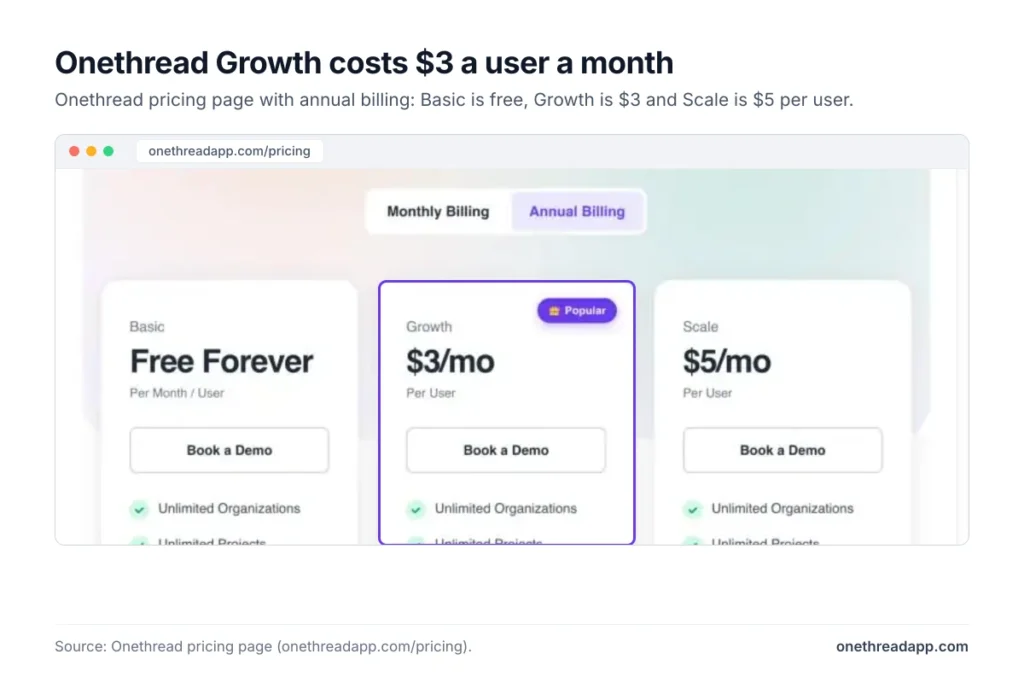
Pricing: Basic is free for the first ten users, with three workflows. Growth costs $3 per user a month billed yearly, or $3.60 monthly. Scale costs $5 yearly or $6 monthly. See the Onethread pricing page for the plan limits.
Best For
- Agencies and small teams that track client work by phase and milestone.
Pros
- Growth at $3 is the lowest first paid price in this list.
- Projects and tasks are unlimited on every plan, with 15 GB of storage.
- Basic includes project and organization dashboards.
Cons
- Phases, milestones, issue management and custom roles start on Scale at $5.
- The features page doesn't mention list or board views.
- The pricing page doesn't say which plan includes the Gantt chart.
What Does a Project Tracker Cost a 10-Person Team?
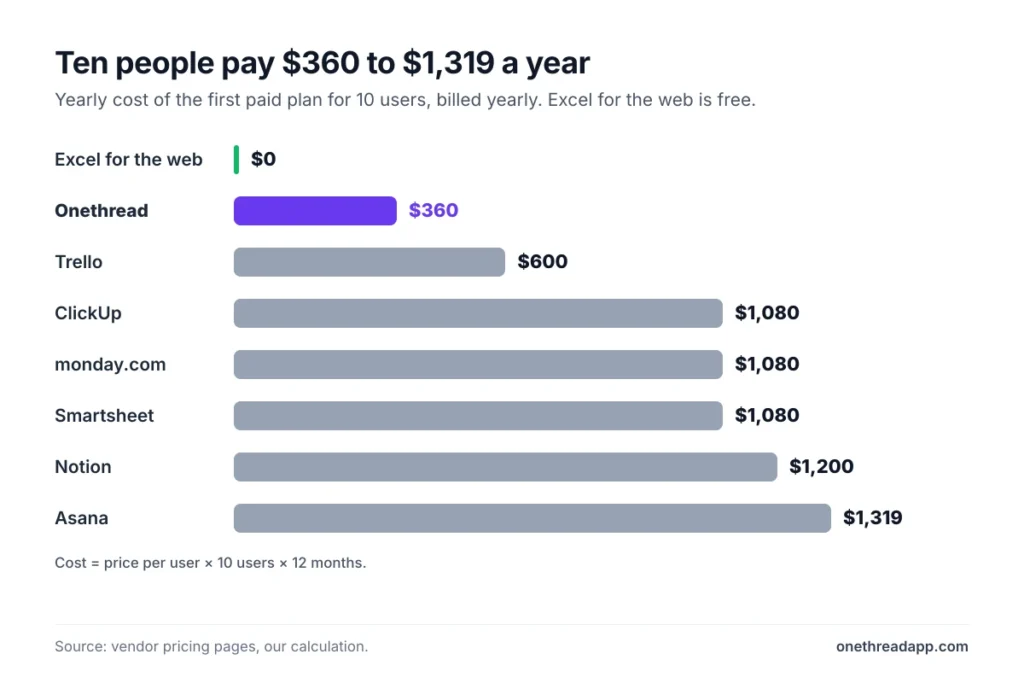
A ten-person team pays $0 on Excel for the web. On the first paid plans of the other seven tools, it pays $360 to $1,319 a year. Onethread Growth is the cheapest at $3 per user, and Asana Starter is the dearest at $10.99.
Free plans change the math for small teams. Onethread Basic covers the first ten users, and Trello Free allows up to 10 collaborators per Workspace.
Example: Ten people on ClickUp Core at the listed $9 pay $9 × 10 × 12 = $1,080 a year. At the $12 regular price the same team pays $1,440, which is $360 more.
Example: Ten people on Trello Standard pay $5 × 10 × 12 = $600 a year. On Trello Free they pay $0 until they need Timeline view or more than 10 boards.
Three things move the bill:
- Gantt on the first paid plan: ClickUp Core, Smartsheet Pro and Asana Starter include it. monday.com needs Standard at $12, which is $1,440 for ten, and Trello needs Premium at $10, or $1,200 for ten, for Timeline.
- Billing term: Asana Starter at $13.49 monthly costs $1,618.80 for ten people, against $1,318.80 yearly.
- Seat rules: monday.com sells three seats at minimum, and Smartsheet Pro stops at ten members.
Top Tip: Price the plan that holds the view you need, not the cheapest plan in the table.
What Should a Project Tracker Template Include?
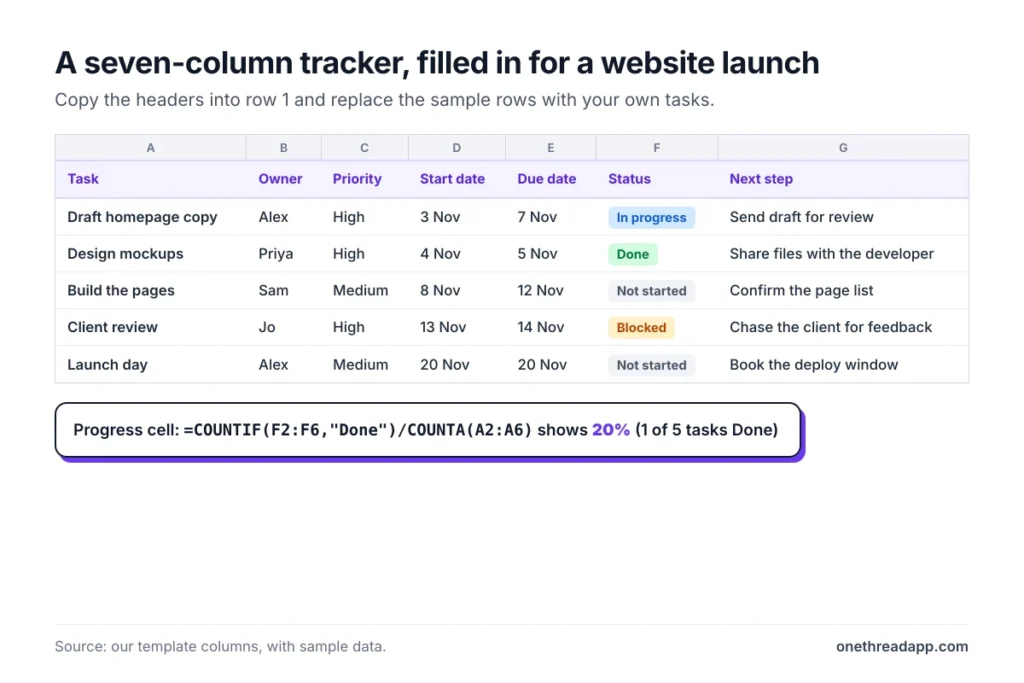
A project tracker template needs seven columns: task, owner, priority, start date, due date, status and next step. Slack lists five of them. We add the start date, so you can draw a timeline, and a next step, which a r/projectmanagement commenter suggested alongside owner, status and blockers.
| Column | What it holds | Sample row |
|---|---|---|
| Task | One action that starts with a verb | Draft homepage copy |
| Owner | One named person | Alex |
| Priority | High, Medium or Low | High |
| Start date | The day work begins | 3 Nov |
| Due date | The day it must finish | 7 Nov |
| Status | Not started, In progress, Blocked or Done | In progress |
| Next step | The one action that unblocks it | Send draft for review |
Add a row for each milestone, such as launch approved, so key dates sit beside the tasks and feed a milestone timeline. Smartsheet's template page shows how far a tracker can grow, with separate versions for costs, risks and budgets. Want your dates on a timeline? Our free Gantt chart generator turns task dates into a chart.
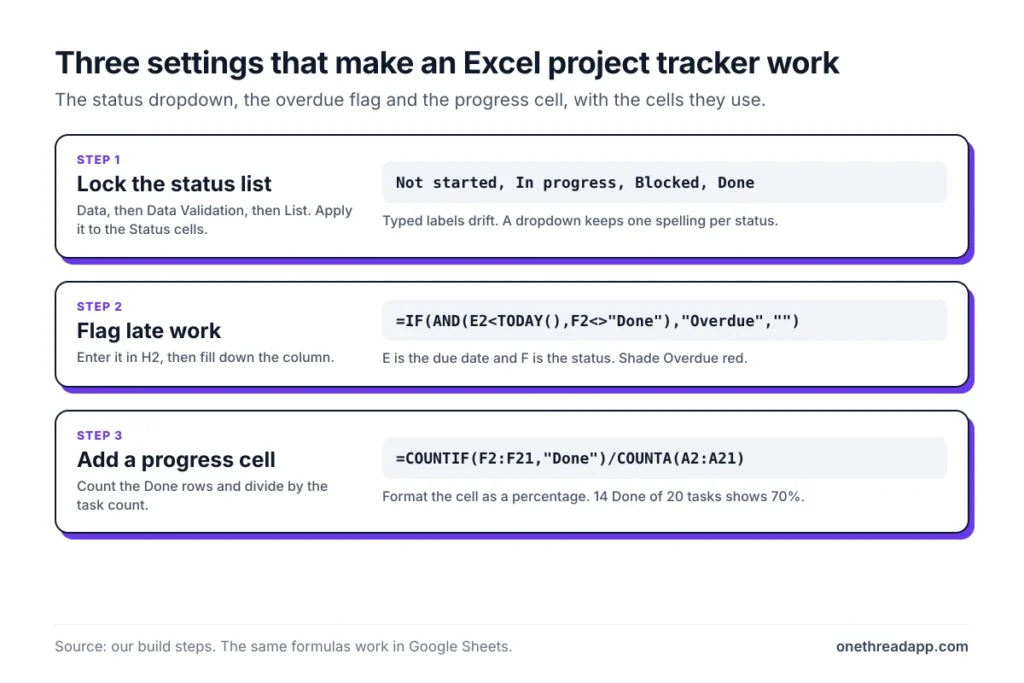
Example: A launch plan lists 20 tasks and 14 show Done. The sheet reports 14 ÷ 20 = 70% complete.
Top Tip: Write the status list once and lock it as a dropdown. Typed labels are how "Done", "done" and "Complete" become three statuses.
How Do You Build a Project Tracker in Excel?
Building a project tracker in Excel takes six steps, and the same steps work in Google Sheets. You track progress with one status per task and one percent-complete cell.
- Open a workbook: Start blank in Excel for the web, or pick one of Microsoft's tracker templates and delete the sample rows.
- Type the headers: Put the seven column names in row 1, then add a flag column as column H.
- Lock the status list: Select the Status cells, choose Data, then Data Validation, then List, and enter Not started, In progress, Blocked, Done.
- Flag late work: In H2, enter =IF(AND(E2<TODAY(),F2<>"Done"),"Overdue",""), where E is the due date and F is the status. Fill it down.
- Color the exceptions: Add conditional formatting that shades late tasks red and Blocked amber.
- Add a progress cell: Enter =COUNTIF(F2:F21,"Done")/COUNTA(A2:A21) and format the cell as a percentage.
Fill the sheet in order. Add the tasks, one per row, give each one owner, set the dates, then set every status to Not started.
Test it with five dummy rows first. Freeze the header row so it stays in view as the list grows. Once a sheet needs more than that, the next section shows when to move.
When Should You Move From a Spreadsheet to Project Tracking Software?
Move when updating the sheet takes more effort than the work it describes. PMI surveyed 5,800+ professionals and found that only 50% of projects succeed. Another 37% partly deliver, and 13% fail.
In a separate survey, 35% of 300 executives named a gap between planning and execution as the top barrier. A tracker shows that gap early, because planned dates sit beside real status.
A 2024 literature review found errors in 94% of spreadsheets used in business decisions. Our guide on why spreadsheets fall short on projects covers the same problem in more depth. Breeze lists the signs that a sheet has run its course:
- Status labels drift: Rows get copied, and statuses stop matching.
- Chat holds the decisions: The sheet summarizes work while the real discussion sits in email and messages.
- Reports need manual work: Client or billable updates mean copying numbers by hand.
- Handoffs break it: Tasks change hands or priorities shift, and the sheet falls behind.
Sheets have real strengths too. Commenters in the r/projectmanagement thread noted that everyone can open one on a phone or browser with no licence hurdle.
Don't switch too early. Commenters in the r/projectmanagement thread advised running your existing process for a few months, finding the real pain points and fixing those first.
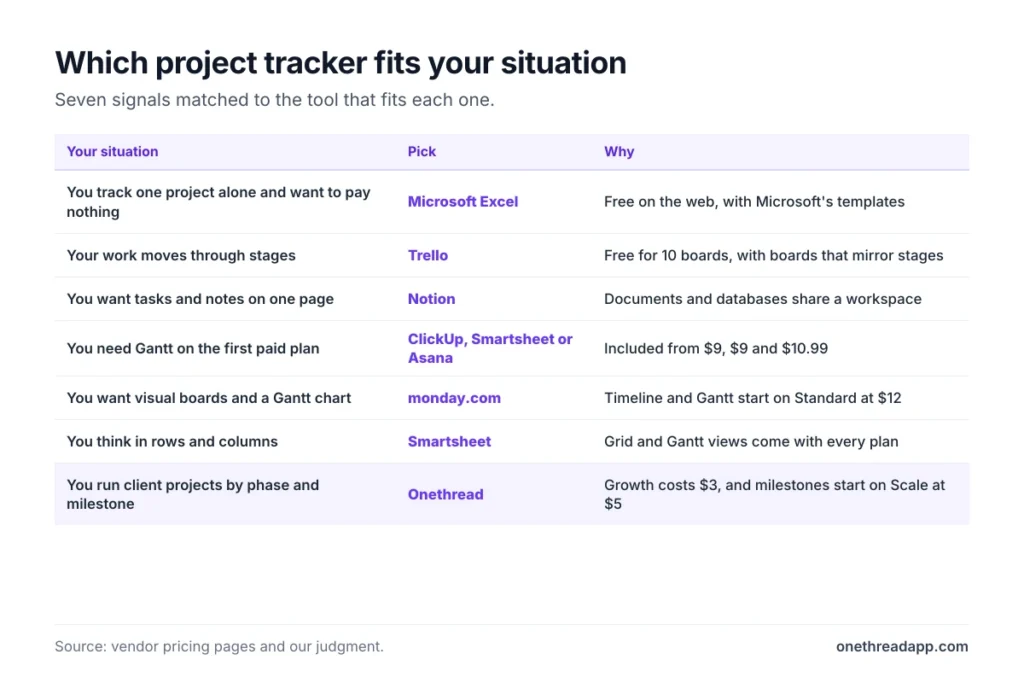
Which Project Tracker Should You Pick?
Pick the project tracker that matches your size and the first feature you miss.
| Signal | Pick | Why |
|---|---|---|
| You track one project alone and want to pay nothing | Microsoft Excel | Free on the web, with Microsoft's templates |
| Your work moves through stages | Trello | Free for 10 boards, with boards that mirror stages |
| You want tasks and notes on one page | Notion | Documents and databases share a workspace |
| You need Gantt on the first paid plan | ClickUp, Smartsheet or Asana | Included from $9, $9 and $10.99 |
| You want visual boards and a Gantt chart | monday.com | Timeline and Gantt start on Standard at $12 |
| You think in rows and columns | Smartsheet | Grid and Gantt views come with every plan |
| You run client projects by phase and milestone | Onethread | Growth costs $3, and milestones start on Scale at $5 |
If none of these fit, our free project management software list and the best marketing project management software guide cover the wider field.
Top Tip: Trial your top pick with one live project, not a demo project. Sample data never shows where a tool slows you down.
What Should You Do Next With Your Project Tracker?
A project tracker earns its place by being updated, so pick the lightest one your team will open. Excel carries one person, a board tool carries stages, and a paid plan with Gantt carries a team that reports to clients.
This week, copy the seven columns into a sheet and load your live projects. If statuses drift or reports eat your Friday, trial the free plan of your top pick on one real project. The sheet will tell you when it's time, and the free plan costs you nothing to check.
FAQs
What Is the Best Free Project Tracker?
Excel for the web is the best free project tracker for one person. Trello Free suits a small team with up to 10 boards. ClickUp Free Forever and Onethread Basic also cost nothing, though ClickUp stores 60 MB and Onethread covers the first ten users.
How Do You Track Project Progress?
Track progress with a status for every task and a percent-complete cell. Count the tasks marked Done and divide by the total, then hold a weekly review of milestones and late work. Boards show the same thing as cards moving to the last column.
Does Excel Have a Template for Tracking Projects?
Yes, Microsoft offers free project tracker and timeline templates for Excel, covering milestones, assigned tasks and progress reports. Either one, or the seven-column table above, works as a starting point for a simple project tracker. Download it, delete the sample rows and keep the formulas.
Can You Use Google Sheets as a Project Tracker?
Yes, Google Sheets works as a project tracker. The six build steps above use IF, AND, TODAY and COUNTIF formulas and a dropdown list, and Google Sheets supports all of them. Smartsheet also publishes project tracking templates for Google Sheets, so you can start from a ready-made file.
How Often Should You Update a Project Tracker?
Update the tracker whenever a task's status changes. Review it as a team once a week. monday.com's guide lists keeping the tracker up to date and reviewing progress as separate steps. A weekly review is our suggestion, not a rule from any vendor.