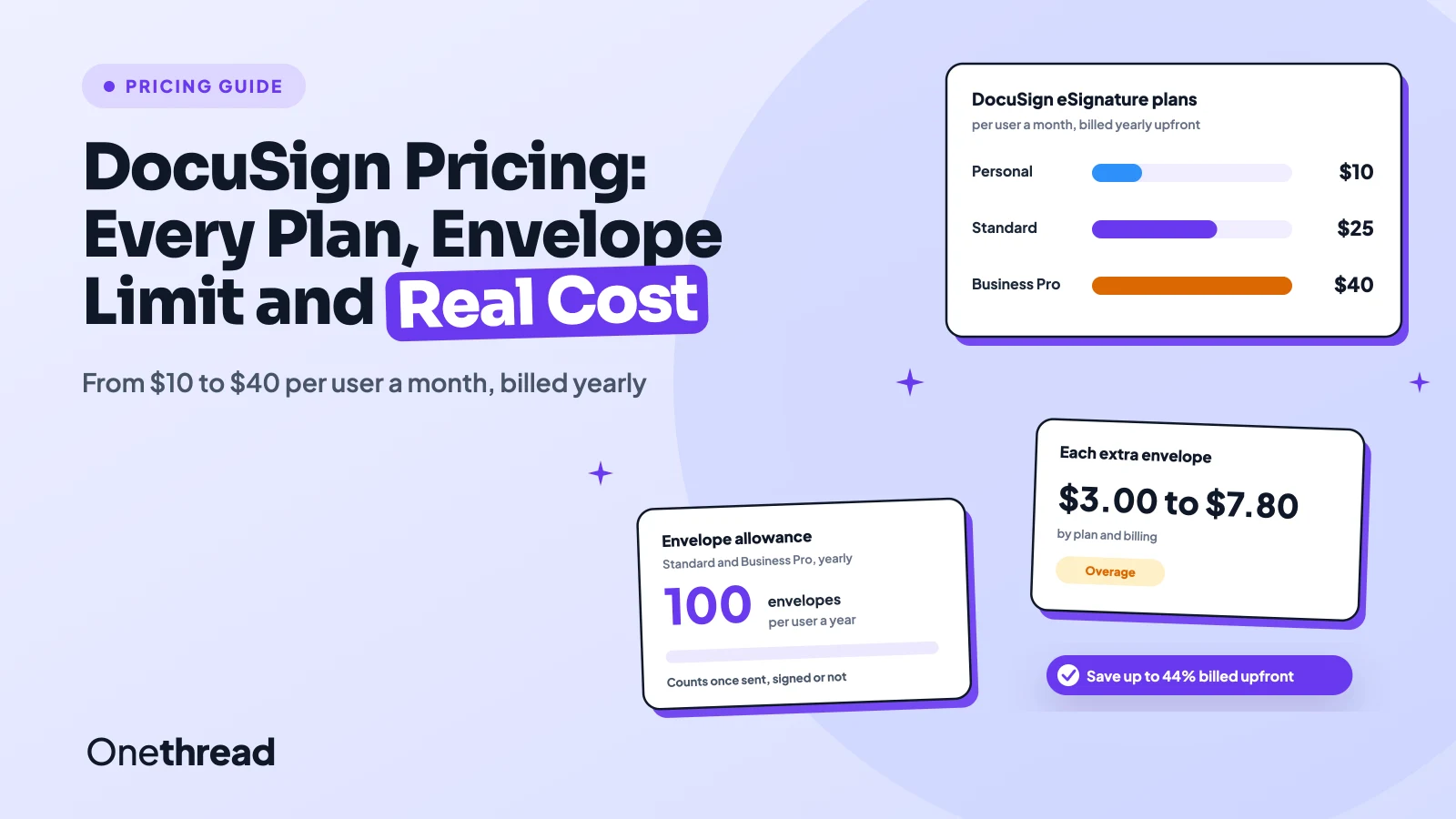
DocuSign pricing looks simple until your team sends its 101st envelope of the year.
DocuSign Personal costs $10 a month, Standard $25 and Business Pro $40 per user a month, billed yearly upfront. Pay for a year in monthly installments and you pay $11, $30 and $45. Month to month, the same plans cost $15, $45 and $65.
The catch: every plan caps your envelopes, and each extra send costs $3.00 to $7.80.
We checked DocuSign’s pricing pages and its support center plan by plan, then ran the numbers for real team sizes.
Here’s what each plan costs you, where the bill grows, and how to pay less.
Key Points
- DocuSign eSignature costs $10 (Personal), $25 (Standard) and $40 (Business Pro) per user a month billed yearly upfront, $11, $30 and $45 on a yearly plan paid monthly, or $15, $45 and $65 month to month.
- Count envelopes before you pick a plan. Personal allows 5 a month, Standard and Business Pro allow 100 per user a year on yearly plans, and extra envelopes cost $3.00 to $7.80 each.
- Pay yearly upfront if you can. A 10-person Standard team pays $3,000 a year upfront, $3,600 on a yearly plan paid monthly, and $5,400 month to month.
- Check the IAM Standard plan if you send a lot. At $45 per user a month billed yearly (3-user minimum), it includes unlimited envelopes sent from the web app.
How Much Does DocuSign Cost per User?
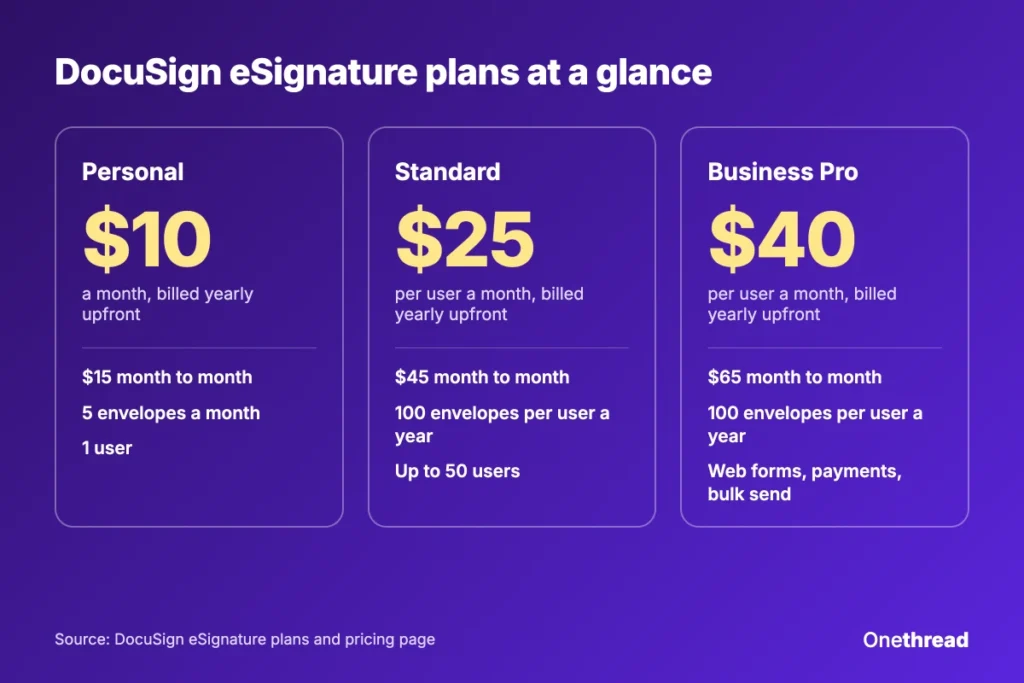
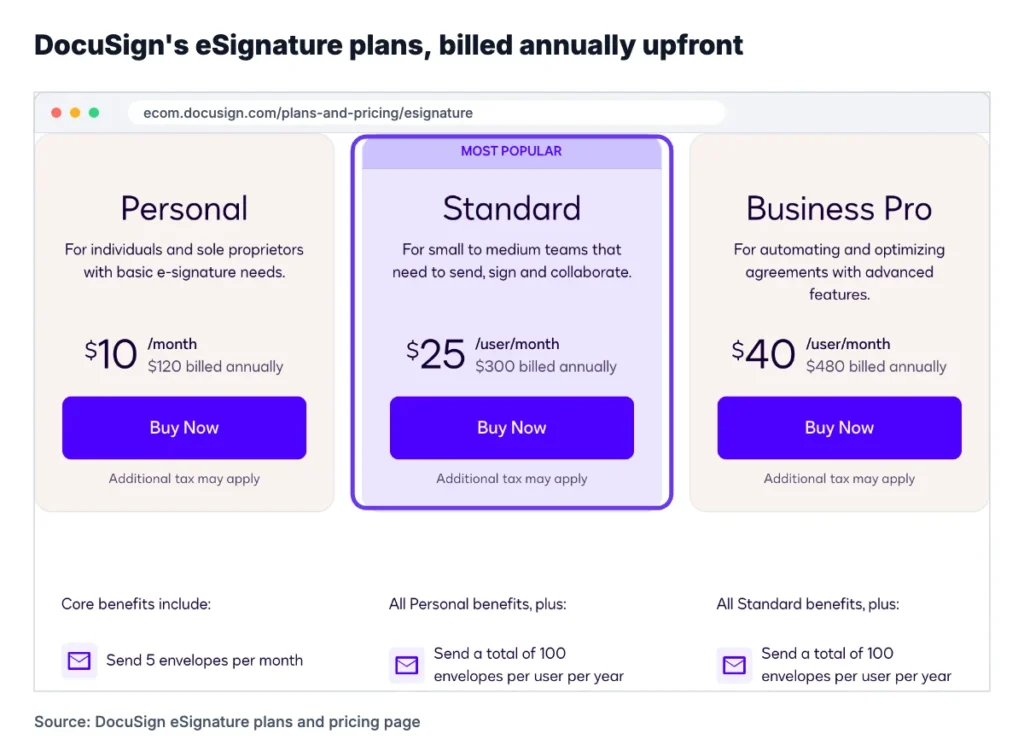
DocuSign costs $10 to $40 per user a month on its published eSignature plans when you pay for a year upfront. The same plans cost $15 to $65 a month on monthly billing, and larger teams get a quote.
| Plan | Yearly, paid upfront | Yearly, paid monthly | Month to month | Envelopes | Users |
|---|---|---|---|---|---|
| Personal | $10 a month, or $120 a year | $11 a month, or $132 a year | $15 a month | 5 a month | 1 |
| Standard | $25 per user a month, or $300 a year | $30 per user a month, or $360 a year | $45 per user a month | 100 per user a year (10 per user a month on monthly plans) | Up to 50 |
| Business Pro | $40 per user a month, or $480 a year | $45 per user a month, or $540 a year | $65 per user a month | 100 per user a year (10 per user a month on monthly plans) | Up to 50 |
| Enhanced plans | Quote | Quote | Quote | Custom limit | 50+ |
“Annual, billed upfront” is the cheapest of DocuSign’s three billing options and saves up to 44%. “Annual, billed monthly” saves up to 33%, but it is still an annual commitment. Monthly costs the most and lets you leave at any time.
Over a full year of monthly billing, one seat costs $180 on Personal, $540 on Standard and $780 on Business Pro.
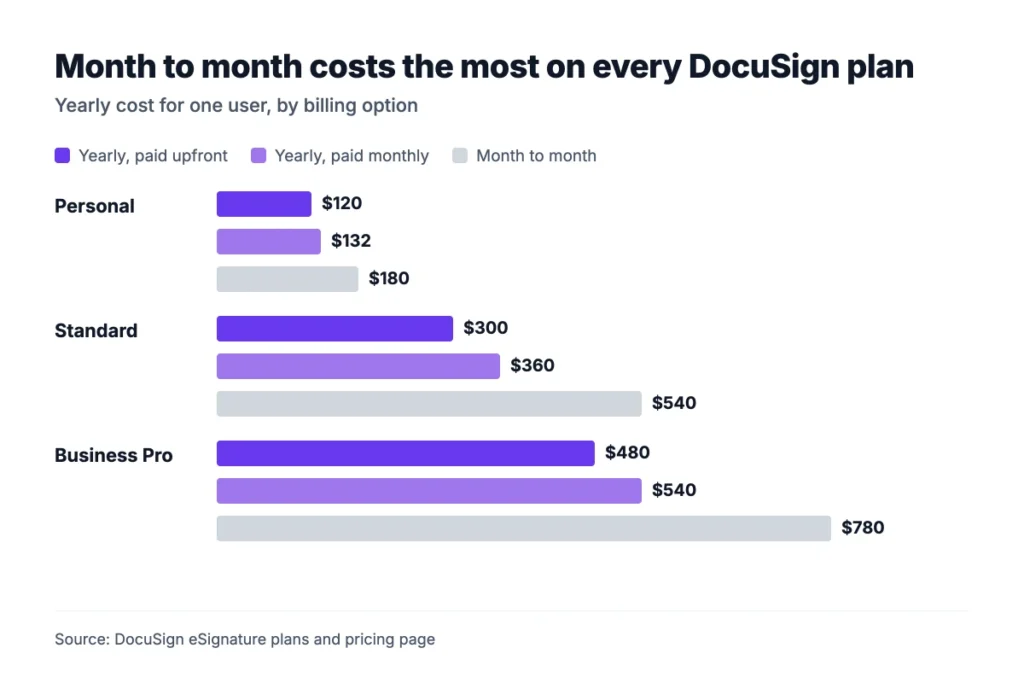
Example: One Standard seat costs $25 × 12 = $300 a year paid upfront. Month to month, it costs $45 × 12 = $540, or $240 more per seat each year.
Sources: DocuSign eSignature plans and pricing, Signeasy’s DocuSign pricing guide.
What Does the DocuSign Personal Plan Include?
DocuSign Personal costs $10 a month billed yearly, which is $120 a year, or $15 month to month. It covers one user and 5 envelopes a month.
You get the signing basics: reusable templates, a real-time audit trail, reminders and the mobile app. It also adds AI summaries and links to Google Drive, Dropbox, Box and OneDrive.
The limit is volume. Five envelopes a month is 60 a year, and unused sends don’t roll over. Personal has no overage option either. DocuSign’s FAQ says that if you need more than 5 envelopes a month, you upgrade to Standard or Business Pro.
Personal also skips team features. You can’t add users, share templates, brand your emails or use in-person signing.
Example: If you send all 60 envelopes on a yearly Personal plan, each one costs $120 ÷ 60 = $2.00. Send 20 a year and each costs $6.00.
Best For
- Freelancers and sole owners who send a few contracts a month
- Anyone who wants DocuSign’s signer experience without a team plan
Pros
- The lowest paid price at $10 a month billed yearly
- Includes templates, reminders and the mobile app
- Signers never need a DocuSign account
Cons
- Hard cap of 5 envelopes a month with no pay-per-send option
- One user only, with no shared templates or branding
What Does the DocuSign Standard Plan Include?
DocuSign Standard costs $25 per user a month billed annually upfront, which is $300 a year. It costs $30 on a yearly plan paid monthly, or $45 month to month. It allows up to 50 users and 100 envelopes per user a year.
Standard adds the team layer. You get shared templates and folders, real-time comments, custom branding, delegated signing, scheduled sending, in-person signing and user permissions. It also connects to Slack, Microsoft Teams, Zoom and Stripe.
DocuSign adds 5 SMS deliveries and 5 identity checks as a one-time bonus. After that, both are paid add-ons.
The envelope rules change with billing. Yearly plans give each user 100 envelopes for the year. Monthly plans give 10 per user each month, which adds up to 120 a year but resets every month.
Top Tip: If your sends spike at quarter end, pick a yearly plan. The 100 envelopes cover the whole year, so a busy month doesn’t push you into overage.
Best For
- Small teams of 2 to 50 people that share templates and contracts
- Sales and service teams that want branded signing emails
Pros
- Shared templates, comments and branding for the whole team
- 100 envelopes per user a year on yearly billing
- Slack, Teams and Zoom integrations included
Cons
- No web forms, payments or bulk send
- Envelope overage starts at $3.00 per extra send
What Does the DocuSign Business Pro Plan Include?
DocuSign Business Pro costs $40 per user a month paid yearly upfront, which is $480 a year. It costs $45 on a yearly plan paid monthly, or $65 month to month. Users and envelopes match Standard: up to 50 users and 100 envelopes per user a year.
What you pay extra for is automation. Business Pro adds web forms, payments during signing, PowerForms and bulk send. It also adds signer attachments, locked templates, drop-down fields and live data checks as signers type.
It is also the first plan with a developer account, DocuSign’s APIs and its 1,000+ partner integrations.
One trap sits inside those features. Envelopes sent through PowerForms and Bulk Send count toward your allowance. A big bulk send can use a year’s envelopes in a day.
Example: A 5-user Business Pro team gets 500 envelopes a year. One bulk send to 400 customers uses 400 of them, which leaves 100 for the rest of the year.
Best For
- Teams that collect payments or form data inside the signing flow
- Operations teams that send the same agreement to many people at once
Pros
- Bulk send, PowerForms and web forms included
- Payment collection during signing
- API access and 1,000+ integrations
Cons
- $15 more per user a month than Standard on yearly billing
- Bulk sends draw down the same 100 envelopes per user
What Do DocuSign Enhanced Plans Include?
DocuSign’s Enhanced plans have no list price. You contact sales for a quote, and the plan suits teams with more than 50 users or strict security needs.
These plans let DocuSign set your envelope limit to fit your volume. They add single sign-on, central organization management, 24/7 live support and document generation inside Salesforce.
Several security and compliance features only appear here. DocuSign’s comparison table marks these as “contact sales” items: knowledge-based authentication, data residency, HIPAA support through a BAA, 21 CFR Part 11 and FedRAMP.
Advanced routing sits here too. Conditional routing, signing groups, document visibility and remote online notary are all Enhanced plan features.
The quote depends on your users, envelope volume and add-ons. Two companies of the same size can pay different prices. Ask for the envelope limit, the overage rate and the renewal terms in writing before you sign.
Those three lines hold most of the hidden costs in a custom DocuSign contract. Get each one fixed for the full term.
Best For
- Companies with more than 50 senders
- Regulated teams that need SSO, HIPAA support or data residency
Pros
- Envelope limits set to your volume
- SSO, org management and 24/7 support
Cons
- No public price, so you must negotiate
- Basic compliance features cost a custom contract
How Do DocuSign Envelopes and Overage Charges Work?
A DocuSign envelope is one package of documents sent for signature. It counts once against your envelope allowance as soon as you send it, whether or not anyone signs.
The number of documents, fields and signers inside doesn’t change the count. One envelope can hold a contract, an NDA and a tax form for three signers, and it still counts as one.
Here is what DocuSign charges per extra envelope on Standard and Business Pro. “Subscribe and save” means you buy extra envelopes ahead of time. “Pay-as-you-go” is the rate DocuSign bills when you go over.
| Plan and billing | Buy ahead (per envelope) | Pay-as-you-go (per envelope) |
|---|---|---|
| Standard, yearly | $3.00 | $3.60 |
| Standard, monthly | $4.50 | $5.40 |
| Business Pro, yearly | $4.80 | $5.80 |
| Business Pro, monthly | $6.50 | $7.80 |
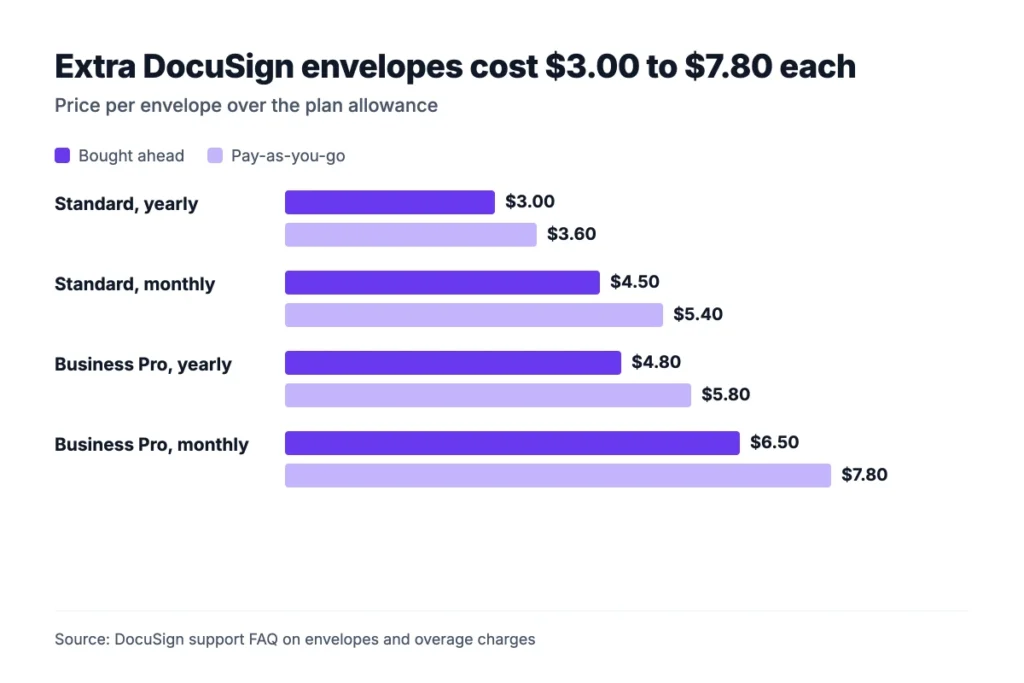
Personal plans have no overage rate. When you hit 5 envelopes, you wait for next month or upgrade.
Example: A 5-user Standard team on yearly billing gets 500 envelopes. If it sends 650, the 150 extra cost 150 × $3.60 = $540 at pay-as-you-go rates, or 150 × $3.00 = $450 if bought ahead.
Sources: DocuSign support FAQ on envelopes and overage charges.
What Do DocuSign Add-Ons Cost?
DocuSign sells two common add-ons on top of Standard and Business Pro: SMS delivery from $0.36 per message and identity verification from $2.40 per attempt. Neither is sold on Personal, so a solo user who needs them has to move up a plan.
SMS delivery sends the signing link to the signer’s phone instead of only by email. DocuSign says this gets signatures 65% faster. It is useful for field sales, tenants and customers who rarely check email.
Identity verification asks the signer to prove who they are before signing. You pay per attempt, not per completed check, so a signer who fails twice costs you twice.
Both plans include 5 of each as a one-time bonus. After those, every delivery and every check bills on top of your plan.
Example: A team sends 200 envelopes a year by SMS and checks each signer’s ID once. It pays at least 200 × $0.36 = $72 for SMS and 200 × $2.40 = $480 for ID checks. That is $552 a year on top of the seats.
Some security add-ons, such as knowledge-based authentication, are only sold on Enhanced plans. Add-ons can be bought at checkout or later in Settings, under Plan and Billing.
Sources: DocuSign eSignature plans and pricing.
How Much Do DocuSign IAM Plans Cost?
DocuSign’s Intelligent Agreement Management (IAM) plans cost $40 to $75 per user a month billed yearly, or $65 to $95 month to month. The two higher plans include unlimited envelopes sent through the web app.
| IAM plan | Yearly, per user a month | Monthly, per user a month | Minimum users | Envelopes |
|---|---|---|---|---|
| IAM Starter | $40 | $65 | 1 | 100 per user a year (10 a month on monthly) |
| IAM Standard | $45 | $75 | 3, so $1,620 a year minimum | Unlimited from the web app |
| IAM Professional | $75 | $95 | 3, so $2,700 a year minimum | Unlimited from the web app |
IAM bundles eSignature with Workflow Builder for no-code workflows and Agreement Manager, an AI contract repository. IAM Standard includes Standard features and IAM Professional includes Business Pro features.
“Unlimited” covers only envelopes sent from the web app, under a reasonable use policy. Web forms, PowerForms and bulk sends still count against an automation allowance of 10 per user a month or 100 per user a year.
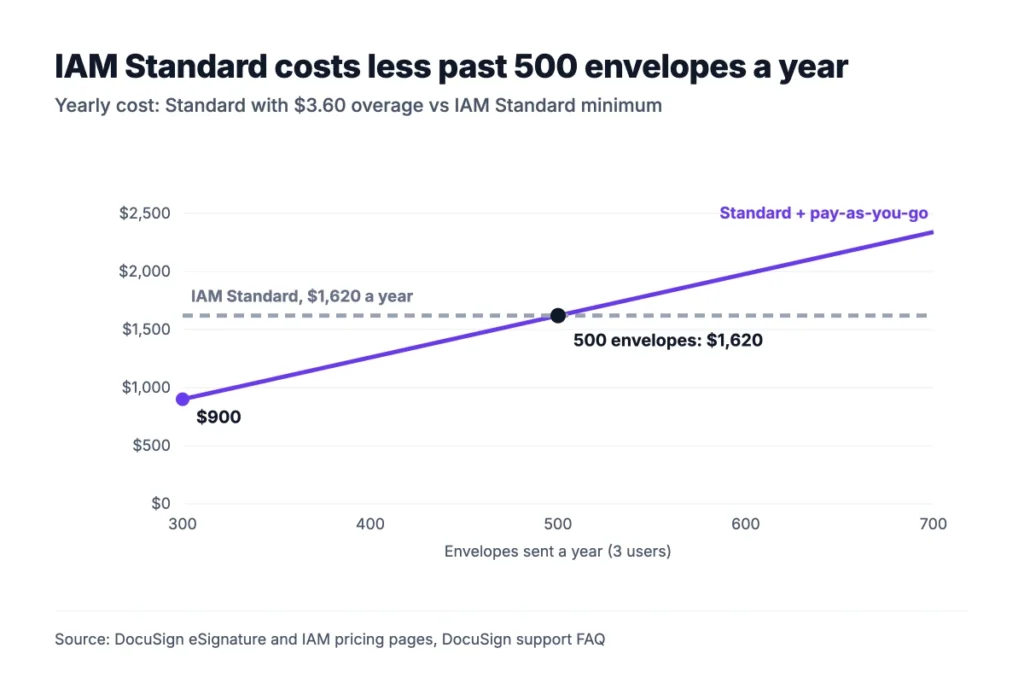
Example: A 3-user Standard team pays $900 a year and gets 300 envelopes. At 500 envelopes, the 200 extra cost 200 × $3.60 = $720, so the total is $1,620. That equals IAM Standard’s $1,620 yearly minimum, which has no web app cap.
Sources: DocuSign IAM plans and pricing.
What Do DocuSign Real Estate and API Plans Cost?
DocuSign sells separate plans for real estate agents and for developers. Real estate plans start at $10 a month billed yearly, and API plans start at $50 a month.
The real estate line has three published plans:
- Real Estate Starter: $10 a month, or $120 a year, for one user and 5 envelopes a month.
- Real Estate: $25 per user a month, or $300 a year, for 1 to 5 users, with 100 envelopes per user a year, real estate association forms and workspaces.
- REALTORS®: $20 per user a month, or $240 a year, for NAR members, with unlimited envelopes under a reasonable use policy.
The developer API plans are priced by envelope volume, not by seat:
- Starter: $50 a month, or $600 a year, with a starting amount of 40 envelopes a month.
- Intermediate: $300 a month, or $3,600 a year, with a starting amount of 100 envelopes a month.
- Advanced: $480 a month, or $5,760 a year. It adds Bulk Send and PowerForms through the API.
Custom API plans need a 5-user minimum and a sales quote. If you only send contracts by hand, you don’t need an API plan at all. Business Pro covers that.
Sources: DocuSign real estate plans, DocuSign developer API plans.
What Does a 10-Person Team Pay for DocuSign per Year?
A 10-person team pays $3,000 to $5,400 a year for DocuSign Standard and $4,800 to $7,800 for Business Pro, depending on billing. The billing choice moves the bill more than the plan choice does.
| Plan, 10 users | Yearly, paid upfront | Yearly, paid monthly | Month to month |
|---|---|---|---|
| Standard | $3,000 | $3,600 | $5,400 |
| Business Pro | $4,800 | $5,400 | $7,800 |
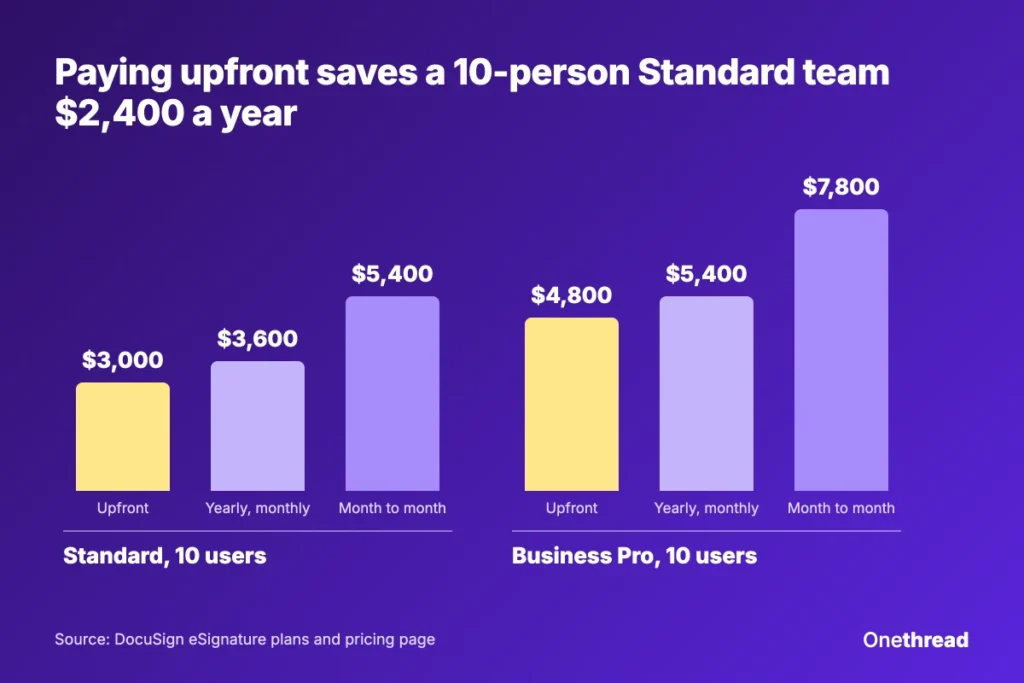
Example: Standard for 10 users costs $25 × 10 × 12 = $3,000 paid upfront. Month to month, it costs $45 × 10 × 12 = $5,400. Paying upfront saves $2,400 a year.
Envelope counts matter too. On yearly plans, 10 users get 1,000 envelopes a year. On monthly plans, they get 100 a month, which is 1,200 a year, but a slow month’s unused sends don’t carry over.
The yearly plan paid monthly costs $600 more than upfront for 10 Standard users, but spreads the cost across the year. Remember that it is still a one-year contract. After the first 30 days, you owe the rest of the term if you cancel.
What Can You Do With a Free DocuSign Account?
DocuSign has no free sending plan, but signing is free. Anyone can open a free DocuSign account to sign and store documents, and DocuSign says this account “lasts forever”.
Sending is where the limits start. Signeasy’s DocuSign guide says the free account includes up to 3 free signature requests. DocuSign also offers a 30-day free trial of its paid features. Its free-account page says no credit card is needed.
DocuSign’s FAQ says recipients don’t need a DocuSign account to review and sign an agreement. Your clients never pay.
DocuSign also runs a money-back window. Yearly plans bought on DocuSign.com can be refunded within 30 days of purchase, once per customer. Monthly plans can be cancelled at any time, and you aren’t charged for the next month.
If you only sign documents other people send you, you never need to pay. If you send more than a few agreements a month, budget for at least Personal at $10 a month billed yearly.
Top Tip: Plans renew on their own. Turn off auto-renewal in your account settings on day one. Then decide at the end of the term whether to keep the plan.
Sources: DocuSign free account, DocuSign guide to signing documents free.
How Does DocuSign Pricing Compare With PandaDoc, Signeasy and Xodo Sign?
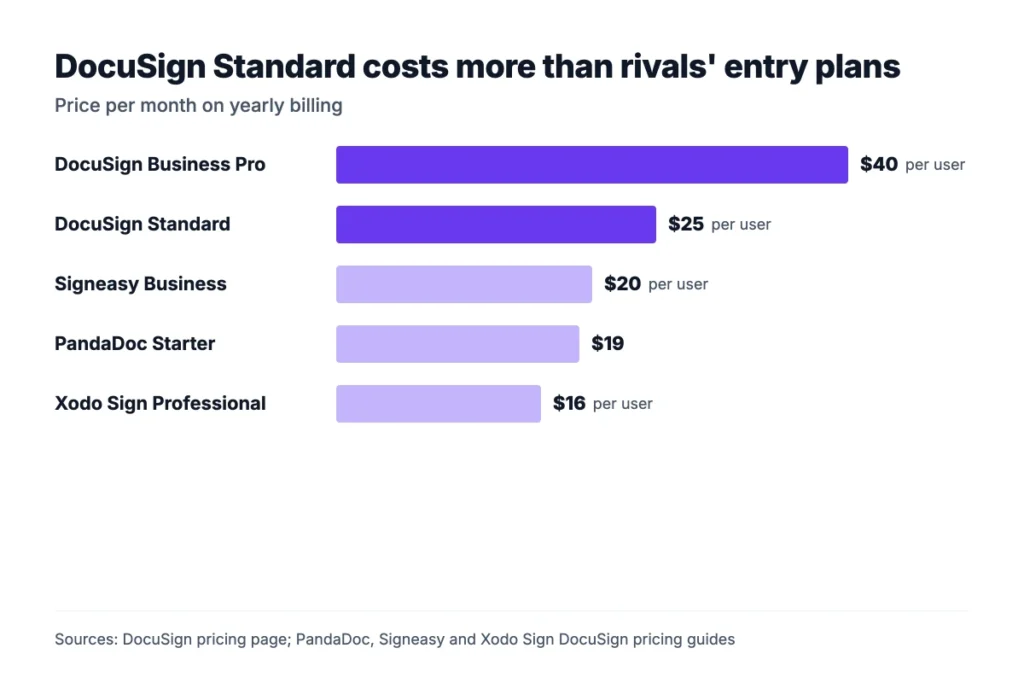
DocuSign Standard costs more per user than most rivals’ entry team plans, and its envelope caps are tighter. PandaDoc, Signeasy and Xodo Sign all list cheaper starting prices on yearly billing.
| Tool and plan | Yearly billing, per month | Send limit |
|---|---|---|
| DocuSign Standard | $25 per user | 100 envelopes per user a year |
| DocuSign Business Pro | $40 per user | 100 envelopes per user a year |
| PandaDoc Starter | $19 | Unlimited documents |
| Signeasy Business | $20 per user | Unlimited document sends |
| Xodo Sign Professional | $16 per user | Not listed in our source |
DocuSign’s Enhanced plans list HIPAA support, FedRAMP authorization and data residency. Check whether a cheaper tool covers the compliance terms your clients ask for.
If your team sends a lot of proposals, pair the signing tool with proposal management software. Drafts then get approved before they become envelopes. You can draft the first version with our free proposal generator.
For real estate paperwork, our guide to Dotloop alternatives covers tools that compete with DocuSign’s real estate plans.
Sources: PandaDoc’s DocuSign pricing guide, Signeasy’s DocuSign pricing guide, Xodo Sign’s DocuSign pricing guide.
Which DocuSign Pricing Plan Should Your Team Pick?
Pick DocuSign Personal for one sender with 5 or fewer envelopes a month. Pick Standard for a team that shares templates, and Business Pro for bulk send, web forms or payments.
| If you… | Pick | Yearly price per user a month |
|---|---|---|
| Send 5 or fewer envelopes a month alone | Personal | $10 |
| Share templates and branding across a team | Standard | $25 |
| Need bulk send, web forms or payments | Business Pro | $40 |
| Send more than about 165 envelopes per user a year | IAM Standard (3+ users) | $45 |
| Have 50+ users or need SSO and HIPAA support | Enhanced plan | Quote |
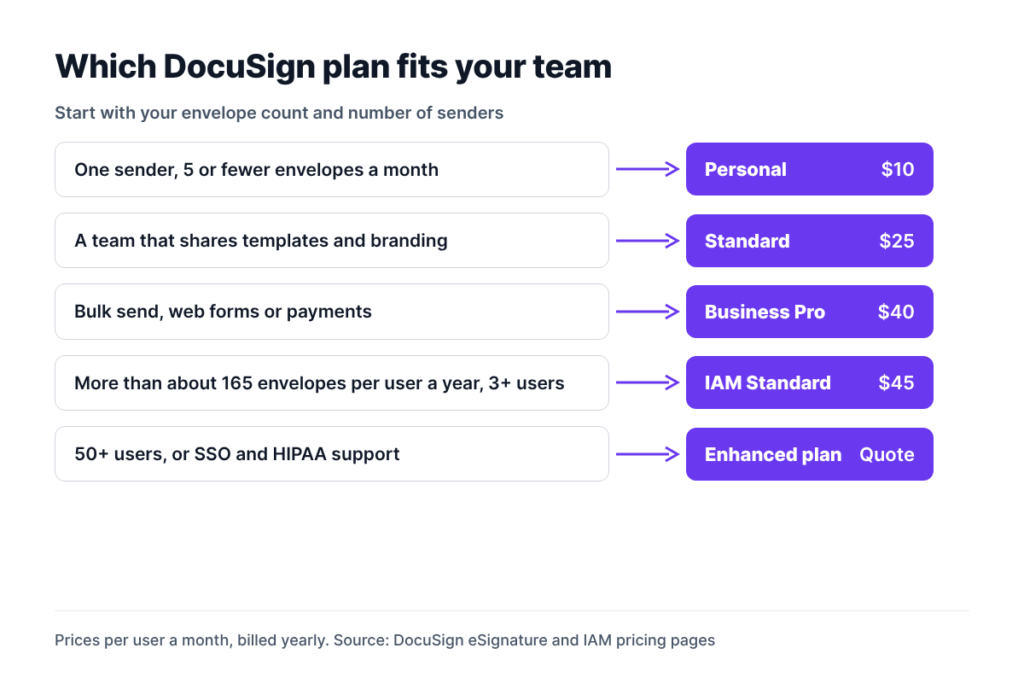
Start from your envelope count, not the feature list. Divide last year’s sent contracts, proposals and forms by your number of senders to see whether the 100-envelope cap holds.
Then check who sends. You may only need seats for the few people who send, while everyone else signs for free.
If your contracts start as proposals and client records, keep that work in one place first. A CRM for small businesses or client management software holds the deal details. The envelope then goes out only once the terms are final.
What Should You Do Next With DocuSign?
DocuSign pricing rewards teams that know their envelope volume and pay yearly. The list price matters less than the cap, the overage rate and the billing option. Once you know those three numbers, you can pick a plan. You stop paying for extra sends or for seats that nobody on the team uses.
Before you buy, count last year’s sent agreements per sender and price Standard and IAM Standard against that number. Then start on yearly billing for only the people who send, and leave the signers on free accounts.
FAQs
Is DocuSign Free?
DocuSign is free for signing. Anyone can create a free account to sign and store documents, and recipients never need an account. Sending is limited: Signeasy’s DocuSign pricing guide says the free account includes up to 3 signature requests, and DocuSign offers a 30-day trial. Regular sending needs a paid plan from $10 a month billed yearly.
How Much Does DocuSign Cost per Month?
DocuSign costs $10 to $40 per user a month when you pay for a year upfront. On a yearly plan paid monthly, it costs $11 to $45. Month to month, Personal costs $15, Standard $45 and Business Pro $65 per user. Enhanced plans for larger teams are quoted by DocuSign’s sales team.
What Is the Cheapest DocuSign Plan?
The cheapest DocuSign plan is Personal at $10 a month billed yearly upfront, which is $120 a year. It covers one user and 5 envelopes a month, with no option to pay for extra sends. Real Estate Starter also costs $10 a month, with the same 5 envelopes, for agents who need association forms.
Does DocuSign Charge per Envelope?
DocuSign charges per user, but each plan caps envelopes. Standard and Business Pro include 100 envelopes per user a year on yearly billing. Extra envelopes cost $3.00 to $7.80 each, depending on plan and billing. Every sent envelope counts, even if nobody signs it, under DocuSign pricing rules.
Can You Cancel DocuSign and Get a Refund?
Yes, within limits. DocuSign refunds yearly plans bought on DocuSign.com within 30 days of purchase, once per customer. Monthly plans can be cancelled at any time without a charge for the next month. On a yearly plan paid monthly, cancelling after 30 days means you owe the rest of the term under DocuSign pricing terms.