Clients rarely leave over one big mistake. They leave after small ones: a missed follow-up, a lost file, a question nobody owned.
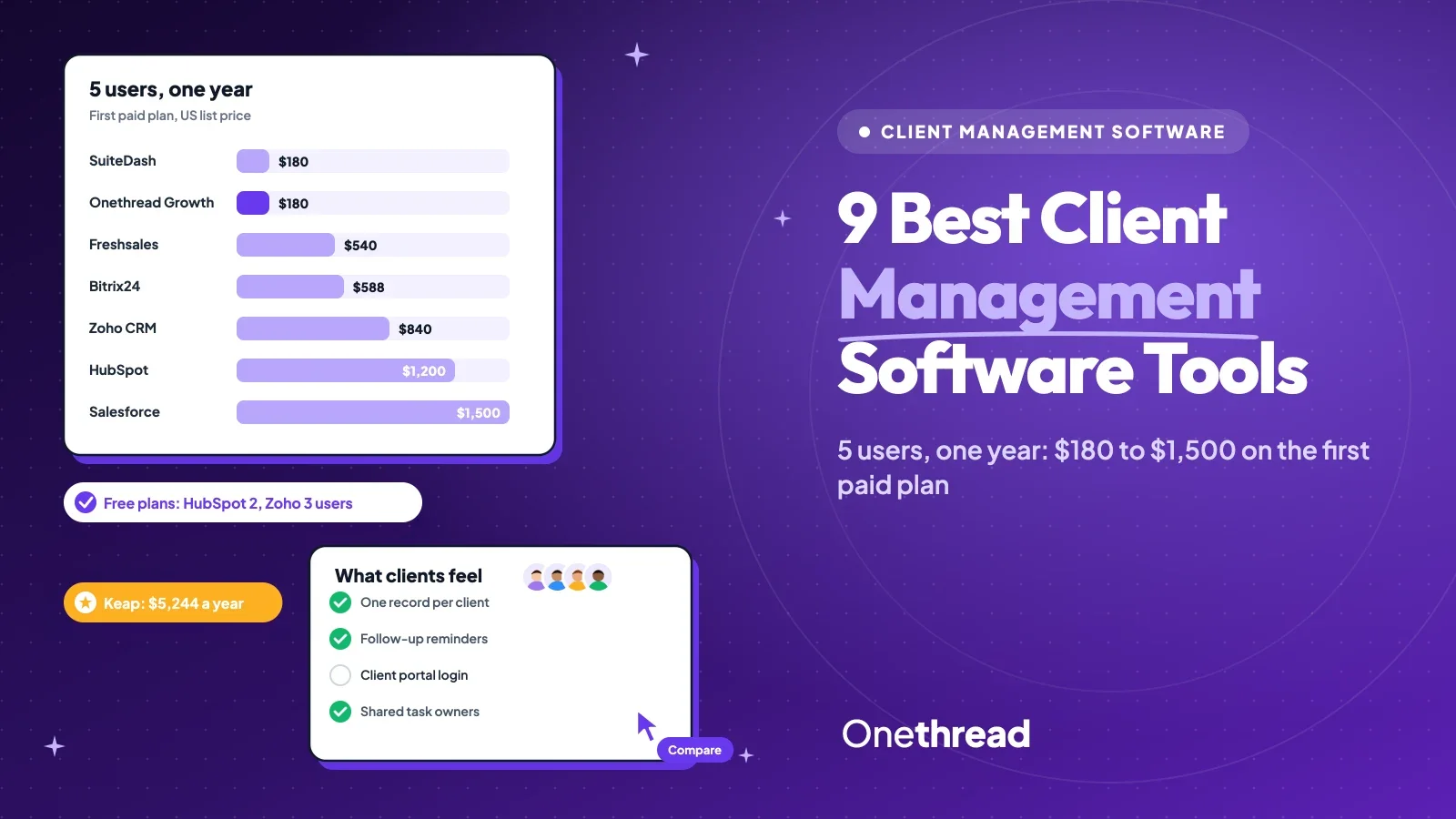
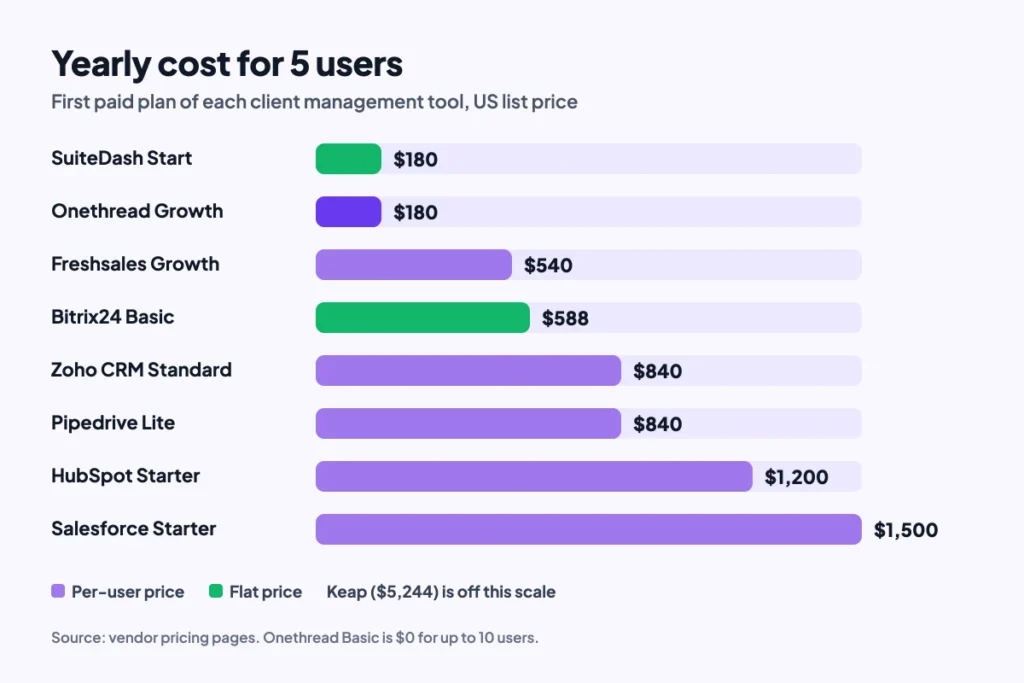
For most small teams, the best client management software is HubSpot (free CRM), Freshsales or Zoho CRM (cheap pipelines) and SuiteDash (portals). For 5 users, a year on the first paid plan costs $180 to $1,500. If you are comparing client-focused tools, our HoneyBook pricing guide breaks down each plan.
That’s a wide spread. And the cheapest tool isn’t the one your clients notice.
We compared 9 tools against the 10 top-ranking guides for this search and checked each price on the vendor’s own page.
You’ll get a 5-user cost table, a review of each tool, and a pick-by-need guide.
Key Points
- HubSpot (free for 2 users), Freshsales (free for 3) and Zoho CRM (free for 3) are the best starting points for most teams. A 5-person team pays $540 a year on Freshsales Growth, $840 on Zoho CRM Standard and $1,200 on HubSpot Starter at list price.
- SuiteDash is the pick when clients need their own login. Its Start plan costs $180 a year flat, with unlimited clients and staff.
- Per-user plans grow with every hire. Flat plans like SuiteDash and Bitrix24 Basic stay put until you outgrow the plan’s limits.
- Pick by the job: a CRM for sales pipelines, a portal for client-facing work, and a project tool like Onethread for delivery.
Which Client Management Software Costs the Least?
SuiteDash Start and Onethread Growth are the cheapest paid options for a 5-person team, at $180 a year each. The table lists each tool’s first paid plan and what 5 users pay for a year.
| Tool | Free plan | First paid plan | 5 users for a year | Best for (our label) |
|---|---|---|---|---|
| SuiteDash | No, 14-day trial | $19 a month flat, or $180 a year | $180 | Client portals |
| Onethread | Yes, first 10 users | $3 per user a month, billed yearly | $0 on Basic, $180 on Growth | Client project delivery |
| Freshsales | Yes, up to 3 users | $9 per user a month, billed yearly | $540 | Low-cost pipeline |
| Bitrix24 | Yes | $49 a month flat for 5 users, billed yearly | $588 | All-in-one workspace |
| Zoho CRM | Yes, up to 3 users | $14 per user a month, billed yearly | $840 | Custom processes |
| Pipedrive | No, 14-day trial | $14 per user a month, billed yearly | $840 | Visual deal pipeline |
| HubSpot | Yes, up to 2 users | $20 per seat a month | $1,200 | Free CRM start |
| Salesforce | No, free trial | $25 per user a month | $1,500 | Room to grow |
| Keap | No, free trial | $320 a month for 2 users, $39 per extra user | $5,244 | Sales automation |
Sources: vendor pricing pages for SuiteDash, Onethread, Freshsales, Bitrix24, Zoho CRM, Pipedrive, HubSpot, Salesforce and Keap. Prices change often, so check each vendor’s page before you buy. We cover plans and total yearly cost in our Pipedrive pricing guide.
Top Tip: HubSpot lists Starter from $7 a seat for new customers. Ask which billing term that price needs before you sign. You can find more on this in our post about business management software.
How Did We Choose These Client Management Tools?
We started with the 10 pages that rank for this search and listed every tool they review. Then we kept the tools that small teams can buy without a sales call, and we checked each price on the vendor’s own pricing page.
Five checks decided the list:
- Client record: each tool keeps contact details, notes and history in one place.
- Price you can see: the first paid plan shows a public price, so you can budget before a demo.
- Free path: a free plan or a free trial, so you can test with real clients.
- Client touchpoints: email, calls, portals or shared tasks that clients actually feel.
- Room to grow: automation, reports or add-ons for when the client list doubles.
Every tool here is online client management software, so your team works from any browser.
One caveat worth being honest about: we compared published plans and features. We didn’t run each tool with a live client base, so treat the labels as a starting point. Prices are US list prices, and most vendors run extra promotions on top of them.
That’s also why the list mixes three kinds of tools. Some are sales CRMs, one is a client portal, and one is a project tool. Your clients feel all three, just at different moments of the project. We review the main risks in our guide to client files and guest logins for agencies.
Which Are the Best Client Management Software Tools?
The best client management software depends on where your clients feel the gaps. Sales-led teams need a pipeline, service teams need a portal, and agencies need shared tasks. We reviewed each tool in the same order: what it does, its price, who it suits, and its limits. Onethread comes last.
HubSpot Smart CRM
HubSpot is the easiest way to start with a CRM for free. Its free plan covers up to 2 users and keeps contact management, deal pipelines and a reporting dashboard in one place.
Say a client emails you twice in a week. HubSpot shows the full communication history on their record, so nobody replies blind.
Pricing: Free for up to 2 users. Starter starts at $20 per seat a month, with lower new-customer prices listed.
Best For
- Small teams that want a free CRM today and paid tools later.
Pros
- Free plan with contact records, deals and tasks.
- Email tracking and meeting links in the same app.
- Large marketplace of apps and integrations.
Cons
- Free plan caps you at 3 email templates and 1 meetings link.
- Costs climb fast on Professional plans.
- Two free users is tight for a growing team.
Salesforce Starter Suite
Salesforce Starter Suite is the small-business entry point to the CRM many large companies run on. It adds automated lead routing and lead scoring, and it puts CRM data inside Slack.
Growing teams often hire a salesforce development company once their setup grows past the starter plan. Its sales forecasting tools help managers read the whole sales pipeline by rep.
Pricing: Starter Suite costs $25 per user a month, billed monthly or yearly. Pro Suite costs $100 per user a month on a yearly contract.
Best For
- Teams that expect to scale and want one CRM for years.
Pros
- Lead scoring and routing on the starter plan.
- Slack link keeps client updates where the team talks.
- Huge partner network for custom setups.
Cons
- No free plan, only a trial.
- Pro Suite needs a yearly contract.
- Setup takes more time than lighter tools.
Zoho CRM
Zoho CRM keeps every client interaction on one record, across email, phone, chat and social channels. Its Blueprint feature turns a sales process into fixed steps, so a deal can’t skip a stage.
That suits teams with rules, like a proposal that must get approved before it goes out.
Pricing: Free for up to 3 users. Standard costs $14 per user a month, billed yearly.
Best For
- Teams that want a set process for every client.
Pros
- Free plan for 3 users.
- Blueprint and workflow rules on paid plans.
- Built-in calling and mass email on Standard.
Cons
- Menus get crowded as you add modules.
- Many features sit on Professional and above.
- Monthly billing costs more than yearly.
Pipedrive Sales CRM
Pipedrive is built around a visual deal pipeline. Every deal sits on a board, and you drag it from stage to stage. The pipeline management view makes stalled deals easy to spot.
It also captures leads from web forms and logs emails from your inbox. Its AI tools sit in the same family as other AI-powered sales assistance apps.
Pricing: No free plan, 14-day free trial. Lite costs $14 per seat a month, billed yearly.
Best For
- Sales teams that think in deals and stages.
Pros
- Clear drag-and-drop pipeline.
- Mobile app for contact management on the go.
- Email sync and lead capture forms.
Cons
- No free plan.
- Light on service and support tools.
- Client portals need another tool.
Freshsales CRM
Freshsales, from Freshworks, gives each client one record with notes, emails, calls and chat. Freddy AI ranks leads, and built-in calling means reps can phone clients without leaving the app.
If you sell physical products, pair it with sound inventory management techniques so sales promises match stock. And if it feels thin for your needs, lists of Freshworks competitors are worth a look.
Pricing: Free for up to 3 users. Growth costs $9 per user a month, billed yearly.
Best For
- Budget-minded teams that call clients often.
Pros
- Lowest per-user price in this list.
- Built-in phone and multichannel inbox.
- AI lead ranking on paid plans.
Cons
- Growth includes only 500 marketing contacts.
- Monthly price isn’t shown on the main page.
- Advanced reports sit on higher plans.
Bitrix24 Workspace
Bitrix24 is an all-in-one workspace with a CRM, tasks, chat and a customer portal. Clients can track the status of their requests in the portal, and every email, call and message lands on their record.
That’s handy when clients keep asking “where are we on this?”
Pricing: Free plan with 5 GB storage. Basic costs $49 a month flat for 5 users, billed yearly, or $69 billed monthly.
Best For
- Small teams that want CRM and team chat in one app.
Pros
- Generous free plan.
- Flat price covers 5 users.
- Client portal with request tracking.
Cons
- Busy interface with many modules.
- User limits on the free plan aren’t clear.
- Basic stops at 5 users.
SuiteDash Client Portal
SuiteDash is a client portal first. Clients log in to a white-label portal where they see files, messages, invoices and onboarding steps.
Say you run a bookkeeping firm. Each client uploads receipts, signs forms and pays invoices in one place, with your logo on top.
Pricing: No free plan, 14-day trial. Start costs $19 a month or $180 a year, with unlimited clients and staff.
Best For
- Service businesses that want clients to self-serve.
Pros
- Unlimited clients and staff on every plan.
- Invoicing, recurring billing and time tracking.
- White-label portal with your branding.
Cons
- No free plan.
- Lighter sales pipeline than a full CRM.
- Many settings to learn at first.
Keap Automation CRM
Keap is a small-business CRM with heavy automation. It sends follow-up emails and texts on a schedule, captures leads with landing pages and forms, and gives you a business phone number.
It’s a good fit when one person runs sales and marketing and can’t send every follow-up by hand.
Pricing: No free plan. Plans start at $320 a month with 2 users, and each extra user costs $39 a month.
Best For
- Owner-led businesses that rely on automated follow-ups.
Pros
- Strong email and text automation.
- Landing pages and forms included.
- Business phone line for calls and texts.
Cons
- Highest price in this list.
- Free trial caps you at 25 emails.
- More than a small team needs for basic records.
Onethread Project Management
Onethread is project management software, not a CRM. It covers the delivery side of client work: tasks, plans and deadlines that clients wait on.
Teams plan client projects on Kanban boards and Gantt charts. They log hours on timesheets and keep project talk in discussion rooms. Every plan includes 15 GB of file sharing.
Pricing: Basic is free for your company’s first 10 users. Growth costs $3 per user a month, billed yearly, or $3.60 billed monthly.
Best For
- Agencies and service teams that need to deliver client work on time.
Pros
- Free for the first 10 users.
- Gantt, calendar and Kanban views.
- Timesheets and discussion rooms built in.
Cons
- No sales pipeline or lead scoring.
- No client portal listed on its features page.
- Pairs best with a separate CRM.
What Is Client Management Software?
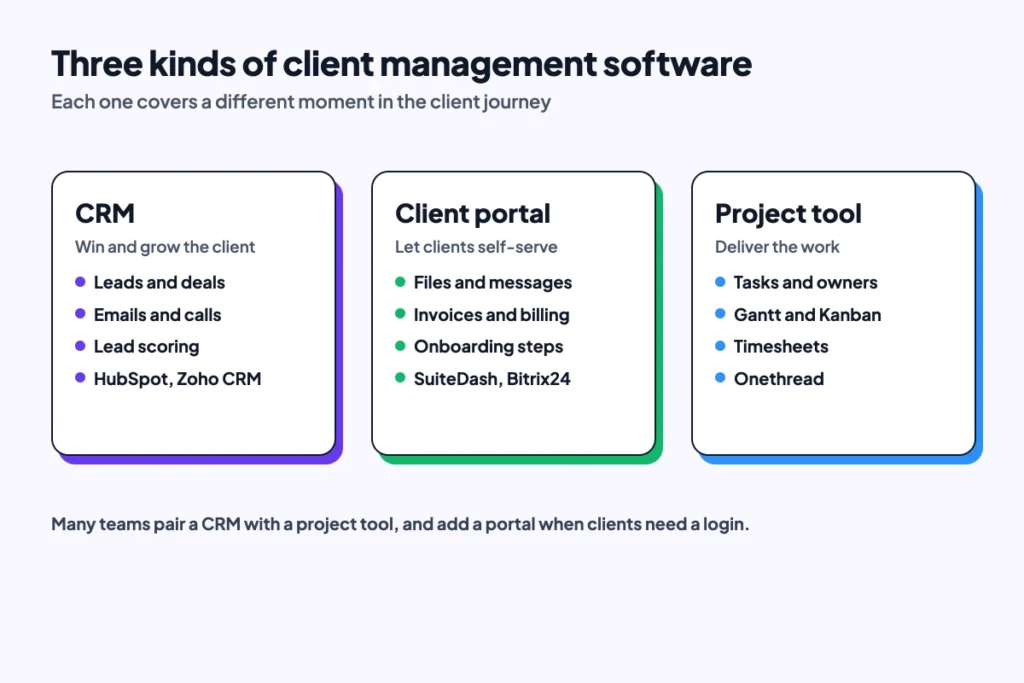
Client management software is a tool that keeps every client’s details, conversations, tasks and files in one place. Most products fall into three groups: CRMs, client portals and project tools. Agency roundups of client management software lean toward portals and billing, while CRM vendors lean toward sales.
You’ll also see it called a client management system, a client management platform, client tracking software or customer management software. The names overlap, and so do the products.
Client Management Software vs CRM
A customer relationship management (CRM) tool focuses on winning and growing accounts. It tracks leads, deals, emails and calls, and it forecasts revenue.
Client management software is the wider term. Some vendors call it client relationship management. It includes CRMs, but also tools that serve clients after the sale: portals, onboarding, billing and shared files.
So every CRM is a client management tool, but not every client management tool is a CRM. SuiteDash is the clearest example in this list. It sells a portal first and a pipeline second.
Client Portals vs Project Management Software
A client portal is a private login where clients see files, invoices and updates. It cuts down on “any news?” emails because clients can check for themselves. If you run a home service business, our guide to Jobber plans shows what a field service CRM with quotes and invoices costs.
Project management software runs the work behind those updates. It holds tasks, owners, dates and dependencies, so the team ships on time.
Agencies often need both: a portal for the client and a project tool for the team. If you’re picking a delivery tool, our guide to a project management system covers the features that matter. For an all-in-one agency CRM, we break down the costs in our GoHighLevel pricing guide.
How Does Client Management Software Help Customer Retention?
Client management software helps customer retention by making sure no client falls through the cracks. Every call, email and task sits on one record, so anyone on the team can pick up where the last person stopped. It’s why vendors also sell these tools as client retention software.
Why Clients Notice Shared Records
Clients notice when a team works from one record. In Salesforce’s State of the Connected Customer report, 73% of customers say companies treat them like an individual, up from 39% in 2023. That’s the new baseline. Teams that work from scattered inboxes fall below it.
Most teams still have gaps. In HubSpot’s State of Service report, 76% of service leaders said they lack full-funnel visibility of the customer experience. Only 68% used CRM software in daily work.
Say a client asks for a revised quote on a Friday. Without a shared record, the request sits in one person’s inbox over the weekend. With one, the task shows up on Monday’s list with a due date.
Three Habits That Close the Gaps
Three habits close those gaps, and none of them needs a big budget:
- One record per client: log every call, email and file on the client’s profile.
- Follow-up reminders: set a task with a date for every promise you make.
- Shared views: give sales, service and delivery the same view of each account.
Start with the first habit. It’s the one every other habit depends on.
The software doesn’t do the caring for you. It just makes the dropped ball easy to see before the client sees it. You can try our free free churn rate calculator to get a first draft quickly.
What Features Should Client Management Software Have?
Client management software should cover the full client journey, from first contact to repeat work. Most teams need six features, and the rest are extras.
- Contact management: one profile per client with details, notes and history.
- Pipeline view: deals or projects shown by stage, so you see what’s stuck.
- Client portal: a login where clients see files, invoices and updates.
- Task management: owners and due dates for every promise you make.
- Automation: reminders and follow-up emails that send on a schedule.
- Integrations: links to email, calendar, accounting and chat.
Reports matter too, once you have enough clients to spot trends. A simple dashboard covers most small teams. It should show open deals, overdue tasks and response times. Skip custom report builders until you know which numbers you check each week.
Client onboarding is the feature most teams forget to test. Ask each vendor how a new client gets set up, from the first form to the first invoice. If the answer needs three tools, count the cost of all three. A good form builder for client intake can cover the first step if your tool lacks one.
Security belongs on the list as well. In Salesforce’s research, 64% of customers believe companies are reckless with customer data. Look for role permissions, so each person sees only the client data they need.
How Much Does Client Management Software Cost as Your Team Grows?
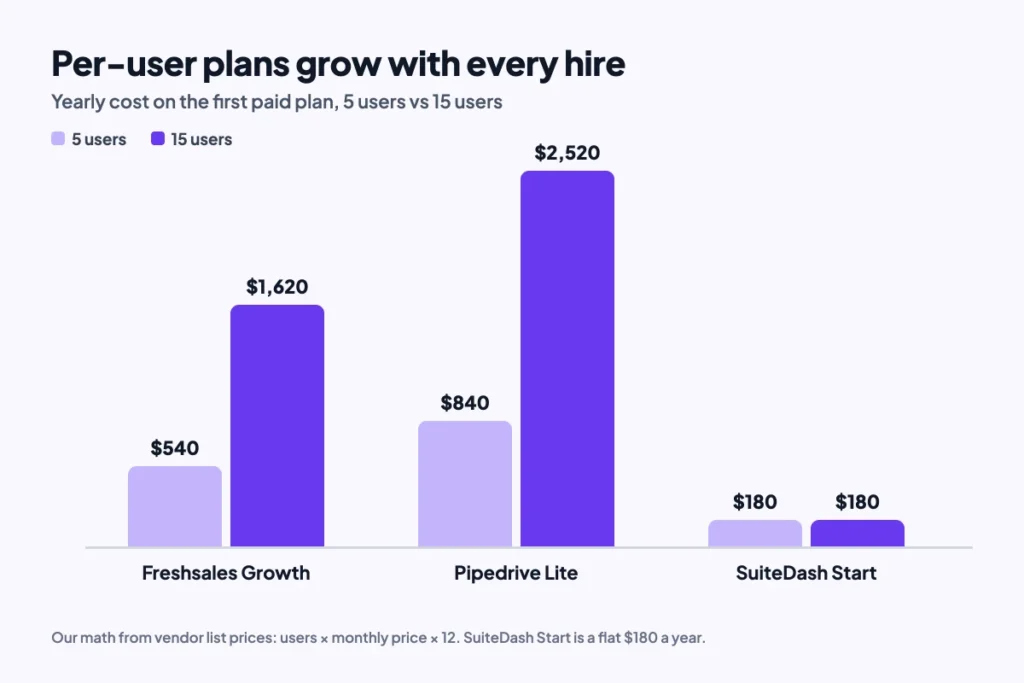
Client management software costs grow in two ways: per user or as a flat fee. Per-user plans look cheap for a small team and climb with every hire. Flat plans cost the same until you hit a user or feature cap.
Per-User Plans Climb With Headcount
Example: Freshsales Growth costs $9 per user a month. For 5 users, that’s 5 × $9 × 12 = $540 a year. At 15 users, it’s 15 × $9 × 12 = $1,620 a year.
Pipedrive Lite shows the same per-user curve as Freshsales. Five users pay $840 a year, and 15 users pay 15 × $14 × 12 = $2,520.
Keap works differently again. Its plan includes 2 users, then adds $39 a month for each extra person. That’s $437 a month for 5 users, or $5,244 a year.
Flat Plans Stay Put Until a Cap
SuiteDash Start stays at $180 a year at both sizes, because every plan includes unlimited clients and staff. Bitrix24 Basic stays at $588 a year, but only up to 5 users. A sixth person means a bigger plan.
Run your own headcount through these numbers before you compare features. A tool that fits 5 people can cost three times as much at 15. Also check the yearly billing terms, since most of these prices assume you pay for 12 months up front.
Which Client Management Tool Fits Your Business?
The right client management tool depends on how your clients buy and what they wait on. Match your main need to a pick in the table.
| If your main need is | Start with | Why |
|---|---|---|
| A free CRM for 2 people | HubSpot | Free plan with deals and contact records |
| The lowest cost per user | Freshsales | $9 per user a month, billed yearly |
| A fixed sales process | Zoho CRM | Blueprint locks steps in order |
| A visual deal board | Pipedrive | Drag-and-drop pipeline |
| Clients who log in | SuiteDash | White-label portal, unlimited clients |
| CRM plus team chat | Bitrix24 | Flat price for 5 users |
| Automated follow-ups | Keap | Email and text automation |
| A CRM for the long run | Salesforce | Scales from Starter to enterprise |
| On-time client delivery | Onethread | Free project tool for 10 users |
Many teams pair two tools: a CRM to win the client and a project tool to deliver the work. If your client work runs on lots of handoffs, our guide to communication strategies helps you set owners and reply times. Startups on a tight budget can also compare project management software for startups by yearly cost.
What Should You Do Next With Client Management Software?
The best client management software is the one your team opens every day. Price matters less than that. For most small teams, it means a free CRM to start and a portal if clients need a login. Add a project tool for the delivery work, and every client touchpoint finally has a home.
This week, list your last 10 clients and note where each one waited on you. Then trial the tool that fixes the most common wait, and book an Onethread demo to see how it runs the delivery side.
Related reading: Client database tools, Best project management software client portal and Best helpdesk software.
Client Management Software FAQs
What Is the Best Free Client Management Software?
HubSpot, Zoho CRM and Freshsales are the strongest free client management software picks. HubSpot’s free plan covers 2 users, while Zoho CRM and Freshsales each cover 3. Bitrix24 also offers a free plan with 5 GB of storage. Onethread Basic is free for your company’s first 10 users, for delivery work.
Is Client Management Software Worth It for Freelancers?
Yes, once you juggle more than a few clients at a time. A free plan keeps notes, files and follow-up dates in one place, so nothing slips. Freelancers who bill clients often get the most from a portal like SuiteDash, which adds invoicing and recurring billing.
What Is the Best Customer Retention Software for Small Businesses?
The best customer retention software for a small business is the one that logs every client touchpoint and reminds you to follow up. Keap fits owner-led firms that want automated emails and texts. HubSpot or Zoho CRM suit teams that want a free start with room to grow.
How Long Does It Take to Set Up Client Management Software?
Setup time depends on how much you bring in. Most of the work goes into importing contacts, naming pipeline stages and setting reminders. A small team with one workflow can start fast, while custom fields, portals or integrations take longer. Start with one workflow and add more later.
Can Client Management Software Connect With Other Tools?
Yes, most client management software connects with email, calendars and chat apps. HubSpot and Salesforce list large app marketplaces, and Salesforce links CRM data to Slack. Check that each tool connects with your accounting and project apps before you buy, since those links save the most manual entry.
Can I Use a Project Management Tool for Client Management?
Yes, for the delivery side of client work. A project tool holds tasks, owners and deadlines, so clients get their work on time. But it won’t track leads or deals. Most teams pair a project tool like Onethread with a CRM for the sales side.