Loom looks cheap on its pricing page. Then your team grows past 25 people, and the yearly bill starts to jump in steps.
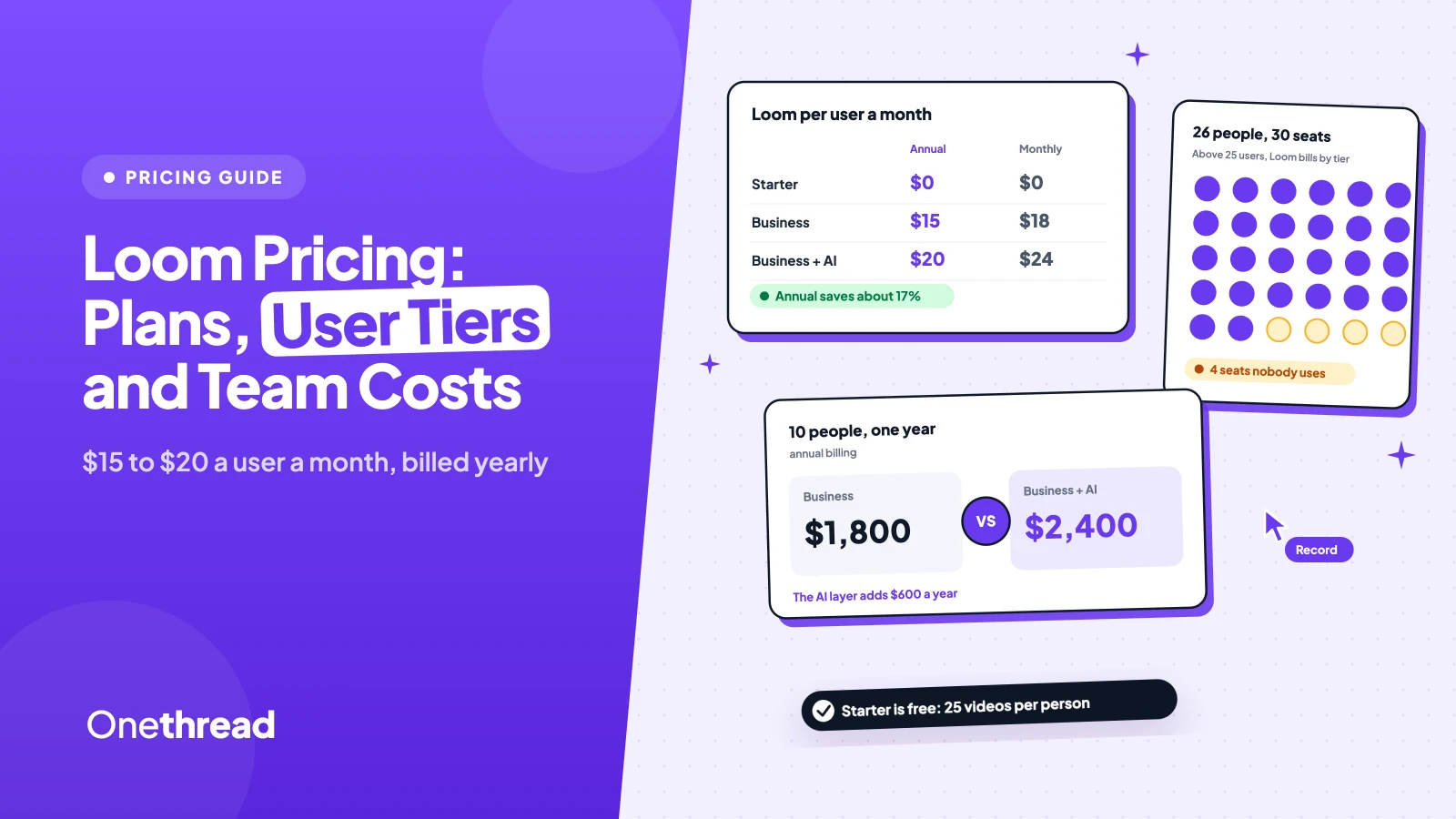
Loom pricing starts with a free Starter plan. Business costs $18 a user a month, or $15 on annual billing. Business + AI costs $24 monthly or $20 annually, and Enterprise is a custom quote.
Most teams don’t get caught by the list price. They get caught by seats nobody planned for.
We checked Loom’s live price calculator at more than 20 team sizes and read Atlassian’s billing rules.
Here’s what each plan includes, what you’ll pay, and where the bill climbs.
Key Points
- Loom has four plans: Starter is free, Business costs $15 a user a month on annual billing or $18 monthly, Business + AI costs $20 annually or $24 monthly, and Enterprise is a custom quote.
- Annual billing saves about 17%, but above 25 users Loom bills by tier. A team of 26 pays for 30 seats, and the 101st user moves you into a $31,500 tier.
- Count every Creator before you renew. The free viewer role is gone, and any seat you don’t deactivate lands on the next invoice, with no refund later.
- Pick Business + AI only if your team will use meeting notes, summaries and transcript editing every week. It adds $60 a user a year on annual billing.
How Much Does Each Loom Plan Cost?
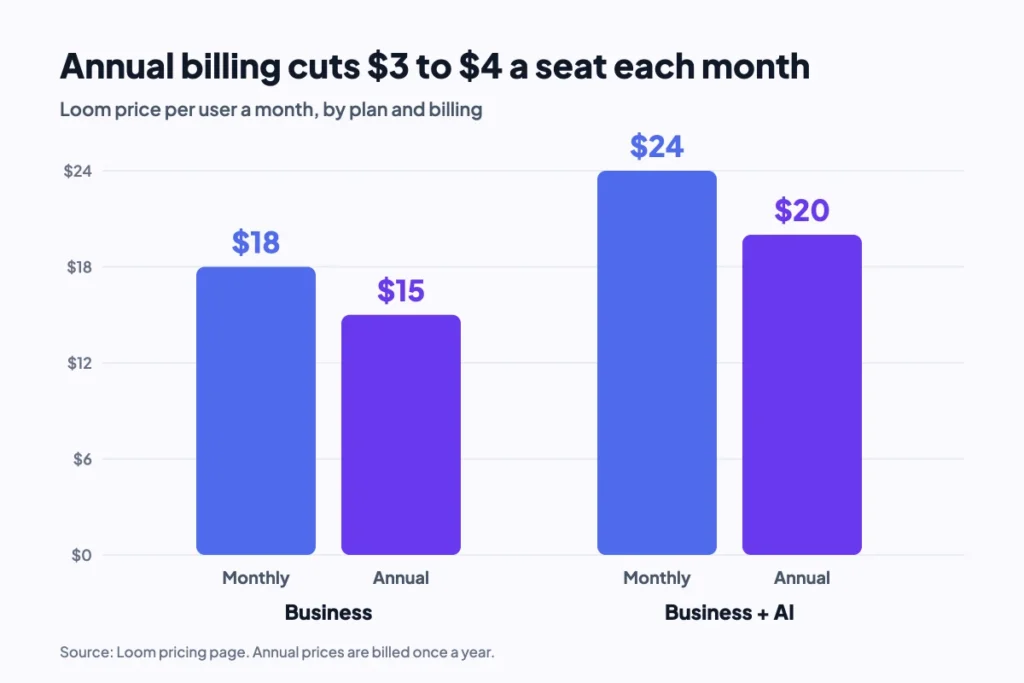
Each Loom plan charges by the seat, except Starter, which is free. Annual billing cuts the Business price from $18 to $15 a user a month, and the Business + AI price from $24 to $20. That’s the “save up to 17%” line on the pricing page.
| Plan | Monthly billing (per user a month) | Annual billing (per user a month) | Yearly cost per user (annual) | Main limit |
|---|---|---|---|---|
| Starter | $0 | $0 | $0 | 25 videos, 5-minute screen recordings |
| Business | $18 | $15 | $180 | No Loom AI features |
| Business + AI | $24 | $20 | $240 | None on videos or length |
| Enterprise | Custom quote | Custom quote | Custom quote | Sold through sales |
Prices come from Loom’s pricing page and its built-in team calculator. Taxes are extra where they apply.
Sources: Loom pricing, Available Loom plans, Loom education discount and verification.
The gap between plans is small per person and large per team. Business + AI costs $60 more a user each year than Business on annual billing. For 10 people, that’s $600 a year for the AI layer alone.
What Does the Loom Starter Plan Include?
Loom Starter is the free plan, and it’s built for trying Loom, not running a team on it. Each person gets 25 videos and screen recordings of up to 5 minutes. Video quality tops out at 720p.
Starter still covers the basics well. You get the screen and camera bubble, transcriptions in more than 50 languages, comments, emoji reactions, and viewer insights. Meeting recordings have no length limit on any plan, Starter included. The pricing page lists up to 50 members on Starter, though Atlassian’s trial rules cap a workspace leaving a trial at 10.
Say a designer sends three short walkthroughs a week. Starter works for about two months, then the 25-video cap forces a cleanup or an upgrade.
Starter also lacks trim and stitch, so a flubbed take means recording again. That’s fine for a quick bug report. It gets old fast for a client demo.
Pricing: $0, with no card needed to sign up.
Best For
- Solo users and small teams testing Loom for short updates and quick feedback.
Pros
- Free, with transcripts and closed captions included.
- No length limit on meeting recordings.
- Works with Slack, Jira, Confluence, GitHub and Gmail.
Cons
- 25 videos per person and 5 minutes per screen recording.
- Video quality capped at 720p.
- No trimming, uploads, downloads or branding removal.
What Does Loom Business Include?
The Business plan removes the limits that make Starter feel small. It adds unlimited videos, unlimited recording time and video quality up to 4K. You also get basic waveform editing, trim and stitch, uploads and downloads, and the option to remove Loom branding.
Business also adds the admin basics a team needs. Password-protected videos, a default privacy setting for the workspace, engagement insights and priority support all start here.
Here’s the thing: Business has no Loom AI writing features. Auto titles and auto CTA are included, but summaries, chapters and filler word removal are not. If your team mostly records quick screen walkthroughs, that’s fine.
Say a support lead records 10 how-to videos a week for customers. Business covers that well: no cap, their logo on the page, and a download for the help center.
Pricing: $15 a user a month on annual billing, which is $180 a year, or $18 a user a month billed monthly.
Best For
- Teams that record often and need long videos, editing and their own branding.
Pros
- Unlimited videos and recording length for every Creator.
- 4K recording, trim and stitch, uploads and downloads.
- Annual billing brings the seat to $15 a month.
Cons
- No AI summaries, chapters or edit by transcript.
- Every person who records needs a paid seat.
- SSO and SCIM need Enterprise.
What Does Loom Business + AI Add?
Loom Business + AI is Business plus Loom AI, and Loom marks it as the most popular plan. It adds auto summaries, auto chapters, filler word and silence removal, edit by transcript, and AI workflows. Newer features include auto meeting notes, meeting recap emails and record for agents.
It also adds admin insights, custom data retention rules and download restrictions. Those matter more to a team lead than to the person recording.
There’s no cheaper AI add-on for Business. You buy the whole tier for every seat, or none of it.
Example: A team of 10 on annual billing pays $1,800 a year for Business and $2,400 for Business + AI. The AI layer costs $600 a year, or $5 a seat each month.
Pricing: $20 a user a month on annual billing, which is $240 a year, or $24 a user a month billed monthly.
Best For
- Teams that record meetings and want notes, recaps and summaries written for them.
Pros
- Meeting notes, recaps, summaries and chapters on every video.
- Edit a video by editing its transcript.
- New Business + AI workspaces get a 14-day free trial.
Cons
- AI comes only as a full tier, for all seats.
- Costs $60 more a seat each year than Business.
- SSO and SCIM still need Enterprise.
How Does Loom Enterprise Pricing Work?
Loom Enterprise pricing is a custom quote from sales, so there’s no list price to check. It includes everything in Business + AI, plus SSO and SCIM through Atlassian Guard Standard, a Salesforce integration, a 99.95% uptime SLA and Zoom import. Enterprise is also priced by Members and admins, not only Creators.
Real deals give a better sense of cost than the sales page. Across 202 purchases, Vendr reports a median Loom contract of $20,160 a year, with a range of $5,972 to $75,219. The same page puts the average saving at about 23%.
Vendr also lists where discounts come from. Buyers report 10% to 20% off list at 50 or more Creators, and 20% to 30% at 200 or more. Multi-year terms and competing quotes also pull the price down. Treat these as ranges reported by buyers, not as offers from Loom.
Pricing: Custom quote. Vendr’s buyer data puts the median at $20,160 a year.
Best For
- Larger companies that need SSO, SCIM, Salesforce and an uptime SLA.
Pros
- Atlassian Guard Standard for SSO and SCIM.
- Salesforce integration and Zoom import.
- Room to negotiate at volume.
Cons
- No public price.
- Trials are arranged case by case with sales.
- Contract terms replace the self-serve refund rules.
How Do Loom’s Annual User Tiers Change Pricing?
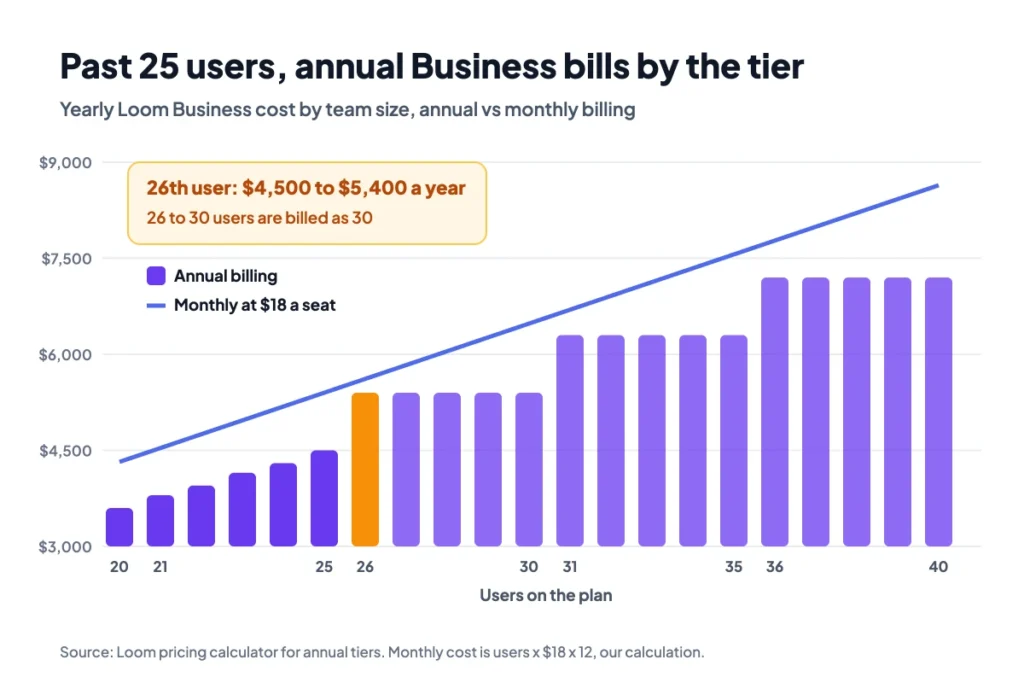
Loom’s annual tiers change pricing once your team passes 25 users. Up to 25, the yearly bill follows your headcount, rounded to the nearest $50. Above 25, Loom bills by tier. Tiers run in steps of 5 up to 50 users, then steps of 10 up to 100, then 101 to 200.
Atlassian’s billing notes describe the rule plainly. You pay a flat rate for the tier, and the next user moves you into the next one. Monthly plans don’t use tiers.
| Team size | Business, annual | Business, monthly | Business + AI, annual | Business + AI, monthly |
|---|---|---|---|---|
| 5 users | $900 | $1,080 | $1,200 | $1,440 |
| 10 users | $1,800 | $2,160 | $2,400 | $2,880 |
| 25 users | $4,500 | $5,400 | $6,000 | $7,200 |
| 26 users | $5,400 | $5,616 | $7,200 | $7,488 |
| 51 users | $10,800 | $11,016 | $14,400 | $14,688 |
We read the annual figures from Loom’s calculator and worked out the monthly ones at $18 and $24 a seat for 12 months.
Example: Going from 25 to 26 users on annual Business raises the bill from $4,500 to $5,400. That one new person costs $900 a year, the price of 5 seats.
The steep edge sits at 100 users. At 100, annual Business costs $18,000. At 101, the calculator shows $31,500 for the 101 to 200 tier.
What Does the Loom Pricing Page Leave Out?
The Loom pricing page shows clean per-seat prices, but the bill also depends on roles, timing and trials. Three rules from Atlassian’s support pages change what teams pay. None of them sits next to the price list, so they’re easy to miss until an invoice arrives.
Creator Lite Seats Now Bill as Creators
Loom used to offer a free role for people who mostly watched videos. That role is gone for workspaces that move to Atlassian. Atlassian’s integration notes say Creator Lite users are upgraded to full Creator seats on the integration date.
You get a grace period until your next renewal. After that, any user you haven’t deactivated joins the invoice as a paid member. Existing customers also move to list prices, which means a first price increase for many of them.
Deactivated Seats Don’t Get Refunds
Removing someone mid-cycle doesn’t hand back money. Loom’s billing FAQ says a deactivated seat forfeits its fees and access for the rest of that billing cycle.
New Creators work the other way. Loom works out the prorated cost and adds it to your next invoice.
So timing matters, and it matters most on annual plans. Clean up seats a few days before you’re billed, not after the charge goes through. On annual billing, that one day decides a full year of cost for each seat.
Free Trials Downgrade Above 10 Users
New workspaces get a 14-day trial of Business + AI, and nothing is charged during it. If no card is on file when it ends, the trial FAQ gives you a 14-day grace period to add one.
After that, the workspace drops to Starter. There’s a catch for bigger teams: a workspace with more than 10 users must cut down to 10 to stay on Starter. If it doesn’t, Loom deactivates the account after the grace period.
Your videos stay viewable either way. But you can’t record again until you upgrade or delete videos to get under 25.
How Can You Pay Less for Loom?
You can pay less for Loom by choosing annual billing below the tier edges and keeping seat counts clean. Five checks cover most of the savings:
- Annual under 25 users: Annual billing saves $36 a user a year on Business and $48 on Business + AI.
- Tier edges: Above 25 users, check the tier before adding one more person. Adding the 31st user costs the same as adding five.
- Seat cleanup: Deactivate unused Creators a few days before the billing date, since there’s no refund after it.
- Business before AI: Start on Business, then move up if your team asks for summaries and meeting notes.
- Volume talks: At 50 or more Creators, ask sales about multi-year terms and volume pricing.
Schools have their own route. Loom no longer offers a fully free education plan, but verified teachers and students can get discounts on paid plans.
If videos mostly replace status meetings, a written habit can cut how many people need to record at all. Our guide to asynchronous communication covers when a short note does the job better than a video.
Top Tip: Before you renew, export six months of user activity from Admin tools, then deactivate anyone who hasn’t recorded. Atlassian recommends the same check before migration.
Which Loom Plan Fits Your Team?
The right Loom plan depends on how often your team records and whether anyone reads the AI output. These pairings are our own reading of the plan limits and prices:
| Signal | Decision |
|---|---|
| Fewer than 25 short videos per person, nothing over 5 minutes | Stay on Starter |
| Long walkthroughs, client videos or your own branding | Business, billed annually |
| Weekly meetings that need notes and recaps | Business + AI |
| Team of 26 to 30, or just over any tier edge | Check monthly billing before you commit |
| SSO, SCIM or Salesforce required | Enterprise quote |
Loom often sits next to a chat and meeting stack. If you’re pricing those too, compare it with our breakdown of Slack pricing and our list of video conferencing software.
For live calls instead of recordings, our roundup of screen sharing software lists tools that cover that job.
What Should You Do Next With Loom?
Loom’s seat price is simple, but the bill isn’t. Annual tiers, retired viewer seats and no-refund deactivations decide what you pay more than the $15 or $20 on the pricing page. Once you know your real Creator count, the plan choice takes minutes. Most small teams land on Business, billed annually.
This week, list everyone who recorded a Loom in the last three months, and leave out anyone who only watched. Run that number through Loom’s calculator on annual and monthly billing, and check how close you sit to a tier edge.
FAQs
Does Loom Charge for People Who Only Watch Videos?
No, Business and Business + AI are priced by Creators and admins, the people who record and manage videos. Viewers who only open a shared link don’t need a seat of their own. Under the new Loom pricing rules, though, former Creator Lite users in your workspace count as paid Creators unless you deactivate them.
Can Loom Record a One-Hour Video?
Yes, on any paid plan. Business, Business + AI and Enterprise have no limit on recording length, so Loom pricing only limits long videos on the free tier. On the free Starter plan, screen recordings stop at 5 minutes, but meeting recordings have no length limit on any plan, including Starter.
How Do You Cancel or Downgrade a Loom Plan?
Admins can downgrade from Business to Starter on their own in Workspace Settings. Enterprise changes go through sales. Downgrading or deactivating seats mid-cycle doesn’t refund the time left, so make the change just before your next billing date. Your videos stay in the workspace after a downgrade, but Starter’s 25-video cap then applies.
Is There a Loom Discount for Students and Teachers?
Yes, but it’s a discount, not a free plan. Loom pricing for verified teachers, professors and students includes up to 50% off for general academic use and up to 75% for classroom use. You must be 16 or older, use a school email and pass a check by Goodstack.