ZoomInfo won’t show you a price until a sales rep has your phone number.
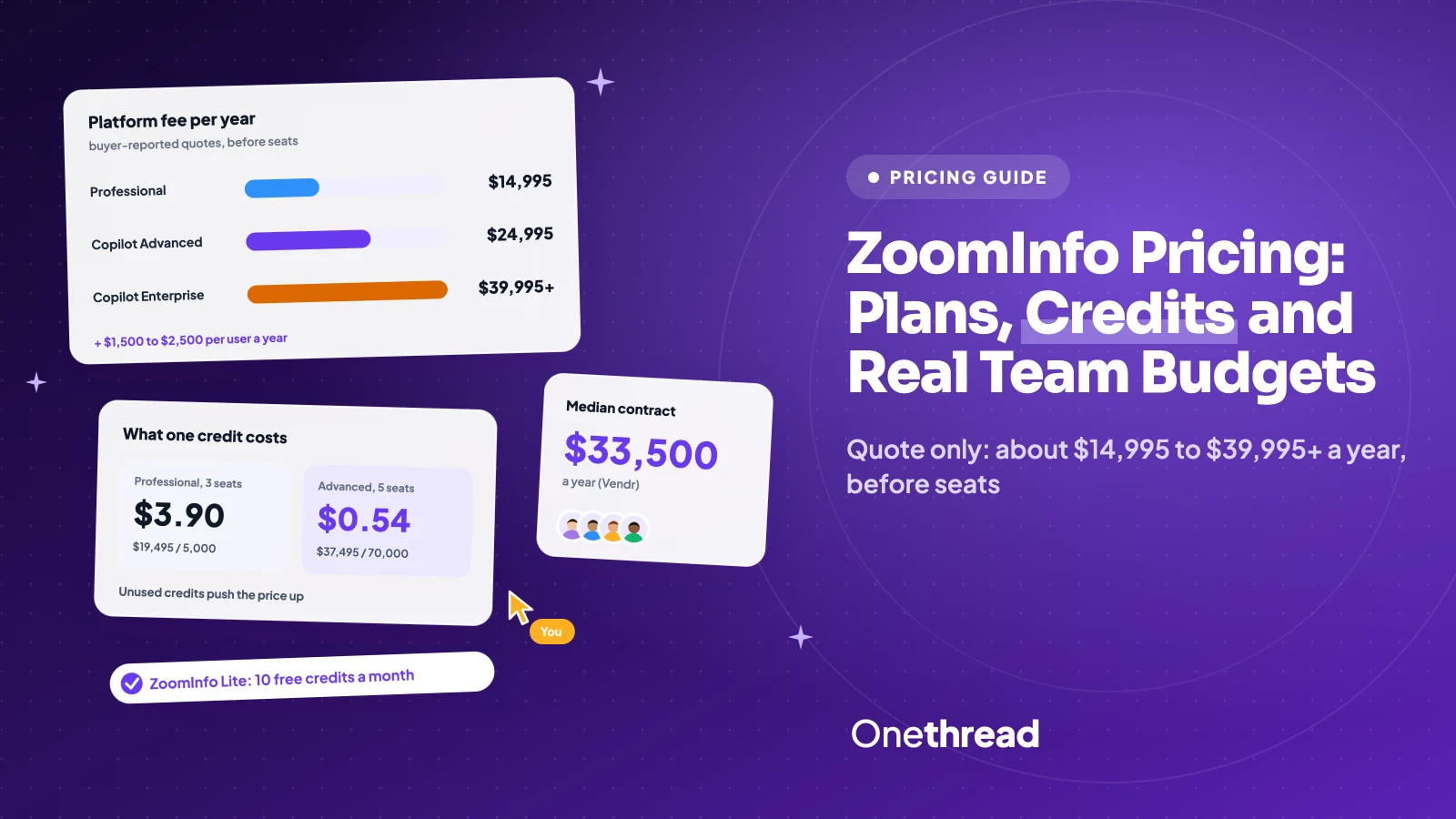
ZoomInfo pricing is quote-only, but buyer quotes put Professional near $14,995 a year and Copilot Advanced near $24,995, plus $1,500 to $2,500 per user. The median contract runs $33,500 a year.
That gap between quote and median is where your budget goes. Extra seats, credit overages and renewal bumps fill it.
We read ZoomInfo’s pricing pages, the GTM AI price list and 8 top-ranking guides, then priced teams of 3, 5 and 10.
You’ll see each plan, what one credit costs you, and which setup fits your team.
Key Points
- ZoomInfo publishes no prices. Buyer quotes show Professional at about $14,995 a year plus $1,500 per user, Copilot Advanced at about $24,995 plus $2,500 per user, and Copilot Enterprise from $39,995. The median deal is $33,500 a year.
- Count credits before seats. Professional includes about 5,000 credits a year, which three busy reps can burn in about 11 weeks.
- Budget for add-ons and renewals. Intent data, international data and API access cost extra, and renewals often rise 5% to 10% a year.
- Test the free doors first. ZoomInfo Lite gives 10 free credits a month, and GTM AI sells single records from $0.38 with no seats or contract.
How Much Does ZoomInfo Cost a Year?
ZoomInfo costs about $14,995 to $39,995 or more a year in platform fees, before seats and add-ons. ZoomInfo doesn’t publish these numbers. They come from a March 2026 sales quote shared by Cleanlist.
Real contracts land higher. Vendr puts the median ZoomInfo deal at $33,500 a year across 1,578 purchases. Its recorded deals run from $7,247 to $156,032.
| Plan | Platform fee per year | Credits included | Extra user per year |
|---|---|---|---|
| ZoomInfo Professional | About $14,995 | 5,000 bulk credits a year | $1,500 |
| Copilot Advanced | About $24,995 | 10,000 bulk credits a year, plus 1,000 per user a month | $2,500 |
| Copilot Enterprise | $39,995 or more | Custom | Custom quote |
| ZoomInfo Lite | $0 | 10 credits a month | Not sold |
| GTM AI | $0 to start | 1,000 free, then $0.38 per record | No seat fees |
Plan prices are buyer-reported quotes, not list prices. ZoomInfo’s own pricing page now names the tiers Professional, Copilot Advanced and Copilot Enterprise. Older guides still call them Professional, Advanced and Elite.
Sources: ZoomInfo pricing page, ZoomInfo pricing FAQ, GTM AI pricing, ZoomInfo pricing guide.
What Does ZoomInfo Professional Include?
ZoomInfo Professional is the entry plan for sales teams. It covers contact and company profiles, quick and advanced search, exports, mobile numbers and business email. You also get prospect lists, alerts, tags, a Chrome extension and a mobile app.
It connects to HubSpot, Salesforce and other CRMs. No CRM yet? Pick one first with our guide to CRMs for small businesses. ZoomInfo data needs somewhere to land, or it ends up in a spreadsheet nobody updates.
Say three SDRs each export 30 new contacts a working day. That’s 90 credits a day. The 5,000 yearly credits last about 56 working days, or roughly 11 weeks. After that, every export is an overage or a wait.
Pricing: about $14,995 a year plus $1,500 a user, with a 3-seat minimum (buyer quote, not a list price).
Best For
- Sales teams of 3 to 5 reps who need verified emails and direct dials.
Pros
- Mobile numbers and business emails on every profile.
- CRM integrations with HubSpot and Salesforce.
- Chrome extension and mobile app for prospecting on the go.
- AI email writing and an AI-assisted dialer.
Cons
- No buyer intent signals or website visitor data.
- 5,000 credits a year run out fast for active teams.
- Billed yearly, upfront, with no public price.
What Does ZoomInfo Copilot Advanced Include?
ZoomInfo Copilot Advanced adds account signals on top of everything in Professional. It lists buyer intent signals, website visitors, funding news, tech insights and an Account Fit Score. It also tracks champions who change jobs and flags new job postings.
Workflows can trigger outreach automatically. Emails export straight to Outreach or Salesloft, and AI drafts talking points and buying groups. Buying group filters show who else sits on the deal, so reps stop emailing one contact at a time.
The credit math changes here. Advanced includes 10,000 bulk credits a year plus 1,000 per user a month. Five users get 70,000 credits a year, 14 times the Professional pool.
Pricing: about $24,995 a year plus $2,500 a user. The same quote lists $1.10 for each credit overage.
Best For
- Teams of 5 or more that sell into named accounts and want intent data.
Pros
- Buyer intent signals and website visitor reveals.
- Monthly per-user credits that grow with the team.
- Workflows that start outreach when an account heats up.
- Exports to Outreach and Salesloft.
Cons
- Platform fee alone runs about $10,000 more than Professional.
- Overage credits at $1.10 cost almost three times the GTM AI rate.
- Intent signals are only as good as your target account list.
What Does ZoomInfo Copilot Enterprise Include?
ZoomInfo Copilot Enterprise is built for larger revenue teams with their own ops staff. It adds real-time intent, custom intent topics, earnings call signals and competitor alerts. It also covers custom integrations, advanced workflows and deeper reporting.
AI writes account summaries and drafts an ideal customer profile. A Copilot chat answers questions about accounts. You also get a dedicated customer success manager and white-glove onboarding.
Think of a 40-rep team with a sales ops lead and a data warehouse. That’s the buyer this plan expects. A 6-person team will pay for features nobody opens.
Enterprise quotes also tend to bundle add-ons. Ask which ones are included. Custom intent and integrations can carry their own line items. Then compare the total with Advanced plus only the add-ons you’d use. The gap is often smaller than the platform fee suggests.
Pricing: $39,995 or more a year, with seats and credits quoted per deal (buyer-reported).
Best For
- Revenue teams of 20 or more with sales ops support.
Pros
- Real-time and custom intent signals.
- Competitor and earnings call alerts.
- Custom integrations and advanced reporting.
- Dedicated success manager and guided onboarding.
Cons
- No published price, seat count or credit pool.
- Highest platform fee before any seats.
- Most value needs ops time to set up.
What Do ZoomInfo Lite and GTM AI Cost?
ZoomInfo Lite and GTM AI let you use ZoomInfo data without a yearly contract. Lite is a free app with a small monthly allowance. GTM AI sells records one at a time through an API. Neither needs a sales call to start.
ZoomInfo Lite Covers Light Prospecting
ZoomInfo Lite is free with no card, no commitment and no end date. It includes 10 contact credits a month, or 25 with Community Edition.
You get advanced search, exports, the Chrome extension, the mobile app and a HubSpot connection. WebSights Lite reveals up to 10 website visitors a day. One trade-off, per CostBench: Lite asks you to share your email contacts and signatures.
Ten credits a month suits a founder checking a few leads. It won’t feed a full sales team.
GTM AI Charges per Record
GTM AI is ZoomInfo’s pay-as-you-go data service for API, MCP and command-line use. New accounts get 1,000 data credits and 1,000 AI credits free. After that, data credits cost $0.38 each on the $1,000 spend tier.
AI credits cost a flat $0.05. Top-ups start at $20, with no contract and no seat fees. A record is charged once per 12 months, and search is free. Here’s the catch: there’s no ZoomInfo app for reps, so someone must wire it into your tools.
How Do ZoomInfo Credits Work?
One ZoomInfo credit equals one exported contact or company profile. Exports from the web app, the ReachOut Chrome extension or any CRM sync all use credits. Searching and browsing profiles costs nothing.
Each package includes a set number of credits based on your quote. According to Cognism, which cites ZoomInfo’s help center, one credit covers a record for 365 days after the first export. Exporting the same person again that year is free, so repeat pulls don’t double the bill.
The price of one credit depends on how many you actually use. That’s the number to work out before you sign.
Example: Professional with 3 seats costs $19,495 a year for 5,000 credits, so $19,495 ÷ 5,000 = $3.90 per credit. Advanced with 5 seats costs $37,495 for 70,000 credits, so $37,495 ÷ 70,000 = about $0.54 per credit.
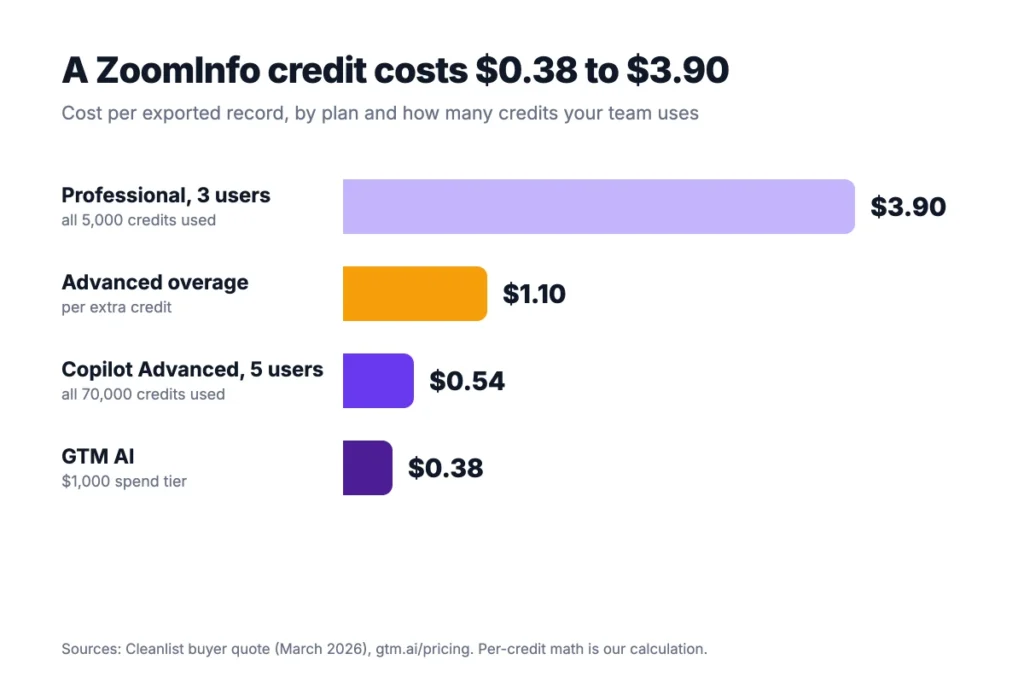
Unused credits push that number up. If your Advanced team exports only 20,000 records, each one costs about $1.87. Count your real monthly exports from last quarter, then divide.
Overages run the other way. The March 2026 Advanced quote charges $1.10 for each extra credit. Salesgear reports overage rates of about $0.20 to $0.60 elsewhere. Agree on the rate before you sign, not after the first big export.
What Hidden Costs Raise ZoomInfo Pricing?
ZoomInfo pricing climbs once add-ons and renewals enter the quote. These hidden costs rarely show up in the first proposal. Salesgear collected these buyer-reported ranges. Six lines tend to grow the bill:
- Extra seats: $1,500 to $2,500 a user each year on the March 2026 quote, and more on Enterprise.
- Intent data: Streaming or custom intent runs about $5,000 to $15,000 a year.
- Data Passport: International contact data costs about $9,995 a year.
- Enrich: CRM enrichment adds about $10,000 to $15,000 a year.
- API access: The full API reportedly starts near $50,000 a year.
- Renewals: Vendr sees 5% to 10% yearly price escalation, often tied to auto-renewal clauses.
Renewals hurt most because they compound. A 10% bump on a $37,495 contract adds $3,750 in year two, before any new seats.
Top Tip: Ask for a renewal cap and a 90 to 120 day notice window in writing. Vendr recommends that notice window, because many contracts renew on their own.
The bigger fix is scope. Price only the add-ons your team will use in the first six months. You can add Data Passport later. Removing it mid-contract is much harder, and the annual contract keeps you paying for it until renewal.
What Does a ZoomInfo Team Pay per Year?
A ZoomInfo team of 5 pays about $22,495 a year on Professional or $37,495 on Copilot Advanced. We built these totals from the buyer quote: the platform fee plus the per-user fee, with a 3-seat minimum.
| Team size | ZoomInfo Professional per year | Copilot Advanced per year | RocketReach Pro per year |
|---|---|---|---|
| 3 users | $19,495 | $32,495 | $2,487 |
| 5 users | $22,495 | $37,495 | $4,145 |
| 10 users | $29,995 | $49,995 | $8,290 |
RocketReach figures use the $829 per seat Pro price from our RocketReach pricing breakdown. Check each vendor’s page before you budget.
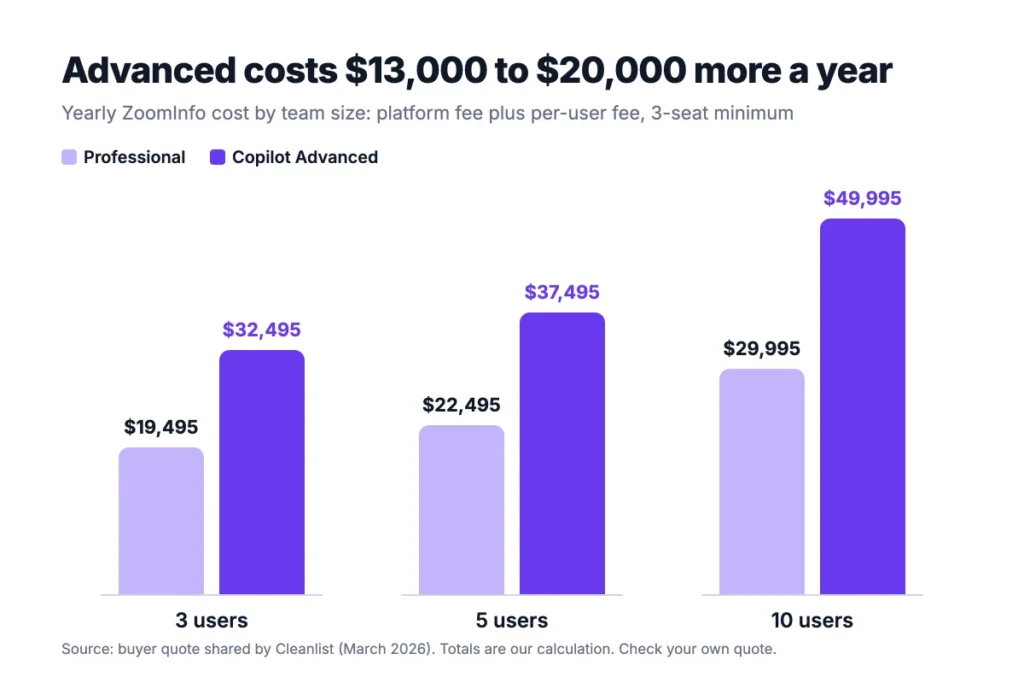
Example: Five reps on Copilot Advanced pay $37,495 in year one. A 10% renewal bump makes year two $41,245, so two years cost $37,495 + $41,245 = $78,740.
Those totals still sit below what many mid-size firms report. SpendHound shows an average of $48,724 a year for companies with 50 to 1,000 employees. Add-ons explain most of that gap.
How Does ZoomInfo Pricing Compare With Alternatives?
ZoomInfo pricing sits far above most self-serve contact tools. The trade is coverage. ZoomInfo lists 500M+ contacts and 135M+ verified phone numbers, plus intent and workflow features most rivals skip.
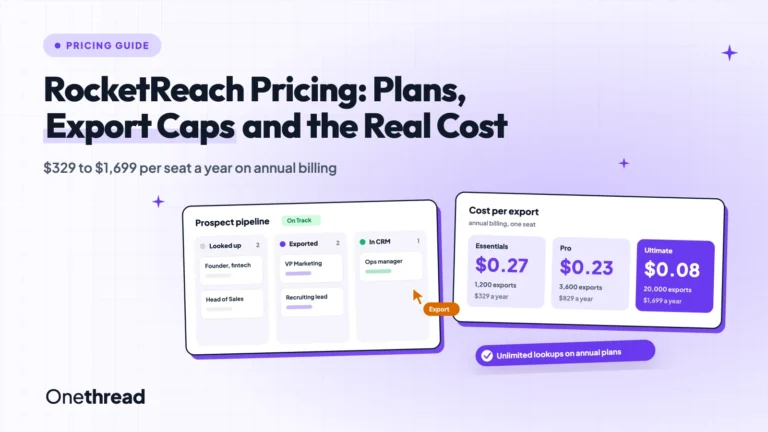
RocketReach is the closest cheap comparison. It charges $329 to $1,699 per seat a year, and Pro includes 3,600 exports. A 5-person team on RocketReach Pro pays $4,145, about one fifth of ZoomInfo Professional.
Apollo and Lusha both sell monthly plans with free tiers. Pin lists Apollo at $0 to $99 a month and Lusha at $0 to $79. Treat those as starting points and check each vendor’s page.
The cheaper tools win when you need emails and phone numbers for a short list. ZoomInfo wins when you need signals across thousands of accounts. Those are different jobs.
Here’s a quick test. List the 50 accounts you most want this quarter. If a cheap tool finds the right people at most of them, you don’t need ZoomInfo yet. If it misses half, the premium starts to make sense.
If what you’re missing is sequencing, not data, read our roundup of cold email tools for sales campaigns. Many teams buy ZoomInfo to fix a follow-up problem.
That’s an expensive fix for a habit.
How Do You Negotiate a Lower ZoomInfo Quote?
You negotiate a lower ZoomInfo quote with timing, term length and a firm budget. Vendr reports average savings of 22% off first quotes. Its buyers got 15% to 30% off for two or three year terms.
Four moves do most of the work:
- Name your budget early: Vendr buyers who anchored to a budget landed 20% to 35% below the first quote.
- Buy near quarter end: Reps chase targets in the last weeks of a quarter.
- Prepay the year: Annual prepayment earned 10% to 20% off in Vendr’s data.
- Lock credit terms: Agree on the overage rate and rollover before you sign.
Bring a competing quote too. A RocketReach or Apollo price gives the rep a number to beat. It also tells you how much the extra ZoomInfo data is worth to you. Reps know buyers compare, so a real written quote carries weight.
Top Tip: Ask the rep to split the quote into platform fee, seats, credits and add-ons. A single bundled number hides which line to cut.
One caveat: multi-year deals lock in the discount and the risk. If your team might shrink, keep the term to one year. A smaller saving beats paying for empty seats until the next renewal.
Which ZoomInfo Plan Fits Your Team?
The right ZoomInfo plan depends on team size, export volume and whether you need buyer signals. Use this table as a starting point. The fit labels are our own judgment.
| Your situation | Best fit |
|---|---|
| Founder checking a few leads a month | ZoomInfo Lite |
| Developer or ops team enriching records in code | GTM AI |
| 3 to 5 reps who need emails and direct dials | ZoomInfo Professional |
| 5 to 15 reps selling into named accounts | Copilot Advanced |
| 20+ reps with sales ops and custom data needs | Copilot Enterprise |
| Small team on a tight budget | RocketReach or Apollo |
Match your outreach style before you choose. A high-volume team burns credits fast. A precision team needs signals more than volume. Our guide to high-volume outreach vs precision targeting helps you pick a side.
What Should You Do Next Before a ZoomInfo Call?
ZoomInfo pricing isn’t a list price. It’s a negotiation over seats, credits and add-ons, and the credit count decides whether the deal is good value. A plan that looks cheap can cost $3.90 a record, while a pricier one can drop near $0.54 when your team uses its credits.
This week, pull last quarter’s export count and your rep headcount. Divide each quote by the credits you’d actually use, and bring that number to the sales call. It’s the one figure a ZoomInfo rep can’t argue with, and it keeps the talk on your terms.
FAQs
Does ZoomInfo Offer a Free Trial?
Yes. ZoomInfo’s pricing FAQ says the free trial includes unlimited searches and views of contact and company profiles. Support and training come free during the trial. The trial length isn’t published, so ask your rep, while ZoomInfo Lite stays free with no end date.
Can You Pay for ZoomInfo Monthly?
Usually not. ZoomInfo’s own pricing guide says paid plans bill yearly and upfront, and monthly billing isn’t standard. Its FAQ says sales sets payment frequency by package, and it accepts card, ACH, wire transfer and check. If cash flow matters, ask for quarterly payments during negotiation.
Can a Single User Buy ZoomInfo?
Yes, but a solo buyer often pays for three seats. Buyer quotes show a 3-seat minimum, so one person on Professional pays about $19,495 in year one. ZoomInfo pricing for one person makes more sense through ZoomInfo Lite or GTM AI. Both start free and need no yearly contract.
Do ZoomInfo Credits Roll Over?
ZoomInfo doesn’t publish a rollover rule for its paid plans. ZoomInfo’s own pricing guide tells buyers to ask whether unused credits roll over before signing. Get the answer in your contract. GTM AI is clearer: its credits never expire while your account stays active.
Why Is ZoomInfo So Expensive?
ZoomInfo pricing bundles a large verified database with sales software. ZoomInfo lists 500M+ contacts, 100M+ companies and 135M+ verified phone numbers. Paid plans add intent signals, workflows and CRM sync, all sold on yearly contracts per seat. You pay for coverage and signals, not just contact details.