A goal you can't see slipping is a goal that slips.
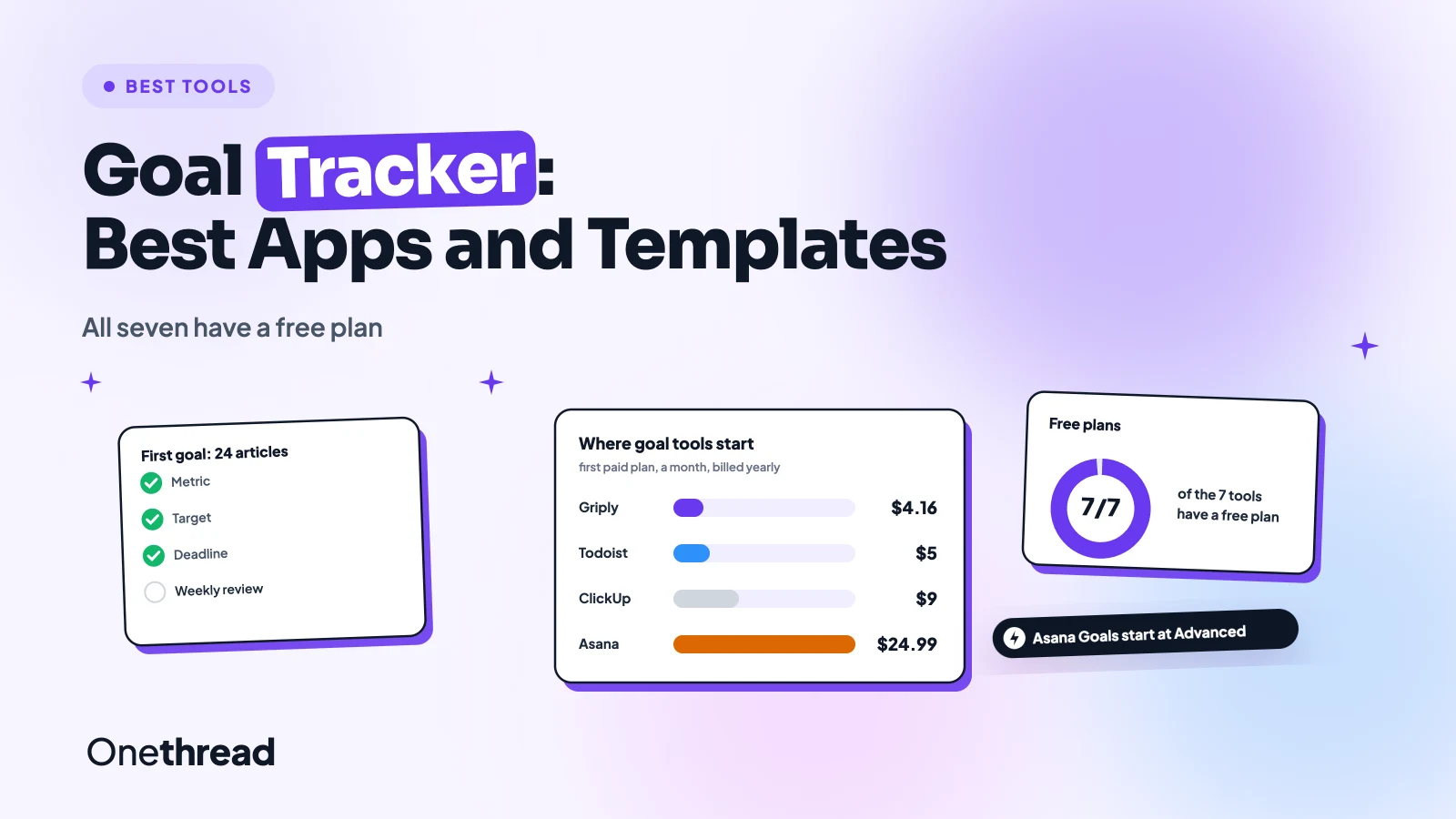
The best goal tracker depends on whose goal it is. Griply, Todoist and Notion suit personal goals, ClickUp, Asana and Perdoo suit team goals and OKRs, and Onethread suits teams that deliver goals as projects. All seven have a free plan.
Most people end up asking a forum which app to use.
We compared seven pricing pages and ten top-ranking pages to answer it.
You'll see what each tool costs, where goal tools start, and which template to copy.
Key Points
- The best goal tracker for personal goals is Griply, Todoist or Notion. For team goals and OKRs, pick ClickUp, Asana or Perdoo. All seven tools have a free plan, but Asana keeps Goals on Advanced at $24.99 per user a month, and ClickUp offers only a trial on Free Forever.
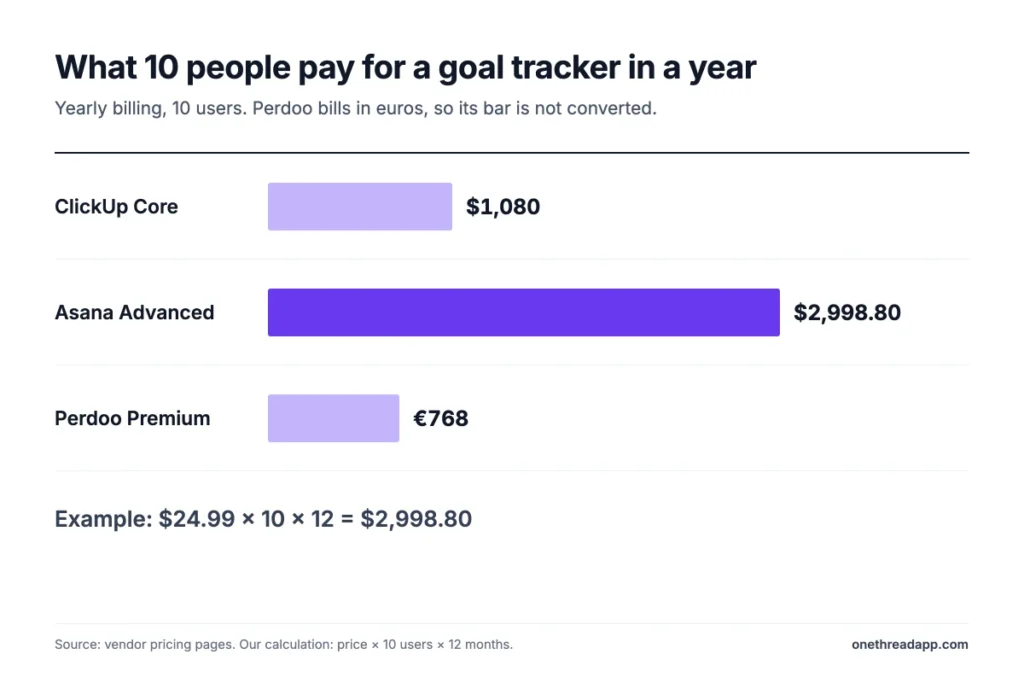
- A 10-person team pays $1,080 a year on ClickUp Core and $2,998.80 on Asana Advanced, the plans where those tools first include Goals. Perdoo Premium costs €768 for the same team.
- A goal tracker template in Google Sheets, Excel, Todoist or Notion costs nothing and fits one person. Move to an app when you need reminders, charts or team roll-ups.
- Tracking works. A meta-analysis of 138 studies found that monitoring progress made people more likely to reach goals, so choose the tool you will open every week.
Which Goal Tracker Fits Which Goal?
Each goal tracker handles a different kind of goal, and none handles all of them. The table shows the first paid plan where each tool's goal features appear.
| Tool | Best for | Goals on the free plan | First paid plan with goal tools, per user a month |
|---|---|---|---|
| Griply | Personal goals with habits | Yes, 2 goals | $4.16 |
| Todoist | A goal template inside a to-do app | Yes, within 5 projects | $5 |
| Notion | Custom goal pages and databases | Yes | $10 |
| ClickUp | Goals tied to project tasks | Trial only | $9 |
| Asana | Company, team and personal goals | No | $24.99 |
| Perdoo | OKR tracking | Yes, up to 5 users | €6.40 |
| Onethread | Goals delivered as projects | No goal module | $5 |
Sources: the pricing pages of Griply, Todoist, Notion, ClickUp, Asana, Perdoo and Onethread. Prices are yearly billing in US dollars, except Notion, which lists monthly prices only, and Perdoo, which bills in euros. Griply and Todoist Pro price one user. The Best for column is our judgment.
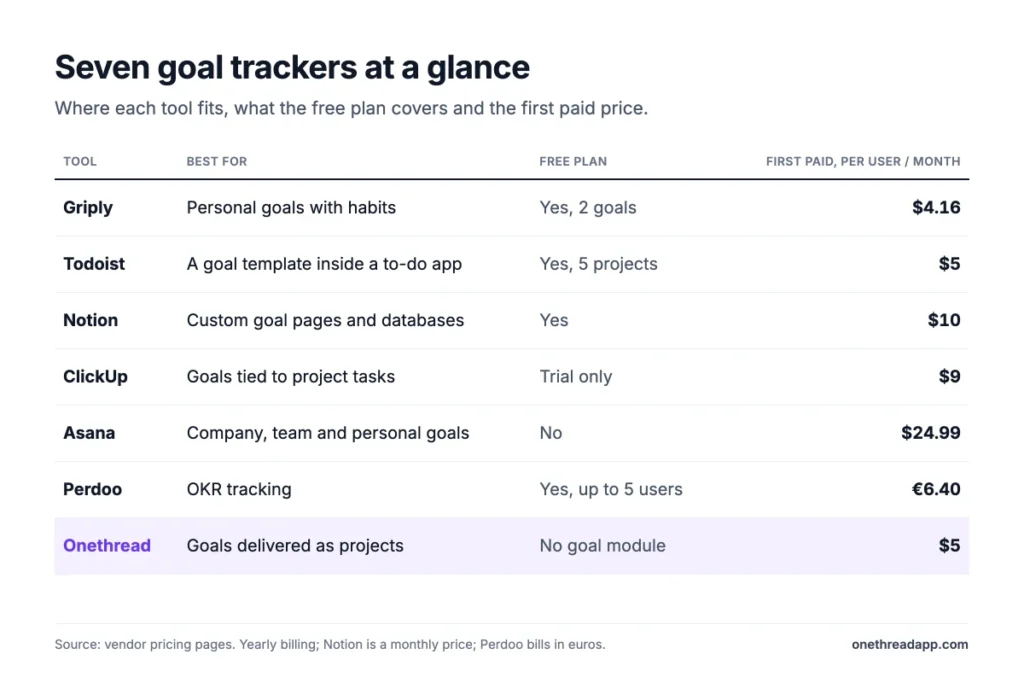
We read seven pricing pages and ten top-ranking pages, then checked four things for each tool:
- Goal type: Whether it tracks personal goals, team goals, OKRs or projects.
- Free plan: What a person can track before paying.
- Progress view: How the tool shows progress, such as charts, statuses or automatic updates.
- Where goals start: The plan that first includes goal tools, since some sit behind a higher tier.
Why Choose Griply for Goal-First Planning?
Griply works as a goal planner that puts goals ahead of tasks. You map your life into areas such as career and health, then hang goals, habits and tasks beneath each one.
Say you want to run a half marathon and save a house deposit. Griply keeps each goal as its own plan, with a habit for the weekly run and tasks for the deposit. Tasks can carry a metric, so finishing one moves the goal.
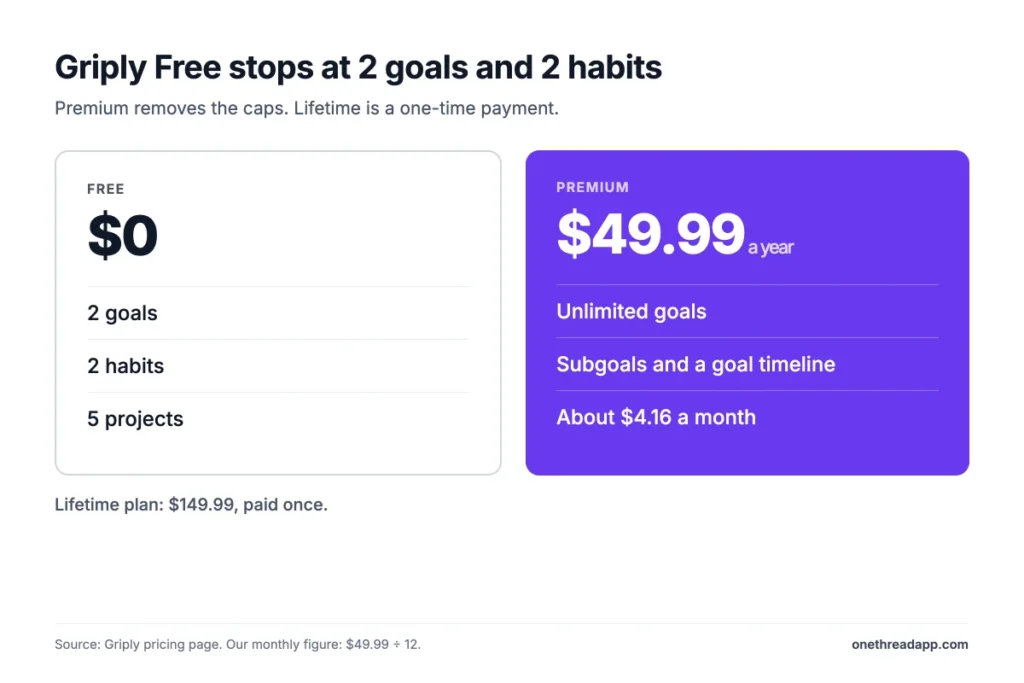
The Free plan includes 2 goals, 2 habits, 5 projects and goal progress charts. Premium adds unlimited goals, subgoals, a goal timeline and a goals and habit dashboard.
Premium also adds calendar and timeblocking, so you can plan the week around your goals. Griply's own page says users switch to it from Todoist, TickTick and Things 3.
Pricing: Free. Premium costs $49.99 a year (about $4.16 a month), and Lifetime costs $149.99 once.
Best For
- Individuals who want goals, habits and tasks in one planner.
Pros
- The Free plan includes goal charts and habit statistics.
- Premium adds subgoals, a goal timeline and timeblocking.
- Lifetime removes the subscription.
Cons
- The Free plan caps you at 2 goals and 2 habits.
- The pricing page mentions iOS widgets and a web login, but not Android.
- It lists no team plan.
Why Choose Todoist for a Simple Goal Tracker?
Todoist turns a goal into a project you already open every day. Its free Goal Tracker template links high-level goals with daily actions, so the goals stay visible all year. You copy it into your account and adjust it.
Say your goal is 12 articles by June. You add one task per article with a due date, and the list shows what's left.
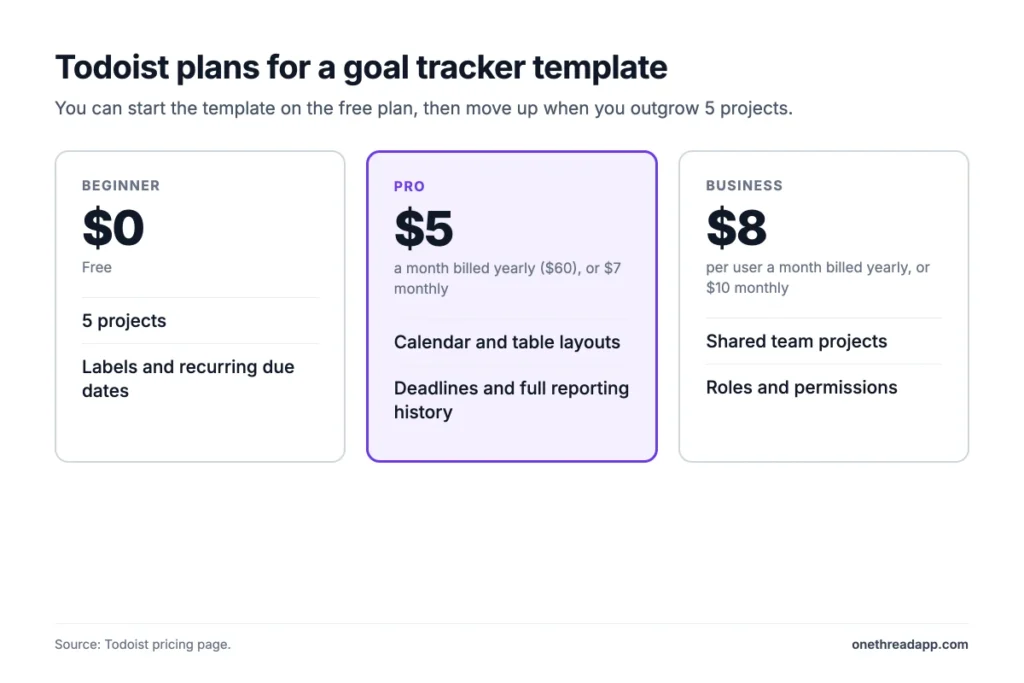
The free Beginner plan includes 5 personal projects, sub-tasks, labels and recurring due dates. Pro adds calendar and table layouts, deadlines and full reporting history.
That reporting history matters for goals. A tracker you can look back on shows whether you kept pace in March or only in January.
Pricing: Free. Pro costs $60 a year, which is $5 a month, or $7 billed monthly. Business costs $8 per user a month billed yearly, or $10 monthly.
Best For
- Anyone who already plans the day in a task list.
Pros
- The template is free and takes a minute to copy.
- The free plan includes sub-tasks, labels and recurring due dates.
- Business adds shared team projects, roles and permissions.
Cons
- Todoist presents the goal tracker as a project template, not a dedicated goals feature.
- The free plan keeps 1 week of reporting history.
- Calendar and table layouts need Pro.
Why Choose Notion for Custom Goal Pages?
Notion lets you shape a goal tracker to your own system. Its Personal Goals category lists goal planners, milestone trackers and motivation boards from individual creators.
Databases on the free plan support subtasks, dependencies and custom properties, so one table can hold goals, targets and deadlines. Say you run a 90-day plan: each goal becomes a row, with a status column you update on Fridays.
Solo users get unlimited pages and blocks on Free. Workspaces with several members face a block limit.
Notion also asks for more setup than a purpose-built app. You pick the columns, the views and the review habit, which suits tinkerers and slows everyone else.
Pricing: Free. Plus costs $10 per member a month and Business costs $20. Yearly billing saves up to 20%, but the page lists no yearly figure.
Best For
- People who enjoy building their own system from a template.
Pros
- Solo users get unlimited pages and blocks for free.
- Databases support subtasks, dependencies and custom properties.
- Notion Calendar comes with the free plan.
Cons
- Free workspaces with several members can add only a limited number of blocks.
- Free page history covers 7 days.
- You build and maintain the system yourself.
- The pricing page lists no yearly Plus figure.
Why Choose ClickUp for Goals Tied to Tasks?
ClickUp links a goal to the work that moves it. Task Targets update automatically as linked tasks are completed, and numerical targets track items measured as numbers or true and false.
Say you link every task in a sprint to one goal. The goal moves as the sprint closes.
Goal Folders group goals for sprint cycles, OKRs or weekly scorecards, and they show progress percentages across several goals in one view. You can also set deadlines and assign one or more owners to each goal.
A numerical target suits counted work, such as five social media posts in a week. ClickUp tracks the count against that target.
Pricing: Free Forever includes a Goals trial. Core costs $9 per user a month billed yearly (regular price $12), and Business costs $17 (regular price $25). The page lists no monthly prices. Our ClickUp pricing guide covers every plan.
Best For
- Teams that already run projects in ClickUp.
Pros
- Progress updates automatically from linked tasks.
- Core includes Goals at $9 per user.
- Targets can be numbers, true or false, or linked tasks.
- Each goal takes owners and permissions.
Cons
- Free Forever offers only a Goals trial.
- Goal Folders need Business, Enterprise or Max.
- The pricing page shows yearly prices only.
Why Choose Asana for Company and Team Goals?
Asana Goals works at three levels: company, team and individual. Each goal is an objective, a key result or an individual goal, and objectives break into sub-goals.
Progress can be manual or automatic from linked sub-goals, projects and apps such as Salesforce. Each goal carries a status of on track, at risk or off track.
Say a team's key result links to three projects. As those projects close, the key result moves, and dashboards show progress across the company. A goal can stay public to the organization or go to specific people, including comment-only access.
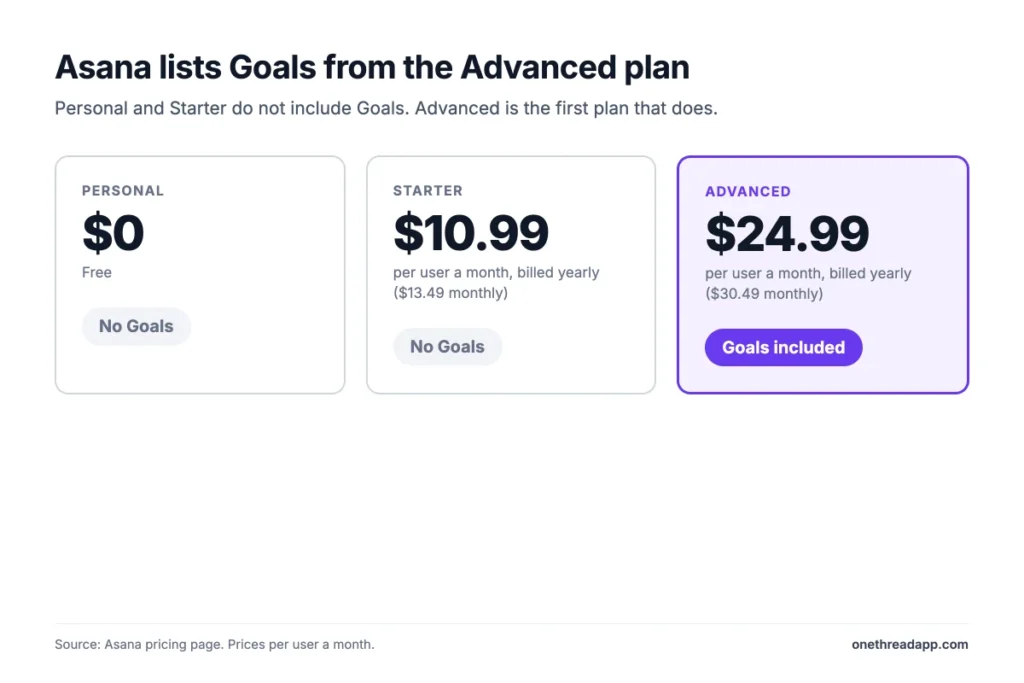
Pricing: Personal is free. Starter costs $10.99 per user a month billed yearly or $13.49 monthly, and neither plan lists Goals. Advanced costs $24.99 yearly or $30.49 monthly and does. Our Asana pricing guide breaks down the seats.
Best For
- Mid-size teams that must show how team work supports company objectives.
Pros
- Goals link to projects, portfolios, tasks and company objectives.
- Timeframes run by quarter, half, year or custom range.
- Goal templates and sharing controls are available.
- Progress can update from sub-goals and Salesforce data.
Cons
- Goals start at the $24.99 Advanced plan.
- Advanced costs more than twice Starter's $10.99.
- The page mentions OKRs but describes no dedicated OKR workflow.
Why Choose Perdoo for OKR Tracking?
Perdoo starts from OKRs, which makes it the most focused tool here. Teams create objectives with key results and KPIs, each with an owner, and a strategy map shows how goals cascade from the top.
Weekly check-ins and automatic status reports keep the rhythm going. Slack and Microsoft Teams let people update goals where they already chat, and Jira, Salesforce and HubSpot connect too. An AI Assistant drafts objectives and summarizes check-ins.
The Free plan covers up to 5 users with OKRs and KPIs, strategy maps, cascade views, meetings and mobile apps.
Say a five-person startup wants one shared set of quarterly goals. Perdoo's free tier fits that case, and the first paid tier starts when the sixth person joins.
Pricing: Free for up to 5 users. Premium costs €6.40 per user a month and Supreme costs €8.00 in the annual view of the pricing page.
Best For
- Companies that run quarterly OKRs and need goals to cascade.
Pros
- The Free plan includes OKRs, KPIs and strategy maps.
- Check-ins and status reports are built in.
- Slack and Microsoft Teams integrations update goals in chat.
Cons
- The Free plan stops at 5 users.
- Prices are in euros.
- Board views, KPI boards and performance reviews sit on Supreme.
Why Choose Onethread When Goals Are Delivered as Projects?
Onethread tracks the work behind a goal, not the goal itself. It organizes work into phases, milestones, tasks and subtasks with dependencies and a critical path, and it shows progress on dashboards built from widgets.
Say the goal is a product launch by March. You plan it as phases and milestones, assign the tasks, and watch the Gantt chart and dashboard show how close you are.
One limit to be honest about: Onethread's features page lists no goals or OKR module. Use it where a goal is a project with a due date, or pair it with a goals sheet. See the Onethread plans for the details.
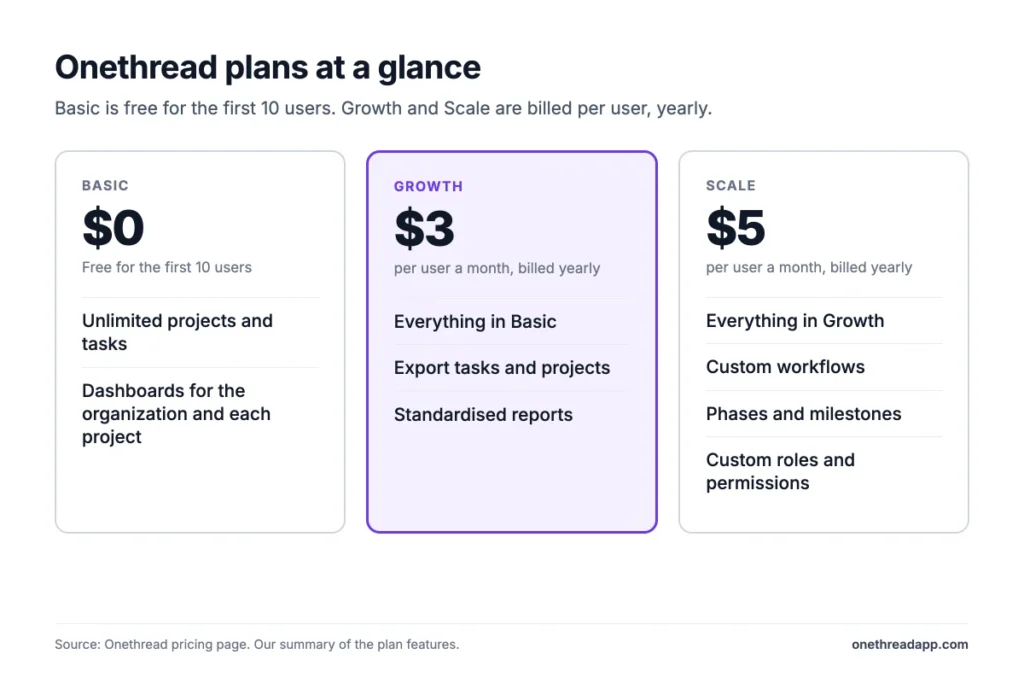
Pricing: Basic is free for the first ten users. Growth costs $3 per user a month billed yearly, and Scale costs $5.
Best For
- Teams whose goals are deliverables with dates, such as launches and client projects.
Pros
- Basic includes unlimited projects and tasks, plus dashboards for the organization and each project.
- Dependencies, a critical path and Gantt charts show whether a deadline holds.
- The free plan covers the first ten users.
Cons
- It lists no dedicated goals or OKR feature.
- Phases and milestones sit on the Scale plan.
- The free plan allows a maximum of three workflows.
What Should a Goal Tracker Template Include?
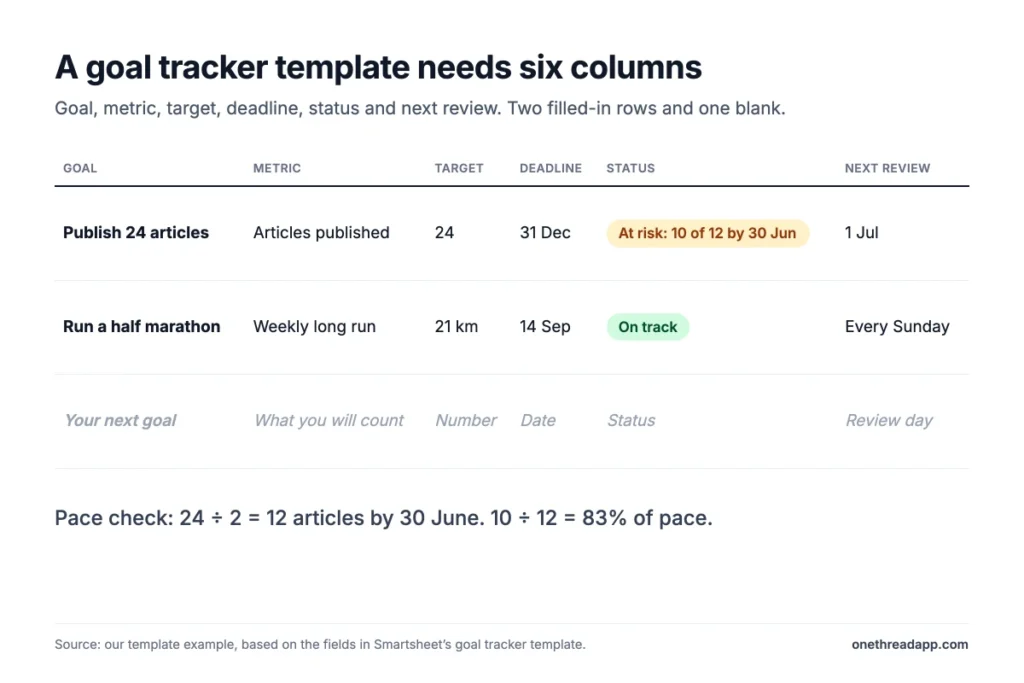
A goal tracker template needs six columns: goal, metric, target, deadline, status and next review. Smartsheet's goal tracker template groups goals by category, highlights priorities and adds progress charts across weekly, monthly, quarterly and yearly views. It comes in Excel and Google Sheets.
- Goal: One sentence that names the outcome.
- Metric: The number you will count.
- Target: The number that means done.
- Deadline: The date you will check it.
- Status: On track, at risk or off track.
- Next review: The day you will update the row.
Add an owner column if more than one person edits the sheet. In Google Sheets, a drop-down in the status column keeps labels consistent. A chart over the target column gives you visual progress at a glance.
Example: The goal is 24 articles this year. By 30 June the pace line says 24 ÷ 2 = 12, and 10 are published. That is 10 ÷ 12 = 83% of pace, so the status is at risk.
Smartsheet also suggests pairing a lagging number, such as articles published, with a leading one, such as drafts started each week. If the goal itself feels vague, tighten it first with our SMART goals guide.
Top Tip: Track one goal for two weeks before you add more. A short list you update beats a long one you don't.
What Is an OKR Tracker, and Who Needs One?
An OKR tracker is a goal tracker built for objectives and key results. You set one ambitious objective, add a few measurable key results, and score them at the end of the cycle. A quarter is the usual cycle, so a tracker should make every score easy to compare.
Andy Grove created the method at Intel, and John Doerr named it OKRs and introduced it to Google's founders in 1999, per What Matters. The same page says to track OKRs regularly and grade them at the end of the cycle.
Example: The objective is a painless onboarding. Key result one moves week-one activation from 40% to 60%. If it reaches 50%, the score is (50 − 40) ÷ (60 − 40) = 50%.
OKRs and SMART goals solve different problems. A SMART goal tests one target for clarity, while OKRs tie a stretch objective to several measurable results. A good OKR tracker shows who owns each result, scores it on a fixed rhythm and links it to the objective above.
One team can run OKRs in a spreadsheet. Past that, Perdoo, Asana Goals or ClickUp Goal Folders keep the cascade and weekly check-ins in one place. Our OKRs guide covers how to write them, and the free OKR generator drafts a first set.
Why Does Goal Tracking Work, and What Should an App Do?
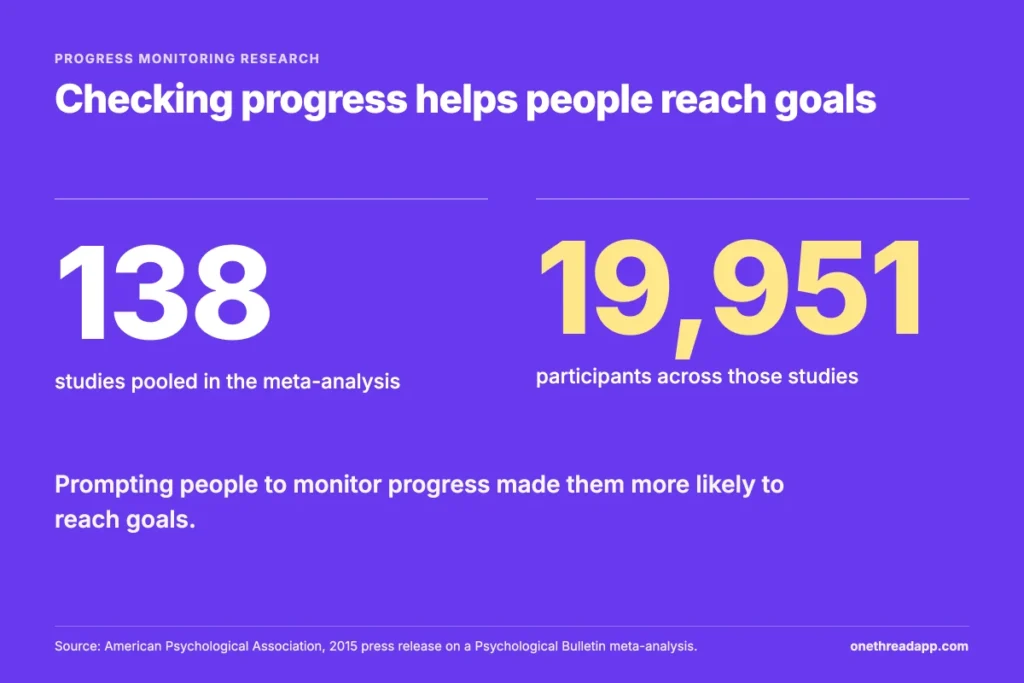
Goal tracking works because checking progress changes behavior. A meta-analysis in Psychological Bulletin pooled 138 studies and 19,951 participants. It found that prompting people to monitor progress made them more likely to reach goals. More frequent monitoring tied to greater success.
Recording progress physically or reporting it publicly had an even larger effect. Monitoring a behavior, such as what someone eats, mainly changed that behavior, while monitoring the outcome, such as weight, mainly changed the outcome. One caveat: most studies covered personal health goals, so treat the result as a strong hint for work goals, not proof.
ClickUp's guide lists four features that put that finding to work:
- Reminders: Nudges that bring you back on your review day, before the number goes stale.
- Goal breakdown: Milestones or subtasks that carry their own deadlines.
- Progress view: Bars, streaks or percentages, not just a stored number.
- Sharing: Goals that a partner or team can follow, which adds light accountability.
A habit tracker covers daily actions, and Strides offers Habit, Target, Average and Project trackers. Use a goal tracker when the finish line has a date, and a habit tracker when the win is repetition. Griply pairs habits with goals, and ClickUp links goals to tasks.
How Do You Pick the Right Goal Tracker?
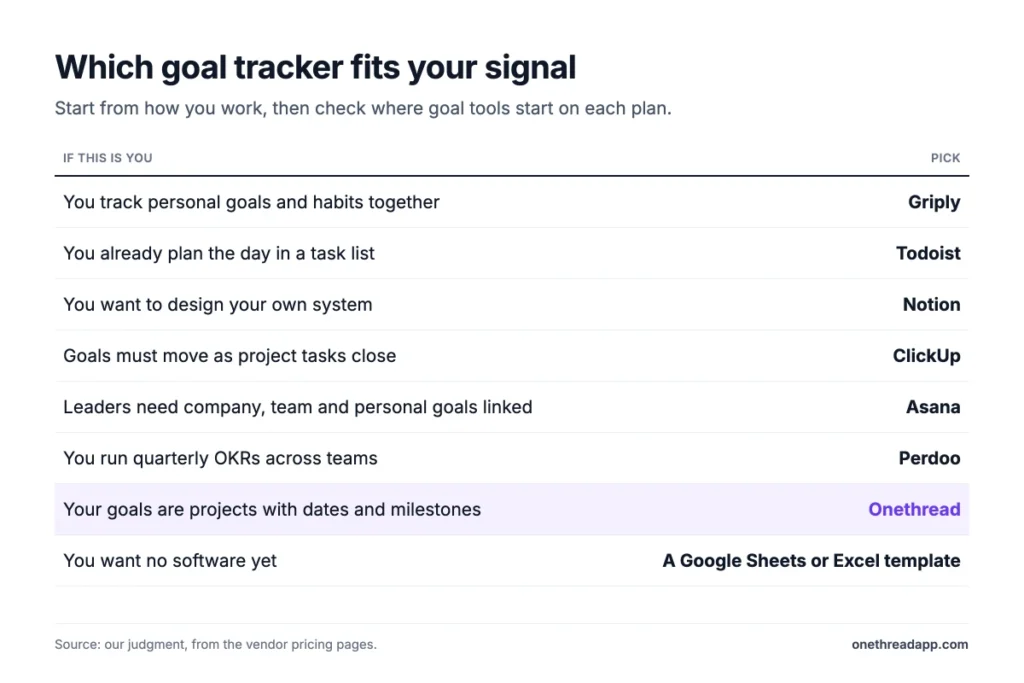
Match the tool to the goal you can't drop, then check where its goal tools start. Goal tracking is one part of a wider stack, so our best productivity apps list covers the rest.
| Signal | Pick |
|---|---|
| You track personal goals and habits together | Griply |
| You already plan the day in a task list | Todoist |
| You want to design your own system | Notion |
| Goals must move as project tasks close | ClickUp |
| Leaders need company, team and personal goals linked | Asana |
| You run quarterly OKRs across teams | Perdoo |
| Your goals are projects with dates and milestones | Onethread |
| You want no software yet | A Google Sheets or Excel template |
Price decides close calls for teams. Example: Ten people on ClickUp Core pay $9 × 10 × 12 = $1,080 a year. Ten on Asana Advanced pay $24.99 × 10 × 12 = $2,998.80, and ten on Perdoo Premium pay €6.40 × 10 × 12 = €768. Use your own headcount.
Top Tip: Check which plan includes goals before you subscribe. Asana lists Goals only from Advanced, and ClickUp's Free Forever offers a trial.
If your goal is hours rather than outcomes, see our time tracking tools list.
What Should You Do Next With Your Goal Tracker?
Goal tracking works when the tool matches the goal and you open it weekly. Personal goals fit Griply, Todoist or Notion, team goals fit ClickUp or Asana, OKRs fit Perdoo, and projects with dates fit Onethread. The table shows where goal tools start on each plan, so you won't pay for a feature that sits on a higher tier.
This week, write one goal with a metric, a target and a deadline. Put it in the free plan of your top pick, then book a ten-minute review for the same day every week.
FAQs
What Is a Goal Tracker?
A goal tracker is a tool that records a goal, a target number, a deadline and your progress toward it. It can be an app, a spreadsheet or a template. The best versions show progress at a glance and prompt you to update it every week, so the number never goes stale.
Can a Free Goal Tracker Be Enough?
Yes, for one person. Griply's Free plan includes 2 goals and 2 habits, Todoist's free plan includes 5 personal projects, and Perdoo's free plan covers up to 5 users. Teams that need roll-ups across many goals usually outgrow free tiers.
Is There a Goal Tracker Template for Google Sheets?
Yes. Smartsheet offers a goal tracker template in Excel and Google Sheets, plus daily and monthly versions. Todoist and Notion offer templates you copy straight into your own account, so a spreadsheet isn't the only route, and a free one works.
Are Goal Tracking Apps Better Than Task Management Apps?
Not always. A task app lists what to do, while a goal tracker adds a target, a deadline and a progress view. If your tasks already roll up to a goal, as they do with ClickUp Task Targets, a task app may be enough.