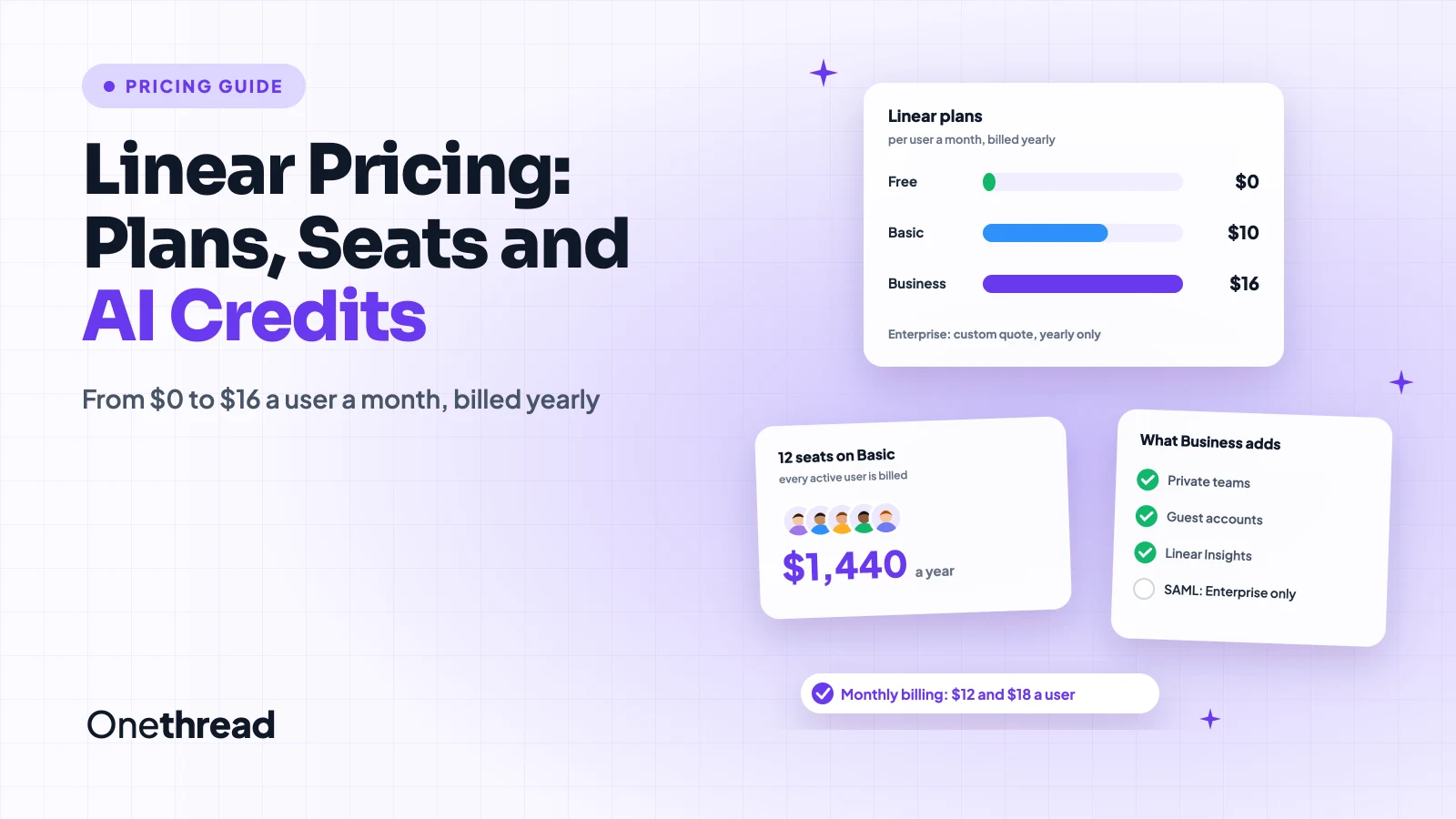
Linear looks cheap on the pricing page. Then the first invoice counts every seat.
Linear pricing starts with a Free plan for unlimited members, 2 teams and 250 issues. Basic costs $10 a user a month and Business $16, billed yearly. Paid monthly, they cost $12 and $18. Enterprise is a custom quote.
So where do bills creep up? Every active user counts. Guests can count too. AI coding runs bill on top.
We checked Linear’s pricing page and billing docs, then compared six top-ranking guides.
You’ll see what each plan costs for your team size and which one to pick.
Key Points
- Linear costs $0 on Free, $10 a user a month on Basic and $16 on Business when billed yearly, or $12 and $18 on monthly billing. Enterprise is quoted by sales and billed yearly only.
- Count your seats before you choose. Linear bills every active user in the workspace, so 12 people on Basic cost $1,440 a year.
- Pay yearly once your team size is stable. It saves $24 a user each year on both paid plans.
- Pick Business only if you need private teams, guests, Insights or support intake. Most small product teams fit on Basic.
How Much Does Linear Cost Per Month?
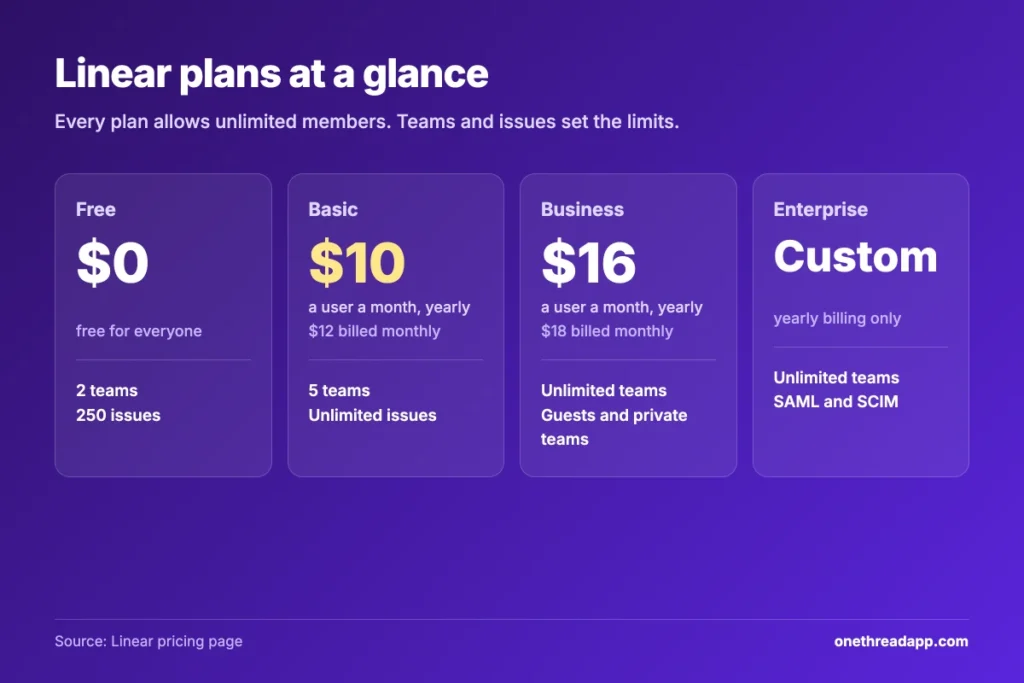
Linear costs $0 to $18 a user a month, depending on the plan and how you pay. The yearly price is the one Linear shows first. Monthly billing adds $2 a user on both paid plans.
| Plan | Billed yearly | Billed monthly | Teams | Issues |
|---|---|---|---|---|
| Free | $0 | $0 | 2 | 250 |
| Basic | $10 a user a month | $12 a user a month | 5 | Unlimited |
| Business | $16 a user a month | $18 a user a month | Unlimited | Unlimited |
| Enterprise | Custom quote | Not offered | Unlimited | Unlimited |
Every plan allows unlimited members. The real limits are teams and issues. Each plan also includes the core tools: issues, projects, cycles, initiatives, the API and the Linear Agent.
Sources: Linear pricing page, Linear billing and plans docs, Linear AI credits docs.
What Does the Linear Free Plan Include?
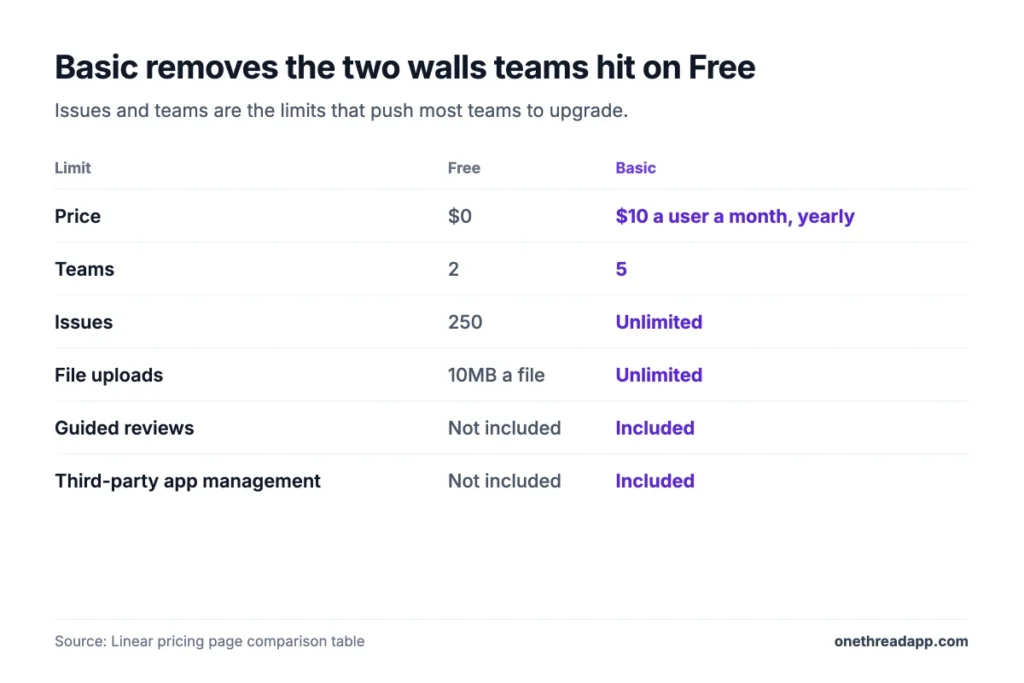
The Linear Free plan costs nothing and has no time limit. It grants unlimited members, 2 teams and 250 issues. File uploads stop at 10MB each.
You still get the core of Linear. That means issues, projects, cycles, triage, the API, integrations and the Linear Agent. Single sign-on is Google only.
Say you run a side project with three friends. Free will hold you for weeks. But a busy team fills that cap fast. Once you pass it, you can’t create new issues until you upgrade.
Nothing gets deleted at that point. Your old issues stay readable, and the workspace keeps working. You just can’t add new work. Two teams is the other wall, since most companies want product and platform split apart.
Pricing: $0, with no time limit.
Best For
- Solo builders, side projects and teams testing Linear before they pay.
- Small groups that log fewer than a few hundred issues in total.
Pros
- No member limit, so the whole team can try it.
- Core issues, projects and cycles work like the paid plans.
- API, webhooks and integrations are included.
Cons
- The issue cap stops new work once you hit it.
- Only 2 teams, so cross-team setups don’t fit.
- Uploads cap at 10MB a file, and there’s no SAML sign-in.
What Does Linear Basic Add for $10 a User?
Linear Basic removes the two limits that push teams off Free. Issues and file uploads go unlimited, and you get 5 teams instead of 2. It also adds admin roles, guided reviews and control over third-party apps.
For a 10-person startup, that’s the whole upgrade most need. One team for product, one for platform, one for bugs, with room to spare.
Basic doesn’t add private teams or guests. If a client or contractor needs access, they’d join as a full member. That means a full seat on the bill, too.
Here’s the thing: most teams never miss what Business adds. If all your work is internal and you run fewer than 6 teams, Basic covers the daily flow. Issues, cycles, projects, triage and the API all work the same.
Pricing: $10 a user a month billed yearly, or $12 on monthly billing.
Best For
- Small product and engineering teams of up to 5 groups that work in the open.
Pros
- Unlimited issues and uploads for $10 a user.
- Five teams cover most startups.
- Admin roles and app controls keep the workspace tidy.
Cons
- No guest accounts, Insights or Asks.
- Every active user is billed, even light users.
- The 5 team limit can pinch growing orgs.
What Does the Linear Business Plan Add for $16?
The Linear business plan is built for teams that need privacy and outside input. It adds unlimited teams, private teams and guest accounts. It also adds Linear Insights, Triage Intelligence, Code Intelligence and Linear Asks for Slack and email intake.
Support tools sit here too. Zendesk and Intercom connect to issues, and you can set issue SLAs and triage rules. Releases allow 15 pipelines.
Picture a team that shares a roadmap with a client while keeping security work private. That’s the Business use case.
The jump is $6 a user a month on yearly billing. For 10 people, that’s $720 more a year than Basic. Worth it if guests and intake replace another tool you pay for. Not worth it if nobody opens Insights.
Pricing: $16 a user a month billed yearly, or $18 on monthly billing.
Best For
- Teams that work with clients, contractors or a support desk.
- Companies with more than 5 teams that need to keep some work hidden.
Pros
- Guests and hidden teams control who sees what.
- Insights and AI triage help larger backlogs.
- Support integrations link tickets to engineering work.
Cons
- Costs 60% more than Basic for every seat.
- Dashboards and web forms still need Enterprise.
- SAML and SCIM aren’t included.
What Does Linear Enterprise Cost?
Linear Enterprise has no public price. You contact sales for a quote, and it’s billed yearly only. Vendr’s buyer data shows a median Linear contract of $22,800 a year, with deals from $5,937 to $68,440.
Enterprise adds what security and IT teams ask for. You get SAML and SCIM, IP restrictions, domain claiming, an audit log and HIPAA support. Dashboards, web forms and sub-initiatives also live here.
You also get priority support, an account manager, custom terms and an uptime SLA. Billing can run on invoice or purchase order. Salesforce sync is an add-on.
One caveat worth being honest about: Vendr’s figure mixes deal sizes and seat counts. It tells you the range buyers pay, not what your quote will be. Ask sales for a per-seat price, a renewal cap and the seat minimum in writing.
Pricing: Custom quote, annual billing only.
Best For
- Large or regulated companies that need SSO, audit logs and contracts.
- IT teams that must manage users through SCIM.
Pros
- SAML, SCIM and an audit log for IT control.
- Account manager and priority support.
- Invoice and purchase order billing.
Cons
- No public price, so you can’t budget without a call.
- No monthly option, so you commit for a full year.
- Salesforce costs extra.
How Does Linear Pricing Work for Seats and AI Credits?
Linear pricing has two parts most teams miss. Seats are charged for every active user. AI coding work bills from a separate prepaid balance. Both sit outside the price on the plan card, so check them before you sign up.
Linear Bills Every Active User
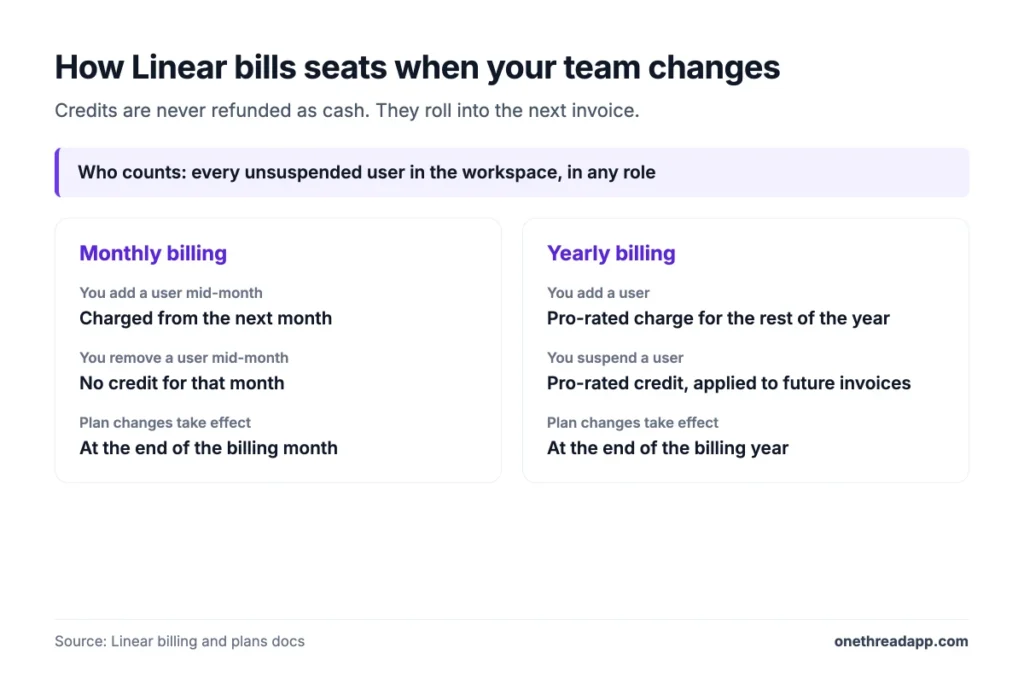
Linear charges for each unsuspended user in the workspace, in any role. Light users count the same as full-time engineers. That’s why “I have to pay for all members?” is a common Reddit thread title.
Example: 8 engineers plus 4 people who only comment make 12 seats. On Basic that’s 12 × $10 × 12 = $1,440 a year, not $960.
On monthly billing, a new user is charged from the next month. On yearly billing, Linear adds a pro-rated charge. Suspended users earn a credit, but credits aren’t refunded.
AI Credits Bill by Usage
Linear AI credits pay for the cloud coding agent and Loops. Other AI features are included in your plan. Credits are a prepaid balance in US dollars, shared by the whole workspace.
The smallest top-up is $10, and auto-reload starts at $50. A typical Loop run costs $0.07 to $0.20. Coding sessions bill model tokens at the provider’s rate, with no markup, plus sandbox time.
Top Tip: Set a spend limit under Usage and limits before anyone starts agents. Admins can’t yet restrict which members spend credits, and added funds expire after 12 months.
How Much Can You Save on Linear?
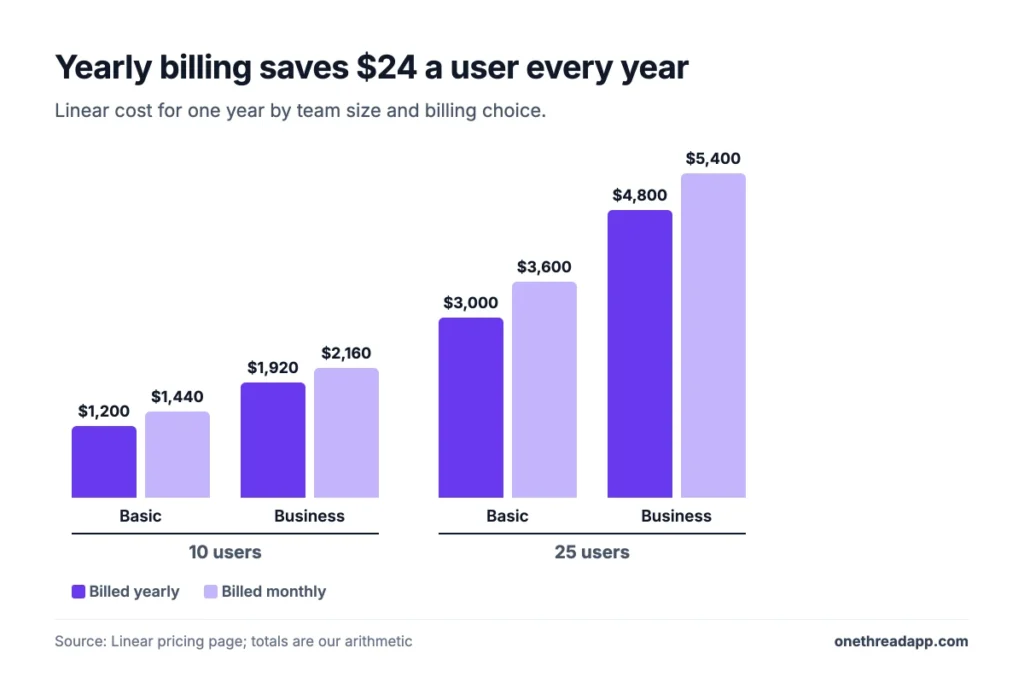
Paying yearly is the simplest saving. It cuts $2 a user a month on both plans, or $24 a user a year. That’s about 17% off Basic and 11% off Business.
| Team size | Basic yearly | Basic monthly | Business yearly | Business monthly |
|---|---|---|---|---|
| 10 users | $1,200 | $1,440 | $1,920 | $2,160 |
| 25 users | $3,000 | $3,600 | $4,800 | $5,400 |
Linear’s own billing docs suggest starting monthly and moving to yearly later. That’s sound advice if your seat count still moves each month.
Discount programs cut deeper. Nonprofits get 75% off Basic and Business, which brings Basic to $2.50 a user on the yearly rate. Full-time students get a free year, and university staff get 75% off. Startups in Linear’s partner program get up to 6 months of Business free.
How Does Linear Pricing Compare to Jira and Onethread?
Linear costs more than Jira for a 10-person team, and much more than Onethread. We priced 10 users for one year on annual billing.
| Tool | First paid plan | 10 users for a year | Best for |
|---|---|---|---|
| Linear | $10 a user a month | $1,200 | Product teams that want speed |
| Jira | $950 a year for 1 to 10 users | $950 | Teams that need deep workflow rules |
| Onethread | $3 a user a month | $360 | Teams that want projects and tasks at a low price |
Jira’s Free plan covers up to 10 users, so a small team can pay nothing there. Check each vendor’s page before you buy, since prices change. The Best for column is our own read.
If you’re weighing more tools, our best project management software roundup ranks the field. For the Jira side, see our Jira vs ClickUp comparison and the ClickUp pricing guide. Onethread’s plans sit on our Onethread pricing page.

Which Linear Plan Should Your Team Pick?
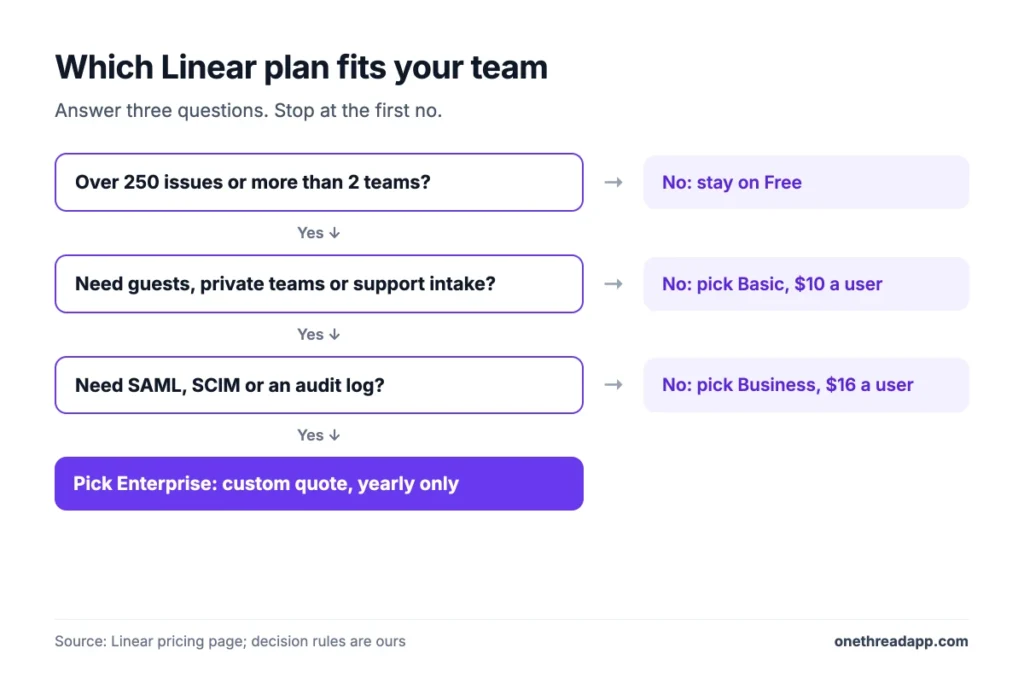
Most small product teams should pick Basic. Move up only when a specific need forces it.
| If your team | Pick |
|---|---|
| Has under 250 open issues and 2 teams | Free |
| Needs more issues or up to 5 teams | Basic |
| Works with clients, guests or a support desk | Business |
| Needs SAML, SCIM or an audit log | Enterprise |
Scrum teams that run sprints should compare cycle features too. Our list of agile and scrum project management tools covers that angle.
What Should Your Team Do Next With Linear?
Linear’s price list is short, but the bill depends on your seat count and billing choice. Basic at $10 a user covers most small product teams, while Business only pays off when you need privacy, guests or support intake. Now you can price your own team, plan by plan, before the first invoice arrives.
This week, export your member list and mark who logs in each week. Then multiply that number by $120 for Basic or $192 for Business, and you’ll have your yearly Linear budget in one clear line.
FAQs
What Does Linear Pricing Mean?
In economics, linear pricing means every unit costs the same, with no bulk discount. Linear the app follows that model. Linear pricing charges a flat rate for each seat, so 20 users cost twice as much as 10. Enterprise deals are the exception, since they’re negotiated case by case.
Does Linear Have a Free Trial?
Linear doesn’t list a free trial for its paid plans. Instead, the Free plan works with no time limit, so you can test issues, cycles and projects first. Linear’s billing docs also suggest starting on monthly billing, then switching to yearly once your team settles.
Is Linear Free for Students?
Yes, full-time students get one year free for student-led programs, clubs and class work. University staff get 75% off Basic and Business instead. You apply by emailing Linear support from a .edu address with proof of enrollment or employment. High schools and online-only schools don’t qualify.
Is the Linear App Legit?
Yes, Linear is a real, widely used issue tracker, and its pricing page says more than 50,000 companies use it. Billing runs through standard monthly or yearly plans managed by workspace admins. If you want to test Linear pricing risk-free, start on the Free plan before you add a card.
Does Linear Charge for Guests?
Guest accounts come with Business and Enterprise only. Linear’s billing docs say it charges for every unsuspended user in any role. We read that as guests counting toward your bill, so confirm with Linear before you invite a large client group.