Pipedrive just got cheaper, and most price guides haven’t caught up.
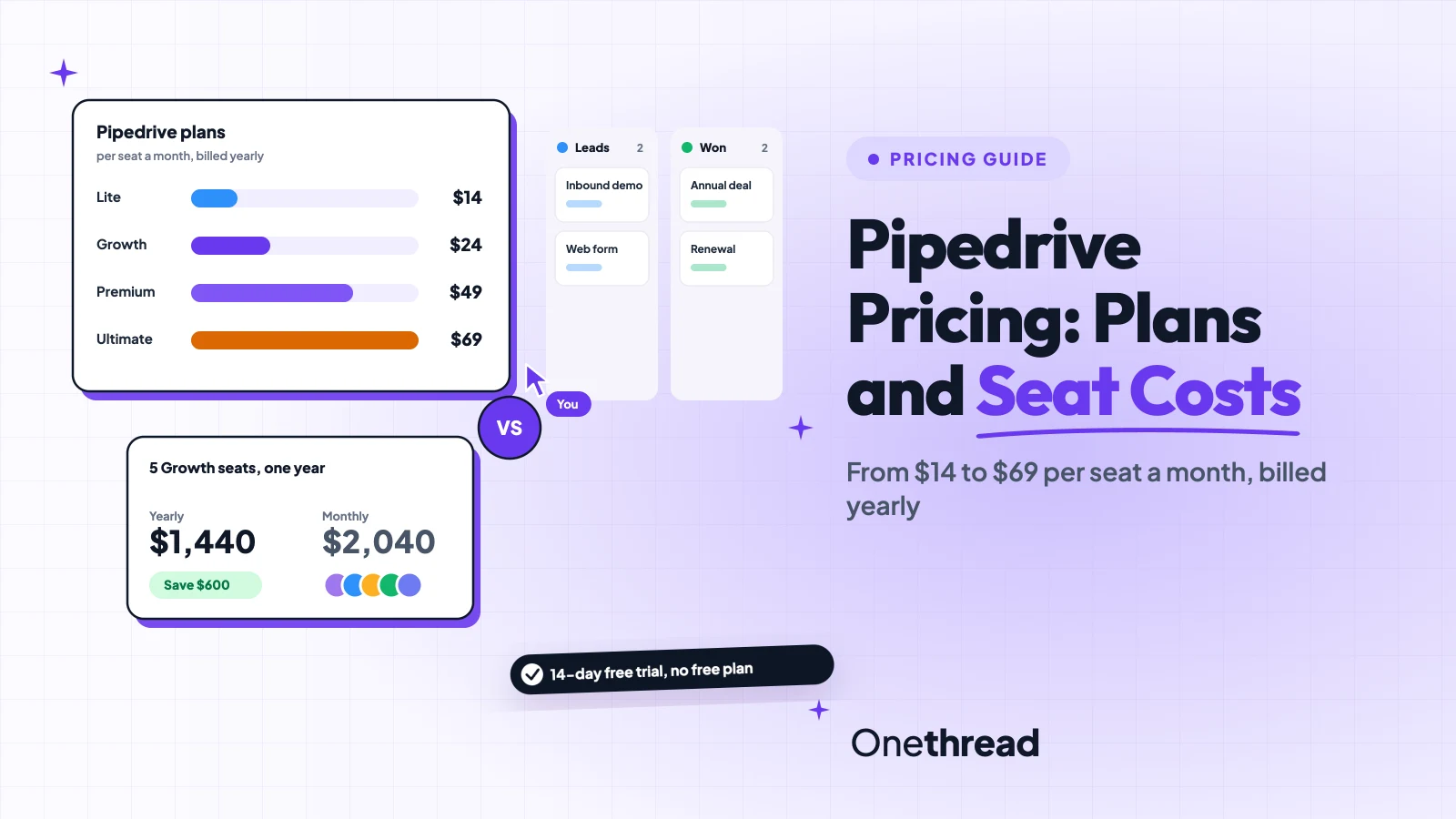
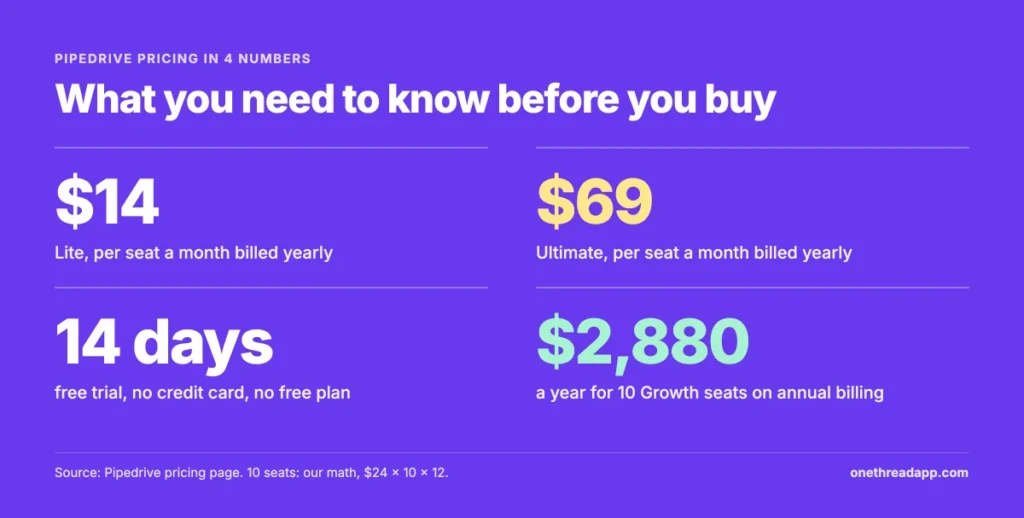
Pipedrive pricing runs $14 to $69 per seat a month on annual billing: Lite $14, Growth $24, Premium $49 and Ultimate $69. Monthly billing costs $19 to $89 per seat.
The plan price is only part of the bill. You pay for every seat, filled or empty, and LeadBooster, Campaigns and Web Visitors cost extra on lower plans.
We read Pipedrive’s pricing page, its full plan comparison table and its billing help articles. Then we did the math for teams of 5 and 10.
Here’s what each plan includes, which limits push an upgrade, and what your team will pay in a year.
Key Points
- Pipedrive pricing per seat a month is $14 (Lite), $24 (Growth), $49 (Premium) and $69 (Ultimate) on annual billing, or $19, $34, $64 and $89 billed monthly. There’s no free plan, only a 14-day free trial.
- Pick Growth if you need automations, two-way email sync or sequences. Lite has none of the three.
- Premium is the first plan that includes LeadBooster, Projects and Smart Docs. Check the add-on math before you pay for the jump from $24 to $49.
- Seats are billed whether anyone uses them or not, and seat cuts only apply at renewal. Remove unused seats 10 to 14 days before your renewal date.
What Does Pipedrive Pricing Look Like per Seat?
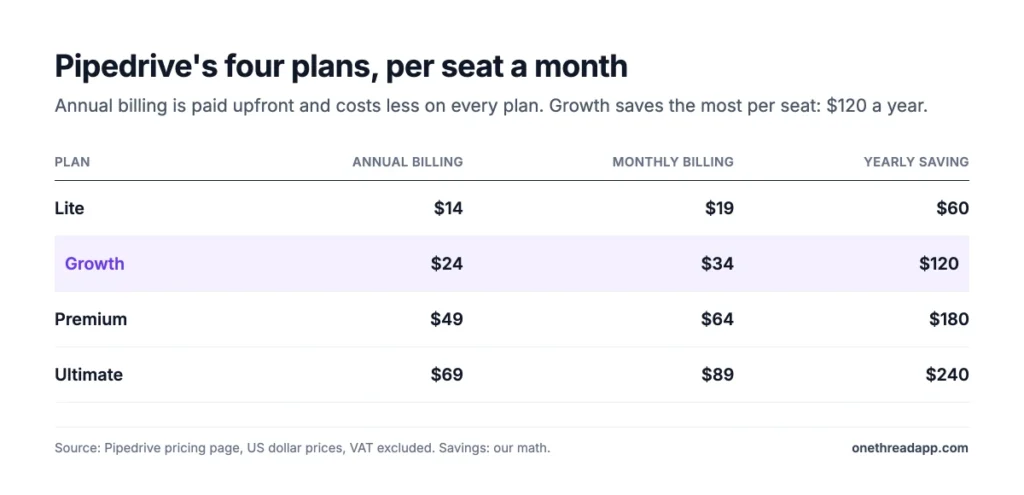
Pipedrive charges a flat price per seat, per month, on four plans. On annual billing you pay upfront for the year, and it costs less on every plan.
| Plan | Annual billing (per seat a month) | Paid upfront per seat a year | Monthly billing (per seat a month) | Yearly saving per seat |
|---|---|---|---|---|
| Lite | $14 | $168 | $19 | $60 |
| Growth | $24 | $288 | $34 | $120 |
| Premium | $49 | $588 | $64 | $180 |
| Ultimate | $69 | $828 | $89 | $240 |
Source: Pipedrive pricing page, US dollar prices. Savings are our math: monthly price times 12, minus the annual price.
Here’s the thing most guides miss. Many still list Growth at $39 and Ultimate at $79. Pipedrive’s pricing page now shows $24 and $69 on annual billing, so check the page before you trust an older quote.
Prices exclude VAT. EU customers pay VAT at their country’s rate unless they give a valid VAT number.
Sources: Pipedrive pricing page, How pricing works in Pipedrive, Billing when you change plans, Seat adjustments and billing, Web Visitors add-on, LeadBooster add-on.
Example: One Growth seat costs $34 × 12 = $408 a year on monthly billing, or $288 paid upfront. That’s $120 back for one billing choice.
The free trial lasts 14 days and needs no credit card. You can invite as many coworkers as you want during it.
What Does the Pipedrive Lite Plan Include?
Lite is the entry plan for people who want a clean sales pipeline and little else. It covers deal management, unlimited customizable pipelines, a products catalog, contact management and the mobile apps.
It also includes Pipedrive Nova meeting intelligence. That means pre-call briefs, call recording with summaries and transcripts, and CRM field updates drafted after each call.
The limits are tight. Lite allows 2,500 leads and deals per seat, 30 custom fields for the whole company and 15 reports per seat.
Say you’re a freelancer tracking 40 open deals. Lite fits. But Lite has no automations, no sequences and no two-way email sync, so every follow-up is manual.
That trade is fine while you’re the only seller. It stops being fine the week a second person joins and nobody knows who sent the last email.
Pricing: $14 per seat a month billed annually, which is $168 a year. Monthly billing costs $19 per seat.
Best For
- Solo sellers and small teams of two or three who log deals by hand.
- Teams that want the meeting recorder at the lowest price.
Pros
- Lowest price per seat of the four plans.
- Call recording, transcripts and pre-call briefs are included.
- SAML single sign-on and 24/7 live chat support on the entry plan.
Cons
- No workflow automations or email sequences.
- No two-way email sync with Gmail or Outlook.
- Visual dashboards are limited to the default ones.
What Does the Pipedrive Growth Plan Include?
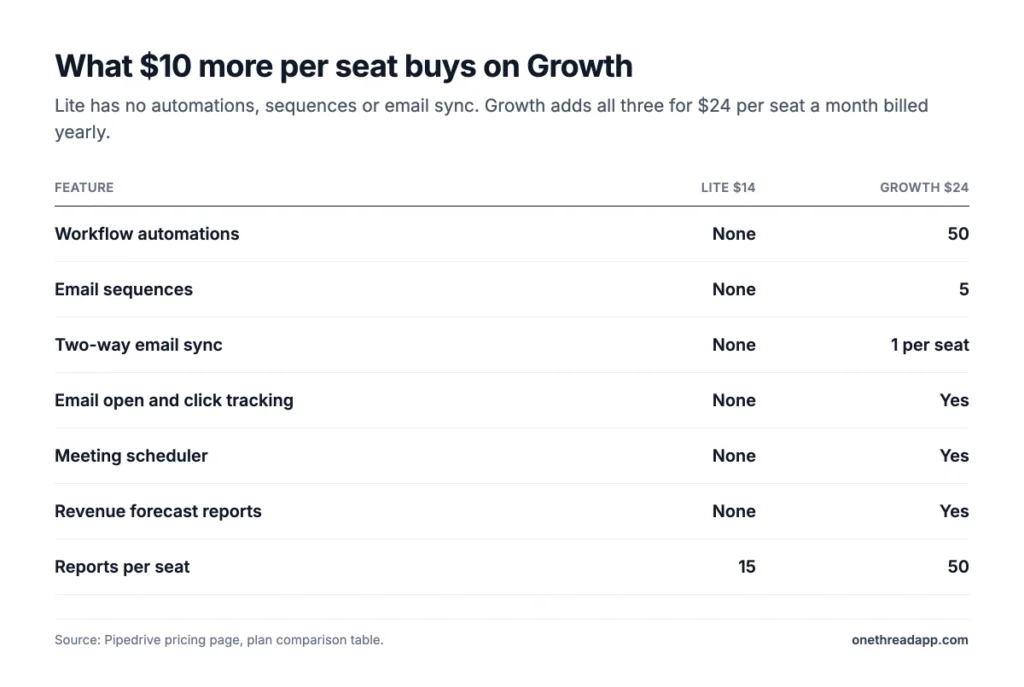
Growth is where Pipedrive starts doing work for you. It adds workflow automations, email sequences, two-way email sync and email open and click tracking.
The meeting scheduler, email templates, group emailing and revenue forecast reports also start here. So do product subscriptions and installments.
Growth raises the limits too: 5,000 leads and deals per seat, 100 custom fields, 50 reports per seat and 50 active automations per company.
Say your team of five sends the same follow-up after every demo. On Growth, one automation does it. On Lite, five people do it by hand, every time.
For most small teams, this is the plan where Pipedrive pricing is worth it. The extra $10 per seat buys back hours of manual follow-up.
Pricing: $24 per seat a month billed annually, which is $288 a year. Monthly billing costs $34 per seat.
Best For
- Small sales teams that want follow-ups to run on their own.
- Teams that live in Gmail or Outlook and need full email sync.
Pros
- 50 automations and 5 sequences per company.
- Two-way email sync, tracking and scheduling in one plan.
- The jump from Lite costs only $10 per seat a month on annual billing.
Cons
- LeadBooster, Projects and Smart Docs are still paid add-ons.
- Only one email sync per seat.
- No phone support, only chat.
What Does the Pipedrive Premium Plan Include?
Premium is the plan Pipedrive labels most popular. Its biggest change is bundling: LeadBooster, Projects and Smart Docs with e-signatures are included instead of sold as add-ons.
It also adds automatic lead and deal assignment, custom scoring, firmographic data enrichment, a team inbox and phone support. AI email writing, email summaries and AI deal notifications start here.
Limits jump again. Premium allows 15,000 leads and deals per seat, 300 custom fields, 250 reports per seat and 150 automations.
Say you route web leads to three reps by region. Automatic assignment handles it, and the LeadBooster chatbot and web forms feed it.
Premium also lifts the custom permission sets and visibility groups to 15 each. That matters once managers and reps need different views of the same deals.
Pricing: $49 per seat a month billed annually, which is $588 a year. Monthly billing costs $64 per seat.
Best For
- Teams that capture inbound leads and need to route them.
- Teams that send quotes and contracts from the CRM.
Pros
- LeadBooster, Projects and Smart Docs are included.
- Automatic assignment, custom scoring and data enrichment.
- Phone support plus 24/7 live chat.
Cons
- More than double the Growth price per seat.
- Email and phone enrichment still need Ultimate.
- Campaigns and Web Visitors remain paid add-ons.
What Does the Pipedrive Ultimate Plan Include?
Ultimate adds the rest of Pipedrive’s feature list. It’s the only plan with email and phone data enrichment, security alerts, security rules and a device history audit log.
It also adds a non-developer sandbox account, extended phone support and partner discounts. The pricing page lists 20% off PandaDoc and CloudTalk and 15% off Surfe.
The limits are the highest: 20,000 leads and deals per seat, 500 custom fields, 500 reports per seat and 250 automations.
Say your security team needs an audit trail of every login. That’s an Ultimate feature, and no add-on gets you there on Premium.
Ultimate also raises custom scores to 10 and API tokens to 210,000 per seat a day. Most teams under 20 seats never touch those limits.
Pricing: $69 per seat a month billed annually, which is $828 a year. Monthly billing costs $89 per seat.
Best For
- Larger sales teams with security or compliance rules.
- Teams that test changes in a sandbox before they go live.
Pros
- Security alerts, rules and a 60-day device history.
- Email and phone data enrichment with 500 credits.
- Highest usage limits on every counted feature.
Cons
- Campaigns and Web Visitors still cost extra.
- A $20 per seat jump over Premium on annual billing.
- Most small teams won’t use the security extras.
Which Limits in Pipedrive Pricing Push Teams to Upgrade?
Usage caps, not features, push most teams up a plan. Pipedrive counts some limits per seat and others per company, so a growing team hits them at different times.
| Limit | Lite | Growth | Premium | Ultimate |
|---|---|---|---|---|
| Leads and deals per seat | 2,500 | 5,000 | 15,000 | 20,000 |
| Custom fields per company | 30 | 100 | 300 | 500 |
| Reports per seat | 15 | 50 | 250 | 500 |
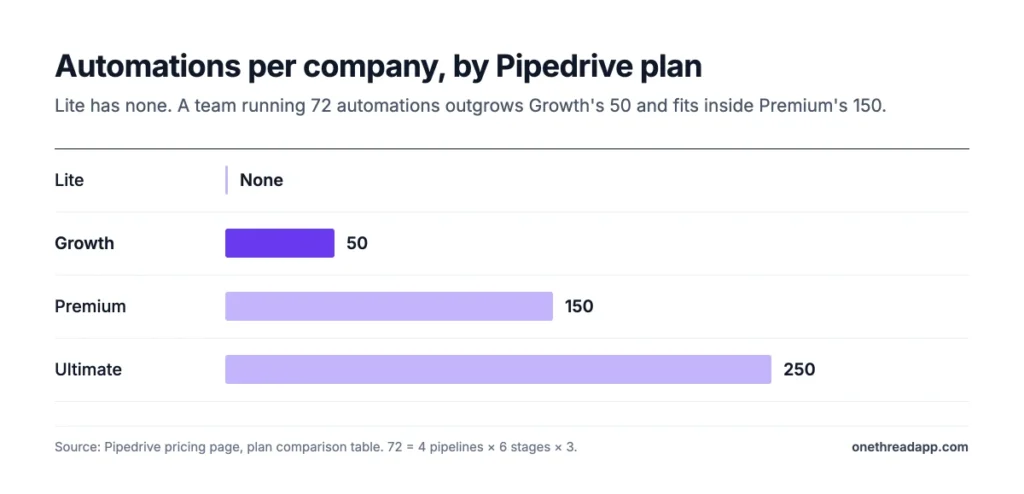
| Automations per company | None | 50 | 150 | 250 |
| Sequences per company | None | 5 | 25 | 50 |
| Email syncs per seat | None | 1 | 3 | 5 |
| Data enrichment credits | None | None | 100 | 500 |
Source: Pipedrive pricing page, plan comparison table. Leads and deals cap at 300,000 per company on every plan.
The automation cap is the one to watch. Fifty sounds like plenty until each pipeline stage gets its own follow-up, reminder and owner change.
Example: A team with 4 pipelines and 6 stages each, running 3 automations per stage, needs 4 × 6 × 3 = 72 automations. That’s past Growth’s 50 and inside Premium’s 150.
What Do Pipedrive Add-Ons Cost?
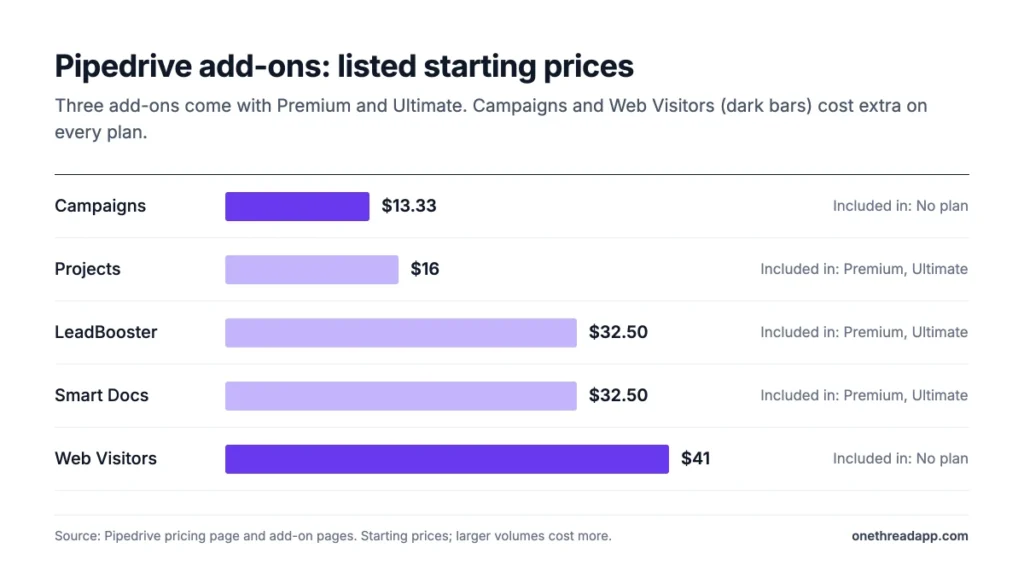
Pipedrive sells five add-ons, and three of them come free with Premium and Ultimate. Add-ons follow the same billing cycle as your plan.
| Add-on | Listed starting price | Included in |
|---|---|---|
| LeadBooster (chatbot, live chat, web forms, Prospector) | $32.50 a month per company | Premium, Ultimate |
| Smart Docs (quotes, contracts, e-signatures) | $32.50 | Premium, Ultimate |
| Projects (boards, tasks, subtasks) | $16 | Premium, Ultimate |
| Campaigns (email marketing) | $13.33 | No plan |
| Web Visitors (who visits your site) | $41 a month | No plan |
Source: Pipedrive pricing page and add-on pages. Starting prices; larger volumes cost more.
Web Visitors prices by how many companies it spots. Pipedrive’s add-on page lists $49 a month for up to 200 organizations, $99 for 201 to 500, and $299 for 501 to 2,000.
Projects is worth a second look. If your team already plans delivery work in a separate tool, you may not need it. Onethread, for example, handles projects and tasks from $3 per user a month on annual billing.
Top Tip: Don’t jump to Premium for LeadBooster alone. LeadBooster lists from $32.50 a month per company, while Premium adds $25 per seat a month on annual billing.
How Does Pipedrive Bill Seats?
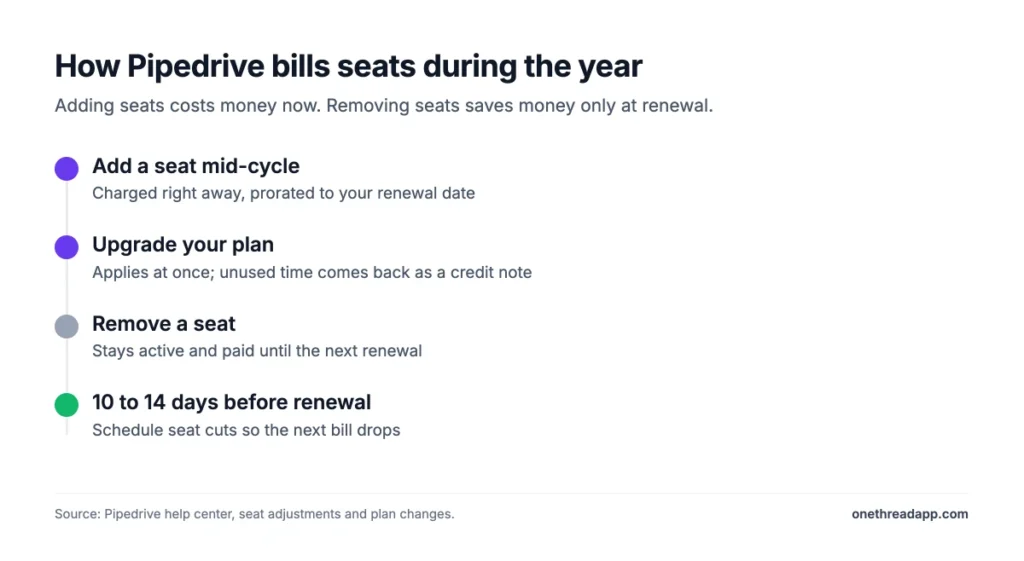
Pipedrive bills per seat, and a seat costs the same whether a user fills it or not. Its billing help article spells it out: four seats at $100 a year cost $400, used or empty. Adding and removing seats follow two different rules.
Adding Seats Mid-Cycle
New seats are prorated. On monthly billing, you pay for the days left until the next renewal, then the full price after that.
Annual plans work the same way. The extra seat is charged from the day you add it to your renewal date, and the renewal date doesn’t move.
Upgrades follow a similar rule. When you move to a higher plan mid-cycle, it applies at once. Pipedrive issues a credit note for the unused part of the old plan and applies it to the new invoice.
Removing Seats at Renewal
Seat cuts don’t save money right away. A removed seat stays active and paid until your next renewal date, on monthly and annual plans alike.
Pipedrive’s help center suggests scheduling seat reductions 10 to 14 days before your renewal date. Billing runs on UTC time, so a change made after the renewal time lands in the next cycle.
Example: You pay for 8 Growth seats on annual billing and one person leaves in month three. That seat still costs its full $288 for the year, so reassign it instead of leaving it empty.
What Does a 5 or 10 Person Team Pay for Pipedrive?
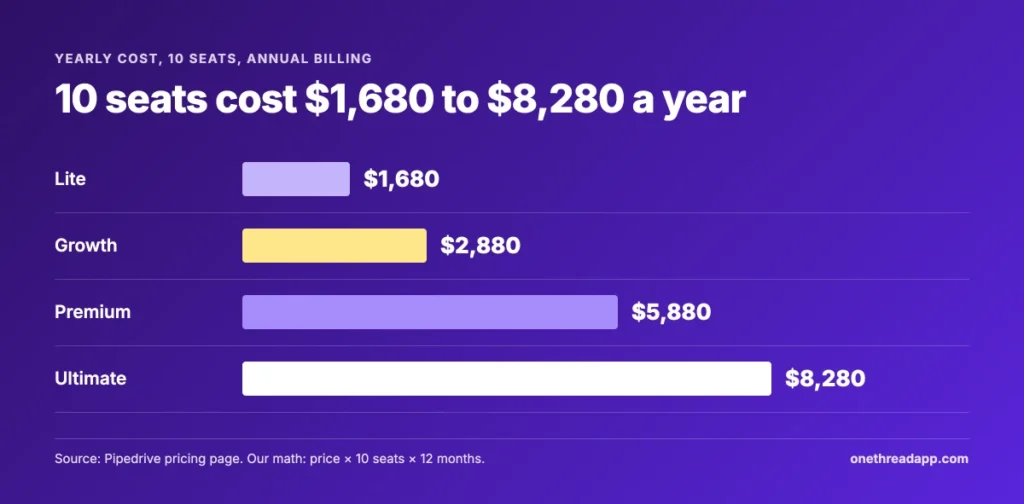
A 10-seat team pays $1,680 to $8,280 a year on annual billing, depending on the plan. Monthly billing raises that to $2,280 to $10,680.
| Plan | 5 seats, annual | 5 seats, monthly | 10 seats, annual | 10 seats, monthly |
|---|---|---|---|---|
| Lite | $840 | $1,140 | $1,680 | $2,280 |
| Growth | $1,440 | $2,040 | $2,880 | $4,080 |
| Premium | $2,940 | $3,840 | $5,880 | $7,680 |
| Ultimate | $4,140 | $5,340 | $8,280 | $10,680 |
Source: our math from Pipedrive pricing page prices. Seats × price × 12 months. Add-ons and VAT not included.
Example: Five Growth seats plus LeadBooster cost $1,440 + $32.50 × 12 = $1,830 a year. Five Premium seats cost $2,940. That $1,110 gap buys Projects, Smart Docs, automatic assignment and phone support.
Free setup help has a floor. Pipedrive says implementation is free on plans over $400 a year. Two Lite seats at $336 fall short, and two Growth seats at $576 qualify.
If the team-size math feels heavy, start with the biggest team and work down. It’s a lot to count once, and easy after that.
How Does Pipedrive Pricing Compare With Zoho CRM?
Pipedrive’s Lite plan and Zoho CRM’s Standard plan both start at $14 per user a month on annual billing. After that, the two split.
Zoho CRM Professional costs $23 per user a month billed yearly, about the same as Pipedrive Growth at $24. Zoho also offers a free plan for up to 3 users. Pipedrive has only the 14-day trial.
Here’s the problem with a straight price match. Pipedrive’s Lite plan has no automations at all, while each Zoho tier draws its own lines. Our Zoho CRM pricing guide breaks those limits down plan by plan.
For a wider shortlist, our roundup of CRMs for small businesses compares five tools on ease of use and cost. If you mostly manage client relationships after the sale, look at client management software instead.
Vendors change prices often, so check Zoho’s own pricing page before you compare totals. The Pipedrive figures above come from its pricing page.
Price per seat tells you less than the cost of the features you’ll use. Count the automations and add-ons first, then compare.
Those are the hidden costs that show up after the first month. A cheap seat with three paid add-ons can cost more than a pricier seat with them built in.
Which Pipedrive Plan Should You Choose?
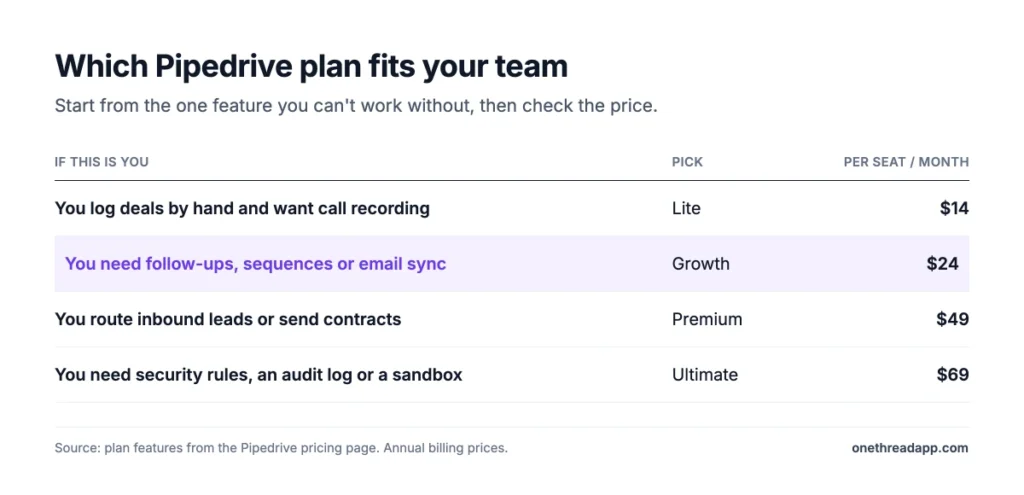
Pick the cheapest plan that covers the one feature your team can’t work without. This table pairs common needs with a plan.
| If this is you | Pick | Per seat a month, annual |
|---|---|---|
| You log deals by hand and want call recording | Lite | $14 |
| You need follow-ups, sequences or email sync | Growth | $24 |
| You route inbound leads or send contracts from the CRM | Premium | $49 |
| You need security rules, an audit log or a sandbox | Ultimate | $69 |
Three checks help you decide:
- Automations: Count the follow-ups you’d automate per pipeline stage, then compare with 50, 150 or 250.
- Add-ons: Price LeadBooster and Smart Docs on Growth against Premium for your seat count.
- Billing: Pay yearly only for seats you’re sure you’ll keep for 12 months.
Not sure yet? Use the 14-day trial to test the one feature you’d upgrade for. Pipedrive calls the trial full access, so you can check it before you pay.
Does your sales team also run client projects? Compare tools in our guide to project management software for small teams first. Then decide on the Projects add-on.
What Should You Do Next With Pipedrive?
Pipedrive’s prices are lower than most guides say, but the seat rules and add-ons decide your real bill. Growth at $24 is the sweet spot for small teams that need automation. Premium pays off when you need its routing and bundled tools together. Seat timing matters as much as the plan you pick.
This week, count your active sellers and your planned automations, then price Growth and Premium for that exact seat count. Then set a reminder two weeks before renewal to cut seats you no longer use. That one sheet will tell you more than any feature list.
FAQs
Is Pipedrive Free?
No. Pipedrive has no free plan. It offers a 14-day free trial with full access and no credit card, and you can invite your whole team during it. After the trial, Pipedrive pricing starts at $14 per seat a month on the Lite plan with annual billing, or $19 billed monthly.
Which CRM Is the Cheapest?
Among paid plans, Pipedrive Lite and Zoho CRM Standard tie at $14 per user a month on annual billing. Zoho CRM also has a free plan for up to 3 users, while Pipedrive has none. The cheapest choice depends on the features you need, since Pipedrive Lite has no automations at all.
Can You Switch From Monthly to Annual Billing in Pipedrive?
Yes. You can change your plan or billing frequency from the Billing page in your account settings. Upgrades apply right away, and Pipedrive credits the unused part of your old plan against the new invoice. Moving to annual billing cuts Pipedrive pricing by $60 to $240 per seat a year.
Is Pipedrive a Good CRM for Small Businesses?
Yes, for small teams that sell through a clear pipeline. Growth at $24 per seat a month on annual billing covers automations, email sync and sequences, which most small teams need. Teams that need a free plan or heavy marketing tools may find better value elsewhere.
Does Pipedrive Charge Setup Fees?
No. Pipedrive doesn’t list setup fees, and its pricing page says implementation is free on plans that cost over $400 a year. Two Growth seats on annual billing cost $576 and qualify, while two Lite seats at $336 don’t. Data migration from another CRM is part of the import tools on every plan.