Most onboarding stalls on a shared spreadsheet and a missing signature.
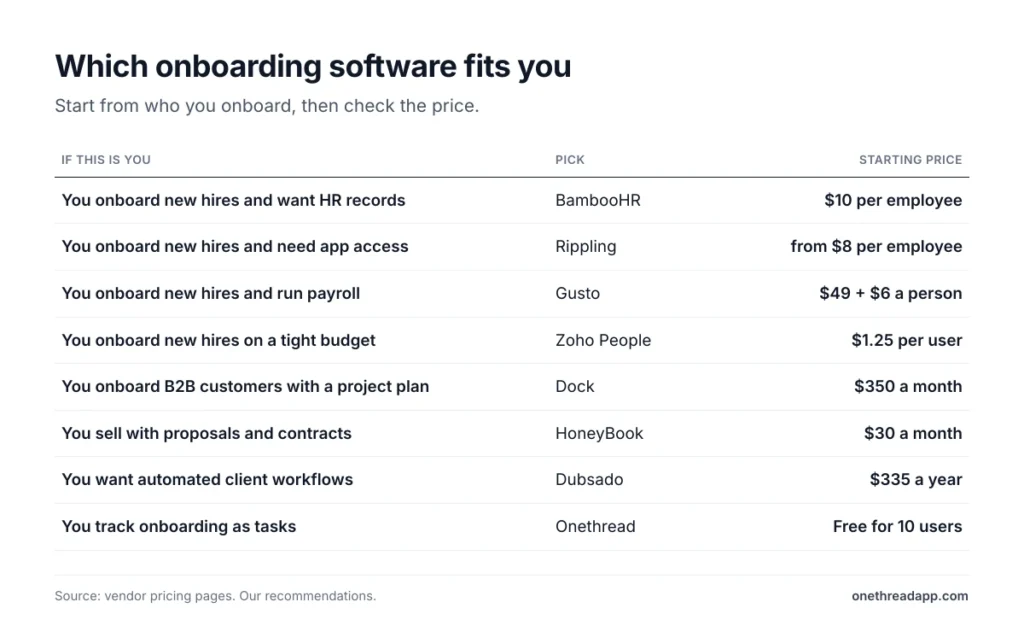
The best onboarding software for new hires is BambooHR, Rippling or Gusto. For new clients, it is Dock, HoneyBook or Dubsado. Prices run from free to $350 a month, and we list each one below.
Gallup finds only 12% of employees strongly agree their employer onboards well. Some teams hire. Others land clients. You might do both.
We priced eight tools and read six top-ranking guides.
You'll leave with a shortlist and a monthly cost.
Key Points
- Pick by who you onboard. BambooHR at $10 per employee a month, Rippling from $8 and Gusto at $49 plus $6 a person onboard new hires. Dock (free), HoneyBook from $30 a month and Dubsado from $335 a year onboard new clients.
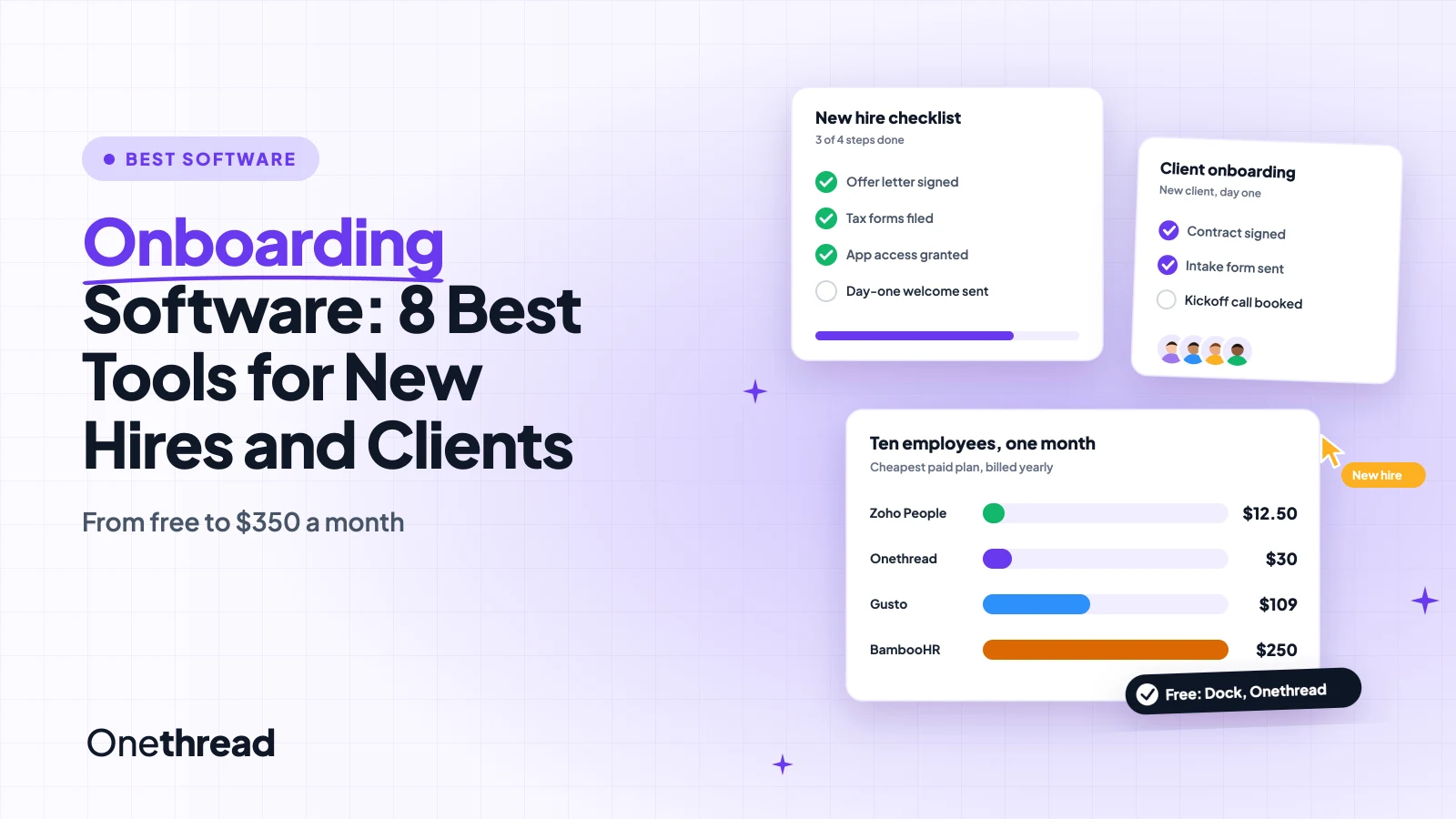
- Ten employees cost $12.50 a month on Zoho People, $109 on Gusto and $250 on BambooHR. Gusto's price includes payroll, so compare features before you compare totals.
- Free options exist, with limits. Zoho People's free edition lists no onboarding, Dock Free caps you at 10 workspaces, and Onethread is free for the first ten users.
- Ask what compliance costs. Gusto charges $20 per Remote I-9 submission, and BambooHR doesn't publish a price for I-9 and E-Verify.
Which Onboarding Software Fits Which Job?
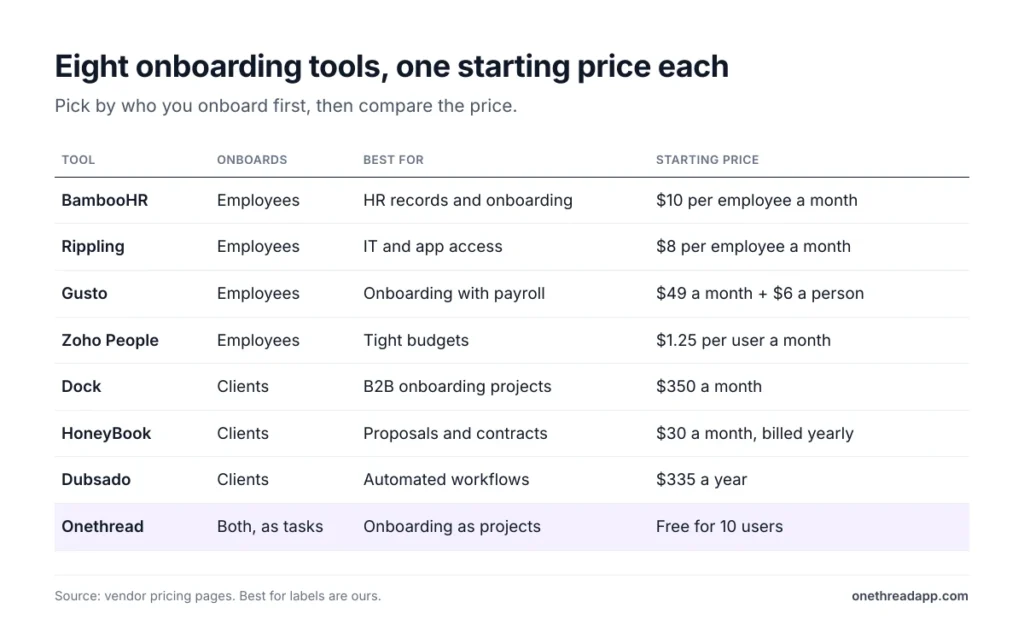
Each of the eight tools below fits one kind of onboarding better than the rest. The table shows the price of getting started.
| Tool | Onboards | Best for | Starting price | Free option |
|---|---|---|---|---|
| BambooHR | Employees | HR teams that want records and onboarding together | $10 per employee a month | None listed |
| Rippling | Employees | Teams that also manage IT and app access | $8 per employee a month, plus a base fee | Six months free for eligible startups |
| Gusto | Employees | Small teams that onboard and run payroll | $49 a month plus $6 a person | None listed |
| Zoho People | Employees | Small teams on a tight budget | $1.25 per user a month, billed yearly | Free edition for up to 5 users |
| Dock | Clients | B2B teams that run an onboarding project per customer | $350 a month | Free plan with 10 workspaces |
| HoneyBook | Clients | Freelancers and studios that sell with proposals | $30 a month, billed yearly | Free trial |
| Dubsado | Clients | Solo providers who want automated workflows | $335 a year | 21-day trial |
| Onethread | Both, as tasks | Teams that track onboarding as projects | Free for 10 users, then $3 a user a month | Free plan |
Prices are US dollars from each vendor's pricing page. Starting price means the cheapest paid plan, or the first price a vendor lists. The Best for labels are ours.
Here's how we compared the tools. We read each vendor's pricing page and onboarding page, then matched the tool to a job. A tool made the list when it publishes a price we can state. It also had to name its onboarding features on its own site.
That rule left out Moxo, whose pricing page lists no plans or prices. It also left out GuideCX and OnRamp, which Userpilot's roundup says don't list public prices. Vendors change plans often, so check the vendor's page before you buy.
What Is Onboarding Software and Who Needs It?
Onboarding software is a tool that automates the steps between a yes and a productive start. It collects documents and signatures, assigns tasks, sends reminders and shows progress through the onboarding process. Gartner's market definition centers on new hires, from pre-hire through about the first six months.
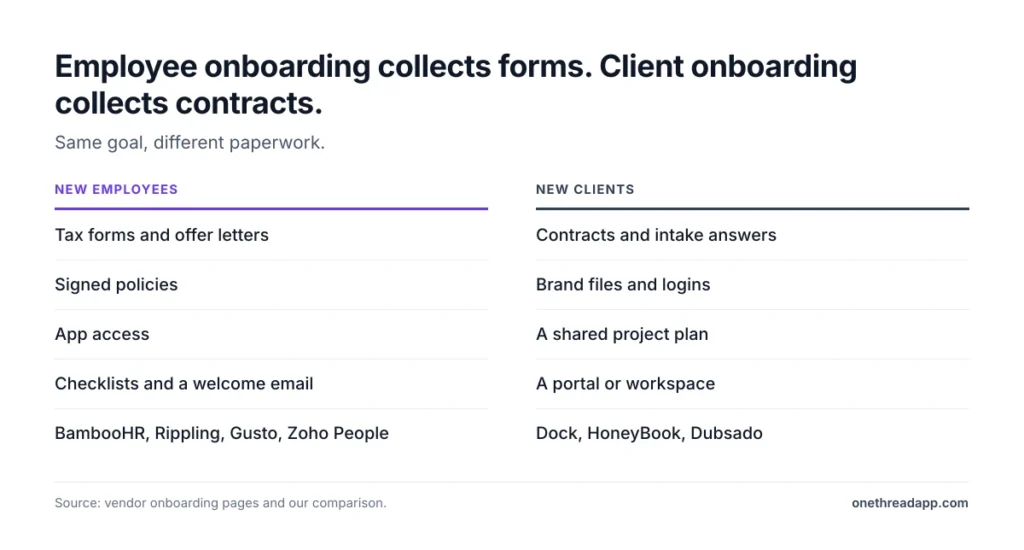
Client onboarding software does the same job for customers. Instead of tax forms, it collects intake answers, contracts and files.
The need is real on the employee side. Gallup reports that only 12% of employees strongly agree their organization does a great job onboarding. Enboarder's 2025 survey of 1,000 HR leaders found that 60.8% saw early attrition rise. Only 36% rated the handoff between recruiting, HR and hiring managers as smooth.
Three kinds of tools cover the job, and most teams need only one. HR platforms such as BambooHR and Gusto handle employee paperwork. Client workspaces such as Dock and HoneyBook handle contracts and shared plans. Project tools such as Onethread track the steps as tasks.
Our read: if two or more people touch each new start, you need a system. If one person does, a checklist may be enough. Either way, pick the tool after you list your steps, not before. A tool can't fix a process nobody wrote down.
Why Choose BambooHR for Employee Onboarding?
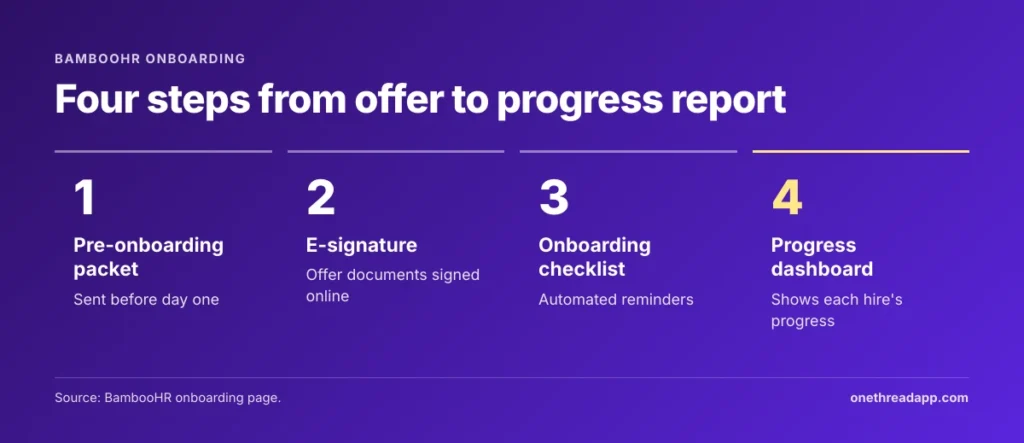
BambooHR puts onboarding inside its HR system, so a new hire's paperwork lands in their employee record. Its onboarding page lists pre-onboarding packets, e-signatures and checklists with automated reminders. A dashboard shows each hire's progress.
New hires can self-onboard before day one. When a candidate comes through BambooHR's applicant tracking, the page says their data pre-populates. I-9 and E-Verify workflows run through Mitratech, and offboarding uses the same checklist tools. The page also lists a Get to Know You welcome email and background checks.
Say you hire six people this quarter. Each gets a packet, signs offer documents online, and you watch one progress report instead of chasing emails.
Pricing: $10 per employee a month on Core, $17 on Pro and $25 on Elite above 25 employees. Teams of 25 or fewer pay a flat $250, $425 or $650 a month.
Best For
- HR teams that want onboarding, records and reporting in one system.
Pros
- Self-onboarding and e-signatures cover day-one paperwork.
- A progress dashboard shows who has finished which tasks.
- BambooHR lists 150+ integrations, including Checkr.
- Small teams get a flat monthly price.
Cons
- The pricing page shows $10 for Core, while its FAQ shows $10.25.
- We couldn't confirm which plan includes each onboarding feature.
- BambooHR doesn't publish a price for I-9 and E-Verify.
What Does Rippling Add to Employee Onboarding?
Rippling treats onboarding as one step in a bigger workflow that spans HR, IT and payroll. Its onboarding page lists document collection with automatic e-signature collection. It also lists one-click app access for tools such as Zoom and Teams.
Rippling claims you can "onboard employees and contractors in 90 seconds." That's the vendor's claim, so time your own first hire.
Say a designer starts Monday. Rippling can add them to Slack and your other apps from the same record that holds their tax forms.
The pricing model is modular. You add products as you grow, and payroll and bundles need a custom quote. The pricing page also says you can switch providers at any time, including mid-year. Rippling can import year-to-date payroll data.
Pricing: From $8 per employee a month, plus a monthly base fee. Eligible US VC-backed startups get six months free.
Best For
- Teams that want app access and HR paperwork in one platform.
Pros
- Document collection and e-signatures run together.
- One-click app access shortens the IT checklist.
- Modular pricing lets you start with one product.
Cons
- Only the $8 floor is published, and the page doesn't say what it covers.
- Payroll and bundles require a custom quote.
- The 90-second figure is a vendor claim.
Why Pick Gusto for Onboarding and Payroll Together?
Gusto starts as a payroll tool, and its onboarding rides on that account. The hiring and onboarding page lists customized offer letters and instant e-signatures. It also lists custom onboarding checklists and new-hire forms such as W-4s and I-9s.
Invite a hire to self-onboard and Gusto emails them to finish the paperwork. Every form is stored in your account. The page mentions a Complete plan for signing custom documents, a name that the pricing page doesn't list. That page shows Simple, Plus and Premium.
Remote I-9 verification is a $20 add-on, so ask about it before you hire remotely. Gusto's pricing page also lists fractional HR support for hiring and onboarding, and Premium adds HR guidance and a named advisor.
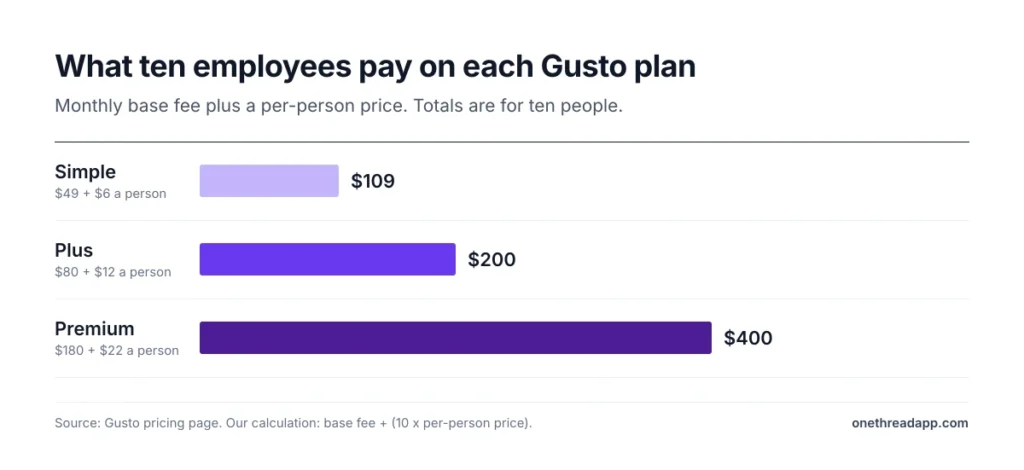
Example: Ten employees on Simple cost $49 + (10 x $6) = $109 a month, or $1,308 a year. The same ten people cost $200 on Plus and $400 on Premium.
Pricing: Simple costs $49 a month plus $6 per person. Plus costs $80 plus $12, and Premium costs $180 plus $22.
Best For
- Small teams that want onboarding and payroll in one account.
Pros
- Offer letters, e-signatures and checklists live together.
- Every plan includes unlimited payroll runs.
- Plans run month to month with no contract.
Cons
- Pricing covers payroll plans, with no separate onboarding price.
- Remote I-9 costs $20 per submission.
- Plan names differ between the pricing and onboarding pages.
How Does Zoho People Handle Onboarding on a Small Budget?
Zoho People is the budget pick for employee onboarding. Its free edition covers up to 5 users with an employee database, time-off and document management. Onboarding and offboarding start on Essential HR, at $1.25 per user a month billed yearly.
The onboarding page describes four phases: pre-onboarding, new hire welcome, role-specific training and integration into the organization. Candidates sign offer agreements, policies and tax forms before day one. A reports view tracks each stage with reminders.
A feature called Invite and Import in a Click converts candidates who finished onboarding into employees. Zoho People offers a 30-day free trial. It also sells a setup service called Jumpstart, with no price listed.
Pricing: Free for up to 5 users. Essential HR costs $1.25, Professional $2, Premium $3 and Enterprise $4.50 per user a month, billed yearly.
Best For
- Small teams that want onboarding at the lowest published price.
Pros
- Essential HR costs $12.50 a month for ten users, or $150 a year.
- The 30-day trial includes every feature of the plan.
- Offboarding sits in the same plan.
- A candidate converts to an employee record in one step.
Cons
- The free edition doesn't list onboarding.
- Local taxes are charged on top of the listed prices.
- The onboarding page doesn't name templates or task assignment as features.
How Does Dock Handle Client Onboarding?
Dock builds a shared workspace for each new customer. The workspace holds a project plan with milestones, task owners and due dates. It also holds files, forms, a resource library and a place for the customer to upload documents.
Templates make the setup repeatable. Dock's page also lists activity insights: who visited, which pages they viewed and how long they stayed. It integrates with HubSpot and Salesforce.
Say a software team lands a new account. The salesperson copies the template, adds the customer's name and shares the link. The customer sees their next tasks instead of a spreadsheet.
Our client management software guide covers what to track after the onboarding ends.
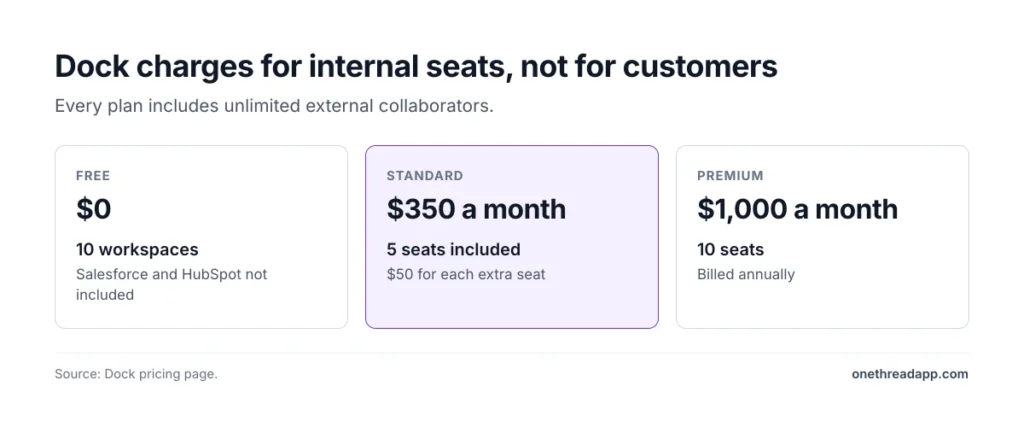
Pricing: Free with 10 workspaces. Standard costs $350 a month with 5 seats included and $50 for each extra seat. Premium costs $1,000 a month, billed annually, with 10 seats.
Best For
- B2B teams that run a multi-step onboarding project for every customer.
Pros
- The free plan includes 10 customer workspaces.
- Every plan includes unlimited external collaborators, because Dock charges only for internal seats.
- Activity insights show where a customer stalled.
- Templates make every customer's plan repeatable.
Cons
- Standard costs $350 a month.
- Free leaves out the Salesforce and HubSpot integrations.
- In our view, it's heavy for a solo freelancer.
What Does HoneyBook Offer for Client Onboarding?
HoneyBook suits freelancers and studios that sell services. Its Starter plan lists proposals and contracts, invoices and payments, and a client portal. It also lists professional templates, two live lead forms and unlimited clients and projects.
Onboarding runs as a sequence. A proposal leads to an e-signed contract and an invoice. Then clients open the portal to find files and project details.
The pricing page lists lead forms too: two on Starter, ten on Essentials and unlimited on Premium. Essentials adds automations, a scheduler and SMS reminders, and allows up to two team members.
If your clients need a dedicated login, compare more tools in our guide to project management software with a client portal.
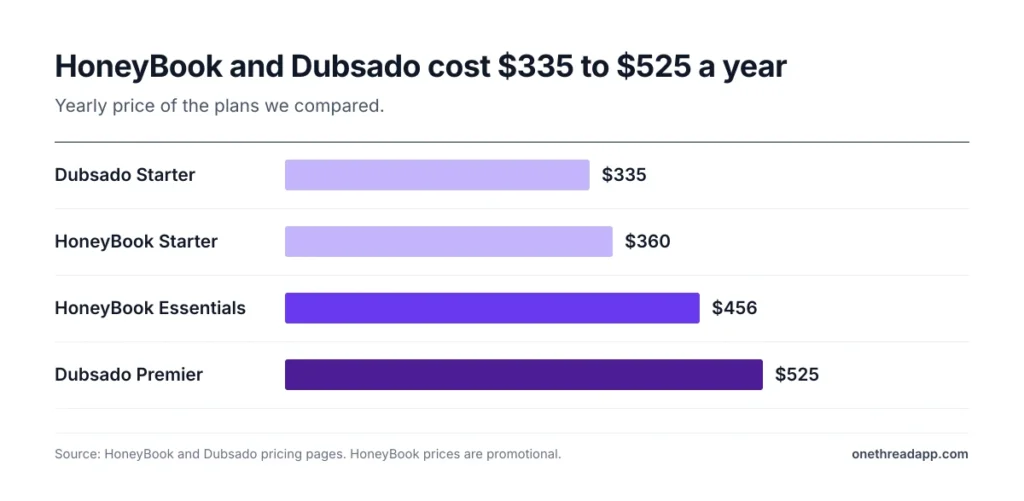
Pricing: Starter costs $30 a month billed yearly, which is $360 a year. Essentials costs $38, or $456 a year, and Premium costs $83. The page lists $36, $59 and $129 as reference prices and runs promotions, so check the live price.
Best For
- Solo service providers who sell with proposals, contracts and invoices.
Pros
- The client portal comes with every plan.
- Proposals, contracts and invoices share one flow.
- Every plan starts with a free trial.
- Contracts collect e-signatures on forms too.
Cons
- Automations start on Essentials, and the scheduler does too.
- Essentials allows only two team members.
- Payment fees start at 2.9% + 25 cents.
How Does Dubsado Automate Client Onboarding?
Dubsado automates it on the higher plan only. Both plans list client portals, form and email templates, invoicing with payment plans and unlimited projects and clients.
Starter allows one active lead capture form and no automated workflows. Premier adds unlimited lead forms, scheduling, automated workflows, public proposals and a Zapier integration.
Say a coach books a new client. On Premier, an onboarding workflow can run the repetitive steps. The coach sends the contract and questionnaire, and the workflow handles the reminders, so fewer manual emails go out.
Three extra users are free. Users four to ten cost $25 a month, and each extra brand costs $10 a month. The trial gives 21 days of full Premier access, with no credit card.
Example: Twelve months of Starter at $35 cost $420. The $335 annual price saves $85.
Pricing: Starter costs $35 a month or $335 a year. Premier costs $55 a month or $525 a year.
Best For
- Solo providers who want automated client workflows at a flat price.
Pros
- Annual billing saves two months.
- Client portals come with both plans.
- Three extra users are free, so a small team pays no seat fees.
Cons
- Automated workflows require Premier.
- Starter allows one active lead form.
- The pricing table doesn't list contracts.
How Can Onethread Run Onboarding Checklists?
Onethread is project management software, so it onboards through tasks rather than forms and e-signatures. A team can open one project per new hire or client. Each step becomes a task with an owner, a due date and a priority. Our features page lists tasks, subtasks, phases, milestones and dependencies.
A custom onboarding workflow on Scale can match your own stages. Task-level conversations keep questions next to the step they concern. Dashboards show each project's status at a glance. A wiki holds the welcome documents, and role permissions control who sees what.
Say an agency lands a client. It keeps one project per client, with tasks for the contract, the kickoff call and asset collection. Need to automate the steps? Our workflow automation roundup compares tools.
Pricing: Basic is free, and the first ten users in a company pay nothing. Growth costs $3.60 per user a month, or $3 on annual billing. Scale costs $6, or $5 annual, and adds custom workflows.
Best For
- Teams that track onboarding steps next to the rest of their project work.
Pros
- The first ten users pay nothing.
- Tasks support subtasks, dependencies and reminders.
- Custom roles and permissions control access.
Cons
- The features page lists no e-signatures, forms or client portal.
- It doesn't list onboarding templates.
- The free plan allows three workflows.
How Much Does Onboarding Software Cost for Ten People?
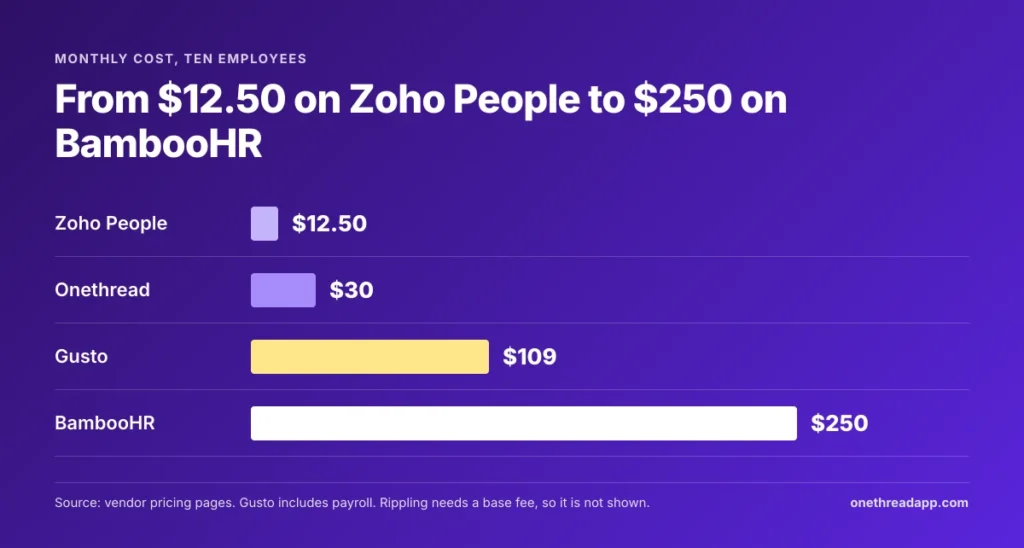
Ten employees cost between $12.50 and $250 a month on the employee tools we priced. The totals aren't equal, because Gusto's price includes payroll and BambooHR's doesn't.
| Tool | Plan | Ten employees a month | Ten employees a year |
|---|---|---|---|
| Zoho People | Essential HR | $12.50 | $150 |
| Onethread | Growth | $30 | $360 |
| Rippling | Starting rate | $80 plus a base fee | $960 plus a base fee |
| Gusto | Simple | $109 | $1,308 |
| BambooHR | Core | $250 | $3,000 |
Example: Ten people on BambooHR Core pay the flat $250, which is $25 per employee. The $10 per-employee rate only applies above 25 employees.
Client tools price per account instead of per head. Dubsado Starter costs $335 a year. HoneyBook Starter costs $360 on its live yearly price, and Dock Standard costs $4,200 a year. Dock Free and Onethread Basic cost nothing.
Top Tip: Gusto and Rippling show a base fee in their plans. Add it to your per-person math before you compare totals.
What Should an Onboarding Checklist Include?
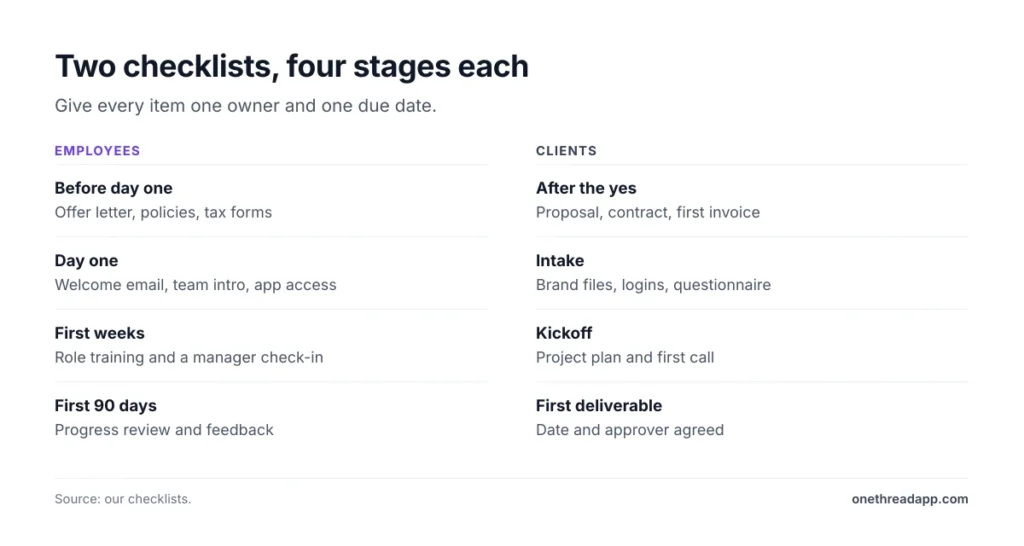
An onboarding checklist covers four phases: before day one, day one, the first weeks and the first 90 days. Zoho People's onboarding page uses a similar split, from pre-onboarding to integration into the organization. Build one list for employees and one for clients.
Employee Onboarding Checklist
Each item below gets one owner and one due date.
- Before day one: Send the offer letter, collect signed policies and tax forms, and set up payroll details.
- Day one: Send a welcome email, introduce the team and grant access to apps.
- First weeks: Assign role-specific training and book a check-in with the manager.
- First 90 days: Review progress against the plan and collect feedback on the onboarding process.
For ideas on the welcome step, see our list of fun ways to introduce new team members.
Client Onboarding Checklist
The client version swaps tax forms for contracts and intake answers.
- After the yes: Send the proposal, the signed contract and the first invoice.
- Intake: Collect brand files, logins and answers to your questionnaire.
- Kickoff: Share the project plan and book the first call.
- First deliverable: Agree on a date and who approves it.
Contractors follow a lighter version of this list. Our guide to onboarding freelancers covers access and security.
Top Tip: Write the checklist before you pick the tool. A tool that can't hold your five steps is the wrong tool.
How Do You Choose the Right Onboarding Software?
Choose onboarding software by who you onboard, how many people start each year, and which steps need a signature. Answer the first question and the shortlist drops from eight tools to three. Then the price decides. These five checks narrow it fast:
- Match the person: Employees need tax forms and app access, so look at BambooHR, Rippling or Gusto. Clients need contracts and portals, so look at Dock, HoneyBook or Dubsado.
- Count the starts: One hire a year doesn't justify BambooHR's $250 flat price. Ten hires might. Rippling and Zoho People scale per head, so they suit uneven hiring.
- Price the compliance step: Gusto's Remote I-9 is a $20 add-on, so price it for every remote hire.
- Check the integrations: BambooHR lists 150+ and Dock links to HubSpot and Salesforce. Confirm the tools you already use appear on the list.
- Test one real onboarding: Run your next hire or client through your top two tools before you commit.
Pick the tool that fits your next ten starts, not your hundredth. Onboarding is one workflow among many. Our business management software guide shows where it fits.
Before you sign, ask each vendor three questions. Which plan includes e-signatures? What compliance steps cost extra? What does renewal cost?
What Should You Do Next With Onboarding Software?
Good onboarding software removes the chasing, not the thinking. Employees and clients need different paperwork, so match the tool to who you onboard. Then price it for your real headcount and check what compliance costs. Do that before the next start, not after.
This week, write the five steps for your next start on paper. Then run that one onboarding through your top two tools and keep the one your team finishes without help. The best tool is the one nobody has to ask about, and the checklist you wrote outlives any tool.
FAQs
What Is the Best Free Onboarding Software?
The best free onboarding software depends on who you onboard. Dock Free covers client onboarding with 10 workspaces, and Onethread Basic is free for the first ten users. Zoho People's free edition covers up to 5 users but doesn't list onboarding. That starts on the paid Essential HR plan.
What Is the Difference Between Employee and Client Onboarding Software?
Employee onboarding software collects tax forms, signatures and app access for new hires. Client onboarding software collects contracts, intake answers and files for new customers, and it often adds a shared portal. Some tools, such as Onethread, handle either as a task list, but they don't offer e-signatures or forms.
Can Onboarding Software Handle I-9 Forms?
Some can. BambooHR lists I-9 and E-Verify workflows powered by Mitratech, and Gusto offers Remote I-9 as a $20 add-on. Rippling and Zoho People don't name I-9 on the onboarding pages we read, so ask the vendor about it before you hire.
Do Small Businesses Need Onboarding Software?
Small businesses need it once more than one person touches each new start. A solo owner who hires once a year can run a checklist. A team that hires monthly, or signs clients weekly, saves time with onboarding software that tracks signatures and tasks.
Can Project Management Software Replace Onboarding Software?
For checklists, yes. A project per start, with tasks and owners, covers the steps. For tax forms, e-signatures and I-9 verification, no. Project tools like Onethread don't list those features. Pair them with an HR system or a client portal.