Canva stops feeling cheap the moment a second person needs a seat.
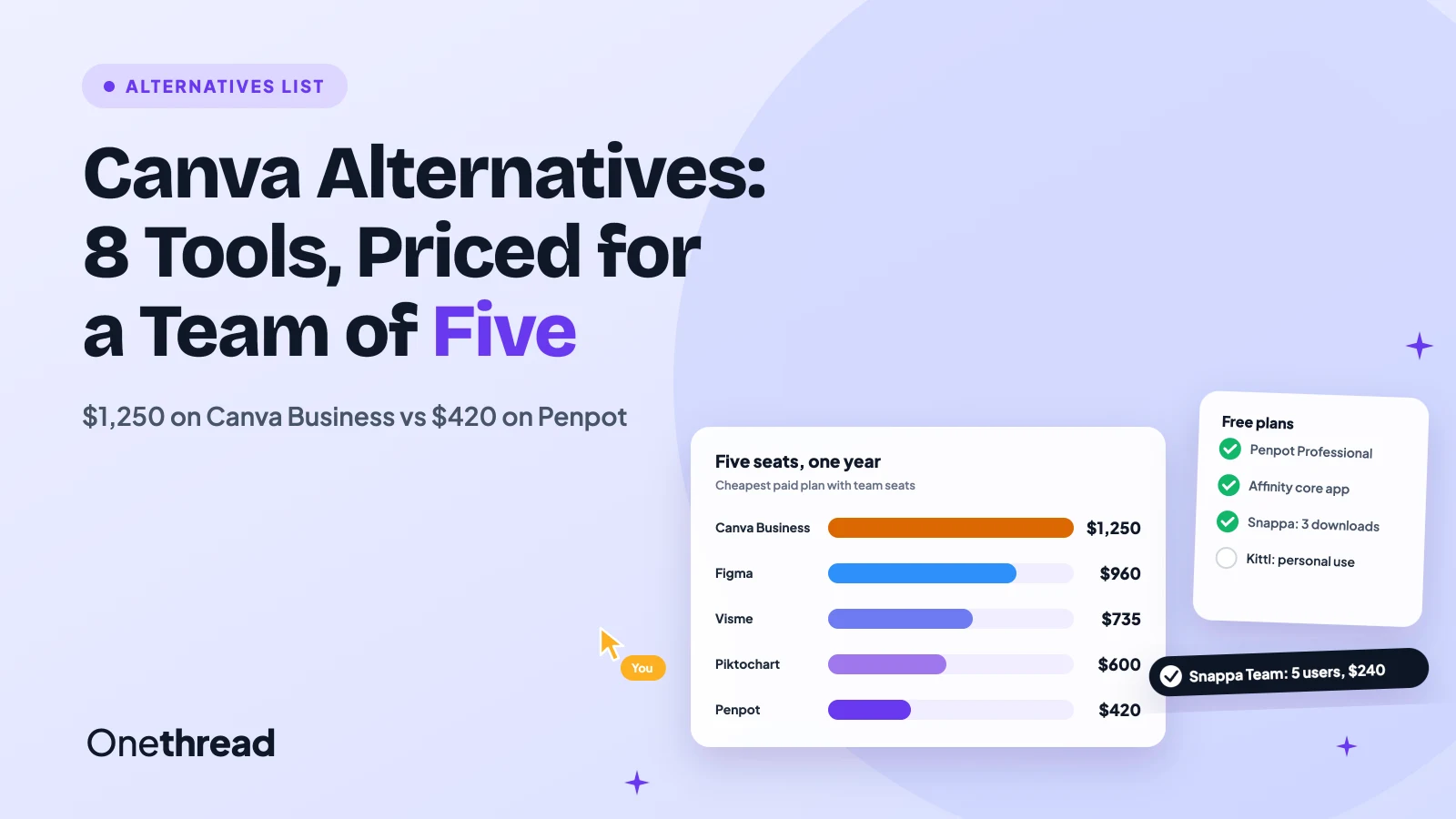
The best Canva alternatives are Adobe Express for most teams, Penpot for free work, and Snappa for a flat five-seat price. Five people pay $1,250 a year on Canva Business, against $240 to $960 on the paid alternatives we priced.
Maybe the bill bothers you. Maybe the AI does. Or maybe the free plan simply stopped fitting.
We priced eight tools for a five-person team and read six top-ranking guides.
You'll leave with a shortlist and a yearly cost.
Key Points
- Five people pay $1,250 a year on Canva Business. The same five seats cost $420 on Penpot, $479.40 on Adobe Express Teams, $600 on Piktochart or Snappa Pro, $720 on Kittl, $735 on Visme Starter and $960 on Figma. Snappa Team covers five users for $240.
- Match the tool to the job. Adobe Express suits quick social posts, Visme and Piktochart suit data and infographics, Figma and Penpot suit product design, and Affinity suits print and photo work.
- Free plans cap your output. Piktochart Free allows 2 PNG downloads, Snappa Free allows 3 downloads a month, and Kittl Free is for personal use only.
- Check what you lose before you switch. Canva Pro lists 3.6 million templates. Adobe Express Premium lists 730,000+, and Snappa lists 6,000+.
Which Canva Alternative Fits Which Job?
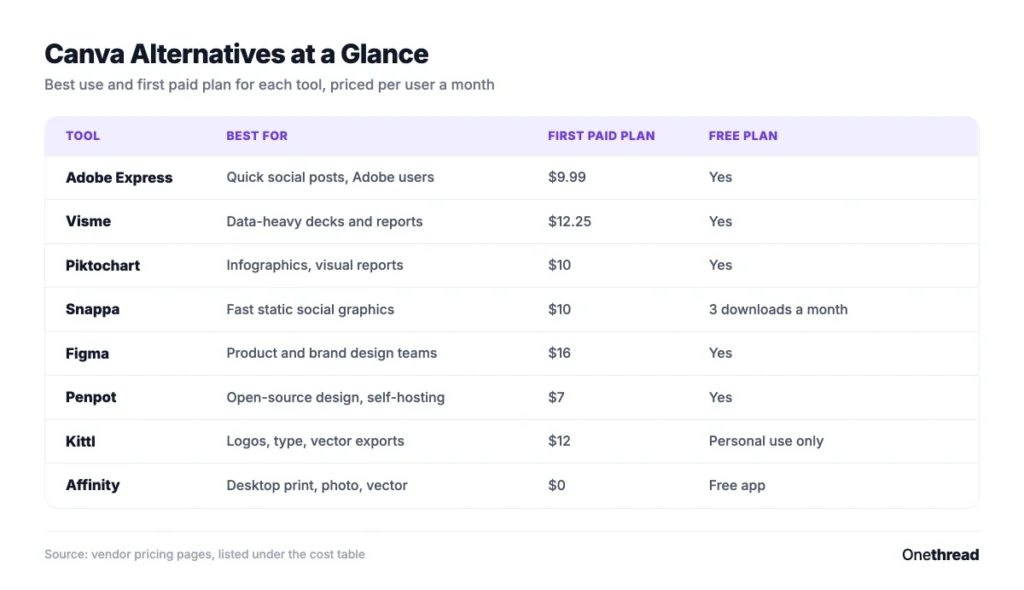
Each of the eight tools below fits one job better than the rest, and the table shows the price of getting started.
| Tool | Best for | First paid plan (per user a month) | Free plan |
|---|---|---|---|
| Adobe Express | Quick social posts and Adobe users | $9.99 | Yes |
| Visme | Data-heavy decks and reports | $12.25 | Yes |
| Piktochart | Infographics and visual reports | $10 | Yes |
| Snappa | Fast static social graphics | $10 | Yes, 3 downloads a month |
| Figma | Product and brand design teams | $16 | Yes |
| Penpot | Open-source design and self-hosting | $7 | Yes |
| Kittl | Logos, type and vector exports | $12 | Personal use only |
| Affinity | Desktop print, photo and vector work | $0 | Free app, AI tools need a Canva plan |
Prices are US dollars per user a month on annual billing, except Adobe Express Premium, which bills monthly. Figma's price is a Full seat. The Best for labels are ours.
Why Do People Look for Canva Alternatives?
People leave Canva over three things: price, AI quality and free-plan limits. In a Reddit thread on cheaper options, commenters called Canva's new pricing "ridiculous" and noted that the free tier lacks the Background Remover. One commenter said Canva's AI has never given me anything I could use.
The original poster makes slide decks, infographics and logos, and wasn't sure Canva Pro was still worth paying for after the price rise.
Others pushed back. Several commenters called Canva cheap for what it does, and the thread never settles it. Your answer depends on how many seats you pay for, so we priced the switch instead of guessing. Cheaper only counts if the tool also fits the job.
The price complaint has a clear cause. Canva Pro covers one person, so a team pays Business rates of $25 per person a month. Our Canva pricing guide breaks down every plan.
Here's how we compared the tools. We read each vendor's pricing page, then priced the cheapest paid plan with team seats for five people over one year. We left VistaCreate out of the table because its pricing page would not load for our check. It shows up on four of the six guides we read, so check its plans yourself.
Why Pick Adobe Express as a Canva Alternative?
Adobe Express follows the same template-first pattern as Canva. Its Free tier lists 345,000+ templates and 5,000+ fonts, and Premium lists 730,000+ premium templates and 30,000+ fonts.
Premium adds 250 generative credits a month per user, three scheduled accounts per social network, brand kits and one-click Resize. Free keeps one scheduled account per network and 5GB of storage.
Say a marketer needs one launch graphic in five sizes. Resize handles the sizes, and the scheduler posts to your social media accounts. Adobe pitches Express as a way to work across the Adobe apps your team already uses.
Teams adds an Admin Console and 1TB of pooled storage per user. It requires two seats.
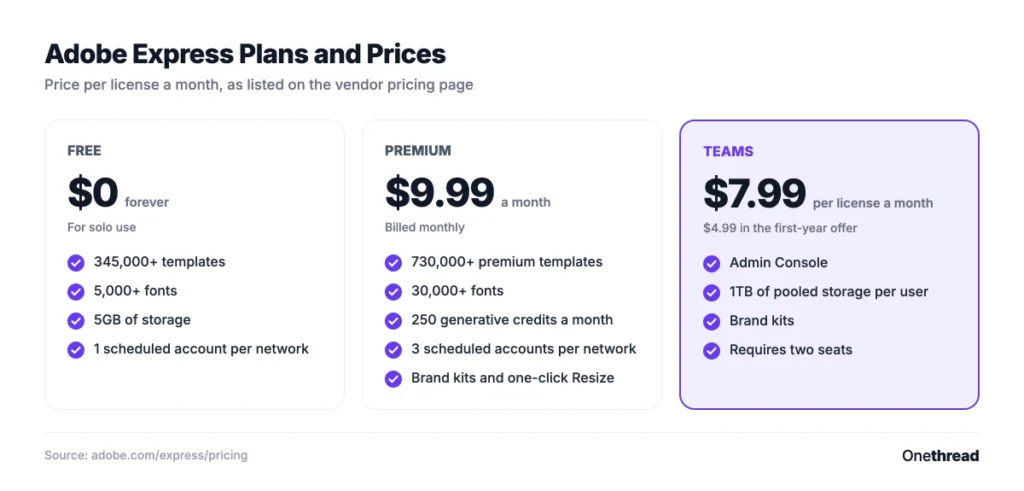
Pricing: Free. Premium costs $9.99 a month, billed monthly. Teams costs $7.99 per license a month, or $4.99 in the first-year offer.
Best For
- Teams already working in Adobe apps.
- Marketers who want templates and one-click Resize in one editor.
Pros
- Lists the largest template count among the alternatives that publish one.
- Teams costs less per seat than Canva Business.
- Premium has no annual commitment.
- Brand kits and an Admin Console sit on the paid plans.
Cons
- Free lets you use branded templates but not create them.
- Free keeps 10 days of version history, against 30 on Premium.
- The Teams discount lasts the first year only.
What Makes Visme a Strong Canva Alternative for Data?
Visme leans toward documents, reports and decks. Reviewers pick it for data visualization, infographics and interactive content, and Starter adds exports to PPTX, MP4, GIF and HTML5.
Say a team sends a monthly client report. Visme builds the charts and exports the deck as PowerPoint. Basic is free but limits storage to 500MB, gives 10 AI credits and caps each project at 50 slides or pages. Paid plans remove the page cap.
Here's the catch. Visme's Brand Kit, analytics and most integrations sit on Business only. At $297 per person a year, that plan costs more than Canva Business at $250.
Pricing: Basic is free. Starter costs $12.25 a month, billed $147 a year. Business costs $24.75 a month, billed $297 a year.
Best For
- Teams that build decks, reports and infographics from data.
Pros
- Starter includes 200 AI credits a month and all premium assets.
- Business adds full PowerPoint import and export.
- Starter exports MP4, GIF and HTML5 as well as PPTX.
- Business adds analytics and privacy controls.
- Nonprofits get the Business feature set at a 25% discount.
Cons
- Brand controls need Business, which costs more than Canva Business.
- Each plan covers one license, so every seat is billed.
- Basic limits you to JPG, PNG and PDF downloads.
When Does Piktochart Beat Canva for Infographics?
Piktochart beats Canva when the design is a chart, a report or an infographic built from real numbers. EXPERTE calls it the pick "for numbers people", and the free tier covers up to four seats.
The free plan allows only 2 PNG downloads and 60 AI credits, so it works as a trial. Pro lifts the download cap and adds 100GB of storage and premium icons, illustrations and 3D graphics.
Business adds PDF and PPT downloads plus a Brand Kit, at a lower price than Visme's Business plan. It also lifts AI credits from 500 on Pro to 1,000 and storage from 100GB to 250GB.
Say a policy team publishes a survey summary every quarter. Pro covers the charts, and Business covers the branded PDF.
Pricing: Free. Pro costs $10 per member a month billed yearly, or $15 monthly. Business costs $17 billed yearly, or $20 monthly.
Best For
- Teams that publish infographics, research summaries and visual reports.
Pros
- Pro costs $10 per member a month on annual billing.
- Business includes a Brand Kit at $17 per member.
- Plans cover 1 to 100 seats.
- The free tier covers up to four seats.
Cons
- Free allows only 2 PNG downloads.
- PDF and PPT downloads need Business.
- Monthly billing raises Pro to $15.
Why Choose Snappa as a Cheap Canva Alternative?
Snappa is the simplest option here, built for people who aren't graphic designers. Its page lists 6,000+ templates, 5,000,000+ HD photos and graphics, 200+ fonts and one-click background removal.
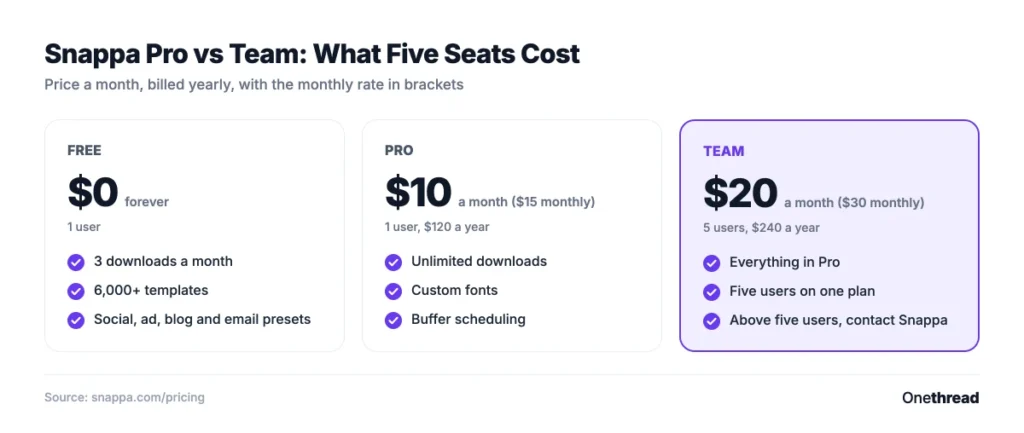
The surprise is the Team plan. It covers five users for $20 a month on annual billing, which beats five separate Pro seats.
Its page lists presets for social media, display ads, blogs, emails and infographics. All photos and graphics are royalty-free and licensed for commercial use.
Its feature list centres on static graphics for social posts, ads, blogs and emails. Video and multi-page documents are not listed.
Say a three-person shop posts every day. Free runs out after three downloads, so Pro is the real starting point.
Pricing: Free allows 3 downloads a month. Pro costs $10 a month billed yearly, or $15 monthly. Team costs $20 billed yearly, or $30 monthly, for 5 users.
Best For
- Small teams that post static graphics every week.
- Teams that want one flat price for five seats.
Pros
- Team covers five users for $240 a year.
- Pro includes unlimited downloads, custom fonts and Buffer scheduling.
- Presets cover social, ads, blogs and email.
Cons
- Free stops at 3 downloads a month.
- Teams above five users must contact Snappa.
- The template library is far smaller than Canva's.
Who Should Use Figma Instead of Canva?
Figma suits teams that build a design system, not teams that fill templates. A designer creates components in Figma Design, and teammates reuse them. Our Figma pricing guide covers every seat type.
Seats decide the bill. Full seats open every Figma product, Dev seats open Dev Mode and the whiteboard tools, and Collab seats open FigJam, Slides and Buzz. Viewers need no paid seat.
One caveat: Dev and Collab seats can't edit design files. Give a Full seat to anyone who designs.
Example: A 10-person team with 4 Full, 3 Dev and 3 Collab seats pays $1,308 a year on Professional. Giving all 10 people a Full seat costs $1,920.
Pricing: Starter is free. Professional costs $16 per Full seat a month billed yearly, or $20 monthly. Dev seats cost $12 and Collab seats cost $3.
Best For
- Design teams that share components and libraries.
- Marketers who only need Collab seats.
Pros
- Collab seats cost $3 a month on annual billing.
- Viewers open and comment on files for free.
- Libraries keep brand assets consistent across files.
- Full seats include 3,000 AI credits a month on Professional.
Cons
- Seats added mid-year bill at the monthly price.
- Starter limits you to three collaborative files.
- A Full seat costs more than any other first paid plan here.
What Makes Penpot a Free Canva Alternative?
Penpot is an open-source design platform, and its Professional plan costs $0. XDA Developers tried five open-source tools for a month and called Penpot "the closest thing to a Canva replacement".
Penpot offers wireframes, prototypes, CSS Grid and Flex layouts, native design tokens and plugins. You can host it yourself or use Penpot's cloud. Enterprise adds advanced governance and team permissions, and discounts exist for nonprofits and education.
The same review notes a smaller template library than Canva's. Penpot targets teams building digital products, so expect layouts, not a poster shop.
Say a product team already works with components. Penpot keeps tokens, shared libraries and prototypes together, and its page lists CSS, HTML, SVG and JSON as supported open standards.
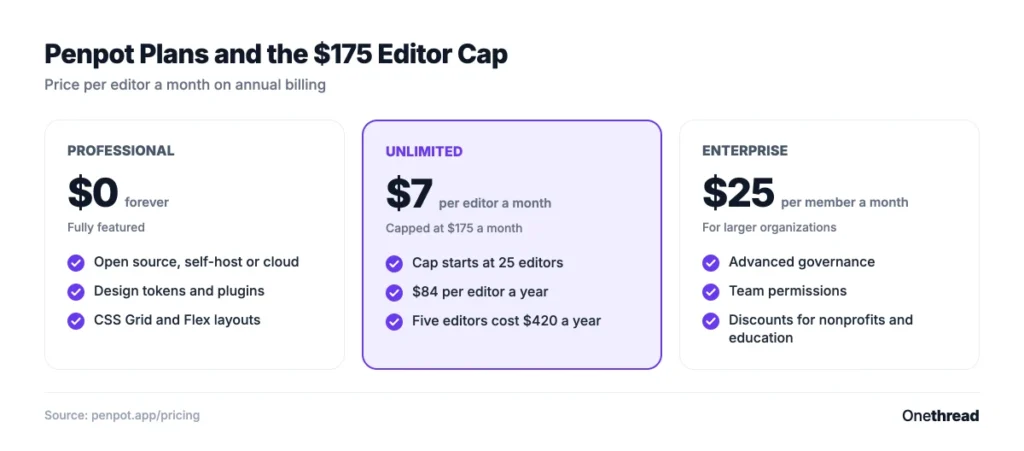
Pricing: Professional costs $0. Unlimited costs $7 per editor a month, capped at $175 a month. Enterprise costs $25 per member a month.
Best For
- Teams that want open source and the option to self-host.
Pros
- The $0 Professional plan is fully featured.
- Unlimited costs $7 per editor, the lowest paid price in the table.
- The $175 cap starts at 25 editors.
Cons
- The template library is smaller than Canva's.
- Penpot's pricing page doesn't map every limit to a plan.
- Self-hosting means you run the server.
How Does Kittl Compare as a Canva Alternative?
Kittl came up most often in the Reddit thread on cheaper Canva options, though one reply came from a Kittl representative. It sells vector exports and a commercial licence.
Pro and Expert carry a commercial licence for up to 500,000 copies, and a separate licence tier covers wider reach. Expert and Max add daily AI tokens, and unused monthly tokens don't roll over. Viewers are free.
Free users can preview some Pro features with light limits, which makes a test run easy.
Say a freelancer designs logos for clients. Pro's commercial licence and vector exports cover the handoff, but the personal-use limit on Free rules it out.
Watch the cancellation rule. Vector exports lock until you reactivate a paid plan, though your designs stay.
Pricing: Free is for personal use. Pro costs $12 per editor a month billed yearly. Expert costs $26 and Max costs $48.
Best For
- Designers who need vector exports and a commercial licence.
Pros
- Viewers are free on every plan.
- Pro includes a commercial licence.
- Paid plans export high-resolution and vector files.
- Free users can preview some Pro features before paying.
Cons
- Free is limited to personal use.
- Vector exports lock after you cancel.
- Monthly prices aren't shown in the page text.
Why Does Affinity Work as a Free Canva Alternative?
Affinity belongs to Canva, which bought it in March 2024, and it's now free. PetaPixel reports that the new app merges the old tools into one program.
It combines Vector, Pixel and Layout studios, which cover Illustrator-style, Photoshop-style and InDesign-style work. It opens PSD, AI, PDF, SVG, TIFF and IDML files. You need a Canva account to sign in on first launch, then the app works offline.
The AI tools are the paid part. TechRadar's reviewer calls the app "more freemium than free" because they need a premium Canva plan. The same review praises an impressive tool with a clean interface, though it suits people who depend on Adobe-specific tools less.
Pricing: Free. AI tools need a premium Canva subscription.
Best For
- Designers who want free layers, vector tools and print layouts on a desktop.
Pros
- The core tools cost $0.
- Vector, pixel and layout work live in one file.
- It imports PSD, AI, PDF, SVG, TIFF and IDML files.
- It works offline after the first sign-in.
Cons
- Smart Objects are missing from the app.
- You need a Canva account for the first sign-in.
- InDesign files must be exported as IDML first.
- It has no built-in file management.
- Adobe's cloud fonts don't transfer.
- Complex Adobe files can open slowly, with no progress indicator.
How Much Do Canva Alternatives Cost for a Team of Five?
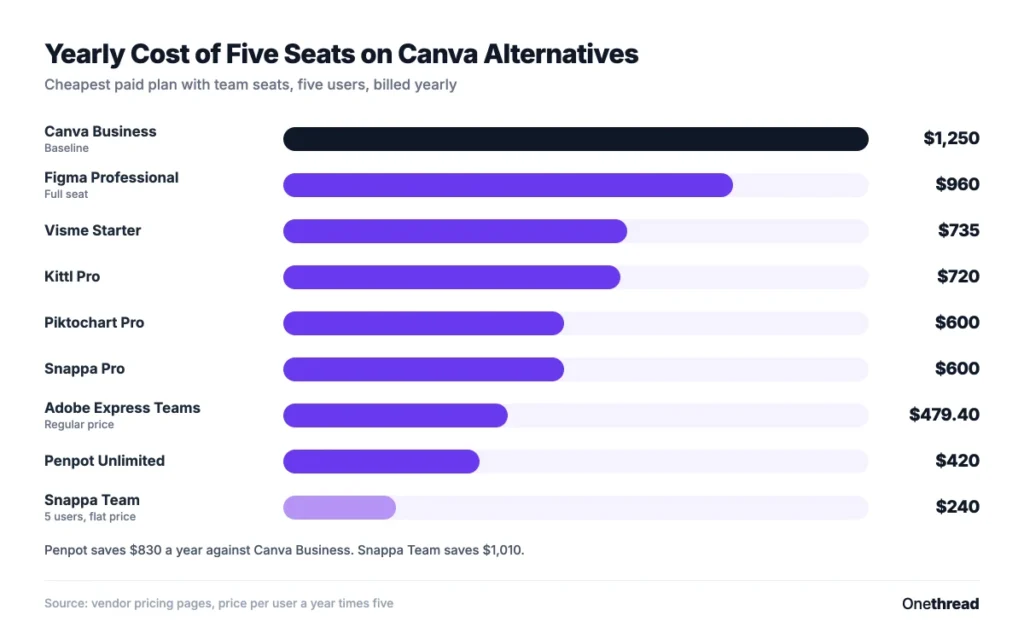
Five people pay $1,250 a year on Canva Business, and the alternatives we priced run from $240 to $960. The table uses each tool's cheapest paid plan with team seats, on annual billing.
| Tool | Plan | Price per user a year | Five users for a year |
|---|---|---|---|
| Canva (baseline) | Business | $250 | $1,250 |
| Figma | Professional, Full seat | $192 | $960 |
| Visme | Starter | $147 | $735 |
| Kittl | Pro | $144 | $720 |
| Piktochart | Pro | $120 | $600 |
| Snappa | Pro | $120 | $600 |
| Adobe Express | Teams | $95.88 | $479.40 |
| Penpot | Unlimited | $84 | $420 |
| Snappa | Team (5 users) | $240 flat | $240 |
Example: Five people on Penpot Unlimited pay $7 × 5 × 12 = $420 a year. That is $830 less than the $1,250 Canva Business bill.
Top Tip: Adobe Express Teams drops to $4.99 per license in the first-year offer, so five seats cost $299.40 for year one. Put the renewal price in your budget.
Sources: Vendor pricing pages for Adobe Express, Visme, Piktochart, Snappa, Penpot, Kittl and Figma. Check each page before you buy, because prices change.
What Do You Give Up When You Leave Canva?
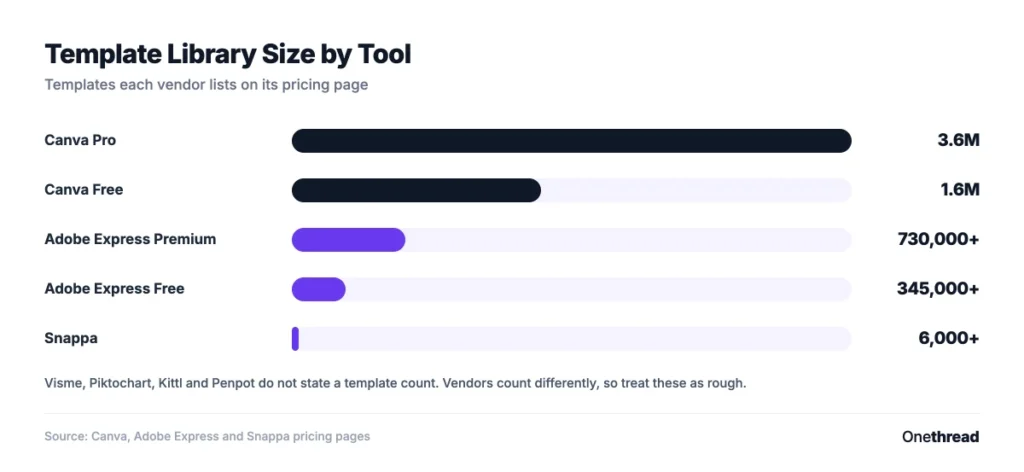
You give up library size first. Canva Pro lists 3.6 million templates, and no alternative we checked publishes a number close to it.
| Tool | Templates listed |
|---|---|
| Canva Pro | 3.6 million |
| Canva Free | 1.6 million |
| Adobe Express Premium | 730,000+ |
| Adobe Express Free | 345,000+ |
| Snappa | 6,000+ |
Visme, Piktochart, Kittl and Penpot don't state a template count on the pages we read. Vendors count templates in different ways, so treat these as rough.
Brand control is the second loss. Canva Business lists up to 100 Brand Kits, while Visme and Piktochart reserve their Brand Kits for Business plans. Write your rules down first with our free brand guidelines generator. If video is the gap, start with our CapCut alternatives.
How Do You Manage Design Requests After Leaving Canva?
A new editor changes where you design. It doesn't change who asks for the design, who approves it, or when it's due.
That workflow needs its own home. Onethread is project management software, and its features include task management with priorities and reminders, task-level conversations, a calendar view, a Gantt chart and timesheets. Projects break into phases, milestones, tasks and subtasks, with dependencies.
Say an agency posts for four clients. It keeps one project per client and one task per post. The editor holds the file, and Onethread holds the status.
Three habits keep that clean:
- Brief: Write one task per design with the size, the copy and the deadline.
- Review: Assign one reviewer and keep feedback in the task conversation.
- Handoff: Link the final file in the task and mark it done.
Dashboards show every request by stage, and shared team inboxes keep client emails next to the tasks they created.
Top Tip: Add a "Needs changes" status to your custom workflow, so rejected designs return to the designer's queue instead of vanishing into chat.
Onethread doesn't edit images. It tracks the work around them. For more on that setup, read our guide to project management software for designers.
What Should You Do Next With Your Canva Alternative?
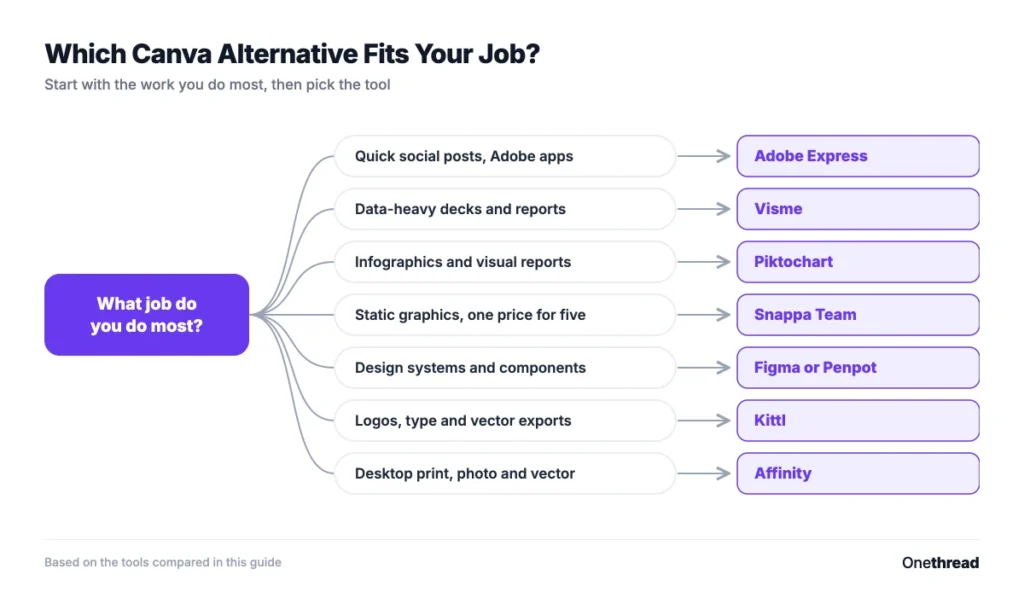
Canva alternatives win on price, not on library size. Pick the job first, then the tool. Quick posts suit Adobe Express, data reports suit Visme or Piktochart, and design systems suit Figma or Penpot. Your five-seat bill can drop from $1,250 to as little as $240.
This week, count your real seats and test your top two tools on one real design. Then price the winner for your own seat count. For deck-first work, our PPT AI generator roundup shows more options. The best tool is the one your team opens on Monday.
FAQs
Which App Is Like Canva but Free?
The best free Canva alternative is Penpot, whose Professional plan costs $0 and is fully featured. Affinity's core tools are free too. Adobe Express, Piktochart, Visme and Snappa also offer free tiers, but those cap downloads or storage. Piktochart allows 2 PNG downloads, and Snappa allows 3 a month.
Why Don't Professional Designers Use Canva?
In our judgment, designers need layers, vector control and print file formats that a template-first editor puts second. Affinity opens PSD, AI and IDML files, and Figma shares components across files. A professional who wants a Canva alternative with that depth should start with those two. Canva still suits fast marketing work.
Is There a Canva Alternative Without AI?
Few tools here are AI-free. Adobe Express, Visme, Piktochart, Kittl and Figma all list AI credits or tokens on their plans. Snappa's pricing page lists none, and Affinity keeps its AI tools behind a paid Canva plan, so its core editor works without them.
Who Is Canva's Biggest Competitor?
Adobe Express is the closest direct rival. Zapier's roundup ranks it the best overall Canva alternative, and Adobe publishes its own Canva comparison page. Premium costs $9.99 a month. Figma competes for professional design teams instead of template-first marketing work.
When Is Canva Still the Better Choice?
Canva is still the better choice when you want the biggest library at no cost. Canva Free lists 1.6 million templates, 5 GB of storage and real-time collaboration. Stay on Free if you post a few designs a month and never need more than three brand colors.