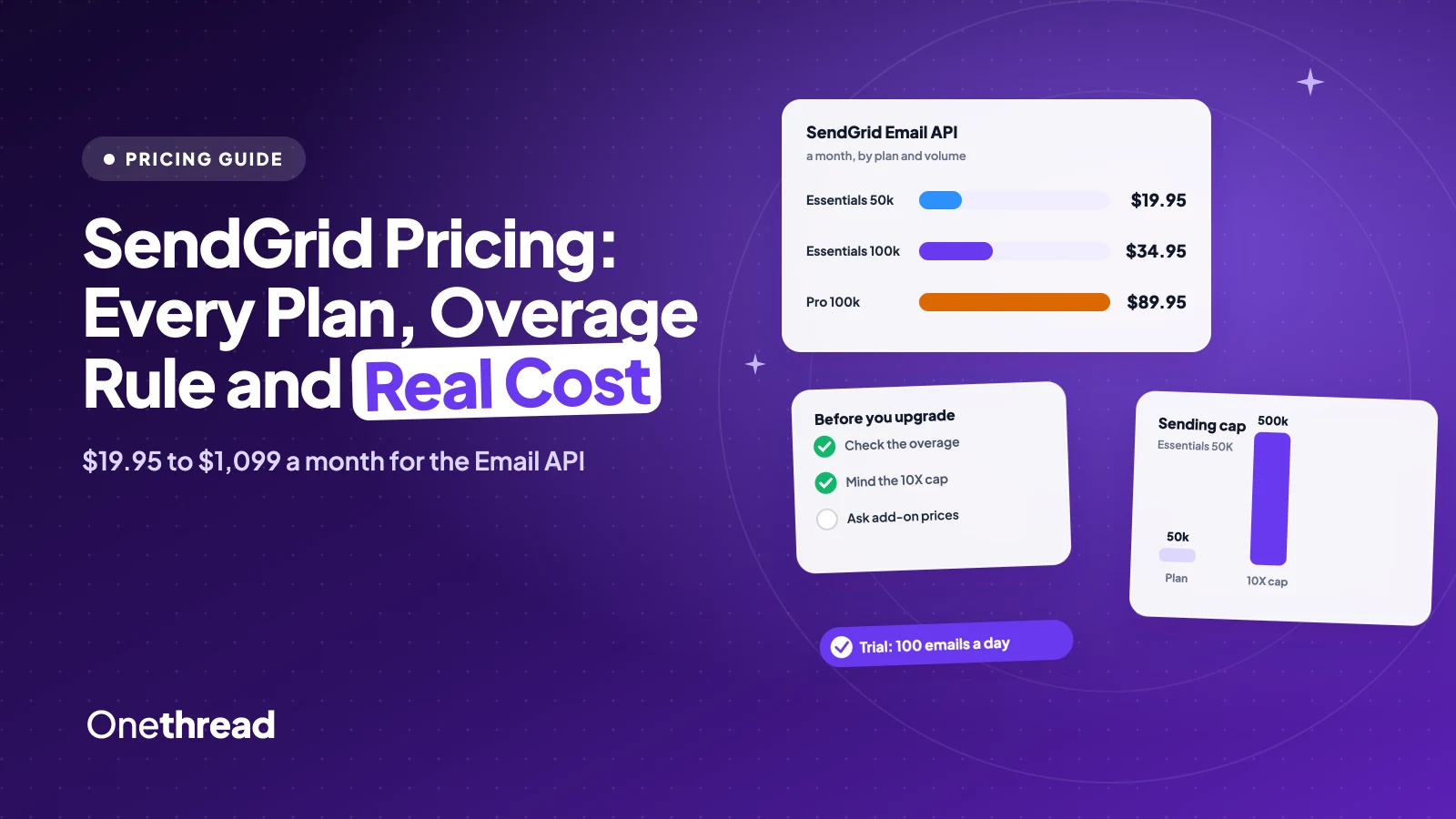
SendGrid’s free plan is now a 60-day trial, and your emails stop when it ends.
SendGrid pricing starts at $19.95 a month for 50,000 emails on Essentials, then $34.95 for 100,000. Pro costs $89.95 at 100,000 emails and $1,099 at 2.5 million. Marketing Campaigns starts at $15.
The price on the card is only the start. Overage charges, a cap at 10 times your plan and add-ons with no listed price follow.
We stepped through both pricing pages tier by tier and read eight support articles.
Here’s what each plan costs, what you pay beyond it, and when a cheaper sender fits.
Key Points
- SendGrid Email API costs $19.95 a month for 50,000 emails (Essentials) up to $1,099 for 2.5 million (Pro). Marketing Campaigns costs $15 to $900 a month by contact count. New accounts get a 60-day trial instead of a free plan.
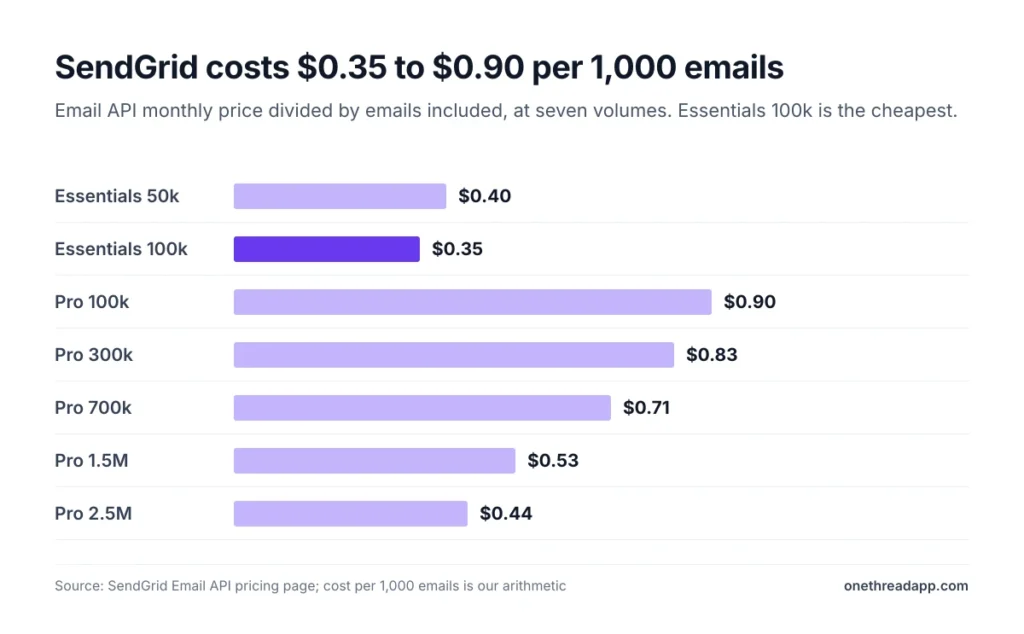
- The price per 1,000 emails falls as volume rises. Essentials costs $0.40 at 50,000 emails and $0.35 at 100,000. Pro costs $0.90 at 100,000 emails and $0.44 at 2.5 million.
- Going over your plan adds overage charges, and Essentials and Pro accounts stop at 10 times their plan. Upgrade before you cross the line, because an upgrade doesn’t cancel overage you already owe.
- Billing is monthly by card, and a downgrade lands on the first day of the next month. At 100,000 emails a month, Amazon SES lists about $10 against $34.95 for Essentials, so price an alternative if you only need sending.
How Much Does SendGrid Cost per Month?
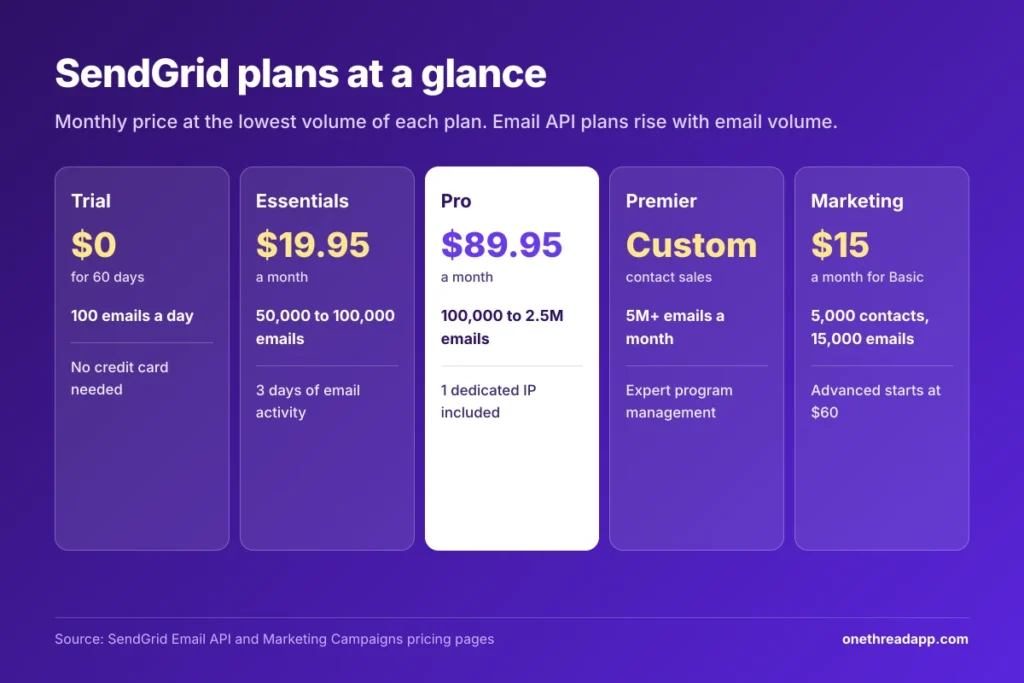
SendGrid costs $19.95 a month for the Email API Essentials plan, which covers 50,000 emails. Pro starts at $89.95 for 100,000 emails and reaches $1,099 for 2.5 million. New accounts start on a trial, and Premier is custom.
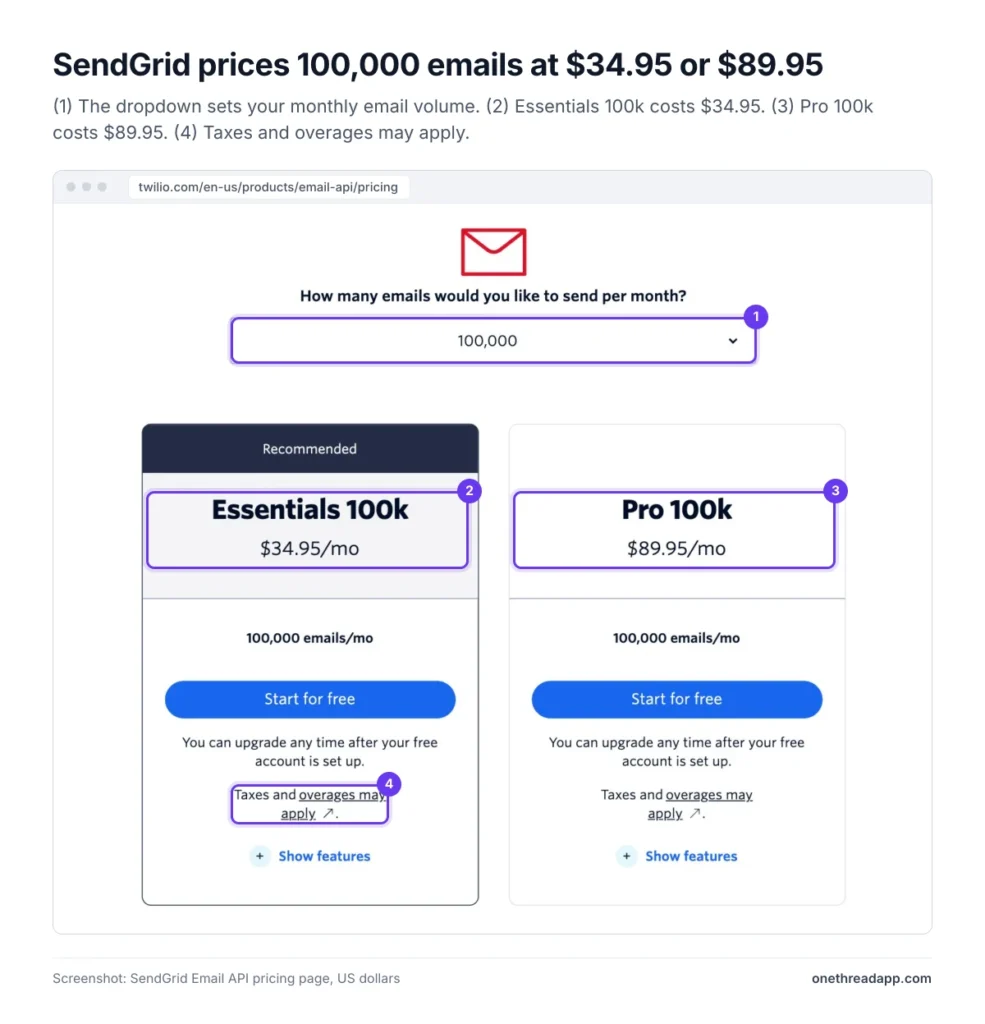
We stepped through every volume on SendGrid’s Email API pricing page, in US dollars. The last column is our own arithmetic.
| Plan | Emails a month | Monthly price | Cost per 1,000 emails |
|---|---|---|---|
| Trial | 100 a day for 60 days | $0 | $0 |
| Essentials | 50,000 | $19.95 | $0.40 |
| Essentials | 100,000 | $34.95 | $0.35 |
| Pro | 100,000 | $89.95 | $0.90 |
| Pro | 300,000 | $249 | $0.83 |
| Pro | 700,000 | $499 | $0.71 |
| Pro | 1,500,000 | $799 | $0.53 |
| Pro | 2,500,000 | $1,099 | $0.44 |
| Premier | Larger volumes | Custom | Custom |
Every plan bills monthly, and the page adds that taxes and overages may apply. Email API and Marketing Campaigns are separate products, so a team that uses both pays two prices.
Our arithmetic shows where SendGrid is cheapest per email. Essentials costs $0.35 per 1,000 emails at 100,000 emails a month. Pro costs $0.90 at the same volume, and only falls to $0.44 at 2.5 million.
Example: A store that sends 20,000 emails a month still pays $19.95 for Essentials, because the smallest paid plan covers 50,000. That works out to about $1.00 per 1,000 emails sent, not the $0.40 on the price card.
Top Tip: Set the dropdown to your real email volume, then compare the Essentials and Pro cards side by side before you pick.
Source: SendGrid Email API pricing page.
What Does the SendGrid Free Trial Include?
SendGrid has no free tier for new accounts, only a 60-day free trial. The Email API trial allows 100 emails a day and needs no credit card. When the 60 days end, sending stops until you upgrade.
The Marketing Campaigns trial also runs 60 days. It stores up to 100 contacts and sends up to 100 marketing emails a day. The Email API trial keeps 3 days of searchable email activity and one event webhook.
You can use the trial once, and upgrading ends it at once. To upgrade, you turn on two-factor authentication, authenticate your sending domain and add a payment method. SendGrid doesn’t charge the card at that point.
Older free accounts weren’t switched overnight. Users on the Bubble forum report notices that gave 60 days to upgrade.
Example: 100 emails a day for 60 days adds up to 6,000 emails. A welcome email to a 6,500-person list can’t finish inside the trial, so test with a small segment. Our email sequence generator can draft the messages first.
Pricing: $0 for 60 days, up to 100 emails a day.
Best For
- Developers who want to test templates, webhooks and domain setup before paying.
Pros
- No credit card needed.
- Email API and Marketing Campaigns each get their own trial.
- You can upgrade at any time.
Cons
- Only 100 emails a day, with no way to exceed it.
- Sending stops when the 60 days end.
- You can’t restart the trial.
Sources: SendGrid 60-day trial overview, SendGrid upgrade documentation, Bubble forum thread on the free tier ending.
What Does the SendGrid Essentials Plan Include?
SendGrid Essentials costs $19.95 a month for 50,000 emails and $34.95 for 100,000. It’s the lowest paid Email API plan, and it sends from shared IP pools.
Essentials covers core sending, tracking and deliverability. You get 2 event webhooks, 3 days of searchable email activity and one teammate.
The gaps matter. Essentials has no dedicated IP, subusers, SSO or phone support, and it leaves out the Email Validation API. Longer activity history is a paid add-on. You can move up at any time, and an upgrade takes effect at once.
Example: Say you send 45,000 emails in a busy month on Essentials 50K. You pay $19.95, or about $0.44 per 1,000 emails. At 55,000 emails you either pay overage on 5,000 emails or move to the $34.95 plan.
Pricing: $19.95 a month for 50,000 emails, $34.95 for 100,000.
Best For
- Apps and sites that send 50,000 to 100,000 emails a month from a shared IP.
Pros
- Lowest price per email, down to $0.35 per 1,000.
- Upgrades take effect at once.
- Event webhooks and activity search included.
Cons
- No dedicated IP, subusers, SSO or phone support.
- Only 3 days of searchable email activity.
- One teammate.
Sources: SendGrid Email API pricing page, SendGrid guide to downgrading between paid plans.
What Does the SendGrid Pro Plan Include?
SendGrid Pro costs $89.95 a month for 100,000 emails and $1,099 for 2.5 million. It adds a dedicated IP, subusers and phone support to what Essentials offers.
Pro also includes 2,500 free email validations, 60 email testing credits a month and SSO. It keeps 7 days of searchable email activity and allows up to 1,000 teammates. Pro also adds bounce and block classifications through Deliverability Insights, and 5 event webhooks instead of 2.
At 100,000 emails, Pro costs $55 more a month than Essentials. That is $660 a year for those extras.
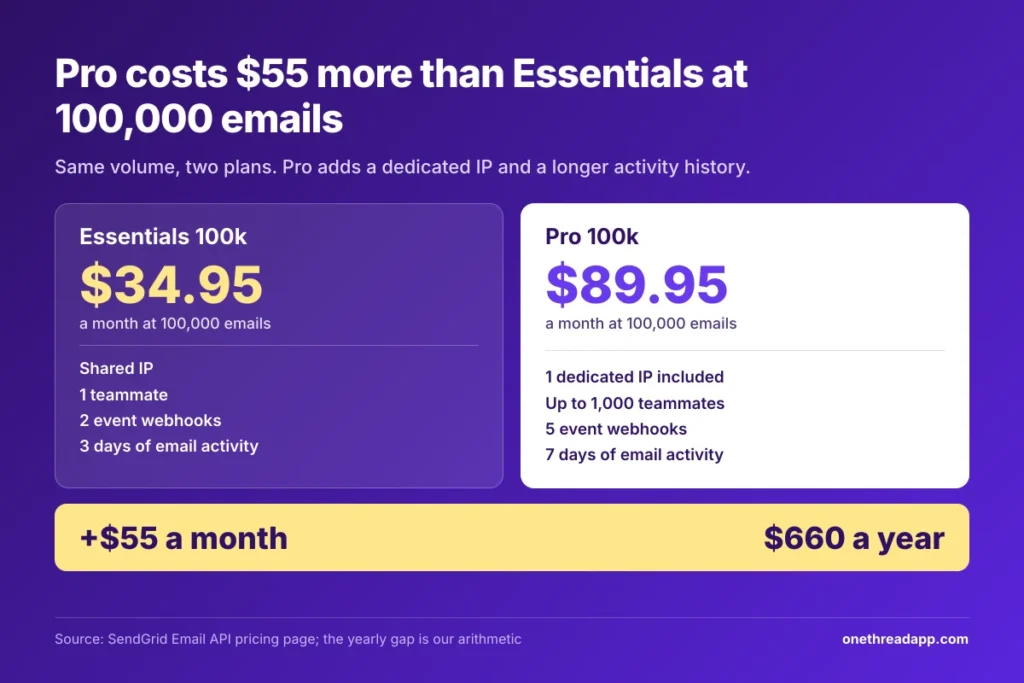
Example: A SaaS app sends 100,000 emails a month. Essentials costs $419.40 a year, and Pro costs $1,079.40. The gap pays for a dedicated IP that only your own mail uses.
Pricing: $89.95 a month for 100,000 emails, rising to $1,099 for 2.5 million.
Best For
- Teams that run several apps or clients and need subusers, SSO, phone support or their own sending IP.
Pros
- One dedicated IP included.
- 2,500 free email validations.
- Phone support, 7 days of email activity and Deliverability Insights.
Cons
- $55 more than Essentials at 100,000 emails.
- $0.90 per 1,000 emails at 100,000.
- Extra IPs and longer history cost extra, with no listed price.
Source: SendGrid Email API pricing page.
What Does the SendGrid Premier Plan Include?
SendGrid Premier has custom pricing. The pricing page lists Pro up to 2.5 million emails a month and sends larger senders to sales.
Premier keeps Pro’s dedicated IP, subusers and SSO, and doubles the free email validations to 5,000. Expert program management is available for purchase.
Volume decides how many IPs you need. SendGrid’s documentation suggests one dedicated IP for every 3 to 4 million messages sent per day.
We found no Premier price on any page we read, so budget with a quote. The pricing FAQ says volume discounts apply as you scale. Professional services and personalized support are for purchase on every paid plan, so they aren’t a reason to move up.
Example: At 2.5 million emails a month, Pro costs $1,099, or $13,188 a year. A Premier quote only helps if it beats that.
Pricing: Custom quote through sales.
Best For
- Senders above the 2.5 million emails a month shown for Pro.
Pros
- Free email validations double to 5,000.
- Volume discounts as you scale.
- Paid expert program management and professional services.
Cons
- No published price.
- A sales call before you can budget.
- Activity search stays at 7 days, well short of the 30 days offered for purchase.
Sources: SendGrid Email API pricing page, SendGrid dedicated IP documentation.
What Does SendGrid Marketing Campaigns Basic Cost?
Marketing Campaigns Basic costs $15 a month for 5,000 contacts and 15,000 emails. It tops out at $200 for 100,000 contacts and 300,000 emails. We stepped through both dropdowns on the Marketing Campaigns pricing page.
| Contacts | Emails a month | Monthly price | Cost per 1,000 contacts |
|---|---|---|---|
| 5,000 | 15,000 | $15 | $3.00 |
| 10,000 | 30,000 | $25 | $2.50 |
| 20,000 | 60,000 | $50 | $2.50 |
| 50,000 | 150,000 | $120 | $2.40 |
| 100,000 | 300,000 | $200 | $2.00 |
Marketing Campaigns charges for stored contacts and for emails sent, and each tier sets both limits. Basic includes 5 signup forms and 10 email testing credits.
Basic has no automations, so it suits one-off newsletters rather than drip series. If you want automated sequences, you need Advanced.
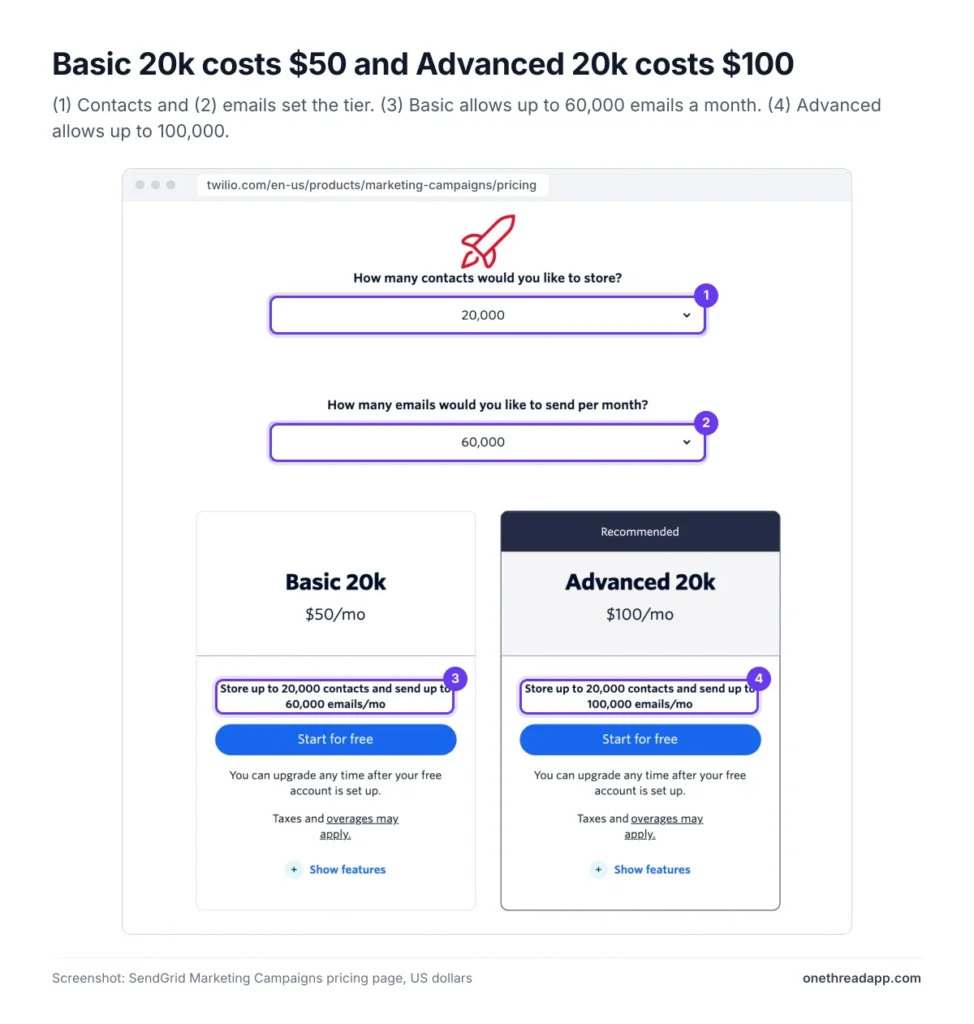
Example: A newsletter with 20,000 contacts that sends 3 emails a month sends 60,000 emails. That fits the 60,000-email limit on Basic 20k, which costs $50, or $600 a year.
Top Tip: Delete or process dead contacts before midnight UTC on the last day of the month. SendGrid says they then drop out of next month’s billing.
Pricing: $15 a month for 5,000 contacts, rising to $200 for 100,000.
Best For
- Newsletters and promotions that go out as one-off sends.
Pros
- Lowest Marketing Campaigns price at every contact count.
- 5 signup forms and 10 email testing credits.
- Price per 1,000 contacts falls from $3.00 to $2.00.
Cons
- No automations.
- No dedicated IP, subusers, SSO or phone support.
- Contact limit and email limit both apply.
Sources: SendGrid Marketing Campaigns pricing page, SendGrid overage article.
What Does SendGrid Marketing Campaigns Advanced Cost?
Marketing Campaigns Advanced costs $60 a month for 10,000 contacts and 50,000 emails. It scales to $900 for 200,000 contacts and 1 million emails.
| Contacts | Emails a month | Advanced price | Basic price | Advanced costs more by |
|---|---|---|---|---|
| 10,000 | 50,000 | $60 | $25 | $35 |
| 20,000 | 100,000 | $100 | $50 | $50 |
| 50,000 | 250,000 | $250 | $120 | $130 |
| 100,000 | 500,000 | $450 | $200 | $250 |
| 200,000 | 1,000,000 | $900 | Not offered | Not offered |
Advanced adds automations, one dedicated IP, subusers, SSO, the Email Validation API and phone support. It also raises email testing credits to 60 and signup forms to 15.
If you plan drip flows, our guide to a marketing automation workflow covers the setup.
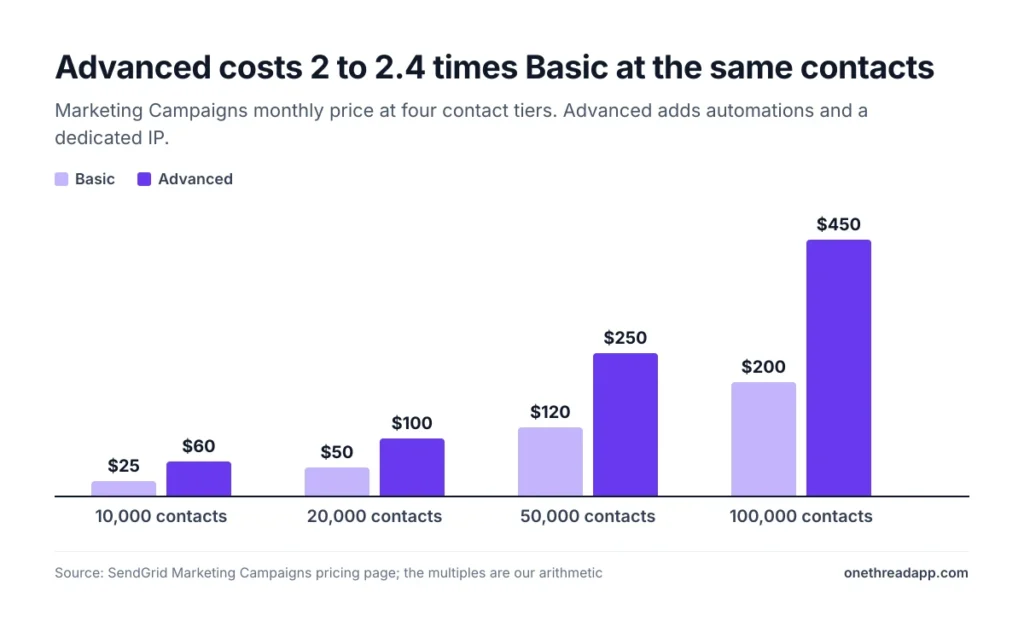
Example: At 50,000 contacts, Advanced costs $250 and Basic costs $120. The $130 gap adds up to $1,560 a year for automations and the extras.
Pricing: $60 a month for 10,000 contacts, rising to $900 for 200,000.
Best For
- Marketers who need automations, or a dedicated IP for campaigns.
Pros
- Automations and a dedicated IP included.
- Up to 200,000 contacts and 1 million emails.
- 60 email testing credits and 15 signup forms.
Cons
- Costs $35 to $250 more than Basic at the same contact count.
- Price per 1,000 contacts is $6.00 at 10,000.
- Custom pricing above 200,000 contacts.
Sources: SendGrid Marketing Campaigns pricing page, SendGrid guide to downgrading between paid plans.
What Happens When You Go Over Your SendGrid Plan?
SendGrid bills overage charges for each email above your sending limit. Twilio describes it as a small amount per extra email, and it appears on the invoice for the month after. For SMS and voice costs on the same account, see our Twilio pricing guide.
The pricing page prints no rate, and the overage article we read doesn’t either. Zapro’s guide estimates $0.0013 per extra email on Essentials 50K, falling to $0.0005 on Pro 2.5M. Treat that as an estimate and confirm it with SendGrid.
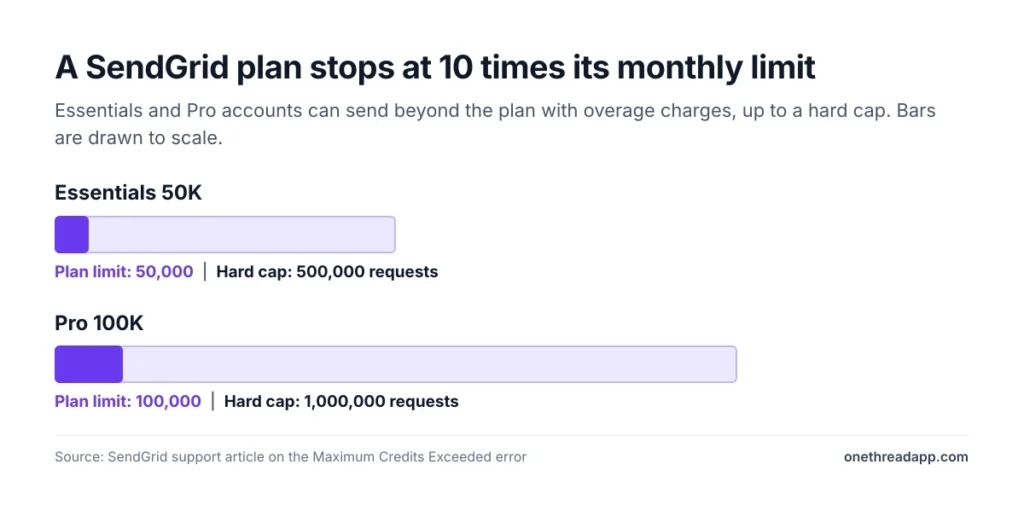
Essentials and Pro also stop at a hard cap of 10 times your plan. On Essentials 50K, that is 500,000 requests a month. Past it, SendGrid returns a Maximum Credits Exceeded error.
Requests count processed plus dropped emails. Upgrading the Email API plan lifts the cap, but upgrading Marketing Campaigns does not.
An upgrade doesn’t cancel overage you already owe, and an unpaid upgrade invoice keeps the limits in place.
Example: Using Zapro’s $0.0013 estimate, 80,000 emails on Essentials 50K adds $39 in overage and brings the month to $58.95. Essentials 100K covers the same send for $34.95.
Top Tip: Check your processed and dropped requests a few days before the month ends. If you will cross the limit, upgrade first.
Sources: SendGrid overage article, SendGrid Maximum Credits Exceeded article, Zapro SendGrid pricing guide.
How Much Do SendGrid Add-Ons Cost?
SendGrid sells several extras as add-ons, but its pricing page lists no price for any of them. Ask sales or support for a quote before you budget.
| Add-on | What the plans include | Price listed |
|---|---|---|
| Extra dedicated IP | One in Pro and Advanced | Not listed |
| Email validation | 2,500 free on Pro, 5,000 on Premier | Not listed |
| Email testing credits | 60 a month on Pro and Advanced | Not listed |
| Longer email activity | Up to 30 days, for purchase | Not listed |
| Expert program management | Premier, for purchase | Not listed |
For scale, other senders publish their IP prices. Amazon SES lists $24.95 a month per standard dedicated IP. Postmark starts at $50 and Mailgun lists $59.
The console lets you buy one new IP a month, and more than one needs support. At 250,000 messages a month, SendGrid suggests at least two IPs, one for marketing and one for transactional email.
Top Tip: Get the add-on price in writing before you add a dedicated IP. The pricing page lists none, and each extra IP adds a monthly charge.
Sources: SendGrid Email API pricing page, SendGrid dedicated IP documentation, Amazon SES pricing, Postmark pricing, Mailgun pricing.
What Do You Lose When You Downgrade a SendGrid Plan?
A downgrade from Pro to Essentials removes your dedicated IP, subusers, SSO and phone support. SendGrid also drops the Email Validation API, email testing credits and reverse DNS setup.
Some limits shrink instead of vanishing. Teammates fall to 1, and SendGrid keeps the newest one. Default searchable email activity falls to 3 days.
Marketing Campaigns Advanced to Basic costs you automations and the same extras. Signup forms fall to 5, and email testing credits fall from 60 to 10.
A downgrade takes full effect on the first day of the next calendar month. An upgrade is immediate. The move also changes your price per email: at 100,000 emails, Pro’s $0.90 per 1,000 becomes $0.35. If you downgrade to Free, SendGrid deletes all contacts in the account, so export them first.
Example: A team on Pro at 100,000 emails saves $55 a month by dropping to Essentials. Any subusers it set up for client apps become unavailable. Check each item against your setup before you request the change.
Top Tip: Export your contacts and note your teammates and signup forms before you downgrade. SendGrid keeps only the newest teammate and the newest forms.
Sources: SendGrid guide to downgrading between paid plans, SendGrid billing documentation.
How Does SendGrid Billing Work?
SendGrid uses monthly billing, by credit or debit card only. It doesn’t offer prepayment, quarterly billing or annual billing, so there’s no annual discount on the pages we read. Six rules matter:
- Refunds: SendGrid refunds only the latest month’s subscription charge. Your account must be unused that month, with no overages and no Marketing Campaigns contacts stored.
- Invoicing: Twilio arranges invoiced billing only for a committed spend of $12,000 a year or more.
- Declined cards: A declined card freezes the account. If you haven’t paid by the end of the month, SendGrid terminates it, and the owner can ask support to restore it within six months.
- Taxes: The pricing page says taxes and overages may apply on top of the plan price, so your invoice can run above the card.
- Subusers: The parent account pays for contacts added to subusers, and for any overages a subuser causes.
- Cancelling: An administrator cancels under Settings, Account Details, Your Products. Cancelling doesn’t delete your account or its data.
Example: You upgrade to Essentials 100K at $34.95 and send nothing that month. You can ask for the $34.95 back by replying to your invoice email or contacting support. Once you send, the refund no longer applies.
Source: SendGrid billing documentation.
How Does SendGrid Pricing Compare With Amazon SES, Mailgun and Postmark?
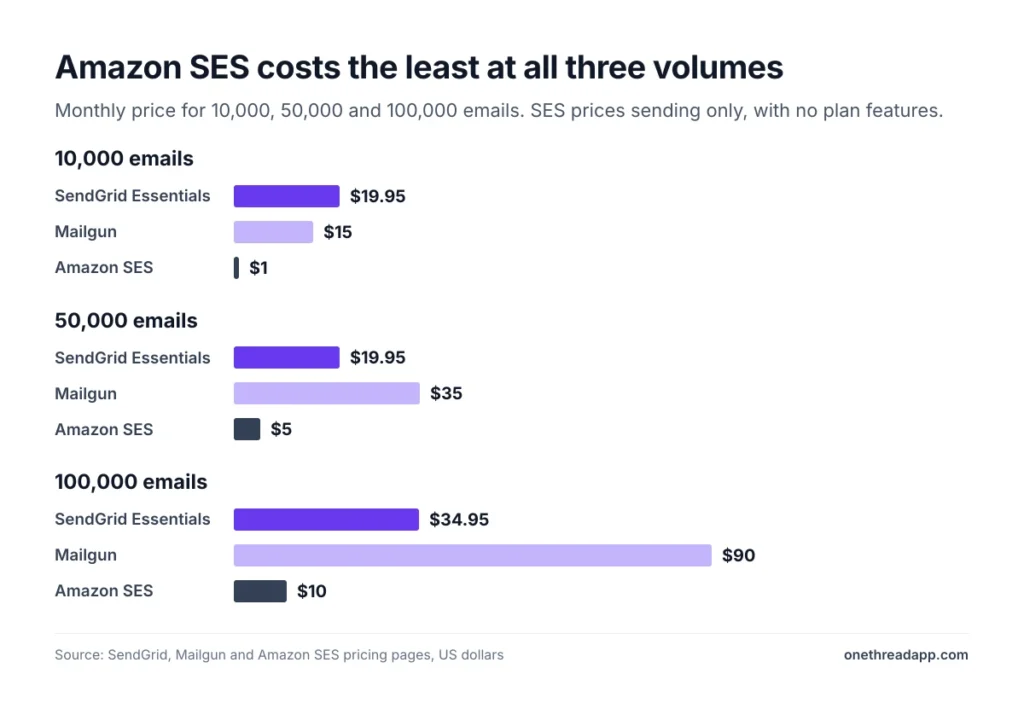
Amazon SES costs less than SendGrid at every volume we checked, at $0.10 per 1,000 emails. Essentials costs less than Mailgun above 10,000 emails, and Mailgun Scale matches the price of SendGrid Pro.
We read each vendor’s own pricing page. These are list prices for sending only, in US dollars.
| Emails a month | SendGrid | Mailgun | Amazon SES |
|---|---|---|---|
| 10,000 | $19.95 (Essentials 50K) | $15 (Basic) | $1.00 |
| 50,000 | $19.95 (Essentials 50K) | $35 (Foundation) | $5.00 |
| 100,000 | $34.95 (Essentials) or $89.95 (Pro) | $90 (Scale) | $10.00 |
SES prices sending only. It lists $0.12 per GB of attachments and $24.95 a month for a standard dedicated IP. Mailgun Scale lists one dedicated IP and 30 days of logs, which lines up with SendGrid Pro at $89.95.
Postmark’s Basic plan starts at $15 for 10,000 emails, with extra emails at $1.80 per 1,000. Its dedicated IPs start at $50 a month on Pro and above.
Example: At 100,000 emails a month, SES costs about $10, Essentials $34.95 and Mailgun Scale $90. Across a year, that’s $120, $419.40 and $1,080.
If your real need is newsletters to a list, our Mailchimp pricing guide shows what a list-based tool costs.
Sources: Amazon SES pricing, Mailgun pricing, Postmark pricing, SendGrid Email API pricing page.
How Can You Lower Your SendGrid Bill?
Match the plan to your real volume first, because every tier price follows it. Then use these habits:
- Right-size the tier: Compare your last three months of sent emails with the 50,000 and 100,000 limits.
- Upgrade before you cross a limit: An upgrade is immediate, and it doesn’t cancel overage you already owe.
- Clean contacts before month end: Contacts you delete or process before midnight UTC drop out of next month’s billing.
- Plan a downgrade: It takes effect on the first day of the next month, so you pay for the higher plan until then.
- Skip Marketing Campaigns for transactional mail: The two products are billed and changed separately.
- Price Amazon SES for pure sending: It lists $0.10 per 1,000 emails, so a send-only app can cost a fraction of Essentials.
- Watch the cap: Essentials and Pro stop at 10 times the plan, so a runaway job can’t bill without limit.
Cleaning also helps your results. Our guide to common email marketing mistakes covers why unengaged contacts hurt more than the bill.
Top Tip: Set a reminder for the week before the month ends. That’s when you can still upgrade or clear contacts before the bill closes.
Sources: SendGrid overage article, SendGrid guide to changing plans.
Which SendGrid Pricing Plan Should You Choose?
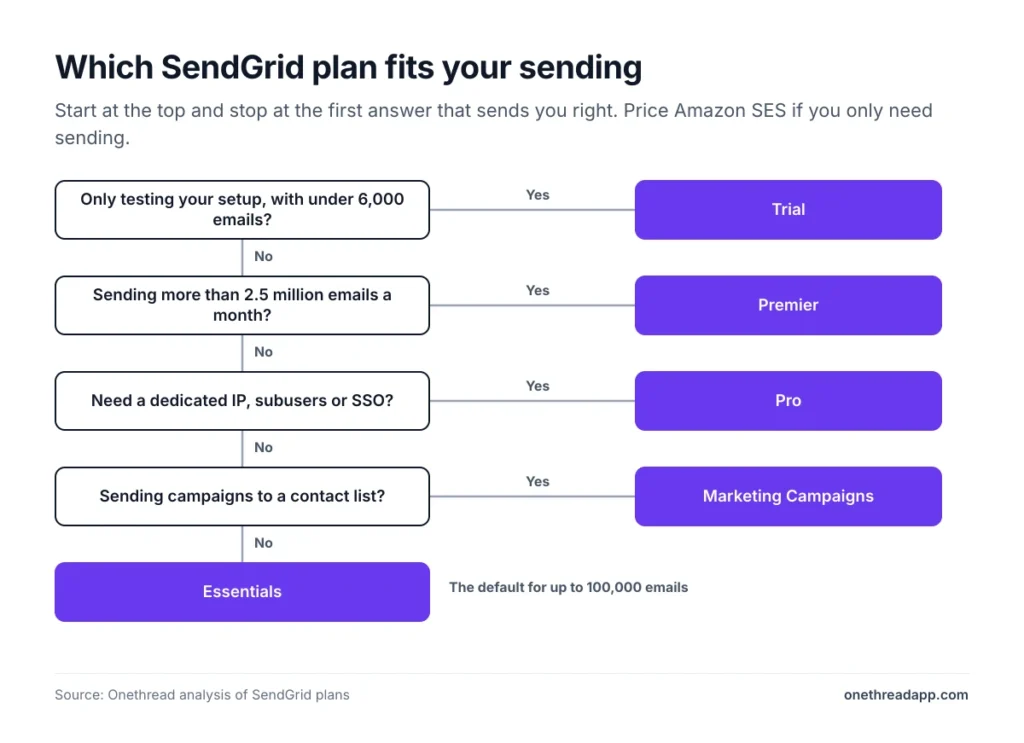
Choose the cheapest plan that covers your monthly volume and the one feature you can’t skip. For most small senders, that’s Essentials.
| If you… | Pick |
|---|---|
| Want to test your setup with under 6,000 emails | Trial |
| Send up to 100,000 emails a month from a shared IP | Essentials |
| Need a dedicated IP, subusers or SSO | Pro |
| Send above 2.5 million emails a month | Premier |
| Send newsletters to up to 100,000 contacts | Marketing Campaigns Basic |
| Need automations or a dedicated IP for campaigns | Marketing Campaigns Advanced |
| Only need sending at the lowest price | Price Amazon SES |
SendGrid sends the email, but you still need somewhere to track the work around it. Our business management software guide covers the tools for that.
What Should You Do Next With SendGrid?
SendGrid pricing looks simple on the card and gets complicated at the edges. The plan price follows your volume, but overage, the 10X cap, add-ons and downgrade losses sit outside it. Once you know your monthly sends, the plan choice takes a few minutes, and the card alone can’t tell you what you’ll pay.
This week, open the pricing page and set the dropdown to your real monthly volume. Then check your processed and dropped requests, and price Amazon SES for the same volume. If the gap is large, test the cheaper option before your next billing date.
FAQs
Does SendGrid Have a Free Plan?
Not for new accounts. SendGrid now offers a 60-day free trial with 100 emails a day and no credit card, and sending stops when it ends. After that, SendGrid pricing starts at $19.95 a month. Some older free accounts received notices to upgrade, so check yours.
How Much Does SendGrid Cost per 1,000 Emails?
On the Email API, SendGrid costs $0.35 per 1,000 emails on Essentials 100K and $0.90 on Pro 100K. It falls to $0.44 on Pro 2.5M. Amazon SES lists $0.10 per 1,000 emails. These figures assume you use the whole plan, so a half-used plan costs more per 1,000.
Is SendGrid Cheaper If You Pay Annually?
No, because SendGrid doesn’t offer annual billing. Accounts pay monthly by credit or debit card, and the pages we read show no annual discount. Invoiced billing needs a committed spend of $12,000 a year or more, so ask sales if your volume is that large.
Does SendGrid Offer Discounts?
Volume discounts apply as you scale, according to the pricing FAQ, and large senders talk to sales about Premier. We found no public coupon or annual discount in SendGrid pricing. If you commit to a large yearly spend, ask for a quote before you sign.
What Is a Cheaper Alternative to SendGrid?
Amazon SES is the cheapest we checked, at $0.10 per 1,000 emails. Mailgun starts at $15 for 10,000 emails, and so does Postmark. Compare them at your own volume, and check deliverability and support needs before you move. SES prices sending only.
Is SendGrid Worth the Price?
It can be at 50,000 emails or more a month, where Essentials costs $0.35 to $0.40 per 1,000 emails. Below about 10,000 emails, you still pay the $19.95 floor. Pro is worth it only if you need a dedicated IP, subusers or SSO.