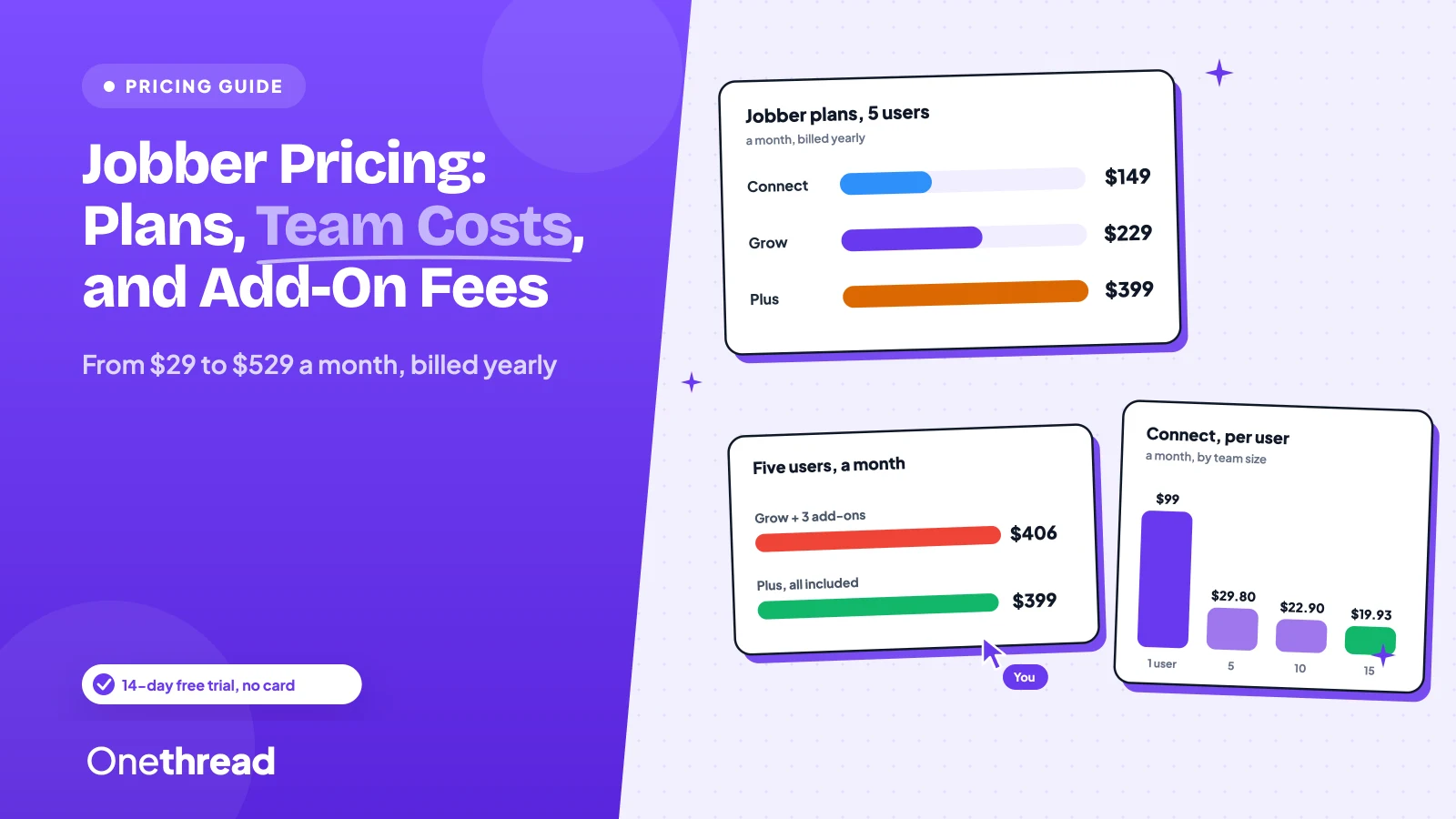
Jobber’s price list looks simple. The bill rarely is.
Jobber pricing runs from $29 a month for one user on Core to $529 a month for 15 users on Plus, all on annual billing. Connect starts at $99, Grow at $149, and every extra user adds $29 a month.
Pay month to month and the same plan costs $20 to $170 more.
We checked Jobber’s pricing page, its help center and seven top-ranking guides, then did the team math for you.
Here’s what you’ll pay on each plan, what a five-person crew pays, and where the extras hide.
Key Points
- Jobber costs $29 (Core, one user), $99 (Connect), $149 (Grow) or $399 (Plus, up to five users) a month on annual billing. At 15 users those climb to $299, $399 and $529. Each user beyond a team-size band adds $29 a month.
- Billing term moves the price as much as the plan does. Five users on Grow pay $2,748 a year on annual billing and $3,588 with no commitment.
- Add-ons and card fees sit outside the plan price: Marketing Suite $99, Sales Pipeline $49, AI Receptionist $29, and 2.9% plus 30¢ per card payment. Plus at $399 beats Grow with all three add-ons at $406.
- Pick Core for one person, Connect for automatic payments and QuickBooks Online sync, Grow for job costing and two-way SMS, and Plus for crew scheduling. The 14-day trial needs no card.
What Is Jobber Pricing Per Month?
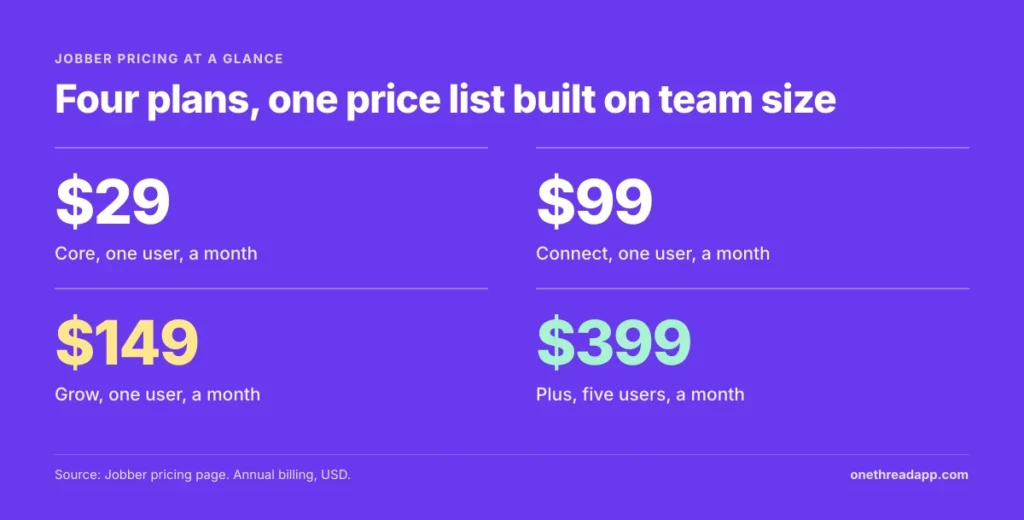
On annual billing, Jobber costs $29 a month for Core, $99 for Connect, $149 for Grow and $399 for Plus. Core covers one user and Plus starts at five. Prices step up with team size, to $299, $399 and $529 at 15 users. Month-to-month billing with no commitment runs $20 to $170 higher.
Here’s the full grid. Each figure is dollars a month with annual billing, in USD.
| Plan | 1 user | Up to 5 users | Up to 10 users | Up to 15 users |
|---|---|---|---|---|
| Core | $29 | Contact sales | Contact sales | Contact sales |
| Connect | $99 | $149 | $229 | $299 |
| Grow | $149 | $229 | $299 | $399 |
| Plus | Not listed | $399 | $449 | $529 |
Core is sold for one user only. Teams of 16 or more get no listed price and go through Jobber’s sales team.
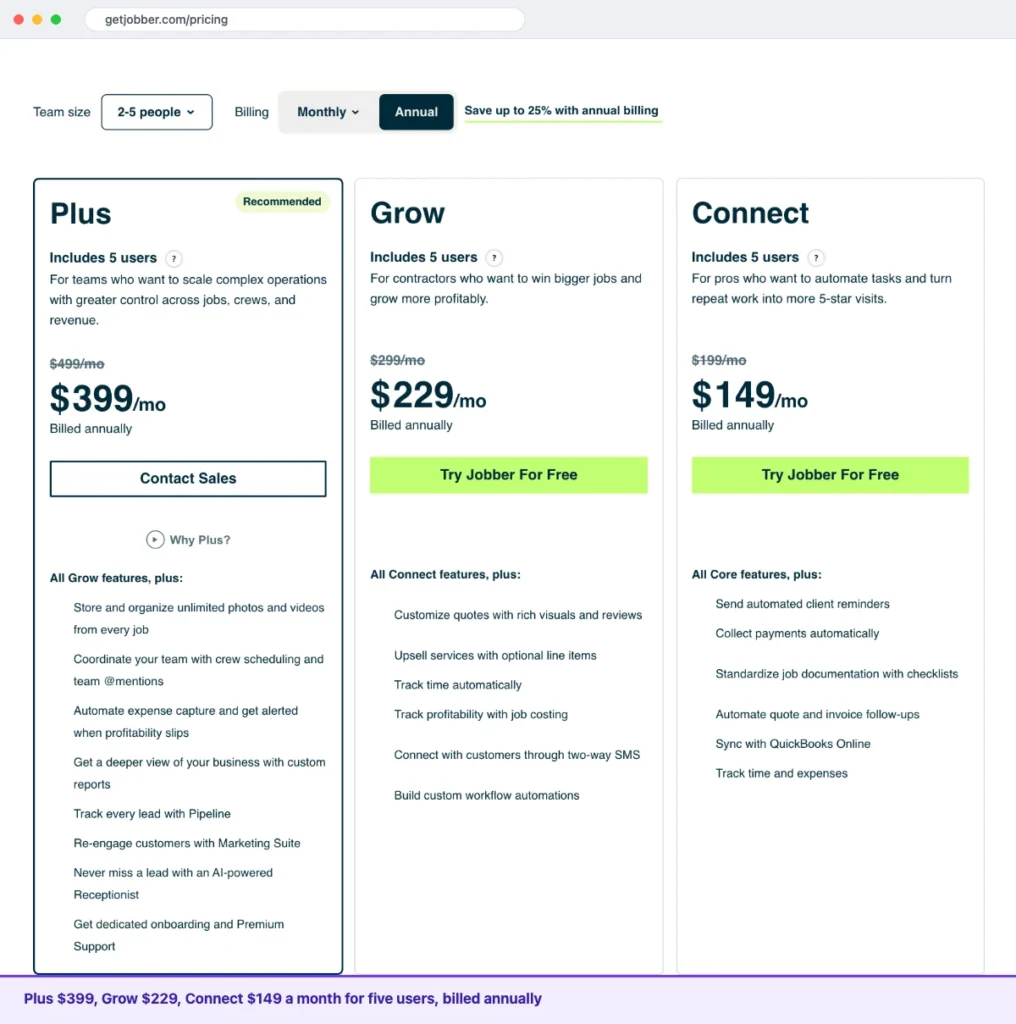
Sources: Jobber pricing, Jobber Plus pricing.
How Does Jobber Pricing Work for Extra Users?
Jobber prices by team-size band, not by seat. Each plan lists 1, 5, 10 or 15 users, and every user beyond your band adds $29 a month. Jobber counts a user as anyone who opens the account, in the office or the field, to view or manage the schedule. An empty seat inside your band still costs money.
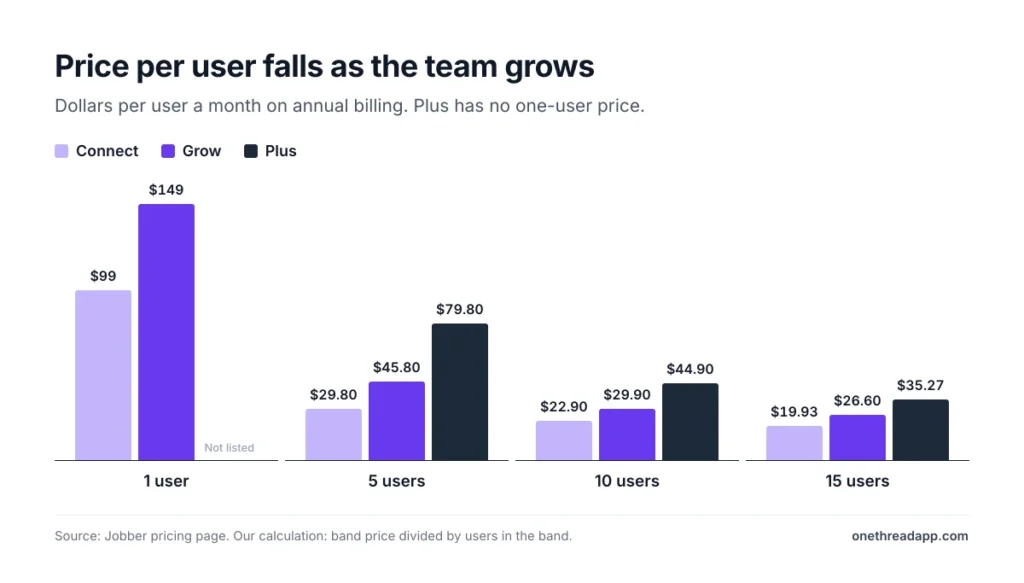
Bands make big teams cheaper per head. Connect costs $99 for one user but $29.80 per user at five, $22.90 at ten and $19.93 at fifteen. Grow falls from $149 to $45.80 per user at five, $29.90 at ten and $26.60 at fifteen. Plus drops from $79.80 at five to $44.90 at ten and $35.27 at fifteen.
Example: a 10-person crew on Connect pays $229 ÷ 10 = $22.90 per user a month, against $99 for a solo user.
Small teams face the opposite problem. A second user on the one-user Connect band costs $99 + $29 = $128 on paper. A third costs $157, already above the five-user band at $149. Jobber’s page doesn’t say which band it picks for a two- or three-person team, so confirm it in the plan wizard before you pay.
Top Tip: Count everyone who opens the schedule, including part-timers and the office, before you pick a band. One uncounted seat costs $29 a month.
What Does the Jobber Core Plan Include?
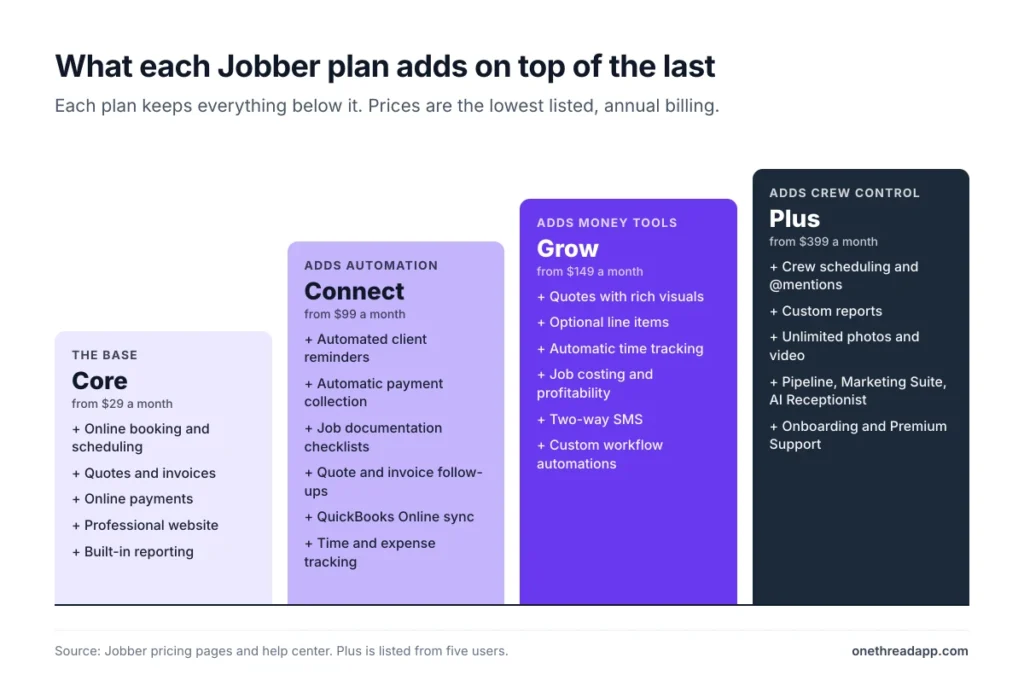
Jobber Core is the solo plan: one user and no team tiers. Jobber pitches it at the solo pro who wants quoting, scheduling and billing on one platform. It covers online job booking and scheduling, quotes, and invoices with online payments. A professional website, built-in reporting and connections to more than 100 tools come with it.
Say you mow lawns alone and invoice from the truck. Core handles the booking, the quote and the bill. Automated reminders and QuickBooks Online sync start one plan up, so the first hire is the usual trigger to move.
Pricing: $29 a month on annual billing, $39 with a one-year commitment, or $49 with no commitment.
Jobber’s page promises to “save up to 25%” with annual billing. On Core, $49 falls to $29, a 41% cut, so the headline undersells it.
Best For
- Solo operators who want quotes, scheduling and invoices in one app.
- Anyone testing Jobber before a first hire.
Pros
- Lowest entry price at $29 a month.
- Online booking and invoices with online payments.
- A professional website at no extra cost.
- Connections to 100+ tools in the app marketplace.
Cons
- One user only, and larger Core teams go to sales.
- No automated client reminders or QuickBooks Online sync.
- No time and expense tracking.
- No job documentation checklists.
What Does the Jobber Connect Plan Include?
Jobber Connect adds the automation. It’s also the first plan with a five-user band, so a small crew lands here. On top of Core, it includes automated client reminders and automatic payment collection. It also adds job documentation checklists, quote and invoice follow-ups, QuickBooks Online sync, and time and expense tracking.
Say two crews finish jobs and clients forget to pay. Connect charges the card on file and chases quotes and invoices itself. That’s the point of the jump from Core.
The jump is steep for a second user. Core’s $29 becomes $128 or $149 on Connect, roughly four to five times the price.
Pricing: $99 for one user, $149 for up to five, $229 for up to ten and $299 for up to fifteen, all with annual billing. With no commitment, the same bands cost $139, $199, $299 and $399.
Best For
- Small crews that want automatic payments and QuickBooks Online sync.
- Owners who still chase late payments by hand.
Pros
- Automatic payment collection and follow-ups.
- QuickBooks Online sync and time and expense tracking.
- Job checklists for documenting work.
Cons
- No job costing or two-way SMS.
- Grow costs $50 to $100 more a month at every band.
- Extra users cost $29 a month each beyond the band.
What Does the Jobber Grow Plan Include?
Jobber Grow adds the money tools. It includes quotes with rich visuals, optional line items for upselling, automatic time tracking, and job costing with profitability tracking. Two-way SMS with customers and custom workflow automations come with it. The 14-day free trial runs on Grow.
Say a client wants basic lawn care and an aeration add-on. Optional line items let them tick the extra on the quote. If you still price jobs by hand, our free project estimate calculator shows the math first.
Now say every job runs two hours over the quote. Automatic time tracking and job costing show that leak within the first week.
Pricing: $149 for one user, $229 for up to five, $299 for up to ten and $399 for up to fifteen, all with annual billing. With no commitment, the same bands cost $199, $299, $399 and $499.
Best For
- Crews that quote upsells and want job costing and two-way SMS.
Pros
- Job costing and profitability tracking.
- Two-way SMS with customers and custom workflow automations.
- Optional line items on quotes for upselling.
Cons
- Marketing Suite, Sales Pipeline and AI Receptionist cost extra.
- Crew scheduling and custom reports need Plus.
- Quote reviews need the Reviews add-on, which has no listed price.
What Does the Jobber Plus Plan Include?
Jobber Plus is the bundle plan, and the only one with crew scheduling and custom reports. It includes everything in Grow, plus unlimited photo and video storage, team @mentions, automated expense capture and profitability alerts.
It also bundles Pipeline lead tracking, Marketing Suite, AI Receptionist, dedicated onboarding and Premium Support. Jobber’s Plus page lists 24/7 phone support and a dedicated support line.
Pipeline tracks open leads and bookings inside Jobber, from first contact to booked job. If you want a standalone tool instead, see our guide to CRMs for small businesses or the Zoho CRM pricing breakdown.
Pricing: $399 for up to five users, $449 for up to ten and $529 for up to fifteen, all with annual billing. With no commitment, those bands cost $499, $599 and $699.
Best For
- Crews of five or more that would buy the add-ons anyway.
- Owners who want one bill instead of three add-on charges.
Pros
- Includes Marketing Suite, Pipeline and AI Receptionist, which cost $177 a month at list price.
- Crew scheduling, custom reports and unlimited photo and video storage.
- Dedicated onboarding and Premium Support.
Cons
- No one-user price on the pricing page.
- Costs $170 more than Grow at five users, before add-ons.
- Teams of 16 or more get a custom quote.
Which Jobber Add-Ons and Fees Raise the Bill?
Three add-ons and the payment fees sit outside the plan price. Marketing Suite, Sales Pipeline and AI Receptionist are optional on Core, Connect and Grow and included in Plus.
| Add-on | Price a month | What it covers |
|---|---|---|
| Marketing Suite | $99 | A customized marketing plan |
| Sales Pipeline | $49 | Lead tracking |
| AI Receptionist | $29 | 30 conversations, then $0.79 each |
Payments carry their own fee. Cards cost 2.9% plus 30¢, Tap to Pay costs 2.7% plus 30¢, and US bank (ACH) payments cost 1%. Instant payouts add another 1%.
Example: a crew that collects $20,000 a month across 40 card payments pays 2.9% × $20,000 + 40 × $0.30 = $592 in payment processing. The same $20,000 by bank transfer costs $200.
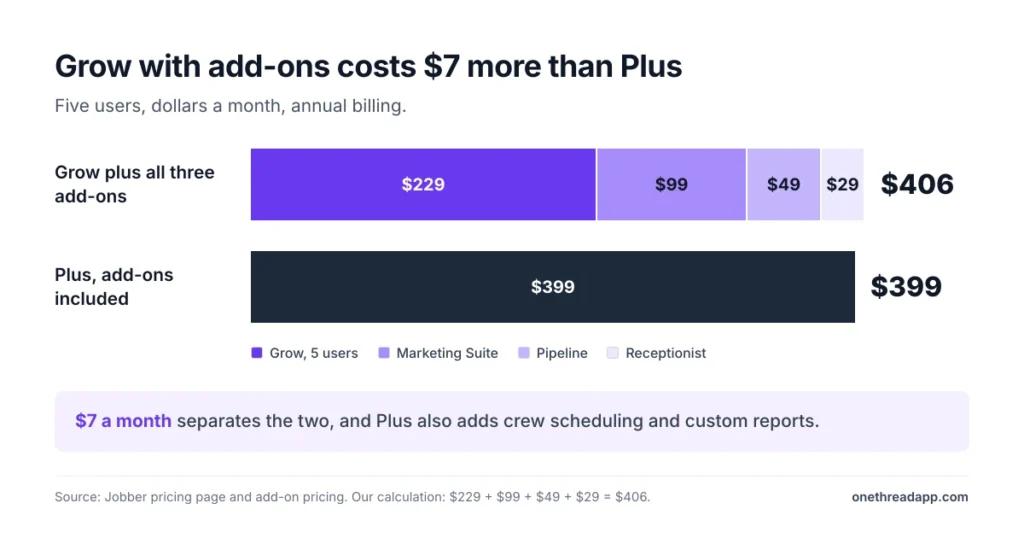
Add-ons change which plan is cheapest. Example: five users on Grow with all three add-ons pay $229 + $99 + $49 + $29 = $406 a month. Plus costs $399 for the same five users and includes all three.
Top Tip: Jobber’s Receptionist help article says $29 buys 30 conversations, while its add-on article says 100 a month. Ask support which applies before you subscribe.
Add-ons can’t be added during the free trial, so you can’t test them before you pay.
How Do Jobber Pricing Terms and the Free Trial Work?
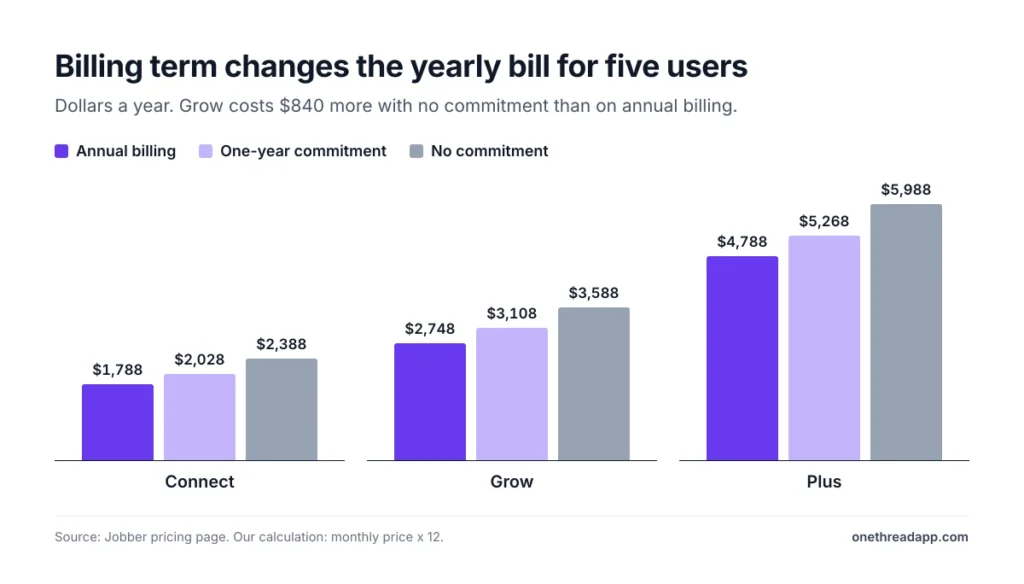
Jobber sells every plan three ways, and the term moves the price more than the plan name does.
- No commitment: billed monthly, and you can cancel any time.
- One-year commitment: billed monthly, with a 12-month minimum.
- Annual billing: paid up front, and the first payment is non-refundable.
All plans auto-renew unless you set them not to.
| Five users, a year | Annual billing | One-year commitment | No commitment |
|---|---|---|---|
| Connect | $1,788 | $2,028 | $2,388 |
| Grow | $2,748 | $3,108 | $3,588 |
| Plus | $4,788 | $5,268 | $5,988 |
Example: five users on Grow cost $229 × 12 = $2,748 on annual billing and $299 × 12 = $3,588 with no commitment, a gap of $840.
Jobber has no free plan. It offers a 14-day free trial with full Grow access and no credit card. Your data isn’t deleted if the trial expires.
What Do Reviewers Say About Jobber Pricing?
Reviewers rate Jobber well, and they still flag its price. Capterra lists 4.6 out of 5 from 1,490 reviews, with 4.4 for value for money. And 88% of value-for-money raters call it good or excellent.
Reviewers say it suits small businesses because you can add features without paying for options you don’t use.
The complaints are specific. Capterra reviewers call the jump between plans significant, report high card fees and say costs climb as users are added. Canadian reviewers dislike paying in USD, and one says the instant payout fee isn’t clear during the free trial.
On Software Advice, 33% of payment processing sentiment is negative. One reviewer called the price per user steep for a five-person crew and cut some staff seats.
The rating covers the product as a whole, so it can’t tell you whether Grow or Plus earns its price for your crew. Is it worth it? Our read: the plan price is rarely the regret. Paying for Grow while using Core features is.
Can you name the Grow feature you opened this week? If not, Connect or Core covers you. Then price the card fees on your real monthly volume, because that line grows with every job you win.
What Are Cheaper Jobber Alternatives?
Sometimes, but not always. Jobber Core at $29 undercuts Housecall Pro’s $59 entry plan for one user, and the two tie at $149 for five users. Housecall Pro doesn’t label the billing term beside each price, so we read the lower figure as annual billing.
| Tool | Users included | Starting price a month | Best for (our read) |
|---|---|---|---|
| Jobber Core | 1 | $29 | Solo operators |
| Jobber Connect | 5 | $149 | Small crews |
| Housecall Pro Basic | 1 | $59 | Solo operators |
| Housecall Pro Essentials | 5 | $149 | Small crews |
| Workiz | Not listed | Request pricing | Teams that want a quote |
Workiz lists no prices and offers a 7-day trial. Capterra notes that ServiceTitan and FieldPulse don’t publish a starting price either.
Sources: Housecall Pro and Workiz plans pages, Capterra.
Which Jobber Plan Should You Choose?
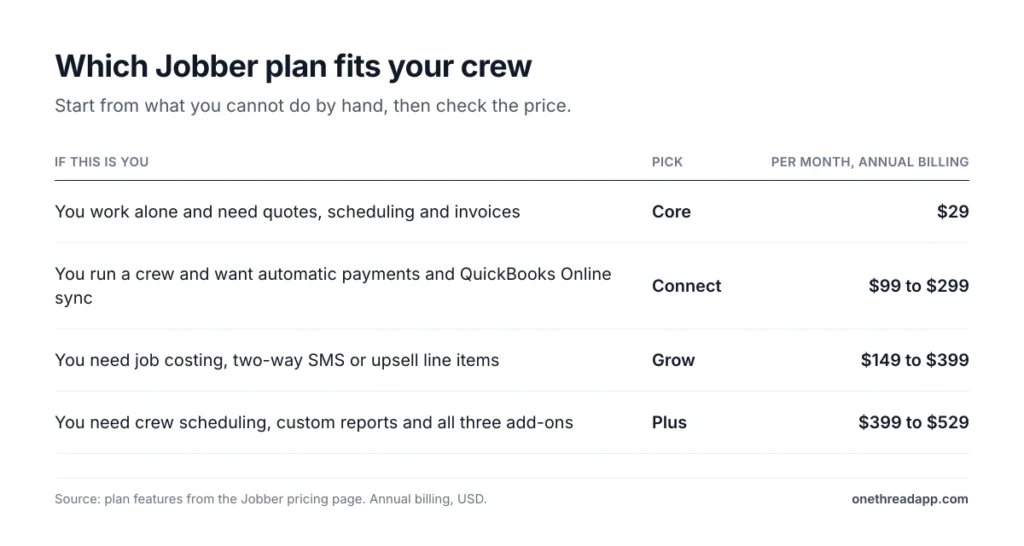
Start with what you can’t do by hand, then check the price.
| If this is you | Pick | Price a month, annual billing |
|---|---|---|
| You work alone and need quotes, scheduling and invoices | Core | $29 |
| You run a crew and want automatic payments and QuickBooks Online sync | Connect | $99 to $299 |
| You need job costing, two-way SMS or upsell line items | Grow | $149 to $399 |
| You need crew scheduling, custom reports and all three add-ons | Plus | $399 to $529 |
Three checks lower the bill:
- Count users first: pick the band that fits everyone who opens the schedule, and no larger.
- Choose the term last: annual billing saves $20 to $170 a month, but the first payment is non-refundable.
- Collect by bank transfer: ACH costs 1%, against 2.9% plus 30¢ on cards.
Still comparing Jobber with broader tools? Our guide to business management software covers the wider field, and client management software covers the client side.
What Should You Do Next With Jobber?
Jobber pricing is a team-size price list with a billing discount and a few meters running beside it. Once you count your users, the band, the term and the card volume matter more than the plan name. That’s where the bill is decided, and where you can still change it.
This week, list everyone who opens your schedule and add up last month’s card payments. Run both through the tables above, then start the free trial and note which features you actually use before you pay for any of them.
FAQs
Is Jobber Better Than QuickBooks?
They do different jobs. Jobber runs scheduling, quoting, invoicing and payments for service crews, while QuickBooks Online handles accounting. Jobber syncs with QuickBooks Online, and that sync starts on the Connect plan, so you don’t have to choose between them.
Can You Change Jobber Plans Anytime?
Yes. Upgrades take effect right away, and downgrades start at the end of your billing cycle, on monthly and annual plans. Annual payments are non-refundable once paid, so Jobber pricing plans are easiest to change when you start on a monthly term.
What Happens When the Jobber Free Trial Ends?
Jobber reminds you to add billing details before the trial ends, and your data isn’t deleted if the trial expires. The trial runs 14 days with full Grow access and no credit card. Add-ons can’t be added during the trial, so you add them after you subscribe.
Does Jobber Pricing Differ in Canada or Australia?
No. Jobber’s Canadian and Australian pricing pages list the same plans and prices as the US page. Both state that all prices are in USD. Sales tax is extra where it applies, so check your country’s page before you pay.
Does Jobber Offer Franchise or Multi-Location Pricing?
Yes, through custom pricing. Jobber sends franchises and multi-location businesses to its Franchise Partnership Program, which comes with dedicated support. Jobber pricing for teams of 16 or more users is also quoted by sales, because the pricing page lists bands only up to 15.