A booking link looks free until the whole team needs one.
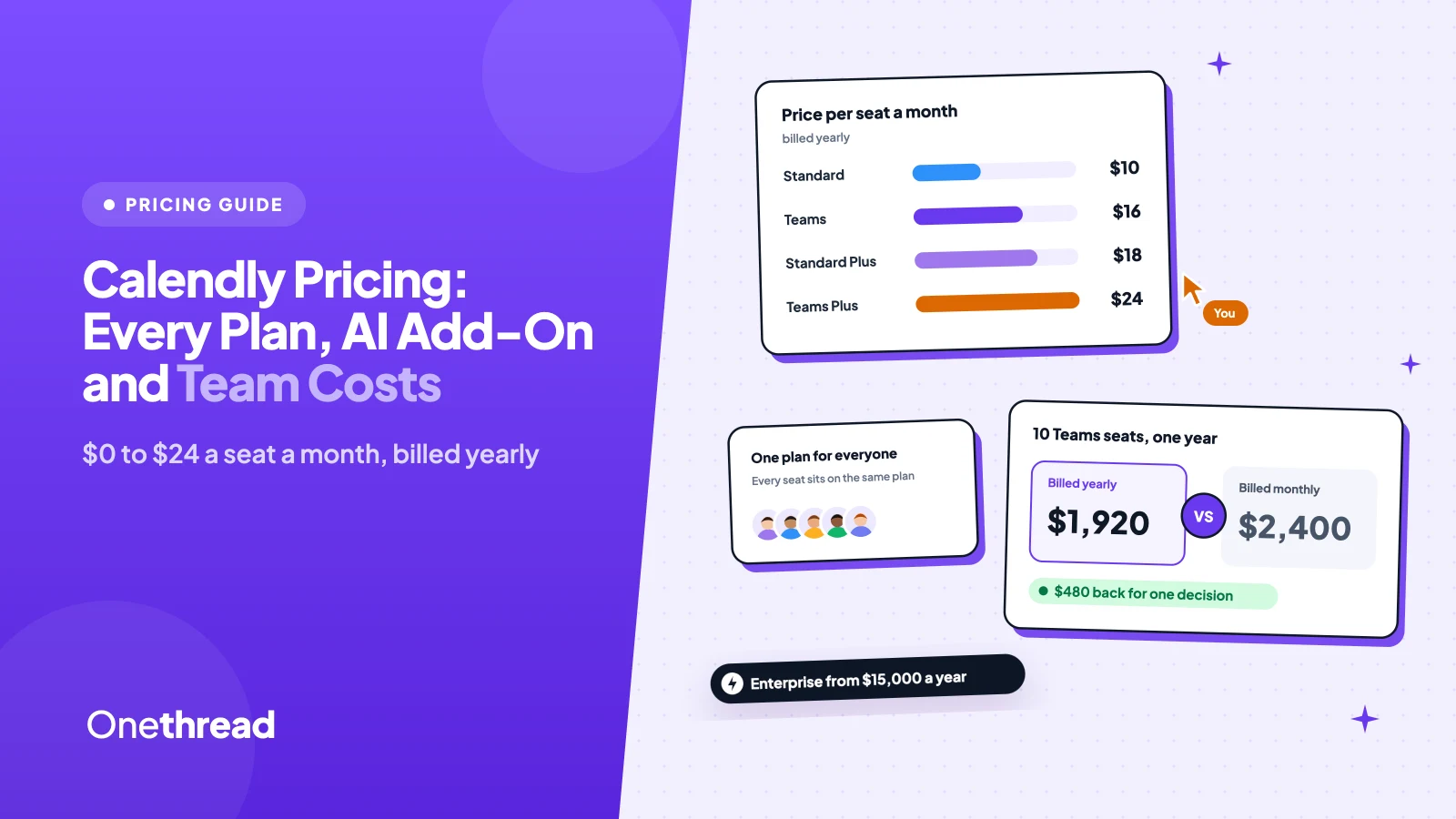
Calendly pricing starts at $0 on the Free plan. Paid plans cost $10 per seat a month for Standard and $16 for Teams, billed yearly, or $12 and $20 billed monthly. The new Plus plans add AI for $18 and $24. Enterprise starts at $15,000 a year.
Then come the seat rules. One person needs round robin, so everyone pays for Teams. You add Notetaker for two people, and the whole org pays for it.
We read Calendly’s pricing page, its plan guide, its billing help, and 8 top-ranking guides.
Here’s what each plan includes and what your team will actually pay.
Key Points
- Calendly pricing runs from $0 (Free) to $10 a seat for Standard, $16 for Teams, $18 for Standard Plus and $24 for Teams Plus a month on yearly billing. Monthly billing costs $12, $20, $24 and $32. Enterprise starts at $15,000 a year for 50 seats.
- Every user in a Calendly organization sits on the same plan. If one person needs round robin or Notetaker, budget for every seat.
- Pay yearly once you’re sure. A 10-seat Teams plan costs $1,920 a year on yearly billing and $2,400 on monthly billing.
- Check the seat tiers before you talk to sales. At 50 seats, Teams costs about $9,240 a year against Enterprise’s $15,000 starting price.
How Much Does Calendly Pricing Cost per Plan?
Calendly pricing runs from $0 to $32 per seat a month across six plans. Yearly billing cuts each paid seat by 17% to 25%. Only people who host meetings or connect calendars need a seat. Your invitees never do.
We added a 10-seat yearly total so you can compare plans at team size.
| Plan | Per seat, billed yearly | Per seat, billed monthly | 10 seats for a year (yearly billing) |
|---|---|---|---|
| Free | $0 | $0 | $0 (one user) |
| Standard | $10 | $12 | $1,200 |
| Standard Plus | $18 | $24 | $2,160 |
| Teams | $16 | $20 | $1,920 |
| Teams Plus | $24 | $32 | $2,880 |
| Enterprise | From $15,000 a year | Not offered | From $15,000 (50 seats minimum) |
Prices from Calendly’s pricing page, in US dollars. Team totals are our own math. Sources: Calendly pricing, Calendly plan guide, Calendly billing overview.
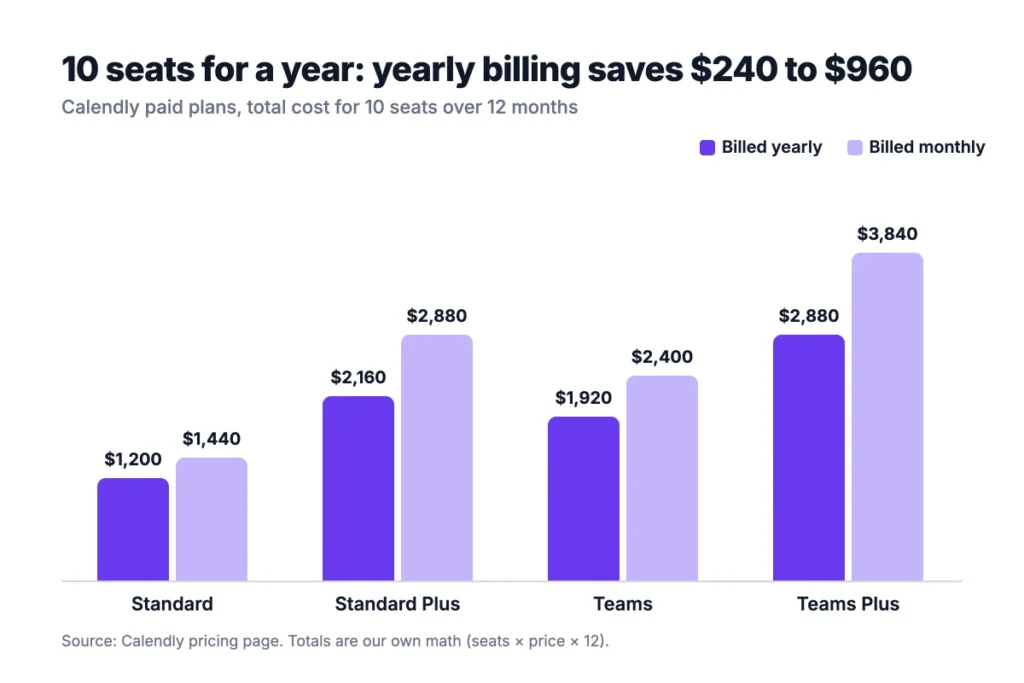
Example: a 10-person Teams account billed monthly costs 10 × $20 × 12 = $2,400 a year. The same seats billed yearly cost 10 × $16 × 12 = $1,920. That’s $480 back for one decision.
What Does the Calendly Free Plan Include?
The Calendly Free plan includes one event type, one calendar connection, and unlimited one-on-one meetings. It costs nothing and has no booking cap.
You also get a customizable booking page, the mobile app and the browser extension. You can embed your calendar on your website, and Calendly sends the confirmation emails.
But the limits show up fast. Say you offer a 15-minute intro call and a 60-minute strategy session. That’s two event types, so you’re already past the Free plan.
There are no automated reminders on Free either. If no-shows are a problem, this plan won’t help.
One quiet upside: Free still builds contact profiles from your bookings, with notes and reminders on each contact. If you meet the same clients again and again, that history lives in one place without a paid seat.
Pricing: $0, for one user.
Best For
- Solo freelancers who book one kind of meeting.
- Anyone testing Calendly before buying seats for a whole team.
Pros
- No time limit and no booking cap.
- Branded booking page and website embed.
- Mobile app and browser extension included.
Cons
- One event type and one calendar only.
- No reminders, workflows or payment collection.
- No group or round-robin meetings.
- Calendly branding stays on your booking page.
What Does the Calendly Standard Plan Include?
The Calendly Standard plan includes unlimited event types, up to six connected calendars, and automated reminders for $10 per seat a month billed yearly. Billed monthly, it costs $12.
Standard is where most solo pros and small teams land. The plan connects HubSpot, Mailchimp and Zapier. Payments at booking run through Stripe or PayPal. You can also remove Calendly branding and get 24/7 live chat support.
Group events (one host, many invitees) and collective events (many hosts, one invitee) work here too. That covers a lot of small-team scheduling without Teams.
Now the catch. Round robin, routing forms and Salesforce sync are not on Standard. If your sales team needs to split inbound leads, you’ll outgrow it.
Example: a three-person agency on Standard pays 3 × $10 × 12 = $360 a year on yearly billing.
Pricing: $10 per seat a month billed yearly, or $12 billed monthly.
Best For
- Consultants, coaches and agencies with several meeting types.
- Small teams that don’t need lead routing or Salesforce.
Pros
- Unlimited event types and six calendars per seat.
- Reminders and follow-ups through automations.
- Payments at booking with Stripe or PayPal.
Cons
- No round robin or routing forms.
- No Salesforce sync.
- No AI notes unless you move to Standard Plus, which costs $8 more per seat.
What Does Calendly Standard Plus Add?
Calendly Standard Plus adds two AI tools to Standard: Notetaker and Callie. It costs $18 per seat a month billed yearly, or $24 billed monthly.
Notetaker joins your Zoom, Google Meet and Microsoft Teams calls. It records them, writes meeting recaps with action items, and drafts follow-up emails. You can share recaps through passcode-protected links.
Callie is an AI assistant that schedules over email. You copy callie@calendly.com into a thread, and it suggests times and books the meeting. Calendly still labels Callie as beta.
Both tools work only in English for now. Calendly launched the Plus plans in August 2026, according to UsagePricing’s change log.
Example: one consultant on Standard Plus pays $18 × 12 = $216 a year. That’s $96 more than Standard, for every recap and every email Callie handles.
Pricing: $18 per seat a month billed yearly, or $24 billed monthly.
Best For
- Consultants who take notes in every client call.
- Solo sellers who schedule over email all day.
Pros
- Meeting recaps and action items without a separate notetaker app.
- Email scheduling with Callie.
- Same scheduling tools as Standard.
Cons
- $8 more per seat a month than Standard on yearly billing.
- English only, and Callie is still in beta.
- The add-on applies to every seat in your account.
What Does the Calendly Teams Plan Include?
The Calendly Teams plan includes round robin, routing forms and Salesforce sync for $16 per seat a month billed yearly. Billed monthly, it costs $20.
Teams exists for sales and customer teams. Round robin spreads meetings across reps. Routing forms qualify leads and send each one to the right person. They work with Calendly, HubSpot, Marketo or Pardot forms. Admins manage event types centrally, so every rep’s links look the same.
SSO (single sign-on) is an optional add-on here. Calendly doesn’t publish its price, so ask sales before you plan around it. Teams also lets admins sort people into groups, each with its own admins.
Here’s the part that stings. Calendly’s own community team says there’s “no way to upgrade some and not all seats” in one organization. So if two reps need routing, all 10 seats pay Teams prices.
Pricing: $16 per seat a month billed yearly, or $20 billed monthly.
Best For
- Sales teams that route inbound demo requests.
- Teams of 5 or more that share meeting load.
Pros
- Round robin and lead routing.
- Salesforce and Marketo sync.
- Seat price drops after 30 seats on yearly billing.
Cons
- 60% more per seat than Standard on yearly billing.
- SSO costs extra, with no public price.
- No phone support.
What Does Calendly Teams Plus Add?
Calendly Teams Plus adds Notetaker and Callie to the Teams plan for $24 per seat a month billed yearly, or $32 billed monthly.
The AI works the same way as on Standard Plus. The team version adds shared recaps, so a manager can read what happened on a rep’s call. It also adds advanced admin controls over who gets which features.
Teams Plus became the plan for Calendly’s free trial in September 2026, according to UsagePricing. So new trial accounts see the most expensive self-serve plan first. Keep that in mind before you click upgrade, because the plan you tried isn’t the plan you need.
Example: 10 seats on Teams Plus cost 10 × $24 × 12 = $2,880 a year. The same seats on Teams cost $1,920. The AI adds $960 a year.
Pricing: $24 per seat a month billed yearly, or $32 billed monthly.
Best For
- Sales teams that want call recaps for every rep.
- Managers who coach reps from meeting notes and action items.
Pros
- Shared recaps and action items across the team.
- Routing, round robin and AI in one plan.
- Same tiered seat discounts as Teams.
Cons
- Highest self-serve price per seat.
- The AI cost applies to every seat, used or not.
- English only, and Callie is still in beta.
What Does Calendly Enterprise Cost?
Calendly Enterprise starts at $15,000 a year and requires at least 50 seats. It’s billed in US dollars only, and you buy it through sales.
Enterprise adds the security and compliance tools big companies ask for. That includes SSO with SAML, SCIM user provisioning, domain control, an audit log and a data deletion API. It also adds Microsoft Dynamics 365 and the full Salesforce routing suite.
Support changes too. You get phone support, a dedicated account team, and help with onboarding and setup.
Notetaker and Callie aren’t included by default. You have to ask about access.
Our math says you shouldn’t go to Enterprise for size alone. Teams at 50 seats costs about $9,240 a year on yearly billing, using Calendly’s seat tiers. That’s $5,760 less than the Enterprise starting price.
Example: even 50 Teams Plus seats cost (30 × $24) + (20 × $22.50) = $1,170 a month, or $14,040 a year. That’s still under $15,000.
Pricing: from $15,000 a year, 50 seats minimum.
Best For
- Companies with SSO, SCIM or audit needs.
- Large sales orgs that route by Salesforce data.
Pros
- Full security and compliance toolkit.
- Dedicated support and onboarding.
- Microsoft Dynamics 365 connection.
Cons
- No public per-seat price.
- 50-seat minimum.
- AI tools need a separate request.
How Does Calendly Charge for Seats?
Calendly charges per seat, and a seat is anyone who connects a calendar or hosts meetings. You also pay for every seat you buy, even an empty one.
Three seat rules shape the bill:
- One plan per organization: every user shares the same plan, so one person’s needs set everyone’s price.
- Empty seats still bill: Calendly’s billing help says you pay for every seat, filled or not.
- Removed seats wait: upgrades start at once, but removed seats only drop off at the end of your billing cycle.
On yearly Teams and Teams Plus plans, seats 31 and up get cheaper. The first 30 seats keep the full price.
| Seats | Teams, per seat a month | Teams Plus, per seat a month |
|---|---|---|
| 1 to 30 | $16.00 | $24.00 |
| 31 to 50 | $14.50 | $22.50 |
| 51 to 100 | $14.00 | $22.00 |
| 101 to 200 | $13.50 | $21.50 |
| 201 to 300 | $13.00 | $21.00 |
| 301 and up | $12.00 | $20.00 |
Tiers from Calendly’s plan guide, yearly billing only.
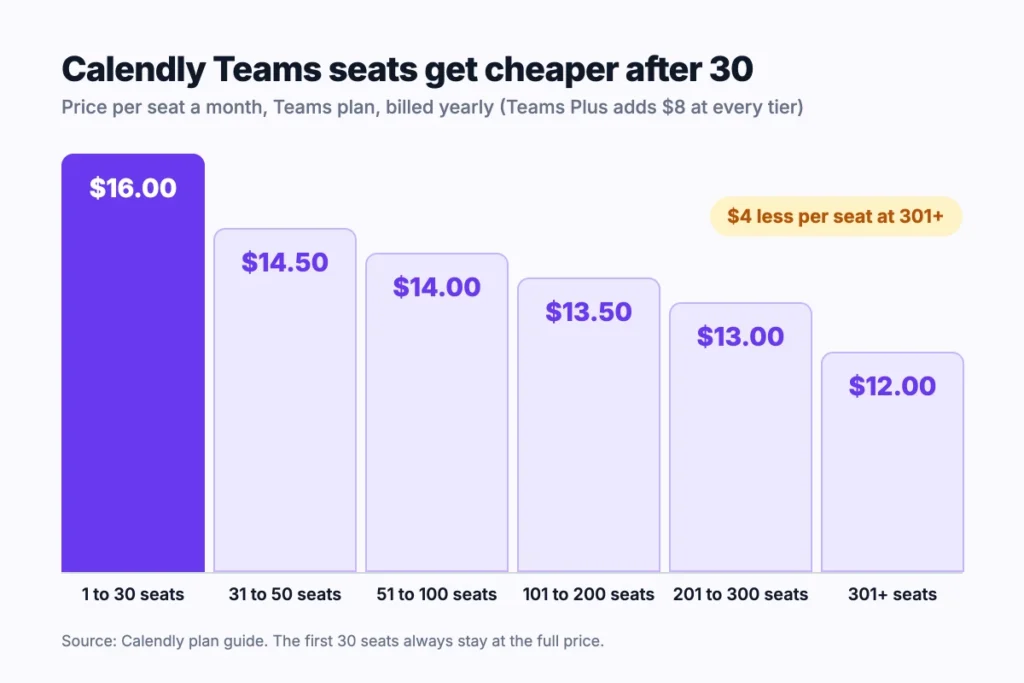
Example: 40 Teams seats cost (30 × $16) + (10 × $14.50) = $625 a month. That’s $7,500 a year, or about $15.63 per seat.
What Hidden Costs Come With Calendly Pricing?
The biggest hidden costs in Calendly pricing come from seat rules, not fees. Each sticker price is honest. Budgets slip in the way seats add up.
Here’s what to check before you buy:
- Plan creep: one feature for one person moves every seat to a higher plan.
- AI on every seat: the Plus upgrade adds $8 per seat a month on yearly billing, for everyone.
- Zapier tasks: Calendly connects to Zapier on Standard, but Zapier bills its own tasks. Our Zapier pricing breakdown covers that math.
- Payment fees: Stripe and PayPal charge their own processing fees, which Calendly doesn’t list.
- SSO on Teams: it’s an add-on with no published price, so it can surprise a security review late in the deal.
- Invoice minimums: paying by invoice needs a $5,000 purchase on Standard or Teams, and $15,000 on Enterprise.
Auto-renew is the one feature nobody needs a trial for. Paid plans renew for the same term unless you downgrade first. And you can’t move your payment date, so a yearly renewal lands as one big charge.
Top Tip: Set a calendar reminder two weeks before your renewal date. Remove unused seats then, because removals only take effect at the end of the billing cycle.
Which Calendly Plan Should Your Team Pick?
Your Calendly plan depends on one question: does anyone need routing or AI notes? If not, Standard covers most small teams.
| Signal | Plan to pick |
|---|---|
| One person, one meeting type | Free |
| Several meeting types, reminders, payments | Standard |
| You want AI recaps but no lead routing | Standard Plus |
| Reps share inbound leads or need Salesforce sync | Teams |
| Reps share leads and managers review call notes | Teams Plus |
| You need SCIM, an audit log or 50+ seats with SSO | Enterprise |
Picks are our own, based on Calendly’s feature lists.
Start with the smallest plan that covers your must-haves. Upgrades take effect right away, so moving up later costs you nothing extra. Moving down takes until the next billing cycle.
Top Tip: List which features each person actually uses before you pick a plan. If only one rep needs routing, a free scheduling tool for that rep may cost less than moving 10 seats to Teams.
If your needs stop at one booking link, our list of the best calendar apps covers cheaper Calendly alternatives. And Calendly books the meeting but doesn’t run the work after it. Teams that hand client calls off as project tasks pair it with a project tool such as Onethread.
What Should Your Team Do Next With Calendly?
Calendly’s price per seat is simple. The bill gets bigger through its rules: one plan for the whole organization, AI on every seat, and empty seats that still cost money. Once you know who needs what, the right plan is usually obvious, and so is the yearly total.
This week, list everyone who hosts meetings and the one feature each person can’t lose. Then price that headcount against the cost table, and pick the plan your most demanding user forces on everyone. Your budget will thank you at renewal time.
FAQs
Is Calendly Free Worth It?
Yes, if you book one kind of meeting from one calendar. The Free plan has no booking cap or time limit. Once you need a second event type, reminders, or payments, Calendly pricing moves you to Standard at $10 per seat a month billed yearly. Check your event types before you upgrade.
What Are the Disadvantages of Calendly?
The main disadvantages are the seat rules and the price jumps between plans. Every user in an organization shares one plan. So a single routing need lifts everyone to Teams. AI tools cost $8 more per seat a month. Phone support only comes with Enterprise.
Does Calendly Offer a Free Trial?
Yes, Calendly offers a 14-day free trial of its paid features. You can invite teammates to the trial at no cost. When the trial ends, every account drops to the Free plan automatically. Calendly doesn’t charge you unless you choose a paid plan from the billing page.
Is There a Calendly Discount for Nonprofits?
Yes, Calendly offers special pricing to qualified nonprofit organizations. It doesn’t publish the discount amount, so you have to contact Calendly support to ask. Get the quote in writing before you compare it with standard Calendly pricing, and check whether it applies to the Plus plans too.
What Payment Methods Does Calendly Accept?
Calendly accepts major credit and debit cards, including Visa, Mastercard, American Express, JCB and Diners Club. PayPal works only for customers outside the United States. Invoice billing is available for purchases of $5,000 or more on Standard or Teams, and $15,000 or more on Enterprise.