Game development rarely stalls for lack of ideas. It stalls when art, code and design tasks drift apart, and the milestone slips.
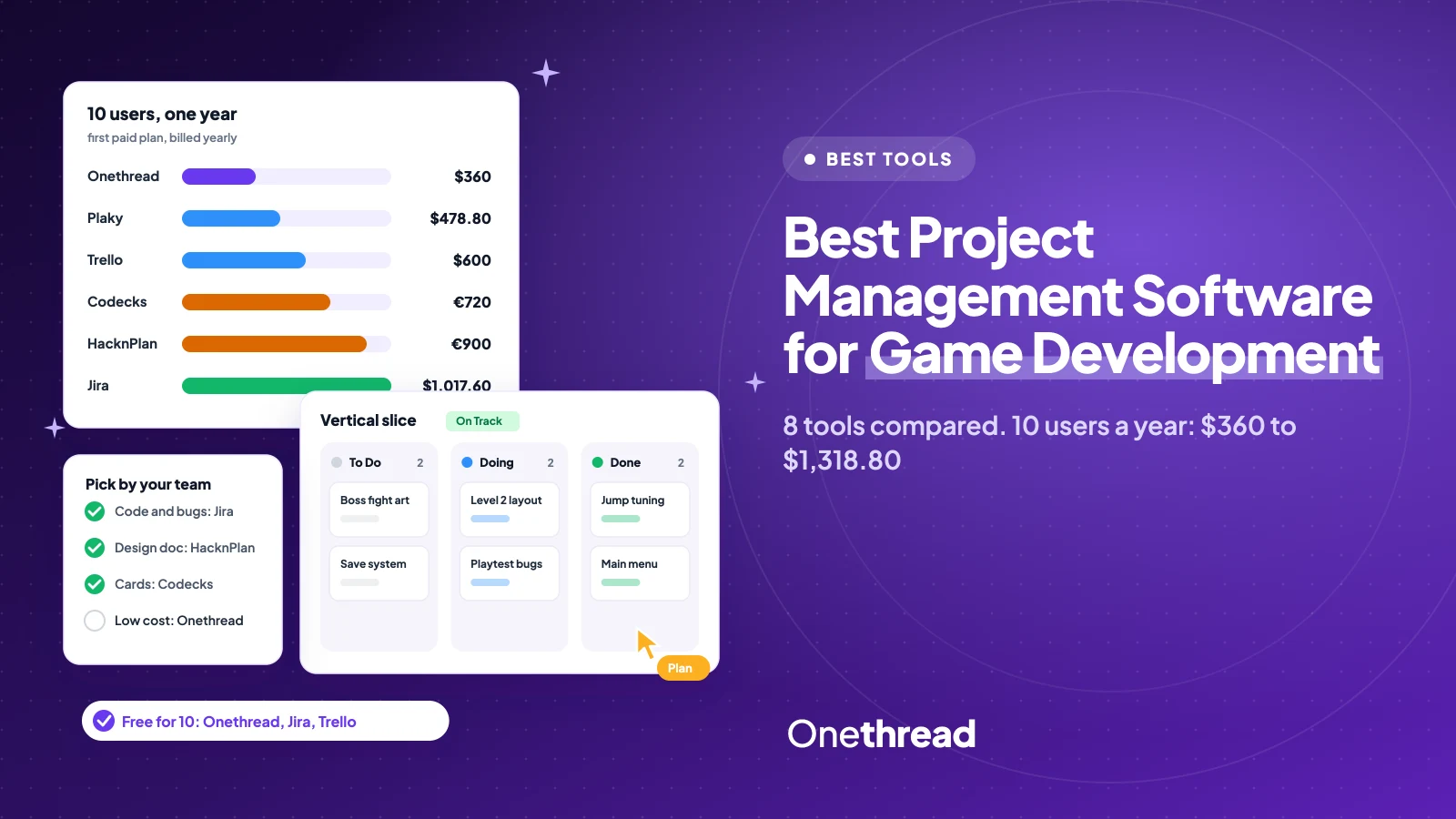
The best project management software for game development depends on your team. HacknPlan and Codecks suit indie studios. Jira suits code-heavy teams, and Onethread is free for up to 10 users.
You’ve likely tried a spreadsheet or a plain board. It works until the first build is late.
We compared 8 tools on their own pricing pages and read the 5 top-ranked guides.
You’ll get the yearly cost for a 10-person team, the best fit for each tool, and a fast way to pick one.
Key Points
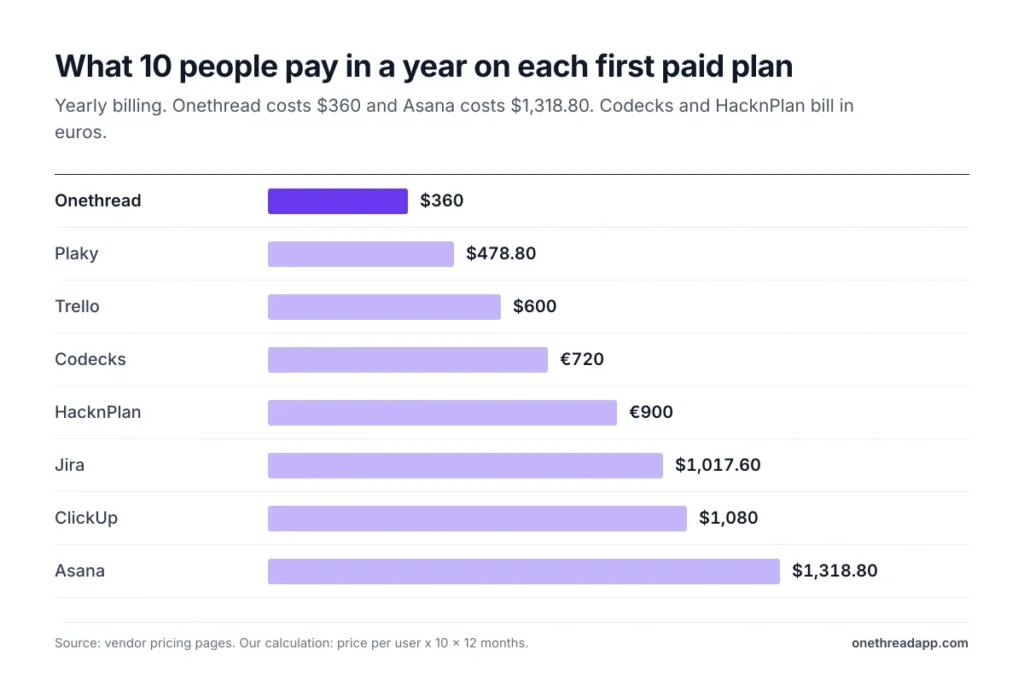
- For 10 people on the first paid plan, billed yearly, a year costs $360 on Onethread, $478.80 on Plaky, $600 on Trello, €720 on Codecks, €900 on HacknPlan, $1,017.60 on Jira, $1,080 on ClickUp and $1,318.80 on Asana.
- Pick HacknPlan or Codecks if you want tools made for games, like a living design document or a Discord bot.
- Pick Jira if most of your backlog is code, bugs and sprints.
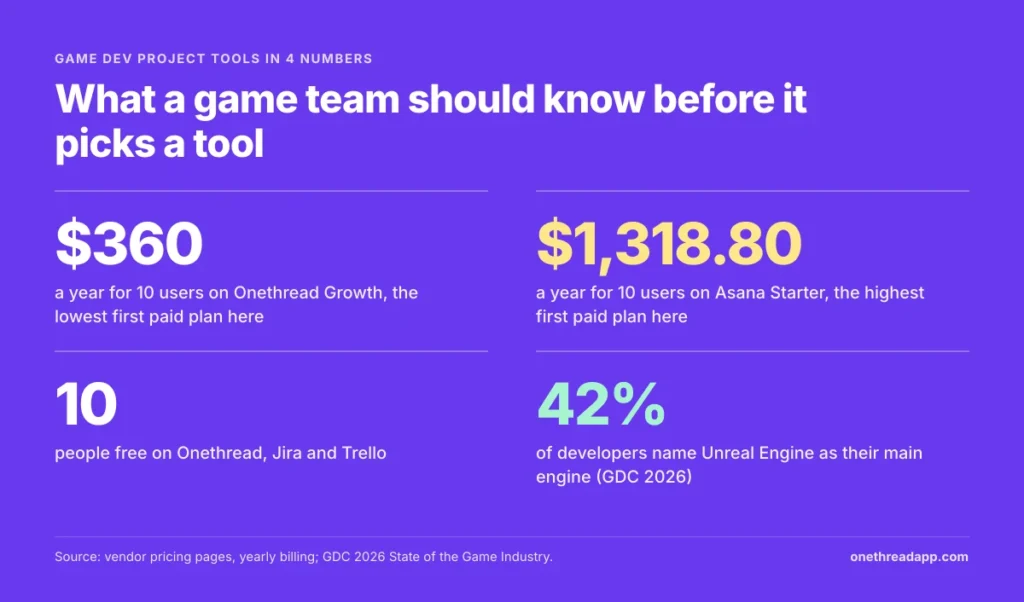
- Start free: Onethread, Jira and Trello all cover up to 10 people at no cost.
Which Project Management Software for Game Development Costs Least?
Onethread costs the least for a 10-person team, at $360 a year on its first paid plan. The table shows each tool’s first paid plan, billed yearly where the vendor offers it.
| Tool | First paid plan, per user a month | 10 users, one year | Free plan | Best for (our label) |
|---|---|---|---|---|
| HacknPlan | €7.50 | €900 | Yes, Personal plan | Indie teams that want a design document next to tasks |
| Codecks | €6 | €720 | Yes, up to 5 users | Card-based game production |
| Jira | $8.48 | $1,017.60 | Yes, up to 10 users | Code-heavy teams that run sprints |
| Trello | $5 | $600 | Yes, up to 10 collaborators | Simple boards for small teams |
| ClickUp | $9 | $1,080 | Yes, no member cap | Docs, sprints and time tracking in one app |
| Asana | $10.99 | $1,318.80 | Yes, up to 2 users | Producers who plan on timelines |
| Plaky | $3.99 | $478.80 | Yes | Low-cost boards with a Gantt view |
| Onethread | $3 | $360 | Yes, first 10 users | Small studios that want tasks, milestones and reports in one place |
We built this from each vendor’s pricing page. We compared the plans on price, free tier and fit for game work. The labels in the last column are our own short summaries.
You can read our review methodology for the full process. HacknPlan adds VAT where it applies. Prices change, so check each vendor’s page before you buy.
Top Tip: Jira, Trello and Onethread are all free for 10 people. Run your next game jam on one of them before you pay for a single seat.
What Makes Game Development Project Management Different?
Game development project management juggles more kinds of work than most projects. One build needs code, art, sound, design, writing and testing. Each group works in its own tools and speaks its own language.
The plan also moves in stages. A team goes from prototype to vertical slice, then to alpha, beta and launch. Each stage needs its own milestone, review and bug pass.
And the team keeps changing. The GDC 2026 State of the Game Industry report surveyed more than 2,300 people. Of them, 28% were laid off in the past two years. That means more contractors, more handoffs and more people who join halfway.
So good project management tools for video game project management do four jobs:
- Links design to tasks: a change to a mechanic should point to the work it affects.
- Tracks builds and bugs: task tracking and bug logs give testers a clear place to report what broke.
- Shows the milestone: producers need to see if the next stage is at risk.
- Holds the files: art and audio files are big, so storage limits matter.
Generic tools can do most of this with setup. Game-focused tools do some of it out of the box. Neither choice is wrong, but the setup time is real. The rest of this guide shows which tool does what, and at what price.
Why Do Indie Studios Pick HacknPlan?
HacknPlan is a planning tool made only for game studios. Its standout feature is the Game Design Model, a living game design document (GDD) that links to your tasks.
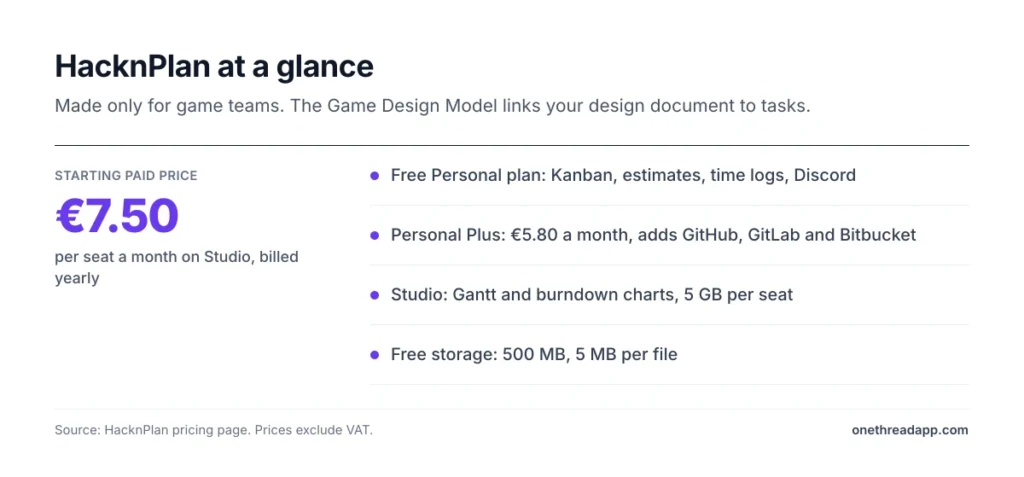
The free Personal plan covers Kanban boards, estimates, time logs and progress metrics. It also connects to Discord. Personal Plus adds a time tracker, board filters and links to Slack, GitHub, GitLab and Bitbucket.
Say your designer changes how the double jump works. You edit that design element, and every linked task sits right under it. Nobody has to hunt for the old note.
The Studio plan adds Gantt charts, burndown charts, role-based permissions and project templates. It also adds dashboards across projects and 5 GB of storage per seat.
HacknPlan also offers special pricing for schools and universities. That helps if you teach a game course or run a student team.
Pricing: Personal is €0. Personal Plus is €5.80 a month for one user, and Studio is €7.50 per seat a month, both billed yearly, plus VAT where it applies.
Best For
- Indie teams that want the design document and the task board in one tool.
Pros
- The Game Design Model ties design to the work it creates.
- The free plan includes Kanban, estimates, time logs and Discord.
- Studio adds Gantt and burndown charts for producers.
- Yearly billing saves 20%.
Cons
- Free storage stops at 500 MB, with a 5 MB file limit.
- Git links start on Personal Plus, not on the free plan.
- Gantt charts need the Studio plan.
How Does Codecks Handle Game Production?
Codecks treats every task as a card, a bit like a trading card game. Cards live in decks, and big goals become Hero Cards with Journeys. Doc Cards hold notes and specs next to the work.
It was built for game studios, and it shows. A Discord bot links your community server to the project. Milestones, metrics and reports sit on top of the cards.
Picture a team of five making a puzzle game. The free plan fits them, with 3 projects and 1 GB of storage. Once a sixth person joins, the team moves to a paid plan.
Paid plans remove the user and project caps. Plus raises storage to 1 GB per user, with files up to 250 MB. Pro raises storage to 10 GB per user. Codecks also gives students and educators free Pro accounts, and nonprofits get 50% off Plus and Pro.
Pricing: Free is €0 for up to 5 users. Plus is €6, Pro is €9 and Enterprise is €15 per user a month, billed yearly, with a 20-user minimum on Enterprise.
Best For
- Small and mid-size studios that like a visual, card-based way to plan.
Pros
- The card and deck system feels natural to game makers.
- The Discord bot connects players and the team.
- Free Pro accounts for students and educators.
- Nonprofits get 50% off paid plans.
Cons
- The free plan stops at 5 users and 3 projects.
- Free storage is 1 GB, with a 10 MB file limit.
- The card style takes a short while to learn if you come from lists.
When Is Jira the Right Tool for a Game Studio?
Jira is the right tool when most of your backlog is code. It runs Scrum and Kanban boards, backlogs and sprints. Bug tracking is where it shines.
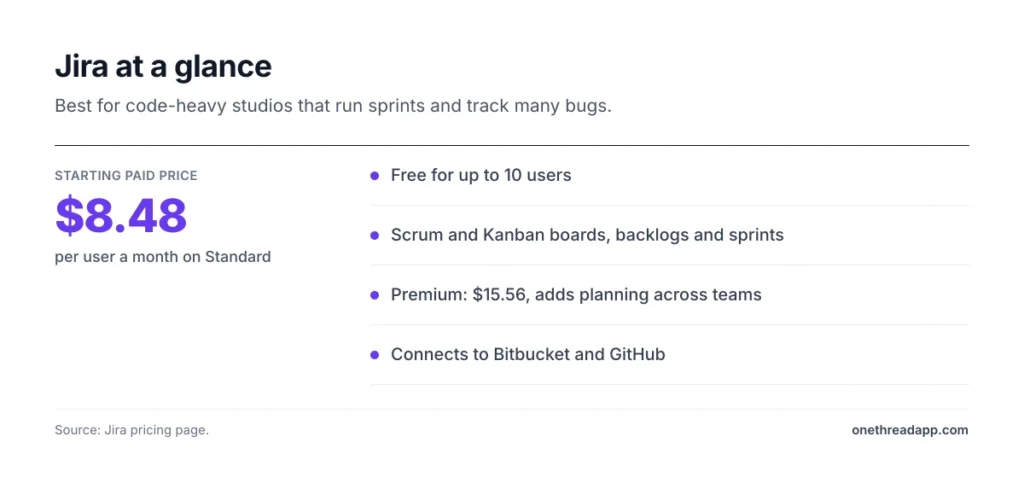
Engineers often know Jira already. And it connects to code hosts like Bitbucket and GitHub, so a commit can point to the ticket it fixes.
Say your QA team logs 40 bugs after a playtest. In Jira, each bug gets a type, a priority and an owner. The sprint board then shows what gets fixed before the next build.
The free plan covers up to 10 users with unlimited projects and tasks. Premium adds planning across teams and dependency management, which helps when several teams share one release.
The catch is setup. Jira can do a lot, but someone has to shape the workflows. Artists and writers may find it heavy for their part of the work.
Many studios solve this with two boards. Code and bugs live in Jira, while art and design run in a lighter tool.
Pricing: Free is $0 for up to 10 users. Standard is $8.48 and Premium is $15.56 per user a month.
Best For
- Code-heavy studios that run sprints and track many bugs.
Pros
- Free for up to 10 users.
- Strong bug tracking with types, priorities and owners.
- Scrum and Kanban boards work out of the box.
Cons
- Workflows take time to set up well.
- Art and design teams may find it heavy.
- No built-in game design document.
Why Is Trello Still Popular With Small Game Teams?
Trello stays popular because it takes minutes to learn. You get boards, lists and cards, and you drag cards as work moves.
That suits a small team making its first game. You might run one board for the backlog and one for bugs. A to-do, doing and done flow is often enough.
The free plan covers up to 10 collaborators per Workspace and 10 boards. It allows unlimited Power-Ups per board and files up to 10 MB. Standard removes the board cap and raises the file limit to 250 MB.
Premium adds Calendar, Timeline, Table, Dashboard and Map views. That’s the plan to watch if your producer wants a timeline.
Most game teams on Trello add labels for art, code and audio. A colored label per discipline keeps a busy board easy to scan.
If you’re weighing Trello against a wiki-style tool, our Trello vs Notion comparison covers the trade-offs.
Pricing: Free is $0. Standard is $5 per user a month billed yearly, or $6 billed monthly. Premium is $10 billed yearly, and Enterprise is $17.50.
Best For
- Small teams and game jams that need a simple shared board.
Pros
- Little to learn, so the whole team uses it.
- Free for up to 10 collaborators.
- Power-Ups add features as you need them.
Cons
- No built-in sprints or burndown charts.
- Timeline views need Premium.
- The free plan caps you at 10 boards per Workspace.
How Does ClickUp Fit a Game Development Workflow?
ClickUp fits teams that want one app for tasks, docs and sprints. It packs a lot into the free plan.
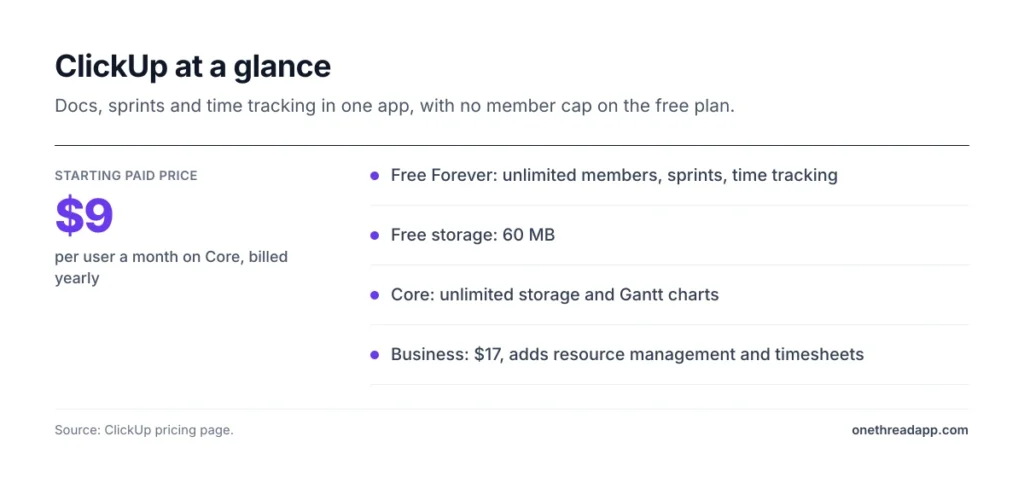
Free Forever includes unlimited tasks, unlimited free members, docs, Kanban boards and a calendar view. It also has sprint management and time tracking. That’s a lot for $0.
Say your writer drafts quest text in a doc while the designer builds the levels. Both can link their work to the same sprint. The producer then sees one view of the release.
Core adds custom fields, unlimited storage and unlimited Gantt charts. Business adds advanced dashboards, resource management and timesheets.
That makes ClickUp one of the more flexible project management tools on this list. But the free plan’s small storage pushes art-heavy teams to Core fast.
ClickUp is often compared with spreadsheet-style tools. Our ClickUp vs Smartsheet breakdown shows where each one wins.
Pricing: Free Forever is $0. Core is $9 and Business is $17 per user a month, billed yearly. Monthly billing costs $12 and $25.
Best For
- Teams that want docs, sprints and time tracking in one tool.
Pros
- The free plan has no cap on members.
- Sprints and time tracking come free.
- Core adds unlimited storage and Gantt charts.
Cons
- Free storage is only 60 MB, which art files fill fast.
- So many features can feel busy at first.
- Resource management starts on Business.
When Does Asana Work for Cross-Discipline Game Teams?
Asana works when a producer plans the whole game on a timeline. It is less about code and more about who does what, and when. Think of the roadmap, not the bug list.
The free Personal plan covers 2 users with unlimited tasks and projects. It has list, board and calendar views. Files can be up to 100 MB each, and storage is unlimited.
Starter removes the seat limit. It adds timeline and Gantt views with task dependencies, plus reporting dashboards.
That makes Asana a good fit for publishers and producers. They need to see many teams at once, not every line of code.
Say your art lead can’t start the boss fight until the level layout is done. On a timeline, you see that link. If the layout slips, you see what moves with it.
Asana also connects with Slack, Google Drive, Zoom and more than 100 other apps. If you’re choosing between two general tools, our Asana vs ClickUp guide helps.
Pricing: Personal is $0 for up to 2 users. Starter is $10.99 per user a month, billed yearly.
Best For
- Producers who plan work across art, design and code on a timeline.
Pros
- Timeline and Gantt views show task links clearly.
- Unlimited storage, with files up to 100 MB.
- More than 100 free integrations.
Cons
- The free plan stops at 2 users.
- The highest first paid price on this list.
- No tools made just for games.
What Does Plaky Offer Game Teams on a Budget?
Plaky offers low-cost boards with a Gantt view. It comes from CAKE.com, the team behind Clockify.
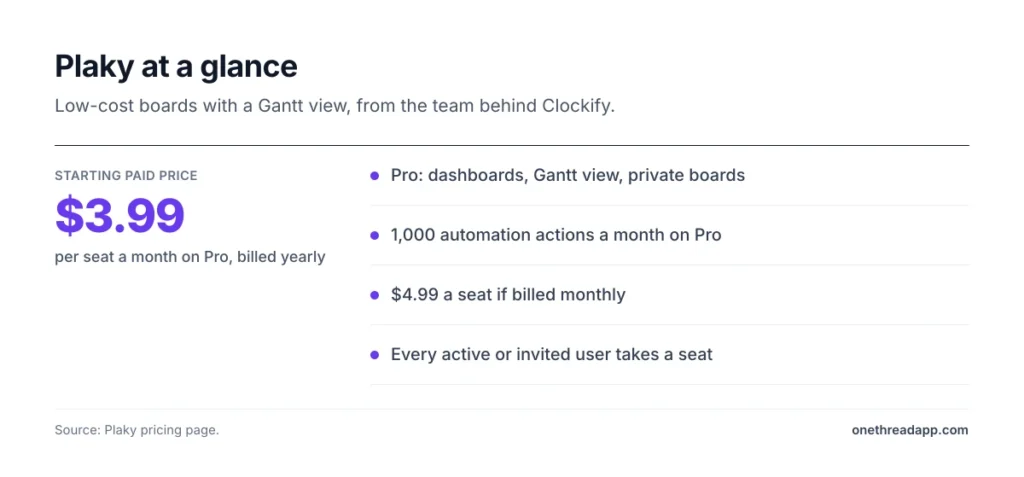
The free plan lets you start with boards and items. Pro adds dashboards, a Gantt view, private boards and unlimited fields per board. It also adds 1,000 automation actions a month and a 6-month activity log.
Say you’re a team of four building a mobile game. You want a board for tasks and a Gantt view for the launch date. Plaky Pro covers both for less than $4 a seat.
One rule to know: every active or invited user takes a paid seat. That includes owners and admins.
Plaky is a general management tool, not a game tool. You won’t find a design document or Discord links. But for task tracking on a tight budget, it does the basics well.
It also fits teams that already use Clockify for time. Both tools come from the same company, so the names and layout feel familiar.
Pricing: Pro is $3.99 per seat a month billed yearly, or $4.99 billed monthly. A free plan is available.
Best For
- Small teams that want boards and a Gantt view at a low price.
Pros
- Pro is one of the cheapest paid plans here.
- Gantt view and dashboards on Pro.
- 1,000 automation actions a month on Pro.
Cons
- Every invited user counts as a paid seat.
- Gantt and automations need Pro.
- No tools made just for games.
Why Choose Onethread for Game Development Project Management?
Onethread suits small studios that want tasks, milestones and reports in one place. It’s our own tool, so we list its limits too.
Work breaks down as Phase, Milestone, Task and Subtask, with dependencies between them. That maps well to a game plan. Prototype, vertical slice and beta can each be a phase.
The Onethread features list includes task management, a calendar view, Gantt charts, sprints, issue management, custom workflows and timesheets.
The free Basic plan covers the first 10 users. It includes unlimited projects, tasks and discussion rooms, plus 15 GB of file sharing. The free plan caps you at three workflows.
Say your team of eight ships a demo for a festival. You set the demo as a milestone and log bugs as issues. Everyone sees the date and what still blocks it.
Growth adds task and project export plus standard reports. Scale adds custom workflows, issue management, phases and milestones, advanced reports and custom roles.
Pricing: Basic is free for the first 10 users. Growth is $3 and Scale is $5 per user a month billed yearly, or $3.60 and $6 billed monthly.
Best For
- Small and mid-size studios that want planning, issues and reports in one tool.
Pros
- Free for the first 10 users, with 15 GB of file sharing.
- The lowest first paid price on this list.
- Phases and milestones fit game stages.
Cons
- No built-in game design document.
- Our pricing page lists no Git or engine links.
- Risk management and budgeting are still marked as upcoming.
How Do These Tools Work With Unity, Unreal and Version Control?
None of these tools replaces your engine. The engine builds the game, and the project tool plans the work. Most teams also use version control, like Git or Perforce, to hold code and assets.
Engines vary by team. In the GDC 2026 survey, 42% of developers named Unreal Engine as their main engine and 30% named Unity. Godot reached 11% among newer indie studios.
Most of the best tools for game development sit on top of these. So the question isn’t which game development software to buy. It’s how your planning tool links to the tools you already use. Look for three links:
- Code links: HacknPlan Personal Plus connects to GitHub, GitLab and Bitbucket. Jira connects to Bitbucket and GitHub.
- Chat links: HacknPlan and Codecks both connect to Discord. Asana and ClickUp connect to Slack.
- File room: big art files need space, so check storage before you commit.
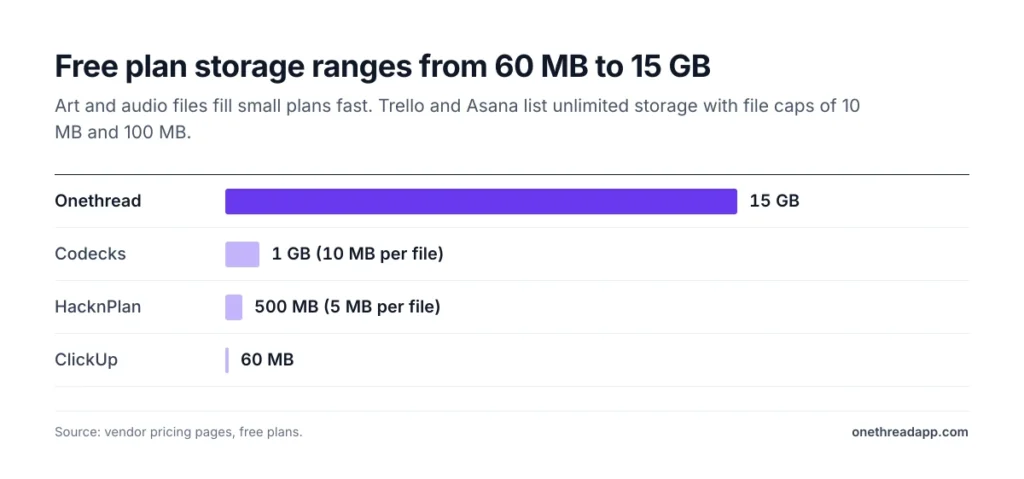
Free storage differs a lot:
| Tool | Free plan storage |
|---|---|
| Onethread | 15 GB of file sharing |
| Codecks | 1 GB in total, 10 MB per file |
| HacknPlan | 500 MB in total, 5 MB per file |
| ClickUp | 60 MB in total |
| Trello | Unlimited, 10 MB per file |
| Asana | Unlimited, 100 MB per file |
Keep large source files in version control, not in task attachments. Attach screenshots, clips and notes to tasks instead.
One caveat worth being honest about: we only list links the vendors publish on their pricing pages. If a link to your engine or Git host matters, test it on a free plan before you buy.
What Should a Game Studio Track Beyond Tasks?
A game studio needs to plan more than code and art. Live games need servers, payments and, in some markets, legal checks.
Each of these brings its own tasks, owners and dates. Add them to the plan early, or they’ll land in the last week.
Multiplayer games need a home for their servers. Choosing dedicated game server hosting early lets you plan load tests as tasks, not surprises.
Games that sell items or passes need payments in the plan. Setting up a gaming payment gateway brings its own testing and review steps, so give it a milestone.
Casino and betting games face strict rules in many markets. Teams with igaming software development experience can help with those compliance tasks.
Some studios hand art, ports or full builds to an outside game development partner. Give that partner guest access and one owner on your side.
Treat each outside partner like a team of its own. Give them a clear brief, a due date and a place to hand files back.
Then add the launch work that’s easy to forget:
- Store pages: screenshots, trailers and text for each store.
- Age ratings: the forms each region asks for.
- Translation: text and voice for each language you ship.
- Playtests: dates, testers and a place to log what they report.
Each item fits as a task with an owner. In Onethread, Jira or ClickUp, you can group them under one launch milestone.
How Much Do These Tools Cost for 5, 10 and 20 Game Developers?
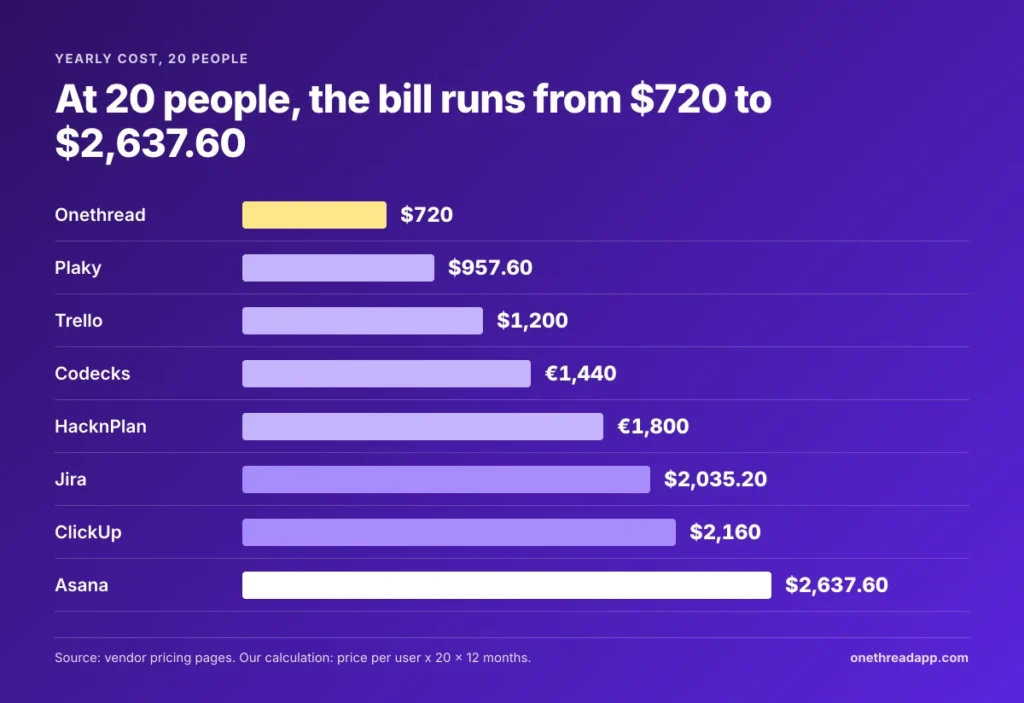
For 20 game developers, a year on the first paid plan runs from $720 on Onethread to $2,637.60 on Asana. The gap grows with every hire, so price your team at the size you expect next year.
We worked out each cost as price per user × people × 12 months, at the yearly rate.
| Tool | 5 people | 10 people | 20 people |
|---|---|---|---|
| Onethread Growth | $180 | $360 | $720 |
| Plaky Pro | $239.40 | $478.80 | $957.60 |
| Trello Standard | $300 | $600 | $1,200 |
| Codecks Plus | €360 | €720 | €1,440 |
| HacknPlan Studio | €450 | €900 | €1,800 |
| Jira Standard | $508.80 | $1,017.60 | $2,035.20 |
| ClickUp Core | $540 | $1,080 | $2,160 |
| Asana Starter | $659.40 | $1,318.80 | $2,637.60 |
Free plans change the math for small teams. Five people pay nothing on Codecks, Jira, Trello or Onethread. At 10 people, Jira, Trello and Onethread are still free.
The jump comes at person 11. On Jira, that eleventh hire moves the whole team to Standard, so the bill goes from $0 to over $1,100 a year.
How Do You Choose the Best Project Management Software for Game Development?
Choose the best project management software for game development by matching it to your team size, your backlog and your budget. Four checks help you decide:
- Count your people: Onethread, Jira and Trello are free for 10 people. Asana’s free plan stops at 2.
- Match the tool to your backlog: code and bugs point to Jira. Design-heavy work points to HacknPlan or Codecks.
- Check the files: art-heavy teams should compare free storage before they move in.
- Price the year, not the month: small monthly gaps grow fast across a full team.
Example: A 6-person indie team on Trello Standard pays 6 × $5 × 12 = $360 a year. On Asana Starter, the same team pays 6 × $10.99 × 12 = $791.28. Run your own head count through the same sum.
| If your team… | Start with |
|---|---|
| Has 5 people or fewer and loves cards | Codecks |
| Wants the design document next to tasks | HacknPlan |
| Fixes lots of bugs in sprints | Jira |
| Needs one simple shared board | Trello |
| Wants docs and sprints in one app | ClickUp |
| Plans the whole game on a timeline | Asana |
| Needs the lowest paid price with milestones | Onethread |
If you also run work outside games, compare more options in our guide to the best project management software.
Top Tip: Before you pay, run one sprint or one milestone on the free plan. Invite an artist, a coder and a tester, then ask which tool they’d keep.
Related reading: real estate development software and project management software for developers.
Sources: pricing pages of HacknPlan, Codecks, Jira, Trello, ClickUp, Asana, Plaky and Onethread.
What Should Your Game Studio Do Next?
The right tool is the one your whole team opens every day. For most small studios, that means a free plan that fits 10 people, a clear stage view and enough room for files. Game-focused tools add design links, while general tools add reports and timelines. Price matters less than daily use.
This week, list your team, your next build date and your biggest files. Then set up that build on two free plans from this list, and invite one person from each discipline. The tool that survives one real build is the one to keep.
FAQs
What Is Game Development Project Management Software?
Game development project management software is a tool that plans and tracks the work behind a game. It holds tasks, bugs, milestones and files for art, code, design and testing. Some tools, like HacknPlan and Codecks, add features made only for games. Others, like Jira, Trello and Onethread, are general tools that game teams set up for their own work.
Do Indie Game Developers Need Project Management Software?
Yes, once more than one person works on the game. A solo dev can manage with a notes app or a simple board. But a team of two or more needs one place for tasks, owners and dates. Free plans from Onethread, Jira, Trello and Codecks cover small indie teams at no cost.
Is Project Management Software the Same as Game Development Software?
No. Game development software, like Unity, Unreal Engine or Godot, builds the game itself. Project management software for game development plans the work around it: tasks, bugs, milestones and who does what. Most studios use both, plus version control like Git or Perforce for code and assets.
Can You Manage a Whole Game Project on a Free Plan?
Yes, for small teams. Onethread is free for the first 10 users with 15 GB of file sharing. Jira is free for up to 10 users, and Trello for up to 10 collaborators. Watch the limits, though. ClickUp Free has 60 MB of storage, and Asana Personal stops at 2 users.
Can Project Management Software Help Remote Game Teams?
Yes. Remote game teams need one shared view of tasks, owners and dates, since they can’t check in at a desk. Most of these tools add comments, file sharing and chat links to Slack or Discord. Pick the best project management software for game development that your remote team will open every day.