HoneyBook looks cheap until your first client pays by card.
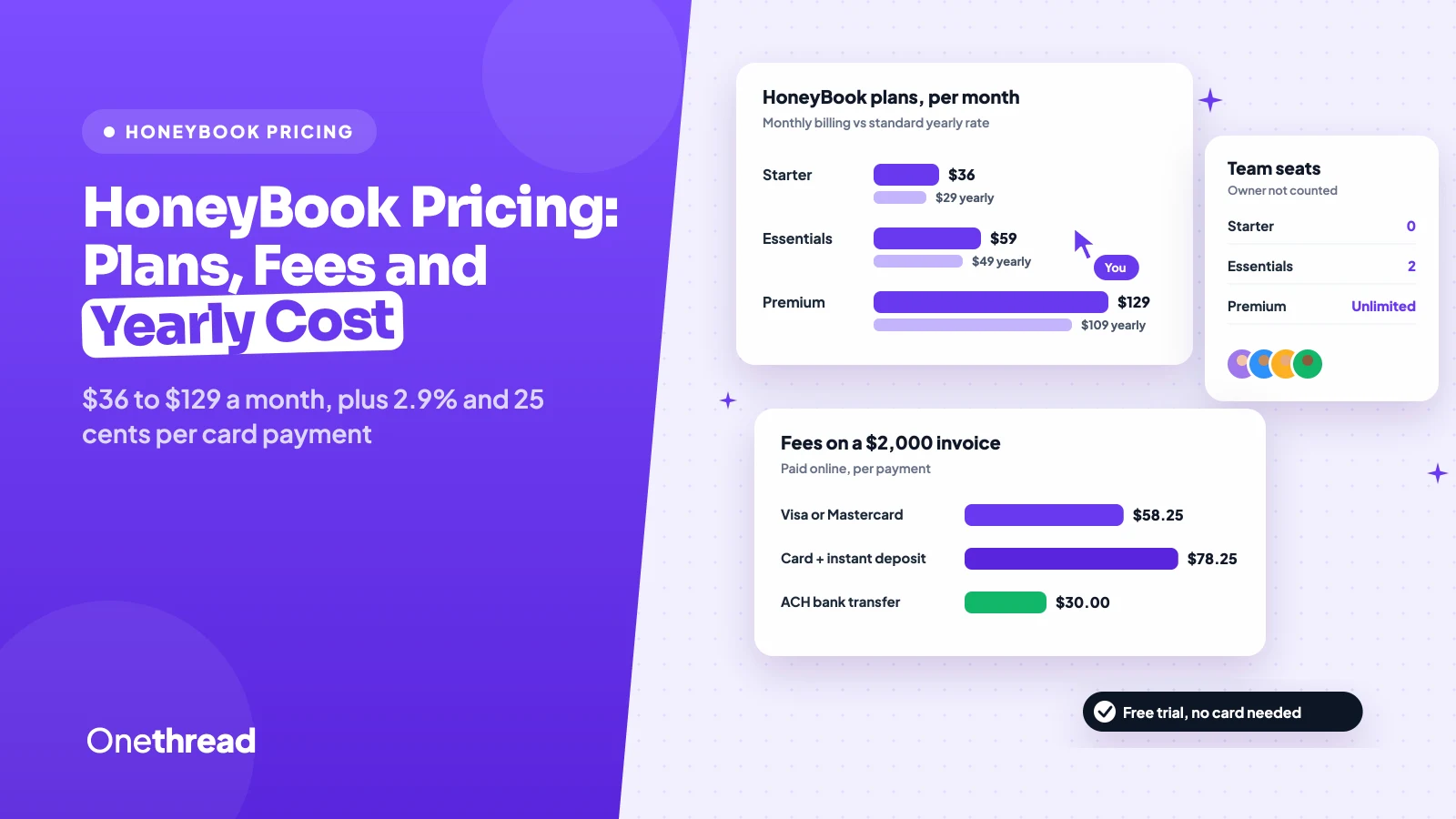
HoneyBook pricing starts at $36 a month for Starter, $59 for Essentials and $129 for Premium on monthly billing. Billed yearly, HoneyBook lists $29, $49 and $109 a month, and card payments add 2.9% plus 25 cents each.
So the plan price is only half the bill. The other half depends on how your clients pay.
We checked HoneyBook’s pricing page, its fee guide, five help center articles and five top-ranking pricing guides.
Here’s what each plan includes, what the fees cost on real invoices, and which plan fits your team.
Key Points
- HoneyBook costs $36, $59 or $129 a month on monthly billing for Starter, Essentials and Premium. Yearly billing lowers that to $29, $49 or $109 a month at the standard rate, and the fall offer shows $30, $38 and $83.
- Payment fees often cost more than the plan. A Visa or Mastercard payment costs 2.9% plus $0.25, a saved card costs 3.4% plus $0.09, and ACH bank transfers cost a flat 1.5%.
- Team size picks the plan for you. Starter allows no team members, Essentials allows 2, and Premium allows unlimited, so the fourth person on your team adds $720 a year.
- Start with the free trial, since it needs no card and never turns into a charge on its own. Paid plans then carry a 60-day money-back guarantee.
How Much Does HoneyBook Cost Per Month?
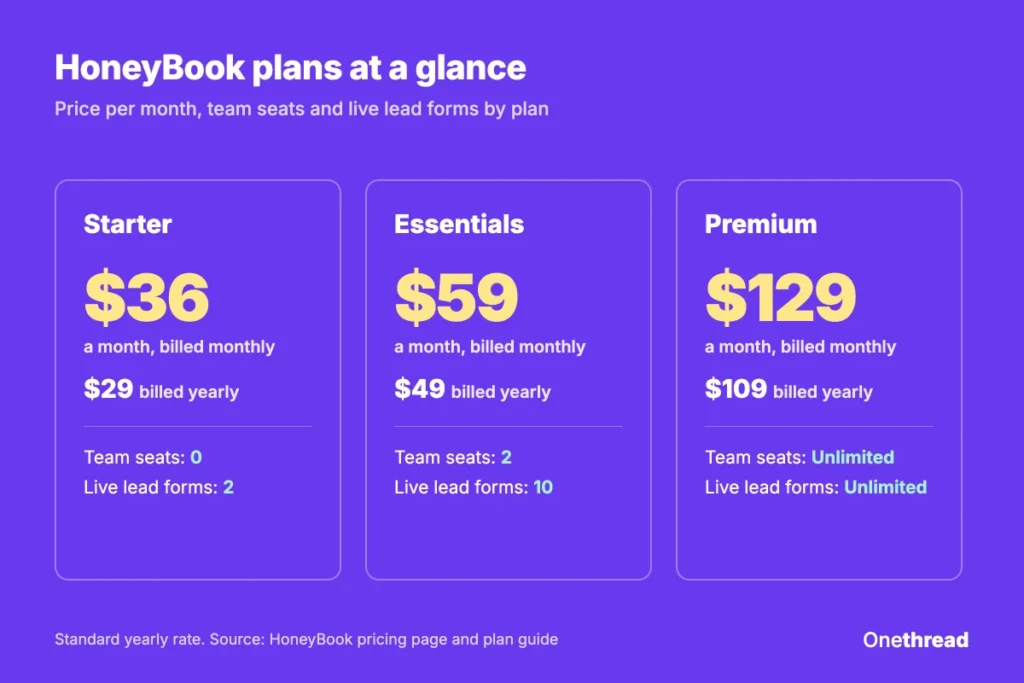
HoneyBook costs $36 a month for Starter, $59 for Essentials and $129 for Premium when you pay monthly. On yearly billing, HoneyBook’s own plan guide and fee guide list $29, $49 and $109 a month. That’s the standard yearly rate.
The pricing page adds a twist. During its fall offer, it shows $30, $38 and $83 a month on yearly plans. HoneyBook’s help center says promotions tied to your first year renew at the regular rate after that year.
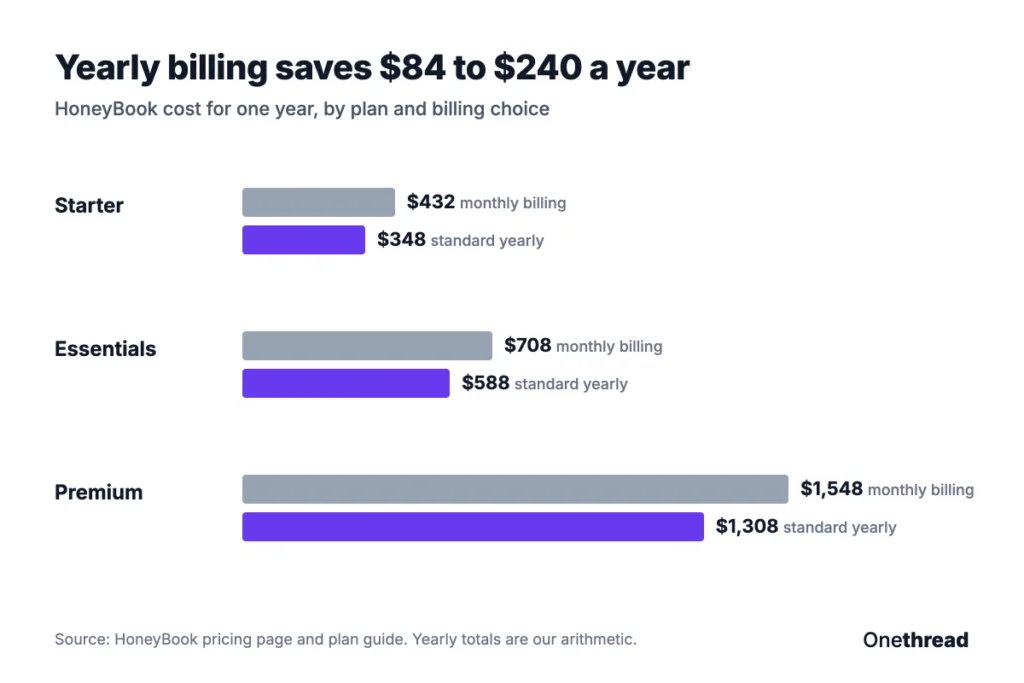
| Plan | Billed monthly | Billed yearly, standard | Yearly total, monthly billing | Yearly total, standard yearly |
|---|---|---|---|---|
| Starter | $36 a month | $29 a month | $432 | $348 |
| Essentials | $59 a month | $49 a month | $708 | $588 |
| Premium | $129 a month | $109 a month | $1,548 | $1,308 |
Sources: HoneyBook pricing page, HoneyBook plan guide, HoneyBook payment fee guide, HoneyBook billing help center.
Example: Premium on monthly billing costs $129 × 12 = $1,548 a year, while the standard yearly rate costs $109 × 12 = $1,308, so yearly billing saves $240.
HoneyBook also bills every 2 years, per its billing help center. And it only takes membership payments by credit card.
What Does the HoneyBook Starter Plan Include?
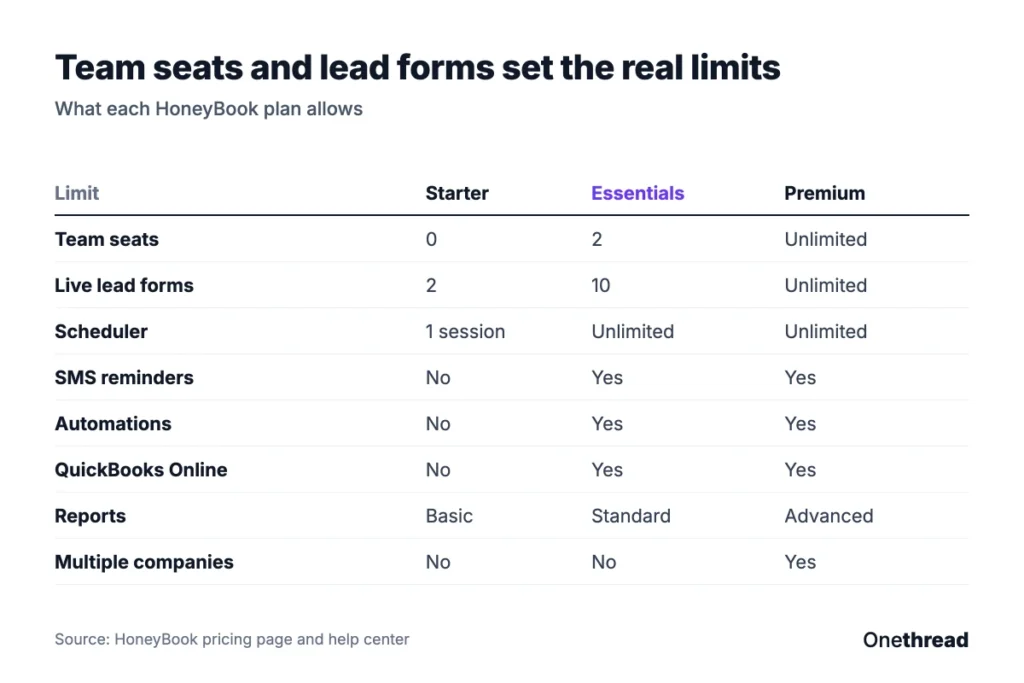
Starter is HoneyBook for one person who books clients and sends paperwork. It includes unlimited clients and projects, invoices and payments, proposals and contracts, a calendar, every professional template, the client portal, basic reports and HoneyBook AI.
The limits sit in the details. Starter allows up to 2 live lead forms. The scheduler covers 1 session, with email reminders only. And Starter allows no team seats at all, per HoneyBook’s plan comparison.
Say you’re a solo photographer. A couple fills in your lead form, gets a proposal, signs the contract and pays the deposit in one file. Starter handles that whole flow.
Starter also includes the mobile app, read receipts and task reminders. That’s plenty for a one-person shop.
Pricing: $36 a month on monthly billing, or $29 a month on the standard yearly rate.
Best For
- Solo service owners who send proposals, contracts and invoices but don’t need automations yet.
Pros
- Unlimited clients and projects on the lowest plan.
- Proposals, contracts, invoices and the client portal are all included.
- HoneyBook AI tools come on every plan, Starter included.
Cons
- No team members, so a single assistant forces an upgrade.
- Only 2 live lead forms and 1 scheduler session.
- No automations, no QuickBooks Online sync and the “Powered by HoneyBook” label stays on.
What Does the HoneyBook Essentials Plan Include?
Essentials is the plan most small studios end up on. HoneyBook marks it “Most Popular” on its pricing page. It adds the scheduler with unlimited sessions, automations, QuickBooks Online integration, SMS reminders and standard reports.
Essentials also lets you add up to 2 team seats and up to 10 live lead forms at once. You can also hide the Powered by HoneyBook label on your emails, forms and client portal.
Picture a planner with one assistant. Automations send the questionnaire once the client signs the contract, and payments sync to QuickBooks Online.
The assistant handles follow-ups from the same inbox. That setup needs Essentials, because Starter has no automations and no team seats. It’s the step where HoneyBook starts saving real hours.
Pricing: $59 a month on monthly billing, or $49 a month on the standard yearly rate.
Best For
- Owners with 1 or 2 helpers who want automations and accounting sync.
Pros
- Automations and pipeline triggers cut repeat follow-up work.
- QuickBooks Online sync keeps payments and books in step.
- SMS meeting reminders and unlimited scheduler sessions.
Cons
- The team cap is 2, so the third hire means Premium.
- Lead forms stop at 10 live forms.
- Monthly billing costs $120 more a year than the standard yearly rate.
What Does the HoneyBook Premium Plan Include?
Premium is HoneyBook for teams and owners with more than one brand. It adds unlimited team members, priority support, advanced reports, unlimited live lead forms and multiple companies.
Multiple companies matters more than it sounds. Each company gets its own settings, projects, bank accounts and integrations under one login. HoneyBook’s help center says there’s no limit on how many companies you add.
Say you run a wedding photo brand and a separate family portrait brand. Premium keeps both apart and bills you once. Premium members who process over $500,000 a year may also qualify for lower card rates, per HoneyBook’s fee guide.
It also comes with an onboarding specialist for setup help in your first 90 days, per the pricing page.
Pricing: $129 a month on monthly billing, or $109 a month on the standard yearly rate.
Best For
- Teams of 4 or more people.
- Owners who run two or more brands from one account.
Pros
- Unlimited team seats with roles and permissions.
- Unlimited companies under one subscription.
- Priority support and advanced financial reports.
Cons
- The jump from Essentials costs $720 more a year on yearly billing.
- Discounted card rates need over $500,000 in yearly payments, and HoneyBook doesn’t publish the lower rate.
- Most solo owners won’t use multiple companies or advanced reports.
How Much Do HoneyBook Payment Fees Add?
HoneyBook charges a fee each time a client pays you online, on every plan. The rate depends on how the client pays. Cash and checks you mark as paid cost nothing. Every other method has its own rate and deposit time, and those differences add up over a year of invoices.
Card and ACH Rates
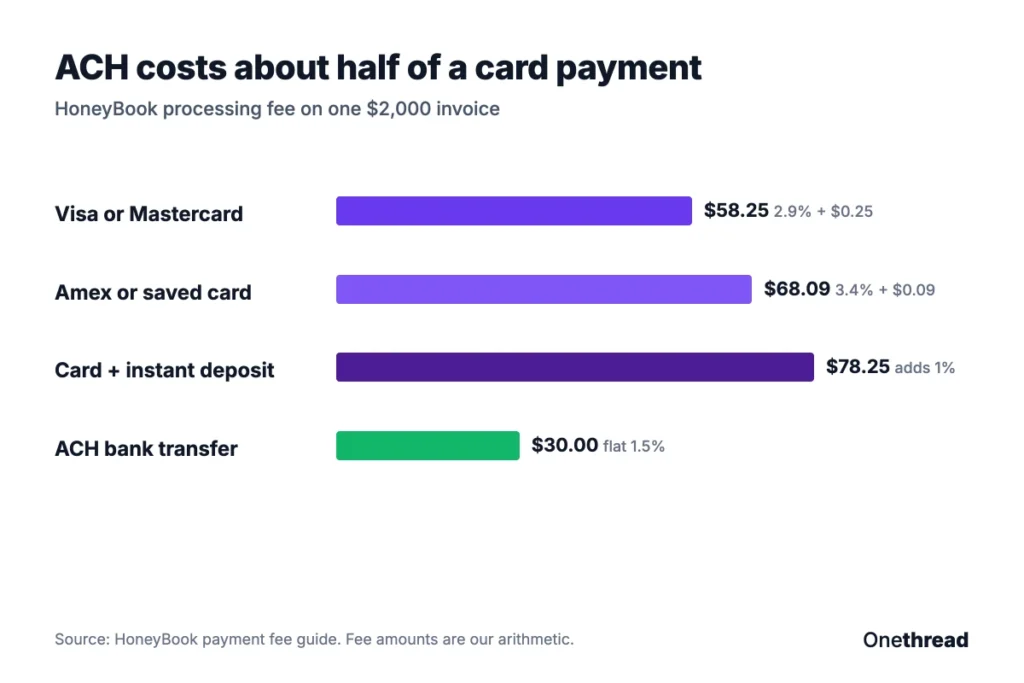
HoneyBook charges 2.9% plus $0.25 for Visa and Mastercard payments a client types in. American Express and saved card payments cost 3.4% plus $0.09. On a $2,000 invoice, that’s $68.09. ACH bank transfers cost a flat 1.5%.
Speed differs too. Card payments land in 2 to 3 business days. ACH payments take 7 to 8 business days, and they can fail if the client’s account lacks funds.
Example: A $2,000 invoice paid by Visa costs 2.9% × $2,000 + $0.25 = $58.25 in fees. The same invoice by ACH costs 1.5% × $2,000 = $30.
Instant Deposit Costs 1% More
Instant deposit gets card payments to your bank in about 30 minutes. It adds 1% on top of the card fee. It only works for card payments, not ACH.
On that $2,000 Visa invoice, instant deposit adds $20, for $78.25 in total fees. That’s fine for a rush. It’s an expensive habit.
HoneyBook also says it adds no international fees and no card brand surcharges. Card-on-file payments are 20% more likely to arrive on time, per HoneyBook’s own member data.
Top Tip: Turn on ACH as a payment option in your invoice settings and mention it to clients with large invoices. On a $5,000 invoice, ACH saves $70.25 over a Visa payment.
What Does HoneyBook Cost in a Year With Fees?
HoneyBook’s real yearly cost is the plan price plus processing fees, and for a busy studio the fees are often the bigger number. None of the guides we read add the two together. So we did.
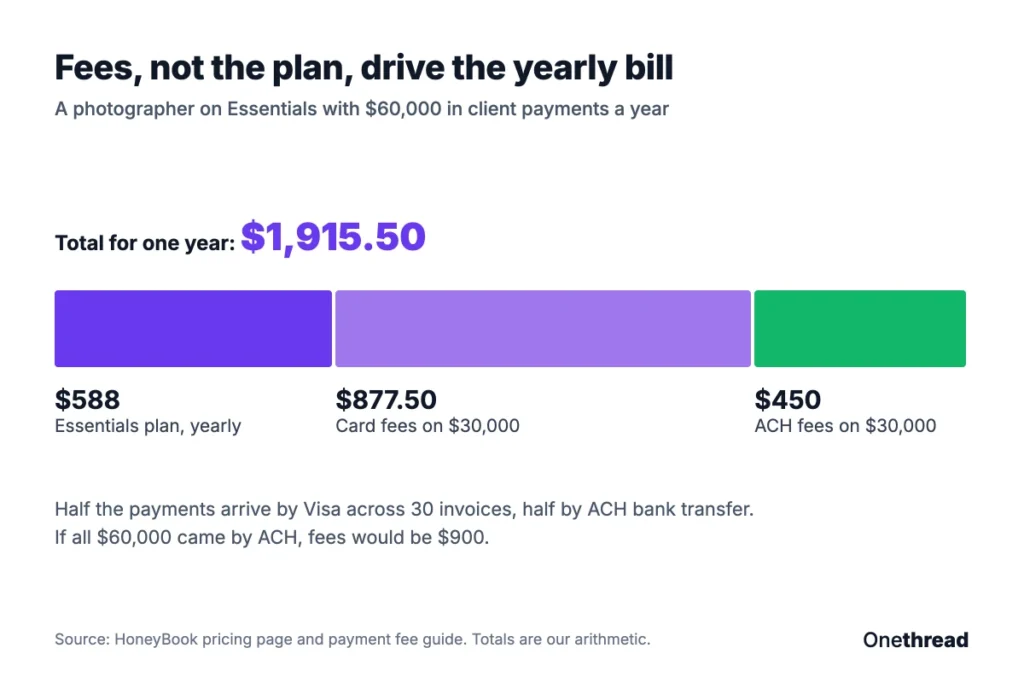
Example: A photographer on Essentials yearly pays $588. Clients send $60,000 a year: $30,000 by Visa across 30 invoices and $30,000 by ACH.
Card fees cost 2.9% × $30,000 + 30 × $0.25 = $877.50. ACH fees cost 1.5% × $30,000 = $450. The total comes to $588 + $877.50 + $450 = $1,915.50.
That’s more than three times the plan price. And it’s before instant deposit, which would add another 1% on any card payment you rush.
Now shift the mix. If two thirds of that $60,000 arrives by ACH, fees fall from $1,327.50 to $1,185. If all of it arrives by ACH, fees fall to $900. The payment mix moves the bill more than the plan does.
HoneyBook argues the bundle replaces 5 or more tools and saves over $2,000 a year. That’s HoneyBook’s own claim on its pricing page. Check it against the tools you’d actually cancel.
If invoicing is the main job, our guide to the best online invoicing tools compares other ways to bill clients. And for a quick one-off bill, a free invoice generator costs nothing at all.
How Do HoneyBook Team Member Limits Change the Price?
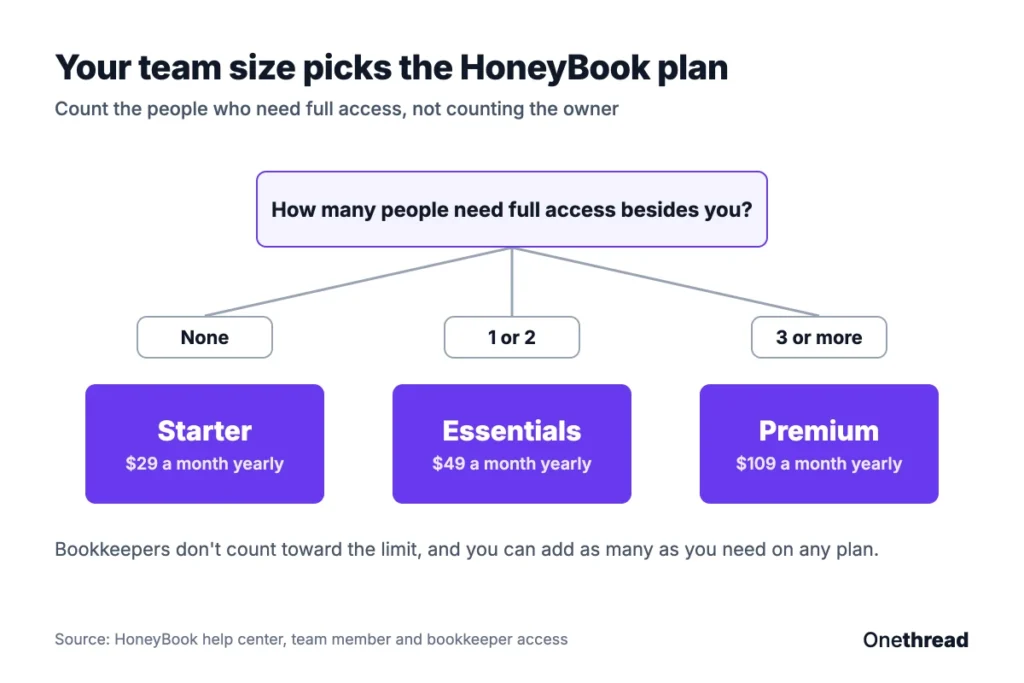
HoneyBook’s team member limit decides your plan faster than any feature list. Starter allows none. Essentials allows up to 2. Premium allows unlimited, per HoneyBook’s team member help article.
The count excludes the account owner. So an owner plus 2 helpers fits Essentials. The fourth person on the team is the expensive one.
Example: Moving from Essentials to Premium on yearly billing adds $109 − $49 = $60 a month, and $60 × 12 = $720 a year. On monthly billing, the gap is $70 × 12 = $840.
There are two cheaper ways to add help. Bookkeepers don’t count toward the cap, and you can add as many as you need on any plan. HoneyBook’s pricing page also lists unlimited collaborators with limited project access.
So before you upgrade, list who actually needs full access, and what each person does in a normal week. A part-time editor who only checks one project may fit as a collaborator. Your accountant fits as a bookkeeper.
Only the account owner can manage the membership and billing, per HoneyBook’s billing help center. HoneyBook works best as a client and billing hub. If your team mostly needs shared tasks and deadlines across many projects, our guide to client management software covers tools built for that work.
How Do the HoneyBook Free Trial and Refund Work?
HoneyBook’s free trial needs no credit card and covers almost every feature. That makes it a low-risk way to build one real proposal before you pay. Some advanced financial features and Premium services start only after you subscribe. And the trial never turns into a paid plan on its own, so nothing gets charged when it ends.
Paid plans then get a 60-day money-back guarantee from your membership start date. Refunds aren’t automatic, though. You ask support through the chat and pick “Talk to a person”, per the cancellation help article.
Plan changes follow fixed rules:
- Upgrade: You pay a prorated difference and get the new features right away.
- Downgrade: You keep the old plan until the billing cycle ends.
- Monthly to yearly: The yearly cycle starts at once, with a prorated credit.
- Yearly to monthly: Monthly billing starts when the yearly cycle ends.
Canceling keeps your account, and you keep access until the paid period ends. You can still view old projects, but you can’t create files, start projects or send messages. If you subscribed through the iOS or Android app, you cancel through Apple or Google Play instead. Promotions from the app stores don’t carry over to a web plan either.
When Did HoneyBook Pricing Go Up?
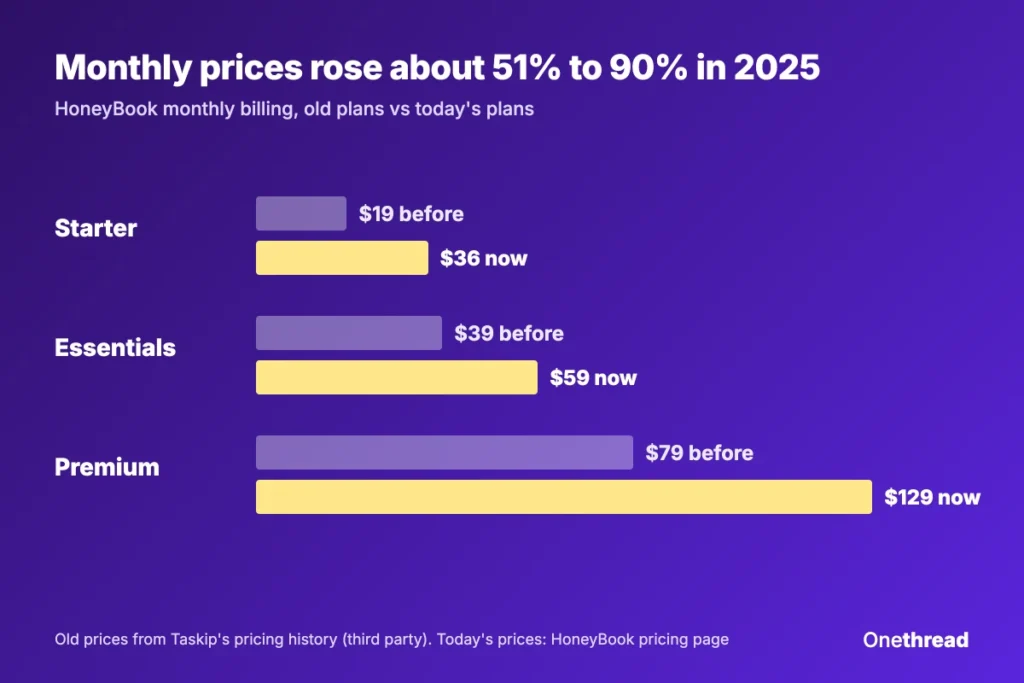
HoneyBook pricing went up in February 2025. That’s when HoneyBook moved to today’s Starter, Essentials and Premium plans per its plan guide. It said existing members would stay on their old plans “at this time”.
Taskip’s pricing history puts the old monthly prices at $19, $39 and $79. Against today’s $36, $59 and $129, that’s a rise of about 51% to 90%, per Taskip’s HoneyBook pricing guide. That’s a third-party figure, not HoneyBook’s. HoneyBook’s own guide confirms the change but doesn’t list the old prices.
Members noticed. On the HoneyBook community forum, one owner said the rise “feels disproportionate for small businesses like ours”. A Reddit thread on the price change in r/weddingvideography drew over 50 comments from working videographers.
The same post asked HoneyBook for clearer notice and tiered options for small budgets. That’s a fair ask from a paying member. HoneyBook’s answer, in effect, was the three-plan ladder you see today.
The lesson isn’t to avoid HoneyBook. It’s to treat any first-year promo as a first-year price. Budget for the regular rate in year two, and note the renewal date in your calendar. Yearly billing also locks your rate for the full year, which helps if prices move again.
Which HoneyBook Pricing Plan Fits Your Business?
The right HoneyBook plan comes down to team size, automations and brand count. Price differences between plans matter less than the processing fees. Use this table to match your situation to a plan:
| Your situation | Plan to pick |
|---|---|
| You work alone and send a few proposals a month | Starter |
| You want automations or QuickBooks Online sync | Essentials |
| You have 1 or 2 helpers who need full access | Essentials |
| You have 3 or more people who need full access | Premium |
| You run two or more brands with separate bank accounts | Premium |
| You process over $500,000 a year in client payments | Premium, then ask about card rates |
These picks are our reading of HoneyBook’s plan limits, not HoneyBook’s advice.
If you’re still choosing between tools, our roundup of CRMs for small businesses compares HoneyBook with other options. For a per-user comparison, the Zoho CRM pricing guide shows how a seat-based CRM adds up. And if proposals are the main job, see our list of proposal management software.
Some teams pair a client tool with project software. If your projects need task owners, timelines and workload views, Onethread’s features cover that side.
What Should You Do Next With HoneyBook?
HoneyBook’s plan price is the smaller part of the bill. Team size picks your plan, and the way your clients pay decides how much of each invoice you keep. Once you see both numbers side by side, the choice between the three plans gets simple.
This week, pull last year’s client payments and split them into card and bank transfer. Multiply by 2.9% and 1.5%, add the yearly plan price, and you’ll know HoneyBook’s real cost before your trial ends. Then pick the plan your team size actually needs today.
FAQs
Is HoneyBook Worth It?
HoneyBook is worth it if you’d otherwise pay for separate proposal, contract, scheduling and invoicing tools. HoneyBook pricing starts at $29 a month on the standard yearly rate. But processing fees of 2.9% plus $0.25 per card payment often cost more than the plan, so check your payment mix first.
Does HoneyBook Have a Free Plan?
No. HoneyBook has no free plan, only a trial period. The trial needs no credit card and covers almost every feature. It doesn’t switch to a paid plan when it ends, so you won’t pay a cent unless you choose a plan yourself.
What Is Better Than HoneyBook?
No single tool beats HoneyBook for everyone. Teams that need shared task boards, timelines and workload views often pair a CRM with project software. Owners who mainly send invoices may only need a simpler billing tool. Compare HoneyBook pricing against the tools you’d actually cancel.
Is HoneyBook Available Outside the US?
Yes, in part. HoneyBook supports business owners in the US, Canada, the UK and Australia. Clients abroad can pay by major credit card with no extra fee from HoneyBook. In Canada, HoneyBook also offers Pre-Authorized Debit at 1% plus $0.30 per payment.
Does HoneyBook Charge Sales Tax on Its Plans?
Yes, in some US states. HoneyBook adds sales tax to membership payments where state law requires it, based on your billing address. The tax shows at checkout before you pay. Tax-exempt businesses can apply for an exemption through HoneyBook support.