Salesforce publishes its prices. Working out what you’ll pay is the hard part.
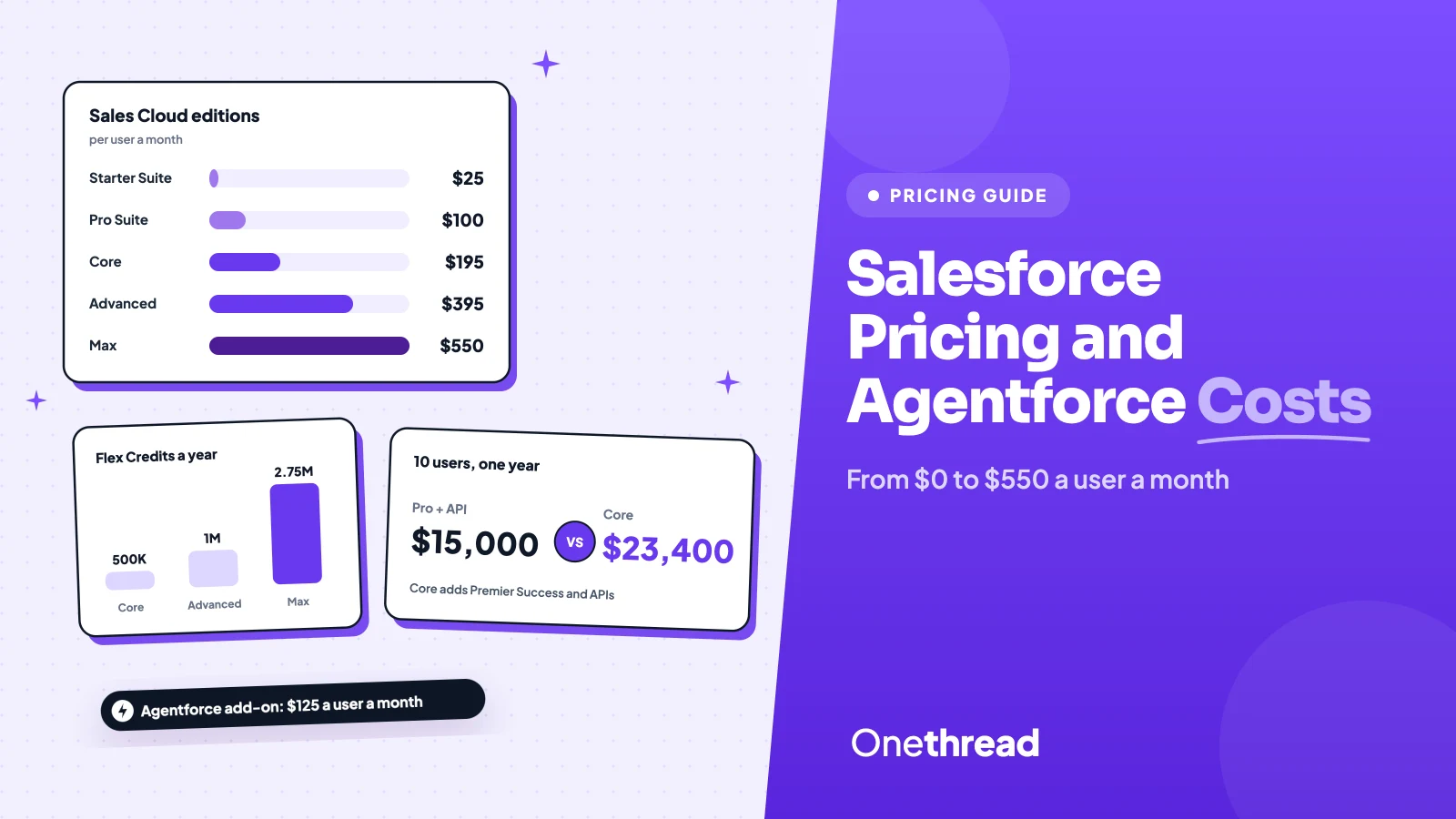
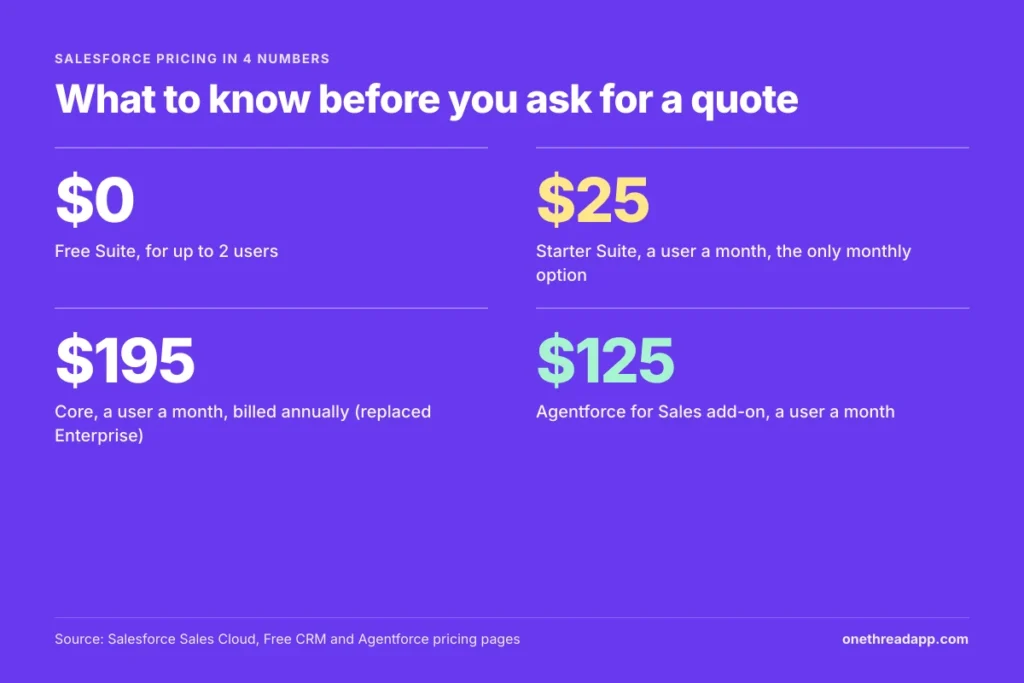
Salesforce pricing starts at $0 for the Free Suite, which covers 2 users. Starter Suite costs $25 a user a month, Pro Suite $100, and the Core, Advanced and Max editions $195, $395 and $550.
Then the questions start. Where did Enterprise Edition go, and why does the quote feel so expensive once add-ons land?
We checked Salesforce’s own pricing pages and six top-ranking cost guides to answer that.
You’ll get every edition, the add-ons that move the bill, and what a 10-person team pays in a year.
Key Points
- Salesforce pricing runs from $0 (Free Suite, 2 users) to $550 a user a month (Max). Starter Suite costs $25, Pro Suite $100, Core $195 and Advanced $395, and only Starter can be paid month to month.
- Core replaced Enterprise Edition and bundles Premier Success, Slack Business+, Tableau Next and 500,000 Flex Credits a year. Price it against Pro Suite plus the add-ons you’d buy anyway.
- Budget AI on its own line below Max. The Agentforce for Sales add-on starts at $125 a user a month, and extra Flex Credits cost $500 per 100,000.
- For 10 users, list prices run from $3,000 a year on Starter Suite to $66,000 on Max. Setup comes on top, and small teams report $10,000 to $20,000 for it.
How Does Salesforce Pricing Work Per User?
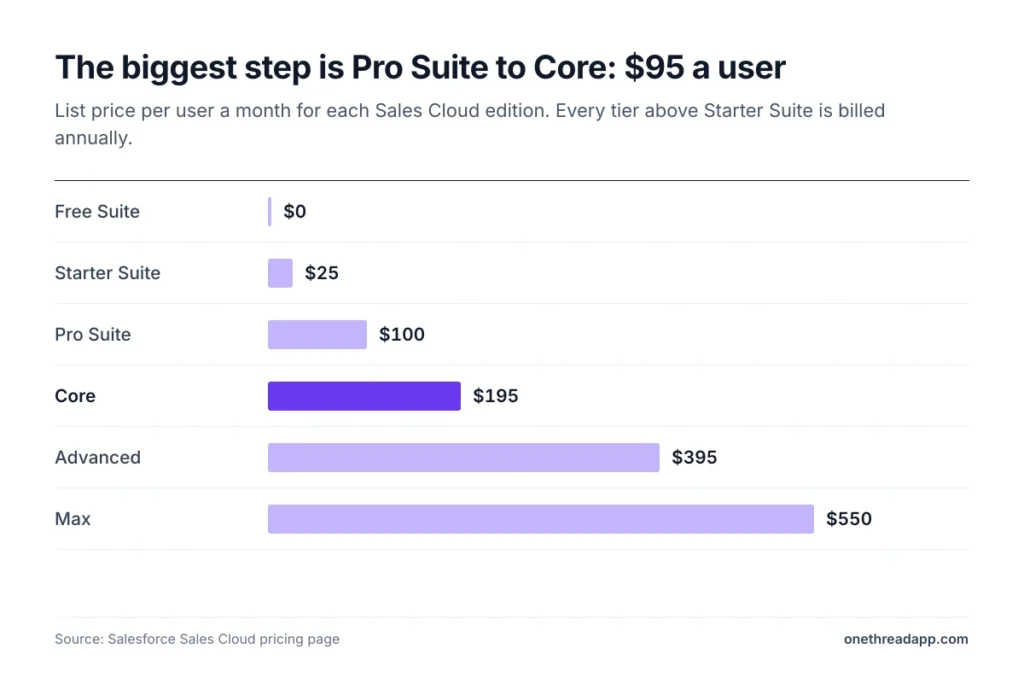
Salesforce charges per user, per month, and the edition sets the price. Sales Cloud lists six tiers, from a free 2-user suite to Max. Every tier above Starter Suite is billed annually, and most contracts run a full year.
| Edition | Price per user a month | Billing | 10 users for a year |
|---|---|---|---|
| Free Suite | $0 | No contract, 2 users max | $0 |
| Starter Suite | $25 | Monthly or annually | $3,000 |
| Pro Suite | $100 | Annually, contract required | $12,000 |
| Core | $195 | Annually | $23,400 |
| Advanced | $395 | Annually | $47,400 |
| Max | $550 | Annually | $66,000 |
Source: Salesforce Sales Cloud pricing page. The yearly column is our arithmetic: price x 10 users x 12 months.
Here’s the thing about the gap. The jump from Pro Suite to Core is $95 a user a month, the biggest step on the list. Most of this guide is about whether that step pays for itself.
What Does the Salesforce Free Suite Include?
The Free Suite is a real CRM with a hard ceiling: 2 user licenses. You don’t need a contract or a credit card. It doesn’t expire either, as long as someone logs in at least once every 60 days.
It covers sales, service and marketing basics in one place. Built-in AI summarizes customer records and drafts emails, and the plan connects to a free Slack workspace.
That makes it the cheapest way to test one thing: will your team actually keep a CRM up to date?
Say you’re a two-person consultancy tracking 40 leads in a spreadsheet. The Free Suite gives you a proper pipeline at no cost. The day you hire a third person, you move to a paid suite.
Pricing: $0, with 2 user licenses included.
Best For
- Solo founders and two-person teams setting up their first CRM.
Pros
- No cost, no contract and no credit card to start.
- Built-in AI for record summaries and email drafts.
- Upgrades straight to Starter or Pro Suite when a third person joins.
Cons
- Stops at 2 users. A third person means a paid plan for everyone.
- Goes inactive unless someone logs in every 60 days.
- Only Slack Free is included, with paid Slack plans sold separately.
What Does Salesforce Starter Suite Include?
Starter Suite is the cheapest paid tier and the only one you can pay month to month. It costs $25 a user a month, billed monthly or annually, and has no user maximum.
The suite covers lead, account, contact and opportunity management. It adds built-in sales flows, lead routing, AI that syncs emails and events, and email marketing with analytics.
Slack comes included at no extra cost, which helps if your team already talks there. And because there’s no user cap, a 30-person team can stay on Starter as long as the features fit.
Picture a five-person sales team that wants a shared pipeline and simple email campaigns. Starter Suite runs them $125 a month, and they can cancel the monthly plan if adoption stalls. A 30-day trial covers up to 10 users.
Pricing: $25 a user a month, billed monthly or annually.
Best For
- Small teams that want a paid CRM without a yearly contract.
Pros
- Monthly billing, which no other paid tier offers.
- Sales, service, marketing and commerce tools in one suite.
- No cap on the number of users.
Cons
- Transaction fees apply to commerce features.
- Customization and automation stay light until Pro Suite.
- No quoting or forecasting tools on this tier.
What Does Salesforce Pro Suite Include?
Pro Suite is the step up for teams that have outgrown default settings. It costs $100 a user a month, billed annually, with a contract required.
It includes everything in Starter, plus more customization and automation, sales quoting and forecasting, and access to AgentExchange apps. Premier Support is sold as an add-on here.
There’s one catch worth knowing early. Najar’s pricing breakdown notes that Pro Suite users must buy a $25 a user a month add-on for Web Services API access. If you plan to connect billing, support or a data warehouse, budget $125 a user, not $100.
For a team of 10, the API add-on alone adds $3,000 a year. That still lands well below Core, which is why Pro Suite plus API is the setup most worth pricing first.
Pricing: $100 a user a month, billed annually. API access adds $25 a user a month.
Best For
- Growing sales teams that need quotes, forecasts and custom fields.
Pros
- Quoting and forecasting built in.
- Deeper customization and automation than Starter.
- Four times the price of Starter, but far cheaper than Core.
Cons
- Annual contract only.
- API access costs an extra $25 a user a month.
- Premier Support is a paid add-on rather than included.
What Does the Salesforce Core Edition Include?
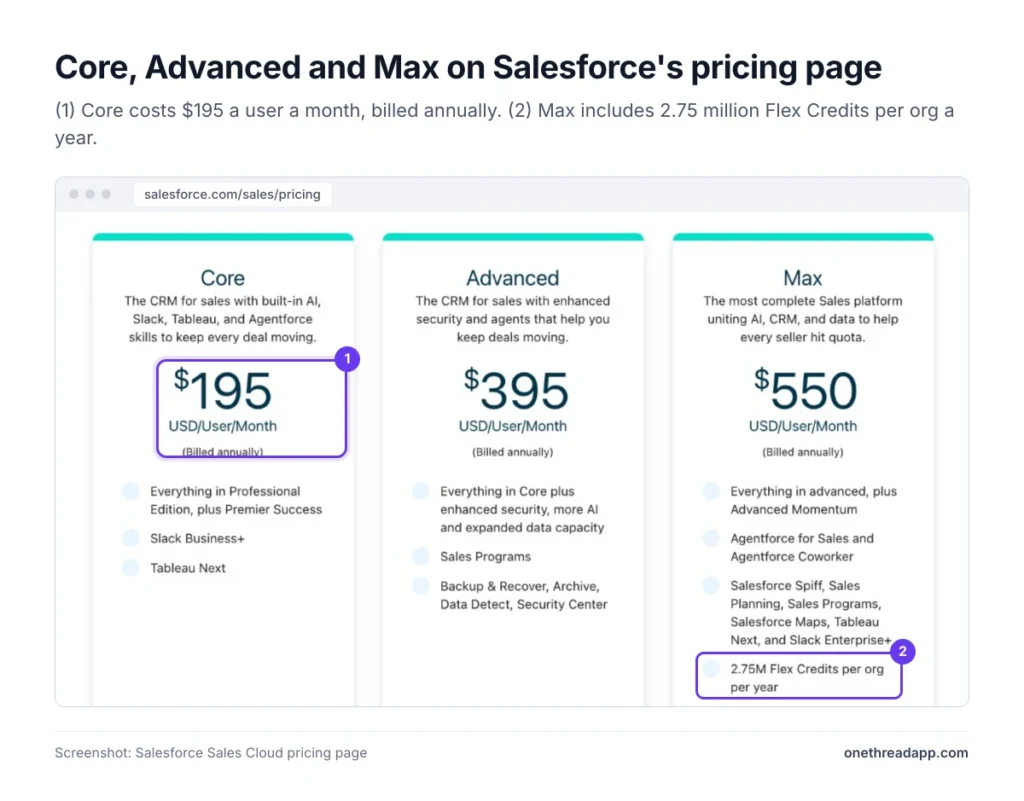
Core is Sales Cloud’s main business edition, and it replaced Enterprise Edition. It costs $195 a user a month, billed annually.
Core bundles a lot that used to cost extra. It includes everything in Professional Edition, Premier Success support, Slack Business+, Tableau Next and APIs. It adds advanced pipeline management, opportunity scoring and conversation intelligence. Agentforce runs through the free Salesforce Foundations add-on, with 500,000 Flex Credits a year.
For context, tech.co listed Enterprise at $175 a user a month. So Core lists $20 higher, with more in the box.
Say you run a 12-person sales team that syncs deals into an invoicing tool and wants weekly forecasts. Core covers the API, the forecasts and the support line in one price: $28,080 a year. On Pro Suite, you’d pay extra for the API and then buy Premier Support on top.
Pricing: $195 a user a month, billed annually.
Best For
- Sales teams that need APIs, forecasting and expert support.
Pros
- Premier Success, Slack Business+ and Tableau Next included.
- APIs included, unlike Pro Suite.
- 500,000 Flex Credits a year for Agentforce actions.
Cons
- Nearly double the price of Pro Suite, before any add-ons.
- Annual billing only, with no monthly option.
- Full Agentforce for Sales is a $125 add-on.
What Does the Salesforce Advanced Edition Include?
Advanced replaced Unlimited Edition and focuses on security, data capacity and more AI. It costs $395 a user a month, billed annually.
It includes everything in Core, plus Sales Programs and a full security set: Backup & Recover, Archive, Data Detect and Security Center. The Flex Credit allowance doubles to 1 million a year.
That security bundle is the main reason to pick it. Regulated teams, or anyone whose auditors ask about backups and data retention, would otherwise buy those tools separately. Expanded data capacity also helps if you keep years of email, call and activity history. Storage limits bite first on long-running orgs.
A 10-person team pays $47,400 a year on Advanced, which is $24,000 more than Core. So the question is simple: would you pay $24,000 for those security tools and extra credits anyway?
Pricing: $395 a user a month, billed annually.
Best For
- Regulated or security-heavy teams that need backup and data controls.
Pros
- Backup & Recover, Archive, Data Detect and Security Center included.
- 1 million Flex Credits a year, double Core’s allowance.
- Sales Programs included for seller enablement.
Cons
- About twice the price of Core, per user, every month.
- Agentforce for Sales still costs extra.
- Hard to justify if your security tools already live elsewhere.
What Does the Salesforce Max Edition Include?
Max is the top Sales Cloud edition and replaced Agentforce 1 Edition at the same price. It costs $550 a user a month, billed annually, and Salesforce sells it through sales reps.
Max includes everything in Advanced, plus Agentforce for Sales and Agentforce Coworker with unmetered use. It also bundles Salesforce Spiff, Sales Planning, Sales Programs, Salesforce Maps, Tableau Next and Slack Enterprise+. The org gets 2.75 million Flex Credits a year.
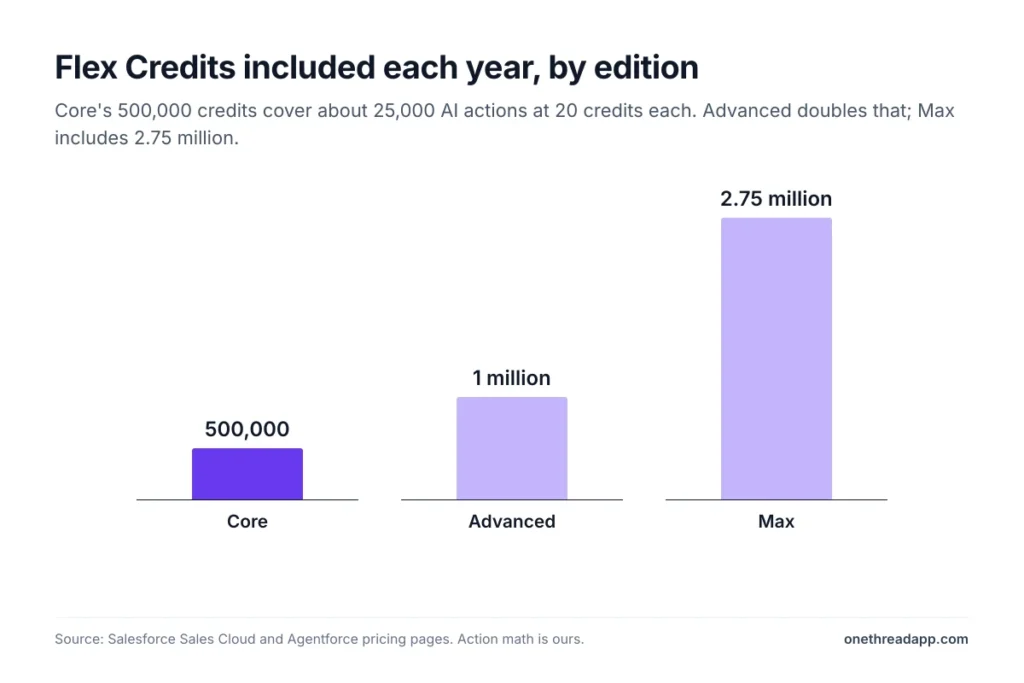
Max makes sense when you’d otherwise stack several add-ons on Advanced. Advanced plus the $125 Agentforce add-on already costs $520 a user. At that point, Max costs $30 more and folds in commissions, territory maps and planning.
Salesforce says Max delivers nearly 60% more value than Agentforce 1 Edition at the same price. That’s the vendor’s own math, so ask your rep which pieces you’d use.
Pricing: $550 a user a month, billed annually.
Best For
- Large sales orgs that want AI, planning and commission tools in one edition.
Pros
- Unmetered Agentforce for Sales and Coworker.
- Spiff, Maps and Sales Planning included.
- 2.75 million Flex Credits a year.
Cons
- The highest list price in Sales Cloud.
- No self-serve checkout; Salesforce asks you to contact sales.
- Bundles commission and territory tools that small teams may never use.
How Does Agentforce Pricing Work in Salesforce?
Agentforce, Salesforce’s AI agent platform, has its own price list on top of the editions. Salesforce Foundations is free and gets you started. After that, you pay in one of four ways:
| Pricing model | Price | How it bills |
|---|---|---|
| Flex Credits | $500 per 100,000 credits | Spent per AI action |
| Conversations | $2 each | Per customer conversation an agent handles |
| Agentforce User License | $5 a user a month | Plus Flex Credits |
| Agentforce add-on | $125 a user a month | Unmetered employee use in Sales, Service and Field Service |
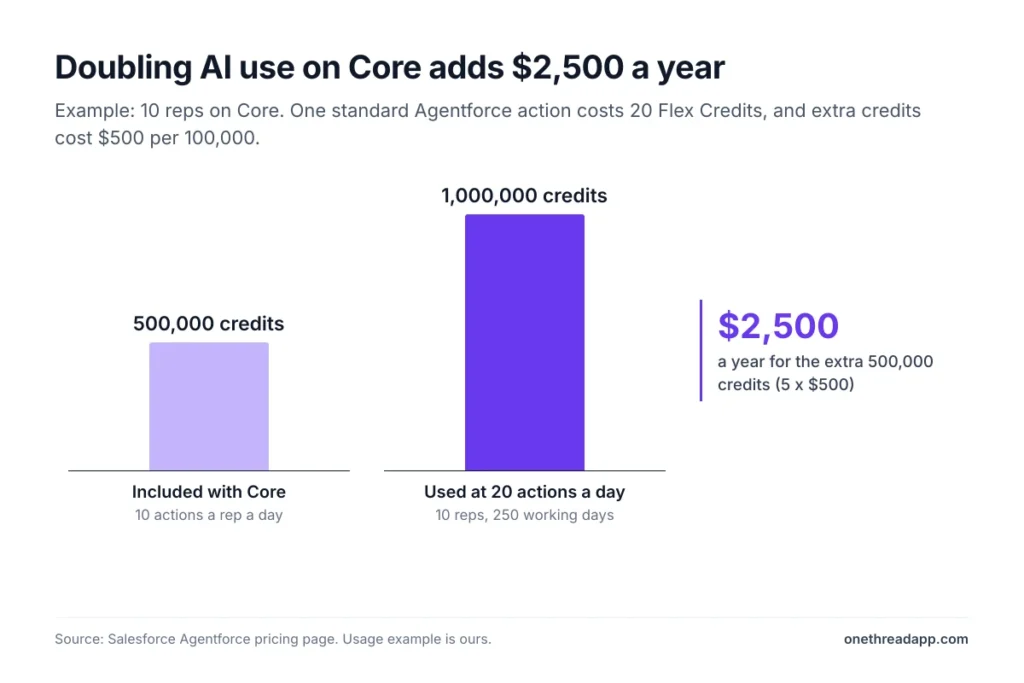
In Salesforce’s own examples, one standard action costs 20 Flex Credits, or $0.10.
Example: 10 reps each run 10 actions a working day for 250 days, which is 25,000 actions, or 500,000 credits. Core covers that exactly. Double the usage and you buy 500,000 more credits: 5 x $500 = $2,500 a year.
Analysts flagged the risk early. Gartner principal analyst Ishan Anand warned that “these complex bundles risk unexpected cost spikes and confusing renewals.”
Top Tip: Ask Salesforce for a Flex Credit estimate from its pricing calculator before you sign. Then check usage in the Digital Wallet each month.
What Do Service Cloud and Marketing Cloud Cost?
Service Cloud uses the same price ladder as Sales Cloud. Starter Suite costs $25 a user a month and Pro Suite $100. Core, Advanced and Max cost $195, $395 and $550, billed annually.
Marketing Cloud works differently. It charges per org, per month, not per user:
| Marketing product | Price an org a month | Billing |
|---|---|---|
| Account Engagement+ | $1,250 | Annually |
| Marketing Cloud Next Growth | $1,500 | Annually |
| Engagement+ | $2,000 | Annually |
| Marketing Cloud Next Advanced | $3,250 | Annually |
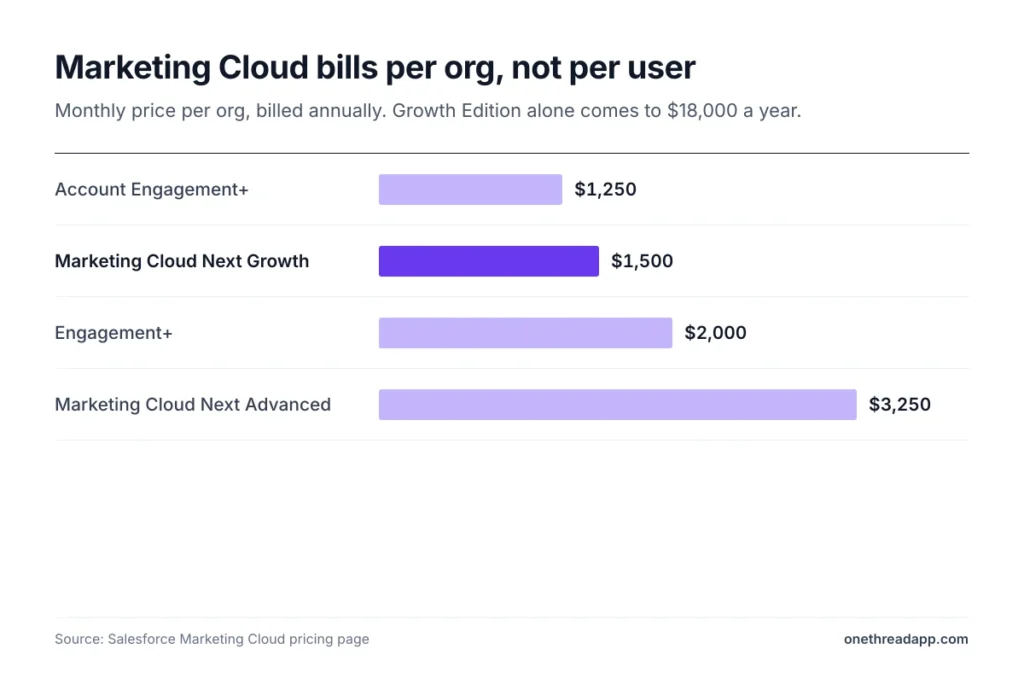
So a small marketing team on Growth Edition pays $18,000 a year before any sales seats. Personalization starts at $8,000 an org a month, and Loyalty Management at $20,000. Those are enterprise budgets, not small business ones.
If you mainly need email campaigns, Starter Suite’s built-in email marketing may cover it for far less.
Which Hidden Costs Sit Outside Salesforce Pricing?
The license is often the smaller cheque. Setup, data and support come on top, and the vendor doesn’t print them on its pricing page.
- Implementation: tech.co reports small businesses paying $10,000 to $20,000 to get started. SoftTeco puts larger projects at $50,000 to $200,000 or more.
- Consultants: Salesdorado lists independent consultants at $500 to $900 a day.
- Data migration: SoftTeco estimates $10,000 to $50,000, depending on data volume and quality.
- Support below Core: SoftTeco puts Premier Success at about 30% of net license fees where it isn’t included.
- Add-ons: Revenue Intelligence starts at $220 a user a month, and Revenue Cloud at $200.
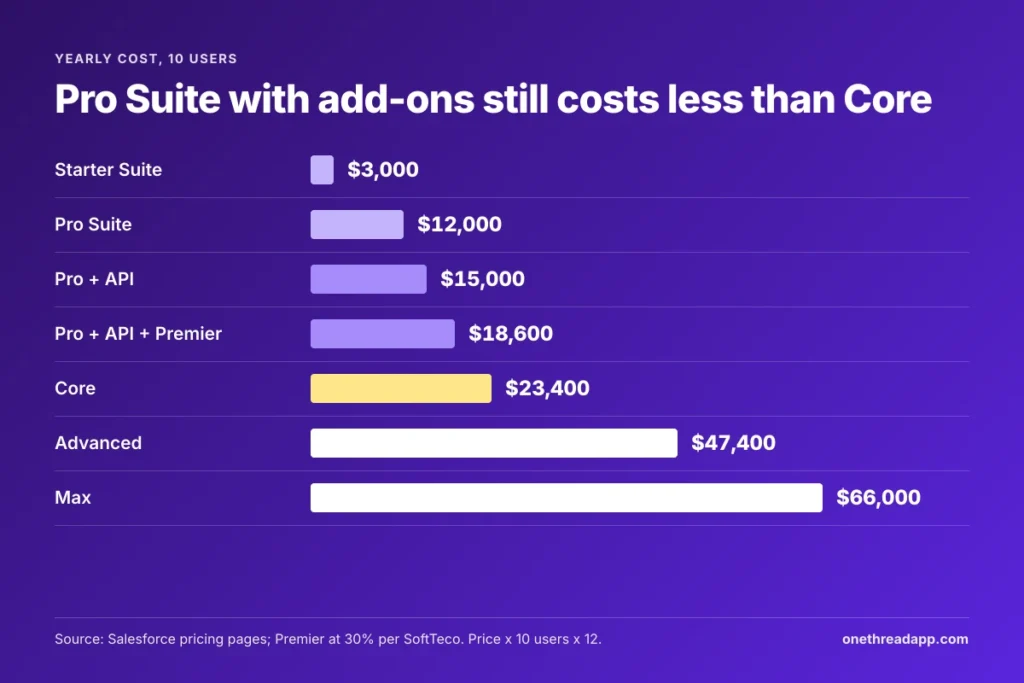
Example: 10 users on Pro Suite with API access cost (100 + 25) x 10 x 12 = $15,000 a year. Add Premier Success at 30% of the $12,000 Pro license, and you reach $18,600. Core costs $23,400 with both included.
Price rises matter too. In its last price increase, Salesforce lifted Enterprise and Unlimited prices by 6% from August 1, 2025, CIO reported. Negotiate renewal caps up front, because the list price is only the first number.
Top Tip: Get the implementation quote before you pick an edition. A $20,000 setup changes the math more than a $95 tier gap.
Which Salesforce Edition Fits Your Team?
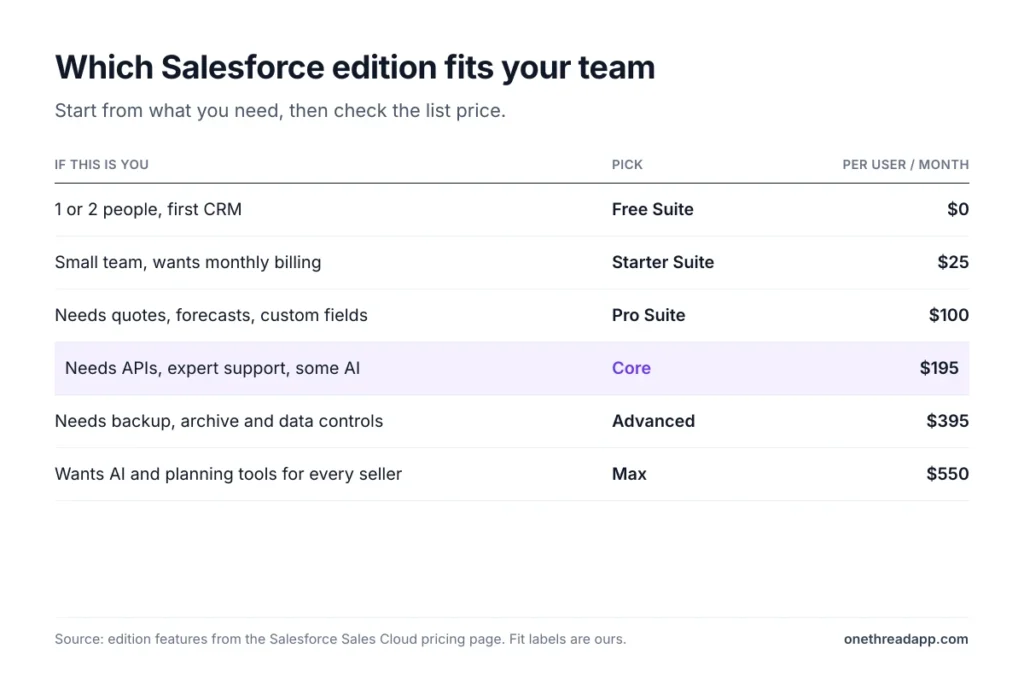
The right edition depends on headcount, integrations and how much AI you’ll actually use. Start from the signal that matches you:
| If this is you | Pick | Per user a month |
|---|---|---|
| 1 or 2 people, first CRM | Free Suite | $0 |
| Small team, wants monthly billing | Starter Suite | $25 |
| Needs quotes, forecasts, custom fields | Pro Suite | $100 |
| Needs APIs, expert support, some AI | Core | $195 |
| Needs backup, archive and data controls | Advanced | $395 |
| Wants AI and planning tools for every seller | Max | $550 |
Two checks keep the choice honest:
- Count real users: Licenses bill per named user, so list who logs in weekly.
- Count integrations: Two or more connected systems usually point to Core over Pro Suite.
If you’re still comparing CRMs, our guide to CRMs for small businesses covers cheaper picks. Teams leaving Microsoft can read our Microsoft Dynamics 365 Sales alternatives roundup, and Zoho alternatives covers the budget end.
Prospect data is a separate bill, as our ZoomInfo pricing breakdown shows. Plug the yearly license into a CAC calculator to see what each new customer costs. And once a deal closes, the delivery work often lives outside the CRM, in project tools like Onethread.
Sources: Salesforce pricing pages for Sales Cloud, Agentforce, Service Cloud and Marketing Cloud. Also the Free CRM page, Nonprofit Cloud pricing and CloudEagle’s guide.
What Should Salesforce Buyers Do Next?
Salesforce isn’t one price. It’s a ladder from $0 to $550 a user, with AI credits and setup costs sitting beside it. Once you know where the big jumps sit, the quote stops being a mystery. It becomes a choice you can defend to finance, line by line, with numbers you checked yourself.
This week, list every person who’d log in and every system you need to connect. Then ask a Salesforce rep to quote Pro Suite with API access against Core for that exact headcount, with price caps in writing.
FAQs
Is There a Salesforce Discount for Nonprofits?
Yes. Through the Power of Us Program, an eligible nonprofit gets 10 Nonprofit Cloud Core licenses at no cost, and extra licenses are discounted. Nonprofit Cloud pricing lists Core at $70 a user a month, Advanced at $125 and Sales Max at $285, billed annually. Eligibility rules sit on Salesforce’s nonprofit pages.
Can You Pay for Salesforce Monthly?
Only Starter Suite. It’s the one tier Salesforce bills monthly or annually. Pro Suite, Core, Advanced and Max are billed annually, and Salesforce says other subscriptions are generally paid annually in advance. So under standard Salesforce pricing, a monthly plan means Starter Suite or the Free Suite, nothing higher.
Does Salesforce Have a Free Trial?
Yes. Salesforce offers a 30-day free trial for every Sales Cloud edition, with no credit card and no installation. The Starter Suite trial covers up to 10 users. Trial orgs can’t be used for live production work, so plan to rebuild or migrate your data when you buy.
Is Salesforce Worth It for a Small Business?
It can be, if you stay on the suites. Starter Suite at $25 a user a month gives a small team sales, service and email marketing in one place. Salesforce pricing climbs fast after Pro Suite, though, and setup costs can exceed a year of licenses for a five-person team.
Can You Reduce Salesforce Licenses Before Renewal?
Usually not. CloudEagle’s buyer notes say licenses can only be reduced at renewal, and editions can’t be downgraded mid-term. Buy for the headcount you have today, not the one in next year’s plan. Then add seats as people join, since upgrades are allowed at any time.