Jira’s price looks simple until your team grows past ten people.
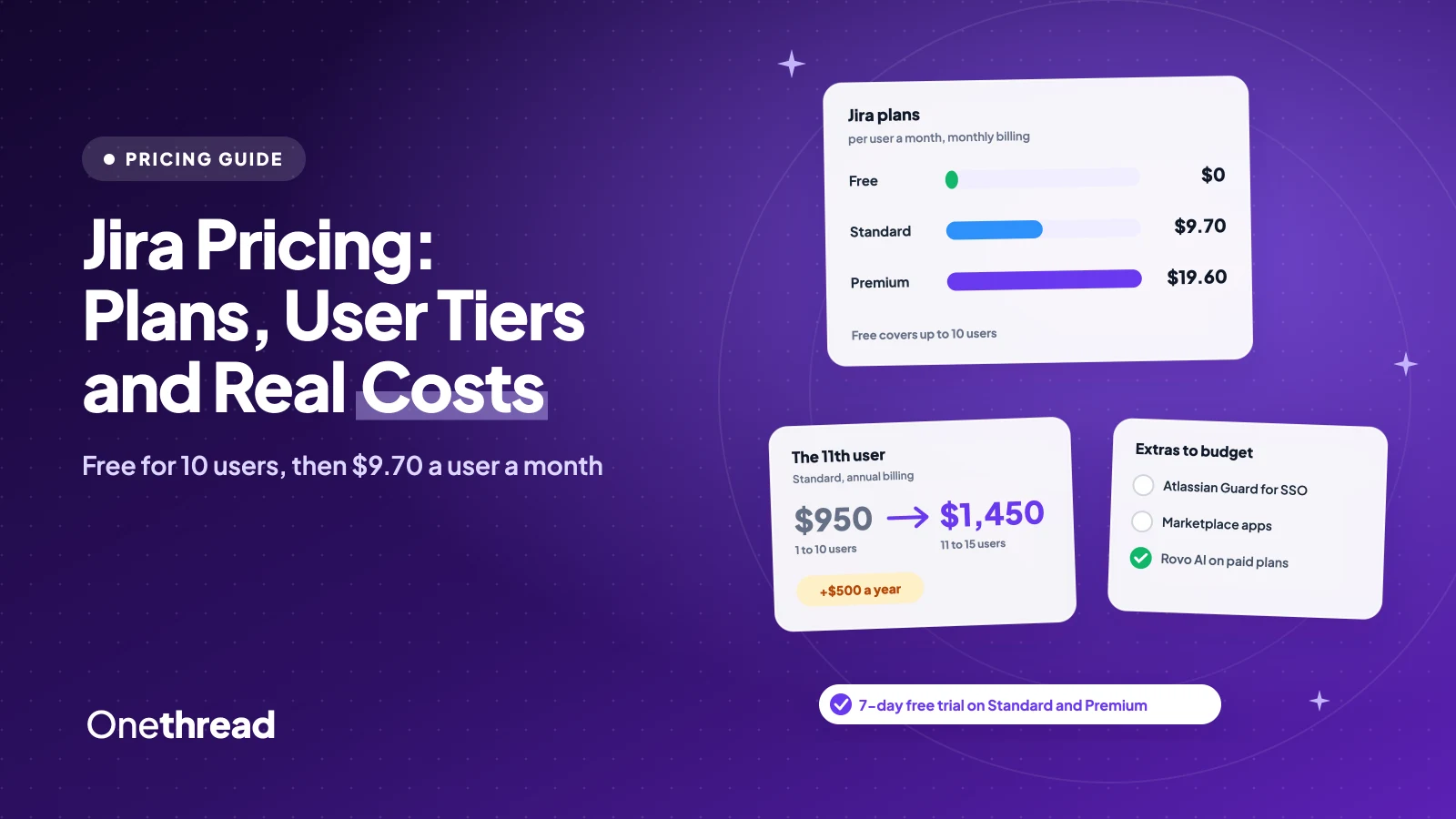
Jira pricing starts with a Free plan for up to 10 users. Standard costs $9.70 a user a month and Premium $19.60 on monthly billing, for teams up to 100. Annual plans charge a flat price per user tier, from $950 a year. Enterprise is quoted by sales.
So where does the bill creep up? An 11th user. A tier you only half fill. Add-ons for single sign-on.
We checked Atlassian’s live calculator at a dozen team sizes and compared six top-ranking guides.
You’ll see what each plan costs for your headcount, when annual billing saves money, and which plan to pick.
Key Points
- Jira costs $0 for up to 10 users, $9.70 a user a month on Standard and $19.60 on Premium with monthly billing, for teams of 1 to 100. Enterprise is quoted by sales.
- Annual billing charges a flat tier price, such as $2,450 a year for 16 to 25 users on Standard. It only beats monthly billing near a tier’s top.
- Budget for extras: SSO needs Atlassian Guard on Standard and Premium, and Marketplace apps bill by seat.
- Most teams of 11 to 100 people fit on Standard. Premium pays off only for cross-team planning or 24/7 support.
How Much Does Jira Cost Per User?
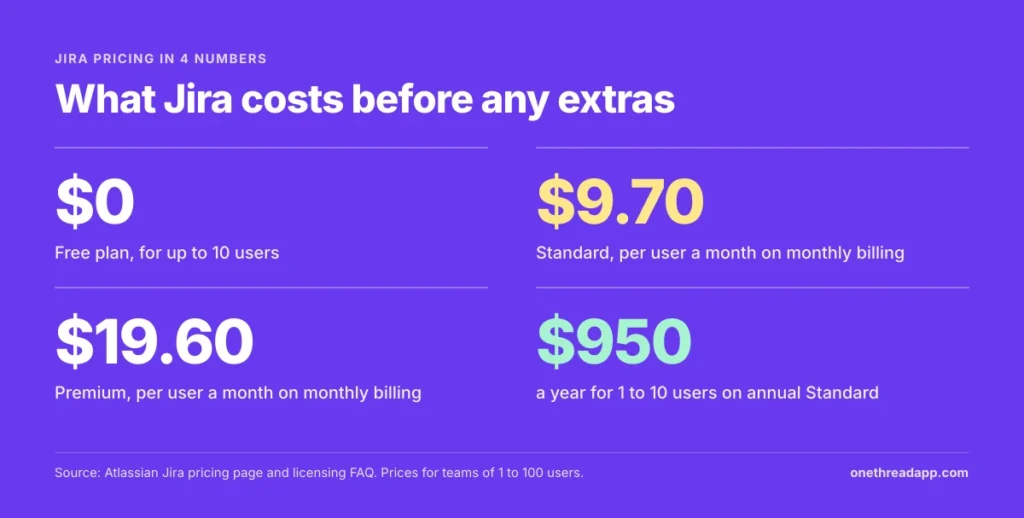
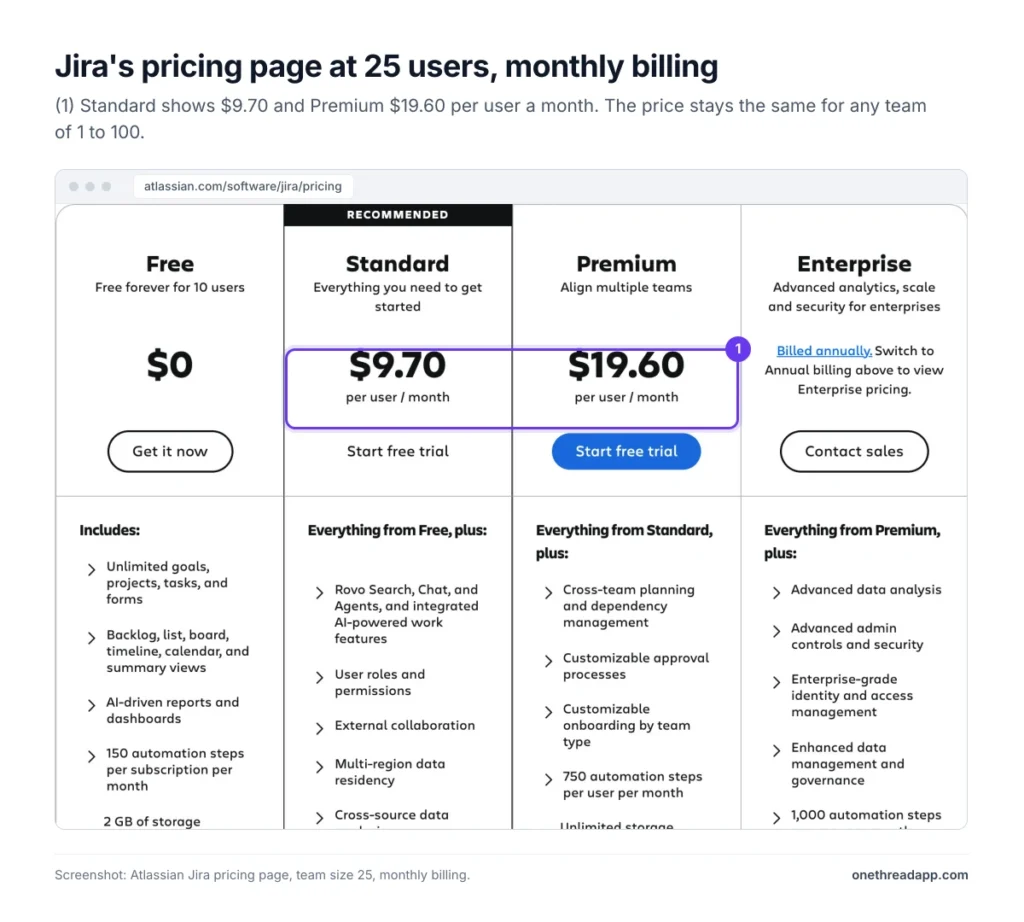
Jira costs $9.70 a user a month on Standard and $19.60 on Premium with monthly billing, for any team of 1 to 100 users. Bigger teams pay less, because monthly Jira Cloud pricing is progressive.
| Plan | Monthly price, 1 to 100 users | Annual price, 1 to 10 users | Users per site | Storage |
|---|---|---|---|---|
| Free | $0 | $0 | 10 | 2 GB |
| Standard | $9.70 a user | $950 a year | 100,000 | 250 GB |
| Premium | $19.60 a user | $1,950 a year | 100,000 | Unlimited |
| Enterprise | Not offered | Custom quote | 100,000 | Unlimited |
Most guides miss this. Atlassian’s calculator loads with 300 users, so the first Standard price you see is $8.48. That’s a blended rate: $9.70 for users 1 to 100, $8.20 for 101 to 250 and $6.85 beyond.
A team under 100 never gets that blended rate. It pays the full $9.70.
Sources: Atlassian Jira pricing page, Atlassian Jira licensing FAQ.
What Does the Jira Free Plan Include?
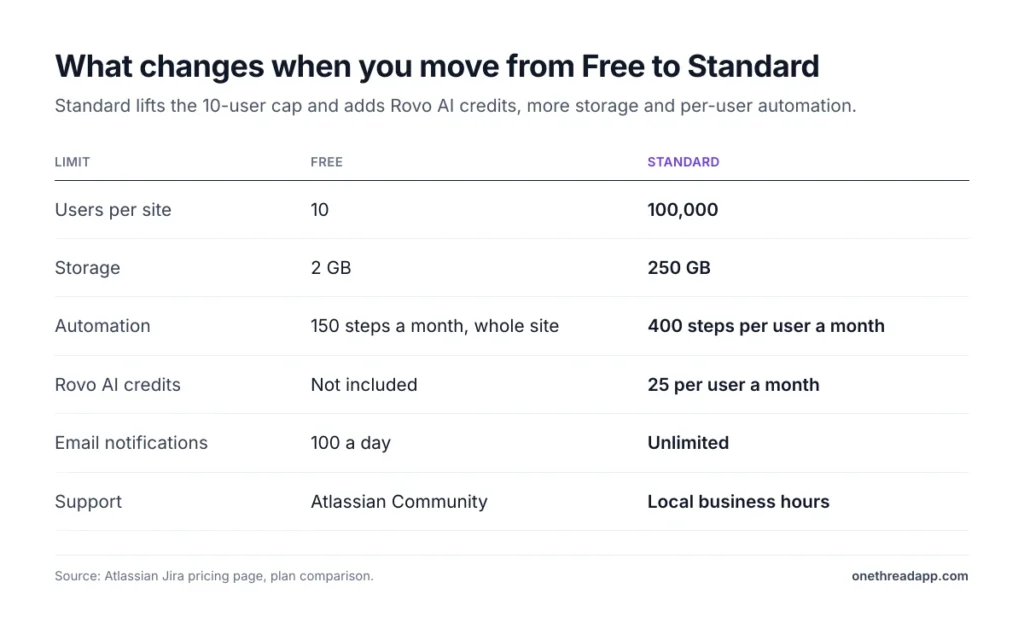
The Jira Free plan costs nothing for up to 10 users, with no time limit. It includes unlimited projects, work items and forms, plus backlog, board, list, timeline and calendar views.
You get 2 GB of storage and help from the Atlassian Community. Automation stops at 150 steps a month for the whole site, not per person. Email notifications cap at 100 a day.
Say you run a five-person dev team. Free will hold you for months. But the 11th invite changes things: a Free site that goes over the limit moves to a 7-day Standard trial automatically.
Free also skips Rovo AI, user roles and external collaboration. That last gap bites when a contractor needs access.
Pricing: $0 for up to 10 users, with no time limit.
Best For
- Teams of up to 10 people who want boards, backlogs and timelines without a bill.
Pros
- Unlimited projects and work items, with the same core views as paid plans.
- Customizable workflows and custom fields are included.
- No card needed, and no trial clock.
Cons
- Hard stop at 10 users, then a forced Standard trial.
- Only 150 automation steps a month for the entire site.
- No user roles, no Rovo AI and only 2 GB of storage.
What Does Jira Standard Cost and Include?
Jira Standard is the plan most growing teams land on. It lifts the user limit to 100,000 per site and adds user roles and permissions, external collaboration and data residency.
It also adds Rovo Search, Chat and Agents, with 25 Rovo credits per user each month. Automation rises to 400 steps per user a month, storage to 250 GB, and support runs in local business hours. Email notifications go unlimited too.
Take a 25-person product team. On monthly billing, that’s 25 × $9.70 = $242.50 a month. The annual 16 to 25 user tier costs $2,450 a year, about $8.17 a head each month.
Most teams never need more. Standard skips cross-project dependencies and an uptime SLA, and single sign-on needs Atlassian Guard.
Pricing: $9.70 a user a month billed monthly, or $950 a year for up to 10 users.
Best For
- Teams of 11 to 100 people that need permissions, guests and more automation.
Pros
- Roles, permissions and external collaboration control who sees what.
- Rovo AI is included, with 25 credits per user a month.
- 250 GB of storage and 400 automation steps per user.
Cons
- Business-hours support only, with no uptime SLA.
- Dependencies stay inside a single project.
- SSO and SCIM need Atlassian Guard, billed separately.
What Does Jira Premium Add for $19.60 a User?
Jira Premium is built for several teams planning work together. It adds cross-team planning and dependency management across projects, plus custom approval processes. It also adds custom onboarding by team type, so new squads start with the right setup.
Support and reliability change too. You get 24/7 support for critical issues and a 99.9% uptime SLA. Storage goes unlimited, automation rises to 750 steps per user and Rovo credits to 70.
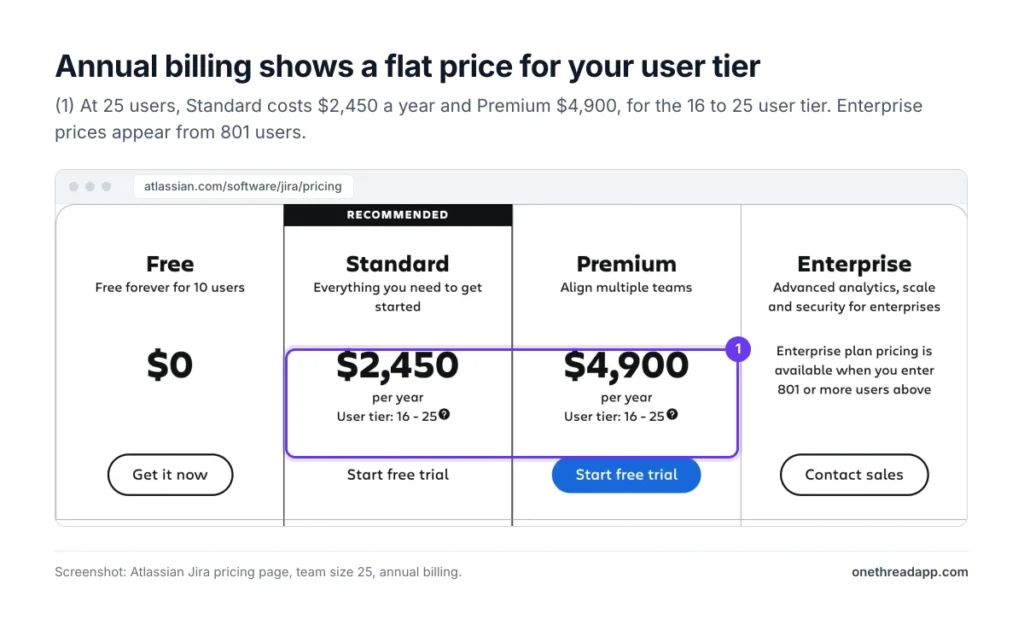
The jump is steep. For 25 users on annual billing, Premium costs $4,900 a year against $2,450 on Standard. Exactly double.
Picture three squads that share one release date and keep blocking each other. That’s the Premium use case. One team with one backlog isn’t.
Pricing: $19.60 a user a month billed monthly, or $1,950 a year for up to 10 users.
Best For
- Organizations with several teams that share dependencies and deadlines.
- Teams where Jira downtime stops work and needs a 24/7 response.
Pros
- Cross-project dependencies and advanced planning in one place.
- 99.9% uptime SLA and 24/7 support for critical issues.
- Unlimited storage and 750 automation steps per user.
Cons
- Costs twice as much as Standard at every team size we checked.
- SSO still needs Atlassian Guard.
- Most extras only pay off with three or more teams.
How Much Is Jira Enterprise, and How Does It Differ From Premium?
Jira Enterprise is billed annually and priced by sales. Atlassian’s calculator only shows an Enterprise figure from 801 users. For 801 to 1,000 users, it lists $179,000 a year, against $118,000 for Premium and $73,500 for Standard.
Enterprise runs up to 150 sites with central billing and admin. It includes Atlassian Guard Standard for SSO, SCIM and Active Directory sync, which Standard and Premium buy separately. It also adds advanced data analysis and stronger data governance.
Atlassian’s FAQ also lists bring-your-own-key encryption and Product Requests for managing shadow IT. Support covers all issues 24/7, the uptime SLA rises to 99.95%, and automation to 1,000 steps per user.
Smaller organizations can still contact sales for a quote. So the split between Premium and Enterprise isn’t planning. It’s security, scale and governance.
Pricing: Custom quote, annual billing only.
Best For
- Companies with hundreds of users, several Jira sites and strict security rules.
Pros
- Atlassian Guard Standard is included, so SSO costs nothing extra.
- Up to 150 sites with central admin and billing.
- 99.95% uptime SLA and 24/7 support for all issues.
Cons
- No public price below 801 users, so you can’t budget without a call.
- Annual billing only, with no monthly option.
- Overkill for a single team, whatever its size.
How Do Jira’s Annual User Tiers Work?
Jira’s annual plans don’t charge per head. They charge a flat price for a user tier, and you pay for the whole tier even if you fill part of it.
Annual Plans Charge for the Whole Tier
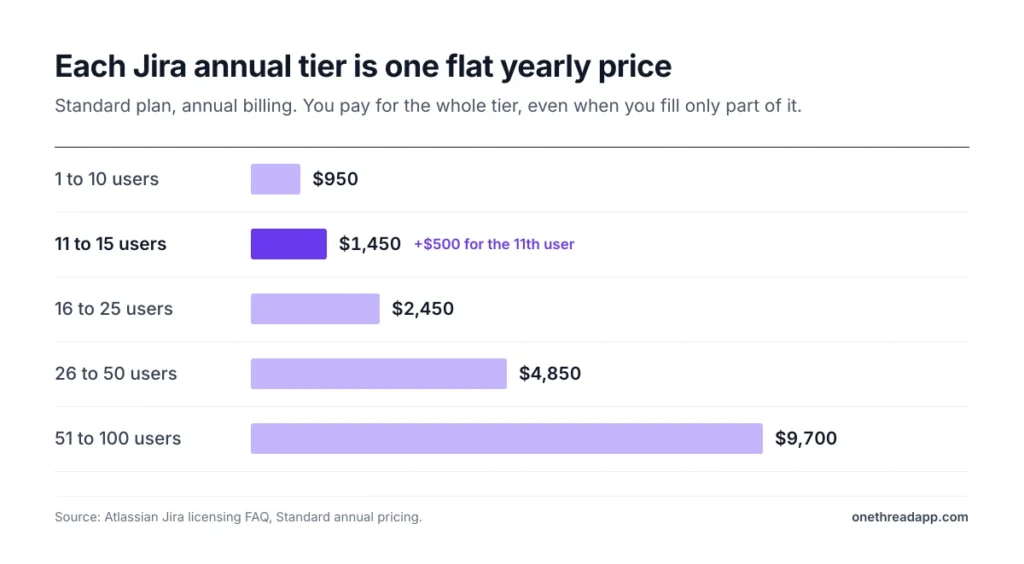
Atlassian bills annual plans at the tier that most closely matches your user count. On Standard, 1 to 10 users cost $950 and 11 to 15 cost $1,450. The next tiers run 16 to 25 for $2,450, 26 to 50 for $4,850 and 51 to 100 for $9,700.
That makes the first user of each tier expensive.
Example: 10 users on annual Standard cost $950. The 11th user moves you to the next tier at $1,450, so one person adds $500 a year. The same 11 users on monthly billing cost 11 × $9.70 × 12 = $1,280.40.
Monthly Plans Bill Your Peak Seat Count
Monthly Jira billing uses Maximum Quantity Billing. Your bill follows the highest number of seats assigned at any point in the cycle.
Add three contractors for a week, and you pay for them that month, pro-rated. Remove them mid-cycle, and the bill doesn’t drop until the next cycle.
A user, in Atlassian’s terms, is anyone who can log in to your site and exists in User Management. Daily users and dormant accounts count the same.
Top Tip: Before each billing date, remove product access from people who’ve left or stopped using Jira. It’s the one cleanup that cuts next month’s bill.
What Hidden Costs Come With Jira Pricing?
Jira pricing covers the plan, but three extras can add to the bill. Price each against your own setup before you compare plans.
Atlassian Guard for Single Sign-On
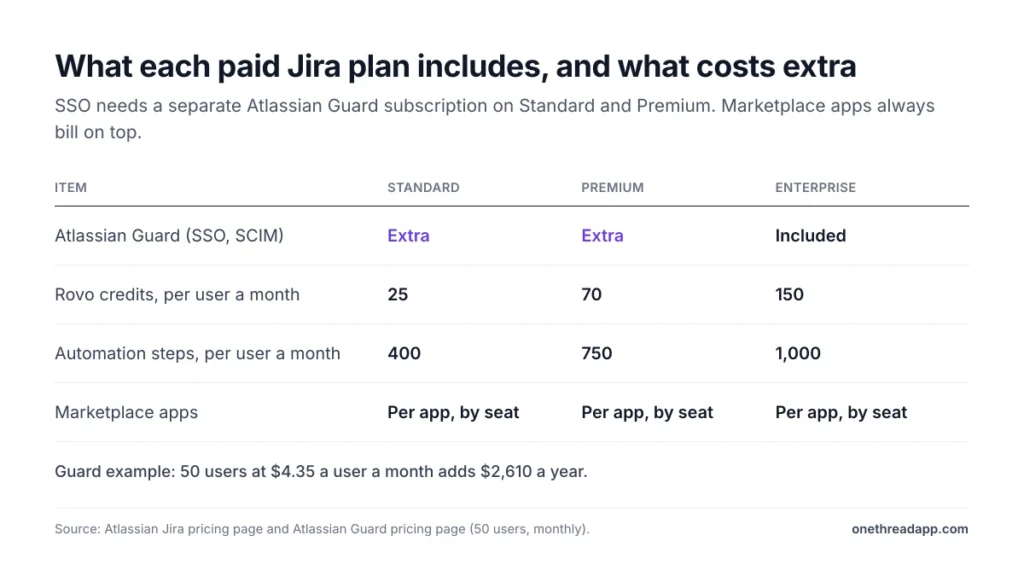
Single sign-on (SSO) and SCIM user provisioning aren’t part of Standard or Premium. Both plans list them as “Requires Atlassian Guard Standard subscription.” Only Enterprise includes Guard.
Guard bills by seat. At 50 users on monthly billing, Atlassian’s calculator showed $4.35 a user a month.
Example: 50 users on monthly Standard cost 50 × $9.70 × 12 = $5,820 a year. Guard adds 50 × $4.35 × 12 = $2,610, for $8,430 in total.
If your security team requires SSO, that 45% jump belongs in the budget from day one.
Rovo Credits for AI Chat and Agents
Rovo Search, Chat and Agents come with every paid plan, but not with Free. Plans differ by monthly credits: 25 per user on Standard, 70 on Premium and 150 on Enterprise.
Credits are pooled across your organization and reset monthly. Search doesn’t use them. Chat and Agent requests do.
For now, Atlassian doesn’t charge for usage beyond your allowance. It has promised at least 90 days’ notice and an explicit opt-in before that changes. A fair deal today, and a line worth checking at renewal.
Marketplace Apps Billed by Seat
Marketplace apps add features Jira doesn’t ship, such as time tracking or test management. On monthly plans, Atlassian bills apps like Jira itself, by the highest seat count in each cycle.
That’s where small-team budgets slip. One user in a Latenode forum thread on Jira costs blamed the “extra plugins you need” for their switch away.
List every app your team runs today with its seat price. Then multiply by your headcount, the same way you price Jira. Check whether each app offers annual tiers too.
How Can You Lower Your Jira Bill?
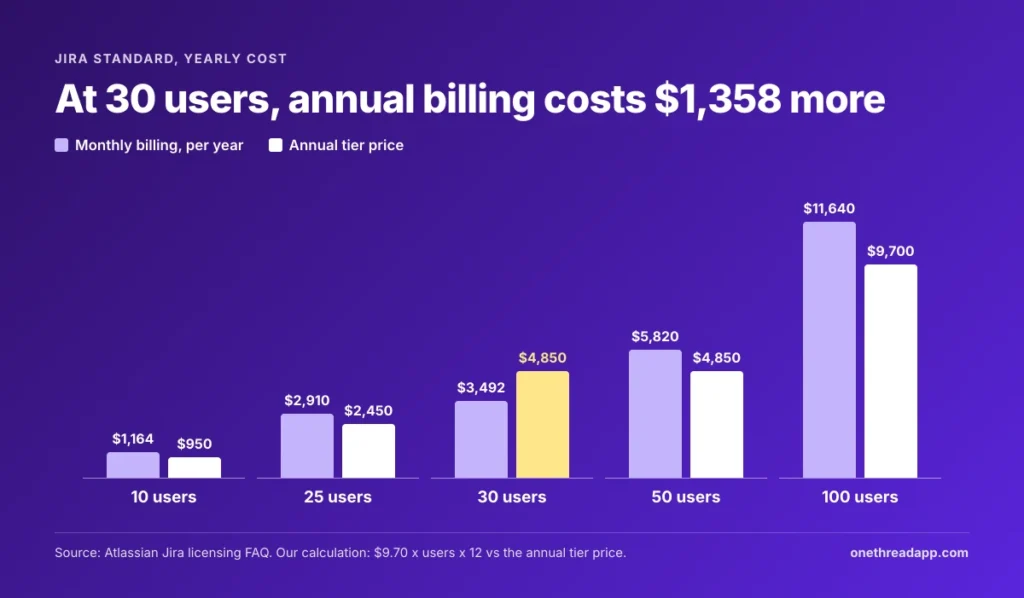
You lower a Jira bill by picking the right billing cycle, sizing your tier and claiming any discount you qualify for. Atlassian says annual billing saves up to 17%. That holds near the top of a tier, not near the bottom.
| Users | Standard monthly, per year | Standard annual | Premium monthly, per year | Premium annual |
|---|---|---|---|---|
| 10 | $1,164 | $950 | $2,352 | $1,950 |
| 25 | $2,910 | $2,450 | $5,880 | $4,900 |
| 30 | $3,492 | $4,850 | $7,056 | $9,800 |
| 50 | $5,820 | $4,850 | $11,760 | $9,800 |
| 100 | $11,640 | $9,700 | $23,520 | $19,500 |
Example: 30 users on monthly Standard cost 30 × $9.70 × 12 = $3,492 a year. The annual 26 to 50 tier costs $4,850, so paying yearly costs $1,358 more.
We worked out the break-even points from Atlassian’s tier table. Annual Standard wins at 13 or more users in the 11 to 15 tier and 22 or more in the 16 to 25 tier. In the 26 to 50 tier you need 42 users, and in the 51 to 100 tier, 84.
Discounts cut deeper. Atlassian lists 75% off cloud for eligible Community customers and 50% off for eligible Academic customers.
How Does Jira Pricing Compare With Trello, Linear and Onethread?
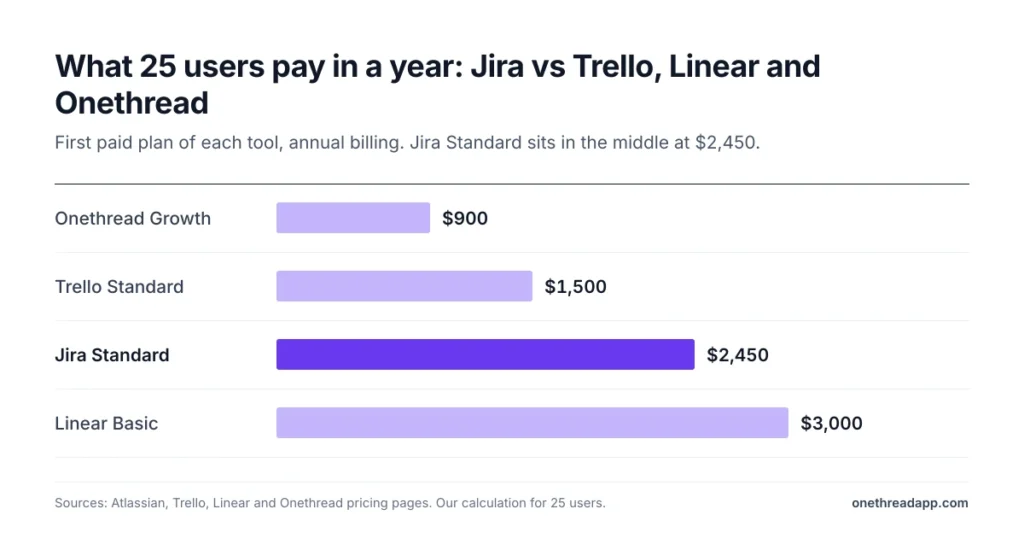
Jira Standard sits in the middle on price for a 25-person team. We compared each tool’s first paid plan on annual billing, for 25 users over one year.
| Tool | First paid plan, annual billing | 25 users for one year | Best for |
|---|---|---|---|
| Jira | $2,450 a year for 16 to 25 users | $2,450 | Software teams with sprints and workflows |
| Trello | $5 a user a month | $1,500 | Simple boards for small teams |
| Linear | $10 a user a month | $3,000 | Fast-moving product teams |
| Onethread | $3 a user a month | $900 | Teams that want projects and tasks at a low price |
The Best for column is our own read. Prices change, so check each vendor’s page before you buy.
Jira wins when you need deep workflow rules, sprint boards and the Atlassian app store. Our Jira vs Trello comparison and Trello pricing guide cover the lighter option.
Weighing ClickUp or Asana? See our Jira vs ClickUp breakdown and Jira vs Asana comparison. Our best project management software roundup ranks the wider field, and Onethread’s plans sit on the Onethread pricing page.
Which Jira Plan Should Your Team Pick?
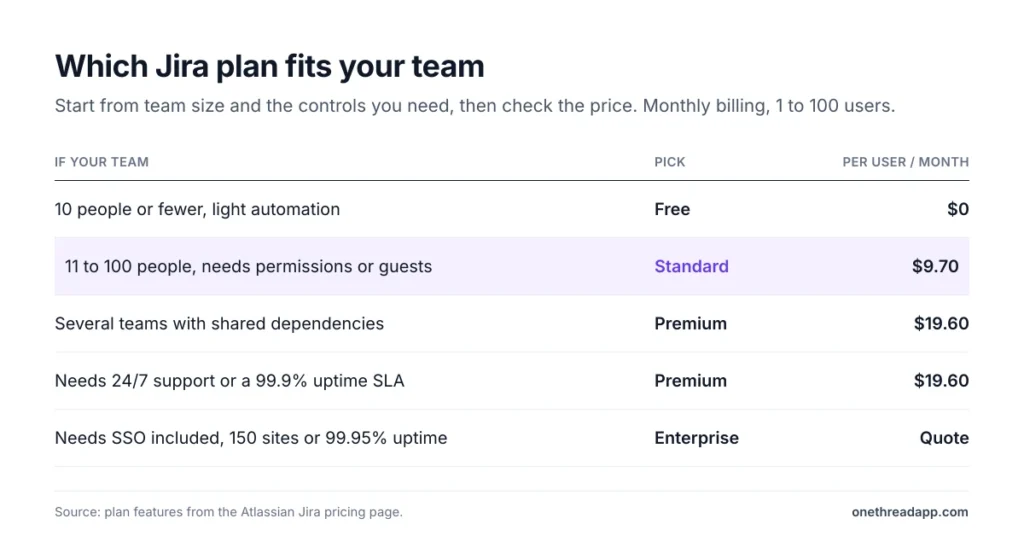
Most teams should start on Free and move to Standard past 10 users. Premium and Enterprise only make sense when a specific need forces the jump.
| If your team | Pick |
|---|---|
| Has 10 people or fewer and light automation | Free |
| Has 11 to 100 people and needs permissions or guests | Standard |
| Runs several teams with shared dependencies | Premium |
| Needs 24/7 support or a 99.9% uptime SLA | Premium |
| Needs SSO included, 150 sites or 99.95% uptime | Enterprise |
Then pick the billing cycle: yearly near the top of a tier, monthly near the bottom.
Three checks settle it:
- Seats: Count everyone with product access, not just daily users.
- Tier position: Find your annual tier and see how close you are to its top.
- Extras: Price Atlassian Guard and your Marketplace apps by seat.
What Should Your Team Do Next With Jira?
Jira pricing isn’t one number. It’s a per-user rate on monthly billing, a flat tier price on annual billing, and a list of extras on top. Premium only earns its double price for multi-team work. Standard covers most teams, and the cheaper billing cycle depends on where your headcount sits inside its tier.
This week, export your user list from Jira’s User Management and count everyone with product access. Then find your tier in the tables above, and you’ll know your yearly Jira cost before the renewal email lands in your inbox.
FAQs
Is Jira Free or Paid?
Jira is both. The Free plan costs nothing for up to 10 users and has no time limit. It caps storage at 2 GB and automation at 150 steps a month. Beyond 10 users, Jira pricing starts at $9.70 a user a month on Standard with monthly billing.
Does Jira Have a Free Trial?
Yes, Atlassian offers a 7-day free trial of Jira Standard and Premium, with no payment details required. You can cancel at any time. If a Free site goes over 10 users, Jira moves it to a Standard trial automatically, so check Jira pricing for your headcount first.
Is Jira Being Phased Out?
No, Jira Cloud isn’t being phased out. Atlassian is retiring the self-managed Data Center edition instead. New Data Center licenses stopped selling on March 30, 2026, and Data Center reaches end of life on March 28, 2029. Teams on it should plan a move.
What Payment Options Does Jira Accept?
Monthly Jira plans take credit card (Mastercard, Visa or American Express) or PayPal. The billing contact can update the card. Annual plans can also be paid by bank transfer or check. Atlassian’s licensing page adds ACH and Net-30 terms for annual quotes above $10,000.
Can You Get a Refund on Jira?
Yes, within set windows. Atlassian refunds monthly subscriptions within your first paid month, after the trial ends. Annual subscriptions qualify within 30 days of payment. Removing a product or app early doesn’t earn a credit for the rest of the term.