Most teams don’t shop for portfolio software until the status meeting runs long.
Project portfolio management software puts every project, budget and person in one view. That lets you rank work and staff it. For most teams, the shortlist is Planview, Smartsheet, Microsoft Planner and Project, Wrike, monday.com, Asana, Celoxis and Onethread. Prices run from $0 to $45 per user a month.
But the sticker price misleads. Portfolio views often sit two plans up, or behind a sales call and a custom quote.
We checked the pricing pages of all 8 tools and the 6 top-ranking guides on this topic.
You’ll get a comparison table, a 10-user cost example and a pick for each type of team.
Key Points
- Project portfolio management software costs $0 to $45 per user a month on published plans. Planview publishes no price. Asana Advanced at $24.99 and Microsoft Planner and Project Plan 3 at $30 are the cheapest published plans that let you build portfolios.
- Check which plan includes portfolios before you compare prices. On monday.com and Smartsheet, portfolio features sit in Enterprise tiers or add-ons with custom pricing.
- Pick by team size: Planview or Celoxis for a formal PMO, Asana or Microsoft for teams already in those apps, Onethread or Smartsheet Pro for small teams on a budget.
- Run a 10-user yearly cost check with your own seat count. The gap between the cheapest and priciest portfolio-ready plan is more than $3,000 a year.
Which Project Portfolio Management Software Fits Which Team?
The right PPM tool depends on two things. How formal is your portfolio process, and how many paid seats do you need? Our table lists the first paid plan for each tool, billed yearly. Best for labels are our own fit notes.
| Tool | First paid plan (per user a month) | 10 users for a year | Best for |
|---|---|---|---|
| Planview | Not published | Custom quote | Enterprise PMOs with formal intake |
| Smartsheet | $9 | $1,080 | Spreadsheet-style teams |
| Microsoft Planner and Project | $10 | $1,200 | Microsoft 365 companies |
| Wrike | $10 | $1,200 | Executive dashboards |
| monday.com | $9 | $1,080 | Visual boards for business teams |
| Asana | $10.99 | $1,318.80 | Cross-team goals and portfolios |
| Celoxis | $10 | $1,200 | Detailed portfolio reporting |
| Onethread | $3 | $360 | Small teams running many projects |
Sources for prices: the vendor pricing pages of Smartsheet, Microsoft 365 Planner, Wrike, monday.com, Asana, Celoxis and Onethread. Planview lists no prices on its PPM Pro page.
We picked these 8 tools because they appear most often across the top-ranking guides for this keyword. Wrike showed up in 6 of 6 guides we checked. Smartsheet, monday.com, Celoxis and Planview each showed up in 5.
We then read each vendor’s own pricing and product pages. Prices in third-party lists go stale fast.
Top Tip: The first paid plan is rarely the one with portfolios. Check the cost table further down before you book a demo.
What Is Project Portfolio Management Software?
Project portfolio management software helps you choose, rank, staff and track a group of projects as one portfolio. Some vendors call it project and portfolio management (PPM) software. Project management software runs one project at a time. PPM software answers a different question: which projects deserve your people and budget right now?
Here’s what that looks like in practice. A project tool tells you that the website redesign is two weeks late. A portfolio tool shows the bigger clash.
The redesign, the launch and a client rollout all need the same two designers in March. And it shows which one to delay.
Most PPM tools support top-down and bottom-up planning, and they cover the same core jobs:
- Intake: New project requests arrive through one form, not through email and hallway chats.
- Prioritization: Requests get scored against goals, cost and risk, so the ranking is visible.
- Capacity: Demand gets compared with the people you have, by person, role or skill.
- Tracking: Status, budget and milestones roll up into one portfolio dashboard.
Planview describes its PPM Pro product in these terms: it helps teams collect, prioritize and execute projects. Lighter tools such as Asana and Onethread cover tracking and dashboards well, with less formal intake.
PPM software also differs from a project management system in who uses it. The main users are PMO leads, department heads and executives. Project managers feed it data, and leaders make the trade-off calls.
Is your real pain one messy project? Then a project management system is likely enough. If the pain is ten projects fighting over the same people, you need portfolio features.
Which Features Should Project Portfolio Management Software Include?
Five portfolio management capabilities separate real PPM solutions from a task list with a dashboard bolted on. Look for each one on the plan you can afford. The feature tour isn’t enough. The H3s below explain what each feature does and how to test it during a trial.
Portfolio Dashboards and Reporting
A portfolio dashboard rolls every project’s status, budget and dates into one screen, which is the portfolio visualization most leaders want. It’s the feature executives open first, so it needs to work without a training session.
Test it with a real question. Ask the dashboard which projects are over budget and late at the same time. If you need to export to a spreadsheet to answer that, the reporting is too thin.
Also check who can view it. Planview says its reports can be shared with stakeholders who don’t hold a license. Smartsheet’s Pro plan caps each dashboard at 10 widgets. A project dashboard software review can help if dashboards are your main need.
Resource and Capacity Planning
Capacity planning compares the work you’ve committed to with the hours your people have. Without it, a portfolio is just a list of wishes.
Look for views by person, role and skill. Planview PPM Pro shows utilization and demand at all three levels. Asana adds workload views on Advanced, and Enterprise adds capacity planning across the whole organization. Microsoft’s People view in Planner Plan 1 handles workload balancing.
Run one test: assign the same person to three projects in the same week. A good tool flags the overload before you publish the plan. Our guide to resource allocation covers the method behind the screen.
Demand Intake and Prioritization
Intake is the front door of a portfolio. Every new request goes through one form with the same questions: goal, cost, size and sponsor.
Prioritization then scores those requests so you can rank them. Planview PPM Pro offers a Kanban-style intake board with a custom form for each request type. Lighter tools handle intake with forms and automation rules, which works for smaller teams.
The test here is simple. Submit three fake requests and see whether the tool lets you compare them side by side. If ranking happens in a meeting, not in the tool, intake is decoration.
Budget and Financial Tracking
Budget tracking ties cost to each project and rolls it up to the portfolio. It’s what lets you stop a project that costs more than it returns.
Depth varies a lot. Wrike lists project, portfolio and client budgets on its Pinnacle plan. Celoxis offers financial reporting across its paid plans. Onethread lists budgeting as an upcoming feature on its Scale plan, so it isn’t there yet.
Ask each vendor one question. Can the tool show planned versus actual cost for the whole portfolio on one screen? A yes with a demo beats a yes on a feature page.
Risk and Governance Controls
Governance covers the rules around the portfolio. Who approves projects, who sees what, and how do risks get logged?
Look for custom roles, approval steps and a risk log. Onethread’s Scale plan adds custom roles and permissions, with risk management and a RAID log listed as upcoming. Enterprise tiers from Smartsheet, monday.com and Asana add stronger admin controls.
Our risk management software guide compares tools built for that job. For most portfolios, a shared risk log plus clear approvers covers the basics.
What Does Planview Offer for Enterprise PMOs?
Planview PPM Pro is one of the enterprise portfolio management solutions built for project management offices. It covers intake, prioritization, scenario planning, capacity and project financials in one product.
Its intake works through a Kanban-style board, with a custom form for each request type. Scenario planning lets you test trade-offs and move people across the portfolio before you commit. Reports and dashboards can be shared with people who don’t have a license.
Say your PMO gets 40 project requests a quarter and can fund 12. Planview is built for that exact sorting job. It also handles stage gates for new product work. It’s heavy for a 15-person agency, though.
One G2 reviewer kept it short: “The interface is clean.”
Pricing: Not published. Planview prices by scale, users, environments and support level, so you’ll need a quote.
Best For
- Enterprise portfolio management across IT and product portfolios.
- Leaders who need scenario planning across many funded projects.
Pros
- Intake, prioritization and capacity live in one product.
- Scenario planning tests trade-offs before you move people.
- Reports can be shared with stakeholders who have no license.
Cons
- No public pricing, so budgeting starts with a sales call and a custom quote.
- Built for formal PMOs, which is more process than small teams need.
- Setup takes time compared with board-style tools.
How Does Smartsheet Handle Portfolio Management?
Smartsheet is a spreadsheet-style work platform with dashboards, forms and automations. Teams that live in Excel tend to feel at home on day one.
The catch sits in the plan table. Pro costs $9 per member a month billed yearly, for 1 to 10 members. Business costs $19 per member a month, for 3 or more members.
But portfolio features come with Enterprise and Advanced Work Management, or with the Control Center add-on. Resource Management is an add-on too.
So Smartsheet works two ways. A small team can run a light portfolio with sheets and a dashboard on Pro. A larger company buys the Enterprise tier for true portfolio rollups.
A G2 reviewer flagged the learning curve: “It’s a bit of a learning curve if you’re used to excel”.
Pricing: Pro $9 and Business $19 per member a month billed yearly, or $12 and $24 billed monthly. Enterprise and Advanced Work Management are custom priced.
Best For
- Teams that already plan in spreadsheets.
- Companies ready to buy Enterprise for portfolio rollups.
Pros
- Familiar grid layout cuts training time.
- Dashboards and forms come on the first paid plan.
- Unlimited contributors on Pro keep viewer costs down.
Cons
- Portfolio features need Enterprise or an add-on.
- Resource Management costs extra.
- Pro caps dashboards at 10 widgets each.
What Do Microsoft Planner and Project Bring to Portfolios?
Microsoft now sells its project tools under the Planner name. Basic Planner comes with Microsoft 365, but it can’t build portfolios.
Planner Plan 1 costs $10 per user a month, paid yearly. It adds a People view for workload balancing. It lets you view portfolios, but not create them.
Planner and Project Plan 3 costs $30 per user a month, paid yearly. That’s the plan that creates portfolios. It adds critical path scheduling and an Assignments view.
Think of a company where everyone already works in Teams and Outlook. Plan 3 keeps the portfolio inside the same login and admin center. That’s the real draw here.
A Capterra reviewer of Microsoft Project put the main con simply: “Has a steep learning curve when first using.”
Pricing: Planner Plan 1 $10 and Planner and Project Plan 3 $30 per user a month, paid yearly on an annual subscription.
Best For
- Companies standardized on Microsoft 365.
- PMOs that need critical path scheduling across projects.
Pros
- Same login, admin and security as the rest of Microsoft 365.
- Plan 3 creates portfolios and handles critical path.
- People view balances workload on Plan 1.
Cons
- Portfolios need Plan 3 at $30 per user a month.
- Plan 1 only lets you view portfolios.
- Annual commitment on both paid plans.
Why Do Executives Pick Wrike for Portfolio Dashboards?
Wrike is a work management platform with strong reporting. TechRepublic ranked it first for executive dashboards in its PPM roundup.
The plan ladder matters here. Team costs $10 per user a month for 2 to 15 users, with a shareable dashboard. Business costs $25 per user a month for 5 to 200 users. Advanced resource and capacity planning, plus project, portfolio and client budgets, sit on Pinnacle, which is quote-only.
Picture a COO who wants one weekly view of 30 projects. Wrike’s dashboards suit that request well. You can share them from the Team plan up, even with people outside the project. But the capacity planning behind honest dashboards costs more than the list price suggests.
A G2 reviewer noted one weak spot: “Wrike’s mobile app is not user friendly for starters”.
Pricing: Free plan available. Team $10 and Business $25 per user a month, billed yearly. Pinnacle and Apex are quote-only.
Best For
- Leadership teams that live in dashboards.
- Mid-size companies that can grow into Pinnacle.
Pros
- Shareable dashboards from the Team plan.
- Portfolio budgets on Pinnacle.
- Business plan covers up to 200 users.
Cons
- Capacity planning needs a quote-only plan.
- Team plan stops at 15 users.
- The mobile app draws complaints from some users.
How Does monday.com Work as Portfolio Software?
monday.com is a board-based work platform that business teams pick up fast. Colors, automations and simple views make it easy to start.
For portfolios, though, look at the top tier. Basic costs $9, Standard $12 and Pro $19 per seat a month, billed yearly. Plans start from 3 users, and a free plan covers 2 seats. Portfolio management and resource management both appear only on Enterprise, which is custom priced.
So a 10-person marketing team can track several campaigns on Pro boards, with time tracking and formulas. A company that wants portfolio rollups and resource views needs Enterprise. That means a sales call and a custom quote. Our monday.com pricing breakdown walks through the seat math.
A G2 reviewer named the trade-off: “The level of customizations can feel a bit overwhelming”.
Pricing: Free for up to 2 seats. Basic $9, Standard $12 and Pro $19 per seat a month, billed yearly. Enterprise is custom.
Best For
- Business teams that want visual boards first.
- Companies ready to buy Enterprise for portfolio features.
Pros
- Fast setup with board templates.
- Clear per-seat prices on Basic, Standard and Pro.
- Strong automations on higher plans.
Cons
- Portfolio and resource management are Enterprise only.
- Plans start at 3 seats.
- Heavy customization can confuse new users.
What Do Asana Portfolios Include?
Asana is a work management tool with goals, portfolios and workload tracking. It’s one of the few tools that publishes a price for its portfolio plan.
Starter costs $10.99 per user a month billed yearly, or $13.49 billed monthly. Advanced costs $24.99 billed yearly, or $30.49 billed monthly. Unlimited portfolios, goals and workload all start on Advanced. Enterprise adds resource management and capacity planning across the whole organization.
Say a 10-person team runs 8 client projects. On Advanced, each project rolls into one portfolio, linked to quarterly goals. Workload views then show who is overbooked next week, before a deadline slips. Our Asana pricing guide covers each plan in detail.
A G2 reviewer raised cost: “Asana tends to be pricier compared to other project management software options.”
Pricing: Starter $10.99 and Advanced $24.99 per user a month billed yearly, or $13.49 and $30.49 billed monthly. Enterprise is custom.
Best For
- Teams that link projects to company goals.
- Companies that want a published price for portfolios.
Pros
- Unlimited portfolios on Advanced.
- Goals and workload views in the same plan.
- No seat limits on paid plans.
Cons
- Portfolios start at $24.99 per user a month.
- Organization-wide capacity planning needs Enterprise.
- Monthly billing costs about 22% more than yearly.
Why Does Celoxis Suit Portfolio Reporting?
Celoxis is project portfolio software with deep reporting and financial views. TechRepublic named it best for portfolio reporting in its PPM roundup.
Every plan includes at least 5 full-access users. Billing is yearly. Core costs $10, Essentials $25, Professional $35 and Business $45 per user a month.
Essentials and up list lower prices for team-member and timesheet users. Enterprise is custom, and it’s the plan that lists on-premise deployment.
A services firm tracks hours, budgets and client issues across 20 projects, and wants financial management with portfolio oversight. Celoxis rolls all of that into reports. No separate BI tool is needed. Clients can even log issues in a register that the team then tracks.
A G2 reviewer flagged one annoyance: “Notifications are a bit messy, with duplicates and gaps at the same time.”
Pricing: Core $10, Essentials $25, Professional $35 and Business $45 per user a month, billed yearly, 5-user minimum. Enterprise is custom.
Best For
- Services firms that report on hours and budgets.
- IT teams that need an on-premise option.
Pros
- Reporting depth without an extra BI tool.
- Cheaper seats for team members and timesheet users.
- On-premise deployment on Enterprise.
Cons
- 5-user minimum on every plan.
- Business plan reaches $45 per user a month.
- Notifications draw complaints from some users.
How Does Onethread Handle Multiple Projects for Small Teams?
Onethread is our own project management tool, so we’ve reviewed it last and listed its limits too. It’s a cloud-based tool for small teams that run many projects at once without a dedicated PMO team.
The Basic plan is free for your company’s first 10 users. It includes unlimited projects and tasks, discussion rooms and a dashboard for the organization and each project.
Growth costs $3 per user a month billed yearly, or $3.60 monthly. It adds exports and standard reports. Scale costs $5 billed yearly, or $6 monthly. It adds custom workflows, phases and milestones, advanced reports and custom roles.
Onethread also shows timelines in a Gantt chart and keeps project docs in a wiki. Our guide to workload management shows how small teams balance people across projects.
A G2 reviewer summed up the value: “For the price, this is an awesome piece of kit!” Another early user on Product Hunt praised “exactly the right amount of tools”.
Pricing: Free for the first 10 users. Growth $3 and Scale $5 per user a month billed yearly, or $3.60 and $6 billed monthly.
Best For
- Small teams and agencies running several projects at once.
- Teams that want portfolio-style dashboards without enterprise prices.
Pros
- Free for the first 10 users.
- Gantt timelines, wiki and dashboards in one tool.
- Lowest published paid price in this list.
Cons
- Budgeting, risk management and a RAID log are listed as upcoming.
- No formal intake scoring like Planview.
- Fewer integrations than the larger vendors.
How Much Does Project Portfolio Management Software Cost for 10 Users?
Ten users on a plan that can build portfolios cost $0 to $3,600 a year on published prices. The range is wide because portfolio features sit on different tiers for each vendor.
| Tool | Plan with portfolio features | Price per user a month | 10 users for a year |
|---|---|---|---|
| Onethread | Basic (free for first 10 users) | $0 | $0 |
| Onethread | Scale | $5 | $600 |
| Asana | Advanced | $24.99 | $2,998.80 |
| Microsoft | Planner and Project Plan 3 | $30 | $3,600 |
| Wrike | Pinnacle | Quote only | Custom quote |
| Smartsheet | Enterprise or Control Center add-on | Quote only | Custom quote |
| monday.com | Enterprise | Quote only | Custom quote |
| Planview | PPM Pro | Quote only | Custom quote |
Prices are per user a month, billed yearly. They come from each vendor’s pricing page. Onethread’s portfolio view is its organization dashboard, which is lighter than Planview’s portfolio module.
Example: 10 users on Asana Advanced cost $24.99 × 10 × 12 = $2,998.80 a year. The same 10 users on Microsoft Planner and Project Plan 3 cost $30 × 10 × 12 = $3,600. That’s a gap of $601.20 a year, before any add-ons.

Swap in your own seat count. Viewers often don’t need paid seats. Count only the people who edit plans. Smartsheet’s Pro plan, for example, includes unlimited contributors.
Top Tip: Ask every quote-only vendor for the price of 10 editors plus 30 viewers. That one number makes the custom quotes comparable.
How Do You Choose the Right Project Portfolio Management Software?
Start with your process, not the feature list. A team with no intake form won’t use scenario planning, however good the demo looks.
Four checks narrow the list fast:
- Count your projects: Under 10 active projects, a tool with good dashboards is enough. Over 30, you need intake and capacity planning.
- Count your editors: Price only the people who plan work. Viewers are often free or cheap.
- Check the portfolio tier: Find the exact plan that creates portfolios, then compare that price.
- Test one real scenario: Load three real projects and one shared person during the trial.
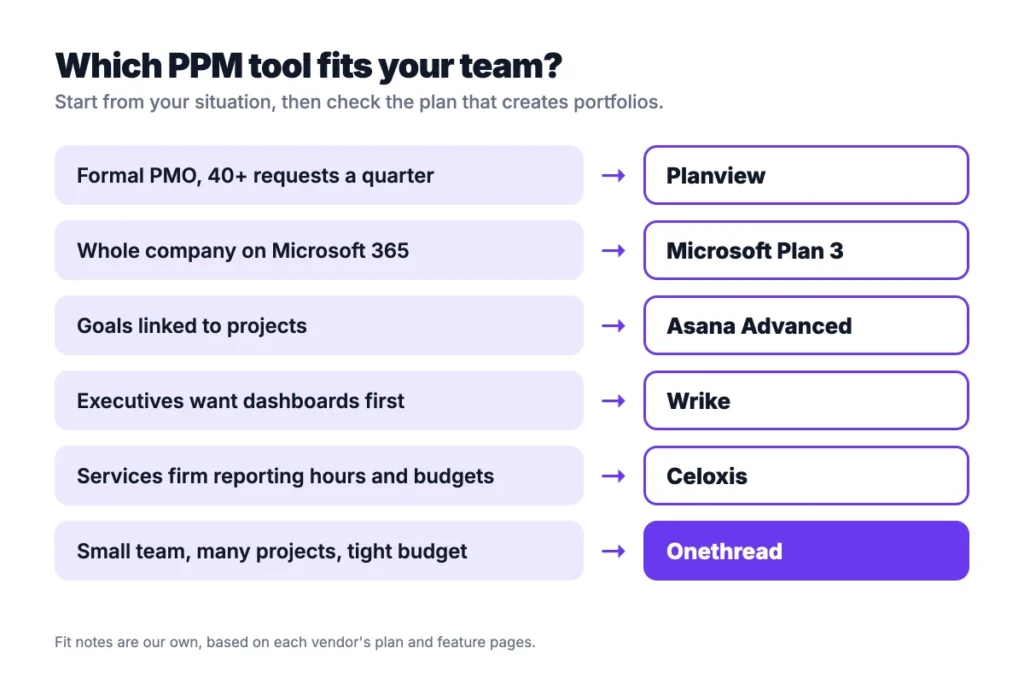
| Signal | Pick |
|---|---|
| Formal PMO with stage gates and 40+ requests a quarter | Planview |
| Whole company on Microsoft 365 | Microsoft Planner and Project Plan 3 |
| Leaders want goals linked to projects | Asana Advanced |
| Executives want dashboards first | Wrike |
| Services firm reporting hours and budgets | Celoxis |
| Teams plan in spreadsheets today | Smartsheet |
| Business teams want visual boards | monday.com |
| Small team, many projects, tight budget | Onethread |
Still choosing between general tools? Our list of the best project management software for small teams is a good next read.
Then ask each vendor three questions. Which plan creates portfolios? What does capacity planning cost? Do viewers need paid seats?
What Should You Do Next With Your PPM Shortlist?
Project portfolio management software earns its price when your projects fight over the same people and budget. The sticker price matters less than the plan where portfolios start. That’s where Asana, Microsoft and the quote-only vendors differ most, so compare portfolio tiers, not entry plans.
This week, list your active projects and the people who edit plans. Price that seat count on the portfolio tier of your top two tools. Then start one trial with three real projects and one shared person. Watch whether the tool flags the clash before you do.
FAQs
What Is the Difference Between Project Management and Project Portfolio Management Software?
Project management software runs one project’s tasks, dates and files. Project portfolio management software ranks and tracks many projects together, comparing cost, capacity and value. Day to day, project managers live in the first. PMO leads and executives use the second to decide which projects get people and budget first.
What Are the Three Phases of Project Portfolio Management?
The three phases are selection, planning and tracking. Selection decides which project requests move forward, and planning sets budgets, dates and people across the portfolio. Tracking compares progress and cost with the plan, so leaders can pause or cut projects. PPM software supports all three with intake, capacity and dashboards.
When Should a Business Move From Spreadsheets to PPM Software?
Move when spreadsheets can’t answer who is free next month. That usually happens past 10 active projects, or when two teams share the same people. Another sign is a weekly status meeting spent rebuilding numbers. Project portfolio management software keeps that data live, so the meeting can focus on decisions.
Is There Free Project Portfolio Management Software?
Yes, a few tools offer free plans, though portfolio features are often limited. Onethread is free for a company’s first 10 users, with organization and project dashboards. Wrike and monday.com offer free plans for small teams. Free plans rarely include capacity planning. Check that limit before you commit.
What Data Should You Prepare Before Implementing PPM Software?
Prepare a list of active projects with owners, dates and budgets. Add each person’s role and weekly hours, plus the goals each project supports. Clean data makes the first dashboard useful on day one. Without it, project portfolio management software shows empty charts.