Bolt.new feels cheap until the tokens run out halfway through a build.
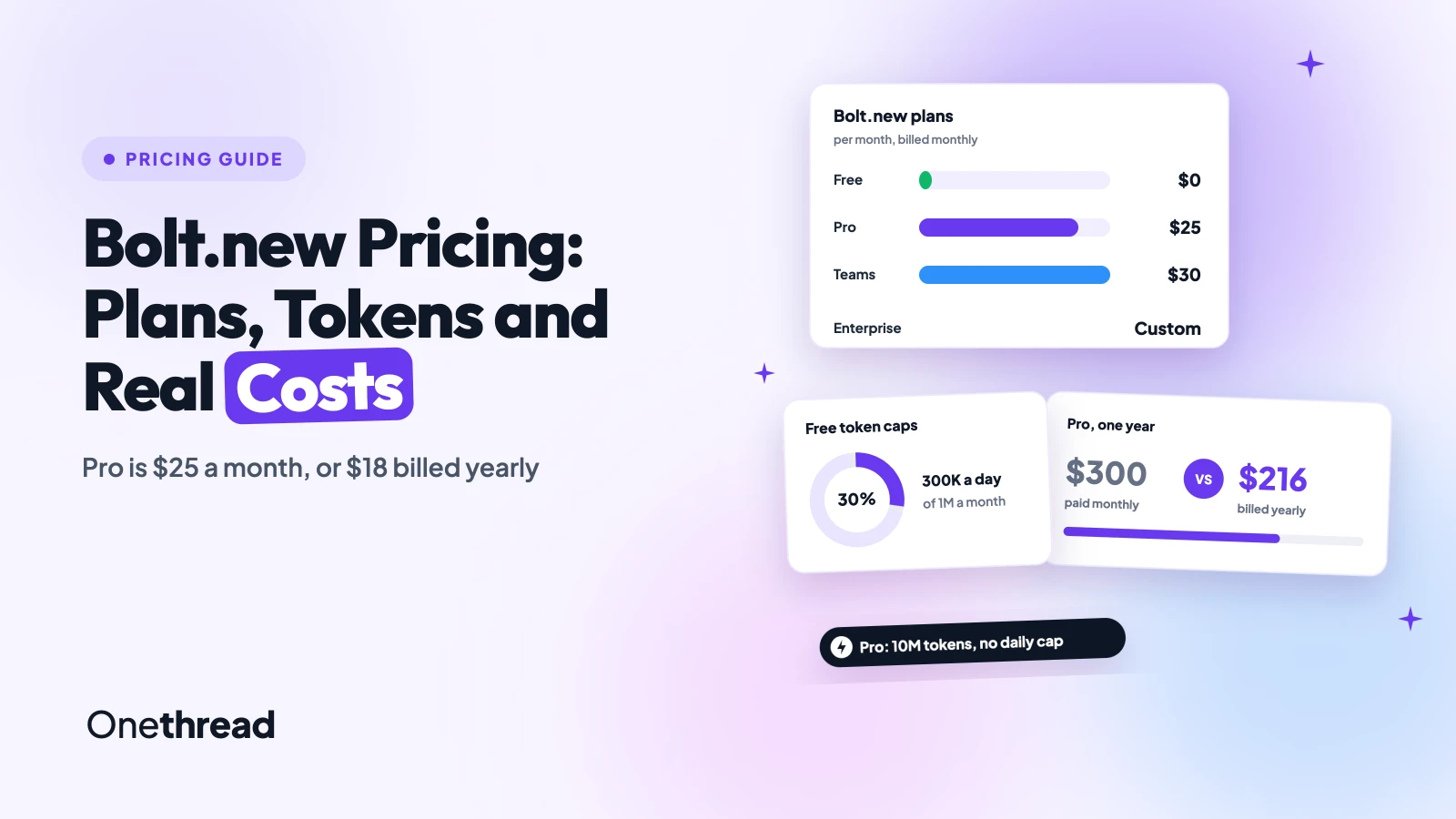
Bolt.new pricing starts at $0 on Free, $25 a month on Pro and $30 per member on Teams. Enterprise is a custom quote. Yearly billing cuts Pro to $18 a month.
Tokens, not seats, set your real bill, and bigger projects burn them faster. We checked Bolt’s pricing page, its help center and seven top-ranking guides.
You’ll get every plan, the yearly math and the limits worth knowing before you pay.
Key Points
- Bolt.new pricing in one line: Free costs $0 for 1M tokens a month with a 300K daily cap. Pro costs $25 a month, or $18 billed yearly, with 10M tokens and no daily cap. Teams costs $30 per member, or $27 billed yearly. Enterprise is a custom quote.
- Tokens decide the real cost: Pro starts at 10M tokens, and Bolt’s help center names bigger tiers at $50 and $100 a month. The $100 tier works out to $1.82 per million tokens, against $2.50 on $25.
- Yearly billing saves 28% on Pro but only 10% on Teams: paid plans are non-refundable, and an annual downgrade waits for the renewal date, so test a month before you prepay.
- Match the plan to the stage: use Free to test an idea, Pro once the app has users or a custom domain, and Teams only when several people prompt in the same project.
How Much Does Bolt.new Cost Per Month?
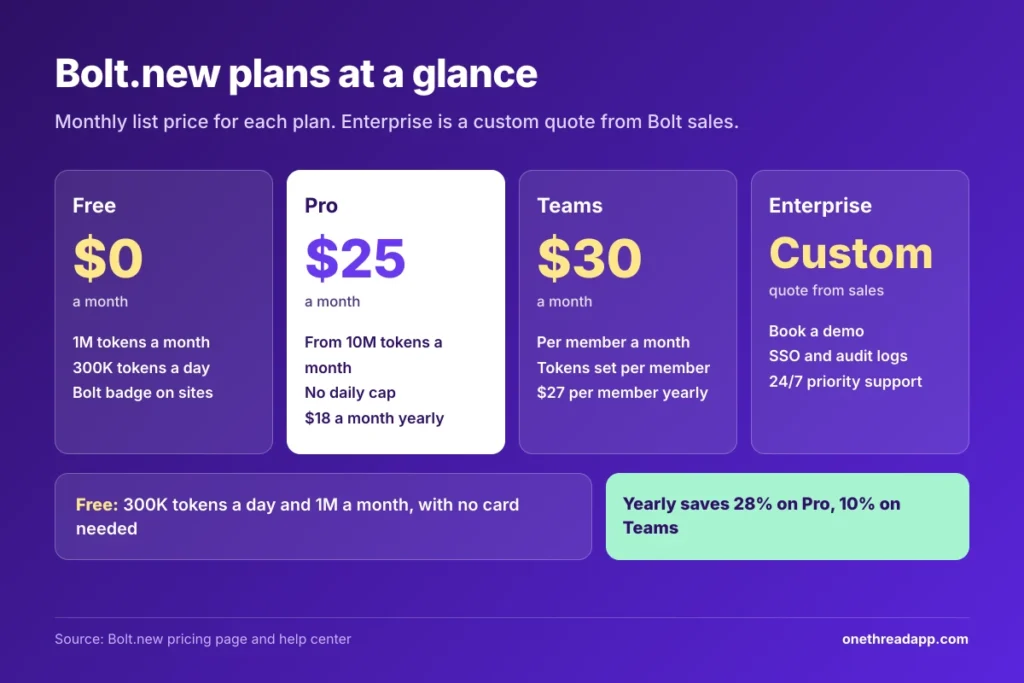
Bolt.new costs $0 a month on Free, $25 on Pro and $30 per member on Teams when billed monthly. Billed yearly, Pro drops to $18 a month and Teams to $27 per member. Enterprise has no public price, so Bolt asks you to book a demo.
| Plan | Monthly billing | Yearly billing | Tokens | Best for |
|---|---|---|---|---|
| Free | $0 | $0 | 1M a month, 300K a day | Testing an idea |
| Pro | $25 | $18 a month, $216 a year | From 10M a month, no daily cap | Solo builders with a live app |
| Teams | $30 per member | $27 per member, $324 a year | Set per member, not pooled | Small product teams |
| Enterprise | Custom quote | Custom quote | Custom | Security and compliance needs |
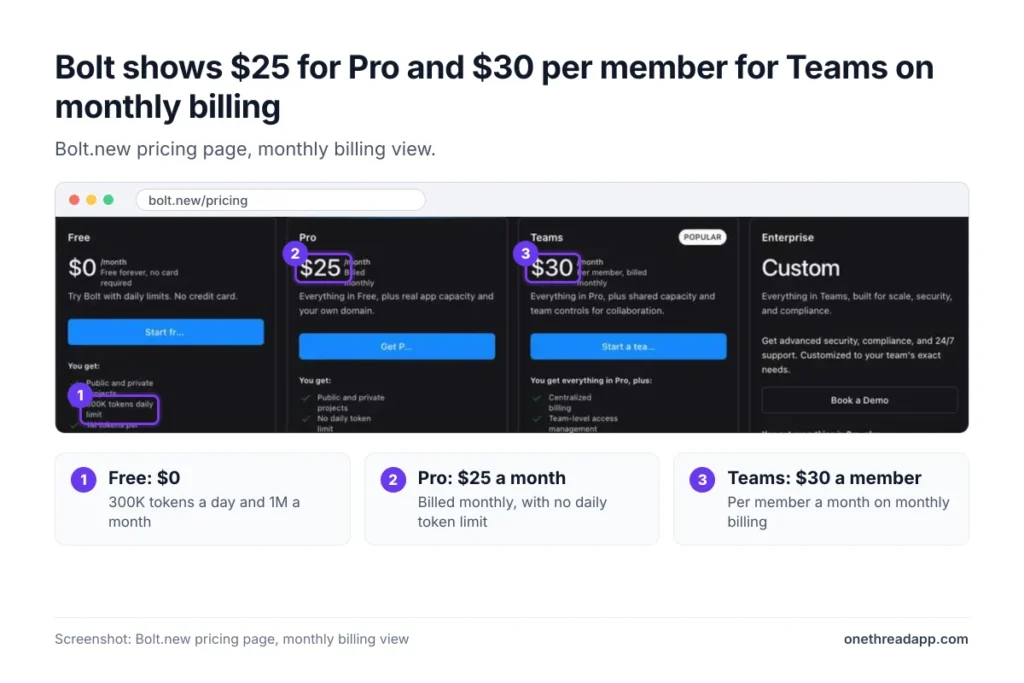
Top Tip: Bolt opens its pricing page on monthly billing. Switch the toggle to Yearly before you compare Bolt with Lovable or Replit.
The pricing page also says yearly billing saves up to 28%. We checked each plan, and only Pro reaches that figure. Bolt Lite, a $9 plan, no longer appears on the page.
What Does the Bolt.new Free Plan Include?
The Bolt.new Free plan costs $0, needs no credit card and includes 1M tokens a month with a 300K daily cap. Both limits stop work rather than bill you. Free also includes public and private projects, website hosting and unlimited databases.
Example: the daily cap is 300K and the monthly cap is 1M. We divide 1M by 300K and get about 3.3 days of full-speed prompting before the month is spent.
Free tokens reset on the 1st and never roll over. If you hit the daily limit, you can still edit code by hand in Code view, which uses no tokens.
Hosting is capped too. Free sites get up to 10 GB of bandwidth and 333,333 web requests a month, and Bolt says there’s no way to raise those limits. A site that passes them goes offline until the month resets. Published sites carry a “Made in Bolt” badge, custom domains aren’t available, and Supabase databases need Pro or Teams.
Pricing: $0 a month.
Best For
- Testing an idea or learning how Bolt builds an app.
Pros
- No credit card and no time limit.
- Includes hosting, private projects and unlimited databases.
- Usage stops at the cap, so you never get a surprise invoice.
Cons
- 300K tokens a day is about three days of heavy use.
- Bolt badge on every published site and no custom domain.
- 10MB upload limit and no Supabase databases.
What Does the Bolt.new Pro Plan Include?
The Bolt.new Pro plan costs $25 a month, or $18 a month billed yearly. It removes the daily token limit and starts you at 10M tokens a month, ten times the Free allowance.
Pro also adds a custom domain, no Bolt branding, private site sharing, AI image editing and a 100MB upload limit. Hosting grows to 30 GB of bandwidth and 1M web requests a month, with pay-as-you-go capacity up to a spending cap you set.
The $25 is a starting point. Bolt’s pricing page says Pro starts at 10M tokens. Its help center’s billing examples name larger tiers: Pro 50 at $50 a month and Pro 100 at $100 a month with 55M tokens. On annual billing, the examples show 10M at $216 a year and 26M at $540 a year.
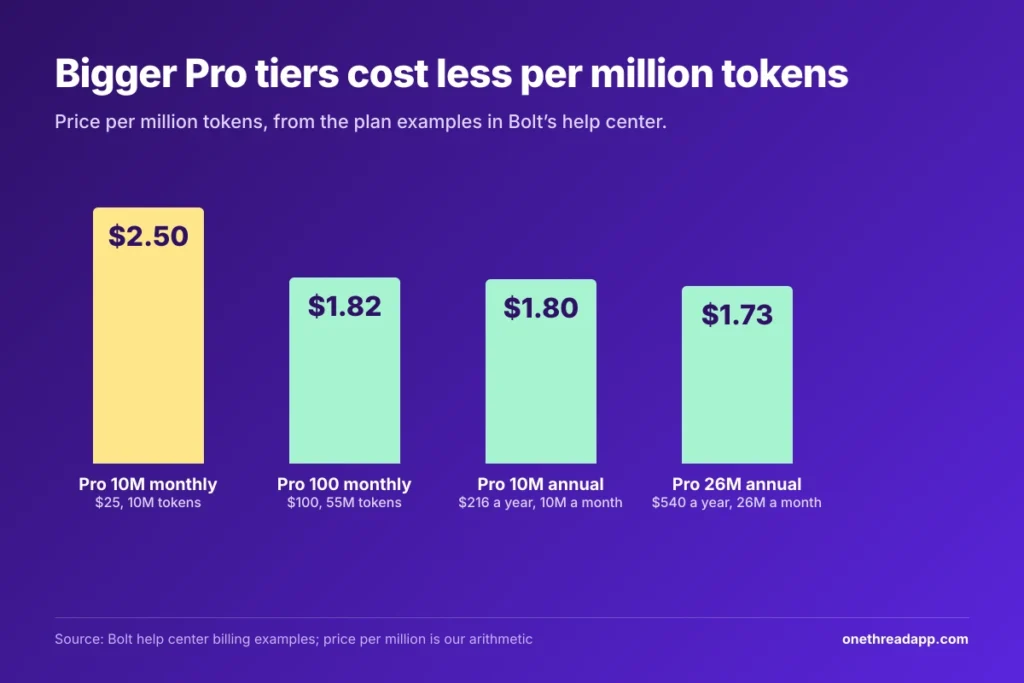
Example: $100 for 55M tokens is $1.82 per million. The $25 plan gives 10M tokens, or $2.50 per million. We worked these out from Bolt’s own examples, so bigger tiers cost less per token, and the help center says the same about reloads.
Pricing: $25 a month, or $18 a month billed yearly, from 10M tokens.
Best For
- Solo builders with a live app, a custom domain or heavy daily use.
Pros
- No daily token cap.
- Rollover keeps unused tokens for two months.
- Custom domain, no Bolt badge and 1M web requests.
- Bigger tiers lower the price per million tokens.
Cons
- 10M tokens can vanish fast on a large project.
- Extra tokens need the top monthly tier or an annual plan.
- Non-refundable, even on a monthly term.
What Does the Bolt.new Teams Plan Add?
The Bolt.new Teams plan costs $30 per member a month, or $27 per member billed yearly. It includes everything in Pro, plus controls for shared work: centralized billing, team-level access management, admin controls with user provisioning, and sharing across your organization.
Teams also supports private NPM registries and design system knowledge with per-package prompts. Only a team admin can update the payment method, and Forge, Bolt’s open-source model mode, isn’t available on Teams.
Capacity is the catch. Tokens go to each member and stay linked to the person who earned them, so Teams does not pool them. Bolt’s pricing page adds that free members can view team projects but can’t send prompts.
Example: five paid members cost 5 x $30 = $150 a month, or $1,800 a year. On yearly billing the same team pays 5 x $27 = $135 a month, or $1,620 a year, a saving of $180.
Pricing: $30 per member a month, or $27 per member billed yearly.
Best For
- Small product teams where each person builds and prompts.
Pros
- Centralized billing and admin controls.
- Organization-wide sharing and private NPM registries.
- Same Pro limits for every paid member.
Cons
- Tokens aren’t pooled, so a heavy user can’t borrow from a light one.
- Free members can’t prompt.
- Yearly billing saves only 10%.
What Does Bolt.new Enterprise Cost?
Bolt.new Enterprise has no public price. The pricing page shows “Custom” and a Book a Demo button, so every quote comes from Bolt’s sales team.
Enterprise adds advanced security (SSO, audit logs and compliance support), a dedicated account manager and 24/7 priority support. You also get custom workflows, integrations and SLAs, data governance and retention policies, flexible billing and procurement, and hands-on onboarding with training.
Bolt publishes no token pool for it, so ask for the allowance and the reload price in writing. The page’s own wording also differs: the plan blurb says everything in Teams, while the feature list says everything in Pro. Ask which features come standard, and ask for the SLA terms and data retention period too.
Enterprise only pays off when a security review, an audit or a procurement process blocks you.
Pricing: custom quote from Bolt sales.
Best For
- Companies that need SSO, audit logs or 24/7 support from a named account manager.
Pros
- Security and compliance features that Teams lacks.
- Data governance and retention policies.
- Dedicated account manager and SLAs.
- Custom billing and procurement terms.
Cons
- No public price or token allowance.
- Needs a sales call before you can budget.
- Overkill for teams that only need shared billing.
How Do Bolt.new Tokens Work?
Bolt uses tokens whenever it reads your prompt and project files, plans a change or writes code. Most usage comes from reading and syncing project files, so the same prompt costs more as your app grows.
How Token Rollover Works
On paid plans, unused tokens stay valid for two months from the start of the billing cycle that issued them. Bolt spends the oldest tokens first.
- Cancel: you lose every allocated token, rollover included, when the billing cycle ends. Resubscribing before they expire restores the unexpired ones.
- Upgrade: moving up a tier removes the Free daily cap, and Bolt calls upgrading the most cost-effective way to get more tokens.
- Reload tokens: these don’t expire. They’re sold only on the highest individual monthly Pro plan or any annual Pro plan, and the price per 10M tokens appears when you reload.
How Far 10M Tokens Go
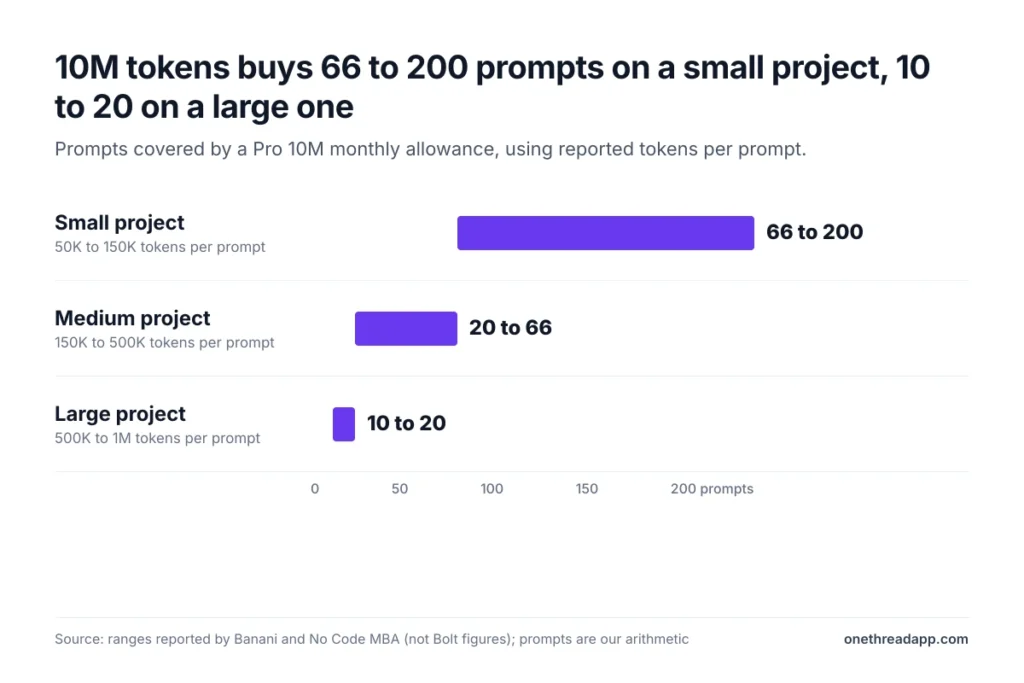
Bolt doesn’t publish tokens per prompt, so we used the ranges that Banani and No Code MBA report from real use. These are their estimates, not Bolt’s figures. The prompt counts are our arithmetic: 10M divided by each range.
| Project size | Tokens per prompt | Prompts in 10M tokens |
|---|---|---|
| Small | 50K to 150K | 66 to 200 |
| Medium | 150K to 500K | 20 to 66 |
| Large | 500K to 1M | 10 to 20 |
One r/boltnewbuilders thread about 60M lost tokens describes a paid balance dropping to zero after a plan change. A Reddit user quoted by Preuve reports burning 10M to 15M tokens on basic fixes. Both are anecdotes, but they’re why we check Billing & usage after every long session.
How Much Does Bolt.new Save on Yearly Billing?
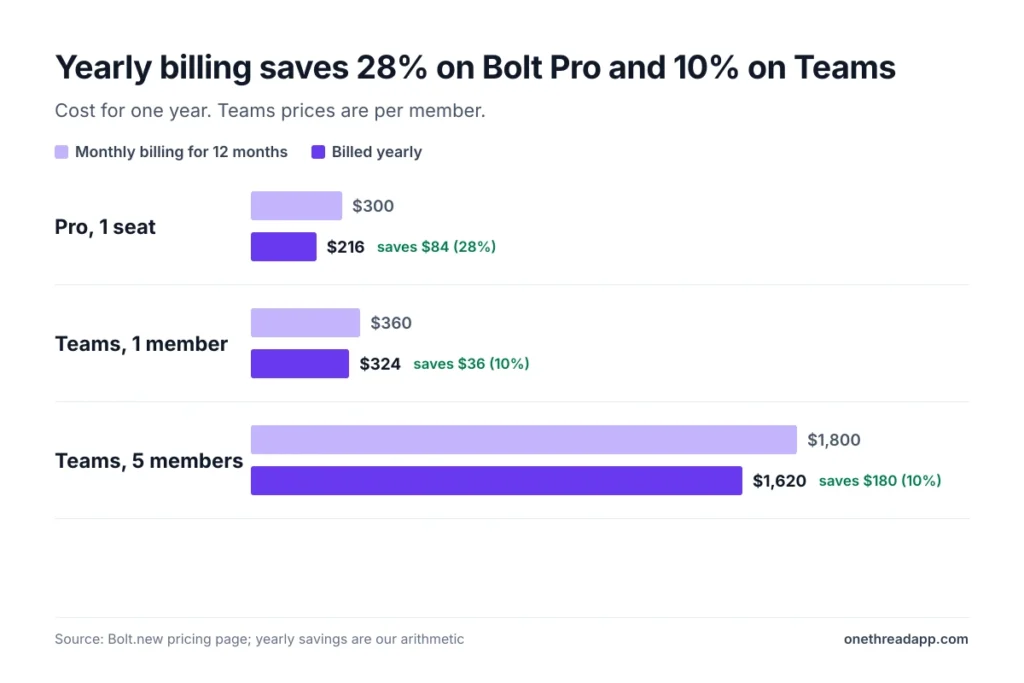
Yes. Yearly billing cuts Pro from $300 to $216 a year, a 28% saving, and Teams from $360 to $324 per member, a 10% saving. Bolt bills the full year up front, and tokens still arrive in monthly allocations.
| Plan | Monthly billing for 12 months | Yearly billing | You save |
|---|---|---|---|
| Pro | $300 | $216 | $84 |
| Teams, 1 member | $360 | $324 | $36 |
| Teams, 5 members | $1,800 | $1,620 | $180 |
The savings come with rules. Annual plans can’t move to monthly by upgrading, and a downgrade takes effect at the next renewal, up to a year away. Bolt subscriptions are non-refundable under its Terms of Service, though you can cancel any time and keep the plan until the period ends.
Top Tip: pay monthly for your first month of real building, check Billing & usage, then switch to yearly at the same tier. A monthly-to-annual switch at the same tier takes effect at your next renewal.
What Hidden Costs Does Bolt.new Have?
The plan price is the floor. These costs sit on top of it:
- Hosting limits: Free hosting is a hard cap. Pro allows pay-as-you-go capacity up to a spending cap you set, and Bolt doesn’t list the overage rates.
- Third-party services: Banani’s guide notes that tools such as Stripe, Supabase and analytics add recurring costs on top of the Bolt subscription. Our Supabase pricing guide shows what that database line can cost.
- Tax: from November 1, 2026, Link, a Stripe payment service, handles Bolt billing and collects any required sales tax or VAT, so your total may rise in some regions.
- Payment method: Pro and Teams accept credit and debit cards. PayPal and bank transfers aren’t accepted.
- Failed payments: if a renewal fails, your account moves to Free right away, and Bolt retries the charge for about a week.
- Cancellation: you lose every allocated token, rollover included, when the billing cycle ends.
- Downgrades: you keep unused higher-tier tokens until they expire, while the lower allocation starts at the next renewal.
- Error loops: community reports say repeated error fixes burn tokens on every retry, a cost the plan table never shows.
If you quote client builds, add these lines to our free project estimate calculator so the Bolt cost reaches the client invoice.
What Happened to Bolt Lite?
Bolt Lite closed to new sign-ups after October 14, 2026. The $9 a month plan ran on Bolt Forge, Bolt’s open-source model mode that runs on Bolt’s own hardware.
Existing Lite subscribers keep the plan at $9 a month, according to Bolt’s help center. The Lite page said sign-ups close that day. The offer was always time-limited, and Forge ran as a research preview for individual Pro plans too.
Bolt said Lite gave up to 50 times the usage of Free’s Standard mode on its most efficient Forge model. Access ran through a waitlist and an access code.
Lite excluded custom domains, AI image generation, security scans, Supabase and extra usage purchases, and its users couldn’t remove the “Made in Bolt” badge. Forge was included with individual Pro plans only during the preview, which ran from September 14 to October 14, 2026.
Lite subscribers keep Forge after the preview ends, according to Bolt’s help center.
The pricing page now lists only Free, Pro, Teams and Enterprise. Several third-party guides still show Lite, so trust the page over the guide. Lite renews monthly until its owner cancels. Treat it as a closed door, and leave its $9 out of your budget.
How Does Bolt.new Pricing Compare With Lovable, Replit and v0?
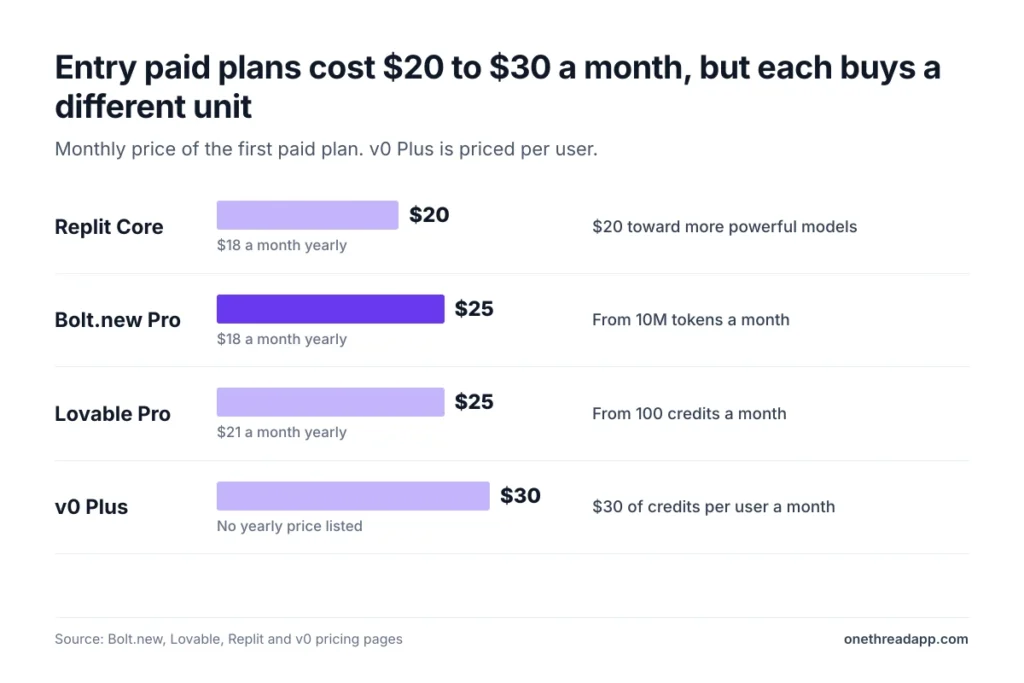
Bolt.new costs the same as Lovable at the entry paid tier and more than Replit. Pro on Bolt is $25 a month for 10M tokens. Lovable Pro is $25 for 100 credits, and Replit Core is $20. The units differ, so the sticker price alone won’t tell you which one is cheaper to finish an app.
| Tool | Entry paid plan | Monthly price | Yearly price | What the price buys |
|---|---|---|---|---|
| Bolt.new | Pro | $25 | $18 a month | From 10M tokens a month |
| Lovable | Pro | $25 | $21 a month | From 100 credits a month |
| Replit | Core | $20 | $18 a month | $20 toward more powerful models |
| v0 | Plus | $30 per user | Not listed | $30 of monthly credits per user |
Compare the cost of one finished feature, not the monthly fee. Token billing works the same way in our Claude Code pricing guide, where usage decides the bill more than the plan does.
Which Bolt.new Plan Is Worth Paying For?
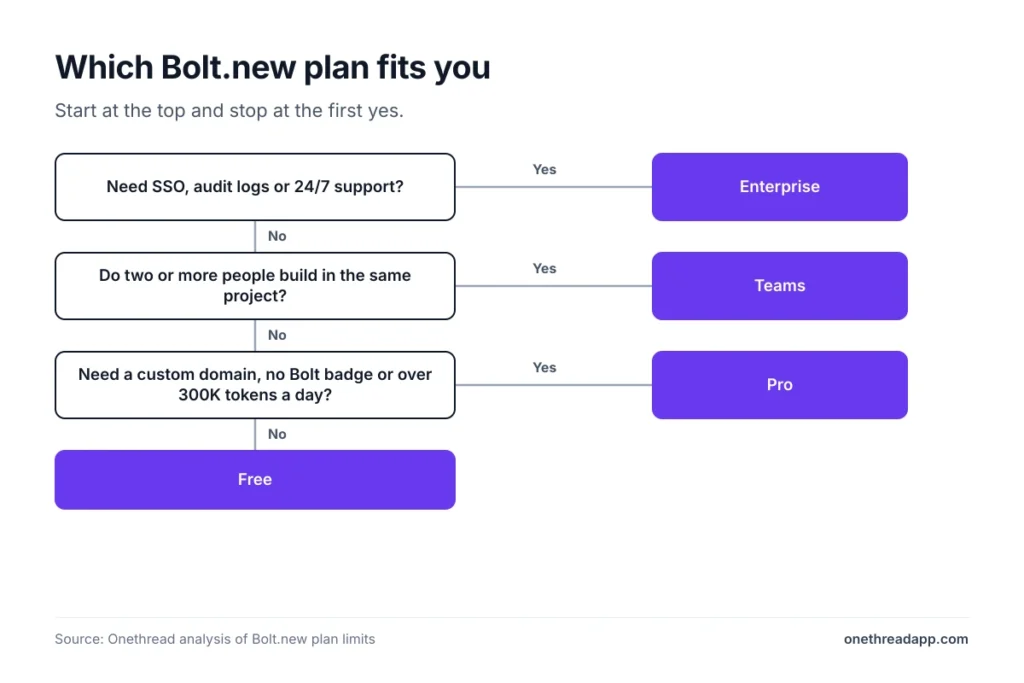
Pay for Pro once a project has users or needs a custom domain. Stay on Free while you test an idea, and pick Teams only when several people prompt in the same project.
Is the spend worth it? Users disagree. The top-voted reply in one thread says to use Bolt to frame up about 60 to 70% of an app, then finish elsewhere. We agree with the approach, because it caps how many tokens a project can burn.
| Signal | Plan |
|---|---|
| You’re testing an idea or learning the tool | Free |
| You hit the 300K daily cap twice in a week | Pro |
| You need a custom domain or no Bolt badge | Pro |
| You prompt for most of the day | Pro at a higher token tier |
| Two or more people build in the same project | Teams |
| A security review needs SSO or audit logs | Enterprise |
Still validating the idea? Read our guide to MVP development for startup ideas before you spend tokens on features nobody asked for. Once the build turns into client work, someone has to track scope and hours. Our list of project management software for developers covers tools for that, and our pick of the best project management software widens the view.
Onethread is one of them. Its Basic plan is free, and Onethread’s paid plans start at $3 a user a month on yearly billing. Custom workflows and advanced reports sit on Scale at $5.
What Should You Do Next With Bolt.new?
Bolt.new pricing is simple on the page and variable in use. The plan fee is the floor, tokens decide the rest, and larger projects burn them faster. Once you know your plan, tier and billing term, the monthly bill stops surprising you.
This week, build one real feature on Free and open Billing & usage afterward to see what it cost in tokens. Move to Pro only when the 300K daily cap blocks you, and pay monthly first. A quiet reframe helps here: the cheapest token is the one a clear prompt never spends.
FAQs
Is Bolt.new 100% Free?
No. The Free plan costs $0 and needs no credit card, but it caps you at 1M tokens a month and 300K a day. Published sites carry a Made in Bolt badge, and custom domains aren’t available. Banani’s guide describes Bolt.diy, the open-source version, as free software that you host and pay to run yourself.
Why Is Bolt.new So Expensive?
Because tokens grow with your project. Bolt reads and syncs your project files on most prompts, so the same request costs more as the app grows. Reported usage runs from 50K tokens per prompt on small projects to 500K to 1M on large ones. That’s why a 10M allowance can disappear in 10 to 20 large prompts.
Can You Buy More Tokens on Bolt.new?
Yes, with limits. Reload tokens are available only on the highest individual monthly Pro plan or any annual Pro plan. They don’t expire, and the price per 10M tokens appears when you reload. Upgrading to a higher tier is the cheaper option, according to Bolt’s help center.
Does Bolt.new Have a Student Discount?
We found none. Bolt’s pricing page and help center don’t mention a student or educator discount, and a third-party guide reports the same. Banani adds that seasonal promo codes may appear, so check at checkout. Lovable lists 50% off its Pro plan for verified students and teachers.
Can You Get a Refund From Bolt.new?
No. Bolt subscriptions are non-refundable under its Terms of Service. You can cancel any time from Billing details, and the plan and unused tokens stay active until the billing period ends. You can undo a scheduled cancellation before it takes effect.
Sources: Bolt.new pricing, Bolt Lite, Bolt help center: billing, Bolt help center: tokens, Bolt Cloud hosting plans. Comparison data: Lovable subscription plans, Replit pricing, v0 pricing. Token estimates: Banani, No Code MBA, Preuve.