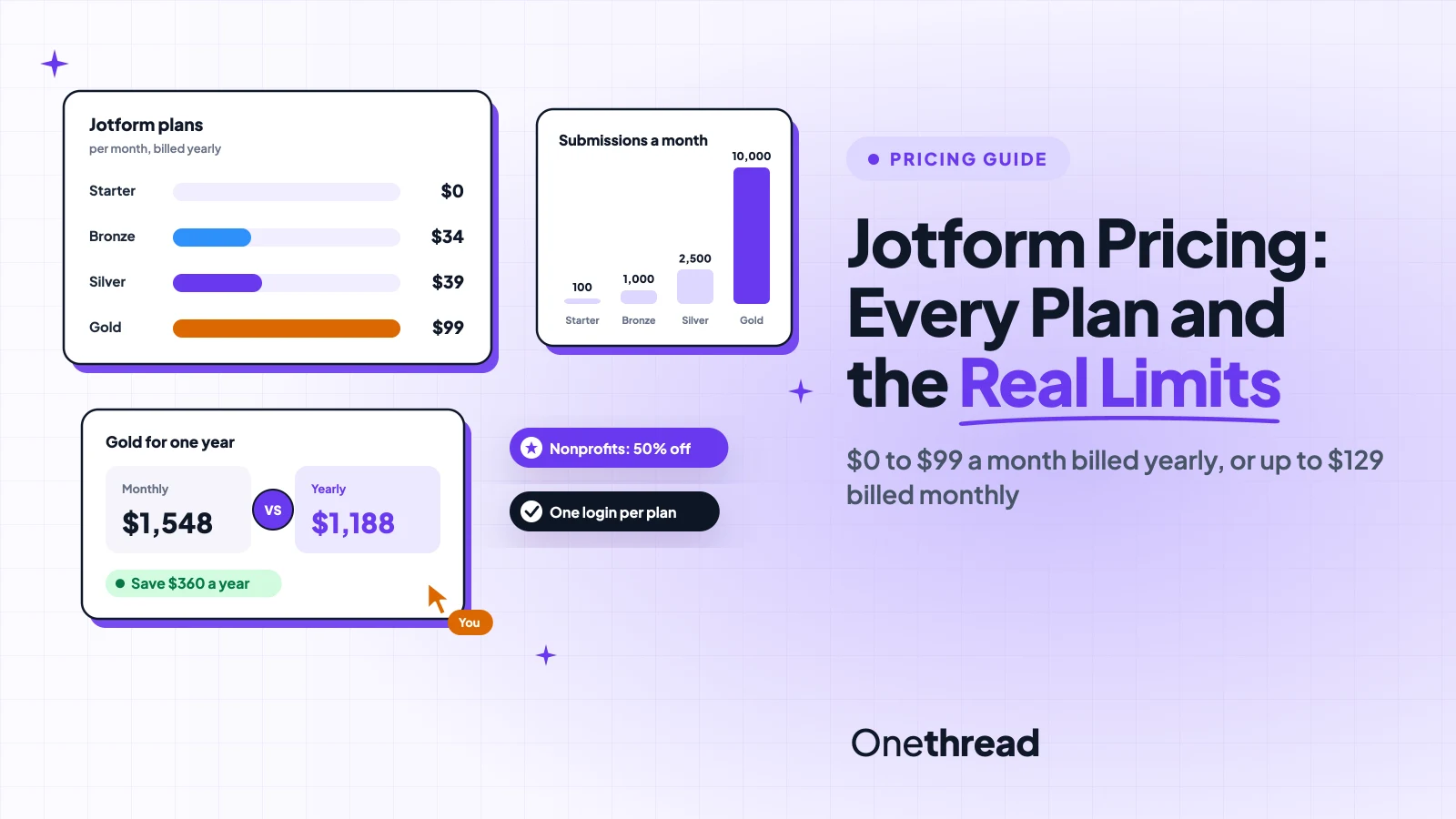
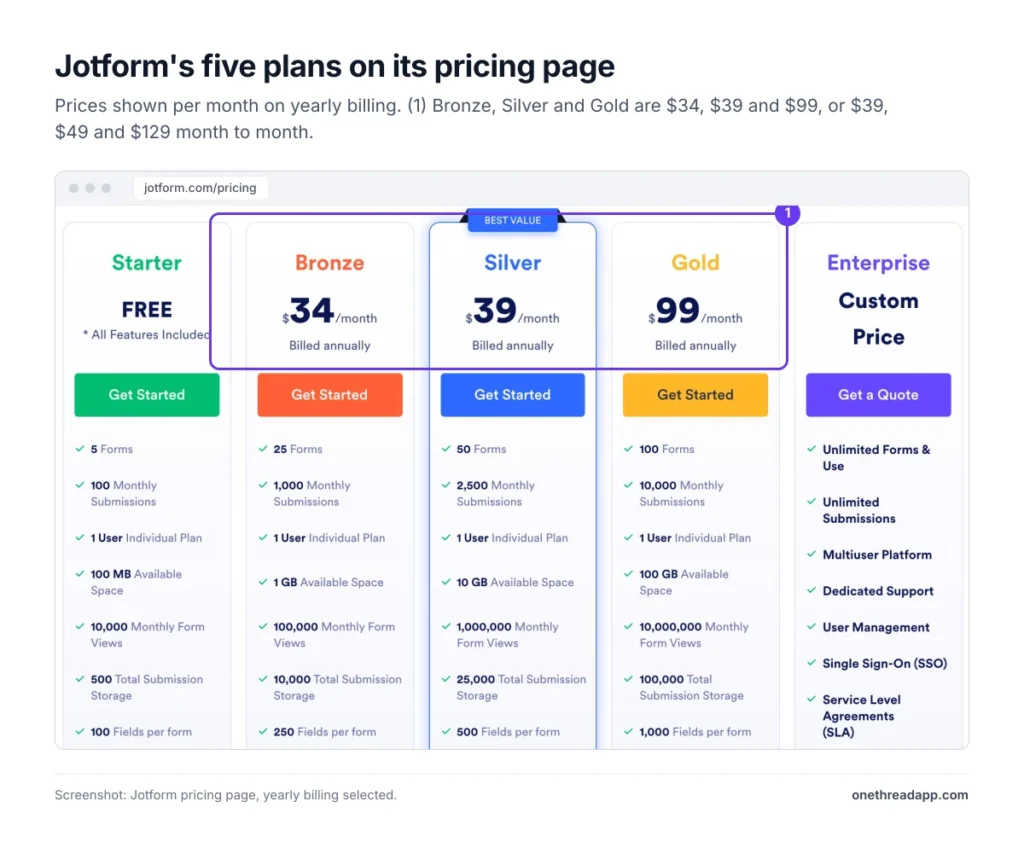
Jotform’s price list looks simple. Four plans, one of them free, and a “Best Value” badge on Silver.
Jotform pricing runs from $0 on Starter to $34, $39 or $99 a month on Bronze, Silver and Gold when you pay yearly. Pay month to month and those become $39, $49 and $129. Enterprise is quote only.
But the price isn’t what decides your bill. The caps do: forms, submissions, storage and one login per account.
We read Jotform’s pricing page, its help center and the top-ranking guides, then ran the yearly math.
Here’s what each plan includes, where the limits bite, and which one fits your forms.
Key Points
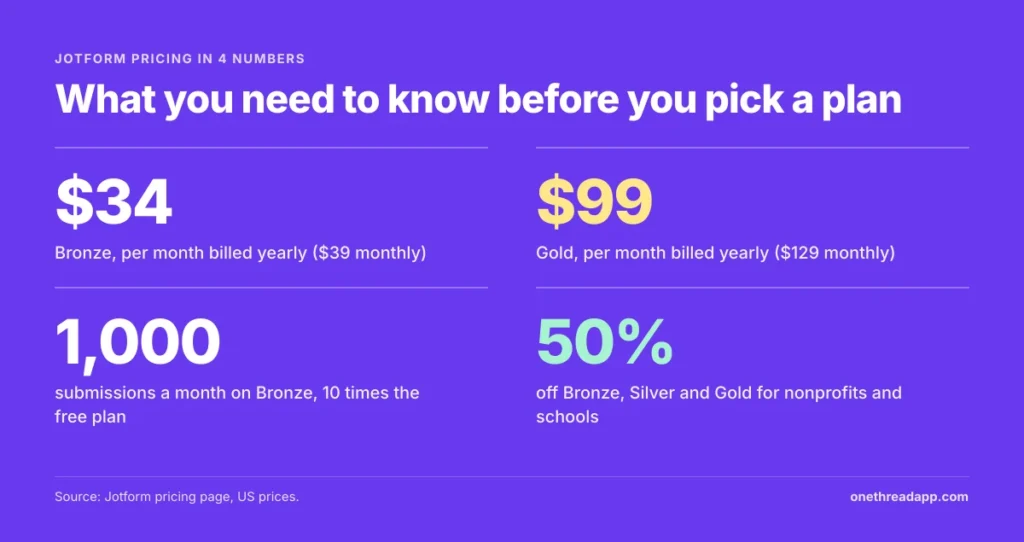
- Jotform costs $0 on Starter, $34 on Bronze, $39 on Silver and $99 on Gold per month billed yearly, or $39, $49 and $129 billed monthly. Enterprise is a custom quote.
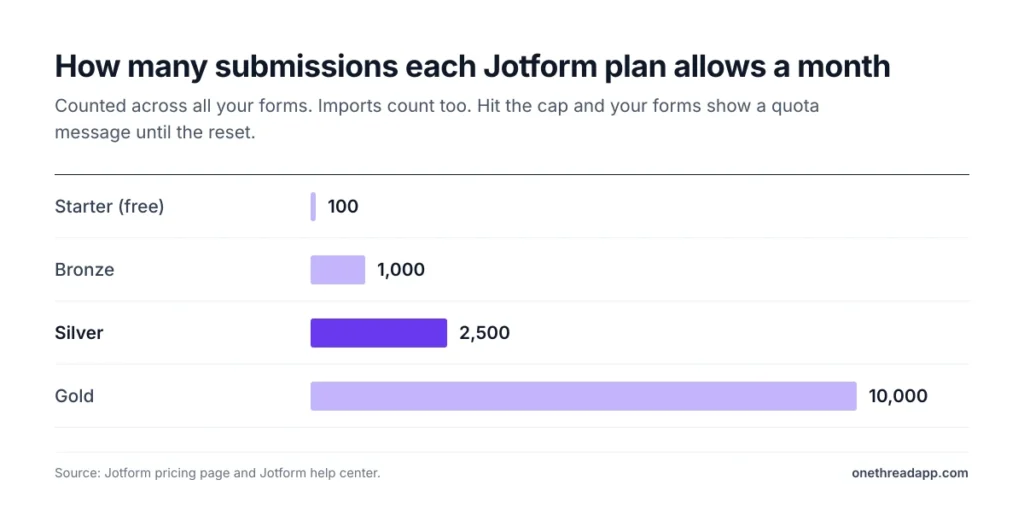
- Pick by monthly submissions first: Bronze covers 1,000, Silver 2,500 and Gold 10,000.
- Every plan below Enterprise is a single login. If several people need their own accounts, you’re shopping for Enterprise.
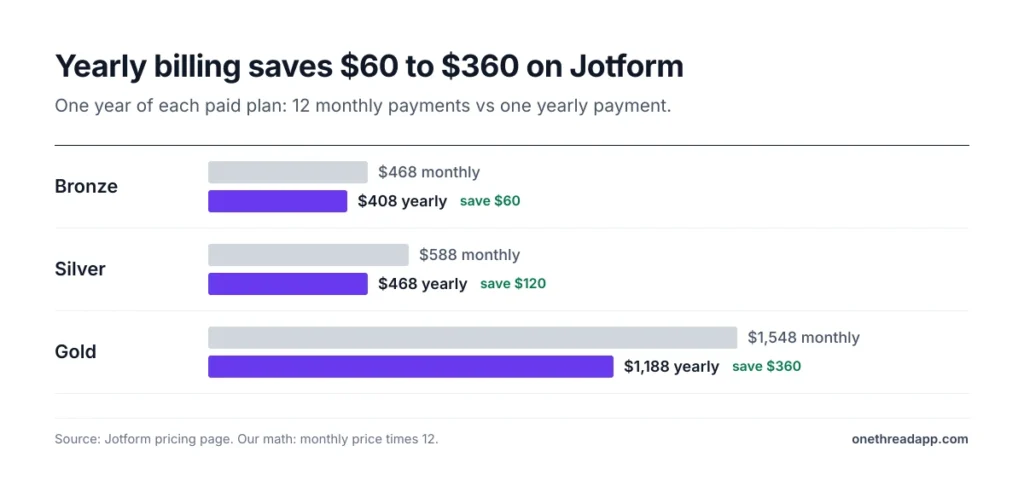
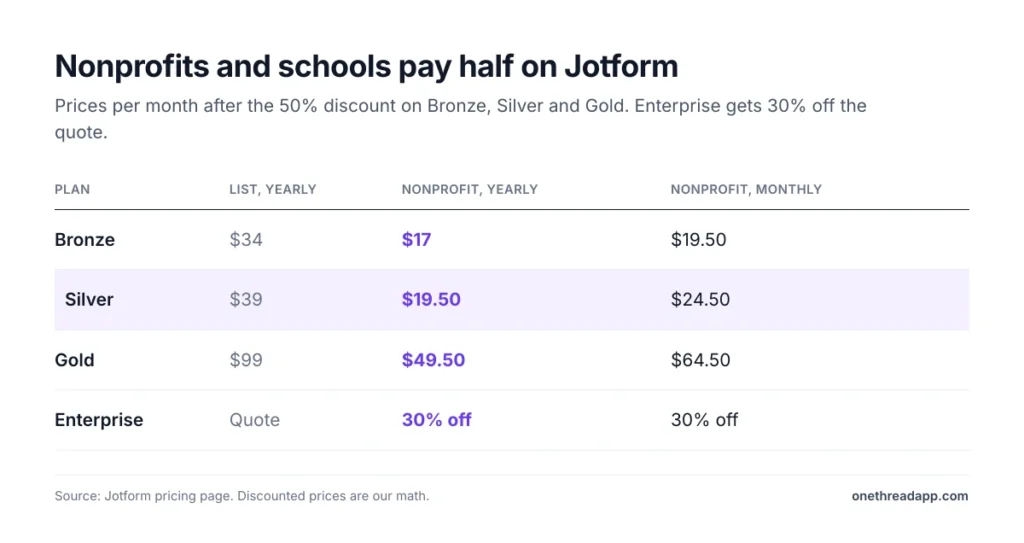
- Nonprofits and schools get 50% off Bronze, Silver and Gold, and yearly billing saves $60 to $360 a year.
How Much Does Jotform Cost Per Month?
Jotform costs $0 to $129 a month for one account, depending on the plan and how you pay. Yearly billing drops the paid plans to $34, $39 and $99 a month, charged as one payment.
| Plan | Billed monthly | Billed yearly, per month | Cost per year, yearly billing | Active forms | Submissions a month |
|---|---|---|---|---|---|
| Starter | $0 | $0 | $0 | 5 | 100 |
| Bronze | $39 | $34 | $408 | 25 | 1,000 |
| Silver | $49 | $39 | $468 | 50 | 2,500 |
| Gold | $129 | $99 | $1,188 | 100 | 10,000 |
| Enterprise | Quote | Quote | Quote | Unlimited | Unlimited |
Source: Jotform pricing page, US prices in USD. Yearly cost is our math: monthly rate on yearly billing times 12.
Sources: Jotform pricing page, Jotform account usage and limits, Jotform support on multiple users.
Each step up raises every limit at once. You can’t buy one bigger limit on its own.
What Does the Jotform Starter Plan Include?
Starter is Jotform’s free plan, and it includes every standard feature: templates, widgets and payment integrations. The catch is volume. You get 5 active forms, 100 submissions a month and 10,000 form views.
It also keeps the Jotform logo on your forms and signed documents. Storage stops at 500 total submissions and 100 MB of uploads. You also get just one email notification with one recipient, so a team inbox and a manager can’t both get alerts.
Say you run sign-ups for a small monthly workshop. Starter handles that fine. A busy contact form on a live website will outgrow it in weeks.
And 100 submissions is an account-wide number, not a per-form one. Five forms with 20 replies each already use the whole month. Payment forms hit their cap sooner, at 10 paid submissions.
Pricing: $0, with no time limit.
Best For
- Testing Jotform before you pay, or running a few low-volume forms.
Pros
- All standard features, including payment integrations and e-signatures.
- 100 AI Agent conversations a month to try the chatbot side.
- No card needed and no trial clock.
Cons
- Jotform branding stays on every form.
- 500 total stored submissions, then the oldest entries start to go.
- One email notification with one recipient.
What Does the Jotform Bronze Plan Include?
Bronze is the cheapest paid plan, at $34 a month billed annually or $39 month to month. It removes Jotform branding and lifts you to 25 forms and 1,000 submissions a month.
The other limits climb in step: 100,000 form views, 1 GB of uploads, 10,000 stored submissions and 100 payment submissions a month. Each form can hold 250 fields.
Picture a freelancer with a client intake form, a quote request and a feedback survey. Even at 30 replies a day, 1,000 submissions covers the month. Bronze is the honest default for that kind of setup.
The weak spot is storage. Bronze keeps 10,000 submissions in total, so a form taking 1,000 a month fills it in about 10 months. After that, download and purge old entries, or the oldest ones get deleted.
Pricing: $34 a month billed yearly, which is $408 a year, or $39 billed monthly.
Best For
- Freelancers and small businesses with a handful of busy forms.
Pros
- Removes Jotform branding at the lowest paid price.
- 1,000 submissions a month, 10 times Starter.
- 100 signed documents a month for simple contracts.
Cons
- Still one user and one login.
- 1 GB of uploads fills up quickly with photo or PDF attachments.
- No HIPAA features.
What Does the Jotform Silver Plan Include?
Silver costs $39 a month billed yearly, just $5 more than Bronze, and Jotform labels it “Best Value”. On the numbers, that label holds up. Silver allows 2,500 submissions a month and 50 forms, with 10 GB of uploads.
Storage jumps to 25,000 stored submissions, and form views reach 1,000,000 a month. You also get 250 payment submissions and 250 signed documents.
Here’s the twist. Silver’s price gap with Bronze is wider on monthly billing. Month to month, Silver costs $10 more: $49 vs $39. Billed annually, it costs $5 more.
That makes Silver the plan most teams should price first. If you’re anywhere near 1,000 submissions, the extra $60 a year buys you room to grow.
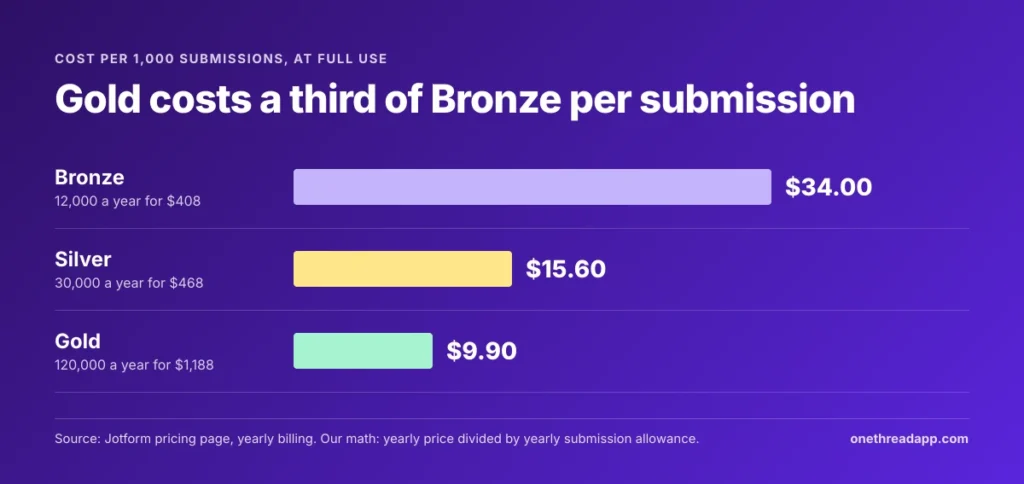
Example: At full use, Bronze costs $408 a year for 12,000 submissions, or $34 per 1,000. Silver costs $468 for 30,000, or $15.60 per 1,000.
Pricing: $39 a month billed yearly, which is $468 a year, or $49 billed monthly.
Best For
- Growing teams that collect files, payments or more than 1,000 replies a month.
Pros
- 2.5 times Bronze’s submissions for $5 more a month on yearly billing.
- 10 GB of uploads, 10 times Bronze.
- 500 fields per form for long applications.
Cons
- Still a single login.
- No HIPAA features, so no patient forms.
- The gap with Bronze doubles on monthly billing.
What Does the Jotform Gold Plan Include?
Gold costs $99 a month billed yearly or $129 monthly, and it’s the only self-serve plan with HIPAA compliance features. Those cover encryption, auditing and PHI (protected health information) handling for patient forms.
The limits jump hard. Gold allows 10,000 submissions a month, 100 forms, 100 GB of uploads and 100,000 stored submissions. Form views reach 10,000,000 a month, with 1,000 payment submissions and 1,000 signed documents.
Say a small clinic runs intake, consent and follow-up paperwork online. HIPAA features alone push it to Gold, even if 2,500 submissions would cover the volume.
Jotform also says it runs HIPAA-enabled AI Agents on Google’s Gemini models through Vertex AI, under a business associate agreement. That matters if you plan to use the chatbot side with patient questions.
Pricing: $99 a month billed yearly, which is $1,188 a year, or $129 billed monthly.
Best For
- Clinics and health teams that need HIPAA features, or any team past 2,500 submissions a month.
Pros
- HIPAA compliance features without an Enterprise contract.
- 10,000 submissions a month and 100 GB of uploads.
- The lowest cost per submission at full use.
Cons
- Still one login, even at $1,188 a year.
- A big jump from Silver’s $468 a year.
- Monthly billing adds $360 a year.
What Does Jotform Enterprise Cost?
Jotform Enterprise has custom pricing, so there’s no list price to compare. It’s the only multiuser Jotform plan, with user management, single sign-on (SSO), a dedicated support team and a service level agreement.
Limits mostly disappear. Enterprise lists unlimited forms, unlimited submissions and unlimited AI Agents, plus data residency, a custom domain and HIPAA features.
The quote depends on your users and needs, so go in with numbers. Count the people who need logins, your yearly submissions and any SSO or data residency rules.
Real numbers are thin, but two sources help. SpendHound’s data from 142 Jotform customers puts average enterprise spend at $43,743 a year and SMB spend at $1,899. One small team on Reddit said they were quoted about $9k per year for 10 users, though that thread is two years old.
Pricing: Quote only. Nonprofits and schools get 30% off.
Best For
- Organizations that need separate logins, SSO or data residency.
Pros
- Unlimited forms and submissions.
- Real multi-user accounts with roles and permissions.
- Custom branding and your own domain.
Cons
- No published price, so you can’t budget before a sales call.
- Reported quotes run far above Gold’s $1,188 a year.
- Voice calls still cap at 1,000 minutes a month for AI Agents.
How Do Jotform’s Usage Limits Work?
Jotform’s limits come in two types: monthly limits that reset, and total limits that don’t. Knowing which is which tells you whether to wait, clean up or upgrade. And when you hit either kind, your forms can stop taking replies.
Monthly Limits Reset, Storage Doesn’t
Submissions, form views, payment submissions and signed documents are monthly limits. Your Account Usage page shows the reset date for each, and the counter starts again from zero.
Forms, fields per form, upload space and submission storage are total limits. They never reset on their own. You free space by deleting and purging old entries, or you upgrade.
One rule surprises people. When you pass your submission storage, Jotform deletes the oldest form entry to make room. Download old submissions before you reach the cap.
Hitting a Limit Disables Your Forms
Jotform emails you when you reach a limit and shows a warning on your dashboard. If you hit a monthly limit or run out of upload space, your forms switch off on the date in that email.
Visitors then see a “Form over quota” message instead of your form. For a lead form, that’s lost business for the rest of the month.
You have two ways out: wait for the monthly reset, or upgrade. Upgrades take effect at once, and Jotform credits the unused time on your old plan.
Top Tip: Check your Account Usage page in the third week of each month. If submissions are past 75% of your cap, upgrade before the form goes dark.
When Is Yearly Billing Worth It on Jotform?
Yearly billing pays off when you keep the plan a full year. It saves $60 on Bronze, $120 on Silver and $360 on Gold, compared with 12 monthly payments.
| Plan | 12 monthly payments | One yearly payment | You save |
|---|---|---|---|
| Bronze | $468 | $408 | $60 |
| Silver | $588 | $468 | $120 |
| Gold | $1,548 | $1,188 | $360 |
Source: Jotform pricing page. Savings are our math.
Jotform’s toggle says “Save up to 20%”, but the real discount varies. Bronze saves about 13%, Silver about 20% and Gold about 23%.
Example: Gold on monthly billing costs $129 times 12, or $1,548. Yearly costs $99 times 12, or $1,188. That’s $360 back for one decision.
There’s a safety net, too. Jotform offers a 30-day money-back guarantee, so a yearly plan you regret in the first month comes back as a full refund.
But monthly billing still makes sense for seasonal work. If you only run registrations for three months a year, three monthly Bronze payments cost $117. That beats $408.
What Extra Costs Come With Jotform Pricing?
Jotform pricing covers the form builder, but a few costs sit outside the plan price. Payment fees, extra users and connected apps each add to the real bill. None is large on its own. Together, they decide whether Jotform fits your team.
Payment Processor Fees Still Apply
Jotform takes no cut of the payments you collect through its form builder. Its founder and CEO, Aytekin Tank, put it plainly: “we don’t charge additional transaction fees.”
Your payment processor still charges its own fees. Stripe, PayPal or Square bill you as they would anywhere else, so budget their rates on top of the plan.
The real limit is volume. Starter allows 10 payment submissions a month and Bronze 100. A paid workshop with 150 sign-ups needs Silver or higher.
Extra Users Need Enterprise
Every plan from Starter to Gold is one user with one login. Jotform’s support team confirms that sharing a login isn’t allowed on those plans.
You can still work with others. Form Collaboration lets several people edit a form’s design, and you can share submission tables with your team.
But separate accounts with their own permissions need Enterprise. If your team is three people, that’s a big step up from a $34 plan.
Top Tip: Before you buy Gold for a team, ask Jotform for an Enterprise quote. If the quote is out of reach, shared tables and Form Collaboration may cover what you need.
If you send submissions to other apps through automation, that’s another bill. Our Zapier pricing guide shows how task-based billing adds up.
Which Jotform Pricing Discounts Can You Get?
Jotform pricing has two big discounts and a few smaller ones. The big ones cut half the price for nonprofits and schools, on monthly and yearly billing alike.
| Plan | List, billed yearly | Nonprofit or education, billed yearly | Nonprofit or education, billed monthly |
|---|---|---|---|
| Bronze | $34 a month | $17 a month | $19.50 a month |
| Silver | $39 a month | $19.50 a month | $24.50 a month |
| Gold | $99 a month | $49.50 a month | $64.50 a month |
| Enterprise | Quote | 30% off the quote | 30% off the quote |
Source: Jotform pricing page. Discounted prices are our math at 50% off.
You apply for the nonprofit discount or the education discount, and the price drops once Jotform approves you.
Jotform also runs sales during the year. These only apply when you upgrade to a higher yearly plan, not to your existing one. And the plan renews at full price the next year.
There’s no free trial on paid plans. Starter fills that role, since it includes the standard features.
Which Jotform Plan Should You Choose?
Choose the cheapest plan whose submissions and forms cover your busiest month, then check three deal-breakers. Most small teams land on Bronze or Silver.
Three checks help you decide:
- Submissions: Count your busiest month of replies across all forms, then add 25%. Under 1,000 points to Bronze, under 2,500 to Silver.
- HIPAA: If you collect patient data, only Gold or Enterprise work.
- Logins: If two or more people need their own accounts, price Enterprise first.
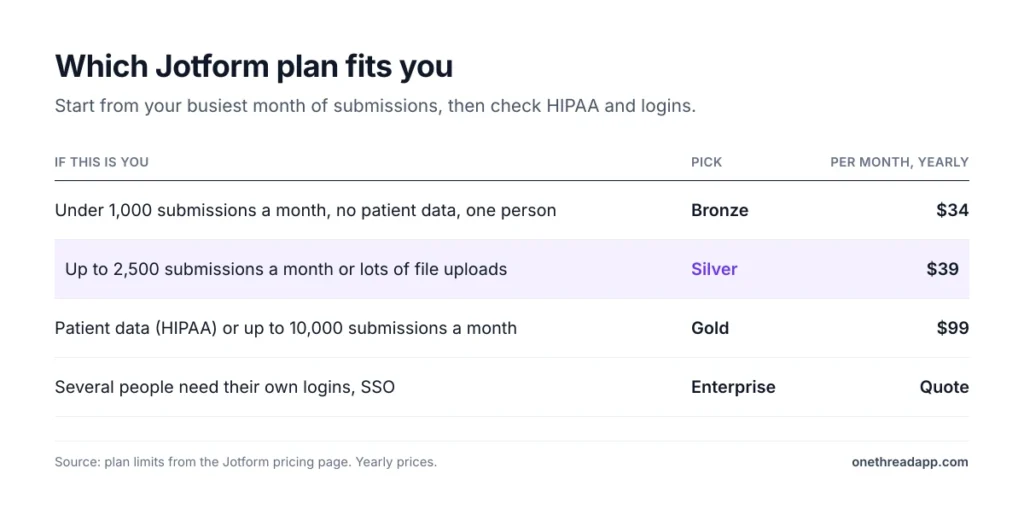
Example: A design studio gets about 900 project inquiries in its peak month. Add 25% and it needs about 1,125 submissions. That’s past Bronze, so Silver at $468 a year is the match.
Now run the same math with your own numbers. If the HIPAA check or the logins check fails, skip straight to Gold or Enterprise.
One more filter helps: fields per form. Bronze allows 250, Silver 500 and Gold 1,000. A long grant application or an employee onboarding packet can hit 250 before it hits any submission cap.
If none of the plans fit, compare other builders before you commit. Our list of Jotform alternatives covers tools with different seat rules. And our roundup of software to create forms shows the wider field.
What Should You Do Next With Jotform?
Jotform’s plans look cheap, and for one person with a few forms, they are. The real cost question is about caps: submissions, storage and logins. Price those three against your busiest month, and the right plan becomes clear fast. Then decide on billing, because a yearly plan saves $60 to $360 if you stay.
This week, open your Account Usage page and write down last month’s submissions and stored entries. Match them to the plan table, add 25% for your busy season, and pick before a form goes over quota.
FAQs
Does Jotform Have a Free Trial?
No, Jotform doesn’t offer a free trial on paid plans. You can use the free Starter plan instead, which includes the standard features with lower limits. Paid plans come with a 30-day money-back guarantee, so you can request a full refund within 30 days of payment.
Can You Cancel Jotform Anytime?
Yes. You can cancel a paid plan at any time from your billing page. You keep your plan until the next billing date, and then Jotform moves your account to the free Starter plan. Downgrades to a smaller paid plan take effect right away, with unused time saved as a balance.
Does Jotform Pricing Include Tax?
Yes, Jotform pricing includes tax in the final price, based on local rules. If you have a valid tax ID, you can remove the tax at checkout. Tax-exempt groups can send their certificate to Jotform support. Customers in Europe pay in euros, and everyone else pays in US dollars.
Is There a Cheaper Option Than Jotform?
Yes. Within Jotform pricing, the cheapest paid option is Bronze at $17 a month for approved nonprofits and schools on yearly billing. Outside Jotform, several form builders charge less or allow more users. Compare seat rules and submission caps, not only the monthly price, before you switch.
What Are the Downsides of Jotform?
The main downsides are caps and logins. Every plan below Enterprise is a single user, and hitting a monthly limit can switch your forms off until the reset. Stored submissions are capped too, and Jotform deletes the oldest entry once you pass that cap.