Wrike’s price list fits on one screen. Your invoice won’t always match it.
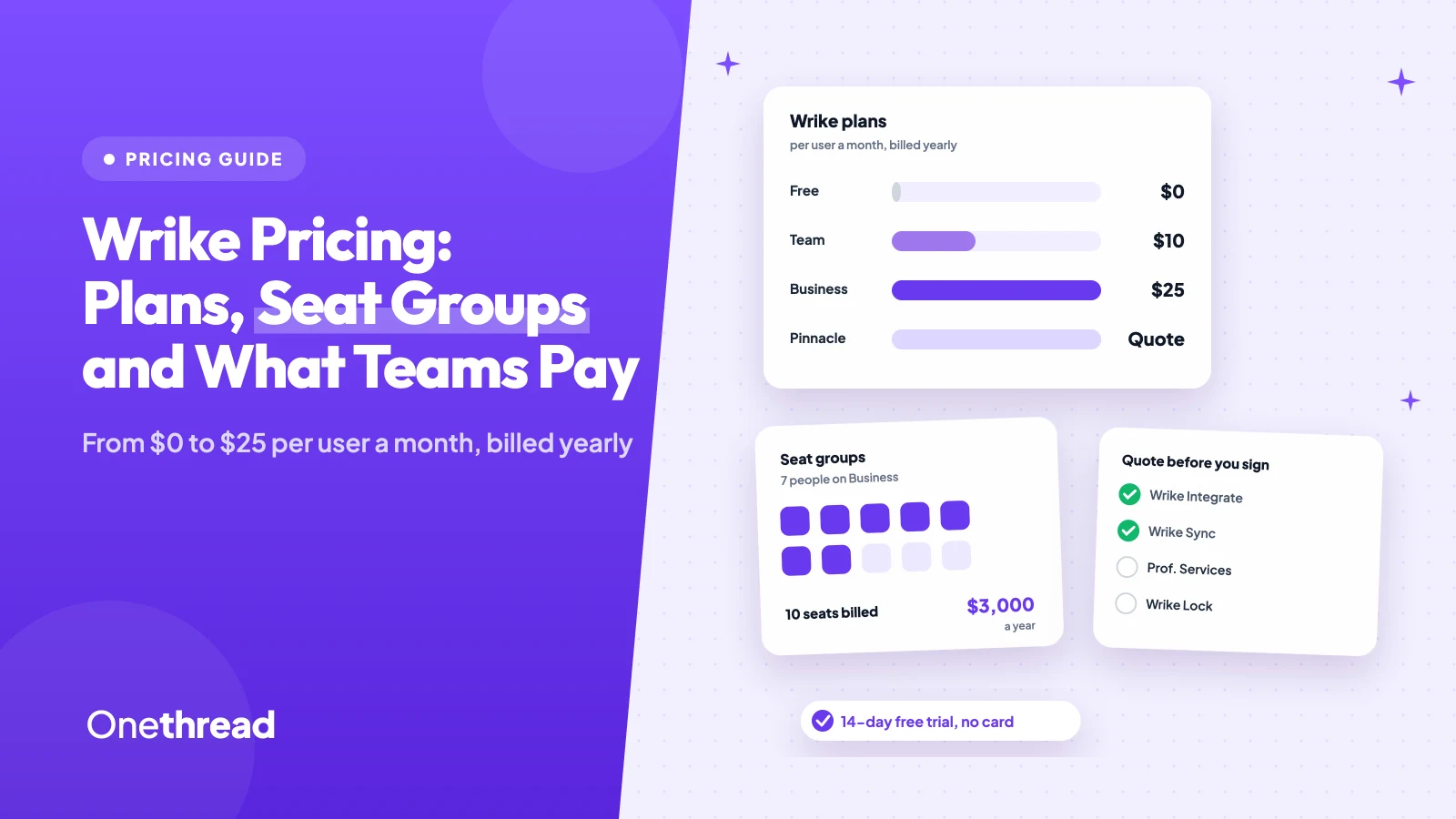
Wrike pricing starts with a Free plan at $0. Paid plans cost $10 per user a month on Team and $25 on Business, billed yearly. Pinnacle and Apex are quote-only, and Wrike sells seats in groups, so a team of 7 pays for 10.
That seat rule is the complaint reviewers raise most. Add-ons with no public price come second.
We checked Wrike’s pricing page, its plan comparison table and eight top-ranking guides, then priced real team sizes.
You’ll see what each plan includes, where the extra costs hide, and which plan fits your team.
Key Points
- Wrike costs $0 on Free, $10 per user a month on Team and $25 on Business, billed yearly. Pinnacle and Apex need a custom quote.
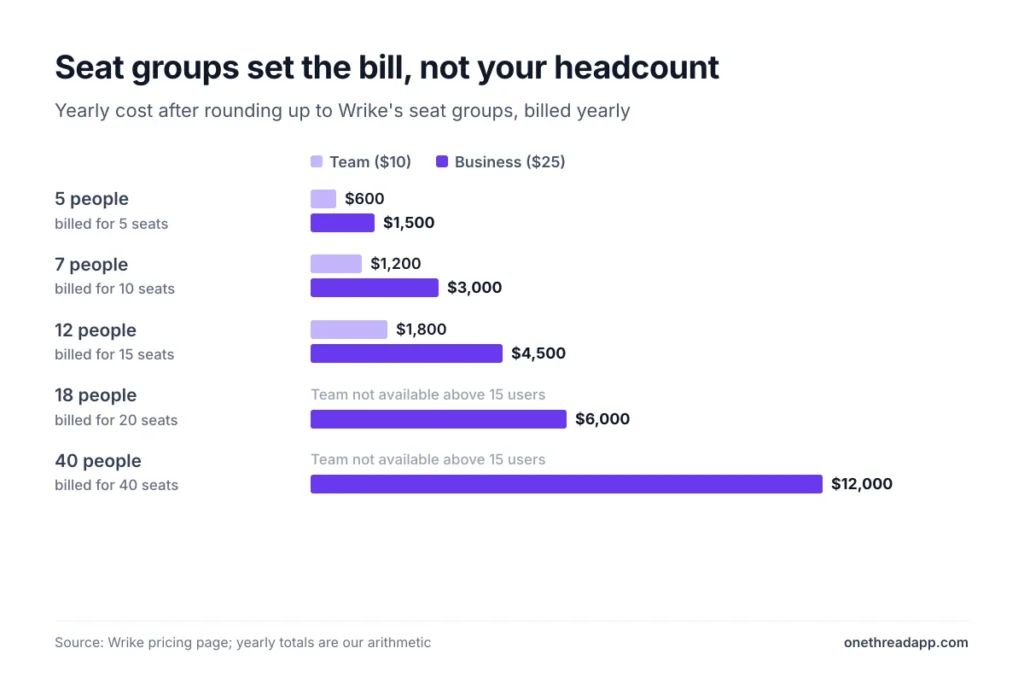
- Count seats in groups, not heads. Wrike sells up to 30 seats in groups of five, so 12 people on Business pay for 15 seats, or $4,500 a year.
- Pick Team for 2 to 15 people who need Gantt charts and dashboards. Move to Business for request forms, approvals, time tracking or more than 15 users.
- Ask for prices on Wrike Integrate, Wrike Sync and Professional Services before you sign, because none of them is published.

How Much Does Wrike Cost per User?
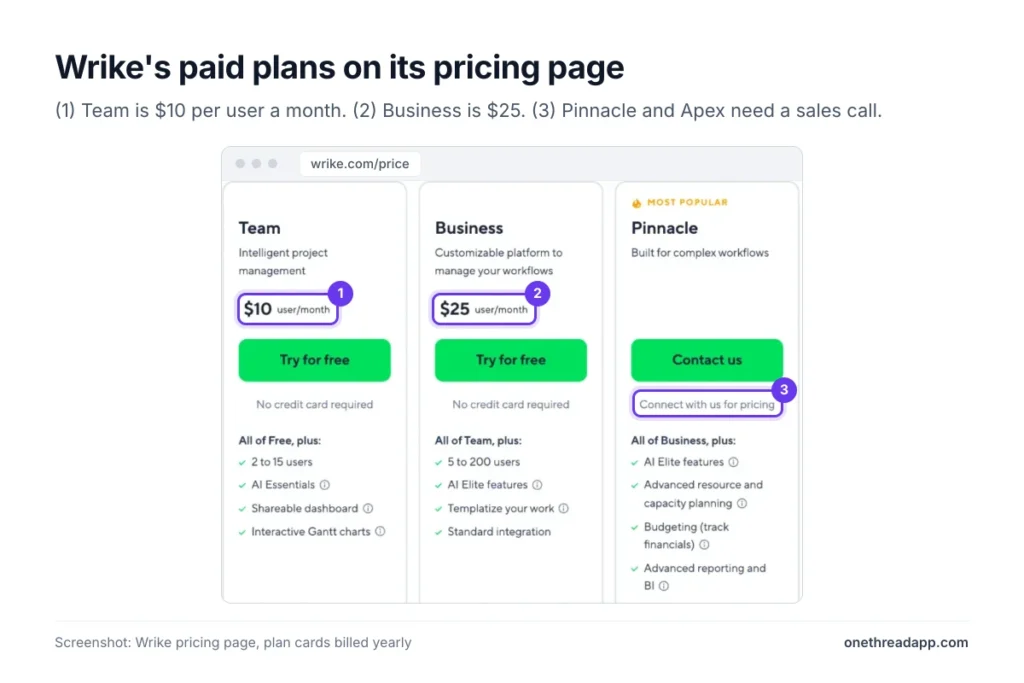
Wrike costs $0 to $25 per user a month on its public plans, billed yearly in US dollars. Pinnacle and Apex have no list price, so you get them through sales.
| Plan | Price per user a month | Users | Storage | Automation actions |
|---|---|---|---|---|
| Free | $0 | Unlimited | 2 GB per account | None |
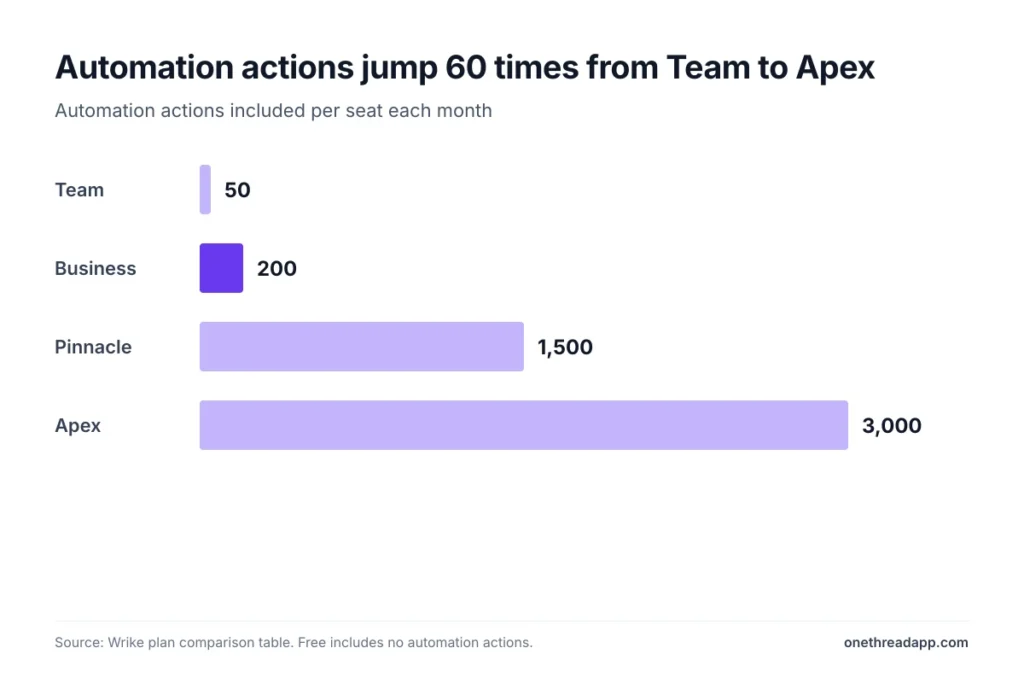
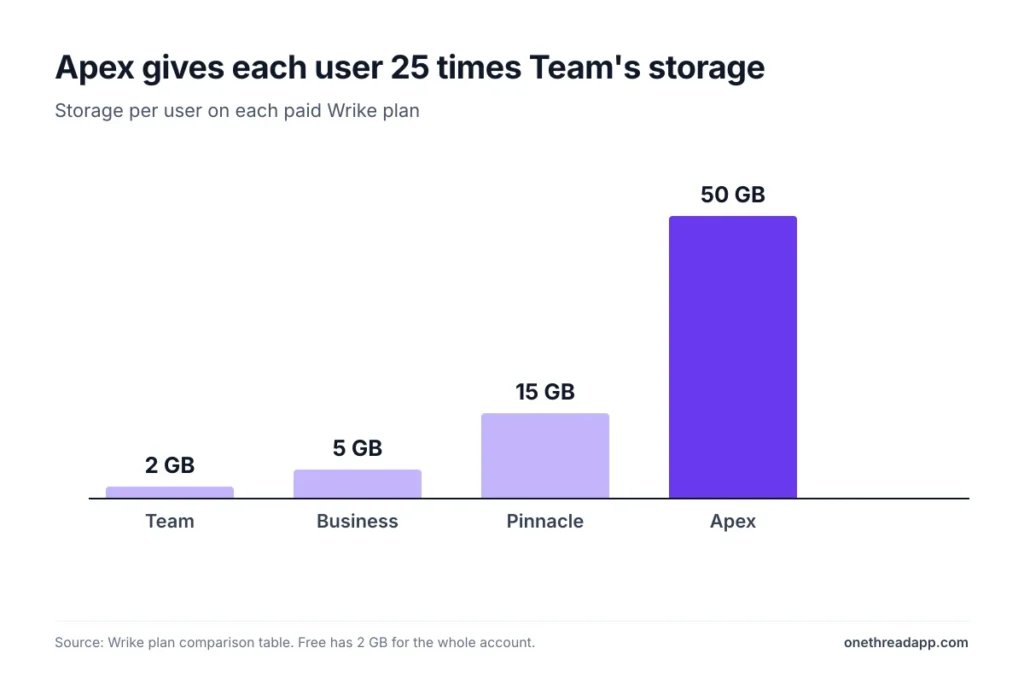
| Team | $10, billed yearly | 2 to 15 | 2 GB per user | 50 per seat a month |
| Business | $25, billed yearly | 5 to 200 | 5 GB per user | 200 per seat a month |
| Pinnacle | Custom quote | Unlimited | 15 GB per user | 1,500 per seat a month |
| Apex | Custom quote | Unlimited | 50 GB per user | 3,000 per seat a month |
Sources: Wrike pricing page and Wrike plan comparison table.
Prices leave out state and local taxes, and Wrike invoices in US dollars. Business and every plan above it are annual-only subscriptions.
You’ll also notice that Wrike’s pricing tiers no longer include an Enterprise plan. Pinnacle and Apex now sit at the top.
What Does the Wrike Free Plan Include?
The Free plan costs nothing and has no user cap. It covers basic task management for a small group that wants to try Wrike without a card.
You get the web, desktop and mobile apps, project and task management, plus board and table views. A few AI tools come with it, such as AI content editing and comment summaries. It also connects to Wrike’s open REST API and cloud storage apps.
Here’s the catch. The free version has no automation actions, no Gantt charts, no dashboards and no custom fields. Storage stops at 2 GB for the whole account.
Say three freelancers share a content calendar. Free handles the task list, but nobody gets a timeline.
Fun fact: the Free plan is also where an expired trial lands. Wrike blocks the account when a trial ends, keeps the data, and lets you downgrade to Free.
Pricing: $0, with unlimited users.
Best For
- Small groups testing Wrike’s task lists and boards before paying.
Pros
- No user limit and no time limit.
- Includes the desktop and mobile apps.
- Keeps your data when a paid trial ends.
Cons
- Only 2 GB of storage for the whole account.
- No Gantt charts, dashboards or automations.
- No custom fields, workflows or statuses.
What Does the Wrike Team Plan Include?
The Team plan costs $10 per user a month, billed yearly, for 2 to 15 users. It’s the cheapest way to get Wrike’s planning views.
Team adds interactive Gantt charts, calendars, shareable dashboards and custom fields, workflows and statuses. It also adds AI Essentials, which writes automation rules from plain language and adds AI highlights. Each seat gets 2 GB of storage and 50 automation actions a month.
Admins get team-level settings and personal work schedules, and the plan connects to common productivity apps.
Think of a five-person marketing team running campaigns with fixed launch dates. Team gives them a timeline, a dashboard for the manager, and simple automations. And it stays at $600 a year for those five seats.
The ceiling is hard, though. A 16th user means moving everyone to Business.
Pricing: $10 per user a month, billed yearly, for 2 to 15 users.
Best For
- Small teams of up to 15 people who need Gantt charts and dashboards.
Pros
- Lowest paid price on Wrike, at $10 per user a month.
- Includes Gantt charts, calendars and dashboards.
- Adds custom fields, workflows and statuses.
Cons
- Stops at 15 users.
- Only 50 automation actions per seat a month.
- No request forms, approvals or time tracking.
What Does the Wrike Business Plan Include?
The Business plan costs $25 per user a month, billed yearly, for 5 to 200 users. It’s the plan most growing teams end up on.
Business adds request forms, custom approval flows, file proofing, time tracking and timesheets. It also adds the resources view and workload charts. AI Elite tools arrive here too, with Copilot and agents included at no extra charge.
Storage rises to 5 GB per user, and automations to 200 per seat a month. Video processing tops out at 0.5 GB per user a month. You also get a branded workspace, folder and project permissions, and Salesforce and NetSuite integrations.
Example: a 5-person minimum on Business costs 5 × $25 × 12 = $1,500 a year. The same five people on Team pay $600, so the upgrade adds $900 a year.
Pricing: $25 per user a month, billed yearly, for 5 to 200 users.
Best For
- Teams of 5 to 200 that take requests, approve work or track time.
Pros
- Request forms, approvals and proofing in one plan.
- Time tracking and workload charts for resource checks.
- AI Elite Copilot and agents with no extra fee.
Cons
- The cost per user is two and a half times Team’s.
- Annual billing only.
- Wrike Integrate and Wrike Sync still cost extra.
What Does the Wrike Pinnacle Plan Include?
The Pinnacle plan has no public price. You contact sales for a quote, and the plan has no upper user limit.
Pinnacle adds advanced resource and capacity planning, budgeting, job roles and a utilization dashboard. It also adds advanced reporting with a BI API, Tableau, QuickBooks and Power BI. Security steps up with SAML single sign-on, two-step verification and IP whitelisting.
Picture an agency that staffs projects by job role and bills against a budget. Pinnacle is the first Wrike plan that tracks both in one place. Advanced proofing for HTML5 and SharePoint files arrives here too.
Each seat gets 15 GB of storage, 1,500 automation actions a month and three times the AI Elite actions of Business. Datahub comes with 10,000 records. If capacity planning is the reason you’re shopping, our list of LiquidPlanner alternatives covers other tools built for it.
Pricing: Custom quote from Wrike sales.
Best For
- Service teams and PMOs that plan capacity and track budgets.
Pros
- Budgeting, job roles and utilization dashboards.
- SAML single sign-on and IP whitelisting.
- 1,500 automation actions per seat a month.
Cons
- No published price, so you can’t compare without a call.
- Wrike Lock is a paid add-on.
- Wrike Integrate and Wrike Sync still cost extra.
What Does the Wrike Apex Plan Include?
The Apex plan is Wrike’s top tier, and it’s also quote-only. It bundles the add-ons that other plans buy separately.
Apex includes unlimited whiteboards and Wrike Integrate, which builds automations across your other apps. It also includes Wrike Sync, which keeps two-way links with 22 systems, such as Jira and GitHub. Wrike Lock and the AI Elite action pack aren’t included.
Each seat gets 50 GB of storage, 3,000 automation actions a month and ten times the AI Elite actions of Business. Datahub grows to 30 million records. That’s a lot of room.
Say an engineering group lives in Jira while marketing runs in Wrike. Apex keeps both sides in sync without buying Wrike Sync on top.
For a team that doesn’t need those links, Pinnacle covers the same planning tools for less. Ask for both quotes and compare the gap against what Sync and Integrate would cost as add-ons.
Pricing: Custom quote from Wrike sales.
Best For
- Large companies that need Wrike synced with many outside systems.
Pros
- Includes Wrike Integrate, Wrike Sync and Whiteboard.
- 50 GB of storage per user.
- 3,000 automation actions per seat a month.
Cons
- No published price.
- Wrike Lock still costs extra.
- More than most teams under 50 people will use.
How Does Wrike Pricing Work With Seat Groups?
Wrike pricing charges by seat, and seats come in groups. Wrike’s FAQ says it sells seats in groups of five up to 30 seats. From 30 to 100 the groups grow to ten, and above 100 to 25.
So your bill follows the next group up, not your headcount. One Capterra reviewer put it bluntly: the “minimum seat requirement drives up the cost unnecessarily.”
| People | Seats billed | Team, per year | Business, per year |
|---|---|---|---|
| 5 | 5 | $600 | $1,500 |
| 7 | 10 | $1,200 | $3,000 |
| 12 | 15 | $1,800 | $4,500 |
| 18 | 20 | Not available | $6,000 |
| 40 | 40 | Not available | $12,000 |
Example: 7 people on Business buy 10 seats, so 10 × $25 × 12 = $3,000 a year. Three of those seats sit empty until you hire.
Not everyone needs a paid seat, though. Viewers are free, and limited users can contribute at a reduced rate. Wrike also includes collaborator invites equal to 20 or 15% of your licenses, whichever is greater.
Want the full project budget, not only the software? Our project estimate calculator adds tools to labor in one place.
Which Wrike Add-Ons Cost Extra?
Wrike lists six add-ons, and only one has a public price. Wrike Whiteboard costs $15 per user a month, and sales quotes the rest.
| Add-on | What it does | Price |
|---|---|---|
| Wrike Whiteboard | Visual planning boards | $15 per user a month |
| Wrike Integrate | Integrations and automations across apps | Custom quote |
| Wrike Sync | Two-way sync with 22 systems, including Jira and GitHub | Custom quote |
| Wrike Datahub | Shared data records | Custom quote |
| Wrike Lock | Your own encryption keys | Custom quote |
| AI Elite action pack | More AI actions each month | Custom quote |
Apex includes every add-on except Wrike Lock and the AI Elite action pack.
AI use has a soft limit. Wrike says it won’t invoice you automatically if you pass your AI actions. It opens a talk about a bigger package instead.
Professional Services is the other unpriced line. Wrike recommends a consultant for new teams and requires a guided deployment for teams of 20 or more.
Top Tip: Ask for the Professional Services quote in the same call as your license quote. A team of 20 can’t skip it, so it belongs in the first budget.
How Does Wrike Pricing Compare With Asana, monday.com and ClickUp?
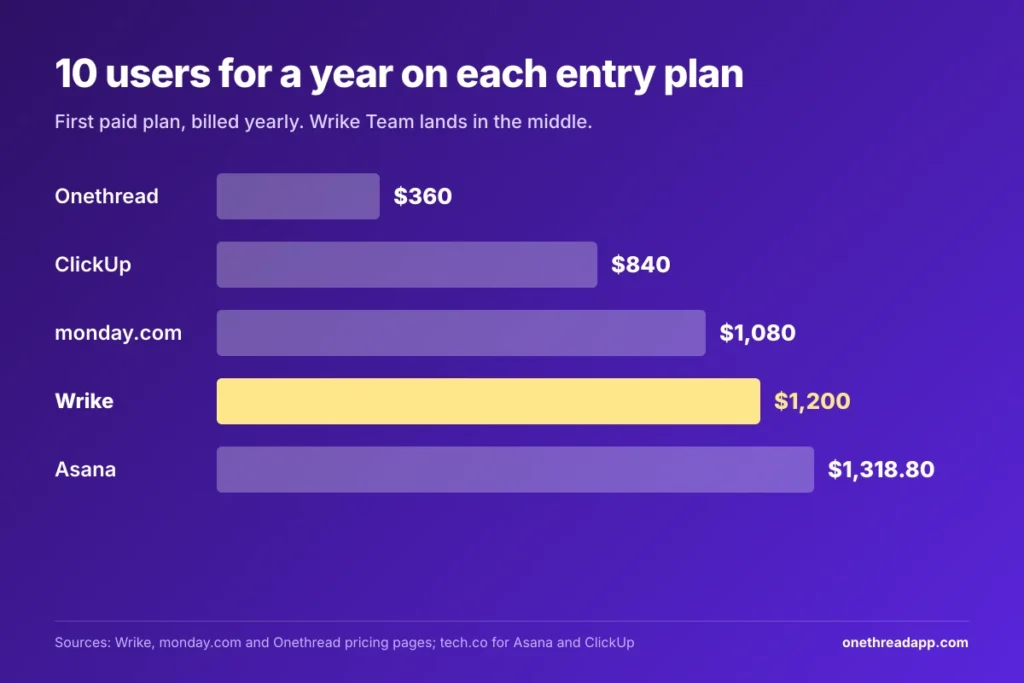
Wrike’s Team plan sits in the middle on price. At 10 users billed yearly, it costs more than ClickUp and monday.com and less than Asana.
| Tool | Price per user a month, billed yearly | 10 users for a year | Best for |
|---|---|---|---|
| Wrike | $10 | $1,200 | Gantt-led planning for small teams |
| Asana | $10.99 | $1,318.80 | Task and project tracking |
| monday.com | $9 | $1,080 | Visual boards, from 3 seats |
| ClickUp | $7 | $840 | Many views on a tight budget |
| Onethread | $3 | $360 | Small teams that want simple pricing |
Sources: Wrike pricing page; monday.com pricing page; Asana and ClickUp prices as listed by tech.co; Onethread pricing page. Best for labels are ours.
Check each vendor’s page before you buy, because these prices change. Our Asana pricing guide and ClickUp plan breakdown walk through those plans the same way.
Onethread is our own tool, so weigh that. Its Growth plan costs $3 per user a month billed yearly, and the free Basic plan covers the first ten users. It has fewer enterprise controls than Wrike Pinnacle. See Onethread’s pricing for every plan and limit.
Still comparing more widely? Our roundup of the best project management software ranks the main options side by side.
Which Wrike Pricing Plan Fits Your Team?
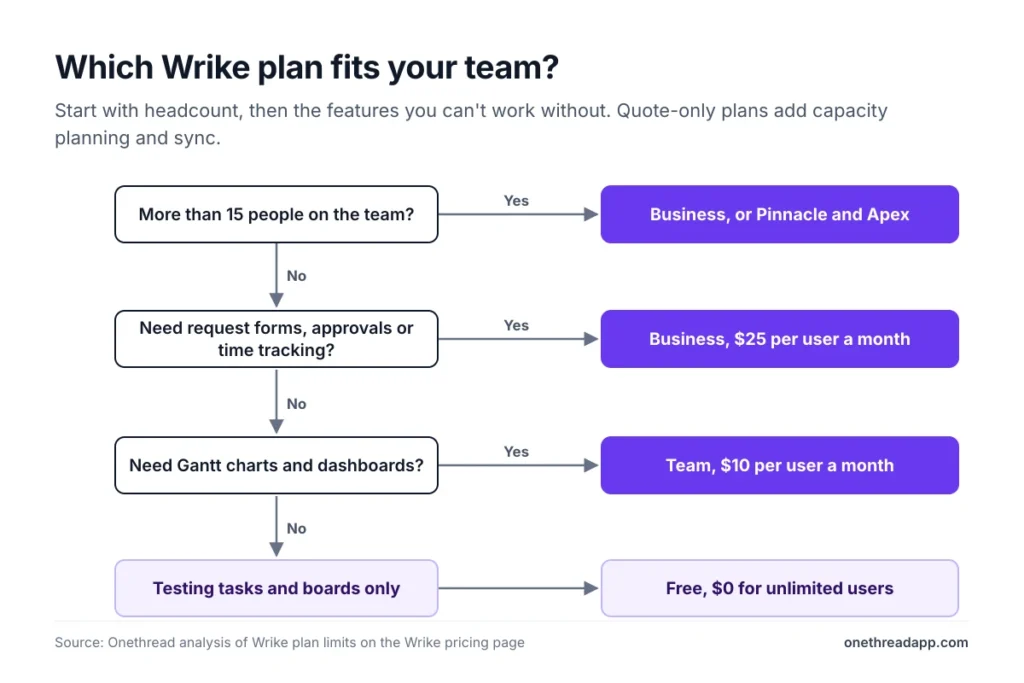
The right Wrike pricing plan depends on headcount first, then on whether you take requests or plan capacity.
| If your team… | Pick |
|---|---|
| Wants to test tasks and boards for free | Free |
| Has 2 to 15 people and needs Gantt charts | Team |
| Takes requests, approves files or tracks time | Business |
| Has more than 15 people | Business |
| Plans capacity and tracks budgets | Pinnacle |
| Syncs Wrike with many other systems | Apex |
These picks are ours, based on the plan limits above. Fergus O’Sullivan at Expert Reviews calls Wrike “a solid project management tool for most businesses.” Capterra reviewers rate it 4.2 out of 5 for value for money, across 3,046 reviews.
Run the 14-day free trial on the plan you’d actually buy. Then you’ll know if Team’s limits bite before you commit to a year.
Top Tip: Round your headcount up to Wrike’s next seat group before comparing plans. A 12-person team pays for 15 seats on either plan.
What Should You Do Next With Wrike?
Wrike’s list price is only the starting line. Seat groups, the 15-user cap on Team, and add-ons with no public price decide the final bill. Once you round your headcount up and price the extras, the five plans get much easier to compare, and the right one usually picks itself.
This week, count everyone who needs a full seat, round up to the next seat group, and price both Team and Business for a year. Then send Wrike sales one email that asks for every add-on and setup quote together.
FAQs
Is Wrike Free to Use?
Yes, Wrike has a Free plan at $0 with no user limit and no time limit. It covers task lists, board and table views, and the mobile and desktop apps. It leaves out Gantt charts, dashboards and automations, and storage stops at 2 GB for the account.
How Long Is the Wrike Free Trial?
The Wrike free trial lasts 14 days, and you don’t need a credit card. When it ends, Wrike blocks the account but keeps your data. You can then buy a plan or downgrade to Free. Team and Business plans for up to 15 users can be bought in the Account section.
Does Wrike Offer a Nonprofit Discount?
Wrike’s pricing page doesn’t list a nonprofit or education discount. Some guides say nonprofits can ask Wrike support for special pricing, but no amount is published. Ask sales directly and get any discount in writing before you sign a yearly Wrike pricing contract.
Can You Pay for Wrike Monthly?
Wrike shows every price per month, but each seat is billed annually. Business, Pinnacle and Apex are annual-only subscriptions. The pricing page doesn’t publish a monthly rate for Team, so ask Wrike before you plan around monthly payments. Plan your budget on the yearly figure.
Do Wrike Prices Include Sales Tax?
No, Wrike prices don’t include state or local taxes, and you pay them on top. Every plan is priced and invoiced in US dollars. If you pay in another currency, your bank converts the charge, so the final amount can differ slightly.
What Is Wrike Used For?
Wrike is project management software for planning work, tracking tasks and managing team capacity. Teams use it for Gantt timelines, dashboards, request forms and approvals. Higher plans add budgeting, resource planning and links to tools like Salesforce, Jira and GitHub, so larger teams can run several departments in one place.