Airtable pricing looks simple until you count who sits in your workspace.
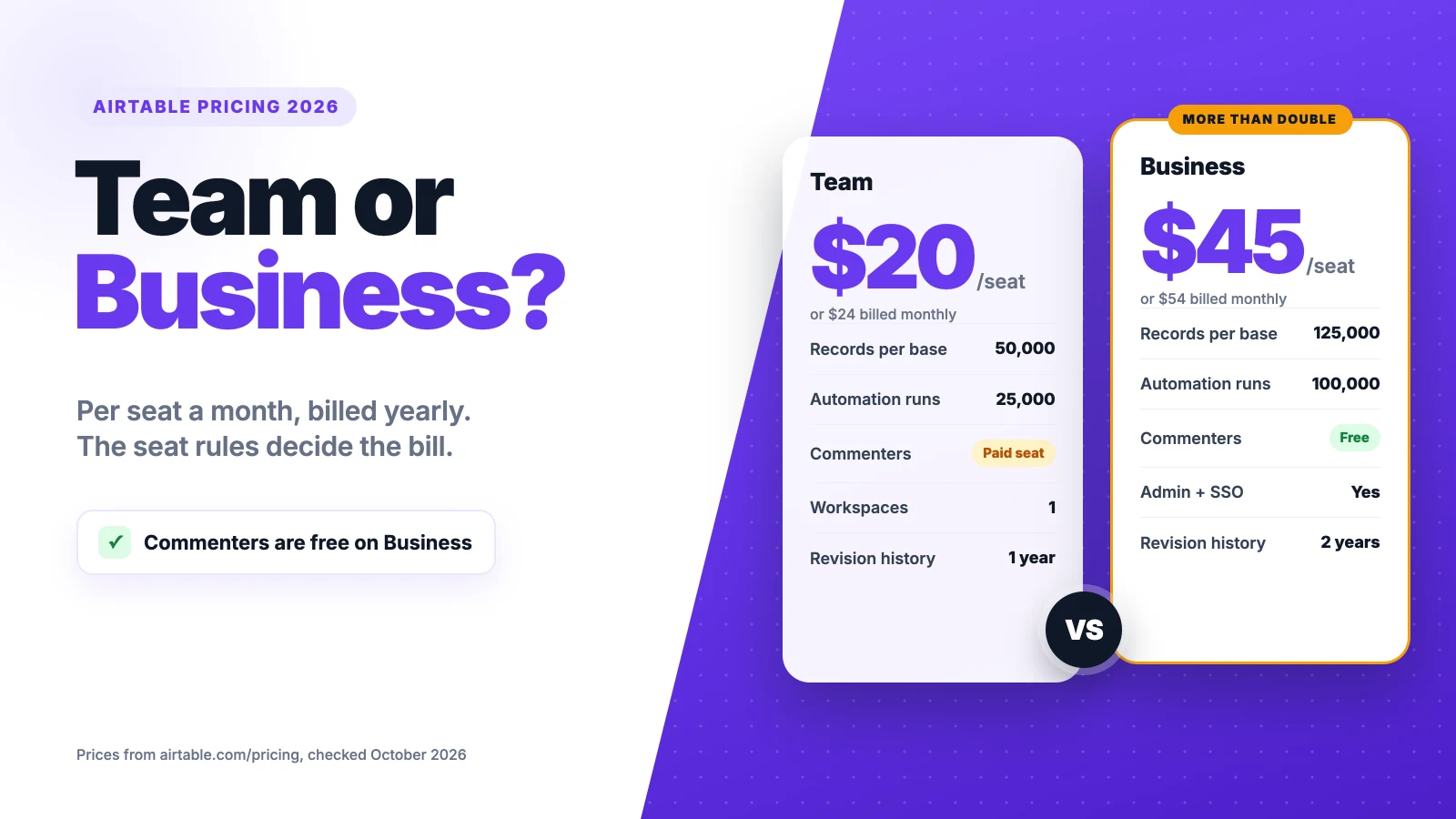
Airtable’s Free plan costs nothing. Team costs $20 per seat a month and Business $45, billed yearly. Monthly billing raises them to $24 and $54. Enterprise Scale is quoted.
The catch is the seat rule. On Team, every editor and every commenter is billable, and record caps push growing bases up a plan.
We checked Airtable’s pricing page and help center, then ran the numbers for a 10-person team like yours.
Here’s what each plan costs you, who you pay for, and when Business is worth more than double.
Key Points
- Airtable’s plans cost $0 (Free), $20 (Team) and $45 (Business) per seat a month billed yearly, or $24 and $54 billed monthly. Enterprise Scale is a custom quote.
- Count commenters before you invite clients. On Team, commenters are paid seats, while on Business only owners, creators and editors are billed. Read-only users are free on every plan.
- Plan around the record limit. Team stops at 50,000 records per base and Business at 125,000, and you can’t add records past the cap until you upgrade.
- Budget add-ons separately. Extra AI credits start at $20 a month for 10,000, and Portals for outside guests start at $120 a month on Team.
How Much Does Airtable Cost per Seat?
Airtable costs $0 to $45 per seat a month on its published plans, billed yearly. Monthly billing raises Team to $24 and Business to $54.
| Plan | Billed yearly (per seat a month) | Billed monthly (per seat a month) | Records per base | Automation runs a month |
|---|---|---|---|---|
| Free | $0 | $0 | 1,000 | 100 |
| Team | $20 | $24 | 50,000 | 25,000 |
| Business | $45 | $54 | 125,000 | 100,000 |
| Enterprise Scale | Custom quote | Custom quote | 500,000 | 500,000 |
Airtable bills per collaborator in a workspace, not per base. One editor on one base takes a full seat across the whole workspace.
Example: Team for 5 editors costs $20 × 5 × 12 = $1,200 a year on annual billing. Paid monthly, it costs $24 × 5 × 12 = $1,440, so annual billing saves $240.
Top Tip: Start on monthly billing while the team settles. On annual plans, a seat added mid-year is charged for the full remaining contract, and removing one doesn’t cut that cycle’s invoice.
Sources: Airtable pricing page, Airtable plans overview, Airtable help center on collaborator billing, Carly’s Airtable pricing breakdown.
What Does the Airtable Free Plan Include?
The Airtable Free plan includes up to 5 editors, with 1,000 records per base and 1 GB of attachments per base. It never expires.
You also get up to 50 commenters and unlimited read-only users. Free adds 100 automation runs a month and 500 AI credits per editor. New workspaces start with a 14-day Team trial before they drop to Free.
The record cap is the wall most teams hit first. A simple content calendar or lead list can pass 1,000 records in a few months.
History is short too. Free keeps 2 weeks of revision history, so an old mistake can be hard to undo.
Gantt views, extensions and longer history only come with paid plans, so the Free plan suits light, solo use.
So treat Free as a test bench. Build one base, check the views and automations you need, then upgrade before the record cap blocks new entries.
Pricing: $0, with no time limit.
Best For
- Individuals and small teams testing Airtable on one or two light bases.
Pros
- Up to 5 editors and 50 commenters at no cost.
- Unlimited read-only users.
- Includes a 14-day Team trial for new workspaces.
Cons
- Only 1,000 records per base.
- Just 100 automation runs a month.
- Revision history stops at 2 weeks.
What Does the Airtable Team Plan Include?
The Airtable Team plan includes 50,000 records per base, 20 GB of attachments per base and 25,000 automation runs a month. It costs $20 per seat a month billed yearly.
Team also adds 100,000 API calls a month, 15,000 AI credits per paid user each month and a year of revision history. You get Gantt and timeline views, extensions and more permission controls than Free.
Seats are the part to watch. On Team, owners, creators, editors and commenters all count as billable seats. Only read-only users and shared view links are free.
Picture a five-person agency that lets three clients comment on project bases. That’s 8 seats, not 5, so the bill goes from $1,200 to $1,920 a year on annual billing.
Team also allows one workspace only. Agencies that want a separate workspace per client run into that limit fast.
Pricing: $20 per seat a month billed yearly, or $24 billed monthly.
Best For
- Small teams that run a few busy bases and keep outside people on read-only access.
Pros
- 50,000 records and 25,000 automation runs.
- 15,000 AI credits per paid user each month.
- A year of revision history.
Cons
- Commenters count as paid seats.
- One workspace only.
- No admin panel or SAML single sign-on (SSO).
What Does the Airtable Business Plan Include?
The Airtable Business plan includes 125,000 records per base, 100 GB of attachments per base and 100,000 automation runs a month. It costs $45 per seat a month billed yearly.
Business removes the API call cap and adds an admin panel and SAML single sign-on (SSO). It also keeps two years of revision history and grants 20,000 AI credits per paid user. Self-serve Business needs a private email domain.
The seat rule also changes. On Business, only owners, creators and editors are billable, and commenters are free. That flips the math for teams with many reviewers.
Example: A workspace with 4 editors and 10 client commenters pays $20 × 14 = $280 a month on Team, billed yearly. On Business it pays $45 × 4 = $180 a month, so Business is $1,200 a year cheaper.
Most teams without lots of commenters will still pay more than double. Ten editors on Business cost $5,400 a year, against $2,400 on Team.
Pricing: $45 per seat a month billed yearly, or $54 billed monthly.
Best For
- Growing teams with large bases, admin needs, or many reviewers who only comment.
Pros
- 125,000 records and 100,000 automation runs.
- Commenters are free.
- Admin panel and SAML SSO.
Cons
- Twice the Team price per editor and then some.
- Needs a private email domain to buy self-serve.
- Portals and extra AI credits still cost extra.
What Does the Airtable Enterprise Scale Plan Include?
The Airtable Enterprise Scale plan has no public price. You talk to Airtable’s sales team, and the quote depends on your seats and terms.
Enterprise Scale raises the limits to 500,000 records per base, 1,000 GB of attachments per base and 500,000 automation runs a month. It includes unlimited workspaces and bases, 25,000 AI credits per paid user and 3 years of revision history.
Billing works differently too. Airtable’s help center says sales-led plans calculate seats by contract, and they can be paid by invoice, ACH, wire or check.
The jump from Business is about scale and control more than features. Most teams under 50 people won’t need it. It earns its price when you run many bases across departments or need strict admin controls.
Before the first sales call, count editors, commenters, read-only users and Portal guests. Those numbers shape the quote more than the feature list does.
Pricing: Custom quote from Airtable’s sales team.
Best For
- Large organizations running many bases across teams, with formal security and admin rules.
Pros
- 500,000 records per base.
- Unlimited workspaces and bases.
- 3 years of revision history.
Cons
- No published price to budget around.
- Buying goes through a sales process.
- More than most small teams will use.
Who Counts as a Paid Seat in Airtable?
A paid seat in Airtable is any collaborator with owner, creator or editor access, and on Team, commenters too. Read-only collaborators and people who open a shared view link are free on every plan.
| Role | Free | Team | Business |
|---|---|---|---|
| Owner, creator or editor | Free, up to 5 | Paid seat | Paid seat |
| Commenter | Free, up to 50 | Paid seat | Free |
| Read-only | Free | Free | Free |
| Shared view link or form | Free | Free | Free |
The timing rules matter as much as the roles. On monthly plans, a new billable collaborator is charged from the next billing date. On annual plans, you pay for their full remaining contract when you add them.
Removing someone mid-cycle doesn’t reduce the invoice you already have. The seat stays open until the cycle ends, and the total drops at the next billing date.
Example: You add a freelancer as an editor 6 months into an annual Team plan. You pay about $20 × 6 = $120 for the rest of the contract, even if they leave next month.
Top Tip: Before each renewal, open the billing page and switch anyone who only reads or reviews to read-only. On Team, that alone can remove several paid seats.
How Much Do Airtable AI Credits and Portals Cost?
Airtable AI credits come with every plan, and extra packs start at $20 a month for 10,000 credits on Team and Business. Portals for outside guests start at $120 a month for 15 guests on Team and $150 on Business.
| Plan | AI credits included (per paid user a month) | Portals add-on |
|---|---|---|
| Free | 500 per editor | Not available |
| Team | 15,000 | From $120 a month for 15 guests |
| Business | 20,000 | From $150 a month |
| Enterprise Scale | 25,000 | Custom quote |
Credits are the hidden costs most teams notice late. Building with Airtable’s AI assistant is free, but running AI fields and agents on records uses credits.
Portals solve a different problem. They let clients or partners log in to an interface without taking a full seat. That can cost less than many commenter seats on Team.
Nonprofit and education plans can’t add Airtable AI at all, so check that before you apply for the discount.
Sources: Carly on Airtable add-ons, Softr’s Airtable pricing guide.
What Happens When You Hit Airtable’s Limits?
When you hit an Airtable limit, nothing is deleted. You just can’t add more records or attachments until you upgrade or clear space. Automation and API use stops at your plan’s cap for the rest of the month.
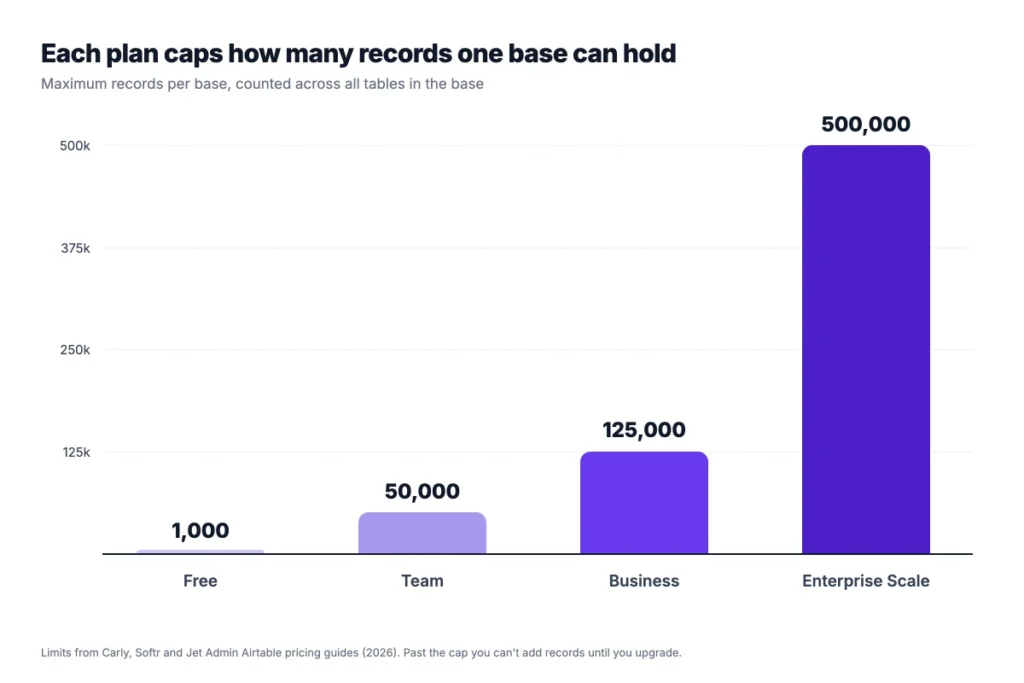
The record limit counts every table in a base together. A base with five linked tables of 10,000 records each is already at the Team cap.
Speed can drop before you reach the cap. Jet Admin notes that large bases can slow down well before 500,000 records, so splitting data across bases helps.
Example: A team adding 2,000 records a month to one base reaches the 50,000 Team limit in 25 months. At 5,000 a month, it gets there in 10 months.
Watch automation runs as well. Team’s 25,000 runs a month sounds like a lot, but a rule that fires on every record update can use them quickly.
The fix is usually cheaper than an upgrade. Archive old records into a separate base, trim attachments you no longer need, and check which automations fire most. Upgrade only when the base you work in every day keeps hitting the cap. That way you pay for room you actually use, not for data you could archive.
How Will Bending Spoons Change Airtable Pricing?
Bending Spoons hasn’t changed Airtable pricing so far. Bending Spoons completed its acquisition of Airtable in September 2026, and no new pricing has been announced.
Bending Spoons has said it plans to invest in Airtable’s product, support and sales. Teable, which tracked the deal, reported no announced change to plans, prices or contracts.
The published prices still read $20 for Team and $45 for Business, billed yearly. That’s what we based every number in this guide on, including the 10-person totals.
New owners often review pricing later, though, so watch your renewal notices. If you’re happy with your plan, an annual contract locks today’s seat price for the year.
Keep an eye on legacy plans as well. Airtable’s pricing page says legacy Enterprise customers see no changes until renewal.
Under its new owner, Airtable still sells the same four plans. For now, we’d plan budgets on the published prices and treat any change as a renewal question. Set a reminder a month before your renewal date, so you have time to compare. Read new terms closely before you renew, and compare them with the seat counts you actually use.
Sources: Pulse 2.0 on the completed acquisition, Teable on the Bending Spoons deal.
What Does a 10-Person Team Pay for Airtable per Year?
A 10-person team pays $1,440 to $6,480 a year for Airtable, depending on the plan, the billing cycle and the extras. We calculated each case from the published per-seat prices.
| Setup for 10 editors | Yearly cost (billed yearly) | Yearly cost (billed monthly) |
|---|---|---|
| Team | $2,400 | $2,880 |
| Team + 3 client commenters | $3,120 | $3,744 |
| Team + Portals for 15 guests | $3,840 | $4,320 |
| Business | $5,400 | $6,480 |
| Team with the nonprofit discount | Not offered | $1,440 |
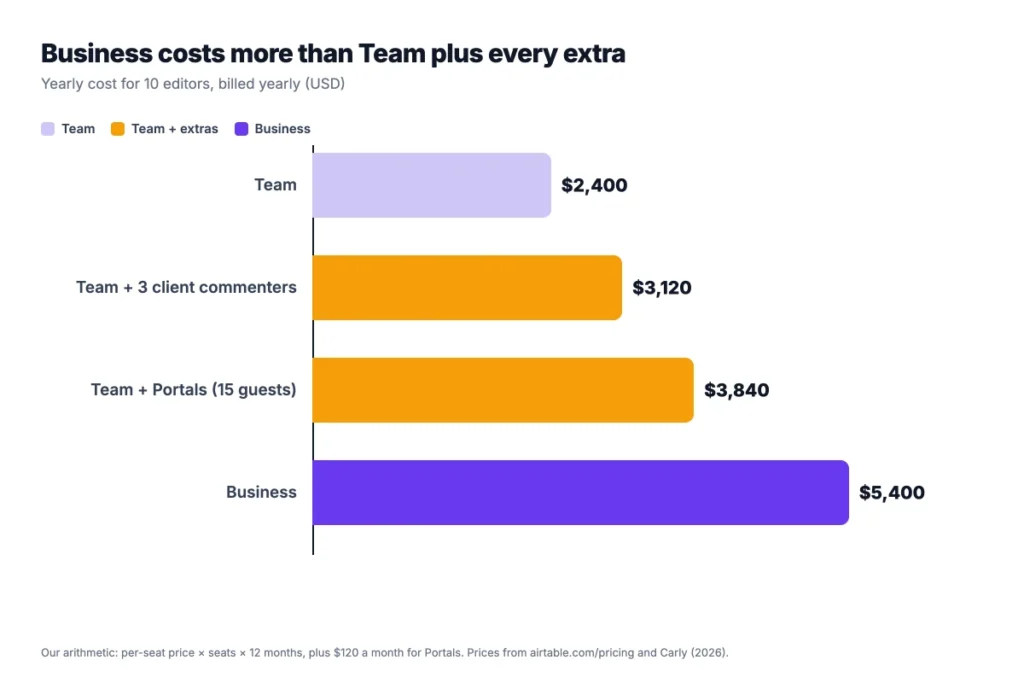
The jump from Team to Business is the biggest one on the table. Commenters and Portals add a few hundred dollars a year each.
Example: Team plus Portals costs $20 × 10 × 12 = $2,400 in seats, plus $120 × 12 = $1,440 for 15 guests. That’s $3,840 a year, still $1,560 less than Business.
Use your own editor count in place of 10, and add commenters only if you’re on Team.
How Does Airtable Pricing Compare With Notion, ClickUp and Asana?
Airtable pricing sits at the top for first paid plans. Team costs more per seat than Notion, ClickUp, Asana, monday.com and Coda.
| Tool | First paid plan, per user a month | Cost for 10 users a year | Best for |
|---|---|---|---|
| Airtable | $20 (Team, billed yearly) | $2,400 | Teams that build custom databases and workflows |
| Notion | $10 (Plus, billed yearly) | $1,200 | Teams that run docs, wikis and databases together |
| ClickUp | $7 (Unlimited, billed yearly) | $840 | Teams that want task views and features in one tool |
| Asana | $10.99 (Starter, billed yearly) | $1,318.80 | Teams that plan cross-team projects and goals |
| monday.com | $9 (billed yearly) | $1,080 | Teams that like visual boards and simple setup |
| Coda | $12 (Pro) | $1,440 | Teams that build docs with tables and formulas |
Competitor prices come from Tech.co’s ClickUp pricing guide for ClickUp, Asana and monday.com, Plaky’s Notion pricing guide for Coda, and Notion’s own pricing page. Check each vendor’s page before you buy. The Best for column is our read.
For the full breakdowns, see our guides to Notion pricing and ClickUp pricing. Onethread, our own tool, also covers task assignment, Gantt charts, dashboards and a wiki in one place.
Which Airtable Pricing Plan Should Your Team Pick?
Pick the cheapest Airtable plan that covers your records, automations and seat mix. Then count commenters before you choose between Team and Business. We’d decide in this order:
- Solo or testing: Free, until a base passes 1,000 records.
- Small team, few reviewers: Team at $20, with clients set to read-only.
- Team with many commenters: Compare Team and Business seat by seat, since Business doesn’t bill commenters.
- Large bases or admin needs: Business at $45, for 125,000 records, SSO and an admin panel.
- Many departments and strict controls: Ask Airtable’s sales team about Enterprise Scale.
Example: A team of 6 editors who share bases with 8 client commenters pays $20 × 14 = $280 a month on Team, billed yearly. Moving those clients to read-only drops the bill to $120, and Business would cost $270.
Check the discounts too, since they can halve the Team bill for eligible groups. Nonprofits and educators get 50% off monthly Team plans, and college students can get Airtable free for 6 to 24 months.
If Airtable feels like too much database for your projects, our roundup of project management software for small teams compares simpler options. Most of them cost less per seat than Airtable’s Team plan.
What Should You Do Next With Airtable?
The Airtable price you pay depends less on the plan list than on your seat mix and your largest base. Once you count editors, commenters and records, the right plan is usually obvious. Business can even beat Team for teams with lots of reviewers.
This week, open your workspace’s billing page and list every collaborator by role. Move anyone who only reads to read-only, multiply the rest by $20 or $45, and compare the yearly totals before you renew. The cheapest seat is always the one nobody needed in the first place.
FAQs
Does Airtable Offer a Nonprofit Discount?
Yes, Airtable pricing includes a 50% discount for eligible nonprofits and educators on the monthly Team plan. That brings Team to $12 per collaborator a month. The discount covers Team only, can’t be combined with annual billing, and doesn’t include Airtable AI. You apply through Airtable’s nonprofit or education form.
Is Airtable Free for Students?
Yes, qualifying college and university students can get Airtable free for 6 to 24 months, depending on their expected graduation date. Students and educators with a .edu email also get a 120-day Team trial when they create a workspace. You apply through Airtable’s student plan form.
Do Read-Only Users Cost Money in Airtable?
No, read-only collaborators are free on every Airtable plan. So are people who open a shared view link or submit a form. On Team, commenters do count as paid seats. Switch reviewers who don’t need to comment to read-only to keep the bill down.
Do You Get Money Back When You Remove a Seat in Airtable?
No, removing a billable collaborator in the middle of a billing cycle doesn’t reduce that cycle’s invoice. Their seat stays available until the cycle ends, and Airtable pricing adjusts at your next billing date. On annual plans, check your seat count before renewal, since that’s when the total resets.
Does Airtable Have a Free Trial?
Yes, every new Airtable workspace starts with a 14-day Team trial, so you can test Gantt views, extensions and higher limits. After the trial, the workspace moves to the Free plan unless you upgrade. Students and educators with a .edu email get a longer 120-day Team trial.