The monday.com price card looks simple. Then checkout asks how many seats you want.
monday.com pricing runs from $0 to $19 per seat a month billed yearly: Free, Basic at $9, Standard at $12 and Pro at $19. Billed monthly, the paid plans cost $12, $14 and $24, and Enterprise is a custom quote.
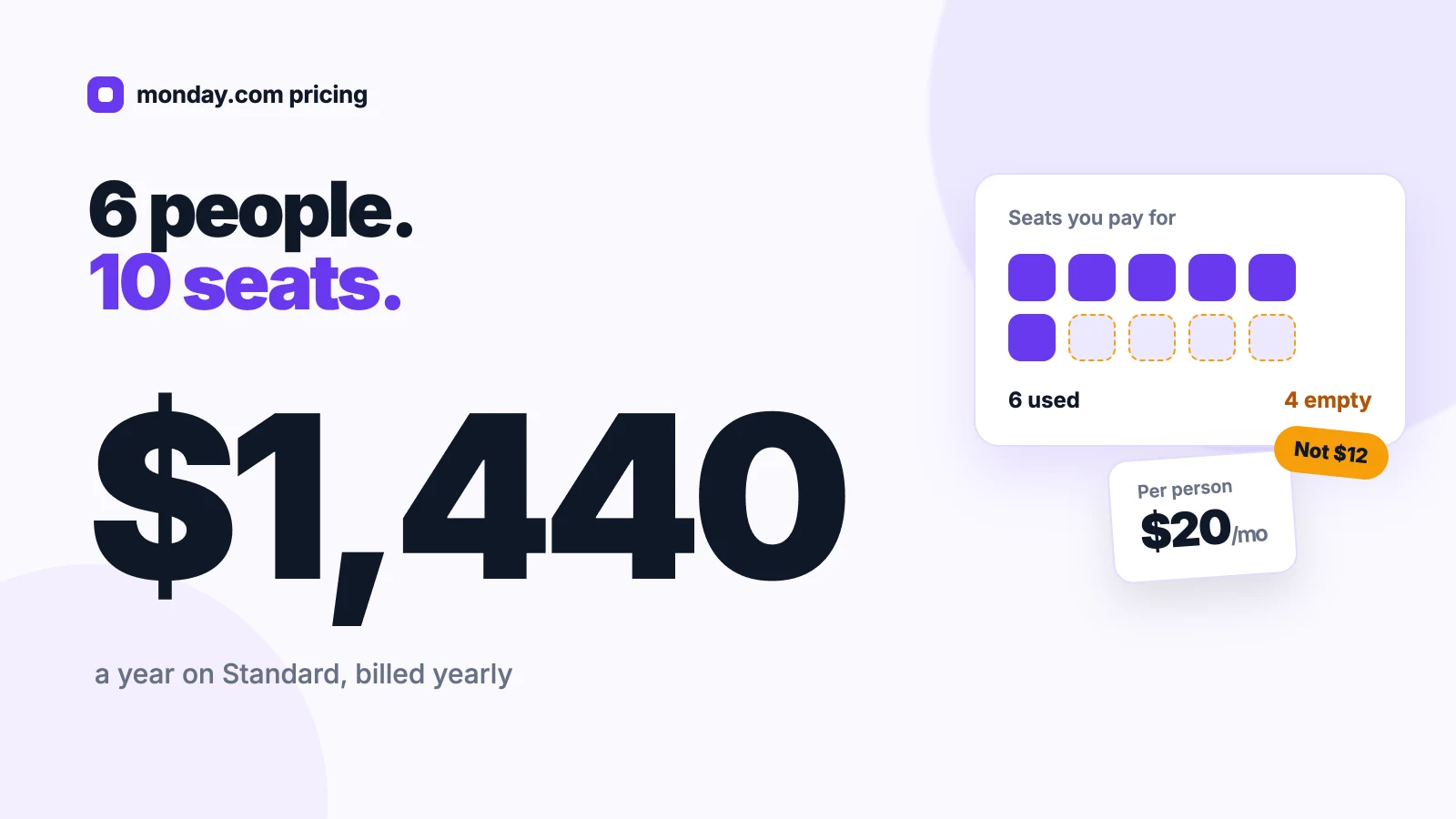
But seats come in buckets. A team of six pays for ten.
We read the pricing page plan by plan and priced each seat bucket against real team sizes.
You’ll see what each plan includes, what your headcount costs, and when yearly billing pays off.
Key Points
- monday.com costs $0 (Free), $9 (Basic), $12 (Standard) and $19 (Pro) per seat a month billed yearly, or $12, $14 and $24 billed monthly. Enterprise is a custom quote.
- Price your seat bucket, not your headcount. Paid plans start at 3 seats and then jump to 5, 10, 15, 20, 25, 30, 40 and 50, so 6 people on Standard pay $1,440 a year for 10 seats.
- Start at Standard if you need automations. Basic includes none, Standard caps them at 250 actions a month, and Pro lifts the cap to 25,000.
- Pay yearly once your headcount settles. It saves $600 a year on 10 Pro seats.
How Much Does monday.com Cost per Seat?
A monday.com seat costs $9, $12 or $19 a month on the three paid plans when you pay yearly. Monthly billing raises those to $12, $14 and $24 per seat.
| Plan | Billed yearly, per seat a month | Billed monthly, per seat a month | AI credits a month | Automation actions a month |
|---|---|---|---|---|
| Free | $0 | $0 | None | None |
| Basic | $9 | $12 | 1,000 | None |
| Standard | $12 | $14 | 2,000 | 250 |
| Pro | $19 | $24 | 3,000 | 25,000 |
| Enterprise | Custom quote | Custom quote | Custom | 250,000 |
The Free plan stops at 2 seats. Every paid plan starts at 3 seats, and prices exclude tax, which depends on your billing country.
Sources: monday.com pricing and monday.com for nonprofits.
How Do monday.com Seat Buckets Change Your Bill?
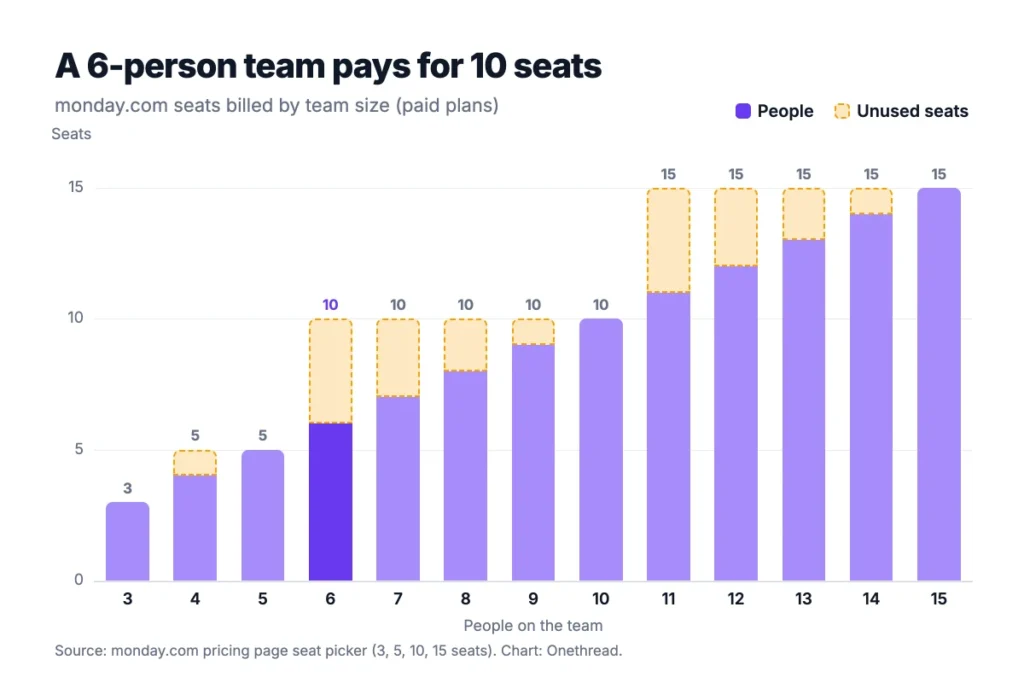
monday.com seat buckets shape your bill more than the plan does. Paid plans start at 3 seats, then the seat picker jumps to 5, 10, 15, 20, 25, 30, 40, 50, 100 and 200+. You buy the bucket that fits everyone, and the gap is unused seats you still pay for.
Buckets Round Every Team Up
Headcount rarely lands on a bucket edge. Two people fit the Free plan, but a third triggers the 3-seat minimum. A team of 4 buys 5 seats. A team of 6 or 7 buys 10.
Example: 6 people on Standard billed yearly pay for 10 seats: 10 × $12 × 12 months = $1,440 a year. That’s $20 per person a month, not the $12 on the price card.
Reviewers notice the rounding. A senior platform engineer on Capterra wrote that you “pay for a minimum of 3, 5, or 10 users”.
Growth Inside a Bucket Costs Nothing
The flip side is free headroom. Once you’ve bought 10 seats, people 7 through 10 add nothing to the bill.
Example: 11 people on Pro billed yearly need the 15-seat bucket: 15 × $19 × 12 = $3,420 a year, about $26 per person a month.
So time your hires. If two people start this quarter, buy the bucket that fits them now.
A user on the monday.com community forum called the increments “bordering on exploitative” for small businesses. Free viewers are the fair workaround, since they can see boards without taking a seat.
What Does the monday.com Free Plan Include?
The monday.com Free plan covers up to 2 seats at $0, with no credit card. It’s a sandbox, not a workspace you’ll run a business on.
You get up to 3 boards, up to 3 Docs, 200+ templates, 8 column types and the iOS and Android apps. There are no automations, no integrations and no AI features, since AI starts at Basic.
Say you and a co-founder want to plan a launch on one board. Free handles that well. But one board per client means the third client ends your free run.
And the 2-seat cap is firm. The moment a third person joins, you move to a paid plan with a 3-seat floor.
Free also skips guest access, so clients can’t join your boards. Treat it as a test drive of the board layout, not a plan you budget around.
Pricing: $0 for up to 2 seats.
Best For
- Two people testing monday.com boards before a team rollout.
Pros
- Costs nothing and needs no card.
- Includes 200+ templates and the mobile apps.
- Lets you learn boards and column types before you pay.
Cons
- Stops at 2 seats and 3 boards.
- Includes no automations, integrations or AI credits.
- Offers no guest access for clients.
What Does the monday.com Basic Plan Include?
monday.com Basic costs $9 per seat a month billed yearly, or $12 billed monthly. It drops the Free plan’s caps and adds unlimited free viewers, so clients and managers can watch boards without a seat.
Basic also brings monday AI, with 3 AI tools and 1,000 AI credits a month. What it doesn’t bring is automation. There are no automation or integration actions, no Timeline or Gantt view, no calendar view and no guest access.
Say you run a 3-person studio that updates job boards by hand. Basic fits. If you copy status changes into chat every morning, you’ve outgrown it.
Example: that studio pays 3 × $9 × 12 = $324 a year on Basic billed yearly. A fourth hire moves it to the 5-seat bucket at 5 × $9 × 12 = $540.
Pricing: $9 per seat a month billed yearly, which is $27 a month for the 3-seat minimum. Monthly billing costs $12 per seat.
Best For
- Small teams that update boards by hand and share them with read-only viewers.
Pros
- Lowest paid price at $9 per seat billed yearly.
- Unlimited free viewers don’t use seats.
- Includes 1,000 AI credits a month.
Cons
- No automations or integrations.
- No Timeline, Gantt or calendar views.
- No guest access for outside collaborators.
What Does the monday.com Standard Plan Include?
monday.com Standard costs $12 per seat a month billed yearly, or $14 billed monthly. It’s the first plan where monday.com starts doing work for you.
Standard adds 250 automation actions and 250 integration actions a month, 3 workflows, Timeline and Gantt views, a calendar view and guest access. It also raises AI to 5 tools and 2,000 credits a month, and allows 1,000 API calls a day.
Here’s the problem with 250 actions. The cap covers the whole account, not each person.
Example: a board that moves 10 items a day through 3 status changes, each firing one automation, uses 30 actions a day. At that pace, 250 actions last about 8 days.
Count actions during the trial before you commit. Pro’s higher cap costs $7 more per seat, or $840 a year more for 10 seats.
Pricing: $12 per seat a month billed yearly, or $14 billed monthly.
Best For
- Teams of 3 to 10 with light automation and client guests.
Pros
- Adds Timeline, Gantt and calendar views.
- Includes guest access for clients and freelancers.
- Includes 250 automation and 250 integration actions a month.
- Doubles AI credits to 2,000 a month.
Cons
- 250 actions a month runs out fast on busy boards.
- No private boards or time tracking.
- Only 3 workflows.
What Does the monday.com Pro Plan Include?
monday.com Pro costs $19 per seat a month billed yearly, or $24 billed monthly. The pricing page tags it “Most Popular”, and the $7 jump from Standard mostly buys automation headroom.
Pro lifts automation and integration actions to 25,000 a month each, 100 times the Standard cap. It adds 20 workflows, private boards and docs, time tracking, advanced columns, advanced board views and 10,000 API calls a day.
AI rises to 6 tools and 3,000 credits a month, including the AI workflow builder.
Say an agency bills by the hour and keeps each client’s board private from the others. Pro covers both needs in one plan.
Example: 10 Pro seats billed yearly cost 10 × $19 × 12 = $2,280 a year, which is $840 more than Standard for the same bucket.
Pricing: $19 per seat a month billed yearly, or $24 billed monthly.
Best For
- Agencies and teams that track time, run many automations or need private boards.
Pros
- Includes 25,000 automation and 25,000 integration actions a month.
- Adds private boards and docs for client work.
- Includes built-in time tracking.
- Raises AI credits to 3,000 a month.
Cons
- Costs $7 more per seat than Standard.
- Monthly billing costs $24 a seat.
- Keeps portfolio and resource management on Enterprise.
What Does the monday.com Enterprise Plan Include?
monday.com Enterprise has no public price. You get a quote from sales, and the pricing page says discounts are available.
It adds enterprise-scale automations and integrations, 250 workflows, portfolio management, resource management, multi-level permissions and 25,000 API calls a day. AI credits are set to match your usage.
The plan also includes 24/7 support and a 99.9% uptime service level agreement (SLA). Say a 120-person firm needs resource planning across teams. That’s a sales conversation, not a checkout page. Ask for the AI credit allowance in writing, since the page leaves it open.
For scale, Vendr puts the median monday.com contract at $30,720 a year, with buyers saving about 18% on average (data from February 2026). That figure spans every deal size, not only Enterprise. Vendr also lists negotiated Pro deals for 50 to 200 seats at about $15 to $18 per seat a month, under the $19 list price.
Pricing: Custom quote.
Best For
- Large organizations that need portfolio views, resource planning and tighter permissions.
Pros
- Includes portfolio and resource management.
- Adds multi-level permissions and security controls.
- Sets the highest API and automation limits.
- Leaves room to negotiate on price.
Cons
- No published price.
- Requires a sales call to get a quote.
- AI credit allowance isn’t published.
How Do monday.com AI Credits Work?
monday.com AI credits come bundled with every paid plan: 1,000 a month on Basic, 2,000 on Standard and 3,000 on Pro. Enterprise gets a custom amount.
Credits pay for the AI tools, such as the Sidekick assistant, the AI agent workforce, AI columns and the meeting notetaker. Higher plans add more tools, so credits go faster there.
Now the part worth reading twice. Set the yearly toggle to 10 seats. The pricing page shows Standard at $140 a month struck through to $120, with a “Special offer: $20 off / month”. Pro shows $220 struck through to $190.
That offer cancels out the credit cost, so today you pay seat prices only. The page doesn’t say when, or whether, it ends.
Example: without the offer, 10 Standard seats would cost $140 × 12 = $1,680 a year instead of $1,440.
How many credits will you use? The pricing FAQ says a typical 3-person team uses 800 to 1,200 a month. Past your bundle, rock.so’s pricing breakdown lists overage at $0.01 per credit on yearly plans and $0.0125 on monthly plans.
Top Tip: Ask monday.com sales in writing how long the special offer lasts before you sign a yearly plan. For 10 Standard seats, it’s the gap between $1,440 and $1,680 a year.
Which monday.com Billing Is Cheaper, Yearly or Monthly?
Yearly billing is cheaper on every monday.com plan. The pricing page advertises an 18% saving, though the real gap differs by plan. You pay $9 instead of $12 on Basic, $12 instead of $14 on Standard and $19 instead of $24 on Pro.
Our math puts the per-seat saving at 25% on Basic, about 14% on Standard and about 21% on Pro.
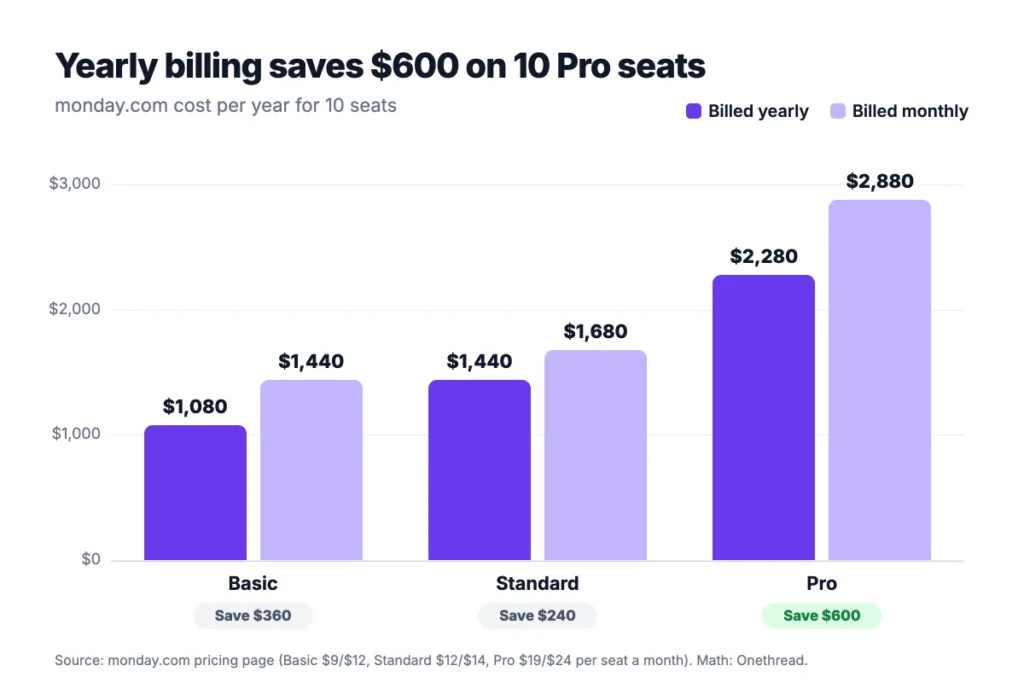
At 10 seats, yearly billing saves $360 on Basic, $240 on Standard and $600 on Pro.
Example: 10 Pro seats billed monthly cost 10 × $24 × 12 = $2,880 a year. Billed yearly, they cost 10 × $19 × 12 = $2,280. You keep $600.
Example: a 5-person team on Standard pays 5 × $14 × 12 = $840 a year on monthly billing, and 5 × $12 × 12 = $720 on yearly billing. Small teams save less in dollars, but the share stays the same.
But yearly billing locks in your bucket. Cancel a yearly plan within 30 days and the FAQ promises a partial refund of the remaining balance. After that, downgrades don’t earn a refund.
So pay monthly while headcount moves, then switch to yearly once it settles. And run the 14-day Pro trial before either. Then put your own seat count through the same math.
How Does monday.com Pricing Compare to Asana, ClickUp and Notion?
monday.com sits in the middle on entry price. Its $9 Basic seat costs less than Asana and Notion but more than ClickUp, comparing each tool’s first paid plan billed yearly.
| Tool | First paid plan, per user a month billed yearly | 10 users a year | Best for |
|---|---|---|---|
| monday.com | $9 | $1,080 | Visual boards shared with read-only viewers |
| Asana | $10.99 | $1,318.80 | Task-heavy teams that live in lists |
| ClickUp | $7 | $840 | Budget teams that want many features |
| Notion | $10 | $1,200 | Teams that mix docs and light project tracking |
The Best for labels are our own short read of each tool. Prices change, so check each vendor’s page before you buy. Our guides to Asana pricing, ClickUp pricing and Notion pricing carry the plan details.
The entry price hides the bigger gap. monday.com and Asana both round small teams up to seat tiers, while ClickUp and Notion bill each member. Agency co-founder Hermann Fink puts it plainly: monday.com is “competitive but not the cheapest”.
For a feature view, read our Asana vs monday.com comparison. And if you want boards without seat buckets, Onethread’s Basic plan is free for a company’s first ten users. Growth costs $3 per user a month billed yearly, as listed on Onethread pricing.
Which monday.com Plan Should Your Team Pick?
Pick the monday.com plan by what automation must do for you, then pick the bucket by headcount. Four checks settle it:
- Automation: Choose Basic if nobody needs automations, Standard for a few, and Pro if boards move all day.
- Clients: Use Basic’s free viewers if clients only read boards, and Standard’s guest access if they comment or edit.
- Privacy and time: Choose Pro if you bill hours or hide boards between clients, since only Pro adds time tracking and private boards.
- Headcount: Round up to the next bucket, then multiply by the seat price and 12 for your yearly bill.
Example: a 7-person agency that tracks time needs Pro and the 10-seat bucket: 10 × $19 × 12 = $2,280 a year. A 4-person team that only shares boards with clients lands on Basic and the 5-seat bucket: 5 × $9 × 12 = $540 a year.
Value is the real test. One owner on Capterra admitted “I wasn’t using it enough to warrant the cost”. Run the four checks first and you’ll know whether your team will.
Top Tip: Count your free viewers before you count seats. Anyone who only reads boards can sit outside the bucket on Basic and above, which can drop you a whole bucket.
What Should You Do Next With monday.com?
monday.com pricing looks like three numbers: $9, $12 and $19. The number that matters is your seat bucket times the plan price, and the bucket often moves the bill more than the plan. Now you can price your team the way checkout will charge it.
This week, list everyone who needs to edit boards, round up to the next bucket, and multiply by the plan price and 12. Then start the 14-day Pro trial with that bucket and count the automation actions your boards use before you pick a plan.
FAQs
Does monday.com Offer a Nonprofit Discount?
Yes. Eligible nonprofits get 10 free seats, 70% off additional seats and 33% off AI capabilities on monday.com’s nonprofit program. You apply first, and monday.com checks eligibility. For a 15-person charity, that leaves only 5 paid seats, each at a steep discount.
Is There a monday.com Free Trial?
Yes. monday.com lists a 14-day free trial of the Pro plan for work management, CRM and dev. The Free plan is separate: it stays free for up to 2 seats with no credit card. Use the trial to measure automation actions before you choose Standard or Pro.
Can You Get a Refund From monday.com?
Partly. Cancel a yearly subscription within 30 days and monday.com refunds part of the remaining balance. After those 30 days, downgrades don’t earn a refund. So monthly billing is the safer start while your headcount still changes, and it’s worth asking support before you cancel if the timing is close.
How Much Does monday CRM Cost?
monday CRM costs $12, $17 and $28 per seat a month billed yearly for Basic, Standard and Pro, or $18, $25 and $41 billed monthly. Ultimate is a custom quote. CRM is a separate product from work management, so a team that wants both pays for both.
Can You Negotiate monday.com Pricing?
Often, yes. The pricing page says Enterprise discounts are available, and Vendr reports buyers save about 18% on average on monday.com deals. Vendr suggests starting talks 60 to 90 days before renewal, sharing quotes from other tools and asking for a cap on yearly price rises.