LinkedIn Sales Navigator pricing looks simple until you add a second seat.
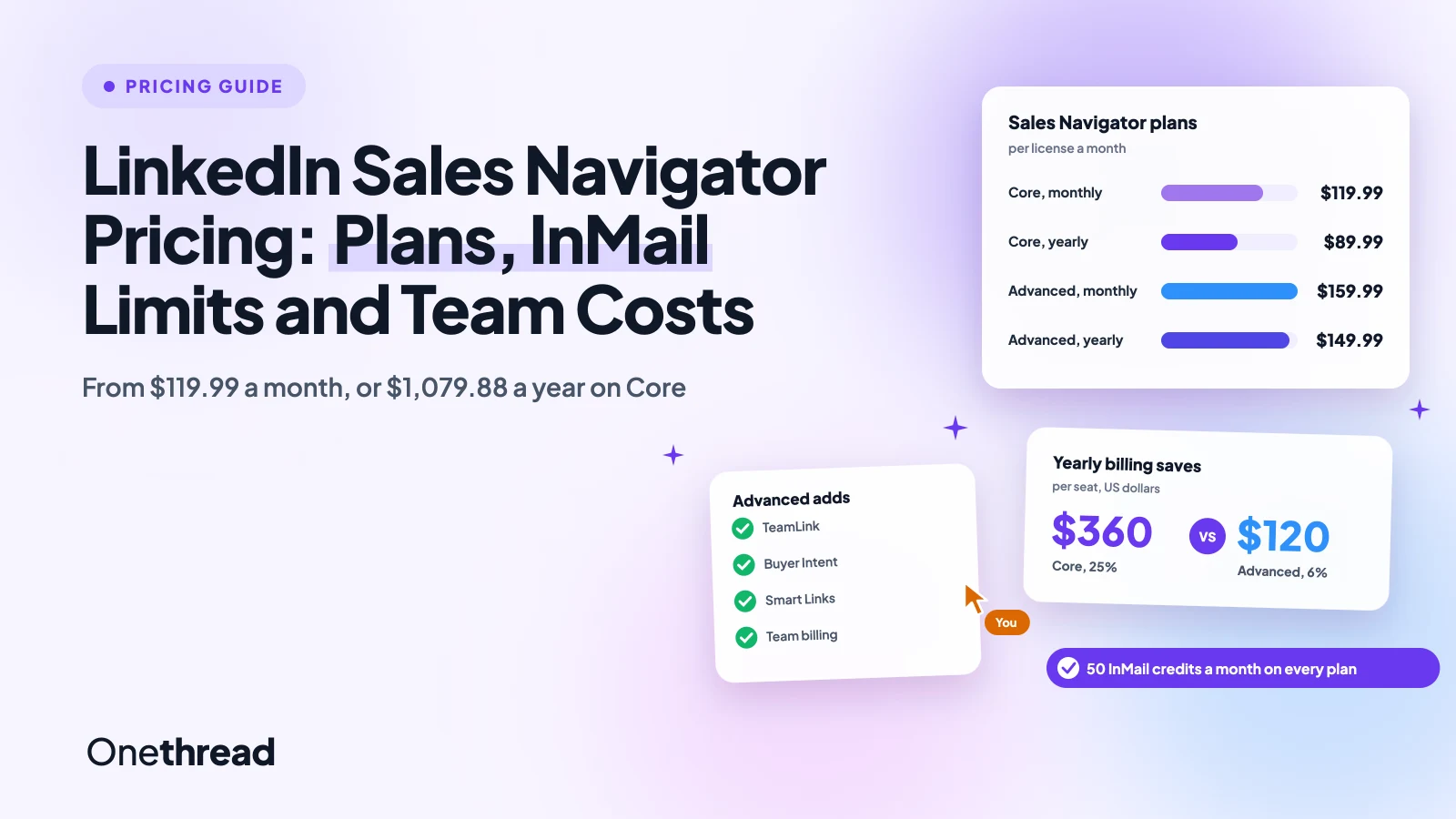
Sales Navigator Core costs $119.99 a month, or $1,079.88 a year, which works out to $89.99 a month. Advanced costs $159.99 a month, or $1,799.88 a year. Advanced Plus is a custom quote, and every plan includes 50 InMail credits a month.
The catch sits in the yearly discount. It saves you 25% on Core but only 6% on Advanced.
We checked LinkedIn’s plan page and help center, then worked out the cost per seat, per InMail and per team.
Here’s what each plan includes, what it leaves out, and which one fits you.
Key Points
- Sales Navigator Core costs $119.99 a month or $1,079.88 a year. Advanced costs $159.99 a month or $1,799.88 a year. Advanced Plus has no public price.
- Pay yearly for Core, since it saves $360 a seat. Advanced saves only $120 a year, so stay monthly until the team settles.
- Pick Core for one seller and Advanced for a team that needs TeamLink, Buyer Intent and shared billing. Move to Advanced Plus only when you need CRM sync.
- Budget for contact data on top. No Sales Navigator plan gives you email addresses or phone numbers, and every plan stops at 50 InMail credits a month.
How Much Does LinkedIn Sales Navigator Cost?
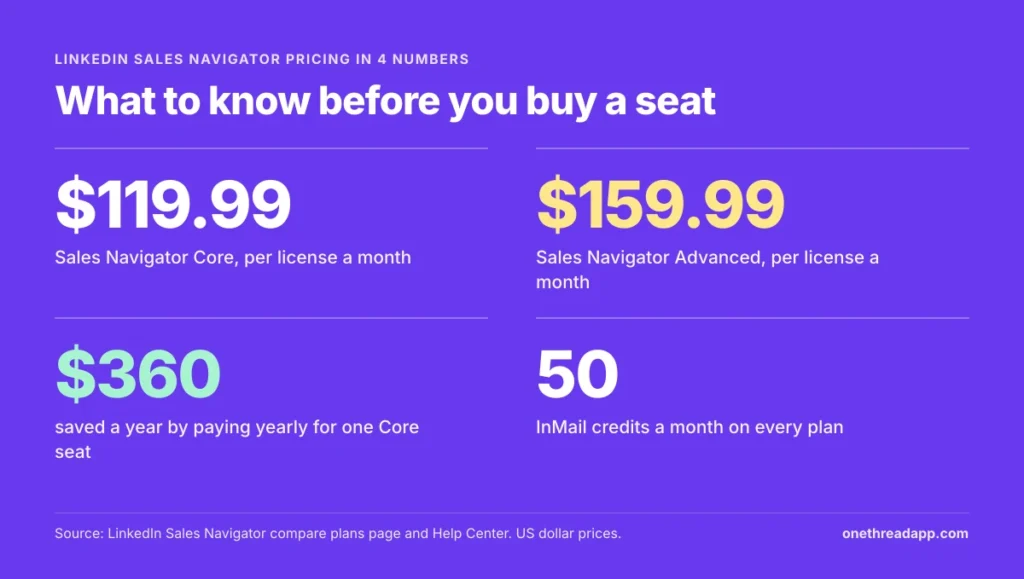
LinkedIn Sales Navigator costs $119.99 to $159.99 per license a month on monthly billing, or $1,079.88 to $1,799.88 a year on yearly billing. Advanced Plus is priced by quote.
| Plan | Billed monthly | Billed yearly | Yearly price per month | Best for |
|---|---|---|---|---|
| Core | $119.99 | $1,079.88 | $89.99 | Individual sellers |
| Advanced | $159.99 | $1,799.88 | $149.99 | Sales teams |
| Advanced Plus | Custom quote | Custom quote | Custom quote | Sales teams using an integrated CRM |
Prices are per license. LinkedIn notes that its prices are estimates that may exclude VAT, GST and promotional discounts.
The gap between the two self-serve plans is bigger than it looks. Core to Advanced adds $40 a month on monthly billing. On yearly billing, it adds $720 a seat, because Core’s discount is so much deeper.
Some older guides still list Core at $99.99 a month, so check the checkout price before you budget.
What Does the Sales Navigator Core Plan Include?
The Sales Navigator Core plan includes 50+ advanced search filters, Account IQ and Lead IQ, alerts and 50 InMail credits a month. It costs $119.99 a month, or $1,079.88 a year.
Core is LinkedIn’s plan for individual sellers. You can search with filters like seniority, company size and job changes, then save the people you care about as leads.
Account IQ and Lead IQ give you AI summaries of a company or a person before you reach out. Relationship Explorer and Relationship Map show who you know and who sits on the buying committee. Message Assist drafts a first message for you.
Saved leads have limits. LinkedIn’s help center says you can save up to 1,000 leads in each list and 10,000 leads in total.
What Core leaves out is the team layer. There’s no TeamLink for warm introductions through colleagues, no Buyer Intent signals, no Smart Links and no team reporting.
Pricing: $119.99 a month, or $1,079.88 a year.
Best For
- Freelancers, founders and individual sellers who prospect on LinkedIn every week.
Pros
- Biggest yearly discount of any plan, at 25%.
- Full search filters, Account IQ and Lead IQ.
- 50 InMail credits a month, the same as Advanced.
Cons
- No TeamLink, Buyer Intent or Smart Links.
- No team billing or reporting.
- No CRM sync.
What Does the Sales Navigator Advanced Plan Include?
The Sales Navigator Advanced plan includes everything in Core plus TeamLink, Buyer Intent, Smart Links, team reporting and team seat management. It costs $159.99 a month, or $1,799.88 a year.
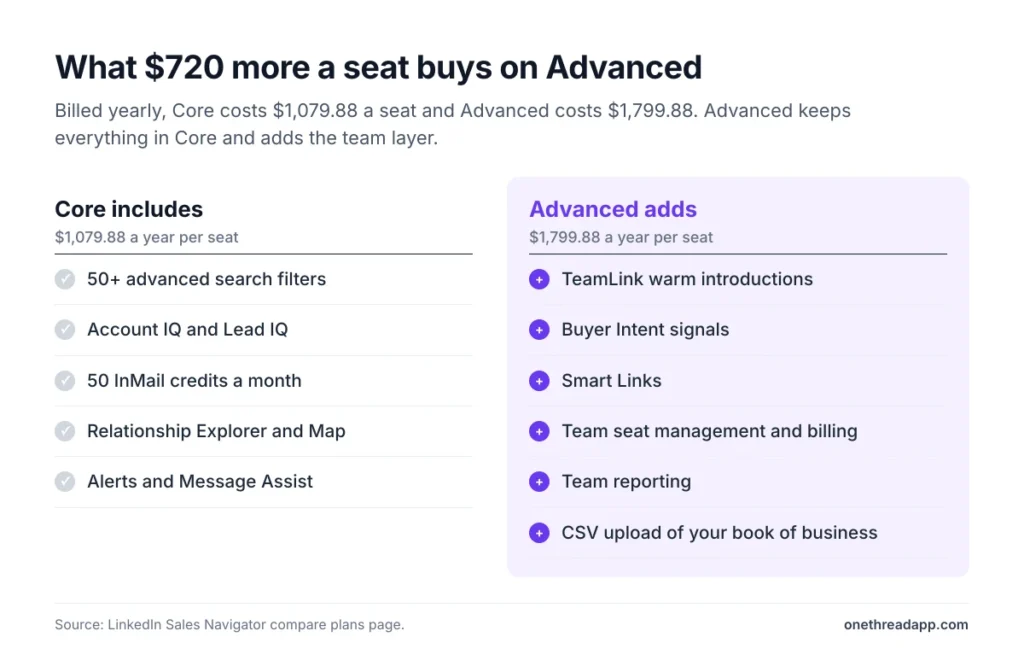
TeamLink is the feature most teams buy Advanced for. It shows when a colleague is connected to a prospect, so you can ask for a warm introduction instead of sending a cold InMail.
Buyer Intent flags accounts that show interest in your company. Smart Links let you share a deck or a case study as a tracked link and see who opened it.
Advanced also moves billing to the team. A Full Admin adds and assigns licenses in the LinkedIn Admin Center, and you can buy up to five licenses online from a desktop. The “Manage your book of business” row adds CSV upload, so you can load your account list and get alerts on it.
The InMail allowance doesn’t grow. Advanced still includes 50 credits a month, so you pay more for team features, not for more messages.
Pricing: $159.99 a month, or $1,799.88 a year.
Best For
- Sales teams of two or more who share accounts and want warm introductions.
Pros
- TeamLink, Buyer Intent and Smart Links.
- Central seat management and billing.
- CSV upload of your book of business.
Cons
- Yearly billing saves only 6%.
- Costs $720 more a seat each year than Core on yearly billing.
- No CRM sync or lead creation in your CRM.
What Does Sales Navigator Advanced Plus Cost?
Sales Navigator Advanced Plus has no public price. LinkedIn prices it on your team’s size, your CRM integration and your onboarding needs. You get a quote after a demo.
Third-party guides give a rough number. Findymail and Woodpecker both put Advanced Plus at about $1,600 a seat a year for smaller contracts. LinkedIn doesn’t confirm that figure, so treat it as a starting point for the sales call.
What you pay for is the CRM link. Advanced Plus is the only plan with LinkedIn’s advanced CRM integrations, which sync with Salesforce, HubSpot, Microsoft Dynamics and Oracle.
It also lets you create leads and contacts in your CRM straight from Sales Navigator. It adds CRM embedded profiles, custom ROI reporting, CSV upload with CRM import and Sales Navigator alerts in Microsoft Teams.
Before the call, count your sellers and name your CRM. Those two answers shape the quote more than the feature list does.
Pricing: Custom quote from LinkedIn’s sales team.
Best For
- Sales teams on Salesforce, HubSpot, Dynamics or Oracle that want LinkedIn data inside the CRM.
Pros
- Two-way CRM sync and lead creation.
- CRM embedded profiles and custom ROI reporting.
- Sales Navigator alerts in Microsoft Teams.
Cons
- No published price to budget around.
- Buying goes through a sales process.
- Still no email addresses or phone numbers.
Which Features Come With Each Sales Navigator Plan?
Every Sales Navigator plan includes the core search and research tools. Advanced adds the team features, and Advanced Plus adds the CRM features.
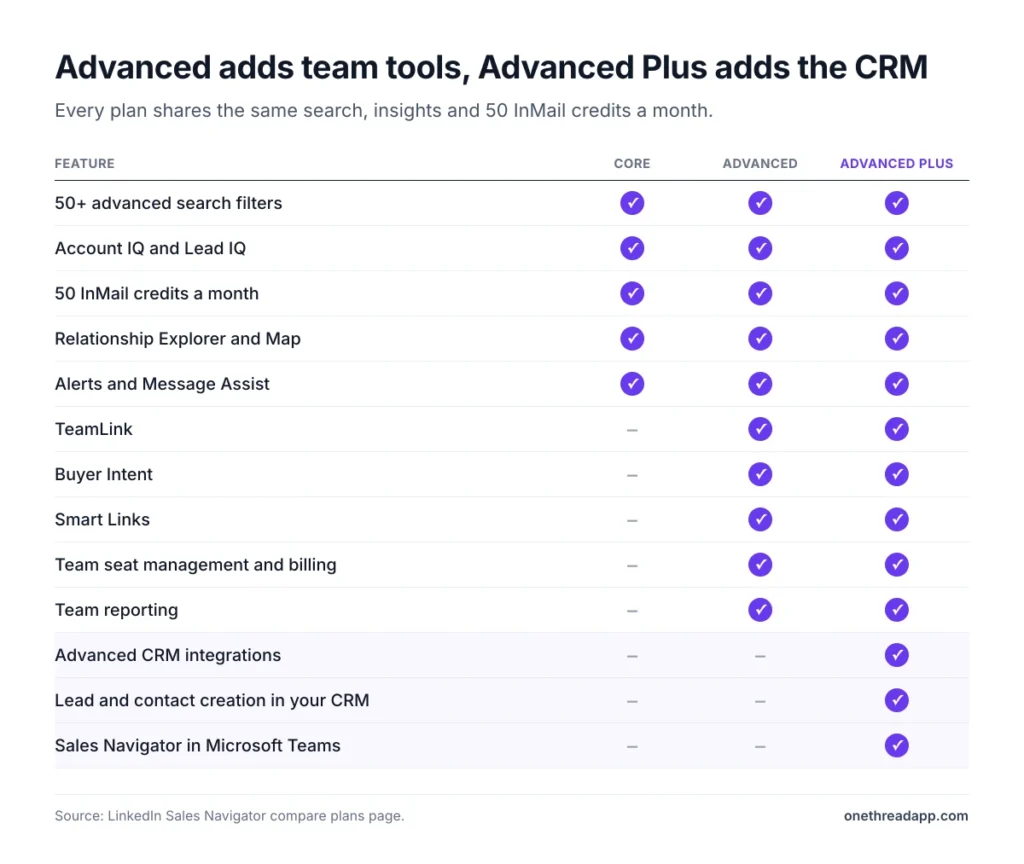
| Feature | Core | Advanced | Advanced Plus |
|---|---|---|---|
| 50+ advanced search filters | Yes | Yes | Yes |
| Account IQ and Lead IQ | Yes | Yes | Yes |
| InMail credits a month | 50 | 50 | 50 |
| Relationship Explorer and Map | Yes | Yes | Yes |
| Alerts and Message Assist | Yes | Yes | Yes |
| TeamLink | No | Yes | Yes |
| Buyer Intent | No | Yes | Yes |
| Smart Links | No | Yes | Yes |
| Team seat management and billing | No | Yes | Yes |
| Team reporting | No | Yes | Yes, plus custom ROI reporting |
| Book of business upload | No | CSV upload | CSV upload and CRM import |
| Advanced CRM integrations | No | No | Yes |
| Lead and contact creation in your CRM | No | No | Yes |
| Sales Navigator in Microsoft Teams | No | No | Yes |
If none of the Advanced rows matter to you, Core covers your work.
How Much Does Annual Billing Save on Sales Navigator?
Annual billing saves $360 a seat on Sales Navigator Core and $120 a seat on Advanced, in US dollars. That’s 25% on Core but only about 6% on Advanced.
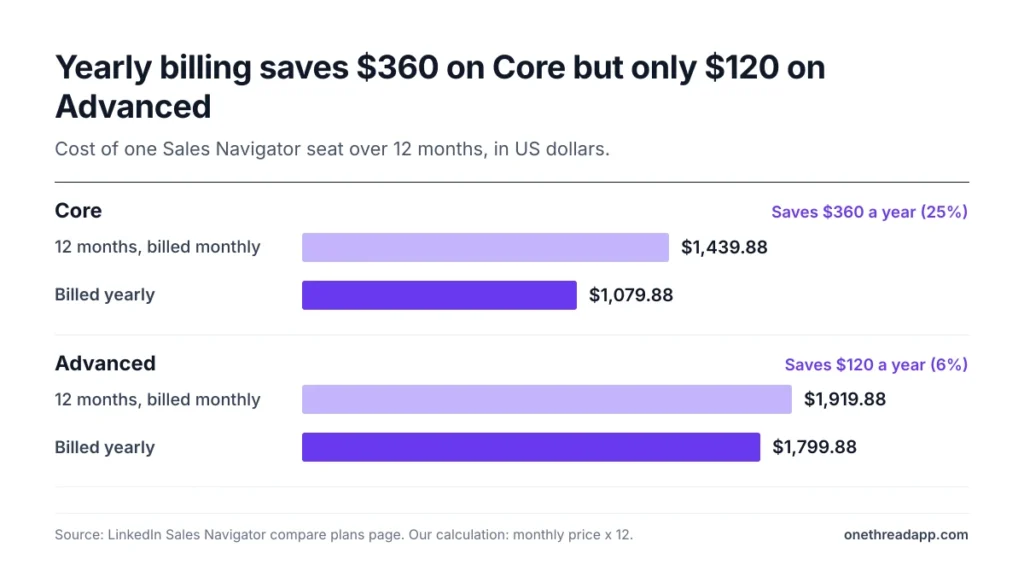
| Plan | 12 months billed monthly | Billed yearly | Yearly saving |
|---|---|---|---|
| Core | $1,439.88 | $1,079.88 | $360 (25%) |
| Advanced | $1,919.88 | $1,799.88 | $120 (6%) |
The saving also changes with your currency. We worked out each saving from the local prices on LinkedIn’s plan page.
| Currency | Core yearly saving | Advanced yearly saving |
|---|---|---|
| US dollar | 25% | 6% |
| Euro | 25% | 5% |
| British pound | 16% | 4% |
| Canadian dollar | 31% | 6% |
| Australian dollar | 19% | 5% |
Example: In pounds, Core costs £94.99 a month, or £1,139.88 over a year. The yearly plan costs £959.88, so you save £180, or about 16%, not the 25% shown for US dollars.
Top Tip: Cancelling a yearly plan only takes effect at the end of the paid year. Start Advanced seats on monthly billing, then switch the seats you’re sure about to yearly.
How Do Sales Navigator InMail Credits Work?
Every Sales Navigator plan gives you 50 InMail credits a month, and you can’t buy more. Unused credits carry over, up to a cap of 150, and expire after 90 days.
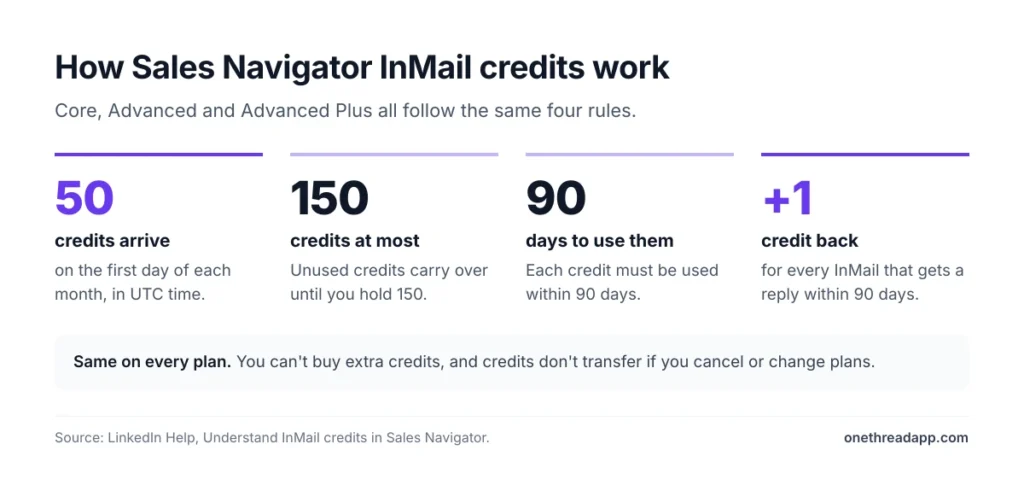
LinkedIn’s help center sets out the rules:
- New credits arrive on the first day of each month, in UTC time.
- You can hold up to 150 credits, and each must be used within 90 days.
- You get a credit back for every InMail that receives a reply within 90 days.
- Auto replies count as replies, including “Not interested”.
- A second InMail to someone who hasn’t replied uses another credit.
- Credits don’t transfer if you cancel or change your plan.
The credit back makes replies cheaper than they look. A good message pays for itself, while a message nobody answers costs a full credit. Follow-ups cost the same full credit, so space them out over a few weeks.
Example: You send 50 InMails in a month and 10 people reply. LinkedIn returns 10 credits, so you start next month with 60 credits on hand.
That’s why the quality of each message matters more than the count. Write each InMail for one person, and mention something from their profile or company.
What Does Sales Navigator Cost for a Sales Team?
A Sales Navigator team of five costs $5,399.40 a year on Core or $8,999.40 a year on Advanced, both billed yearly. We multiplied LinkedIn’s per-license prices by the number of seats.
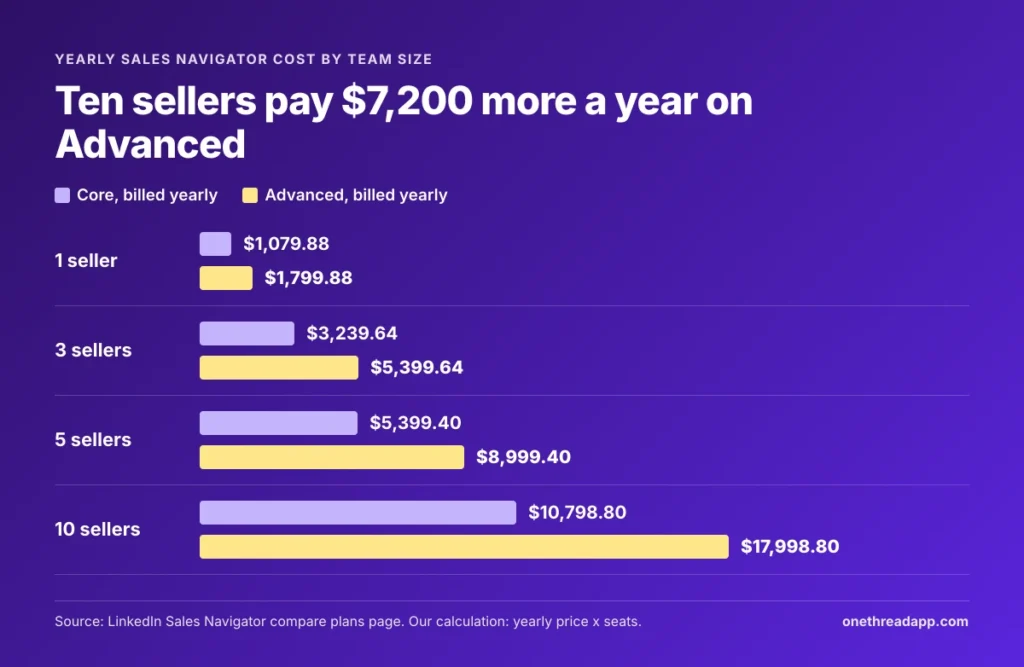
| Team size | Core, billed yearly | Advanced, billed yearly | Advanced, billed monthly |
|---|---|---|---|
| 1 seller | $1,079.88 | $1,799.88 | $1,919.88 |
| 3 sellers | $3,239.64 | $5,399.64 | $5,759.64 |
| 5 sellers | $5,399.40 | $8,999.40 | $9,599.40 |
| 10 sellers | $10,798.80 | $17,998.80 | $19,198.80 |
Example: Ten sellers on Advanced billed yearly cost $1,799.88 × 10 = $17,998.80. The same ten on Core cost $10,798.80, so the team features cost $7,200 a year.
That $7,200 is the number to test. Would warm introductions through TeamLink and Buyer Intent alerts win you more than $7,200 of extra deals in a year? If not, Core seats are the better buy.
How Does LinkedIn Sales Navigator Pricing Compare With LinkedIn Premium?
LinkedIn Sales Navigator pricing starts at $119.99 a month, against $69.99 for Premium Business and $89.99 for Premium All-in-One. Sales Navigator buys you more InMail credits and 50+ sales search filters.
| Plan | Price from, a month | InMail credits a month | Sales search filters |
|---|---|---|---|
| Premium Business | $69.99 | 15 | Limited |
| Premium All-in-One | $89.99 | 30 | Limited |
| Sales Navigator Core | $119.99 | 50 | 50+ |
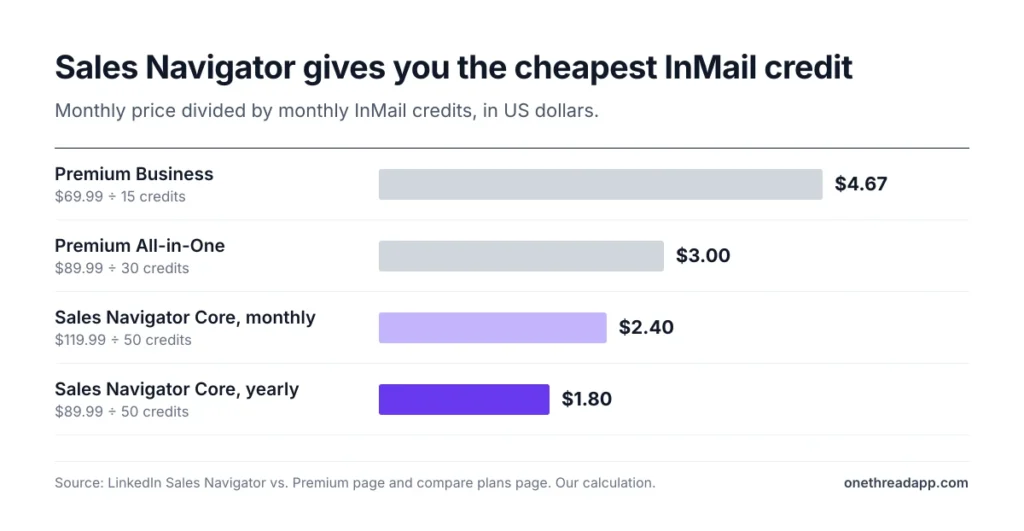
Per InMail, Sales Navigator is the cheaper buy. We divided each monthly price by its monthly credits.
Example: Premium Business costs $69.99 ÷ 15 credits, or about $4.67 a credit, and Premium All-in-One about $3.00. Sales Navigator Core costs $119.99 ÷ 50, or about $2.40, and about $1.80 on yearly billing.
Premium suits people who mainly want profile features and a few messages each month.
Sales Navigator suits people who search for buyers every day. Lead lists, Account IQ, Lead IQ and alerts only come with Sales Navigator.
What Does Sales Navigator Not Include?
Sales Navigator doesn’t include email addresses, phone numbers or a way to bulk export your leads. Most teams pay for at least one more tool before they can reach a saved lead.
ZoomInfo’s and Supered’s pricing guides both note that no plan delivers verified emails or direct phone numbers. Supered also cites LinkedIn Help saying no plan offers a CSV or spreadsheet export of leads or accounts.
That leaves three common add-ons:
- A contact data tool. Email finders and data platforms fill in emails and phone numbers. See our guides to ZoomInfo pricing and RocketReach pricing for what that costs.
- An outreach tool. InMail stops at 50 credits a month, so email sequences carry the volume. Our list of cold email tools for sales campaigns compares the options.
- A CRM. Core and Advanced don’t sync leads to a CRM, and full CRM sync sits on Advanced Plus. Our roundup of CRMs for small businesses covers tools that hold the pipeline.
Count these before you compare plans. A $119.99 seat with a data tool and a CRM can cost a small team more than Advanced on its own. Price the whole stack per seller each year, not just the LinkedIn license.
When Is LinkedIn Sales Navigator Worth the Cost?
LinkedIn Sales Navigator is worth the cost when you sell to businesses, your buyers are active on LinkedIn, and you prospect every week. If you search a few times a month, the price is hard to justify.
LinkedIn’s own claim is strong. Its pages say Forrester found Sales Navigator pays for itself in six months. That study comes from LinkedIn’s own pages, so test the claim against your own pipeline.
The easiest test is one month of Core. Track three numbers each week: InMails sent, replies and meetings booked.
Example: Core billed monthly costs $119.99. If the month books 4 meetings, each meeting costs you about $30 in Sales Navigator fees, before your time and your other tools.
Sales Navigator pays off fastest in a few cases:
- You sell high-value deals, where one extra meeting covers a year of seats.
- Your buyers change jobs often, so job change alerts open doors.
- Your team shares accounts, which makes TeamLink worth its price on Advanced.
It’s a poor fit when your buyers don’t use LinkedIn or rarely reply there.
Prospects often check your profile after an InMail, so post often. Our free LinkedIn post generator gives you a draft to start from.
Which Sales Navigator Plan Should You Pick?
Pick Sales Navigator Core if you sell alone and Advanced if you sell as a team. Pick Advanced Plus only if you need LinkedIn data inside your CRM. We’d decide in this order:
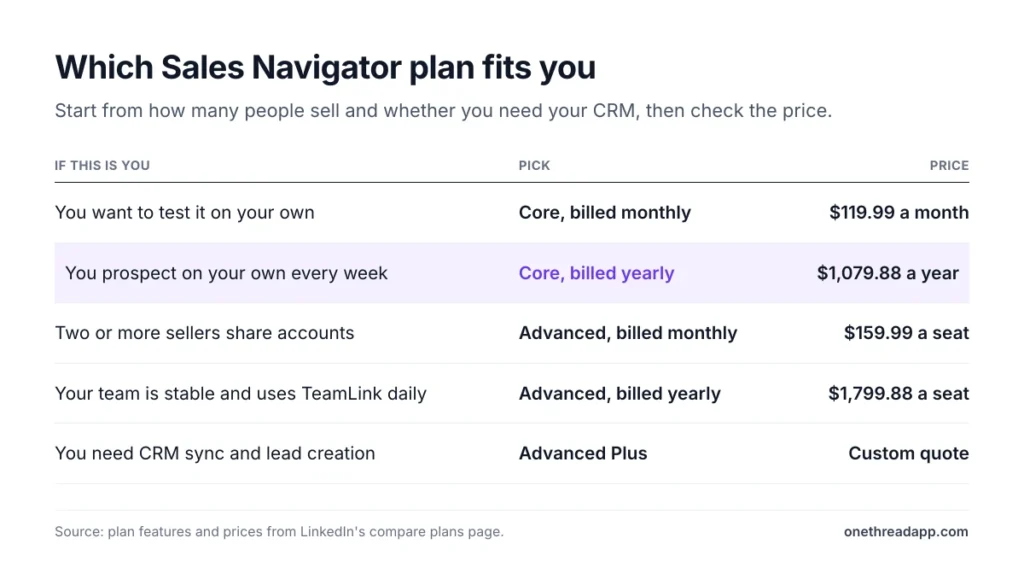
- You’re testing it: Core on monthly billing, at $119.99 for your first month.
- You prospect on your own every week: Core billed yearly, at $1,079.88 a year.
- Two or more sellers share accounts: Advanced on monthly billing, at $159.99 a seat each month.
- Your team is stable and uses TeamLink daily: Advanced billed yearly, at $1,799.88 a seat.
- You need lead creation and sync with Salesforce, HubSpot, Dynamics or Oracle: ask LinkedIn for an Advanced Plus quote.
Before you pay, check whether you qualify for a free trial. Then add the yearly cost of your email finder and CRM to the total.
Prospecting is only half the work, since each deal you win leads to delivery. Our guide to business management software covers tools that keep that client work on track after the sale. Onethread, our own tool, keeps client projects, tasks and budgets in one place.
Sources: LinkedIn Sales Navigator compare plans, LinkedIn Sales Navigator vs. Premium, LinkedIn Help on InMail credits, LinkedIn Help on saving leads.
What Should You Do Next With Sales Navigator?
Sales Navigator pricing comes down to one choice: are you buying search for one seller, or team features for several? Core is the better deal for solo sellers, especially on yearly billing. Advanced only earns its extra $720 a seat when your team uses TeamLink and Buyer Intent every week.
This week, start a free trial or one month of Core and track InMails, replies and meetings. If a month of results covers the seat, move to yearly billing, and keep the rest of the budget for contact data and outreach.
FAQs
Does Sales Navigator Have a Free Trial?
Yes, LinkedIn offers free trials of Sales Navigator Core and Advanced. You qualify if you have no paid LinkedIn subscription and haven’t used a LinkedIn free trial in the past 365 days. LinkedIn asks for payment details and emails you a reminder seven days before the trial ends.
Can You Get a Refund If You Cancel Sales Navigator?
LinkedIn’s plan page doesn’t promise refunds. It says cancellation takes effect at the end of the month on monthly plans, or at the end of the paid year on yearly plans. You keep access until then, so contact LinkedIn support before you cancel a yearly plan.
Does Sales Navigator Integrate With Your CRM?
Full CRM sync comes only with Advanced Plus under LinkedIn Sales Navigator pricing. That plan connects with Salesforce, HubSpot, Microsoft Dynamics and Oracle, and lets you create leads and contacts in the CRM. Core and Advanced don’t offer LinkedIn’s advanced CRM integrations, so leads stay inside Sales Navigator.
Can You Use Sales Navigator for Cold Email?
Not on its own, because Sales Navigator doesn’t include email addresses or phone numbers on any plan. You can find and save leads, then send up to 50 InMail credits a month. For cold email, teams add an email finder and an outreach tool on top of their seats.
Can You Buy Extra InMail Credits in Sales Navigator?
No, LinkedIn’s help center says you can’t buy extra InMail credits in Sales Navigator. Every plan gets 50 credits a month, with a cap of 150 saved credits that expire after 90 days. You do get a credit back for each InMail that receives a reply within 90 days.
What Is the Difference Between Sales Navigator Core, Advanced and Advanced Plus?
Core is for one seller and costs $119.99 a month under LinkedIn Sales Navigator pricing. Advanced, at $159.99, adds TeamLink, Buyer Intent, Smart Links and team billing. Advanced Plus is quoted and adds CRM sync and lead creation. All three plans include the same 50 InMail credits a month.